center console CADILLAC CTS 2016 3.G User Guide
[x] Cancel search | Manufacturer: CADILLAC, Model Year: 2016, Model line: CTS, Model: CADILLAC CTS 2016 3.GPages: 354, PDF Size: 3.56 MB
Page 108 of 354
Cadillac CTS/CTS-V Owner Manual (GMNA-Localizing-MidEast-9369309) -
2016 - crc - 7/30/15
Instruments and Controls 107
{Warning
In freezing weather, do not use
the washer until the windshield is
warmed. Otherwise the washer
fluid can form ice on the
windshield, blocking your vision.
Wiper-Activated Headlamps
This feature activates the
headlamps and parking lamps after
the windshield wipers have been in
use for a while. The transition time
for the lamps coming on varies
based on the wiper speed. For this
feature to work, the exterior lamp
control must be in AUTO.
The wiper-activated headlamps
immediately turn off when the
ignition is turned to LOCK/OFF,
or the windshield wiper control is
turned off.
Clock
The infotainment system controls
are used to access the time and
date settings through the menusystem. See
“Overview”in the
infotainment manual for information
about how to use the menu system.
Setting the Time
To set the time:
1. Press the SETTINGS screen button and press Time
and Date.
2. Press Set Time and press + or −to increase or decrease
hours, minutes, and AM or PM.
Press 12Hr or 24Hr for 12 or
24 hour clock.
3. Press
}to go back to the
previous menu.
If auto timing is set, the time
displayed on the clock may not
update immediately when driving
into a new time zone.
To set the date: 1. Press the SETTINGS screen button and press Time
and Date.
2. Press Set Date and press + or −to increase or decrease
month, day, or year. 3. Press
}to go back to the
previous menu.
To set the clock display: 1. Press the SETTINGS screen button and press Time
and Date.
2. Press Clock Display and press OFF or ON to turn the clock
display off or on.
3. Press
}to go back to the
previous menu.
Power Outlets
Power Outlets 12 Volt Direct
Current
Accessory power outlets can be
used to plug in electrical equipment,
such as a cell phone or MP3 player.
The vehicle has three 12-volt
accessory power outlets on the
center console:
. Inside the center console
storage in front of the armrest
cover.
. Inside the storage area under
the armrest cover.
Page 109 of 354
Cadillac CTS/CTS-V Owner Manual (GMNA-Localizing-MidEast-9369309) -
2016 - crc - 7/30/15
108 Instruments and Controls
.Inside the storage area on the
rear of the center console,
if equipped.
These outlets are powered while the
vehicle is in ON/RUN/START or
ACC/ACCESSORY mode, or until
the driver door is opened within
10 minutes of turning off the vehicle.
Lift the cover to access the
accessory power outlet.
Certain electrical accessories may
not be compatible with the
accessory power outlet and could
overload a vehicle circuit breaker or
adapter fuse. If overloaded, the
circuit breaker will reset after all
devices are disconnected or if
Retained Accessory Power (RAP) is
turned off and then back on. See
Retained Accessory Power (RAP)
0 197. Wait one minute to allow the
circuit breaker to reset before
reconnecting devices or turning
RAP back on. If the problem
continues, the issue could be within
your device. Try another known
good device to make sure the circuit breaker is operating properly. If this
does not resolve your problem, see
your dealer.
It is possible to replace the factory
power outlet with a cigar lighter
receptacle, if desired. This requires
the factory installed circuit breaker
to be replaced with a standard
minifuse by the dealer. A minifuse
will not reset and will have to be
replace if blown.
Caution
Failure to replace the circuit
breaker with the minifuse could
overheat the cigar lighter and
damage the vehicle.
Always unplug electrical equipment
when not in use and do not plug in
equipment that exceeds the
maximum 15 amps rating.
When adding electrical equipment,
be sure to follow the proper
installation instructions included with
the equipment. See Add-On
Electrical Equipment 0248.
Caution
Hanging heavy equipment from
the power outlet can cause
damage not covered by the
vehicle warranty. The power
outlets are designed for
accessory power plugs only, such
as cell phone charge cords.
Power Outlet 220/230 Volt
Alternating Current
If equipped, this power outlet is
inside the center console. It can be
used to plug in electrical equipment
that uses a maximum limit of 150
watts.
Page 120 of 354

Cadillac CTS/CTS-V Owner Manual (GMNA-Localizing-MidEast-9369309) -
2016 - crc - 7/30/15
Instruments and Controls 119
Passenger Safety Belt
Reminder Light
There is a passenger safety belt
reminder light near the passenger
airbag status indicator. See
Passenger Sensing System077.
When the vehicle is started, this
light flashes and a chime may come
on to remind passengers to fasten
their safety belt. Then the light stays
on solid until the belt is buckled.
This cycle continues several times if
the passenger remains or becomes
unbuckled while the vehicle is
moving.
If the passenger safety belt is
buckled, neither the chime nor the
light comes on.
The front passenger safety belt
reminder light and chime may turn
on if an object is put on the seat
such as a briefcase, handbag, grocery bag, laptop, or other
electronic device. To turn off the
reminder light and/or chime, remove
the object from the seat or buckle
the safety belt.
Airbag Readiness Light
This light shows if there is an
electrical problem with the airbag
system. The system check includes
the airbag sensor(s), passenger
sensing system, the pretensioners,
the airbag modules, the wiring, and
the crash sensing and diagnostic
module. For more information on the
airbag system, see
Airbag System
0 71.
The airbag readiness light comes on
for several seconds when the
vehicle is started. If the light does
not come on then, have it fixed
immediately.
{Warning
If the airbag readiness light stays
on after the vehicle is started or
comes on while driving, it means
the airbag system might not be
working properly. The airbags in
the vehicle might not inflate in a
crash, or they could even inflate
without a crash. To help avoid
injury, have the vehicle serviced
right away.
If there is a problem with the airbag
system, a Driver Information Center
(DIC) message may also come on.
See Airbag System Messages
0 144.
Passenger Airbag Status
Indicator
The vehicle has a passenger
sensing system. See Passenger
Sensing System 077 for important
safety information. The passenger
airbag status indicator is in the
overhead console.
Page 162 of 354

Cadillac CTS/CTS-V Owner Manual (GMNA-Localizing-MidEast-9369309) -
2016 - crc - 7/30/15
Lighting 161
To manually turn the reading lamps
on or off:
Pressmornnext to each
overhead console reading lamp.
Press the lamp lenses over the rear
passenger doors.
Lighting Features
Entry Lighting
The headlamps, taillamps, license
plate lamps, dome lamps, and most
of the interior lights turn on briefly at
night when
Kis pressed on the
Remote Keyless Entry (RKE)
transmitter. See Remote Keyless
Entry (RKE) System Operation 029.
After about 30 seconds the exterior
lamps turn off, then the dome and
remaining interior lamps dim to off.
Entry lighting can be disabled
manually by changing the ignition
out of the OFF position, or by
pressing
Qon the RKE transmitter.
This feature can be turned on or off.
See “Vehicle Locator Lights” under
Vehicle Personalization 0147.
Exit Lighting
Some exterior lamps and interior
lights come on at night, or in areas
with limited lighting, when the driver
door is opened after the ignition is
turned off. The dome lamp comes
on after the ignition is changed to the OFF position. The exterior
lamps and dome lamp remain on for
a set amount of time, then
automatically turn off.
The exterior lamps turn off
immediately by turning the exterior
lamp control off.
This feature can be changed. See
Vehicle Personalization
0147.
Battery Load
Management
The vehicle has Electric Power
Management (EPM), which
estimates the battery's temperature
and state of charge. It then adjusts
the voltage for best performance
and extended life of the battery.
When the battery's state of charge
is low, the voltage is raised slightly
to quickly bring the charge back up.
When the state of charge is high,
the voltage is lowered slightly to
prevent overcharging. If the vehicle
has a voltmeter gauge or a voltage
display on the Driver Information
Center (DIC), you may see the
Page 175 of 354
Cadillac CTS/CTS-V Owner Manual (GMNA-Localizing-MidEast-9369309) -
2016 - crc - 7/30/15
174 Climate Controls
Sensor
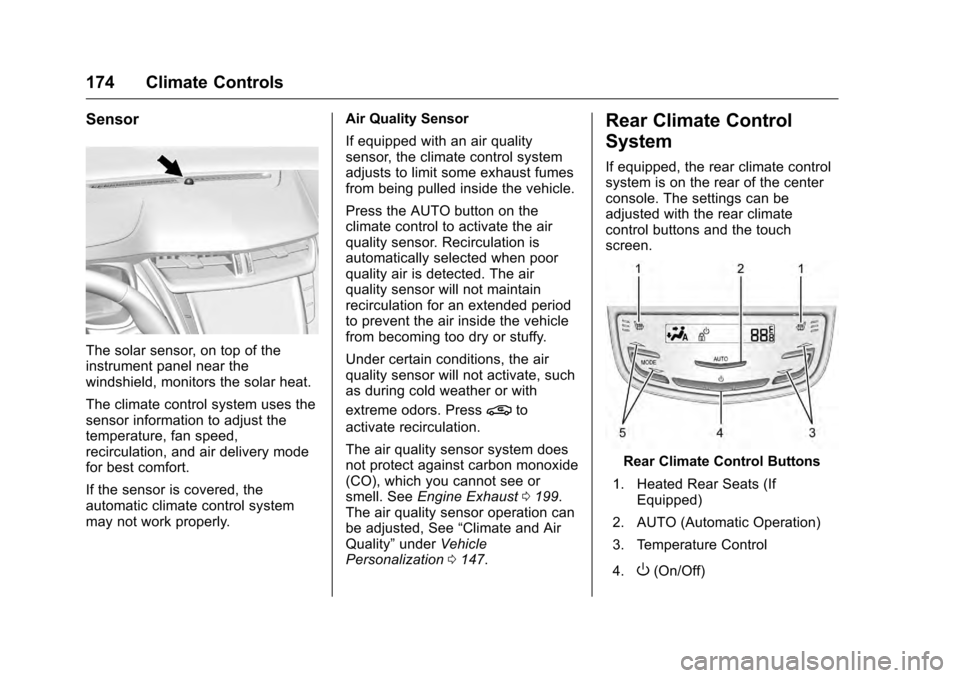
The solar sensor, on top of the
instrument panel near the
windshield, monitors the solar heat.
The climate control system uses the
sensor information to adjust the
temperature, fan speed,
recirculation, and air delivery mode
for best comfort.
If the sensor is covered, the
automatic climate control system
may not work properly.Air Quality Sensor
If equipped with an air quality
sensor, the climate control system
adjusts to limit some exhaust fumes
from being pulled inside the vehicle.
Press the AUTO button on the
climate control to activate the air
quality sensor. Recirculation is
automatically selected when poor
quality air is detected. The air
quality sensor will not maintain
recirculation for an extended period
to prevent the air inside the vehicle
from becoming too dry or stuffy.
Under certain conditions, the air
quality sensor will not activate, such
as during cold weather or with
extreme odors. Press
@to
activate recirculation.
The air quality sensor system does
not protect against carbon monoxide
(CO), which you cannot see or
smell. See Engine Exhaust 0199.
The air quality sensor operation can
be adjusted, See “Climate and Air
Quality” underVehicle
Personalization 0147.
Rear Climate Control
System
If equipped, the rear climate control
system is on the rear of the center
console. The settings can be
adjusted with the rear climate
control buttons and the touch
screen.
Rear Climate Control Buttons
1. Heated Rear Seats (If Equipped)
2. AUTO (Automatic Operation)
3. Temperature Control
4.
O(On/Off)
Page 209 of 354

Cadillac CTS/CTS-V Owner Manual (GMNA-Localizing-MidEast-9369309) -
2016 - crc - 7/30/15
208 Driving and Operating
To turn TCS and StabiliTrak on
again, press and release the
Y
button. The traction off lightiand
StabiliTrak OFF light
gin the
instrument cluster turn off.
Adding accessories can affect the
vehicle's performance. See
Accessories and Modifications
0 250.
Driver Mode Control
Driver Mode Control attempts to add
a sportier feel, provide a more
comfortable ride, or assist in
different weather conditions or
terrain. This system simultaneously
changes the software calibration of
various sub-systems. Depending on
the option package, available
features, and mode selected, the
suspension, steering, and
powertrain will change calibrations
to achieve the desired mode
characteristics. If the vehicle is
equipped with Magnetic Ride
Control, selecting the various Driver
Modes adjusts the ride of the vehicle to enhance the ride
performance for the road conditions
and the selected mode.
While in the Sport and/or Track
Modes, the vehicle monitors driving
behavior and automatically enables
Performance Shift Features when
spirited driving is detected. These
features maintain lower
transmission gears to increase
available engine braking and
improve acceleration response. The
vehicle will exit these features and
return to normal operation after a
short period when no spirited driving
is detected.Driver Mode Control Switch
The Driver Mode Control has three
or four modes: Tour, Sport, Snow/
Ice, and Track. The Track Mode is
for V-Series models only. Press
«
orzon the MODE switch on the
center console to make a mode
selection. The first press of the
switch will show the current mode.
Subsequent presses will scroll
though the available modes. The
Tour and Sport Modes will feel
similar on a smooth road. Select a
new setting whenever driving
conditions change.
Page 213 of 354
Cadillac CTS/CTS-V Owner Manual (GMNA-Localizing-MidEast-9369309) -
2016 - crc - 7/30/15
212 Driving and Operating
performance when cornering. The
amount of available engine power is
based on the mode selected, track
conditions, driver skill, and the
radius of each corner.
This light is on when the vehicle is
in the PTM mode.
To select this optional handling
mode, the vehicle mode must be
Track. Then quickly press the TCS/
StabiliTrak
Ybutton on the center
console two times. PERF TRAC 1 -
WET ACTIVE HANDLING ON
displays in the DIC.
When PTM is active, the up and
down buttons will no longer change
Drive Modes, but instead change
PTM modes.
To select a mode while in PTM,
press the Driver Mode Control/PTM
buttons on the center console. To experience the performance
benefit of this system, after entering
a curve and at the point where
normal acceleration occurs, fully
push the accelerator pedal. The
PTM system will modify the level of
engine power for a smooth and
consistent corner exit.
The PTM system contains five
modes. These modes are selected
by pressing the Driver Mode
Control/PTM buttons on the center
console. Scroll up or down through
modes 1–5 by pressing the MODE
SELECT up and down buttons The
following is a DIC display
description and the recommended
usage of each mode:
PERF TRAC 1
–WET ACTIVE
HANDLING ON
. Intended for all driver skill levels.
. Wet or damp conditions only —
not intended for use in heavy
rain or standing water.
. StabiliTrak is on and engine
power is reduced based on
conditions.
PERF TRAC 2 –DRY ACTIVE
HANDLING ON
. For use by less experienced
drivers or while learning a new
track.
. Dry conditions only.
. StabiliTrak is on and engine
power is slightly reduced.
PERF TRAC 3 –SPORT
ACTIVE HANDLING ON
. For use by drivers who are
familiar with the track.
. Dry conditions only.
. Requires more driving skill than
mode 2.
. StabiliTrak is on and more
engine power is available than in
mode 2.
PERF TRAC 4 –SPORT
ACTIVE HANDLING OFF
. For use by drivers who are
familiar with the track.
. Dry conditions only.
. Requires more driving skill than
modes 2 or 3.
Page 346 of 354

Cadillac CTS/CTS-V Owner Manual (GMNA-Localizing-MidEast-9369309) -
2016 - crc - 7/30/15
Index 345
AutomaticDoor Locks . . . . . . . . . . . . . . . . . . . . . 38
Headlamp System . . . . . . . . . . . . 158
Transmission . . . . . . . . . . . . . . . . . 200
Transmission Fluid . . . . . . . . . . . 262
Automatic Transmission Manual Mode . . . . . . . . . . . . . . . . . 202
Shift Lock Control Function
Check . . . . . . . . . . . . . . . . . . . . . . . 276
B
Battery . . . . . . . . . . . . . . . . . . . . . . . . . 273Exterior Lighting BatterySaver . . . . . . . . . . . . . . . . . . . . . . . 162
Jump Starting . . . . . . . . . . . . . . . . . 313
Load Management . . . . . . . . . . . . 161
Power Protection . . . . . . . . . . . . . 162
Voltage and Charging Messages . . . . . . . . . . . . . . . . . . . 135
Blade Replacement, Wiper . . . . . 277
Brake Parking, Electric . . . . . . . . . . . . . . 204
System Warning Light . . . . . . . . 122
Brakes . . . . . . . . . . . . . . . . . . . . . . . . . . 271 Antilock . . . . . . . . . . . . . . . . . . . . . . . 203
Assist . . . . . . . . . . . . . . . . . . . . . . . . . 206
Fluid . . . . . . . . . . . . . . . . . . . . . . . . . . 272
System Messages . . . . . . . . . . . . 136
Braking . . . . . . . . . . . . . . . . . . . . . . . . . 180 Break-In, New Vehicle . . . . . . . . . . 193
Bulb Replacement . . . . . . . . . . . . . . 279
Halogen Bulbs . . . . . . . . . . . . . . . . 278
Headlamp Aiming . . . . . . . . . . . . . 278
Headlamps . . . . . . . . . . . . . . . . . . . 278
High Intensity Discharge(HID) Lighting . . . . . . . . . . . . . . . 278
License Plate Lamps . . . . . . . . . 279
Buying New Tires . . . . . . . . . . . . . . . 301
C
Capacities and Specifications . . . . . . . . . . . . . . . . . 338
Carbon Fiber . . . . . . . . . . . . . . . . . . . 193
Carbon Monoxide Engine Exhaust . . . . . . . . . . . . . . . 199
Trunk . . . . . . . . . . . . . . . . . . . . . . . . . . . 39
Winter Driving . . . . . . . . . . . . . . . . 187
Cargo Tie-Downs . . . . . . . . . . . . . . . . . . . . 102
Caution, Danger, and Warning . . . . 2
Center Console Storage . . . . . . . . 101
Chains, Tire . . . . . . . . . . . . . . . . . . . . 304
Charging
Wireless . . . . . . . . . . . . . . . . . . . . . . 109
Charging System Light . . . . . . . . . 120
Check
Malfunction IndicatorEngine Light . . . . . . . . . . . . . . . . 121 Child Restraints
Infants and Young Children . . . . . 85
Lower Anchors and Tethers
for Children . . . . . . . . . . . . . . . . . . . 89
Older Children . . . . . . . . . . . . . . . . . . 83
Securing . . . . . . . . . . . . . . . . . . . . 95, 96
Systems . . . . . . . . . . . . . . . . . . . . . . . . 87
Circuit Breakers . . . . . . . . . . . . . . . . 280
Cleaning Exterior Care . . . . . . . . . . . . . . . . . 318
Interior Care . . . . . . . . . . . . . . . . . . 323
Climate Control Systems Dual Automatic . . . . . . . . . . . . . . . 169
Rear . . . . . . . . . . . . . . . . . . . . . . . . . . 174
Clock . . . . . . . . . . . . . . . . . . . . . . . . . . . 107
Cluster, Instrument . . . . . . . . . . . . . 112
Compartments Storage . . . . . . . . . . . . . . . . . . . . . . . 100
Competitive Driving Mode . . . . . . 211
Compressor Kit, Tire Sealant . . . 306
Control Traction and ElectronicStability . . . . . . . . . . . . . . . . . . . . . 206
Control of a Vehicle . . . . . . . . . . . . . 180
Convenience Net . . . . . . . . . . . . . . . 102
Convex Mirrors . . . . . . . . . . . . . . . . . . 43
Coolant Engine . . . . . . . . . . . . . . . . . . . . . . . . 266
Page 353 of 354

Cadillac CTS/CTS-V Owner Manual (GMNA-Localizing-MidEast-9369309) -
2016 - crc - 7/30/15
352 Index
Steering (cont'd)Wheel Controls . . . . . . . . . . . . . . . 105
Storage Areas Armrest . . . . . . . . . . . . . . . . . . . . . . . 101
Center Console . . . . . . . . . . . . . . . 101
Convenience Net . . . . . . . . . . . . . 102
Glove Box . . . . . . . . . . . . . . . . . . . . 100
Instrument Panel . . . . . . . . . . . . . 100
Storage Compartments . . . . . . . . . 100
Storing the Tire Sealant and
Compressor Kit . . . . . . . . . . . . . . . 312
Stuck Vehicle . . . . . . . . . . . . . . . . . . . 189
Summer Tires . . . . . . . . . . . . . . . . . . 292
Sun Visors . . . . . . . . . . . . . . . . . . . . . . . 48
Sunroof . . . . . . . . . . . . . . . . . . . . . . . . . . 49
Sunshade Rear Window . . . . . . . . . . . . . . . . . . . 48
Symbols . . . . . . . . . . . . . . . . . . . . . . . . . . 3
System
Forward CollisionAlert (FCA) . . . . . . . . . . . . . . . . . . 232
Infotainment . . . . . . . . . . . . . 163, 343
Systems
Driver Assistance . . . . . . . . . . . . . 224T
Tachometer . . . . . . . . . . . . . . . . . . . . . 116
Theft-Deterrent Systems . . . . . . . . . 42
Thigh Support Adjustment . . . . . . . 57
Time . . . . . . . . . . . . . . . . . . . . . . . . . . . . 107
Tires . . . . . . . . . . . . . . . . . . . . . . . . . . . . 289All-Season . . . . . . . . . . . . . . . . . . . . 290
Buying New Tires . . . . . . . . . . . . . 301
Chains . . . . . . . . . . . . . . . . . . . . . . . . 304
Different Size . . . . . . . . . . . . . . . . . 302
If a Tire Goes Flat . . . . . . . . . . . . 304
Inspection . . . . . . . . . . . . . . . . . . . . 298
Low Profile . . . . . . . . . . . . . . . . . . . 292
Messages . . . . . . . . . . . . . . . . . . . . 146
Pressure . . . . . . . . . . . . . . . . . . . . . . 294
Pressure Light . . . . . . . . . . . . . . . . 126
Pressure Monitor Operation . . 295
Pressure Monitor System . . . . . 294
Rotation . . . . . . . . . . . . . . . . . . . . . . 299
Run-Flat . . . . . . . . . . . . . . . . . . . . . . 291
Sealant andCompressor Kit . . . . . . . . . . . . . 306
Sealant and Compressor Kit, Storing . . . . . . . . . . . . . . . . . . 312
Wheel Alignment and Tire Balance . . . . . . . . . . . . . . . . . . . . . 303
Wheel Replacement . . . . . . . . . . 303 Tires (cont'd)
When It Is Time for New
Tires . . . . . . . . . . . . . . . . . . . . . . . . 300
Winter . . . . . . . . . . . . . . . . . . . . . . . . 290
Towing Driving Characteristics . . . . . . . . 243
Equipment . . . . . . . . . . . . . . . 247, 248
General Information . . . . . . . . . . 243
Recreational Vehicle . . . . . . . . . . 316
Trailer . . . . . . . . . . . . . . . . . . . 246–248
Vehicle . . . . . . . . . . . . . . . . . . . . . . . 315
Track Events and Competitive Driving . . . . . . . . . . . 182
Traction
Control System (TCS)/StabiliTrak
®Light . . . . . . . . . . . . 125
Limited-Slip Differential . . . . . . . 214
Off Light . . . . . . . . . . . . . . . . . . . . . . 125
Traction Control/Electronic Stability Control . . . . . . . . . . . . . . . 206
Trailer Towing . . . . . . . . . . . . . . . . . . . 246–248
Transmission
Automatic . . . . . . . . . . . . . . . . . . . . . 200
Fluid, Automatic . . . . . . . . . . . . . . 262
Messages . . . . . . . . . . . . . . . . . . . . 146
Trip Odometer . . . . . . . . . . . . . . . . . . 116
Trunk . . . . . . . . . . . . . . . . . . . . . . . . . . . . 39