fuel CADILLAC CTS 2016 3.G Owner's Manual
[x] Cancel search | Manufacturer: CADILLAC, Model Year: 2016, Model line: CTS, Model: CADILLAC CTS 2016 3.GPages: 354, PDF Size: 3.56 MB
Page 172 of 354
Cadillac CTS/CTS-V Owner Manual (GMNA-Localizing-MidEast-9369309) -
2016 - crc - 7/30/15
Climate Controls 171
Automatic Operation
The system automatically controls
the fan speed, air delivery, air
conditioning, and recirculation in
order to heat or cool the vehicle to
the desired temperature.
When the indicator light is on or
AUTO is displayed on the touch
screen, the system is in full
automatic operation. If the air
delivery mode or fan setting is
manually adjusted, the auto
indicator turns off and the display
will show the selected settings. Auto
operation can be turned off
individually for climate settings.
For automatic operation:1. Press AUTO.
2. Set the temperature. Allow the system time to stabilize. Then
adjust the temperature as
needed for best comfort.
To improve fuel efficiency and to
cool the vehicle faster, recirculation
may be automatically selected in
warm weather. The recirculation light will not come on. Press@to
select recirculation; press it again to
select outside air.
English units can be changed to
metric units through the instrument
cluster. See “Cluster Options Menu”
under Instrument Cluster 0112.
OFF (Fan) : Press to turn the fan on
or off. The temperature control and
air delivery mode can still be
adjusted.
w/x(Driver and Passenger
Temperature Controls) : The
temperature can be adjusted
separately for the driver and the
passenger. Press to increase or
decrease the temperature. Press
and hold to rapidly increase or
decrease the temperature.
The driver and passenger
temperatures can also be adjusted
by pressing the controls on the
touch screen.
SYNC (Synchronized
Temperature) : Press SYNC on the
touch screen to link all climate zone
settings to the driver settings. Adjust
the driver side temperature control to change the linked temperature.
When the passenger settings are
adjusted, the SYNC button is
displayed when the temperatures
are unlinked.
Rear (If Equipped) :
Press this
button on the front climate control
touch screen to open the rear
climate control screen. The rear
climate control settings can now be
adjusted from the front
passenger area.
Manual Operation
z 9 y(Fan Control) : Press the
fan control buttons or the touch
screen fan control, to increase or
decrease the fan speed. Press and
hold the buttons or the touch screen
control to adjust speed more
quickly. The fan speed setting
displays. Pressing either button
cancels automatic fan control and
the fan can be controlled manually.
Press AUTO to return to automatic
operation. To turn off the fan and
climate control system, press and
hold the fan down button or touch
screen fan control until it is off.
Page 179 of 354
Cadillac CTS/CTS-V Owner Manual (GMNA-Localizing-MidEast-9369309) -
2016 - crc - 7/30/15
178 Driving and Operating
Driving and
Operating
Driving Information
Distracted Driving . . . . . . . . . . . . 179
Defensive Driving . . . . . . . . . . . . . 180
Control of a Vehicle . . . . . . . . . . . 180
Braking . . . . . . . . . . . . . . . . . . . . . . . 180
Steering . . . . . . . . . . . . . . . . . . . . . . 180
Off-Road Recovery . . . . . . . . . . . 181
Loss of Control . . . . . . . . . . . . . . . 182
Track Events and CompetitiveDriving . . . . . . . . . . . . . . . . . . . . . . 182
Driving on Wet Roads . . . . . . . . 186
Hill and Mountain Roads . . . . . 187
Winter Driving . . . . . . . . . . . . . . . . 187
If the Vehicle Is Stuck . . . . . . . . 189
Vehicle Load Limits . . . . . . . . . . . 189
Starting and Operating
New Vehicle Break-In . . . . . . . . . 193
Carbon Fiber . . . . . . . . . . . . . . . . . 193
Ignition Positions . . . . . . . . . . . . . 193
Starting the Engine . . . . . . . . . . . 195
Retained Accessory Power (RAP) . . . . . . . . . . . . . . . . 197
Shifting Into Park . . . . . . . . . . . . . 197
Shifting out of Park . . . . . . . . . . . 198 Parking over Things
That Burn . . . . . . . . . . . . . . . . . . . 199
Engine Exhaust
Engine Exhaust . . . . . . . . . . . . . . 199
Running the Vehicle WhileParked . . . . . . . . . . . . . . . . . . . . . . 199
Automatic Transmission
Automatic Transmission . . . . . . 200
Manual Mode . . . . . . . . . . . . . . . . . 202
Drive Systems
All-Wheel Drive . . . . . . . . . . . . . . . 203
Brakes
Antilock BrakeSystem (ABS) . . . . . . . . . . . . . . . 203
Electric Parking Brake . . . . . . . . 204
Brake Assist . . . . . . . . . . . . . . . . . . 206
Ride Control Systems
Traction Control/Electronic Stability Control . . . . . . . . . . . . . 206
Driver Mode Control . . . . . . . . . . 208
Competitive Driving Mode (V-Series Only) . . . . . . . . . . . . . . 211
Limited-Slip Differential (Except V-Series) . . . . . . . . . . . 214
Limited-Slip Differential (V-Series Only) . . . . . . . . . . . . . . 214
Cruise Control
Cruise Control . . . . . . . . . . . . . . . . 214
Adaptive Cruise Control . . . . . . 217
Driver Assistance Systems
Driver Assistance Systems . . . 224
Assistance Systems forParking or Backing . . . . . . . . . . 225
Assistance Systems for Driving . . . . . . . . . . . . . . . . . . . . . . 231
Forward Collision Alert (FCA) System . . . . . . . . . . . . . . . . . . . . . . 232
Front Automatic Braking (FAB) System . . . . . . . . . . . . . . . . . . . . . . 234
Side Blind Zone Alert (SBZA) . . . . . . . . . . . . . . . . 236
Lane Change Alert (LCA) . . . . . 236
Lane Departure Warning (LDW) . . . . . . . . . . . . . 238
Lane Keep Assist (LKA) . . . . . . 238
Fuel
Fuel . . . . . . . . . . . . . . . . . . . . . . . . . . 240
Fuel Additives . . . . . . . . . . . . . . . . 241
Filling the Tank . . . . . . . . . . . . . . . 241
Filling a Portable Fuel Container . . . . . . . . . . . . . . . . . . . 242
Trailer Towing
General TowingInformation . . . . . . . . . . . . . . . . . . 243
Page 184 of 354
Cadillac CTS/CTS-V Owner Manual (GMNA-Localizing-MidEast-9369309) -
2016 - crc - 7/30/15
Driving and Operating 183
after every 24 hours of racing or
competitive driving. See
Recommended Fluids and
Lubricants0333.
Caution
During a first time track or racing
event, high axle temperatures can
occur. Damage could be caused
to the axle and would not be
covered by the vehicle warranty.
Do not drive as long or as fast the
first time the vehicle is driven on
the track or raced.
Engine Oil
2.0L (LTG) Engine
This is not available with a track
package option and is not
recommended for track use.
3.6L Twin Turbo (LF3) Engine
This requires premium fuel, and
comes standard with a 6.63 L (7 qt)
sump, integrated oil cooler, and
other powertrain and powertrain
cooling components in preparation
for track use. 3.6L (LGX) Engine
.
With Oil Cooler: Confirm the oil
level is at the upper mark that
shows the proper operating
range on the engine oil dipstick.
. Without Oil Cooler: Do not use
for track events and competitive
driving.
6.2L Supercharged (LT4) Engine
Change the engine oil to 0W-40 or
5W-40 that meets the dexos2 ™
specification. If this oil is not
available, the following oils can be
used as an alternative: Valvoline
®
SYNPOWER MST 5W-40, Mobil®1
ESP Formula M 5W-40. See
Capacities and Specifications 0338.
This requires premium fuel, and
comes standard with a 10 qt sump,
air/oil separator, integrated oil
cooler, and other powertrain and
powertrain cooling components in
preparation for track use.
Check the oil level often during track
events and competitive driving and
keep the oil level at or near the
upper mark.
Brake Fluid
For track events and competitive
driving, it is recommended that the
brake fluid be replaced with a high
performance brake fluid that has a
dry boiling point greater than 279 °C
(534 °F). After conversion to the
high performance brake fluid, follow
the brake fluid service
recommendations outlined by the
fluid manufacturer. Do not use
silicone or DOT-5 brake fluids.
Caution
Removing the splash shield can
degrade wet braking
performance, as well as introduce
brake pedal pulsation, due to
brake disc exposure to road
debris. Only remove the front
brake disc splash shield and front
tire deflector when driving in track
events.
Brake cooling can be improved if
the front brake disc splash shield
and front tire deflector are removed.
Removing the shield will require that
Page 189 of 354
Cadillac CTS/CTS-V Owner Manual (GMNA-Localizing-MidEast-9369309) -
2016 - crc - 7/30/15
188 Driving and Operating
freezing rain begins to fall. Avoid
driving on wet ice or in freezing rain
until roads can be treated.
For slippery road driving:
.Accelerate gently. Accelerating
too quickly causes the wheels to
spin and makes the surface
under the tires slick.
. Turn on Traction Control. See
Traction Control/Electronic
Stability Control 0206.
. Antilock Brake System (ABS)
improves vehicle stability during
hard stops, but the brakes
should be applied sooner than
when on dry pavement. See
Antilock Brake System (ABS)
0203.
See Driver Mode Control 0208
. Allow greater following distance
and watch for slippery spots. Icy
patches can occur on otherwise
clear roads in shaded areas.
The surface of a curve or an
overpass can remain icy when
the surrounding roads are clear. Avoid sudden steering
maneuvers and braking while
on ice.
. Turn off cruise control.
Blizzard Conditions
Stay with the vehicle unless there is
help nearby. Get help and keep
everyone in the vehicle safe:
.Turn on the hazard warning
flashers.
. Tie a red cloth to an outside
mirror.
{Warning
Snow can trap engine exhaust
under the vehicle. This may
cause exhaust gases to get
inside. Engine exhaust contains
carbon monoxide (CO), which
cannot be seen or smelled. It can
cause unconsciousness and even
death.
If the vehicle is stuck in snow:
(Continued)
Warning (Continued)
.Clear snow from the base of
the vehicle, especially any
blocking the exhaust pipe.
. Open a window about 5 cm
(2 in) on the vehicle side
that is away from the wind,
to bring in fresh air.
. Fully open the air outlets on
or under the instrument
panel.
. Adjust the climate control
system to circulate the air
inside the vehicle and set
the fan speed to the highest
setting. See “Climate
Control Systems.”
For more information about CO,
see Engine Exhaust 0199.
To save fuel, run the engine for
short periods to warm the vehicle
and then shut the engine off and
partially close the window. Moving
about to keep warm also helps.
Page 190 of 354
Cadillac CTS/CTS-V Owner Manual (GMNA-Localizing-MidEast-9369309) -
2016 - crc - 7/30/15
Driving and Operating 189
If it takes time for help to arrive,
when running the engine, push the
accelerator pedal slightly so the
engine runs faster than the idle
speed. This keeps the battery
charged to restart the vehicle and to
signal for help with the headlamps.
Do this as little as possible, to
save fuel.
If the Vehicle Is Stuck
Slowly and cautiously spin the
wheels to free the vehicle when
stuck in sand, mud, ice, or snow.
If stuck too severely for the traction
system to free the vehicle, turn the
traction system off and use the
rocking method. SeeTraction
Control/Electronic Stability Control
0 206.
{Warning
If the vehicle's tires spin at high
speed, they can explode, and you
or others could be injured. The
vehicle can overheat, causing an
engine compartment fire or other
(Continued)
Warning (Continued)
damage. Spin the wheels as little
as possible and avoid going
above 56 km/h (35 mph).
Rocking the Vehicle to Get
it Out
Turn the steering wheel left and
right to clear the area around the
front wheels. Turn off any traction
system. Shift back and forth
between R (Reverse) and a low
forward gear, spinning the wheels
as little as possible. To prevent
transmission wear, wait until the
wheels stop spinning before shifting
gears. Release the accelerator
pedal while shifting, and press
lightly on the accelerator pedal
when the transmission is in gear.
Slowly spinning the wheels in the
forward and reverse directions
causes a rocking motion that could
free the vehicle. If that does not get
the vehicle out after a few tries, it
might need to be towed out. If the
vehicle does need to be towed out,
seeTowing the Vehicle 0315.
Vehicle Load Limits
It is very important to know how
much weight the vehicle can
carry. This weight is called the
vehicle capacity weight and
includes the weight of all
occupants, cargo, and all
nonfactory-installed options.
Two labels on the vehicle may
show how much weight it may
properly carry: the Tire and
Loading Information label and
the Certification label.
{Warning
Do not load the vehicle any
heavier than the Gross
Vehicle Weight Rating
(GVWR), or either the
maximum front or rear Gross
Axle Weight Rating (GAWR).
This can cause systems to
break and change the way the
vehicle handles. This could
cause loss of control and a
(Continued)
Page 193 of 354
Cadillac CTS/CTS-V Owner Manual (GMNA-Localizing-MidEast-9369309) -
2016 - crc - 7/30/15
192 Driving and Operating
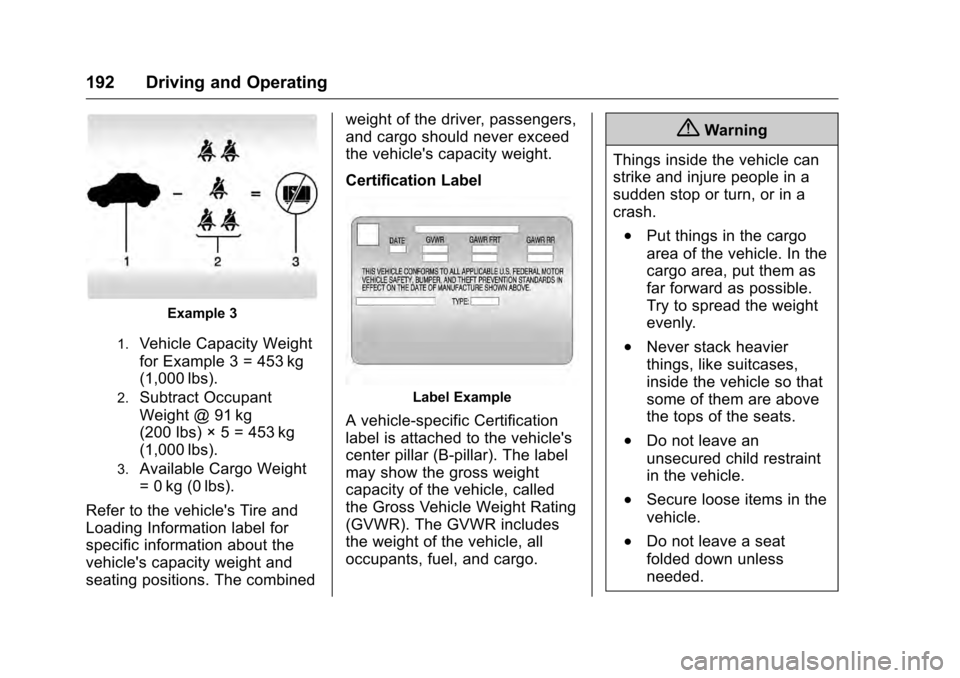
Example 3
1.Vehicle Capacity Weight
for Example 3 = 453 kg
(1,000 lbs).
2.Subtract Occupant
Weight @ 91 kg
(200 lbs) × 5 = 453 kg
(1,000 lbs).
3.Available Cargo Weight
= 0 kg (0 lbs).
Refer to the vehicle's Tire and
Loading Information label for
specific information about the
vehicle's capacity weight and
seating positions. The combined weight of the driver, passengers,
and cargo should never exceed
the vehicle's capacity weight.
Certification Label
Label Example
A vehicle-specific Certification
label is attached to the vehicle's
center pillar (B-pillar). The label
may show the gross weight
capacity of the vehicle, called
the Gross Vehicle Weight Rating
(GVWR). The GVWR includes
the weight of the vehicle, all
occupants, fuel, and cargo.
{Warning
Things inside the vehicle can
strike and injure people in a
sudden stop or turn, or in a
crash.
.Put things in the cargo
area of the vehicle. In the
cargo area, put them as
far forward as possible.
Try to spread the weight
evenly.
.Never stack heavier
things, like suitcases,
inside the vehicle so that
some of them are above
the tops of the seats.
.Do not leave an
unsecured child restraint
in the vehicle.
.Secure loose items in the
vehicle.
.Do not leave a seat
folded down unless
needed.
Page 194 of 354

Cadillac CTS/CTS-V Owner Manual (GMNA-Localizing-MidEast-9369309) -
2016 - crc - 7/30/15
Driving and Operating 193
Starting and
Operating
New Vehicle Break-In
Follow these recommended
guidelines during the first
2 400 km (1,500 mi) of driving this
vehicle. Parts have a break-in
period and performance will be
better in the long run.
For the first 2 400 km (1,500 mi):
.Avoid full throttle starts and
abrupt stops.
. Do not exceed 4000 engine rpm.
. Avoid driving at any one
constant speed, fast or slow.
. Avoid downshifting to brake or
slow the vehicle when the
engine speed will exceed
4000 rpm.
. Do not let the engine labor.
Never lug the engine in high
gear at low speeds. .
Do not participate in track
events, sport driving schools,
or similar activities during this
break-in period.
. Check engine oil with every
refueling and add if necessary.
Oil and fuel consumption may be
higher than normal during the
first 2 400 km (1,500 mi).
. To break in new tires, drive at
moderate speeds and avoid hard
cornering for the first
300 km (200 mi). New tires do
not have maximum traction and
may tend to slip.
. New brake linings also need a
break–in period. Avoid making
hard stops during the first
300 km (200 mi). This is
recommended every time brake
linings are replaced.
Carbon Fiber
This vehicle may be equipped with
carbon fiber parts. Dealer-installed
accessories may also contain
carbon fiber.
{Warning
The exposed edges of carbon
fiber parts can be sharp when
damaged. You or others could be
injured. Use caution when
washing the vehicle, coming in
contact with damaged carbon
fiber parts, or removing these
parts. See your dealer for
replacement.
Ignition Positions
Page 197 of 354

Cadillac CTS/CTS-V Owner Manual (GMNA-Localizing-MidEast-9369309) -
2016 - crc - 7/30/15
196 Driving and Operating
Information Center (DIC) will
display a message. SeeKey
and Lock Messages 0139 and
Remote Keyless Entry (RKE)
System Operation 029.
Caution
Cranking the engine for long
periods of time, by returning the
ignition to the START position
immediately after cranking has
ended, can overheat and damage
the cranking motor, and drain the
battery. Wait at least 15 seconds
between each try, to let the
cranking motor cool down.
2. If the engine does not start after five to 10 seconds,
especially in very cold weather
(below −18 °C or 0 °F), it could
be flooded with too much
gasoline. Try pushing the
accelerator pedal all the way to
the floor and holding it there as
you press the ENGINE START/
STOP button, if equipped. Wait
at least 15 seconds between
each try, to allow the cranking motor to cool down. When the
engine starts, release the
accelerator. If the vehicle starts
briefly but then stops again, do
the same thing. This clears the
extra gasoline from the engine.
Do not race the engine
immediately after starting it.
Operate the engine and
transmission gently until the oil
warms up and lubricates all
moving parts.
Stop/Start System
{Warning
Exiting the vehicle without first
shifting into P (Park) may cause
the vehicle to move. You or others
may be injured. Because the
vehicle has the auto engine stop/
start feature, the vehicle's engine
might seem to be shut off;
however, once the brake pedal is
released, the engine will start up
again.
(Continued)
Warning (Continued)
Shift to P (Park) and turn the
ignition to LOCK/OFF, before
exiting the vehicle.
If equipped with the 2.0L L4, or 3.6L
V6 non-turbo engine, the vehicle
has a fuel saving stop/start system
to shut off the engine to help
conserve fuel.
Auto Engine Stop/Start
When the brakes are applied and
the vehicle is at a complete stop,
the engine may turn off. When
stopped, the tachometer displays
AUTO STOP. See Tachometer
0 116. When the brake pedal is
released or the accelerator pedal
pushed, the engine will restart.
Auto Stop may be deactivated if:
. A minimum vehicle speed is not
reached.
. The engine or transmission is
not at the required operating
temperature.
Page 202 of 354
Cadillac CTS/CTS-V Owner Manual (GMNA-Localizing-MidEast-9369309) -
2016 - crc - 7/30/15
Driving and Operating 201
ON/RUN. If you cannot shift out of
P (Park), ease pressure on the shift
lever and push the shift lever all the
way into P (Park) as you maintain
brake application. Then press the
shift lever button and move the shift
lever into another gear. SeeShifting
out of Park 0198.
Caution
Shifting to R (Reverse) while the
vehicle is moving forward could
damage the transmission. The
repairs would not be covered by
the vehicle warranty. Shift to
R (Reverse) only after the vehicle
is stopped.
R : Use this gear to back up.
At low vehicle speeds, R (Reverse)
can be used to rock the vehicle
back and forth to get out of snow,
ice, or sand without damaging your
transmission. See If the Vehicle Is
Stuck 0189.
N : In this position, the engine does
not connect with the wheels. To
restart when the vehicle is already moving, use N (Neutral) only. You
can also use N (Neutral) when the
vehicle is being towed.
{Warning
Shifting into a drive gear while the
engine is running at high speed is
dangerous. Unless your foot is
firmly on the brake pedal, the
vehicle could move very rapidly.
You could lose control and hit
people or objects. Do not shift
into a drive gear while the engine
is running at high speed.
Caution
Shifting out of P (Park) or
N (Neutral) with the engine
running at high speed may
damage the transmission. The
repairs would not be covered by
the vehicle warranty. Be sure the
engine is not running at high
speed when shifting the vehicle.
D :
This position is for normal
driving. It provides the best fuel
economy. If you need more power
for passing, and you are:
. Going less than 55 km/h
(35 mph), push the accelerator
pedal about halfway down.
. Going about 55 km/h (35 mph) or
more, push the accelerator all
the way down.
The transmission will shift down
to a lower gear and have more
power.
Downshifting the transmission in
slippery road conditions could result
in skidding. See “Skidding”under
Loss of Control 0182.
M : This mode can be entered with
the shift lever in the D (Drive)
position by pressing the M (Manual
Mode) button on the top of the shift
lever. M (Manual Mode) allows the
driver to select gears appropriate for
current driving conditions.
M (Manual Mode) can be exited with
a second press of the M (Manual
Mode) button. See Manual Mode
0 202.
Page 241 of 354
Cadillac CTS/CTS-V Owner Manual (GMNA-Localizing-MidEast-9369309) -
2016 - crc - 7/30/15
240 Driving and Operating
Fuel
Use the recommended fuel for
proper vehicle maintenance.
If the vehicle has an LGX 3.6L
V6 engine, use regular unleaded
gasoline with a posted octane rating
of 91 RON or higher, otherwise an
audible knocking noise may be
heard. If heavy knocking is heard
when using gasoline rated at 91
RON or higher, the engine needs
service.
If the vehicle has the LTG 2.0L L4
engine, use premium unleaded
gasoline with a posted octane rating
of 95 RON or higher. Regular
unleaded gasoline rated at 91 RON
or higher can be used, but
acceleration and fuel economy will
be reduced, and an audible
knocking noise may be heard. If this
occurs, use a gasoline rated at 95
RON or higher as soon as possible.
Otherwise, the engine could be
damaged. If heavy knocking is
heard when using gasoline rated at
95 RON or higher, the engine needs
service.If the vehicle has an LF3 3.6L V6
Twin Turbo or the LT4 V8 engine,
use premium unleaded gasoline
with a posted octane rating of 95
RON or higher. If the octane is less
than 95 RON, you could damage
the engine and may void the vehicle
warranty. If heavy knocking is heard
when using gasoline rated at 95
RON octane or higher, the engine
needs service..
Use of Seasonal Fuels
Use summer and winter fuels in the
appropriate season. The fuels
industry automatically modifies the
fuel for the appropriate season.
If fuel is left in the vehicle tank for
long periods of time, driving or
starting could be affected. Drive the
vehicle until the fuel is at one-half
tank or less, then refuel with the
current seasonal fuel.
Prohibited Fuels
Gasolines containing oxygenates
such as ethers and ethanol, as well
as reformulated gasolines, are
available in some cities. If these
gasolines comply with the
previously described specification,then they are acceptable to use.
However, E85 (85% ethanol) and
other fuels containing more than
15% ethanol must be used only in
FlexFuel vehicles.
Caution
Do not use fuel containing
methanol. It can corrode metal
parts in the fuel system and also
damage plastic and rubber parts.
That damage would not be
covered under the vehicle
warranty.
Some gasolines, mainly high octane
racing gasolines, can contain an
octane-enhancing additive called
methylcyclopentadienyl manganese
tricarbonyl (MMT). Do not use
gasolines and/or fuel additives with
MMT as they can reduce spark plug
life and affect emission control
system performance. The
malfunction indicator lamp may turn
on. If this occurs, see your dealer
for service.