instrument panel CADILLAC CTS 2016 3.G Owner's Manual
[x] Cancel search | Manufacturer: CADILLAC, Model Year: 2016, Model line: CTS, Model: CADILLAC CTS 2016 3.GPages: 354, PDF Size: 3.56 MB
Page 159 of 354
Cadillac CTS/CTS-V Owner Manual (GMNA-Localizing-MidEast-9369309) -
2016 - crc - 7/30/15
158 Lighting
.The ignition is on.
. The exterior lamp control is
in AUTO.
. The light sensor determines it is
daytime.
. The parking brake is released or
the vehicle is not in P (Park).
The taillamps, instrument panel
lights, and other lamps will not
be on.
The DRL turn off when the
headlamps are turned to
;or the
ignition is off.
Automatic Headlamp
System
When the exterior lamp control is
set to AUTO and it is dark enough
outside, the headlamps come on
automatically.
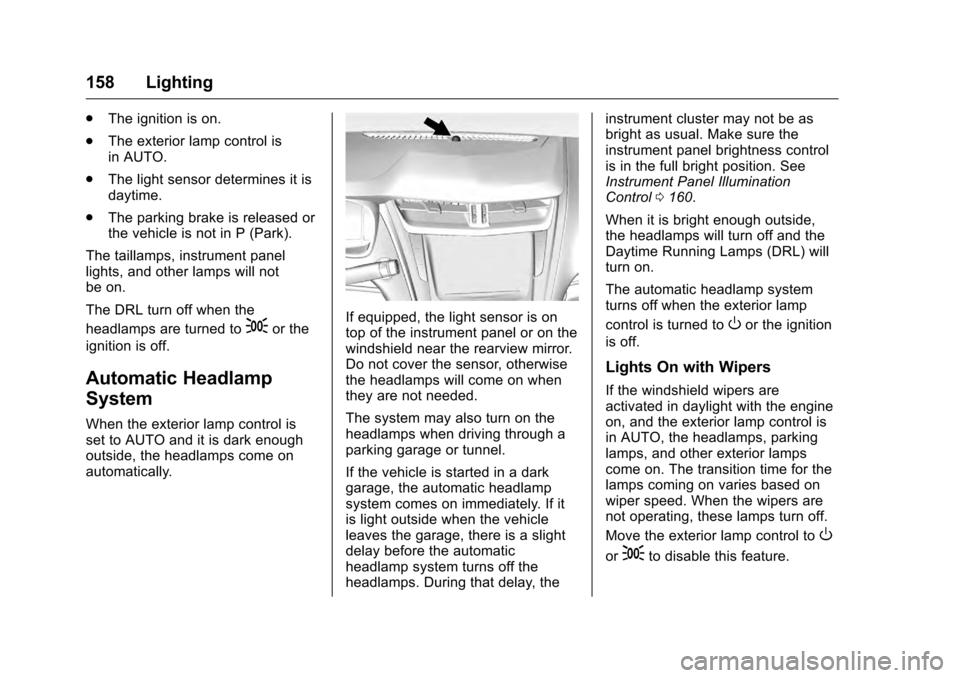
If equipped, the light sensor is on
top of the instrument panel or on the
windshield near the rearview mirror.
Do not cover the sensor, otherwise
the headlamps will come on when
they are not needed.
The system may also turn on the
headlamps when driving through a
parking garage or tunnel.
If the vehicle is started in a dark
garage, the automatic headlamp
system comes on immediately. If it
is light outside when the vehicle
leaves the garage, there is a slight
delay before the automatic
headlamp system turns off the
headlamps. During that delay, the instrument cluster may not be as
bright as usual. Make sure the
instrument panel brightness control
is in the full bright position. See
Instrument Panel Illumination
Control
0160.
When it is bright enough outside,
the headlamps will turn off and the
Daytime Running Lamps (DRL) will
turn on.
The automatic headlamp system
turns off when the exterior lamp
control is turned toOor the ignition
is off.
Lights On with Wipers
If the windshield wipers are
activated in daylight with the engine
on, and the exterior lamp control is
in AUTO, the headlamps, parking
lamps, and other exterior lamps
come on. The transition time for the
lamps coming on varies based on
wiper speed. When the wipers are
not operating, these lamps turn off.
Move the exterior lamp control to
O
or;to disable this feature.
Page 161 of 354
Cadillac CTS/CTS-V Owner Manual (GMNA-Localizing-MidEast-9369309) -
2016 - crc - 7/30/15
160 Lighting
If after signaling a turn or lane
change, the arrow flashes rapidly or
does not come on, a signal bulb
might be burned out.
Replace any burned out bulbs. If a
bulb is not burned out, check the
fuse. SeeFuses and Circuit
Breakers 0280.Interior Lighting
Instrument Panel
Illumination Control
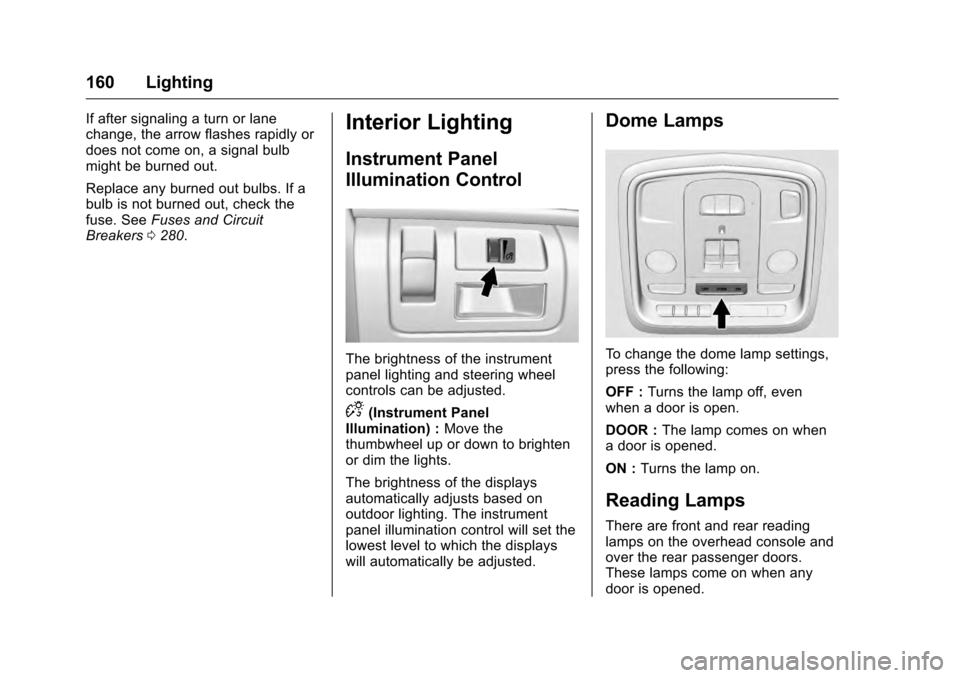
The brightness of the instrument
panel lighting and steering wheel
controls can be adjusted.
D(Instrument Panel
Illumination) : Move the
thumbwheel up or down to brighten
or dim the lights.
The brightness of the displays
automatically adjusts based on
outdoor lighting. The instrument
panel illumination control will set the
lowest level to which the displays
will automatically be adjusted.
Dome Lamps
To change the dome lamp settings,
press the following:
OFF : Turns the lamp off, even
when a door is open.
DOOR : The lamp comes on when
a door is opened.
ON : Turns the lamp on.
Reading Lamps
There are front and rear reading
lamps on the overhead console and
over the rear passenger doors.
These lamps come on when any
door is opened.
Page 173 of 354

Cadillac CTS/CTS-V Owner Manual (GMNA-Localizing-MidEast-9369309) -
2016 - crc - 7/30/15
172 Climate Controls
Air Delivery Mode Control :When
the climate information is displayed,
press the desired air delivery mode
on the touch screen to change the
direction of the airflow. The selected
air delivery mode button is lit.
Pressing any of the air delivery
buttons cancels automatic air
delivery control and the direction of
the airflow can be controlled
manually. Press AUTO to return to
automatic operation.
To change the current mode, select
one of the following:
Y(Vent) : Air is directed to the
instrument panel outlets.
\(Bi-Level) : Air is divided
between the instrument panel
outlets and the floor outlets.
[(Floor) : Air is directed to the
floor outlets.
-(Defog) : Clears the windows of
fog or moisture. Air is directed to the
windshield and floor outlets.
0(Defrost) : Clears the
windshield of fog or frost more
quickly. Air is directed to the
windshield. Press the
0button to turn on or off. Changing the air
delivery mode also turns the
defrost off.
A/C (Air Conditioning) :
Press the
AC Mode touch screen control to
turn the automatic air conditioning
on or off. If the fan is turned off, the
air conditioner will not run. Outside
temperatures below freezing may
also prevent the air conditioner from
running.
Press AUTO to return to automatic
operation and the air conditioner
runs as needed.
Automatic Air Recirculation :
When the AUTO indicator light is
on, the air is automatically
recirculated as needed to help
quickly cool the inside of the
vehicle.
The climate control system may
have a sensor to detect air pollution.
When using automatic air
recirculation, the air quality control
system may operate. To adjust the
sensitivity of the air quality sensor,
see “Climate and Air Quality” under
Vehicle Personalization 0147.
@(Recirculation) : Press to
alternate between recirculating air
inside the vehicle or pulling in
outside air. The indicator light on the
button is lit when recirculation mode
is active. This helps to quickly cool
the air inside the vehicle or reduce
the outside air and odors that might
enter.
Pressing this button cancels
automatic recirculation. Press AUTO
to return to automatic operation;
recirculation runs automatically as
needed.
Manual recirculation mode is not
available when in Defrost or Defog
modes.
Auto Defog : The climate control
system may have a sensor to
automatically detect high humidity
inside the vehicle. When high
humidity is detected, the climate
control system may adjust to
outside air supply and turn on the
air conditioner. If the climate control
system does not detect possible
window fogging, it returns to normal
operation. To turn Auto Defog off or
Page 175 of 354
Cadillac CTS/CTS-V Owner Manual (GMNA-Localizing-MidEast-9369309) -
2016 - crc - 7/30/15
174 Climate Controls
Sensor
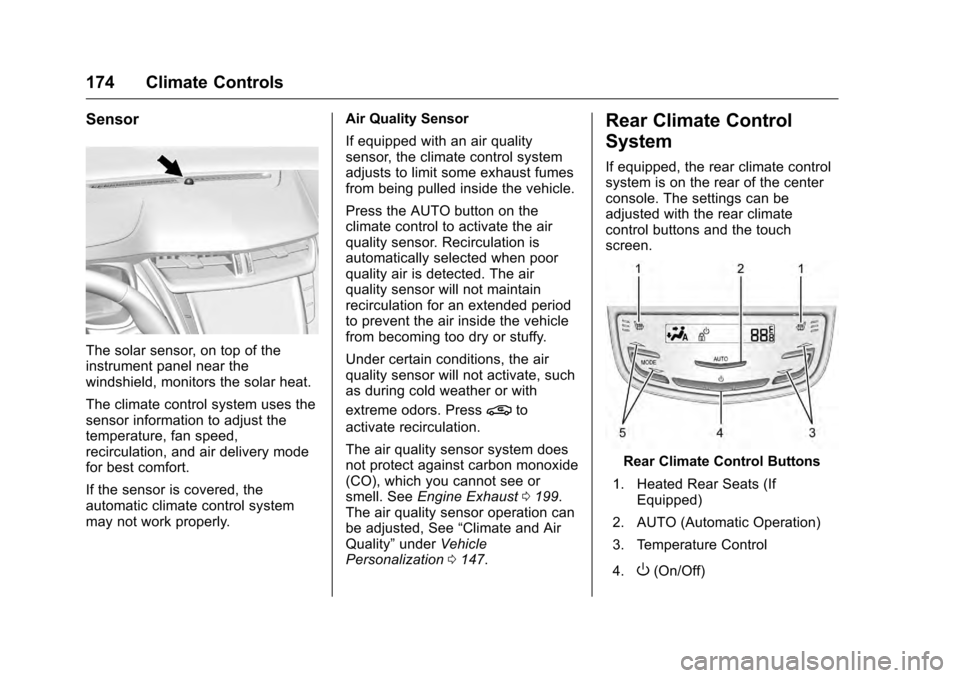
The solar sensor, on top of the
instrument panel near the
windshield, monitors the solar heat.
The climate control system uses the
sensor information to adjust the
temperature, fan speed,
recirculation, and air delivery mode
for best comfort.
If the sensor is covered, the
automatic climate control system
may not work properly.Air Quality Sensor
If equipped with an air quality
sensor, the climate control system
adjusts to limit some exhaust fumes
from being pulled inside the vehicle.
Press the AUTO button on the
climate control to activate the air
quality sensor. Recirculation is
automatically selected when poor
quality air is detected. The air
quality sensor will not maintain
recirculation for an extended period
to prevent the air inside the vehicle
from becoming too dry or stuffy.
Under certain conditions, the air
quality sensor will not activate, such
as during cold weather or with
extreme odors. Press
@to
activate recirculation.
The air quality sensor system does
not protect against carbon monoxide
(CO), which you cannot see or
smell. See Engine Exhaust 0199.
The air quality sensor operation can
be adjusted, See “Climate and Air
Quality” underVehicle
Personalization 0147.
Rear Climate Control
System
If equipped, the rear climate control
system is on the rear of the center
console. The settings can be
adjusted with the rear climate
control buttons and the touch
screen.
Rear Climate Control Buttons
1. Heated Rear Seats (If Equipped)
2. AUTO (Automatic Operation)
3. Temperature Control
4.
O(On/Off)
Page 177 of 354
Cadillac CTS/CTS-V Owner Manual (GMNA-Localizing-MidEast-9369309) -
2016 - crc - 7/30/15
176 Climate Controls
Y/[/\(Air Delivery Mode
Control) : Press the desired mode
button on the touch screen or the
MODE button on the rear faceplate
to change the direction of the airflow
in the rear seating area.
MorL(Heated Rear Seats, If
Equipped) : Press
MorLto heat
the left or right outboard seat
cushion and seatback. See Heated
Rear Seats 063.
Air Vents
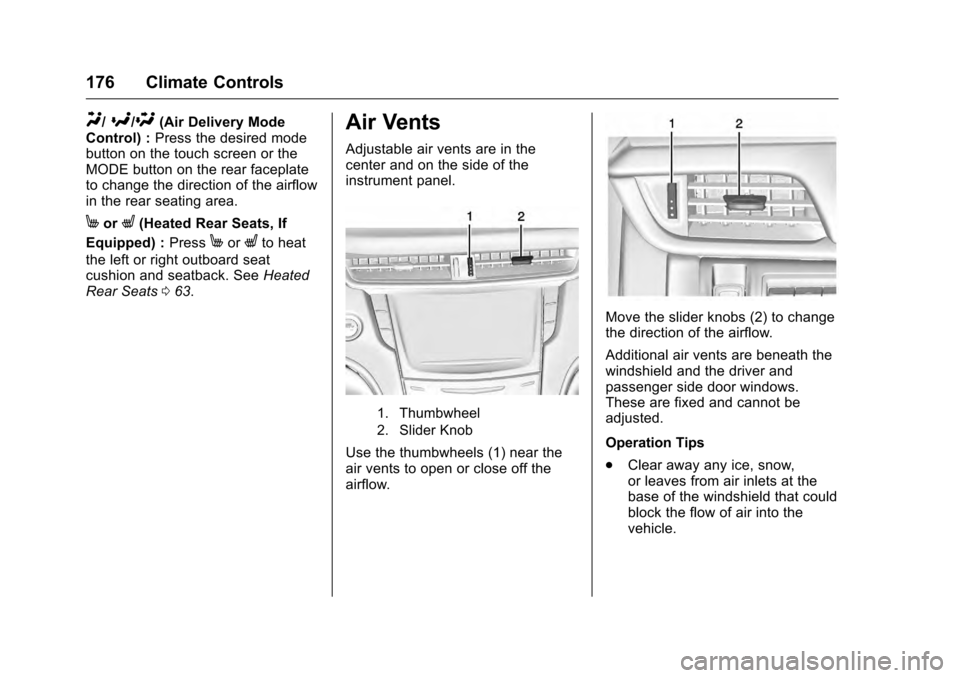
Adjustable air vents are in the
center and on the side of the
instrument panel.
1. Thumbwheel
2. Slider Knob
Use the thumbwheels (1) near the
air vents to open or close off the
airflow.
Move the slider knobs (2) to change
the direction of the airflow.
Additional air vents are beneath the
windshield and the driver and
passenger side door windows.
These are fixed and cannot be
adjusted.
Operation Tips
.
Clear away any ice, snow,
or leaves from air inlets at the
base of the windshield that could
block the flow of air into the
vehicle.
Page 189 of 354
Cadillac CTS/CTS-V Owner Manual (GMNA-Localizing-MidEast-9369309) -
2016 - crc - 7/30/15
188 Driving and Operating
freezing rain begins to fall. Avoid
driving on wet ice or in freezing rain
until roads can be treated.
For slippery road driving:
.Accelerate gently. Accelerating
too quickly causes the wheels to
spin and makes the surface
under the tires slick.
. Turn on Traction Control. See
Traction Control/Electronic
Stability Control 0206.
. Antilock Brake System (ABS)
improves vehicle stability during
hard stops, but the brakes
should be applied sooner than
when on dry pavement. See
Antilock Brake System (ABS)
0203.
See Driver Mode Control 0208
. Allow greater following distance
and watch for slippery spots. Icy
patches can occur on otherwise
clear roads in shaded areas.
The surface of a curve or an
overpass can remain icy when
the surrounding roads are clear. Avoid sudden steering
maneuvers and braking while
on ice.
. Turn off cruise control.
Blizzard Conditions
Stay with the vehicle unless there is
help nearby. Get help and keep
everyone in the vehicle safe:
.Turn on the hazard warning
flashers.
. Tie a red cloth to an outside
mirror.
{Warning
Snow can trap engine exhaust
under the vehicle. This may
cause exhaust gases to get
inside. Engine exhaust contains
carbon monoxide (CO), which
cannot be seen or smelled. It can
cause unconsciousness and even
death.
If the vehicle is stuck in snow:
(Continued)
Warning (Continued)
.Clear snow from the base of
the vehicle, especially any
blocking the exhaust pipe.
. Open a window about 5 cm
(2 in) on the vehicle side
that is away from the wind,
to bring in fresh air.
. Fully open the air outlets on
or under the instrument
panel.
. Adjust the climate control
system to circulate the air
inside the vehicle and set
the fan speed to the highest
setting. See “Climate
Control Systems.”
For more information about CO,
see Engine Exhaust 0199.
To save fuel, run the engine for
short periods to warm the vehicle
and then shut the engine off and
partially close the window. Moving
about to keep warm also helps.
Page 205 of 354

Cadillac CTS/CTS-V Owner Manual (GMNA-Localizing-MidEast-9369309) -
2016 - crc - 7/30/15
204 Driving and Operating
avoid a sudden obstacle, a
computer senses the wheels are
slowing down. If one of the wheels
is about to stop rolling, the computer
will separately work the brakes at
each wheel.
ABS can change the brake pressure
to each wheel, as required, faster
than any driver could. This can help
you steer around the obstacle while
braking hard.
As the brakes are applied, the
computer keeps receiving updates
on wheel speed and controls
braking pressure accordingly.
Remember: ABS does not change
the time needed to get a foot up to
the brake pedal or always decrease
stopping distance. If you get too
close to the vehicle in front of you,
there will not be enough time to
apply the brakes if that vehicle
suddenly slows or stops. Always
leave enough room up ahead to
stop, even with ABS.Using ABS
Do not pump the brakes. Just hold
the brake pedal down firmly and let
ABS work. You may hear the ABS
pump or motor operating and feel
the brake pedal pulsate. This is
normal.
Braking in Emergencies
ABS allows you to steer and brake
at the same time. In many
emergencies, steering can help
more than even the very best
braking.
Electric Parking Brake
The vehicle has an Electric Parking
Brake (EPB). The switch for the
EPB is on the instrument panel, to
the left of the steering wheel. The
EPB can always be activated, even
if the ignition is off. To prevent
draining the battery, avoid repeated
cycles of the EPB system when the
engine is not running.
The system has a red parking brake
status light and an amber parking
brake warning light. SeeParking
Brake Light 0123 andService
Electric Parking Brake Light 0123.
There are also parking brake-related
Driver Information Center (DIC)
messages. See Brake System
Messages 0136. In case of
insufficient electrical power, the EPB
cannot be applied or released.
Before leaving the vehicle, check
the red parking brake status light to
ensure that the parking brake is
applied.
EPB Apply
To apply the EPB:
1. Be sure the vehicle is at a complete stop.
Page 214 of 354
Cadillac CTS/CTS-V Owner Manual (GMNA-Localizing-MidEast-9369309) -
2016 - crc - 7/30/15
Driving and Operating 213
.StabiliTrak is off and available
engine power is the same as
mode 3.
PERF TRAC 5 –RACE ACTIVE
HANDLING OFF
. For use by experienced drivers
who are familiar with the track.
. Dry conditions only.
. Requires more driving skill than
in other modes.
. StabiliTrak is off and engine
power is available for maximum
cornering speed.
Press and release the TCS/
StabiliTrak
Ybutton to turn off
PTM and return to the traction
control and StabiliTrak systems. The
traction off light
iand StabiliTrak
OFF light
gwill go out.
Launch Control (V-Series Only)
A Launch Control feature is
available, within Competitive Driving
Mode or Performance Traction
Management (V-Series), to allow the
driver to achieve high levels of
vehicle acceleration in a straight line. Launch Control is a form of
traction control that manages tire
spin while launching the vehicle.
This feature is intended for use
during closed course race events
where consistent zero to
60 and quarter mile times are
desirable.
Launch Control is only available
when the following criteria are met:
.
Competitive Driving Mode is
selected or any of the
Performance Traction
Management modes are
selected (V-Series). The TCS
light comes on the instrument
panel and the appropriate DIC
message displays.
. The vehicle is not moving.
. The steering wheel is pointing
straight.
. The brake pedal must be firmly
pressed to the floor, equivalent
to a panic brake event.
. The accelerator pedal is rapidly
applied to wide open throttle. (If
the vehicle rolls due to wide
open throttle, release the throttle, press the brake pedal
more firmly, and re-apply the
accelerator to wide open
throttle.)
The Launch Control feature will
initially limit engine speed as the
driver rapidly applies the accelerator
pedal to wide open throttle. Allow
the engine rpm to stabilize.
A smooth, quick release of the
brake pedal, while maintaining the
fully pressed accelerator pedal, will
manage wheel slip.
After the vehicle is launched, the
system continues in Competitive
Driving Mode or Performance
Traction Management (V-Series).
Competitive Driving Mode, PTM,
and Launch Control are systems
designed for a closed course race
track and not intended for use on
public roads. The systems are not
intended to compensate for lack of
driver experience or familiarity with
the race track.
Page 245 of 354

Cadillac CTS/CTS-V Owner Manual (GMNA-Localizing-MidEast-9369309) -
2016 - crc - 7/30/15
244 Driving and Operating
{Warning
When towing a trailer, exhaust
gases may collect at the rear of
the vehicle and enter if the
liftgate, trunk/hatch, or rear-most
window is open.
When towing a trailer:. Do not drive with the
liftgate, trunk/hatch,
or rear-most window open.
. Fully open the air outlets on
or under the instrument
panel.
. Also adjust the climate
control system to a setting
that brings in only outside
air. See “Climate Control
Systems” in the Index.
For more information about
Carbon Monoxide, see Engine
Exhaust 0199.
Towing a trailer requires a certain
amount of experience. The
combination you are driving is
longer and not as responsive as the vehicle itself. Get acquainted with
the handling and braking of the rig
before setting out for the open road.
Before starting, check all trailer hitch
parts and attachments, safety
chains, electrical connectors, lamps,
tires, and mirrors. If the trailer has
electric brakes, start the
combination moving and then apply
the trailer brake controller by hand
to be sure the brakes work.
During the trip, check occasionally
to be sure that the load is secure
and the lamps and any trailer
brakes still work.
Following Distance
Stay at least twice as far behind the
vehicle ahead as you would when
driving the vehicle without a trailer.
This can help to avoid heavy
braking and sudden turns.
Passing
More passing distance is needed
when towing a trailer. The
combination will not accelerate as
quickly and is longer so it is
necessary to go much farther
beyond the passed vehicle before
returning to the lane.
Backing Up
Hold the bottom of the steering
wheel with one hand. To move the
trailer to the left, move that hand to
the left. To move the trailer to the
right, move your hand to the right.
Always back up slowly and,
if possible, have someone
guide you.
Making Turns
Caution
Making very sharp turns while
trailering could cause the trailer to
come in contact with the vehicle.
The vehicle could be damaged.
Avoid making very sharp turns
while trailering.
When turning with a trailer, make
wider turns than normal. Do this so
the trailer will not strike soft
shoulders, curbs, road signs, trees,
Page 250 of 354
Cadillac CTS/CTS-V Owner Manual (GMNA-Localizing-MidEast-9369309) -
2016 - crc - 7/30/15
Vehicle Care 249
Vehicle Care
General Information
General Information . . . . . . . . . . 250
Accessories andModifications . . . . . . . . . . . . . . . . 250
Vehicle Checks
Doing Your OwnService Work . . . . . . . . . . . . . . . 251
Hood . . . . . . . . . . . . . . . . . . . . . . . . . 251
Engine Compartment Overview . . . . . . . . . . . . . . . . . . . . 252
Engine Oil . . . . . . . . . . . . . . . . . . . . 259
Engine Oil Life System . . . . . . . 261
Automatic Transmission Fluid . . . . . . . . . . . . . . . . . . . . . . . . 262
Engine Air Cleaner/Filter . . . . . . 263
Cooling System . . . . . . . . . . . . . . 264
Engine Coolant . . . . . . . . . . . . . . . 266
Engine Overheating . . . . . . . . . . 269
Washer Fluid . . . . . . . . . . . . . . . . . 271
Brakes . . . . . . . . . . . . . . . . . . . . . . . 271
Brake Fluid . . . . . . . . . . . . . . . . . . . 272
Battery . . . . . . . . . . . . . . . . . . . . . . . . 273
All-Wheel Drive . . . . . . . . . . . . . . . 274
Starter Switch Check . . . . . . . . . 275
Automatic Transmission Shift Lock Control Function
Check . . . . . . . . . . . . . . . . . . . . . . . 276 Park Brake and P (Park)
Mechanism Check . . . . . . . . . . 276
Wiper Blade Replacement . . . . 277
Windshield Replacement . . . . . 277
Headlamp Aiming
Headlamp Aiming . . . . . . . . . . . . 278
Bulb Replacement
Bulb Replacement . . . . . . . . . . . . 278
Halogen Bulbs . . . . . . . . . . . . . . . . 278
High Intensity Discharge (HID) Lighting . . . . . . . . . . . . . . . . . . . . . 278
LED Lighting . . . . . . . . . . . . . . . . . 278
License Plate Lamp . . . . . . . . . . 279
Replacement Bulbs . . . . . . . . . . . 279
Electrical System
Electrical System Overload . . . 280
Fuses and Circuit Breakers . . . 280
Engine Compartment Fuse Block . . . . . . . . . . . . . . . . . . . . . . . . 281
Instrument Panel Fuse Block . . . . . . . . . . . . . . . . . . . . . . . . 284
Rear Compartment Fuse Block . . . . . . . . . . . . . . . . . . . . . . . . 287
Wheels and Tires
Tires . . . . . . . . . . . . . . . . . . . . . . . . . . 289
All-Season Tires . . . . . . . . . . . . . . 290
Winter Tires . . . . . . . . . . . . . . . . . . 290
Run-Flat Tires . . . . . . . . . . . . . . . . 291 Low-Profile Tires . . . . . . . . . . . . . 292
Summer Tires . . . . . . . . . . . . . . . . 292
Tire Pressure . . . . . . . . . . . . . . . . . 292
Tire Pressure for High-Speed
Operation . . . . . . . . . . . . . . . . . . . 294
Tire Pressure Monitor System . . . . . . . . . . . . . . . . . . . . . . 294
Tire Pressure Monitor Operation . . . . . . . . . . . . . . . . . . . 295
Tire Inspection . . . . . . . . . . . . . . . . 298
Tire Rotation . . . . . . . . . . . . . . . . . 299
When It Is Time for New Tires . . . . . . . . . . . . . . . . . . . . . . . . 300
Buying New Tires . . . . . . . . . . . . . 301
Different Size Tires and Wheels . . . . . . . . . . . . . . . . . . . . . . 302
Wheel Alignment and Tire Balance . . . . . . . . . . . . . . . . . . . . . 303
Wheel Replacement . . . . . . . . . . 303
Tire Chains . . . . . . . . . . . . . . . . . . . 304
If a Tire Goes Flat . . . . . . . . . . . . 304
Tire Sealant and Compressor Kit . . . . . . . . . . . . . 306
Storing the Tire Sealant and Compressor Kit . . . . . . . . . . . . . 312
Jump Starting
Jump Starting . . . . . . . . . . . . . . . . 313
Towing the Vehicle
Towing the Vehicle . . . . . . . . . . . 315