manual transmission CADILLAC CTS 2016 3.G Owner's Manual
[x] Cancel search | Manufacturer: CADILLAC, Model Year: 2016, Model line: CTS, Model: CADILLAC CTS 2016 3.GPages: 354, PDF Size: 3.56 MB
Page 199 of 354

Cadillac CTS/CTS-V Owner Manual (GMNA-Localizing-MidEast-9369309) -
2016 - crc - 7/30/15
198 Driving and Operating
3. Turn the ignition off.
4. Take the Remote Keyless Entry(RKE) transmitter with you.
Leaving the Vehicle with the
Engine Running
{Warning
It can be dangerous to leave the
vehicle with the engine running.
It could overheat and catch fire.
It is dangerous to get out of the
vehicle if the shift lever is not fully
in P (Park) with the parking brake
firmly set. The vehicle can roll.
Do not leave the vehicle when the
engine is running. If you have left
the engine running, the vehicle
can move suddenly. You or others
could be injured. To be sure the
vehicle will not move, even when
you are on fairly level ground,
always set the parking brake and
move the shift lever to P (Park).
See Shifting Into Park 0197.
(Continued)
Warning (Continued)
If you are towing a trailer, see
Driving Characteristics and
Towing Tips 0243.
If you have to leave the vehicle with
the engine running, the vehicle must
be in P (Park) and the parking brake
set. After shifting into P (Park), try to
move the shift lever out without first
pushing the button on the shift lever.
If you can, the shift lever was not
fully locked into P (Park).
Torque Lock
Torque lock is when the weight of
the vehicle puts too much force on
the parking pawl in the
transmission. This happens when
parking on a hill and shifting the
transmission into P (Park) is not
done properly and then it is difficult
to shift out of P (Park). To prevent
torque lock, set the parking brake
and then shift into P (Park). To find
out how, see "Shifting Into Park"
listed previously. If torque lock does occur, the
vehicle may need to be pushed
uphill by another vehicle to relieve
the parking pawl pressure, so you
can shift out of P (Park).
Shifting out of Park
This vehicle is equipped with an
electronic shift lock release system.
The shift lock release is designed to
prevent movement of the shift lever
out of P (Park), unless the ignition is
in ON/RUN and the brake pedal is
applied.
The shift lock release is always
functional except in the case of an
uncharged or low voltage (less than
9 volt) battery.
If the vehicle has an uncharged
battery or a battery with low voltage,
try charging or jump starting the
battery. See
Jump Starting 0313 for
more information.
To shift out of P (Park):
1. Apply the brake pedal.
2. Release the parking brake. See Electric Parking Brake
0 204.
Page 201 of 354
Cadillac CTS/CTS-V Owner Manual (GMNA-Localizing-MidEast-9369309) -
2016 - crc - 7/30/15
200 Driving and Operating
If the vehicle is left with the engine
running, follow the proper steps to
be sure the vehicle will not move.
SeeShifting Into Park 0197 and
Engine Exhaust 0199.
If parking on a hill and pulling a
trailer, see Driving Characteristics
and Towing Tips 0243.Automatic
Transmission
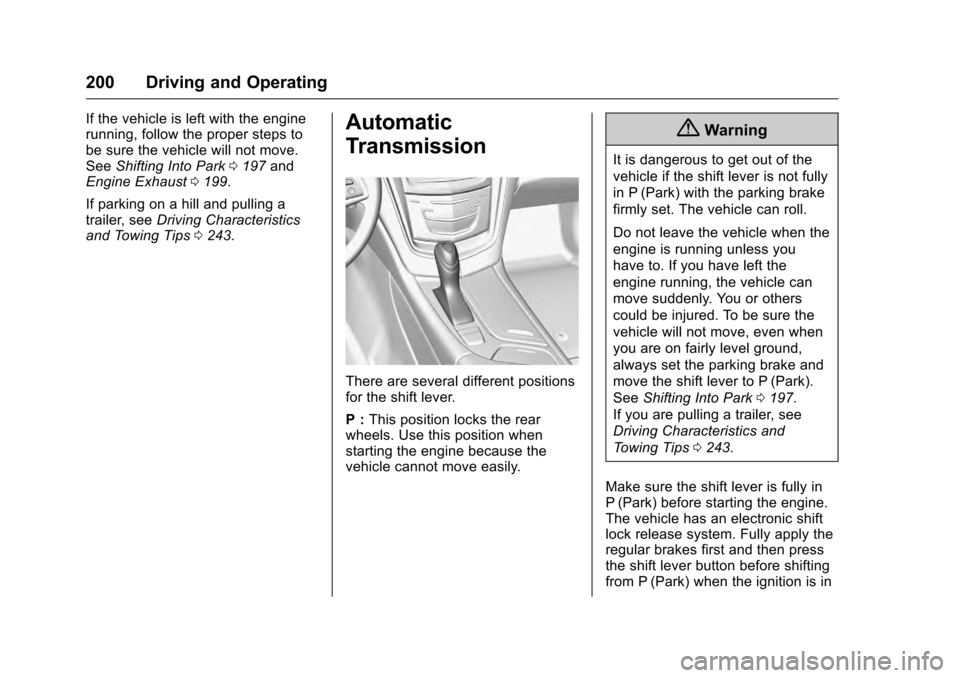
There are several different positions
for the shift lever.
P : This position locks the rear
wheels. Use this position when
starting the engine because the
vehicle cannot move easily.
{Warning
It is dangerous to get out of the
vehicle if the shift lever is not fully
in P (Park) with the parking brake
firmly set. The vehicle can roll.
Do not leave the vehicle when the
engine is running unless you
have to. If you have left the
engine running, the vehicle can
move suddenly. You or others
could be injured. To be sure the
vehicle will not move, even when
you are on fairly level ground,
always set the parking brake and
move the shift lever to P (Park).
See Shifting Into Park 0197.
If you are pulling a trailer, see
Driving Characteristics and
Towing Tips 0243.
Make sure the shift lever is fully in
P (Park) before starting the engine.
The vehicle has an electronic shift
lock release system. Fully apply the
regular brakes first and then press
the shift lever button before shifting
from P (Park) when the ignition is in
Page 202 of 354
Cadillac CTS/CTS-V Owner Manual (GMNA-Localizing-MidEast-9369309) -
2016 - crc - 7/30/15
Driving and Operating 201
ON/RUN. If you cannot shift out of
P (Park), ease pressure on the shift
lever and push the shift lever all the
way into P (Park) as you maintain
brake application. Then press the
shift lever button and move the shift
lever into another gear. SeeShifting
out of Park 0198.
Caution
Shifting to R (Reverse) while the
vehicle is moving forward could
damage the transmission. The
repairs would not be covered by
the vehicle warranty. Shift to
R (Reverse) only after the vehicle
is stopped.
R : Use this gear to back up.
At low vehicle speeds, R (Reverse)
can be used to rock the vehicle
back and forth to get out of snow,
ice, or sand without damaging your
transmission. See If the Vehicle Is
Stuck 0189.
N : In this position, the engine does
not connect with the wheels. To
restart when the vehicle is already moving, use N (Neutral) only. You
can also use N (Neutral) when the
vehicle is being towed.
{Warning
Shifting into a drive gear while the
engine is running at high speed is
dangerous. Unless your foot is
firmly on the brake pedal, the
vehicle could move very rapidly.
You could lose control and hit
people or objects. Do not shift
into a drive gear while the engine
is running at high speed.
Caution
Shifting out of P (Park) or
N (Neutral) with the engine
running at high speed may
damage the transmission. The
repairs would not be covered by
the vehicle warranty. Be sure the
engine is not running at high
speed when shifting the vehicle.
D :
This position is for normal
driving. It provides the best fuel
economy. If you need more power
for passing, and you are:
. Going less than 55 km/h
(35 mph), push the accelerator
pedal about halfway down.
. Going about 55 km/h (35 mph) or
more, push the accelerator all
the way down.
The transmission will shift down
to a lower gear and have more
power.
Downshifting the transmission in
slippery road conditions could result
in skidding. See “Skidding”under
Loss of Control 0182.
M : This mode can be entered with
the shift lever in the D (Drive)
position by pressing the M (Manual
Mode) button on the top of the shift
lever. M (Manual Mode) allows the
driver to select gears appropriate for
current driving conditions.
M (Manual Mode) can be exited with
a second press of the M (Manual
Mode) button. See Manual Mode
0 202.
Page 203 of 354

Cadillac CTS/CTS-V Owner Manual (GMNA-Localizing-MidEast-9369309) -
2016 - crc - 7/30/15
202 Driving and Operating
Caution
Spinning the tires or holding the
vehicle in one place on a hill
using only the accelerator pedal
may damage the transmission.
The repair will not be covered by
the vehicle warranty. If you are
stuck, do not spin the tires. When
stopping on a hill, use the brakes
to hold the vehicle in place.
While in Sport or Track Mode, the
vehicle monitors driving behavior,
and automatically enables
Performance Shift Features when
spirited driving is detected. These
features maintain lower
transmission gears to increase
available engine braking and
improve acceleration response. The
vehicle will exit these features and
return to normal operation after a
short period when no spirited driving
is detected. See Driver Mode
Control 0208.
Manual Mode
Tap Shift
Caution
Driving with the engine at a high
rpm without upshifting while using
Tap Shift, could damage the
vehicle. Always upshift when
necessary while using Tap Shift.
Vehicles with Tap Shift have
controls on the back of the steering
wheel to manually shift the
automatic transmission.
To enter Permanent Tap Shift Mode: 1. With the shift lever in D (Drive), press the M (Manual Mode)
button on the top of the shift
lever. While in Tap Shift Mode,
the M of the PRNDM section of
the instrument cluster will
become highlighted, and the
current gear is indicated.
2. Tap the left control to downshift, and the right control
to upshift.
3. To exit, press the M (Manual Mode) button a second time.
With the shift lever in D (Drive) and
not in Permanent Tap Shift Mode,
the tap shift controls will activate a
temporary tap manual shift mode,
allowing the transmission to be
manually shifted. Automatic shifts
return after no manual shifts have
been done for seven to 10 seconds.
The Temporary Tap Shift Mode can
also be deactivated by holding the
right upshift control briefly.
While using Tap Shift, the vehicle
will have firmer, quicker shifting. You
can use this for sport driving or
Page 204 of 354
Cadillac CTS/CTS-V Owner Manual (GMNA-Localizing-MidEast-9369309) -
2016 - crc - 7/30/15
Driving and Operating 203
when climbing or descending hills,
to stay in gear longer, or to
downshift for more power or engine
braking.
The transmission will only allow you
to shift into gears appropriate for the
vehicle speed and engine
revolutions per minute (rpm). The
transmission will not automatically
shift to the next lower gear if the
engine rpm is too high, nor to the
next higher gear when the maximum
engine rpm is reached.
If shifting is prevented for any
reason, a SHIFT DENIED message
will be displayed in the instrument
cluster. SeeTransmission
Messages 0146.
When accelerating the vehicle from
a stop in snowy and icy conditions,
it is suggested to shift into second
gear. A higher gear allows the
vehicle to gain more traction on
slippery surfaces.Drive Systems
All-Wheel Drive
Vehicles with this feature always
send engine power to all four
wheels. It is fully automatic, and
adjusts itself as needed for road
conditions.
Brakes
Antilock Brake
System (ABS)
This vehicle has ABS, an advanced
electronic braking system that helps
prevent a braking skid.
When the vehicle begins to drive
away, ABS checks itself.
A momentary motor or clicking noise
might be heard while this test is
going on, and it might even be
noticed that the brake pedal moves
a little. This is normal.
If there is a problem with ABS, this
warning light stays on. See Antilock
Brake System (ABS) Warning Light
0 124.
If driving safely on a wet road and it
becomes necessary to slam on the
brakes and continue braking to
Page 209 of 354

Cadillac CTS/CTS-V Owner Manual (GMNA-Localizing-MidEast-9369309) -
2016 - crc - 7/30/15
208 Driving and Operating
To turn TCS and StabiliTrak on
again, press and release the
Y
button. The traction off lightiand
StabiliTrak OFF light
gin the
instrument cluster turn off.
Adding accessories can affect the
vehicle's performance. See
Accessories and Modifications
0 250.
Driver Mode Control
Driver Mode Control attempts to add
a sportier feel, provide a more
comfortable ride, or assist in
different weather conditions or
terrain. This system simultaneously
changes the software calibration of
various sub-systems. Depending on
the option package, available
features, and mode selected, the
suspension, steering, and
powertrain will change calibrations
to achieve the desired mode
characteristics. If the vehicle is
equipped with Magnetic Ride
Control, selecting the various Driver
Modes adjusts the ride of the vehicle to enhance the ride
performance for the road conditions
and the selected mode.
While in the Sport and/or Track
Modes, the vehicle monitors driving
behavior and automatically enables
Performance Shift Features when
spirited driving is detected. These
features maintain lower
transmission gears to increase
available engine braking and
improve acceleration response. The
vehicle will exit these features and
return to normal operation after a
short period when no spirited driving
is detected.Driver Mode Control Switch
The Driver Mode Control has three
or four modes: Tour, Sport, Snow/
Ice, and Track. The Track Mode is
for V-Series models only. Press
«
orzon the MODE switch on the
center console to make a mode
selection. The first press of the
switch will show the current mode.
Subsequent presses will scroll
though the available modes. The
Tour and Sport Modes will feel
similar on a smooth road. Select a
new setting whenever driving
conditions change.
Page 210 of 354

Cadillac CTS/CTS-V Owner Manual (GMNA-Localizing-MidEast-9369309) -
2016 - crc - 7/30/15
Driving and Operating 209
Tour Mode
Use for normal city and highway
driving to provide a smooth,
soft ride.
Sport Mode
Use where road conditions or
personal preference demand a more
controlled response.
When selected, the Sport Mode
indicator will display in the Driver
Information Center (DIC).
Competitive Driving Mode can be
accessed through this mode.
Snow/Ice Mode
Use when more traction is needed
during slippery conditions.
When selected, the Snow/Ice Mode
indicator will display in the DIC.
This feature is not intended for use
when the vehicle is stuck in sand,
mud, ice, snow, or gravel. If the
vehicle becomes stuck, seeIf the
Vehicle Is Stuck 0189.
Track Mode (V-Series Only)
Use when maximum vehicle
handling is desired.
When selected, the Track Mode
indicator will display in the DIC.
When in Track Mode, the automatic
transmission and steering will
function similar to Sport Mode. The
accelerator pedal is adjusted to give
maximum control during the highest
level of spirited driving. The
Magnetic Ride Control will be set to
the optimum level for vehicle
responsiveness. Competitive Driving
Mode or PTM can be accessed
through this mode.
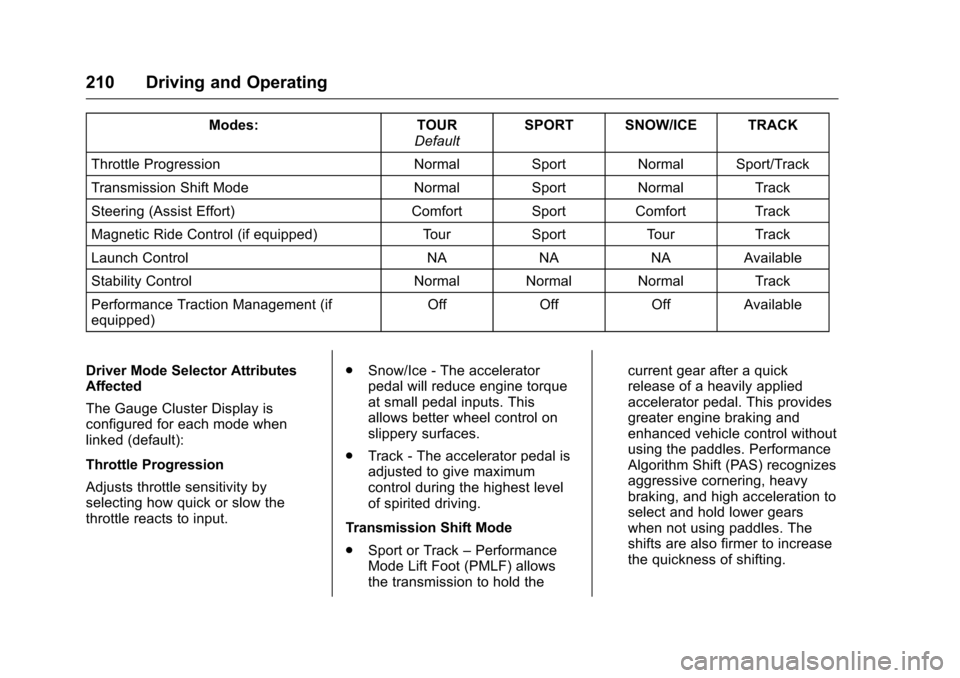
There are seven attributes that vary
by mode shown below. Not all
vehicles have all features,
depending on the vehicle options.
Page 211 of 354
Cadillac CTS/CTS-V Owner Manual (GMNA-Localizing-MidEast-9369309) -
2016 - crc - 7/30/15
210 Driving and Operating
Modes:TOUR
Default SPORT SNOW/ICE TRACK
Throttle Progression NormalSportNormal Sport/Track
Transmission Shift Mode NormalSportNormal Track
Steering (Assist Effort) Comfort Sport Comfort Track
Magnetic Ride Control (if equipped) TourSport TourTrack
Launch Control NANANAAvailable
Stability Control Normal Normal Normal Track
Performance Traction Management (if
equipped) Off
OffOffAvailable
Driver Mode Selector Attributes
Affected
The Gauge Cluster Display is
configured for each mode when
linked (default):
Throttle Progression
Adjusts throttle sensitivity by
selecting how quick or slow the
throttle reacts to input. .
Snow/Ice - The accelerator
pedal will reduce engine torque
at small pedal inputs. This
allows better wheel control on
slippery surfaces.
. Track - The accelerator pedal is
adjusted to give maximum
control during the highest level
of spirited driving.
Transmission Shift Mode
. Sport or Track –Performance
Mode Lift Foot (PMLF) allows
the transmission to hold the current gear after a quick
release of a heavily applied
accelerator pedal. This provides
greater engine braking and
enhanced vehicle control without
using the paddles. Performance
Algorithm Shift (PAS) recognizes
aggressive cornering, heavy
braking, and high acceleration to
select and hold lower gears
when not using paddles. The
shifts are also firmer to increase
the quickness of shifting.
Page 212 of 354

Cadillac CTS/CTS-V Owner Manual (GMNA-Localizing-MidEast-9369309) -
2016 - crc - 7/30/15
Driving and Operating 211
.Snow/Ice –The transmission will
use 2 (Second) gear instead of
1 (First) gear when accelerating
from a stop. The vehicle will
upshift normally when the
vehicle is moving. The
transmission will also shift
differently to assist in
maintaining traction.
Steering (Assist Effort)
Adjusts from a lighter steering feel
in Tour mode to reduced assist in
Sport and Track mode for more
steering feel.
Magnetic Ride Control (if
equipped)
Adjusts the shock dampening
firmness from a comfort tune in Tour
mode to an optimized
responsiveness tune in Sport and
Track.
Launch Control
Available only in Track mode for
maximum “off-the-line” acceleration
when in Competitive Driving Mode
or PTM. Stability Control
.
Competitive mode allows less
computer control to permit some
slide and drift and is selected
with the button –only available
in Track mode.
. StabiliTrak can be turned off by
pressing and holding the button
for five seconds.
PTM (Performance Traction
Management) (if equipped)
. Available in Track Mode.
. There are five selectable
settings.
Competitive Driving Mode
(V-Series Only)
To select this optional handling
mode, press the
Ybutton quickly
two times and the DIC will display
the appropriate message. While in
the Competitive Driving Mode, the
traction off light
iand StabiliTrak
OFF light
gwill come on in the
instrument cluster. TCS does not
limit wheel spin, the Electronic Limited-Slip Differential (ELSD)
allows increased vehicle agility, and
more effort is required to turn the
steering wheel. See
“Limited-Slip
Differential (V-Series Only)” later in
this section. Adjust your driving
accordingly.
Press the
Ybutton again, or turn
the ignition to ACC/ACCESSORY
and restart the vehicle, to turn TCS
back on. The traction off light
iand
StabiliTrak OFF light
gwill go out in
the instrument cluster.
Caution
When traction control is turned
off, or Competitive Driving Mode
is active, it is possible to lose
traction.
Performance Traction
Management (V-Series Only)
Performance Traction Management
(PTM) integrates the Traction
Control, StabiliTrak, and Selective
Ride Control systems to provide
improved and consistent
Page 218 of 354

Cadillac CTS/CTS-V Owner Manual (GMNA-Localizing-MidEast-9369309) -
2016 - crc - 7/30/15
Driving and Operating 217
Also, you may have to brake or shift
to a lower gear to keep the vehicle
speed down. If the brake pedal is
applied, cruise control disengages.
Ending Cruise Control
There are four ways to end cruise
control:
.Step lightly on the brake pedal.
. Press
*.
. Shift the transmission to
N (Neutral).
. Press
J.
Erasing Speed Memory
The cruise control set speed is
erased from memory if
Jis
pressed or if the ignition is
turned off.
Adaptive Cruise Control
If equipped with Adaptive Cruise
Control (ACC), it allows the driver to
select the cruise control set speed
and following gap. Read this entire
section before using this system.
The following gap is the following time between your vehicle and a
vehicle detected directly ahead in
your path moving in the same
direction. If no vehicle is detected in
your path, ACC works like regular
cruise control. ACC uses camera
and radar sensors.
If a vehicle is detected in your path,
ACC can apply acceleration or
limited, moderate braking to
maintain the selected following gap.
To disengage ACC, apply the brake.
If ACC is controlling your vehicle
speed when the Traction Control
System (TCS) or electronic stability
control system activates, the ACC
may automatically disengage. See
Traction Control/Electronic Stability
Control
0206. When road
conditions allow ACC to be safely
used, the ACC can be turned
back on.
ACC will not engage if the TCS or
electronic stability control system is
disabled.
{Warning
ACC has limited braking ability
and may not have time to slow
the vehicle down enough to avoid
a collision with another vehicle
you are following. This can occur
when vehicles suddenly slow or
stop ahead, or enter your lane.
Also see “Alerting the Driver” in
this section. Complete attention is
always required while driving and
you should be ready to take
action and apply the brakes. See
Defensive Driving 0180.
{Warning
ACC will not detect or brake for
children, pedestrians, animals,
or other objects.
Do not use ACC when:
. On winding and hilly roads
or when the sensors are
blocked by snow, ice, or dirt.
The system may not detect
(Continued)