seats CADILLAC CTS 2016 3.G Repair Manual
[x] Cancel search | Manufacturer: CADILLAC, Model Year: 2016, Model line: CTS, Model: CADILLAC CTS 2016 3.GPages: 354, PDF Size: 3.56 MB
Page 150 of 354

Cadillac CTS/CTS-V Owner Manual (GMNA-Localizing-MidEast-9369309) -
2016 - crc - 7/30/15
Instruments and Controls 149
.Collision/Detection Systems
. Comfort and Convenience
. Lighting
. Power Door Locks
. Remote Lock, Unlock, Start
Climate and Air Quality
Select and the following may
display:
. Auto Fan Max Speed
. Air Quality Sensor
. Auto Heated Seats
. Auto Defog
. Auto Rear Defog
Auto Fan Max Speed
This feature will set the maximum
auto fan speed.
Select Low, Medium, or High.
Air Quality Sensor
This allows for selection of air
quality sensor operation at high or
low sensitivity.
Select Off, Low Sensitivity, or High
Sensitivity. Auto Heated Seats
When enabled, this feature will
automatically activate the heated
seats at the level required by the
interior temperature. The auto
heated seats can be turned off by
using the heated seat buttons on
the center stack.
Select Off or On.
Auto Defog
When set to On, the front defog will
automatically react to temperature
and humidity conditions that may
cause fogging.
Select Off or On.
Auto Rear Defog
When set to On, this feature will
automatically turn on the rear
window defogger when it is cold
outside.
Select Off or On.
Collision/Detection Systems
Select the Collision/Detection
Systems menu and the following
may display:
.
Alert Type
. Auto Collision Preparation
. Park Assist
. Go Notifier
. Rear Cross Traffic Alert
. Lane Change Alert
Alert Type
This feature will set crash alerts to
beeps or seat vibrations. This
setting affects all crash alerts
including:
. Forward Collision
. Lane Departure Warning
. Adaptive Cruise Control
. Parking Assist
. Backing Warning
Select Beeps or Safety Alert Seat.
Auto Collision Preparation
This feature will turn on or off the
Forward Collision Alert (FCA) and
Front Automatic Braking (FAB). The
Off setting disables all FCA and
FAB functions. With the Alert and
Brake setting, both FCA and FAB
Page 151 of 354

Cadillac CTS/CTS-V Owner Manual (GMNA-Localizing-MidEast-9369309) -
2016 - crc - 7/30/15
150 Instruments and Controls
are available. The Alert setting
disables FAB, but some last-second
automatic braking capability is still
provided, though less likely to occur.
SeeFront Automatic Braking (FAB)
System 0234.
Select Off, Alert and Brake, or Alert.
Park Assist
This allows the Ultrasonic Parking
Assist feature to be turned on or off.
See Assistance Systems for Parking
or Backing 0225.
Select Off or On.
Go Notifier
This feature will give a reminder
from Adaptive Cruise Control when
it has brought the vehicle to a
complete stop behind another
stopping vehicle, and then that
vehicle drives on. See Adaptive
Cruise Control 0217.
Select Off or On.
Rear Cross Traffic Alert
This allows the feature to be turned
on or off. See Assistance Systems
for Parking or Backing 0225. Select Off or On.
Lane Change Alert
This allows the feature to be turned
on or off. See
Lane Change Alert
(LCA) 0236.
Select Off or On.
Comfort and Convenience
Select and the following may
display:
. Auto Memory Recall
. Easy Exit Options
. Chime Volume
. Reverse Tilt Mirror
. Auto Mirror Folding
. Personalization by Driver
. Rainsense Wipers
Auto Memory Recall
This feature automatically recalls
the current driver ’s previously stored
1 or 2 button positions when
entering the vehicle. See Memory
Seats 058.
Select Off or On. Easy Exit Options
This feature automatically recalls
the current driver
’s previously stored
Exit button position when exiting the
vehicle. See Memory Seats 058.
Select Off or On.
Chime Volume
This allows the selection of the
chime volume level.
Press + or −to adjust the volume.
Reverse Tilt Mirror
This allows the feature to be turned
on or off.
Select Off, On - Driver and
Passenger, On - Driver, or On -
Passenger.
Auto Mirror Folding
When on, the outside rearview
mirrors will automatically fold or
unfold when the Remote Keyless
Entry (RKE) transmitter
QorK
button is pressed and held.
Select Off or On.
Page 152 of 354

Cadillac CTS/CTS-V Owner Manual (GMNA-Localizing-MidEast-9369309) -
2016 - crc - 7/30/15
Instruments and Controls 151
Personalization by Driver
This allows the Personalization by
Driver to be turned on or off.
Select Off or On.
Rainsense Wipers
This allows the feature to be turned
on or off.
Select Off or On.
Lighting
Select and the following may
display:
.Vehicle Locator Lights
. Exit Lighting
. Left or Right Hand Traffic
Vehicle Locator Lights
This feature will flash the exterior
lamps and allows some of the
exterior lamps and most of the
interior lamps to turn on briefly at
night when
Kon the Remote
Keyless Entry (RKE) transmitter is
pressed to locate the vehicle.
Select Off or On. Exit Lighting
This allows the selection of how
long the exterior lamps stay on
when leaving the vehicle when it is
dark outside.
Select Off, 30 Seconds, 60
Seconds, or 120 Seconds.
Power Door Locks
Select and the following may
display:
.
Unlocked Door Anti-Lockout
. Auto Door Lock
. Delayed Door Lock
Unlocked Door Anti-Lockout
When on, this feature will keep the
driver door from locking when the
door is open. If Off is selected, the
Delayed Door Lock menu will be
available.
Select Off or On.
Auto Door Unlock
When on, the doors will
automatically unlock when the
vehicle is shifted into P (Park).
Select Off, All Doors, or Driver Door. Auto Door Lock
When this feature is turned on, the
doors will automatically lock when
the vehicle is shifted into P (Park).
Select Off or On.
Remote Lock, Unlock, Start
Select and the following may
display:
.
Remote Unlock Light Feedback
. Remote Lock Feedback
. Remote Door Unlock
. Remote Start Auto Cool Seats
. Remote Start Auto Heat Seats
. Remote Window Operation
. Passive Door Unlock
. Passive Door Lock
. Remote Left in Vehicle Alert
Remote Unlock Light Feedback
When on, the exterior lamps will
flash when unlocking the vehicle
with the RKE transmitter.
Select Off or Flash Lights.
Page 153 of 354

Cadillac CTS/CTS-V Owner Manual (GMNA-Localizing-MidEast-9369309) -
2016 - crc - 7/30/15
152 Instruments and Controls
Remote Lock Feedback
This allows selection of what type of
feedback is given when locking the
vehicle with the RKE transmitter.
Select Off, Lights and Horn, Lights
Only, or Horn Only.
Remote Door Unlock
This allows selection of which doors
will unlock when pressing
Kon the
RKE transmitter.
Select All Doors or Driver Door.
Remote Start Auto Cool Seats
If equipped and turned on, this
feature will turn on the ventilated
seats when using remote start on
warm days.
Select Off or On.
Remote Start Auto Heat Seats
If equipped and turned on, this
feature will turn on the heated seats
when using remote start on
cold days.
Select Off or On. Remote Window Operation
This allows the window to be
opened when pressing
Kon the
RKE transmitter. See Remote
Keyless Entry (RKE) System
Operation 029.
Select Off or On.
Passive Door Unlock
This allows the selection of what
doors will unlock when using the
button on the driver door to unlock
the vehicle.
Select All Doors or Driver Door.
Passive Door Lock
This allows passive locking to be
turned on or off and selects
feedback. See Remote Keyless
Entry (RKE) System Operation 029.
Select Off, On with Horn
Chirp, or On.
Remote Left in Vehicle Alert
This feature sounds an alert when
the RKE transmitter is left in the
vehicle.
Select Off or On.
Bluetooth
Select and the following may
display:
. Pair New Device
. Device Management
. Ringtones
. Voice Mail Numbers
Pair New Device
Select to pair a new device. See
“Pairing” in“Infotainment Controls”
under “Bluetooth” in the infotainment
manual.
Device Management
Select to connect to a different
phone source, disconnect a phone,
or delete a phone.
Ringtones
Press to change the ring tone for
the specific phone. The phone does
not need to be connected to change
the ring.
Page 163 of 354
Cadillac CTS/CTS-V Owner Manual (GMNA-Localizing-MidEast-9369309) -
2016 - crc - 7/30/15
162 Lighting
voltage move up or down. This is
normal. If there is a problem, an
alert will be displayed.
The battery can be discharged at
idle if the electrical loads are very
high. This is true for all vehicles.
This is because the generator
(alternator) may not be spinning fast
enough at idle to produce all the
power that is needed for very high
electrical loads.
A high electrical load occurs when
several of the following are on, such
as: headlamps, high beams, fog
lamps, rear window defogger,
climate control fan at high speed,
heated seats, engine cooling fans,
and loads plugged into accessory
power outlets.
EPM works to prevent excessive
discharge of the battery. It does this
by balancing the generator's output
and the vehicle's electrical needs.
It can increase engine idle speed to
generate more power, whenever
needed. It can temporarily reduce
the power demands of some
accessories.Normally, these actions occur in
steps or levels, without being
noticeable. In rare cases at the
highest levels of corrective action,
this action may be noticeable to the
driver. If so, a DIC message might
be displayed. If a battery message
is displayed, it is recommended that
the driver reduce the electrical loads
as much as possible. See
Driver
Information Center (DIC) 0129.
Battery Power Protection
The battery saver feature is
designed to protect the vehicle's
battery.
If some interior lamps are left on
and the ignition is turned off, the
battery rundown protection system
automatically turns the lamp off after
some time.
Exterior Lighting Battery
Saver
The exterior lamps turn off about
10 minutes after the ignition is
turned off, if the parking lamps or
headlamps have been manually left
on. This protects against draining the battery. To restart the 10-minute
timer, turn the exterior lamp control
to the off position and then back to
the parking lamp or headlamp
position.
To keep the lamps on for more than
10 minutes, the ignition must be in
the ACC/ACCESSORY or ON/RUN/
START position.
Page 170 of 354
Cadillac CTS/CTS-V Owner Manual (GMNA-Localizing-MidEast-9369309) -
2016 - crc - 7/30/15
Climate Controls 169
Climate Controls
Climate Control Systems
Dual Automatic ClimateControl System . . . . . . . . . . . . . 169
Rear Climate Control System . . . . . . . . . . . . . . . . . . . . . . 174
Air Vents
Air Vents . . . . . . . . . . . . . . . . . . . . . 176
Maintenance
Passenger Compartment AirFilter . . . . . . . . . . . . . . . . . . . . . . . . 177
Service . . . . . . . . . . . . . . . . . . . . . . . 177
Climate Control Systems
Dual Automatic Climate Control System
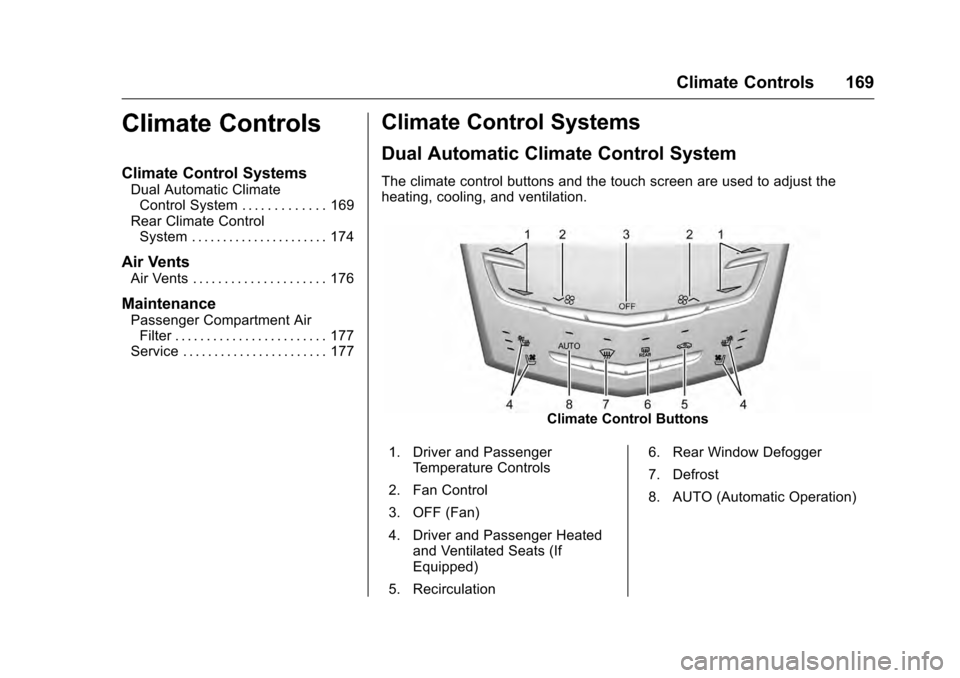
The climate control buttons and the touch screen are used to adjust the
heating, cooling, and ventilation.
Climate Control Buttons
1. Driver and Passenger Temperature Controls
2. Fan Control
3. OFF (Fan)
4. Driver and Passenger Heated and Ventilated Seats (If
Equipped)
5. Recirculation 6. Rear Window Defogger
7. Defrost
8. AUTO (Automatic Operation)
Page 174 of 354

Cadillac CTS/CTS-V Owner Manual (GMNA-Localizing-MidEast-9369309) -
2016 - crc - 7/30/15
Climate Controls 173
on, see“Climate and Air Quality”
under Vehicle Personalization
0 147.
Rear Window Defogger
=(Rear Window Defogger) :
Press to turn the rear window
defogger on or off. An indicator light
on the button comes on to show that
the rear window defogger is on.
The rear window defogger can be
set to automatic operation. See
“Climate and Air Quality” under
Vehicle Personalization 0147.
When Auto Rear Defog is selected,
the rear window defogger turns on
automatically when the interior
temperature is about 4 °C (40 °F)
and below.
The upper gridlines on the rear
window are antenna lines and are
not intended to heat when the
defogger is activated.
The heated outside rearview mirrors
turn on when the rear window
defogger button is on and help to
clear fog or frost from the surface of
the mirrors.
Caution
Do not try to clear frost or other
material from the inside of the
front windshield and rear window
with a razor blade or anything
else that is sharp. This may
damage the rear window
defogger grid and affect the
radio's ability to pick up stations
clearly. The repairs would not be
covered by the vehicle warranty.
Driver and Passenger Heated and
Ventilated Seats (If Equipped) :
Press
Jorzto heat the driver or
passenger seat cushion and
seatback.
Press
Cor{to ventilate the driver
or passenger seat.
The vehicle also has auto heated
seats that turn on when the vehicle
is on. The seats will activate at the
level required by the vehicle’s
interior temperature. To turn off,
press
Jorz. The auto heated seats can be turned on or off. See
Vehicle Personalization
0147 and
Heated and Ventilated Seats 014.
Remote Start Climate Control
Operation : If equipped with the
remote start feature, the climate
control system may run when the
vehicle is started remotely. The
system uses the driver ’s previous
settings to heat or cool the inside of
the vehicle. The rear defog may
come on during remote start based
on cold ambient conditions. The
rear defog indicator light does not
come on during a remote start.
If equipped with heated or ventilated
seats, they may come on during a
remote start. See Remote Vehicle
Start 033 and Heated and
Ventilated Seats 014.
Page 175 of 354
Cadillac CTS/CTS-V Owner Manual (GMNA-Localizing-MidEast-9369309) -
2016 - crc - 7/30/15
174 Climate Controls
Sensor
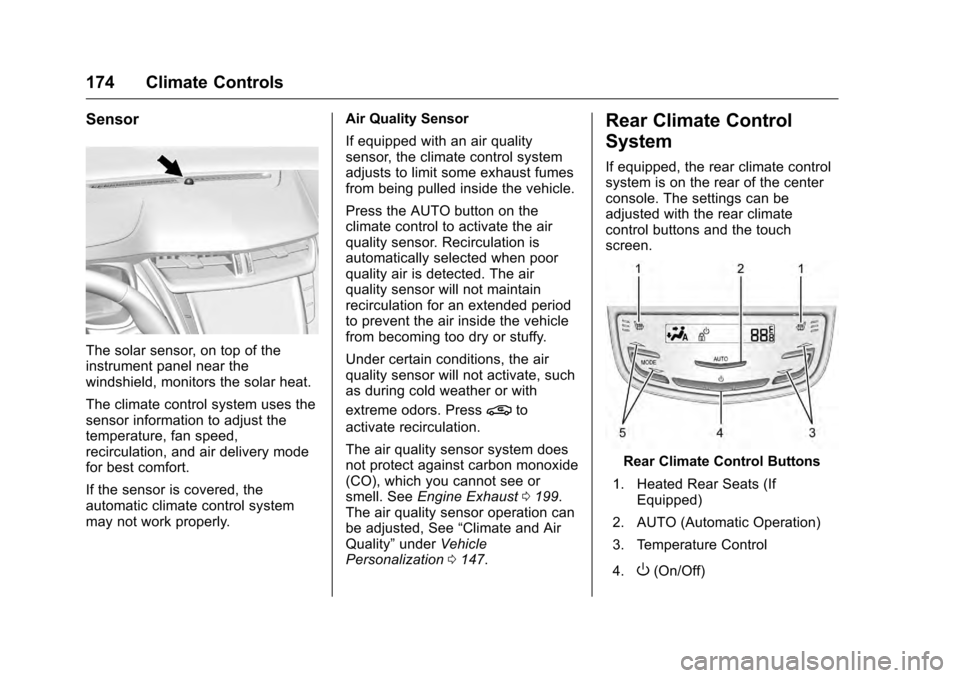
The solar sensor, on top of the
instrument panel near the
windshield, monitors the solar heat.
The climate control system uses the
sensor information to adjust the
temperature, fan speed,
recirculation, and air delivery mode
for best comfort.
If the sensor is covered, the
automatic climate control system
may not work properly.Air Quality Sensor
If equipped with an air quality
sensor, the climate control system
adjusts to limit some exhaust fumes
from being pulled inside the vehicle.
Press the AUTO button on the
climate control to activate the air
quality sensor. Recirculation is
automatically selected when poor
quality air is detected. The air
quality sensor will not maintain
recirculation for an extended period
to prevent the air inside the vehicle
from becoming too dry or stuffy.
Under certain conditions, the air
quality sensor will not activate, such
as during cold weather or with
extreme odors. Press
@to
activate recirculation.
The air quality sensor system does
not protect against carbon monoxide
(CO), which you cannot see or
smell. See Engine Exhaust 0199.
The air quality sensor operation can
be adjusted, See “Climate and Air
Quality” underVehicle
Personalization 0147.
Rear Climate Control
System
If equipped, the rear climate control
system is on the rear of the center
console. The settings can be
adjusted with the rear climate
control buttons and the touch
screen.
Rear Climate Control Buttons
1. Heated Rear Seats (If Equipped)
2. AUTO (Automatic Operation)
3. Temperature Control
4.
O(On/Off)
Page 177 of 354
Cadillac CTS/CTS-V Owner Manual (GMNA-Localizing-MidEast-9369309) -
2016 - crc - 7/30/15
176 Climate Controls
Y/[/\(Air Delivery Mode
Control) : Press the desired mode
button on the touch screen or the
MODE button on the rear faceplate
to change the direction of the airflow
in the rear seating area.
MorL(Heated Rear Seats, If
Equipped) : Press
MorLto heat
the left or right outboard seat
cushion and seatback. See Heated
Rear Seats 063.
Air Vents
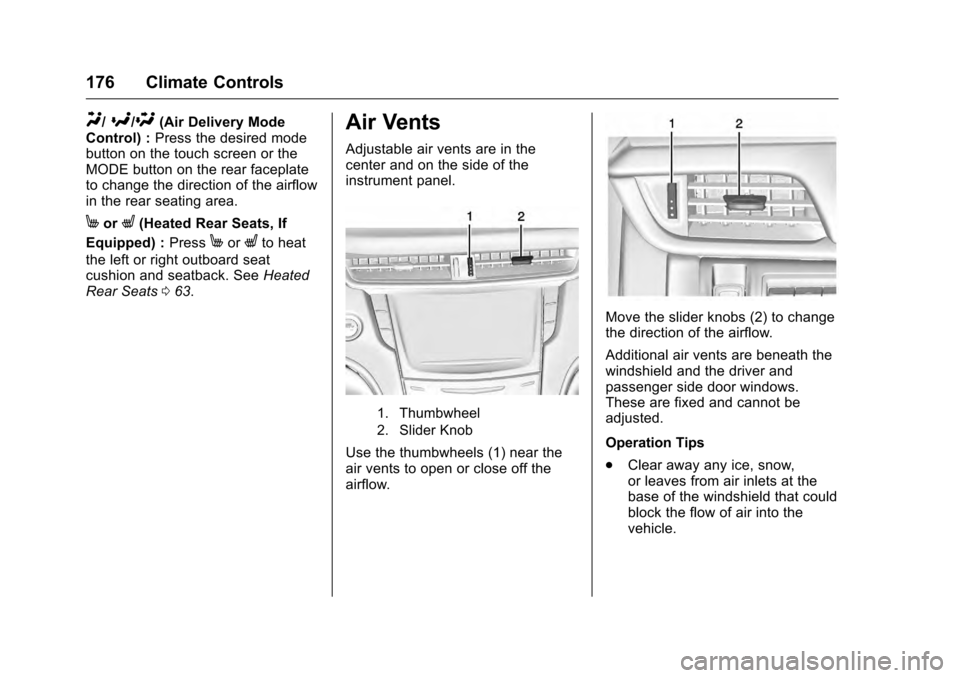
Adjustable air vents are in the
center and on the side of the
instrument panel.
1. Thumbwheel
2. Slider Knob
Use the thumbwheels (1) near the
air vents to open or close off the
airflow.
Move the slider knobs (2) to change
the direction of the airflow.
Additional air vents are beneath the
windshield and the driver and
passenger side door windows.
These are fixed and cannot be
adjusted.
Operation Tips
.
Clear away any ice, snow,
or leaves from air inlets at the
base of the windshield that could
block the flow of air into the
vehicle.
Page 178 of 354
Cadillac CTS/CTS-V Owner Manual (GMNA-Localizing-MidEast-9369309) -
2016 - crc - 7/30/15
Climate Controls 177
.Keep the path under the front
seats clear of objects to help
circulate the air inside of the
vehicle more effectively.
. Use of non-GM approved hood
deflectors can adversely affect
the performance of the system.
Check with your dealer before
adding equipment to the outside
of the vehicle.
. Do not attach any devices to the
air vent slats. This restricts
airflow and may cause damage
to the air vents.Maintenance
Passenger Compartment
Air Filter
The filter reduces dust, pollen, and
other airborne irritants from outside
air that is pulled into the vehicle.
The filter should be replaced as part
of routine scheduled maintenance.
See Maintenance Schedule 0329.
See your dealer regarding
replacement of the filter.
Service
All vehicles have a label underhood
that identifies the refrigerant used in
the vehicle. The refrigerant system
should only be serviced by trained
and certified technicians. The air
conditioning evaporator should
never be repaired or replaced by
one from a salvage vehicle.
It should only be replaced by a new
evaporator to ensure proper and
safe operation.
During service, all refrigerants
should be reclaimed with proper
equipment. Venting refrigerants directly to the atmosphere is harmful
to the environment and may also
create unsafe conditions based on
inhalation, combustion, frostbite,
or other health-based concerns.