seat memory CADILLAC CTS 2016 3.G Owners Manual
[x] Cancel search | Manufacturer: CADILLAC, Model Year: 2016, Model line: CTS, Model: CADILLAC CTS 2016 3.GPages: 354, PDF Size: 3.56 MB
Page 6 of 354
Cadillac CTS/CTS-V Owner Manual (GMNA-Localizing-MidEast-9369309) -
2016 - crc - 7/30/15
In Brief 5
In Brief
Instrument Panel
Instrument Panel . . . . . . . . . . . . . . . . 6
Initial Drive Information
Initial Drive Information . . . . . . . . . . 8
Stop/Start System . . . . . . . . . . . . . . . 8
Remote Keyless Entry (RKE)System . . . . . . . . . . . . . . . . . . . . . . . . 8
Remote Vehicle Start . . . . . . . . . . . 9
Door Locks . . . . . . . . . . . . . . . . . . . . . 9
Trunk . . . . . . . . . . . . . . . . . . . . . . . . . . 10
Windows . . . . . . . . . . . . . . . . . . . . . . . 10
Seat Adjustment . . . . . . . . . . . . . . . 10
Memory Features . . . . . . . . . . . . . . 13
Heated and Ventilated Seats . . . 14
Head Restraint Adjustment . . . . 14
Safety Belts . . . . . . . . . . . . . . . . . . . . 15
Passenger Sensing System . . . 15
Mirror Adjustment . . . . . . . . . . . . . . 15
Steering Wheel Adjustment . . . . 16
Interior Lighting . . . . . . . . . . . . . . . . 17
Exterior Lighting . . . . . . . . . . . . . . . 17
Windshield Wiper/Washer . . . . . . 18
Climate Controls . . . . . . . . . . . . . . . 18
Transmission . . . . . . . . . . . . . . . . . . 19
Starting the Engine . . . . . . . . . . . . 20
Vehicle Features
Infotainment System . . . . . . . . . . . 20
Steering Wheel Controls . . . . . . . 20
Cruise Control . . . . . . . . . . . . . . . . . 20
Driver Information Center (DIC) . . . . . . . . . . . . . . . . . 21
Forward Collision Alert (FCA) System . . . . . . . . . . . . . . . . . . . . . . . 21
Front Automatic Braking (FAB) System . . . . . . . . . . . . . . . . . . . . . . . 21
Lane Keep Assist (LKA) . . . . . . . 22
Lane Change Alert (LCA) . . . . . . 22
Surround Vision (CTS Only) . . . 22
Curb View Camera (CTS-V Only) . . . . . . . . . . . . . . . . . 22
Rear Vision Camera (RVC) . . . . 23
Rear Cross Traffic Alert (RCTA) System . . . . . . . . . . . . . . . . . . . . . . . 23
Parking Assist . . . . . . . . . . . . . . . . . 23
Automatic Parking Assist (APA) . . . . . . . . . . . . . . . . . . 23
Rear Automatic Braking (RAB) System . . . . . . . . . . . . . . . . . . . . . . . 23
Power Outlets . . . . . . . . . . . . . . . . . 23
Sunroof . . . . . . . . . . . . . . . . . . . . . . . . 24
Performance and Maintenance
Traction Control/Electronic Stability Control . . . . . . . . . . . . . . 25
Tire Pressure Monitor . . . . . . . . . . 25
Engine Oil Life System . . . . . . . . 26 Car Wash Guidelines . . . . . . . . . . 26
Driving for Better Fuel
Economy . . . . . . . . . . . . . . . . . . . . . 26
Page 14 of 354
Cadillac CTS/CTS-V Owner Manual (GMNA-Localizing-MidEast-9369309) -
2016 - crc - 7/30/15
In Brief 13
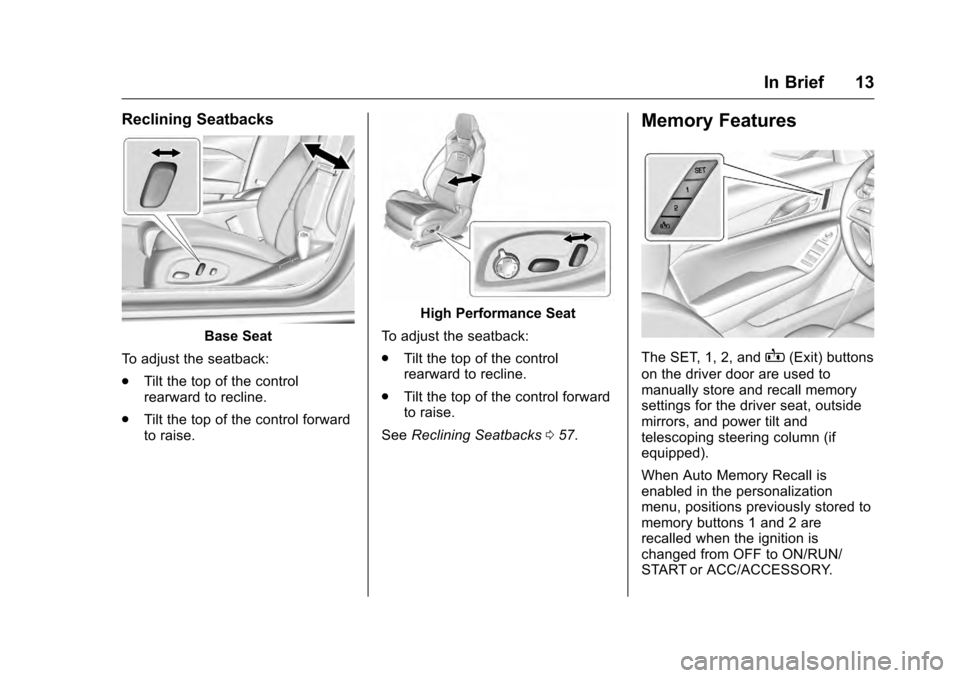
Reclining Seatbacks
Base Seat
To adjust the seatback:
. Tilt the top of the control
rearward to recline.
. Tilt the top of the control forward
to raise.
High Performance Seat
To adjust the seatback:
. Tilt the top of the control
rearward to recline.
. Tilt the top of the control forward
to raise.
See Reclining Seatbacks 057.
Memory Features
The SET, 1, 2, andB(Exit) buttons
on the driver door are used to
manually store and recall memory
settings for the driver seat, outside
mirrors, and power tilt and
telescoping steering column (if
equipped).
When Auto Memory Recall is
enabled in the personalization
menu, positions previously stored to
memory buttons 1 and 2 are
recalled when the ignition is
changed from OFF to ON/RUN/
START or ACC/ACCESSORY.
Page 15 of 354
Cadillac CTS/CTS-V Owner Manual (GMNA-Localizing-MidEast-9369309) -
2016 - crc - 7/30/15
14 In Brief
When Easy Exit Options is enabled
in the personalization menu, the
seats will move rearward when the
ignition is changed to OFF and
driver door is opened within a
short time.
SeeMemory Seats 058 and
Vehicle Personalization 0147.
Heated and Ventilated
Seats
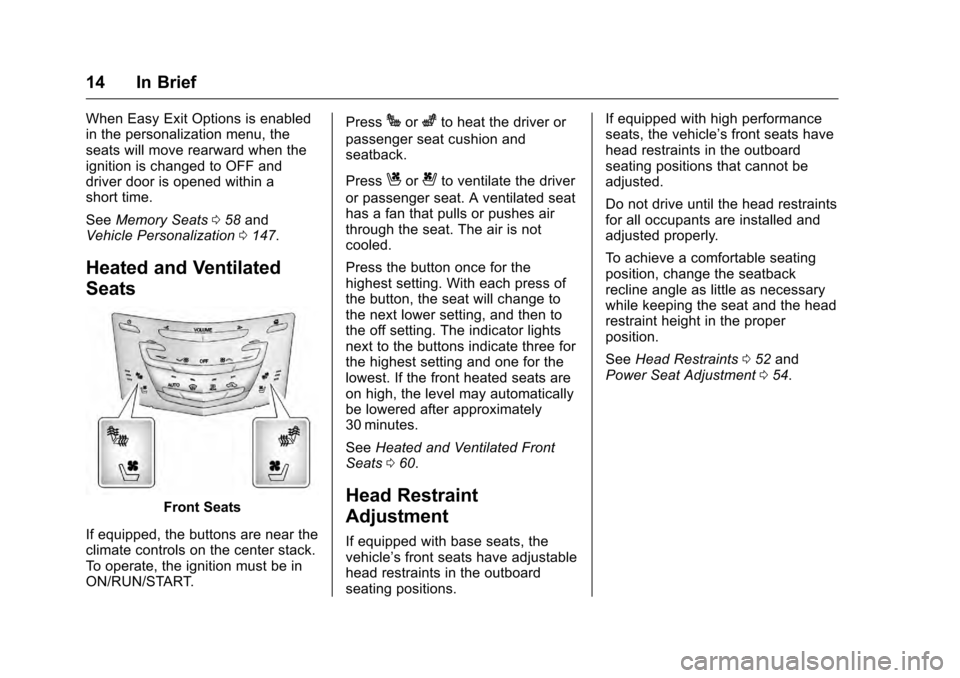
Front Seats
If equipped, the buttons are near the
climate controls on the center stack.
To operate, the ignition must be in
ON/RUN/START. Press
Jorzto heat the driver or
passenger seat cushion and
seatback.
Press
Cor{to ventilate the driver
or passenger seat. A ventilated seat
has a fan that pulls or pushes air
through the seat. The air is not
cooled.
Press the button once for the
highest setting. With each press of
the button, the seat will change to
the next lower setting, and then to
the off setting. The indicator lights
next to the buttons indicate three for
the highest setting and one for the
lowest. If the front heated seats are
on high, the level may automatically
be lowered after approximately
30 minutes.
See Heated and Ventilated Front
Seats 060.
Head Restraint
Adjustment
If equipped with base seats, the
vehicle’s front seats have adjustable
head restraints in the outboard
seating positions. If equipped with high performance
seats, the vehicle’s front seats have
head restraints in the outboard
seating positions that cannot be
adjusted.
Do not drive until the head restraints
for all occupants are installed and
adjusted properly.
To achieve a comfortable seating
position, change the seatback
recline angle as little as necessary
while keeping the seat and the head
restraint height in the proper
position.
See
Head Restraints 052 and
Power Seat Adjustment 054.
Page 17 of 354

Cadillac CTS/CTS-V Owner Manual (GMNA-Localizing-MidEast-9369309) -
2016 - crc - 7/30/15
16 In Brief
4. PressOto deselect the mirror.
See Power Mirrors 044.
Interior
Adjust the inside rearview mirror for
a clear view of the area behind the
vehicle.
The mirror automatically dims to
reduce the glare of headlamps from
behind. The dimming feature comes
on when the vehicle is started. See
Automatic Dimming Rearview Mirror
045.
Steering Wheel
Adjustment
To adjust the steering wheel:
1. Pull the lever down.
2. Move the steering wheel up or down.
3. Pull or push the steering wheel closer or away from you.
4. Pull the lever up to lock the steering wheel in place. Power Tilt and Telescoping Wheel
If equipped, the control is on the left
side of the steering column.
.
Push the control up or down to
tilt the steering wheel up
or down.
. Push the control forward or
rearward to move the steering
wheel toward the front or rear of
the vehicle.
Do not adjust the steering wheel
while driving.
To set the power tilt wheel memory
position, see Memory Seats 058.
Page 22 of 354
Cadillac CTS/CTS-V Owner Manual (GMNA-Localizing-MidEast-9369309) -
2016 - crc - 7/30/15
In Brief 21
(5 mph) mark on the speedometer,
press +RES up to the second
detent.
SET−:Press the control down
briefly to set the speed and activate
cruise control. If cruise control is
already active, use to decrease
vehicle speed. To decrease speed
by 1 km/h (1 mph), press SET−
down to the first detent. To decrease
speed to the next 5 km/h (5 mph)
mark on the speedometer, press
SET− down to the second detent.
*:Press to disengage cruise
control without erasing the set
speed from memory.
See Cruise Control 0214 or
Adaptive Cruise Control 0217 (if
equipped).
Driver Information
Center (DIC)
The DIC display is in the instrument
cluster. It shows the status of many
vehicle systems.
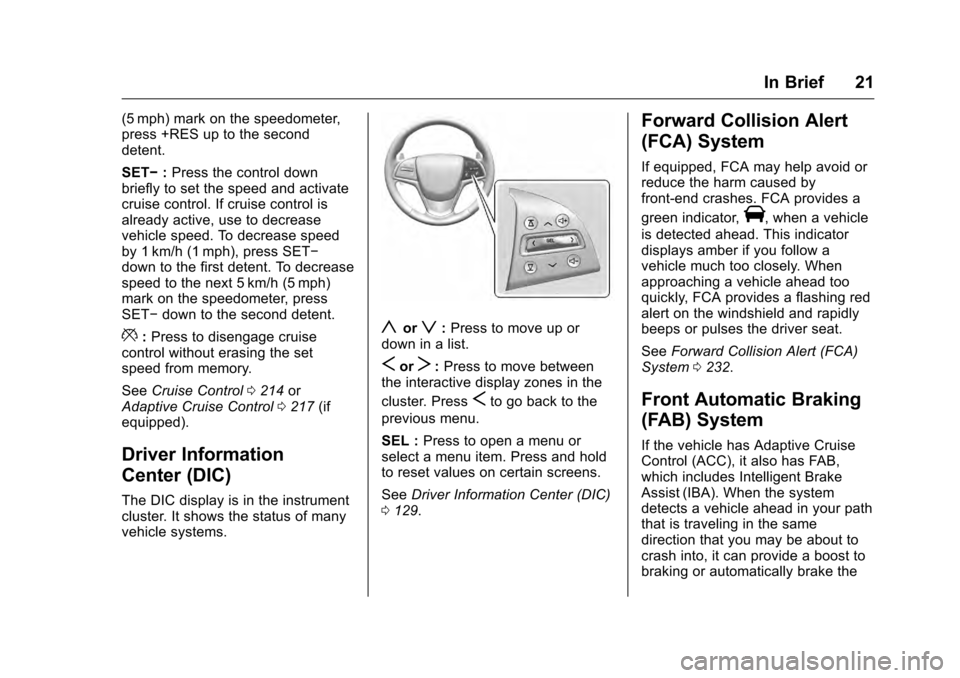
yorz: Press to move up or
down in a list.
SorT: Press to move between
the interactive display zones in the
cluster. Press
Sto go back to the
previous menu.
SEL : Press to open a menu or
select a menu item. Press and hold
to reset values on certain screens.
See Driver Information Center (DIC)
0 129.
Forward Collision Alert
(FCA) System
If equipped, FCA may help avoid or
reduce the harm caused by
front-end crashes. FCA provides a
green indicator,
V, when a vehicle
is detected ahead. This indicator
displays amber if you follow a
vehicle much too closely. When
approaching a vehicle ahead too
quickly, FCA provides a flashing red
alert on the windshield and rapidly
beeps or pulses the driver seat.
See Forward Collision Alert (FCA)
System 0232.
Front Automatic Braking
(FAB) System
If the vehicle has Adaptive Cruise
Control (ACC), it also has FAB,
which includes Intelligent Brake
Assist (IBA). When the system
detects a vehicle ahead in your path
that is traveling in the same
direction that you may be about to
crash into, it can provide a boost to
braking or automatically brake the
Page 45 of 354

Cadillac CTS/CTS-V Owner Manual (GMNA-Localizing-MidEast-9369309) -
2016 - crc - 7/30/15
44 Keys, Doors, and Windows
Power Mirrors
To adjust each mirror:1. Press L (Left) or R (Right) to select the driver or passenger
side mirror.
2. Press the arrows on the control pad to move the mirror up,
down, right, or left.
3. Adjust each mirror so that a little of the vehicle and the area
behind it can be seen.
4. Press
Oto deselect the mirror.
Power Folding Mirrors
The outside mirrors fold inward to
prevent damage when going
through an automatic car wash. To
fold the mirrors move the selector
switch to
Oand press the down
arrow on the control pad. Both
mirrors will fold. Press the down
arrow again to return the mirrors to
their original position.
Reset the power folding mirrors if:
. They are obstructed while
folding.
. They are accidentally manually
folded or unfolded.
. They do not stay in the unfolded
position.
. They vibrate at normal driving
speeds.
To reset the power folding mirrors,
fold and unfold the mirrors one time
using the controls. A noise may be
heard during the resetting. This
sound is normal after a manual
folding operation. The vehicle may have an Auto
Mirror Folding feature, see
Remote
Keyless Entry (RKE) System
Operation 029 and Vehicle
Personalization 0147.Memory Mirrors
If equipped, the vehicle may have
memory mirrors. See Memory Seats
0 58.
Automatic Dimming
The driver side mirror automatically
dims to reduce the glare of the
vehicle headlamps from behind.
This feature comes on when the
vehicle is started.
Heated Mirrors
=
:If equipped, the rear window
defogger also heats the outside
mirrors.
See Dual Automatic Climate Control
System 0169.
Reverse Tilt Mirrors
If equipped with memory seats, the
passenger and/or driver mirror tilts
to a preselected position when the
Page 52 of 354
Cadillac CTS/CTS-V Owner Manual (GMNA-Localizing-MidEast-9369309) -
2016 - crc - 7/30/15
Seats and Restraints 51
Seats and
Restraints
Head Restraints
Head Restraints . . . . . . . . . . . . . . . 52
Front Seats
Power Seat Adjustment . . . . . . . . 54
Lumbar Adjustment . . . . . . . . . . . . 56
Thigh Support Adjustment . . . . . 57
Reclining Seatbacks . . . . . . . . . . . 57
Memory Seats . . . . . . . . . . . . . . . . . 58
Heated and Ventilated FrontSeats . . . . . . . . . . . . . . . . . . . . . . . . . 60
Rear Seats
Rear Seats . . . . . . . . . . . . . . . . . . . . 61
Heated Rear Seats . . . . . . . . . . . . 63
Rear SeatPass-Through Door . . . . . . . . . . 64
Safety Belts
Safety Belts . . . . . . . . . . . . . . . . . . . . 64
How to Wear Safety BeltsProperly . . . . . . . . . . . . . . . . . . . . . . 65
Lap-Shoulder Belt . . . . . . . . . . . . . 66
Safety Belt Use During Pregnancy . . . . . . . . . . . . . . . . . . . . 69
Safety System Check . . . . . . . . . . 70 Safety Belt Care . . . . . . . . . . . . . . . 70
Replacing Safety Belt System
Parts after a Crash . . . . . . . . . . . 70
Airbag System
Airbag System . . . . . . . . . . . . . . . . . 71
Where Are the Airbags? . . . . . . . 73
When Should an AirbagInflate? . . . . . . . . . . . . . . . . . . . . . . . 74
What Makes an Airbag Inflate? . . . . . . . . . . . . . . . . . . . . . . . 75
How Does an Airbag Restrain? . . . . . . . . . . . . . . . . . . . . . 75
What Will You See after an Airbag Inflates? . . . . . . . . . . . . . . 76
Passenger Sensing System . . . 77
Servicing the Airbag-Equipped Vehicle . . . . . . . . . . . . . . . . . . . . . . . 81
Adding Equipment to the Airbag-Equipped Vehicle . . . . . 82
Airbag System Check . . . . . . . . . . 82
Replacing Airbag System Parts after a Crash . . . . . . . . . . . . . . . . . 83
Child Restraints
Older Children . . . . . . . . . . . . . . . . . 83
Infants and Young Children . . . . 85
Child Restraint Systems . . . . . . . 87
Where to Put the Restraint . . . . . 88
Lower Anchors and Tethers forChildren (LATCH System) . . . . 89 Replacing LATCH System Parts
After a Crash . . . . . . . . . . . . . . . . . 95
Securing Child Restraints (Rear Seat) . . . . . . . . . . . . . . . . . . . 95
Securing Child Restraints (Front
Passenger Seat) . . . . . . . . . . . . . 96
Page 59 of 354
Cadillac CTS/CTS-V Owner Manual (GMNA-Localizing-MidEast-9369309) -
2016 - crc - 7/30/15
58 Seats and Restraints
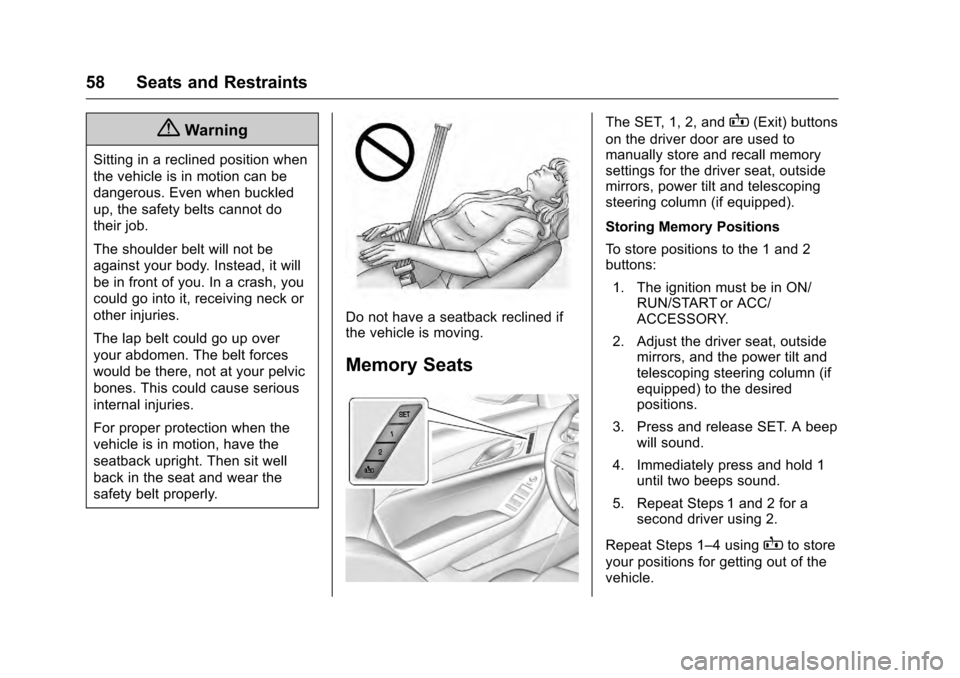
{Warning
Sitting in a reclined position when
the vehicle is in motion can be
dangerous. Even when buckled
up, the safety belts cannot do
their job.
The shoulder belt will not be
against your body. Instead, it will
be in front of you. In a crash, you
could go into it, receiving neck or
other injuries.
The lap belt could go up over
your abdomen. The belt forces
would be there, not at your pelvic
bones. This could cause serious
internal injuries.
For proper protection when the
vehicle is in motion, have the
seatback upright. Then sit well
back in the seat and wear the
safety belt properly.
Do not have a seatback reclined if
the vehicle is moving.
Memory Seats
The SET, 1, 2, andB(Exit) buttons
on the driver door are used to
manually store and recall memory
settings for the driver seat, outside
mirrors, power tilt and telescoping
steering column (if equipped).
Storing Memory Positions
To store positions to the 1 and 2
buttons:
1. The ignition must be in ON/ RUN/START or ACC/
ACCESSORY.
2. Adjust the driver seat, outside mirrors, and the power tilt and
telescoping steering column (if
equipped) to the desired
positions.
3. Press and release SET. A beep will sound.
4. Immediately press and hold 1 until two beeps sound.
5. Repeat Steps 1 and 2 for a second driver using 2.
Repeat Steps 1–4 using
Bto store
your positions for getting out of the
vehicle.
Page 60 of 354
Cadillac CTS/CTS-V Owner Manual (GMNA-Localizing-MidEast-9369309) -
2016 - crc - 7/30/15
Seats and Restraints 59
Manually Recalling Memory
Positions
Press and hold 1, 2, or
Bto
manually recall the previously
stored memory positions. Releasing
1, 2, or
Bbefore the stored
positions are reached stops the
recall.
Automatically Recalling Memory
Positions
If programmed in the vehicle
personalization Menu, the Auto
(Automatic) Memory Recall feature
automatically recalls the current
driver ’s previously stored 1 or 2
position when the ignition is
changed from off to ON/RUN/
START or ACC/ACCESSORY.
The transmission must be in
P (Park).
See Vehicle Personalization 0147.
To stop recall movement, press one
of the memory, driver seat, outside
mirror, or power tilt and telescoping
steering column controls. RKE transmitters are not labeled
with a number. If your memory seat
position is stored to 1 or 2 but this
position is not automatically
recalling, then store your positions
to the other button or switch RKE
transmitters with the other driver.
If the vehicle’s driver has changed,
in some vehicles the Driver ID may
be displayed for the first few ignition
cycles.
Easy Exit Recall
If programmed on in the vehicle
personalization menu, the Easy Exit
feature recalls the previously stored
B(Exit) positions when leaving the
vehicle. See “Storing Memory
Positions” listed previously. See
also Vehicle Personalization 0147.
Easy Exit Recall automatically
activates when one of the following
occurs:
. The vehicle is turned off and the
driver door is opened within a
short time.
. The vehicle is turned off with the
driver door open. Obstructions
If something has blocked the driver
seat and/or the power tilt and
telescoping steering column while
recalling a memory position, the
recall may stop. Remove the
obstruction. Then do one of the
following:
.
If automatically or manually
recalling the stored memory
position, press and hold the
appropriate manual control for
two seconds. Try recalling again
by pressing the appropriate
memory button, then try recalling
again by opening the driver door
and pressingKon the RKE
transmitter..
. If recalling the exit position,
press and hold the appropriate
manual control for the exit
feature not recalling for
two seconds. Then try recalling
the exit position again.
If the memory position is still not
recalling, see your dealer for
service.
Page 105 of 354
Cadillac CTS/CTS-V Owner Manual (GMNA-Localizing-MidEast-9369309) -
2016 - crc - 7/30/15
104 Instruments and Controls
Vehicle ReminderMessages . . . . . . . . . . . . . . . . . . . 146
Vehicle Speed Messages . . . . . 147
Washer Fluid Messages . . . . . . 147
Vehicle Personalization
Vehicle Personalization . . . . . . . 147
Controls
Steering Wheel
Adjustment
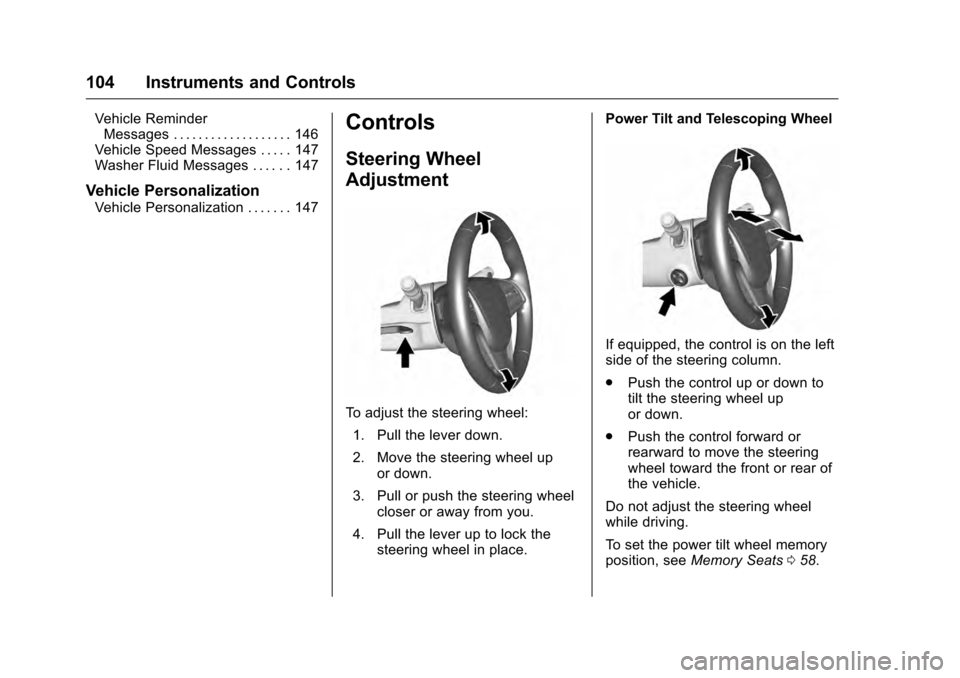
To adjust the steering wheel:
1. Pull the lever down.
2. Move the steering wheel up or down.
3. Pull or push the steering wheel closer or away from you.
4. Pull the lever up to lock the steering wheel in place. Power Tilt and Telescoping Wheel
If equipped, the control is on the left
side of the steering column.
.
Push the control up or down to
tilt the steering wheel up
or down.
. Push the control forward or
rearward to move the steering
wheel toward the front or rear of
the vehicle.
Do not adjust the steering wheel
while driving.
To set the power tilt wheel memory
position, see Memory Seats 058.