ignition CADILLAC CTS 2017 3.G Workshop Manual
[x] Cancel search | Manufacturer: CADILLAC, Model Year: 2017, Model line: CTS, Model: CADILLAC CTS 2017 3.GPages: 352, PDF Size: 3.99 MB
Page 273 of 352

Cadillac CTS/CTS-V Owner Manual (GMNA-Localizing-MidEast-10293089) -
2017 - crc - 6/22/16
272 VEHICLE CARE
{Warning
Do not use a match or flame near a
vehicle's battery. If you need more
light, use a flashlight.
Do not smoke near a vehicle's
battery.
When working around a vehicle’s
battery, shield your eyes with
protective glasses.
Keep children away from vehicle
batteries.
{Warning
Batteries have acid that can burn
you and gas that can explode. You
can be hurt badly if you are not
careful.
Follow instructions carefully when
working around a battery.
Battery posts, terminals and related
accessories contain lead and lead
compounds which can cause cancer
and reproductive harm. Wash
hands after handling.
After a power loss, such as
disconnecting the battery or removing
the maxi fuses in the power
distribution fuse block, the following
steps must be performed to calibrate
the electronic throttle control. If this
is not done, the engine will not run
properly. 1. Turn the ignition on but do not start the engine. 2. Leave the ignition on for at least
three minutes so that the
electronic throttle control will
cycle and relearn its home
position.
3. Turn the ignition off.
4. Start and run the engine for at least 30 seconds.
Vehicle Storage
Infrequent Usage: Remove the black,
negative (−) cable from the battery to
keep the battery from running down.
Extended Storage: Remove the black,
negative (−) cable from the battery or
use a battery trickle charger.
All-Wheel Drive
If the vehicle is equipped with
All-Wheel-Drive (AWD), this is an
additional system that needs
lubrication.
Transfer Case
When to Check Lubricant
It is not necessary to regularly check
the transfer case fluid unless a leak is
suspected or an unusual noise is
Page 275 of 352
Cadillac CTS/CTS-V Owner Manual (GMNA-Localizing-MidEast-10293089) -
2017 - crc - 6/22/16
274 VEHICLE CARE
2. Firmly apply the parking brake.See Electric Parking Brake 0207.
Be ready to apply the regular
brake immediately if the vehicle
begins to move.
3. With the engine off, turn the ignition on, but do not start the
engine. Without applying the
regular brake, try to move the
shift lever out of P (Park) with
normal effort. If the shift lever
moves out of P (Park), contact
your dealer for service.
Park Brake and P (Park)
Mechanism Check
{Warning
When you are doing this check, the
vehicle could begin to move. You or
others could be injured and
property could be damaged. Make
sure there is room in front of the
vehicle in case it begins to roll. Be
ready to apply the regular brake at
once should the vehicle begin
to move. Park on a fairly steep hill, with the
vehicle facing downhill. Keeping your
foot on the regular brake, set the
parking brake.
.
To check the parking brake's
holding ability: With the engine
running and the transmission in
N (Neutral), slowly remove foot
pressure from the regular brake
pedal. Do this until the vehicle is
held by the parking brake only.
. To check the P (Park) mechanism's
holding ability: With the engine
running, shift to P (Park). Then
release the parking brake followed
by the regular brake.
Contact your dealer if service is
required.Wiper Blade Replacement
Windshield wiper blades should be
inspected for wear and cracking.
Replacement blades come in different
types and are removed in different
ways. For proper type and length, see
Maintenance Replacement Parts 0332.
Caution
Allowing the wiper arm to touch
the windshield when no wiper blade
is installed could damage the
windshield. Any damage that occurs
would not be covered by the vehicle
warranty. Do not allow the wiper
arm to touch the windshield.
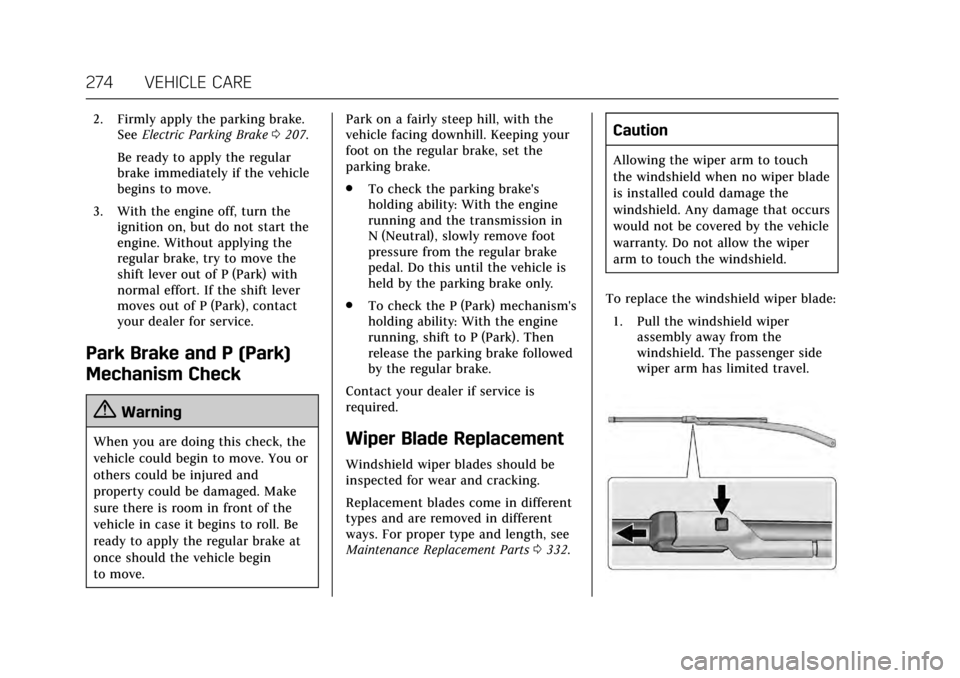
To replace the windshield wiper blade: 1. Pull the windshield wiper assembly away from the
windshield. The passenger side
wiper arm has limited travel.
Page 282 of 352

Cadillac CTS/CTS-V Owner Manual (GMNA-Localizing-MidEast-10293089) -
2017 - crc - 6/22/16
VEHICLE CARE 281
FusesUsage
*21 –
22 Driver motorized safety belt
*26 –
27 –/Heated seat 2
28 –/Reverse lock out
*29 AFS AHL/Pedestrian protection
30 –
31 Passenger window switch
32 –
33 Sunroof
34 Front wiper
35 Steering column lock
36 RBEC/Ignition
37 –/MIL/Ignition
38 Aeroshutter
39 O2 sensor/Emissions
40 Ignition coil/Injectors Fuses
Usage
41 –/Ignition coil/
Injectors
*42 Engine control module
43 –
44 –
45 Washer
48 Instrument panel/ Body/Ignition
49 FSCM/Ignition
*50 Heated steering wheel
*51 Engine control module/Ignition
*52 TCM/Ignition 53 Coolant pump
55 –
*56 TCM/–
*64 Automatic headlamp leveling
*65 Left HID headlamp 66 Right HID headlamp Fuses
Usage
67 High-beam headlamps
68 Headlamp leveling motor
69 Horn
71 Coolant fan
72 Starter 2
*73 Brake vacuum pump 74 Starter
75 A/C clutch
76 –
Relays Usage
*8 Headlamp washer
23 Wiper control relay
24 Wiper speed
25 Engine control module
46 Rear washer
47 Front washer
*54 Coolant pump
Page 294 of 352
Cadillac CTS/CTS-V Owner Manual (GMNA-Localizing-MidEast-10293089) -
2017 - crc - 6/22/16
VEHICLE CARE 293
of replacement or alternate tires or
wheels on the vehicle that prevent the
TPMS from functioning properly.
Always check the TPMS malfunction
telltale after replacing one or more
tires or wheels on your vehicle to
ensure that the replacement or
alternate tires and wheels allow the
TPMS to continue to function
properly.
SeeTire Pressure Monitor Operation
0 293 for additional information.
Tire Pressure Monitor
Operation
This vehicle may have a Tire Pressure
Monitor System (TPMS). The TPMS is
designed to warn the driver when a
low tire pressure condition exists.
TPMS sensors are mounted onto each
tire and wheel assembly, excluding the
spare tire and wheel assembly. The
TPMS sensors monitor the air
pressure in the tires and transmit the
tire pressure readings to a receiver
located in the vehicle.
When a low tire pressure condition is
detected, the TPMS illuminates the
low tire pressure warning light on the
instrument cluster. If the warning
light comes on, stop as soon as
possible and inflate the tires to the
recommended pressure shown on the
Tire and Loading Information label.
SeeVehicle Load Limits 0192.
A message to check the pressure in a
specific tire displays in the Driver
Information Center (DIC). The low tire
pressure warning light and the DIC
warning message come on at each
ignition cycle until the tires are
inflated to the correct inflation
pressure. Using the DIC, tire pressure
levels can be viewed. For additional
information and details about the DIC
operation and displays see Driver
Information Center (DIC) 0132. The low tire pressure warning light
may come on in cool weather when
the vehicle is first started, and then
turn off as the vehicle is driven. This
could be an early indicator that the air
pressure is getting low and needs to
be inflated to the proper pressure.
A Tire and Loading Information label,
attached to your vehicle, shows the
size of the original equipment tires
and the correct inflation pressure for
the tires when they are cold. See
Vehicle Load Limits
0192, for an
example of the Tire and Loading
Information label and its location.
Also see Tire Pressure 0290.
The TPMS can warn about a low tire
pressure condition but it does not
replace normal tire maintenance. See
Tire Inspection 0296, Tire Rotation
0 296 and Tires 0287.
Caution
Tire sealant materials are not all
the same. A non-approved tire
sealant could damage the TPMS
sensors. TPMS sensor damage
(Continued)
Page 295 of 352

Cadillac CTS/CTS-V Owner Manual (GMNA-Localizing-MidEast-10293089) -
2017 - crc - 6/22/16
294 VEHICLE CARE
Caution (Continued)
caused by using an incorrect tire
sealant is not covered by the
vehicle warranty. Always use only
the GM approved tire sealant
available through your dealer or
included in the vehicle.
Factory-installed Tire Inflator Kits use
a GM approved liquid tire sealant.
Using non-approved tire sealants
could damage the TPMS sensors. See
Tire Sealant and Compressor Kit 0303
for information regarding the inflator
kit materials and instructions.
TPMS Malfunction Light and
Message
The TPMS will not function properly if
one or more of the TPMS sensors are
missing or inoperable. When the
system detects a malfunction, the low
tire warning light flashes for about
one minute and then stays on for the
remainder of the ignition cycle. A DIC
warning message also displays. The
malfunction light and DIC warning
message come on at each ignition cycle until the problem is corrected.
Some of the conditions that can cause
these to come on are:
.
One of the road tires has been
replaced with the spare tire. The
spare tire does not have a TPMS
sensor. The malfunction light and
DIC message should go off after
the road tire is replaced and the
sensor matching process is
performed successfully. See “TPMS
Sensor Matching Process ”later in
this section.
. The TPMS sensor matching
process was not done or not
completed successfully after
rotating the tires. The malfunction
light and the DIC message should
go off after successfully
completing the sensor matching
process. See "TPMS Sensor
Matching Process" later in this
section.
. One or more TPMS sensors are
missing or damaged. The
malfunction light and the DIC
message should go off when the
TPMS sensors are installed and the sensor matching process is
performed successfully. See your
dealer for service.
. Replacement tires or wheels do
not match the original equipment
tires or wheels. Tires and wheels
other than those recommended
could prevent the TPMS from
functioning properly. See Buying
New Tires 0298.
. Operating electronic devices or
being near facilities using radio
wave frequencies similar to the
TPMS could cause the TPMS
sensors to malfunction.
If the TPMS is not functioning
properly it cannot detect or signal a
low tire condition. See your dealer for
service if the TPMS malfunction light
and DIC message comes on and
stays on.
TPMS Sensor Matching Process
Each TPMS sensor has a unique
identification code. The identification
code needs to be matched to a new
tire/wheel position after rotating the
vehicle’s tires or replacing one or more
of the TPMS sensors. The TPMS
Page 296 of 352

Cadillac CTS/CTS-V Owner Manual (GMNA-Localizing-MidEast-10293089) -
2017 - crc - 6/22/16
VEHICLE CARE 295
sensor matching process should also
be performed after replacing a spare
tire with a road tire containing the
TPMS sensor. The malfunction light
and the DIC message should go off at
the next ignition cycle. The sensors
are matched to the tire/wheel
positions, using a TPMS relearn tool,
in the following order: driver side
front tire, passenger side front tire,
passenger side rear tire, and driver
side rear. See your dealer for service or
to purchase a relearn tool.
There are two minutes to match the
first tire/wheel position, and
five minutes overall to match all four
tire/wheel positions. If it takes longer,
the matching process stops and must
be restarted.
The TPMS sensor matching process is:1. Set the parking brake.
2. Place the vehicle power mode in ON/RUN/START. See Ignition
Positions 0196.
3. Make sure the Tire Pressure info display option is turned on. The
info displays on the DIC can be turned on and off through the
Settings menu. See
Driver
Information Center (DIC) 0132.
4. Use the five-way DIC control on the right side of the steering
wheel to scroll to the Tire
Pressure screen under the DIC
info page. See Driver Information
Center (DIC) 0132.
5. Press and hold the SEL button in the center of the five-way DIC
control.
The horn sounds twice to signal
the receiver is in relearn mode
and the TIRE LEARNING ACTIVE
message displays on the DIC
screen.
6. Start with the driver side front tire.
7. Place the relearn tool against the tire sidewall, near the valve stem.
Then press the button to activate
the TPMS sensor. A horn chirp
confirms that the sensor
identification code has been
matched to this tire and wheel
position. 8. Proceed to the passenger side
front tire, and repeat Step 7.
9. Proceed to the passenger side rear tire, and repeat Step 7.
10. Proceed to the driver side rear tire, and repeat Step 7. The horn
sounds two times to indicate the
sensor identification code has
been matched to the driver side
rear tire, and the TPMS sensor
matching process is no longer
active. The TIRE LEARNING
ACTIVE message on the DIC
display screen goes off.
11. Shut the ignition off.
12. Set all four tires to the recommended air pressure level
as indicated on the Tire and
Loading Information label.
Page 303 of 352

Cadillac CTS/CTS-V Owner Manual (GMNA-Localizing-MidEast-10293089) -
2017 - crc - 6/22/16
302 VEHICLE CARE
If a Tire Goes Flat
If the vehicle has run-flat tires, there
is no need to stop on the side of the
road to change a flat tire. SeeRun-Flat
Tires 0288.
{Warning
Special tools and procedures are
required to service a run-flat tire.
If these special tools and
procedures are not used, injury or
vehicle damage may occur. Always
be sure the proper tools and
procedures, as described in the
service manual, are used.
It is unusual for a tire to blow out
while driving, especially if the tires are
maintained properly. See Tires0287.
If air goes out of a tire, it is much
more likely to leak out slowly. But if
there is ever a blowout, here are a few
tips about what to expect and what
to do:
If a front tire fails, the flat tire creates
a drag that pulls the vehicle toward
that side. Take your foot off the accelerator pedal and grip the steering
wheel firmly. Steer to maintain lane
position, and then gently brake to a
stop, well off the road, if possible.
A rear blowout, particularly on a
curve, acts much like a skid and may
require the same correction as used in
a skid. Stop pressing the accelerator
pedal and steer to straighten the
vehicle. It may be very bumpy and
noisy. Gently brake to a stop, well off
the road, if possible.
{Warning
Lifting a vehicle and getting under
it to do maintenance or repairs is
dangerous without the appropriate
safety equipment and training. If a
jack is provided with the vehicle, it
is designed only for changing a flat
tire. If it is used for anything else,
you or others could be badly injured
or killed if the vehicle slips off the
jack. If a jack is provided with the
vehicle, only use it for changing a
flat tire.
If this vehicle does not have run-flat
tires and a tire goes flat, avoid further
tire and wheel damage by driving
slowly to a level place, well off the
road, if possible.
1. Turn on the hazard warning flashers. See Hazard Warning
Flashers 0161.
2. Set the parking brake firmly.
3. Put an automatic transmission in P (Park) or a manual
transmission in 1 (First) or
R (Reverse).
4. Turn off the ignition.
5. Inspect the flat tire.
{Warning
Driving on a flat tire will cause
permanent damage to the tire.
Re-inflating a tire after it has been
driven on while severely
underinflated or flat may cause a
blowout and a serious crash. Never
attempt to re-inflate a tire that has
been driven on while severely (Continued)
Page 312 of 352

Cadillac CTS/CTS-V Owner Manual (GMNA-Localizing-MidEast-10293089) -
2017 - crc - 6/22/16
VEHICLE CARE 311
2. Position the two vehicles so thatthey are not touching.
3. Set the parking brake firmly and put the shift lever in P (Park)
with an automatic transmission,
or Neutral with a manual
transmission.
Caution
If any accessories are left on or
plugged in during the jump starting
procedure, they could be damaged.
The repairs would not be covered
by the vehicle warranty. Whenever
possible, turn off or unplug all
accessories on either vehicle when
jump starting.
4. Set the ignition to OFF. Turn off all lights and accessories in both
vehicles, except the hazard
warning flashers if needed.
{Warning
An electric fan can start up even
when the engine is not running and
can injure you. Keep hands,
clothing, and tools away from any
underhood electric fan.
{Warning
Using a match near a battery can
cause battery gas to explode. People
have been hurt doing this, and
some have been blinded. Use a
flashlight if you need more light.
Battery fluid contains acid that can
burn you. Do not get it on you.
If you accidentally get it in your
eyes or on your skin, flush the place
with water and get medical help
immediately.
{Warning
Fans or other moving engine parts
can injure you badly. Keep your
hands away from moving parts
once the engine is running.
5. Connect one end of the red positive (+) cable to the remote
positive (+) terminal on the
discharged battery.
6. Connect the other end of the red positive (+) cable to the
positive (+) terminal of the good
battery.
7. Connect one end of the black negative (–) cable to the
negative (–) terminal of the good
battery.
8. Connect the other end of the black negative (–) cable to the
remote negative (–) grounding
terminal for the discharged
battery.
9. Start the engine in the vehicle with the good battery and run
the engine at idle speed for at
least four minutes.
Page 315 of 352

Cadillac CTS/CTS-V Owner Manual (GMNA-Localizing-MidEast-10293089) -
2017 - crc - 6/22/16
314 VEHICLE CARE
Caution
Use of a shield mounted in front of
the vehicle grille could restrict
airflow and cause damage to the
transmission. The repairs would not
be covered by the vehicle warranty.
If using a shield, only use one that
attaches to the towing vehicle.
Dolly Towing (Rear-Wheel-Drive
Vehicles)
To dolly tow a rear-wheel-drive vehicle
from the rear:1. Attach the dolly to the tow vehicle following the dolly
manufacturer instructions.
2. Put the rear wheels on the dolly.
3. Shift the transmission to P (Park).
4. Firmly set the parking brake.
5. Use an adequate clamping device designed for towing to ensure
that the front wheels are locked
into the straight-ahead position.
6. Secure the vehicle to the dolly following the manufacturer
instructions.
7. Release the parking brake only after the vehicle being towed is
firmly attached to the towing
vehicle.
8. Turn the ignition to OFF.Dolly Towing (All-Wheel Drive
Vehicles)
Vehicles with all-wheel drive cannot
be dolly towed.
Page 347 of 352

Cadillac CTS/CTS-V Owner Manual (GMNA-Localizing-MidEast-10293089) -
2017 - crc - 6/22/16
346 INDEX
Headlamps (cont'd)Lamps On Reminder . . . . . . . . . . . . . . 131
Heated Rear Seats . . . . . . . . . . . . . . . . . . . . . . . . . . . 63
Steering Wheel . . . . . . . . . . . . . . . . . . . . 106
Heated and Ventilated Front Seats . . . . . . . . . . . . . . . . . . . . . . . . . . . . . . . . 60
Heated Mirrors . . . . . . . . . . . . . . . . . . . . . . . 44
Heating . . . . . . . . . . . . . . . . . . . . . . . . .172, 177
High-Beam On Light . . . . . . . . . . . . . . . . 130
High-Speed Operation . . . . . . . . . . . . . . 291
Hill and Mountain Roads . . . . . . . . . . 189
Hood . . . . . . . . . . . . . . . . . . . . . . . . . . . . . . . . . 249
Horn . . . . . . . . . . . . . . . . . . . . . . . . . . . . . . . . . 106
How to Wear Safety Belts Properly . . . . . . . . . . . . . . . . . . . . . . . . . . . . . 65
HVAC . . . . . . . . . . . . . . . . . . . . . . . . . . .172, 177
I
Ignition Positions . . . . . . . . . . . . . . . . . . . 196
Indicator Vehicle Ahead . . . . . . . . . . . . . . . . . . . . . 127
Infants and Young Children, Restraints . . . . . . . . . . . . . . . . . . . . . . . . . . . 84
Infotainment . . . . . . . . . . . . . . . . . . . . . . . . 165
Infotainment System . . . . . . . . . . . . . . . 341
Instrument Cluster . . . . . . . . . . . . . . . . . 114
Instrument Panel Storage Area . . . . . . . . . . . . . . . . . . . . . . 100 Interior Rearview Mirrors . . . . . . . . . . . 45
Introduction . . . . . . . . . . . . . . . . . . . . . . . . . . . . 2
J
Jump Starting . . . . . . . . . . . . . . . . . . . . . . . 310
K
Key and Lock Messages . . . . . . . . . . . . 141
Keyless Entry
Remote (RKE) System . . . . . . . . . . . . . . 29
Keys . . . . . . . . . . . . . . . . . . . . . . . . . . . . . . . . . . 28
L
Lamps Courtesy . . . . . . . . . . . . . . . . . . . . . . . . . . . 162
Daytime Running (DRL) . . . . . . . . . . 159
Dome . . . . . . . . . . . . . . . . . . . . . . . . . . . . . . 162
Exterior Controls . . . . . . . . . . . . . . . . . . 157
Exterior Lamps Off Reminder . . . . 159
Exterior Lighting BatterySaver . . . . . . . . . . . . . . . . . . . . . . . . . . . . . 164
License Plate . . . . . . . . . . . . . . . . . . . . . . 277
Malfunction Indicator . . . . . . . . . . . . 123
Messages . . . . . . . . . . . . . . . . . . . . . . . . . . 141
On Reminder . . . . . . . . . . . . . . . . . . . . . . 131
Reading . . . . . . . . . . . . . . . . . . . . . . . . . . . . 162
Lane Change Alert (LCA) . . . . . . . . . . . 239
Lane Departure Warning (LDW) . . . . . . . . . . . . . . . . . . . 241
Lane Keep Assist (LKA) . . . . . . . . . . . . 241 Lane Keep Assist Light . . . . . . . . . . . . . 126
Lap-Shoulder Belt . . . . . . . . . . . . . . . . . . . . 66
LATCH System
Replacing Parts after a Crash . . . . . . 95
LATCH, Lower Anchors and Tethers for Children . . . . . . . . . . . . . . . 89
LED Lighting . . . . . . . . . . . . . . . . . . . . . . . . 276
Light
Adaptive Forward Lighting(AFL) Light . . . . . . . . . . . . . . . . . . . . . . 130
Parking Brake . . . . . . . . . . . . . . . . . . . . . 125
Light, Auto Stop Mode . . . . . . . . . . . . . 130
Lighter, Cigarette . . . . . . . . . . . . . . . . . . . 112
Lighting Adaptive Forward . . . . . . . . . . . . . . . . . 160
Entry . . . . . . . . . . . . . . . . . . . . . . . . . . . . . . 163
Exit . . . . . . . . . . . . . . . . . . . . . . . . . . . . . . . . 163
Illumination Control . . . . . . . . . . . . . . 162
LED . . . . . . . . . . . . . . . . . . . . . . . . . . . . . . . . 276
Lights . . . . . . . . . . . . . . . . . . . . . . . . . . . . . . . . 126 Airbag Readiness . . . . . . . . . . . . . . . . . 122
Antilock Brake System (ABS)
Warning . . . . . . . . . . . . . . . . . . . . . . . . . 126
Brake System Warning . . . . . . . . . . . 125
Charging System . . . . . . . . . . . . . . . . . . 123
Cruise Control . . . . . . . . . . . . . . . . . . . . . 131
Door Ajar . . . . . . . . . . . . . . . . . . . . . . . . . . 131