center console CADILLAC CTS 2017 3.G Owners Manual
[x] Cancel search | Manufacturer: CADILLAC, Model Year: 2017, Model line: CTS, Model: CADILLAC CTS 2017 3.GPages: 352, PDF Size: 3.99 MB
Page 24 of 352
Cadillac CTS/CTS-V Owner Manual (GMNA-Localizing-MidEast-10293089) -
2017 - crc - 6/22/16
IN BRIEF 23
backing crashes when the vehicle is
shifted into R (Reverse). If the system
detects the vehicle is backing too fast
to avoid a crash with a detected object
behind your vehicle in your path, it
may automatically brake hard to
a stop.
SeeAssistance Systems for Parking or
Backing 0228.
Power Outlets
Power Outlets 12 Volt Direct Current
Accessory power outlets can be used
to plug in electrical equipment, such
as a cell phone or MP3 player.
The vehicle has three 12-volt
accessory power outlets:
.
Inside the center console storage
in front of the armrest cover.
. Inside the storage area under the
armrest cover.
. Inside the storage area on the rear
of the center console, if equipped. These outlets are powered while the
vehicle is in ON/RUN/START or ACC/
ACCESSORY mode, or until the driver
door is opened within 10 minutes of
turning off the vehicle.
Lift the cover to access the accessory
power outlet.
See
Power Outlets 0109.
Sunroof
If equipped, the sunroof will only
operate when the ignition is in ON/
RUN or ACC/ACCESSORY, or when
Retained Accessory Power (RAP) is
active. See Retained Accessory Power
(RAP) 0200.
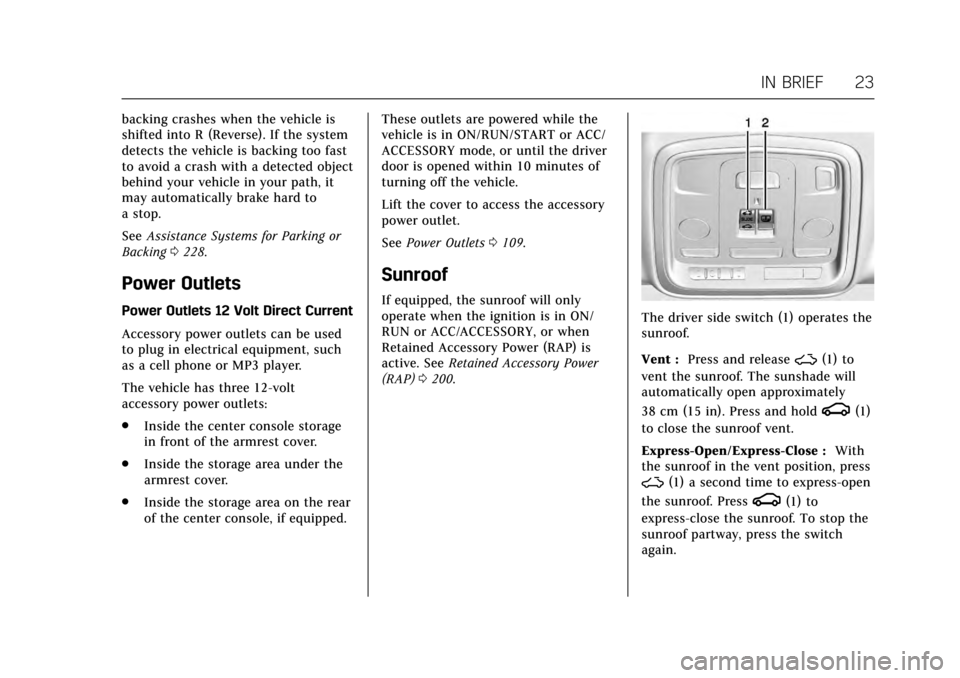
The driver side switch (1) operates the
sunroof.
Vent : Press and release
~(1) to
vent the sunroof. The sunshade will
automatically open approximately
38 cm (15 in). Press and hold
g(1)
to close the sunroof vent.
Express-Open/Express-Close : With
the sunroof in the vent position, press
~(1) a second time to express-open
the sunroof. Press
g(1) to
express-close the sunroof. To stop the
sunroof partway, press the switch
again.
Page 25 of 352
Cadillac CTS/CTS-V Owner Manual (GMNA-Localizing-MidEast-10293089) -
2017 - crc - 6/22/16
24 IN BRIEF
The passenger side switchQ(2)
operates the sunshade. Press and
release
Q(2) to express-open or
express-close the sunshade. To stop
the sunshade partway, press the
switch again.
See Sunroof 050.
Performance and
Maintenance
Traction Control/Electronic
Stability Control
The Traction Control System (TCS)
limits wheel spin. The system turns
on automatically every time the
vehicle is started.
StabiliTrak assists with directional
control of the vehicle in difficult
driving conditions. The system turns
on automatically every time the
vehicle is started.
.
To turn off TCS, press and
release
Yon the center
console.
iilluminates in the
instrument cluster. The
appropriate DIC message is
displayed. See Ride Control System
Messages 0144.
. Press
Yagain to turn traction
control back on. .
To turn off both TCS and
StabiliTrak, press and hold
Yon
the center console until
gandi
illuminate in the instrument
cluster. The appropriate DIC
message displays. See Ride Control
System Messages 0144.
. Press
Yagain to turn on both
systems.
See Traction Control/Electronic Stability
Control 0209.
The vehicle has Driver Mode Control
and may have Competitive Driving
Mode. See Driver Mode Control 0211
and Competitive Driving Mode 0214.
Tire Pressure Monitor
This vehicle may have a Tire Pressure
Monitor System (TPMS).
Page 34 of 352
Cadillac CTS/CTS-V Owner Manual (GMNA-Localizing-MidEast-10293089) -
2017 - crc - 6/22/16
KEYS, DOORS, AND WINDOWS 33
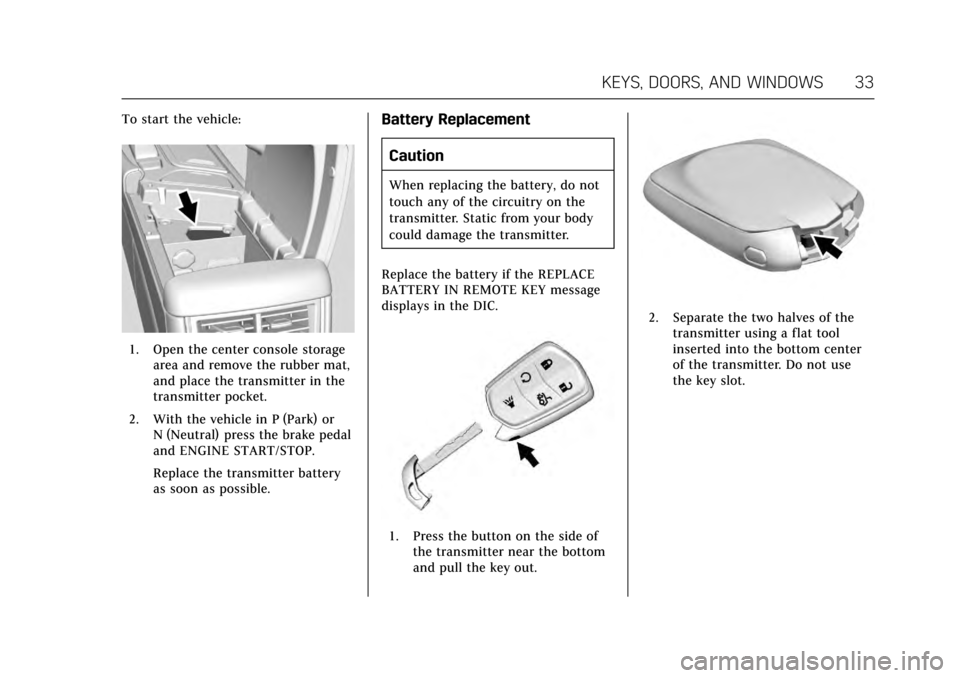
To start the vehicle:
1. Open the center console storagearea and remove the rubber mat,
and place the transmitter in the
transmitter pocket.
2. With the vehicle in P (Park) or N (Neutral) press the brake pedal
and ENGINE START/STOP.
Replace the transmitter battery
as soon as possible.
Battery Replacement
Caution
When replacing the battery, do not
touch any of the circuitry on the
transmitter. Static from your body
could damage the transmitter.
Replace the battery if the REPLACE
BATTERY IN REMOTE KEY message
displays in the DIC.
1. Press the button on the side of the transmitter near the bottom
and pull the key out.
2. Separate the two halves of thetransmitter using a flat tool
inserted into the bottom center
of the transmitter. Do not use
the key slot.
Page 44 of 352

Cadillac CTS/CTS-V Owner Manual (GMNA-Localizing-MidEast-10293089) -
2017 - crc - 6/22/16
KEYS, DOORS, AND WINDOWS 43
vehicle. Only a correctly matched RKE
transmitter will start the vehicle.
If the transmitter is ever damaged,
you may not be able to start your
vehicle.
When trying to start the vehicle, the
security light may come on briefly
when the ignition is turned on.
If the engine does not start and the
security light stays on, there is a
problem with the system. Turn the
ignition off and try again.
If the vehicle will not change ignition
modes (ACC/ACCESSORY, ON/RUN/
START, OFF), and the RKE transmitter
appears to be undamaged, try another
transmitter. Or, you may try placing
the transmitter in the transmitter
pocket located in the center console.
SeeKey and Lock Messages 0141.
If the ignition modes will not change
with the other transmitter, your
vehicle needs service. If the ignition
does change modes, the first
transmitter may be faulty. See the
dealer. It is possible for the immobilizer
system to learn new or replacement
RKE transmitters. Up to eight
transmitters can be programmed for
the vehicle. To program additional
transmitters, see
“Programming
Transmitters to the Vehicle ”under
Remote Keyless Entry (RKE) System
Operation 029.
Do not leave the key or device that
disarms or deactivates the
theft-deterrent system in the vehicle.Exterior Mirrors
Convex Mirrors
{Warning
A convex mirror can make things,
like other vehicles, look farther
away than they really are. If you cut
too sharply into the right lane, you
could hit a vehicle on the right.
Check the inside mirror or glance
over your shoulder before changing
lanes.
The driver and passenger side mirrors
are convex shaped. A convex mirror's
surface is curved so more can be seen
from the driver seat.
Page 50 of 352

Cadillac CTS/CTS-V Owner Manual (GMNA-Localizing-MidEast-10293089) -
2017 - crc - 6/22/16
KEYS, DOORS, AND WINDOWS 49
Warning (Continued)
obstacle detection override, make
sure that all people and
obstructions are clear of the
window path.
The window can be closed by holding
the window switch in the up position
if conditions prevent it from express
closing.
Programming the Power
Windows
Programming may be necessary if the
vehicle's battery has been
disconnected or discharged. If the
window is unable to express-up, follow
these steps to program the window:
To program the window: 1. Close all doors.
2. Place the ignition in ACC/ ACCESSORY or ON/RUN. 3. Partially open the window to be
programmed, then close it and
continue to pull the switch
briefly after the window has fully
closed.
4. Press the power window switch until the window is fully open
and briefly hold.
Remote Window Operation
If equipped, this feature allows all the
windows to be opened remotely.
If enabled in vehicle personalization,
press and hold
Kon the RKE
transmitter. See Vehicle
Personalization 0149.
Sun Visors
Pull the sun visor down to block glare.
Detach the sun visor from the center
mount to pivot to the side window or,
if equipped, extend along the rod.
Rear Window Sunshade
If equipped with a rear window
sunshade, the switch is on the
overhead console. The sunshade only
operates with the ignition in ON/RUN/
START.
To open the sunshade, press and
release the switch. The sunshade will
fully extend. To close the sunshade,
press and release the switch again.
The sunshade will fully close.
Page 64 of 352

Cadillac CTS/CTS-V Owner Manual (GMNA-Localizing-MidEast-10293089) -
2017 - crc - 6/22/16
SEATS AND RESTRAINTS 63
Raising the Seatback
{Warning
If either seatback is not locked, it
could move forward in a sudden
stop or crash. That could cause
injury to the person sitting there.
Always push and pull on the
seatbacks to be sure they are
locked.
{Warning
A safety belt that is improperly
routed, not properly attached,
or twisted will not provide the
protection needed in a crash. The
person wearing the belt could be
seriously injured. After raising the
rear seatback, always check to be
sure that the safety belts are
properly routed and attached, and
are not twisted.To raise a seatback:
1. Lift the seatback up. Make sure the center safety belt and latch
do not get trapped behind the
seat. Push the seatback rearward
to secure it in place.
A red tab near the seatback lever
retracts when the seatback is in
place.
2. Push and pull the top of the seatback to be sure it is in
position.
3. Lock the seatback using the vehicle key in the cylinder.
4. Reconnect the center safety belt mini-latch to the mini-buckle. Do
not let the belt twist.
5. Pull on the center safety belt to make sure the mini-latch is
secure.
6. Repeat the steps to raise the other seatback, if necessary.
When the seat is not in use, it should
be kept in the upright, locked position.
Heated Rear Seats
{Warning
If you cannot feel temperature
change or pain to the skin, the seat
heater may cause burns. See the
Warning under Heated and
Ventilated Front Seats 060.
If equipped, the buttons are on the
rear of the center console.
With the ignition in ON/RUN/START,
press
MorLto heat the left or right
outboard seat cushion and seatback.
Page 101 of 352
Cadillac CTS/CTS-V Owner Manual (GMNA-Localizing-MidEast-10293089) -
2017 - crc - 6/22/16
100 STORAGE
Storage
Storage Compartments
Storage Compartments . . . . . . . . . . 100
Instrument Panel Storage . . . . . . . . 100
Glove Box . . . . . . . . . . . . . . . . . . . . . . . . . 100
Cupholders . . . . . . . . . . . . . . . . . . . . . . . . 101
Armrest Storage . . . . . . . . . . . . . . . . . . 101
Center Console Storage . . . . . . . . . . 101
Additional Storage Features
Cargo Tie-Downs . . . . . . . . . . . . . . . . . 102
Convenience Net . . . . . . . . . . . . . . . . . 102
Safety Kit . . . . . . . . . . . . . . . . . . . . . . . . . 102
Storage Compartments
{Warning
Do not store heavy or sharp objects
in storage compartments. In a
crash, these objects may cause the
cover to open and could result in
injury.
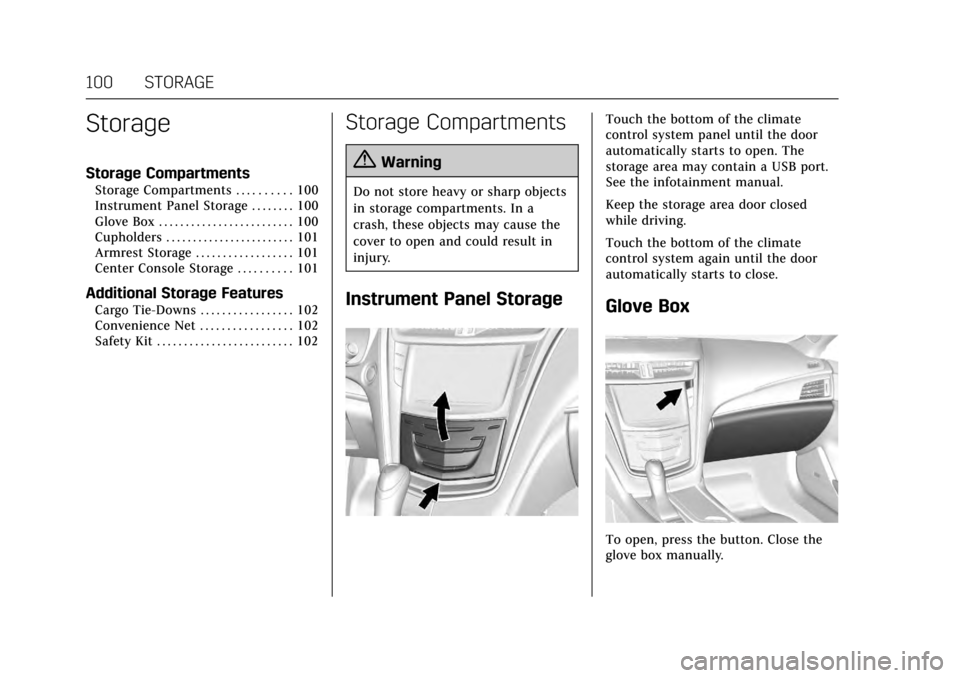
Instrument Panel Storage
Touch the bottom of the climate
control system panel until the door
automatically starts to open. The
storage area may contain a USB port.
See the infotainment manual.
Keep the storage area door closed
while driving.
Touch the bottom of the climate
control system again until the door
automatically starts to close.
Glove Box
To open, press the button. Close the
glove box manually.
Page 102 of 352
Cadillac CTS/CTS-V Owner Manual (GMNA-Localizing-MidEast-10293089) -
2017 - crc - 6/22/16
STORAGE 101
Cupholders
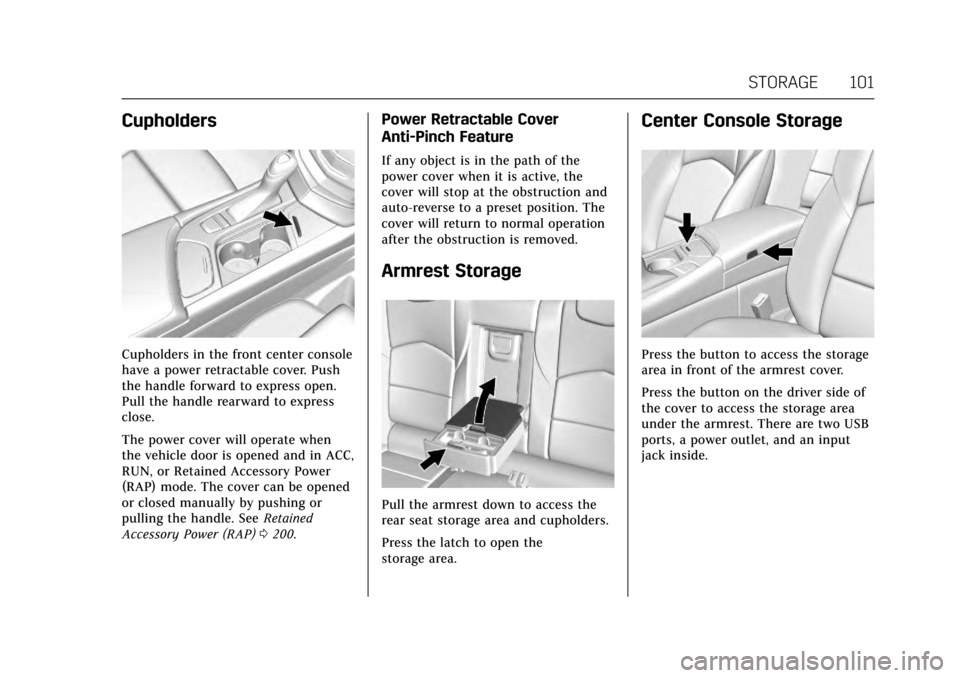
Cupholders in the front center console
have a power retractable cover. Push
the handle forward to express open.
Pull the handle rearward to express
close.
The power cover will operate when
the vehicle door is opened and in ACC,
RUN, or Retained Accessory Power
(RAP) mode. The cover can be opened
or closed manually by pushing or
pulling the handle. SeeRetained
Accessory Power (RAP) 0200.
Power Retractable Cover
Anti-Pinch Feature
If any object is in the path of the
power cover when it is active, the
cover will stop at the obstruction and
auto-reverse to a preset position. The
cover will return to normal operation
after the obstruction is removed.
Armrest Storage
Pull the armrest down to access the
rear seat storage area and cupholders.
Press the latch to open the
storage area.
Center Console Storage
Press the button to access the storage
area in front of the armrest cover.
Press the button on the driver side of
the cover to access the storage area
under the armrest. There are two USB
ports, a power outlet, and an input
jack inside.
Page 103 of 352

Cadillac CTS/CTS-V Owner Manual (GMNA-Localizing-MidEast-10293089) -
2017 - crc - 6/22/16
102 STORAGE
If equipped, press the top of the door
to open the storage area on the rear of
the center console. If equipped, there
is a power outlet inside.
Additional Storage
Features
Cargo Tie-Downs
The cargo tie-downs can be used to
secure small loads inside the trunk.
Convenience Net
If equipped, the convenience net is in
the rear. Put small loads behind the
net. It can also be positioned into an
envelope style to hold smaller items.
The net is not for heavier loads. Store
items as far forward as you can.
Safety Kit
The safety kit is a freestanding bag in
the cargo area.
Page 110 of 352
Cadillac CTS/CTS-V Owner Manual (GMNA-Localizing-MidEast-10293089) -
2017 - crc - 6/22/16
INSTRUMENTS AND CONTROLS 109
Power Outlets
Power Outlets 12 Volt Direct Current
Accessory power outlets can be used
to plug in electrical equipment, such
as a cell phone or MP3 player.
The vehicle has three 12-volt
accessory power outlets on the center
console:
.Inside the center console storage
in front of the armrest cover.
. Inside the storage area under the
armrest cover.
. Inside the storage area on the rear
of the center console, if equipped.
These outlets are powered while the
vehicle is in ON/RUN/START or ACC/
ACCESSORY mode, or until the driver
door is opened within 10 minutes of
turning off the vehicle.
Lift the cover to access the accessory
power outlet.
Certain electrical accessories may not
be compatible with the accessory
power outlet and could overload a
vehicle circuit breaker or adapter fuse.
If overloaded, the circuit breaker will reset after all devices are disconnected
or if Retained Accessory Power (RAP)
is turned off and then back on. See
Retained Accessory Power (RAP)
0200.
Wait one minute to allow the circuit
breaker to reset before reconnecting
devices or turning RAP back on. If the
problem continues, the issue could be
within your device. Try another
known good device to make sure the
circuit breaker is operating properly.
If this does not resolve your problem,
see your dealer.
It is possible to replace the factory
power outlet with a cigar lighter
receptacle, if desired. This requires the
factory installed circuit breaker to be
replaced with a standard minifuse by
the dealer. A minifuse will not reset
and will have to be replace if blown.
Caution
Failure to replace the circuit
breaker with the minifuse could
overheat the cigar lighter and
damage the vehicle. Always unplug electrical equipment
when not in use and do not plug in
equipment that exceeds the maximum
15 amps rating.
When adding electrical equipment, be
sure to follow the proper installation
instructions included with the
equipment. See
Add-On Electrical
Equipment 0246.
Caution
Adding any electrical equipment to
the vehicle may damage it or keep
other components from working as
they should. The repairs would not
be covered by the vehicle warranty.
Do not use equipment exceeding
maximum amperage rating of
15 amperes. Check with your dealer
before adding electrical equipment.