instrument cluster CADILLAC CTS 2017 3.G Owners Manual
[x] Cancel search | Manufacturer: CADILLAC, Model Year: 2017, Model line: CTS, Model: CADILLAC CTS 2017 3.GPages: 352, PDF Size: 3.99 MB
Page 8 of 352

Cadillac CTS/CTS-V Owner Manual (GMNA-Localizing-MidEast-10293089) -
2017 - crc - 6/22/16
IN BRIEF 7
1.Air Vents 0179.
2. Turn Signal Lever. See Turn and
Lane-Change Signals 0161.
3. Manual Mode 0205 (If
Equipped).
4. Instrument Cluster 0114.
5. Windshield Wiper/Washer 0106.
6. Hazard Warning Flashers 0161.
Lane Keep Assist (LKA) 0241 (If
Equipped).
Start/Stop Disable Switch (If
Equipped). See Starting the
Engine 0198.
7. Light Sensor (If Equipped). See Automatic Headlamp
System 0160.
Solar Sensor. See Dual Automatic
Climate Control System 0172.
8. Infotainment 0165.
9. Glove Box Button. See Glove
Box 0100.
Automatic Parking Assist Button
(If Equipped). See Assistance
Systems for Parking or
Backing 0228. Parking Assist Button. See
Assistance Systems for Parking or
Backing
0228.
10. Heated and Ventilated Front Seats
060 (If Equipped).
11. Dual Automatic Climate Control
System 0172.
12. Instrument Panel Storage 0100.
Wireless Charging Pad (If
Equipped) (Out of View). See
Wireless Charging 0110.
13. Traction Control/Electronic
Stability Control 0209.
14. MODE Switch. See Driver Mode
Control 0211.
15. Shift Lever. See Automatic
Transmission 0203.
Manual Mode Button. See
Automatic Transmission 0203.
16. ENGINE START/STOP Button. SeeIgnition Positions 0196.
17. Steering Wheel Controls 0106.
Driver Information Center (DIC)
Controls. See Driver Information
Center (DIC) 0132. 18.
Horn 0106.
19. Steering Wheel Adjustment 0105.
20. Cruise Control 0218 (If
Equipped).
Adaptive Cruise Control 0220 (If
Equipped).
Forward Collision Alert (FCA)
System 0235 (If Equipped).
Heated Steering Wheel 0106 (If
Equipped).
21. Instrument Panel Illumination
Control 0162.
22. Head-Up Display (HUD) 0135 (If
Equipped).
23. Data Link Connector (DLC) (Out of View). See Malfunction
Indicator Lamp (Check Engine
Light) 0123.
24. Hood Release. See Hood0249.
25. Electric Parking Brake (EPB) Switch. See Electric Parking
Brake 0207.
Page 21 of 352
Cadillac CTS/CTS-V Owner Manual (GMNA-Localizing-MidEast-10293089) -
2017 - crc - 6/22/16
20 IN BRIEF
Cruise Control
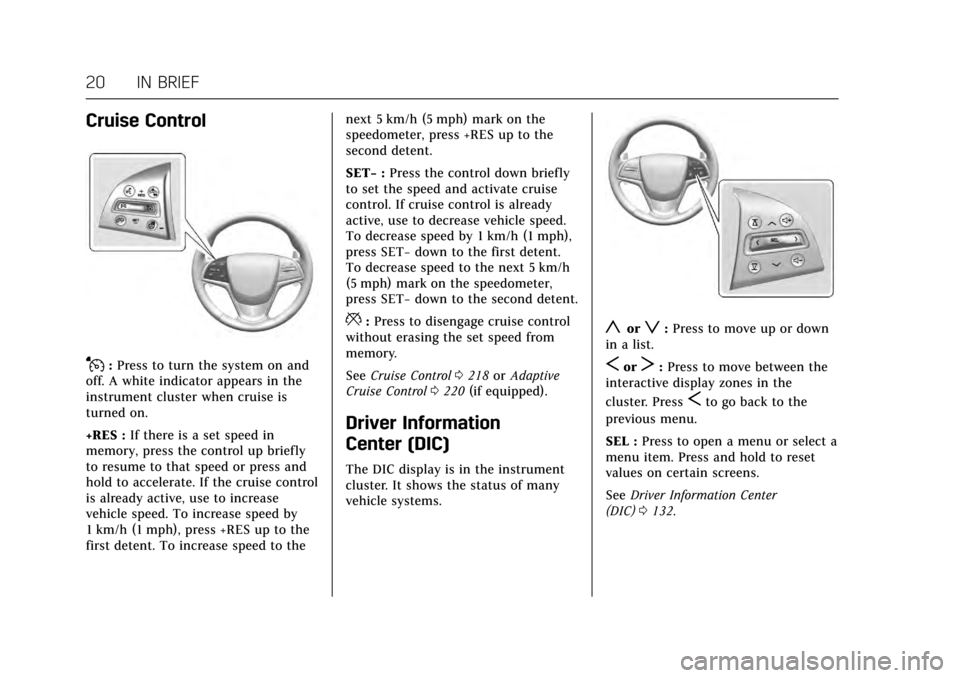
J:Press to turn the system on and
off. A white indicator appears in the
instrument cluster when cruise is
turned on.
+RES : If there is a set speed in
memory, press the control up briefly
to resume to that speed or press and
hold to accelerate. If the cruise control
is already active, use to increase
vehicle speed. To increase speed by
1 km/h (1 mph), press +RES up to the
first detent. To increase speed to the next 5 km/h (5 mph) mark on the
speedometer, press +RES up to the
second detent.
SET−
:Press the control down briefly
to set the speed and activate cruise
control. If cruise control is already
active, use to decrease vehicle speed.
To decrease speed by 1 km/h (1 mph),
press SET− down to the first detent.
To decrease speed to the next 5 km/h
(5 mph) mark on the speedometer,
press SET− down to the second detent.
*:Press to disengage cruise control
without erasing the set speed from
memory.
See Cruise Control 0218 orAdaptive
Cruise Control 0220 (if equipped).
Driver Information
Center (DIC)
The DIC display is in the instrument
cluster. It shows the status of many
vehicle systems.
yorz:Press to move up or down
in a list.
SorT: Press to move between the
interactive display zones in the
cluster. Press
Sto go back to the
previous menu.
SEL : Press to open a menu or select a
menu item. Press and hold to reset
values on certain screens.
See Driver Information Center
(DIC) 0132.
Page 23 of 352
Cadillac CTS/CTS-V Owner Manual (GMNA-Localizing-MidEast-10293089) -
2017 - crc - 6/22/16
22 IN BRIEF
Front Vision Camera
If equipped, a view of the area in front
of the vehicle displays on the
infotainment display to aid with
parking and low-speed maneuvers.
See“Front Vision Camera ”under
Assistance Systems for Parking or
Backing 0228.
Curb View Camera
(CTS-V Only)
If equipped, a view of the area in front
of the vehicle displays on the center
stack to aid with parking and
low-speed maneuvers. The display
shows a front, top down view at the
top of the screen and left and right
front camera images on the bottom.
See “Curb View Camera (CTS-V Series
Only)” underAssistance Systems for
Parking or Backing 0228.
Rear Vision Camera (RVC)
If equipped, RVC displays a view of
the area behind the vehicle on the
infotainment display when the vehicle is shifted into R (Reverse) to aid with
parking and low-speed backing
maneuvers.
See
Assistance Systems for Parking or
Backing 0228.
Rear Cross Traffic Alert
(RCTA) System
If equipped, the RCTA system uses a
triangle with an arrow displayed on
the infotainment display to warn of
traffic behind your vehicle that may
cross your vehicle's path while in
R (Reverse). In addition, beeps will
sound, or the driver seat will pulse.
See Assistance Systems for Parking or
Backing 0228.
Parking Assist
If equipped, Rear Parking Assist (RPA)
uses sensors on the rear bumper to
assist with parking and avoiding
objects while in R (Reverse).
It operates at speeds less than 8 km/h
(5 mph). RPA may display a warning
triangle on the Rear Vision Camera
screen and a graphic on the
instrument cluster to provide the object distance. In addition, multiple
beeps or seat pulses may occur if very
close to an object.
The vehicle may also have the Front
Parking Assist system.
See
Assistance Systems for Parking or
Backing 0228.
Automatic Parking
Assist (APA)
If equipped, the APA system helps to
search for and maneuver the vehicle
into parallel or perpendicular parking
spots using automatic steering, DIC
displays, and beeps. When the vehicle
speed is below 30 km/h (18 mph),
press
Oto enable the system.
See “Automatic Parking Assist (APA)”
under Assistance Systems for Parking
or Backing 0228.
Reverse Automatic
Braking (RAB)
If the vehicle has Adaptive Cruise
Control (ACC) it also has the RAB
system, which is designed to help
avoid or reduce the harm caused by
Page 25 of 352
Cadillac CTS/CTS-V Owner Manual (GMNA-Localizing-MidEast-10293089) -
2017 - crc - 6/22/16
24 IN BRIEF
The passenger side switchQ(2)
operates the sunshade. Press and
release
Q(2) to express-open or
express-close the sunshade. To stop
the sunshade partway, press the
switch again.
See Sunroof 050.
Performance and
Maintenance
Traction Control/Electronic
Stability Control
The Traction Control System (TCS)
limits wheel spin. The system turns
on automatically every time the
vehicle is started.
StabiliTrak assists with directional
control of the vehicle in difficult
driving conditions. The system turns
on automatically every time the
vehicle is started.
.
To turn off TCS, press and
release
Yon the center
console.
iilluminates in the
instrument cluster. The
appropriate DIC message is
displayed. See Ride Control System
Messages 0144.
. Press
Yagain to turn traction
control back on. .
To turn off both TCS and
StabiliTrak, press and hold
Yon
the center console until
gandi
illuminate in the instrument
cluster. The appropriate DIC
message displays. See Ride Control
System Messages 0144.
. Press
Yagain to turn on both
systems.
See Traction Control/Electronic Stability
Control 0209.
The vehicle has Driver Mode Control
and may have Competitive Driving
Mode. See Driver Mode Control 0211
and Competitive Driving Mode 0214.
Tire Pressure Monitor
This vehicle may have a Tire Pressure
Monitor System (TPMS).
Page 43 of 352

Cadillac CTS/CTS-V Owner Manual (GMNA-Localizing-MidEast-10293089) -
2017 - crc - 6/22/16
42 KEYS, DOORS, AND WINDOWS
If the driver door is opened without
first unlocking with the RKE
transmitter, the horn will chirp and
the lights will flash to indicate
pre-alarm. If the vehicle is not started,
or the door is not unlocked by
pressing
Kon the RKE transmitter
during the 10-second pre-alarm, the
alarm will be activated.
The alarm will also be activated if a
passenger door, the trunk, or the hood
is opened without first disarming the
system. When the alarm is activated,
the turn signals flash and the horn
sounds for about 30 seconds. The
alarm system will then re-arm to
monitor the next unauthorized event.
Disarming the Alarm System
To disarm the alarm system or turn
off the alarm if it has been activated:
. Press
Kon the RKE transmitter.
. Unlock the vehicle using the
Keyless Access system.
. Start the vehicle. To avoid setting off the alarm by
accident:
.
Lock the vehicle after all
occupants have left the vehicle
and all doors are closed.
. Always unlock a door with the
RKE transmitter or use the Keyless
Access system.
Unlocking the driver door with the key
will not disarm the system or turn off
the alarm.
How to Detect a Tamper
Condition
IfKis pressed on the transmitter and
the horn chirps and the lights flash
three times, a previous alarm occurred
while the system was armed.
If the alarm has been activated, a
message will appear on the DIC. See
Security Messages 0146.
Immobilizer Operation
This vehicle has a passive
theft-deterrent system.
The system does not have to be
manually armed or disarmed.
The vehicle is automatically
immobilized when the vehicle is
turned off.
The immobilization system is
disarmed when the pushbutton start
is activated to enter the ACC/
ACCESSORY mode or the ON/RUN/
START mode and a valid transmitter
is present in the vehicle.
The security light, in the instrument
cluster, comes on if there is a problem
with arming or disarming the
theft-deterrent system.
The system has one or more RKE
transmitters matched to an
immobilizer control unit in the
Page 73 of 352

Cadillac CTS/CTS-V Owner Manual (GMNA-Localizing-MidEast-10293089) -
2017 - crc - 6/22/16
72 SEATS AND RESTRAINTS
{Warning
You can be severely injured or
killed in a crash if you are not
wearing your safety belt, even with
airbags. Airbags are designed to
work with safety belts, not replace
them. Also, airbags are not designed
to inflate in every crash. In some
crashes safety belts are the only
restraint. SeeWhen Should an
Airbag Inflate? 074.
Wearing your safety belt during a
crash helps reduce your chance of
hitting things inside the vehicle or
being ejected from it. Airbags are
“supplemental restraints” to the
safety belts. Everyone in the vehicle
should wear a safety belt properly,
whether or not there is an airbag
for that person.
{Warning
Because airbags inflate with great
force and faster than the blink of an
eye, anyone who is up against,
or very close to any airbag when it
inflates can be seriously injured or
killed. Do not sit unnecessarily
close to any airbag, as you would be
if sitting on the edge of the seat or
leaning forward. Safety belts help
keep you in position before and
during a crash. Always wear a safety
belt, even with airbags. The driver
should sit as far back as possible
while still maintaining control of
the vehicle. The safety belts and the
front outboard passenger airbags
are most effective when you are
sitting well back and upright in the
seat with both feet on the floor.
Occupants should not lean on or
sleep against the door or side
windows in seating positions with
seat-mounted side impact airbags
and/or roof-rail airbags.
{Warning
Children who are up against,
or very close to, any airbag when it
inflates can be seriously injured or
killed. Always secure children
properly in the vehicle. To read
how, see Older Children 083 or
Infants and Young Children 084.
There is an airbag readiness light on
the instrument cluster, which shows
the airbag symbol. The system checks
the airbag electrical system for
malfunctions. The light tells you if
there is an electrical problem. See
Airbag Readiness Light 0122 for more
information.
Page 105 of 352
Cadillac CTS/CTS-V Owner Manual (GMNA-Localizing-MidEast-10293089) -
2017 - crc - 6/22/16
104 INSTRUMENTS AND CONTROLS
Instruments and
Controls
Controls
Steering Wheel Adjustment . . . . . 105
Steering Wheel Controls . . . . . . . . . 106
Heated Steering Wheel . . . . . . . . . . 106
Horn . . . . . . . . . . . . . . . . . . . . . . . . . . . . . . . 106
Windshield Wiper/Washer . . . . . . . 106
Clock . . . . . . . . . . . . . . . . . . . . . . . . . . . . . . 108
Power Outlets . . . . . . . . . . . . . . . . . . . . . 109
Wireless Charging . . . . . . . . . . . . . . . . 110
Cigarette Lighter . . . . . . . . . . . . . . . . . . 112
Ashtrays . . . . . . . . . . . . . . . . . . . . . . . . . . 112
Warning Lights, Gauges, and
Indicators
Warning Lights, Gauges, andIndicators . . . . . . . . . . . . . . . . . . . . . . . 113
Instrument Cluster . . . . . . . . . . . . . . . 114
Speedometer . . . . . . . . . . . . . . . . . . . . . . 118
Odometer . . . . . . . . . . . . . . . . . . . . . . . . . 118
Trip Odometer . . . . . . . . . . . . . . . . . . . . 118
Tachometer . . . . . . . . . . . . . . . . . . . . . . . 118
Fuel Gauge . . . . . . . . . . . . . . . . . . . . . . . . 118
Boost Gauge (Performance Configuration Only) . . . . . . . . . . . . 119
Engine Coolant Temperature Gauge . . . . . . . . . . . . . . . . . . . . . . . . . . . . 120 Safety Belt Reminders . . . . . . . . . . . . 121
Airbag Readiness Light . . . . . . . . . . 122
Passenger Airbag Status
Indicator . . . . . . . . . . . . . . . . . . . . . . . . . 122
Charging System Light . . . . . . . . . . . 123
Malfunction Indicator Lamp
(Check Engine Light) . . . . . . . . . . . 123
Brake System Warning Light . . . . 125
Parking Brake Light . . . . . . . . . . . . . . 125
Service Electric Parking Brake Light . . . . . . . . . . . . . . . . . . . . . . . . . . . . . 126
Antilock Brake System (ABS) Warning Light . . . . . . . . . . . . . . . . . . 126
Lane Keep Assist (LKA) Light . . . 126
Vehicle Ahead Indicator . . . . . . . . . 127
Traction Off Light . . . . . . . . . . . . . . . . 127
StabiliTrak
®OFF Light . . . . . . . . . . . 127
Traction Control System (TCS)/ StabiliTrak
®Light . . . . . . . . . . . . . . 128
Engine Coolant Temperature Warning Light . . . . . . . . . . . . . . . . . . 128
Tire Pressure Light . . . . . . . . . . . . . . . 128
Engine Oil Pressure Light . . . . . . . . 129
Low Fuel Warning Light . . . . . . . . . 129
Auto Stop Mode (Uplevel Cluster Only) . . . . . . . . . . . . . . . . . . . . 130
Security Light . . . . . . . . . . . . . . . . . . . . . 130
High-Beam On Light . . . . . . . . . . . . . 130
Adaptive Forward Lighting (AFL) Light . . . . . . . . . . . . . . . . . . . . . . . . . . . . . 130
Lamps On Reminder . . . . . . . . . . . . . 131 Cruise Control Light . . . . . . . . . . . . . . 131
Door Ajar Light . . . . . . . . . . . . . . . . . . . 131
Information Displays
Driver Information
Center (DIC) . . . . . . . . . . . . . . . . . . . . . 132
Head-Up Display (HUD) . . . . . . . . . 135
Vehicle Messages
Vehicle Messages . . . . . . . . . . . . . . . . . 138
Battery Voltage and Charging Messages . . . . . . . . . . . . . . . . . . . . . . . . 138
Brake System Messages . . . . . . . . . . 138
Cruise Control Messages . . . . . . . . . 139
Door Ajar Messages . . . . . . . . . . . . . . 139
Engine Cooling System Messages . . . . . . . . . . . . . . . . . . . . . . . . 140
Engine Oil Messages . . . . . . . . . . . . . 140
Engine Power Messages . . . . . . . . . . 140
Fuel System Messages . . . . . . . . . . . 141
Key and Lock Messages . . . . . . . . . . 141
Lamp Messages . . . . . . . . . . . . . . . . . . . 141
Object Detection System Messages . . . . . . . . . . . . . . . . . . . . . . . . 142
Ride Control System Messages . . . . . . . . . . . . . . . . . . . . . . . . 144
Airbag System Messages . . . . . . . . . 146
Safety Belt Messages . . . . . . . . . . . . . 146
Security Messages . . . . . . . . . . . . . . . . 146
Service Vehicle Messages . . . . . . . . 146
Starting the Vehicle Messages . . . 147
Page 115 of 352

Cadillac CTS/CTS-V Owner Manual (GMNA-Localizing-MidEast-10293089) -
2017 - crc - 6/22/16
114 INSTRUMENTS AND CONTROLS
Instrument Cluster
Base Level with Auto Stop
Page 117 of 352

Cadillac CTS/CTS-V Owner Manual (GMNA-Localizing-MidEast-10293089) -
2017 - crc - 6/22/16
116 INSTRUMENTS AND CONTROLS
Reconfigurable Instrument
Cluster
The uplevel cluster display layout can
be changed.
Balanced Configuration
The Balanced configuration has three
interactive display zones: one in the
center of each of the gauges.
Enhanced Configuration
The Enhanced configuration has three
interactive display zones.
Performance Configuration (CTS-V Series and V-Sport Only)
The Performance configuration has
two interactive display zones.
Use the five-way control on the right
side of the steering wheel to move
between the different display zones
and scroll through the different
displays.
To change the cluster configuration:
1. Find the Options page in one of the interactive display zones on
the cluster.
2. Press SEL to enter the Options menu.
3. Scroll down to highlight Display Layout. Then press SEL to
select it. 4. Each layout in the menu is
represented by a small preview
image of the display layout.
Scroll up or down and highlight
the selection. Press SEL to select
the desired cluster configuration.
5. Exit the Display Layout menu by pressing
S.
Cluster Application Displays
The cluster can display information
regarding Navigation, Audio, and
Phone. On the base cluster, a
speedometer can also be displayed in
the center zone.
Navigation
If there is no active route, a compass
will be displayed. If there is an active
route, press SEL to end route guidance
(if equipped) or turn the voice
prompts (if equipped) on or off.
Audio
While the Audio application page is
displayed, press SEL to enter the
Audio menu. In the Audio menu,
search for music, select from favorites,
or change the audio source.
Page 118 of 352

Cadillac CTS/CTS-V Owner Manual (GMNA-Localizing-MidEast-10293089) -
2017 - crc - 6/22/16
INSTRUMENTS AND CONTROLS 117
Phone
While the Phone application page is
displayed, press SEL to enter the
Phone menu. In the Phone menu,
if there is no active phone call, view
recent calls, select from favorites,
or scroll through contacts. If there is
an active call, mute the phone or
switch to handset operation.
Cluster Options Menu
To enter the cluster Options menu:1. Use the five-way control on the right side of the steering wheel
to find the Options page in one
of the interactive display zones
on the cluster.
2. Press SEL on the center of the five-way control to enter the
Options menu.
Units : Press SEL while Units is
highlighted to enter the Unit menu.
Choose English, Imperial, or metric
units by pressing SEL while the
desired item is highlighted.
A checkmark will be displayed next to
the selected item. Info Pages :
Press SEL while Info
Pages is highlighted to select the
items to be displayed in the DIC info
displays. See Driver Information Center
(DIC) 0132.
Display Layout : Press SEL while
Display Layout is highlighted to
change the configuration of the
uplevel cluster. See “Reconfigurable
Instrument Cluster” earlier in this
section.
Head-up Display (HUD) Rotation :
This feature allows for adjusting the
angle of the HUD image. Press SEL on
the steering wheel controls while
Head-up Display Rotation is
highlighted to enter Adjust Mode.
Press
yorzto adjust the angle of
the HUD display. Press
SorTto
highlight OK, then press SEL to save
the setting. Cancel can also be
selected to cancel the setting. The
vehicle must be in P (Park).
Fav Button Options : Press SEL while
Fav Button Options is highlighted to
select between FAV Primary and SEEK
Primary. This selection allows for
configuration of the
CandB
steering wheel controls. When FAV
Primary is selected, pressing
Cand
Bwill go to the next or previous
favorite and pressing and holding
C
andBwill seek. When SEEK Primary
is selected, pressing
CandBwill
seek and pressing and holding
Cand
Bwill go to the next or previous
favorite.
Tire Loading : Press SEL while Tire
Loading is highlighted to change the
tire loading setting. Choose Light (for
comfort pressure up to three people),
Eco (for Eco pressure up to three
people), or Max (for full loading) by
pressing SEL while the desired item is
highlighted.
Open Source Software : Press SEL
while Open Source Software is
highlighted to display open source
software information.