center console CADILLAC CTS 2018 User Guide
[x] Cancel search | Manufacturer: CADILLAC, Model Year: 2018, Model line: CTS, Model: CADILLAC CTS 2018Pages: 394, PDF Size: 6.48 MB
Page 115 of 394
Cadillac CTS/CTS-V Owner Manual (GMNA-Localizing-U.S./Canada/Mexico-
11349156) - 2018 - CRC - 9/29/17
114 INSTRUMENTS AND CONTROLS
Lift the cover to access the accessory
power outlet.
Certain electrical accessories may not
be compatible with the accessory
power outlet and could overload a
vehicle circuit breaker or adapter fuse.
If overloaded, the circuit breaker will
reset after all devices are disconnected
or if Retained Accessory Power (RAP)
is turned off and then back on. See
Retained Accessory Power (RAP)0197.
Wait one minute to allow the circuit
breaker to reset before reconnecting
devices or turning RAP back on. If the
problem continues, the issue could be
within your device. Try another
known good device to make sure the
circuit breaker is operating properly.
If this does not resolve your problem,
see your dealer.
It is possible to replace the factory
power outlet with a cigar lighter
receptacle, if desired. This requires the
factory installed circuit breaker to be
replaced with a standard minifuse by
the dealer. A minifuse will not reset
and will have to be replace if blown.Caution
Failure to replace the circuit
breaker with the minifuse could
overheat the cigar lighter and
damage the vehicle.
When adding electrical equipment, be
sure to follow the proper installation
instructions included with the
equipment. See Add-On Electrical
Equipment 0251.
Caution
Adding any electrical equipment to
the vehicle may damage it or keep
other components from working as
they should. The repairs would not
be covered by the vehicle warranty.
Do not use equipment exceeding
maximum amperage rating of
15 amperes. Check with your dealer
before adding electrical equipment.
Caution
Hanging heavy equipment from the
power outlet can cause damage not
covered by the vehicle warranty.
The power outlets are designed for
accessory power plugs only, such as
cell phone charge cords.
Power Outlet 110/120 Volt
Alternating Current
If equipped, this power outlet is inside
the center console. It can be used to
plug in electrical equipment that uses
a maximum limit of 150 watts.
Page 127 of 394
Cadillac CTS/CTS-V Owner Manual (GMNA-Localizing-U.S./Canada/Mexico-
11349156) - 2018 - CRC - 9/29/17
126 INSTRUMENTS AND CONTROLS
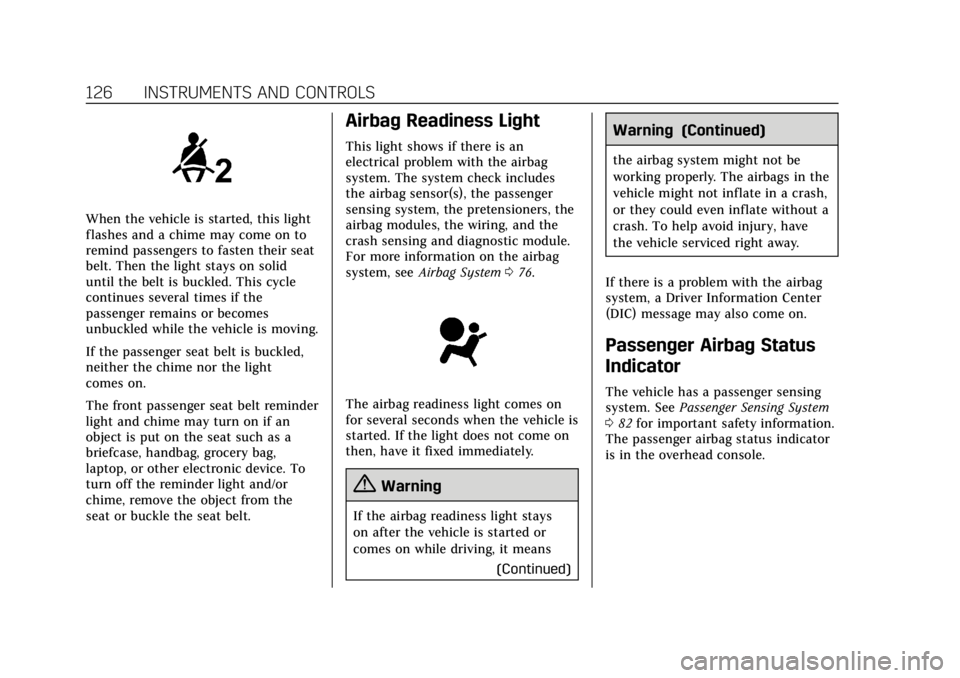
When the vehicle is started, this light
flashes and a chime may come on to
remind passengers to fasten their seat
belt. Then the light stays on solid
until the belt is buckled. This cycle
continues several times if the
passenger remains or becomes
unbuckled while the vehicle is moving.
If the passenger seat belt is buckled,
neither the chime nor the light
comes on.
The front passenger seat belt reminder
light and chime may turn on if an
object is put on the seat such as a
briefcase, handbag, grocery bag,
laptop, or other electronic device. To
turn off the reminder light and/or
chime, remove the object from the
seat or buckle the seat belt.
Airbag Readiness Light
This light shows if there is an
electrical problem with the airbag
system. The system check includes
the airbag sensor(s), the passenger
sensing system, the pretensioners, the
airbag modules, the wiring, and the
crash sensing and diagnostic module.
For more information on the airbag
system, seeAirbag System 076.
The airbag readiness light comes on
for several seconds when the vehicle is
started. If the light does not come on
then, have it fixed immediately.
{Warning
If the airbag readiness light stays
on after the vehicle is started or
comes on while driving, it means
(Continued)
Warning (Continued)
the airbag system might not be
working properly. The airbags in the
vehicle might not inflate in a crash,
or they could even inflate without a
crash. To help avoid injury, have
the vehicle serviced right away.
If there is a problem with the airbag
system, a Driver Information Center
(DIC) message may also come on.
Passenger Airbag Status
Indicator
The vehicle has a passenger sensing
system. See Passenger Sensing System
0 82 for important safety information.
The passenger airbag status indicator
is in the overhead console.
Page 173 of 394
Cadillac CTS/CTS-V Owner Manual (GMNA-Localizing-U.S./Canada/Mexico-
11349156) - 2018 - CRC - 9/29/17
172 CLIMATE CONTROLS
Sensor
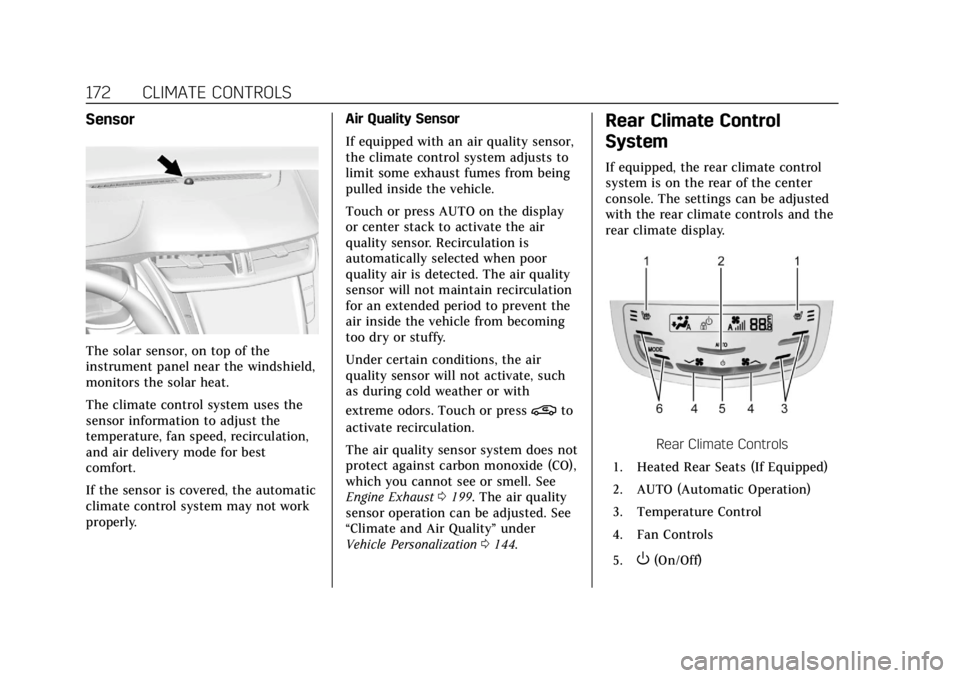
The solar sensor, on top of the
instrument panel near the windshield,
monitors the solar heat.
The climate control system uses the
sensor information to adjust the
temperature, fan speed, recirculation,
and air delivery mode for best
comfort.
If the sensor is covered, the automatic
climate control system may not work
properly.Air Quality Sensor
If equipped with an air quality sensor,
the climate control system adjusts to
limit some exhaust fumes from being
pulled inside the vehicle.
Touch or press AUTO on the display
or center stack to activate the air
quality sensor. Recirculation is
automatically selected when poor
quality air is detected. The air quality
sensor will not maintain recirculation
for an extended period to prevent the
air inside the vehicle from becoming
too dry or stuffy.
Under certain conditions, the air
quality sensor will not activate, such
as during cold weather or with
extreme odors. Touch or press
@to
activate recirculation.
The air quality sensor system does not
protect against carbon monoxide (CO),
which you cannot see or smell. See
Engine Exhaust 0199. The air quality
sensor operation can be adjusted. See
“Climate and Air Quality” under
Vehicle Personalization 0144.
Rear Climate Control
System
If equipped, the rear climate control
system is on the rear of the center
console. The settings can be adjusted
with the rear climate controls and the
rear climate display.
Rear Climate Controls
1. Heated Rear Seats (If Equipped)
2. AUTO (Automatic Operation)
3. Temperature Control
4. Fan Controls
5.
O(On/Off)
Page 174 of 394
Cadillac CTS/CTS-V Owner Manual (GMNA-Localizing-U.S./Canada/Mexico-
11349156) - 2018 - CRC - 9/29/17
CLIMATE CONTROLS 173
6. MODE (Air Delivery ModeControl)
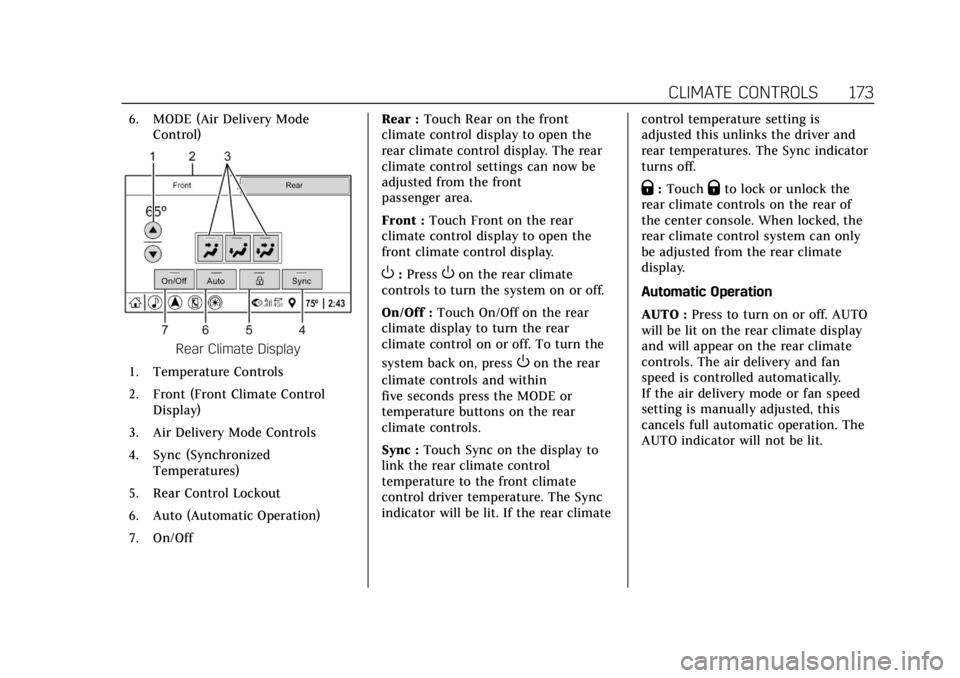
Rear Climate Display
1. Temperature Controls
2. Front (Front Climate Control Display)
3. Air Delivery Mode Controls
4. Sync (Synchronized Temperatures)
5. Rear Control Lockout
6. Auto (Automatic Operation)
7. On/Off Rear :
Touch Rear on the front
climate control display to open the
rear climate control display. The rear
climate control settings can now be
adjusted from the front
passenger area.
Front : Touch Front on the rear
climate control display to open the
front climate control display.
O: PressOon the rear climate
controls to turn the system on or off.
On/Off : Touch On/Off on the rear
climate display to turn the rear
climate control on or off. To turn the
system back on, press
Oon the rear
climate controls and within
five seconds press the MODE or
temperature buttons on the rear
climate controls.
Sync : Touch Sync on the display to
link the rear climate control
temperature to the front climate
control driver temperature. The Sync
indicator will be lit. If the rear climate control temperature setting is
adjusted this unlinks the driver and
rear temperatures. The Sync indicator
turns off.
Q:
TouchQto lock or unlock the
rear climate controls on the rear of
the center console. When locked, the
rear climate control system can only
be adjusted from the rear climate
display.
Automatic Operation
AUTO : Press to turn on or off. AUTO
will be lit on the rear climate display
and will appear on the rear climate
controls. The air delivery and fan
speed is controlled automatically.
If the air delivery mode or fan speed
setting is manually adjusted, this
cancels full automatic operation. The
AUTO indicator will not be lit.
Page 209 of 394
Cadillac CTS/CTS-V Owner Manual (GMNA-Localizing-U.S./Canada/Mexico-
11349156) - 2018 - CRC - 9/29/17
208 DRIVING AND OPERATING
To turn off only TCS, press and
release
Y. The traction off lighti
displays in the instrument cluster.
A DIC message may display.
To turn TCS on again, press and
release
Y. The traction off lighti
displayed in the instrument cluster
will turn off.
If TCS is limiting wheel spin when
Y
is pressed, the system will not turn off
until the wheels stop spinning.
To turn off both TCS and StabiliTrak,
press and hold
Yuntil the traction
off light
iand StabiliTrak OFF light
gcome on and stay on in the
instrument cluster. A DIC message
may display.
To turn TCS and StabiliTrak on again,
press and release
Y. The traction off
light
iand StabiliTrak OFF lightg
in the instrument cluster turn off.
Adding accessories can affect the
vehicle's performance. See Accessories
and Modifications 0254.
Driver Mode Control
Driver Mode Control attempts to add
a sportier feel, provide a more
comfortable ride, or assist in different
weather conditions or terrain. This
system simultaneously changes the
software settings of various
sub-systems. Depending on the option
package, available features, and mode
selected, the suspension, steering, and
powertrain will change settings to
achieve the desired mode
characteristics. If the vehicle is
equipped with Magnetic Ride Control,
selecting the various Driver Modes
adjusts the ride of the vehicle to
enhance the ride performance for the
road conditions and the
selected mode.
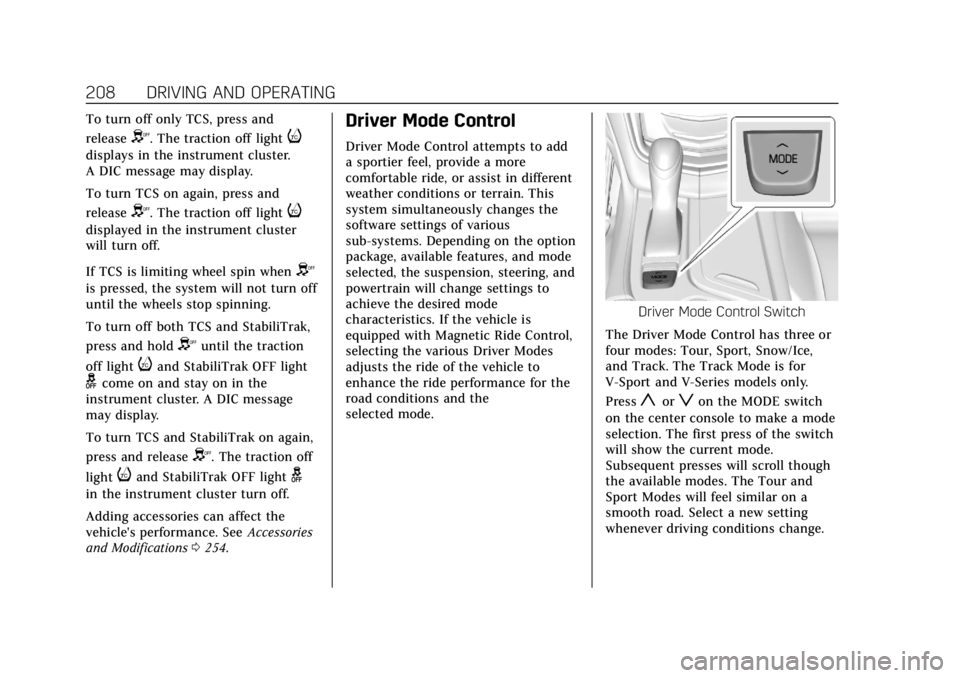
Driver Mode Control Switch
The Driver Mode Control has three or
four modes: Tour, Sport, Snow/Ice,
and Track. The Track Mode is for
V-Sport and V-Series models only.
Press
yorzon the MODE switch
on the center console to make a mode
selection. The first press of the switch
will show the current mode.
Subsequent presses will scroll though
the available modes. The Tour and
Sport Modes will feel similar on a
smooth road. Select a new setting
whenever driving conditions change.
Page 212 of 394
Cadillac CTS/CTS-V Owner Manual (GMNA-Localizing-U.S./Canada/Mexico-
11349156) - 2018 - CRC - 9/29/17
DRIVING AND OPERATING 211
hold lower gears when not using
paddles. The shifts are also firmer to
increase the quickness of shifting.
Steering (Assist Effort)
Adjusts from a lighter steering feel in
Tour Mode to reduced assist in Sport
and Track Mode for more
steering feel.
Magnetic Ride Control (if equipped)
Adjusts the shock dampening
firmness from a comfort tune in Tour
Mode to an optimized responsiveness
tune in Sport and Track.
Launch Control (V-Series Only)
Available only in Track Mode for
maximum“off–the–line ”acceleration
when in Competitive or PTM Modes.
Stability Control
. Competitive Mode allows less
computer control to permit some
slide and drift and is selected with
the button –only available in
Track Mode.
. StabiliTrak can be turned off by
pressing and holding the button
for five seconds.Driver Mode Customization
The Engine Sound Management,
steering, and suspension drive modes
can be set to the driver’s preference.
See “Driving Mode ”under Vehicle
Personalization 0144.
When in the Track main vehicle mode,
you cannot overwrite the Steering or
Suspension settings. These settings
are designed to interact with the
advanced functions in the Track Mode
and cannot be overwritten.
The selections made in the Driving
Mode menu overwrite the main
vehicle mode selection via the buttons
or switch on the center console. In
order to customize and overwrite,
select one of the three settings by
touching the infotainment display.
When in the customization screen for
each system, select one of the
available options:
. Auto (Follows the MODE switch)
. Tour
. Sport
. Track The default will be to follow the
vehicle MODE switch settings, but the
main vehicle mode selection for the
currently selected system can be
overwritten using this menu. The
settings selected in this menu will set
the vehicle behavior in all selected
vehicle modes, and will be retained
over each ignition cycle. They do not
have to be reset each time the vehicle
is started.
Competitive Driving Mode
(V-Sport Only)
To select this optional handling mode,
press
Yquickly two times and the
DIC will display COMPETITIVE MODE
ON. While in the Competitive Driving
Mode, the traction off light
iand
StabiliTrak OFF light
gwill come on
in the instrument cluster. TCS does
not limit wheel spin, the Electronic
Limited-Slip Differential (eLSD) allows
increased vehicle agility, and more
effort is required to turn the steering
wheel. See “Limited-Slip Differential
Page 213 of 394
Cadillac CTS/CTS-V Owner Manual (GMNA-Localizing-U.S./Canada/Mexico-
11349156) - 2018 - CRC - 9/29/17
212 DRIVING AND OPERATING
(V-Sport and V-Series Only)”later in
this section. Adjust your driving
accordingly.
Press
Yagain, or turn the ignition to
ACC/ACCESSORY and restart the
vehicle, to turn TCS back on. The
traction off light
iand StabiliTrak
OFF light
gwill go out in the
instrument cluster.
Caution
When traction control is turned off,
or Competitive Driving Mode is
active, it is possible to lose traction.
Performance Traction
Management (V-Series Only)
Performance Traction Management
(PTM) integrates the Traction Control,
StabiliTrak, and Selective Ride Control
systems to provide improved and
consistent performance when
cornering. The amount of available
engine power is based on the mode
selected, track conditions, driver skill,
and the radius of each corner.
This light is on when the vehicle is in
the PTM mode.
To select this optional handling mode,
the vehicle mode must be Track. Then
quickly press
Yon the center
console two times. PERFORMANCE
TRACTION 1 - WET ACTIVE
HANDLING ON displays in the DIC.
When PTM is active, the up and down
buttons will no longer change Drive
Modes, but instead change PTM
modes.
To select a mode while in PTM, press
the Driver Mode Control/PTM buttons
on the center console.
To experience the performance benefit
of this system, after entering a curve
and at the point where normal
acceleration occurs, fully push the
accelerator pedal. The PTM system will modify the level of engine power
for a smooth and consistent
corner exit.
The PTM system contains five modes.
These modes are selected by pressing
the Driver Mode Control/PTM buttons
on the center console. Scroll up or
down through modes 1–5 by pressing
the MODE up and down buttons. The
following is a DIC display description
and the recommended usage of
each mode:
PERFORMANCE TRACTION 1
–
WET ACTIVE HANDLING ON
. Intended for all driver skill levels.
. Wet or damp conditions only —
not intended for use in heavy rain
or standing water.
. StabiliTrak is on and engine power
is reduced based on conditions.
PERFORMANCE TRACTION 2 –
DRY ACTIVE HANDLING ON
. For use by less experienced drivers
or while learning a new track.
. Dry conditions only.
Page 384 of 394

Cadillac CTS/CTS-V Owner Manual (GMNA-Localizing-U.S./Canada/Mexico-
11349156) - 2018 - CRC - 9/29/17
INDEX 383
Auto Stop Mode . . . . . . . . . . . . . . . . . . . . 135
AutomaticDimming Mirrors . . . . . . . . . . . . . . . . . . . 48
Door Locks . . . . . . . . . . . . . . . . . . . . . . . . . . 41
Forward Braking . . . . . . . . . . . . . . . . . . 235
Headlamp System . . . . . . . . . . . . . . . . 156
Transmission . . . . . . . . . . . . . . . . . . . . . . 200
Transmission Fluid . . . . . . . . . . . . . . . 266
Automatic Transmission Manual Mode . . . . . . . . . . . . . . . . . . . . . 202
Shift Lock Control FunctionCheck . . . . . . . . . . . . . . . . . . . . . . . . . . . . 280
B
BatteryExterior Lighting BatterySaver . . . . . . . . . . . . . . . . . . . . . . . . . . . . . 160
Load Management . . . . . . . . . . . . . . . . 159
Power Protection . . . . . . . . . . . . . . . . . . 160
Battery - North America . . . . . .277, 323
Blade Replacement, Wiper . . . . . . . . . 280
Boost Gauge . . . . . . . . . . . . . . . . . . . . . . . . . 123
Brake Parking, Electric . . . . . . . . . . . . . . . . . . 204
System Warning Light . . . . . . . . . . . . 129
Brakes . . . . . . . . . . . . . . . . . . . . . . . . . . . . . . . 275
Antilock . . . . . . . . . . . . . . . . . . . . . . . . . . . 204
Assist . . . . . . . . . . . . . . . . . . . . . . . . . . . . . . 206 Brakes (cont'd)
Fluid . . . . . . . . . . . . . . . . . . . . . . . . . . . . . . . 276
Braking . . . . . . . . . . . . . . . . . . . . . . . . . . . . . . 178 Automatic Forward . . . . . . . . . . . . . . . 235
Break-In, New Vehicle . . . . . . . . . . . . . . 191
Bulb Replacement Back-up Lamps . . . . . . . . . . . . . . . . . . . 283
Halogen Bulbs . . . . . . . . . . . . . . . . . . . . 283
Headlamp Aiming . . . . . . . . . . . . . . . . 282
Headlamps . . . . . . . . . . . . . . . . . . . . . . . . 283
High Intensity Discharge(HID) Lighting . . . . . . . . . . . . . . . . . . . 283
License Plate Lamps . . . . . . . . . . . . . . 284
Buying New Tires . . . . . . . . . . . . . . . . . . . 309
C
Cadillac Premium Care
Maintenance . . . . . . . . . . . . . . . . . . . . . . 339
Calibration . . . . . . . . . . . . . . . . . . . . . . . . . . 113
California
Fuel Requirements . . . . . . . . . . . . . . . . 243
Perchlorate MaterialsRequirements . . . . . . . . . . . . . . . . . . . 254
California Proposition
65 Warning . . . . . . . . . . . . .253, 277, 323, Back Cover
Canadian Vehicle Owners . . . . . . . . . . . . . 2
Capacities and Specifications . . . . . . 353 Carbon Monoxide
Engine Exhaust . . . . . . . . . . . . . . . . . . . 199
Trunk . . . . . . . . . . . . . . . . . . . . . . . . . . . . . . . . 42
Winter Driving . . . . . . . . . . . . . . . . . . . . 186
Cargo Tie-Downs . . . . . . . . . . . . . . . . . . . . . . . . . 108
Caution, Danger, and Warning . . . . . . . . 3
Center Console Storage . . . . . . . . . . . . . 107
Chains, Tire . . . . . . . . . . . . . . . . . . . . . . . . . 313
Charging Wireless . . . . . . . . . . . . . . . . . . . . . . . . . . . 115
Charging System Light . . . . . . . . . . . . . 127
Check Engine Light (MalfunctionIndicator) . . . . . . . . . . . . . . . . . . . . . . . . 128
Child Restraints
Infants and Young Children . . . . . . . . 90
Lower Anchors and Tethers forChildren . . . . . . . . . . . . . . . . . . . . . . . . . . . 95
Older Children . . . . . . . . . . . . . . . . . . . . . . 88
Securing . . . . . . . . . . . . . . . . . . . . . . 101, 103
Systems . . . . . . . . . . . . . . . . . . . . . . . . . . . . . 92
Circuit Breakers . . . . . . . . . . . . . . . . . . . . . 285
Cleaning Exterior Care . . . . . . . . . . . . . . . . . . . . . . 329
Interior Care . . . . . . . . . . . . . . . . . . . . . . 333
Climate Control Systems Dual Automatic . . . . . . . . . . . . . . . . . . . 167
Page 391 of 394

Cadillac CTS/CTS-V Owner Manual (GMNA-Localizing-U.S./Canada/Mexico-
11349156) - 2018 - CRC - 9/29/17
390 INDEX
Safety Defects Reporting (cont'd)U.S. Government . . . . . . . . . . . . . . . . . . 367
Safety Locks . . . . . . . . . . . . . . . . . . . . . . . . . . 42
Safety System Check . . . . . . . . . . . . . . . . 75
Scheduling Appointments . . . . . . . . . . 363
Sealant Kit, Tire . . . . . . . . . . . . . . . . . . . . . 315
Seat Belts . . . . . . . . . . . . . . . . . . . . . . . . . . . . . 69 Care . . . . . . . . . . . . . . . . . . . . . . . . . . . . . . . . . . 75
Extender . . . . . . . . . . . . . . . . . . . . . . . . . . . . . 75
How to Wear Seat BeltsProperly . . . . . . . . . . . . . . . . . . . . . . . . . . . . 70
Lap-Shoulder Belt . . . . . . . . . . . . . . . . . . . 71
Reminders . . . . . . . . . . . . . . . . . . . . . . . . . 125
Replacing after a Crash . . . . . . . . . . . . . 76
Use During Pregnancy . . . . . . . . . . . . . . 74
Seats Head Restraints . . . . . . . . . . . . . . . . . . . . . 56
Heated and Ventilated Front . . . . . . . 64
Heated, Rear . . . . . . . . . . . . . . . . . . . . . . . . 68
Lumbar Adjustment, Front . . . . . . . . . 60
Memory . . . . . . . . . . . . . . . . . . . . . . . . . . . . . 62
Power Adjustment, Front . . . . . . . . . . 57
Rear . . . . . . . . . . . . . . . . . . . . . . . . . . . . . . . . . . 66
Reclining Seatbacks . . . . . . . . . . . . . . . . 61
Securing Child Restraints . . . . .101, 103
Security Light . . . . . . . . . . . . . . . . . . . . . . . . . . . . . . . 135
OnStar . . . . . . . . . . . . . . . . . . . . . . . . . . . . . 373 Security (cont'd)
Vehicle . . . . . . . . . . . . . . . . . . . . . . . . . . . . . . . 44
Vehicle Alarm . . . . . . . . . . . . . . . . . . . . . . . 44
Service . . . . . . . . . . . . . . . . . . . . . . . . . . . . . . . 175
Accessories andModifications . . . . . . . . . . . . . . . . . . . . 254
Doing Your Own Work . . . . . . . . . . . 254
Maintenance Records . . . . . . . . . . . . 351
Maintenance, General Information . . . . . . . . . . . . . . . . . . . . . . 337
Parts Identification Label . . . . . . . . 352
Publications Ordering Information . . . . . . . . . . . . . . . . . . . . . . 366
Scheduling Appointments . . . . . . . . 363
Service Electric Parking Brake Light . . . . . . . . . . . . . . . . . . . . . . . . . . . . . . . 130
Services Special Application . . . . . . . . . . . . . . . 344
Servicing the Airbag . . . . . . . . . . . . . . . . . 86
Shift Lock Control Function Check, Automatic
Transmission . . . . . . . . . . . . . . . . . . . . . . 280
Shifting
Into Park . . . . . . . . . . . . . . . . . . . . . . . . . . 197
Out of Park . . . . . . . . . . . . . . . . . . . . . . . . 198
Side Blind Zone Alert (SBZA) . . . . . . 236
Signals, Turn and Lane-Change . . . . 157
Special Application Services . . . . . . . 344 Specifications and Capacities . . . . . . 353
Speedometer . . . . . . . . . . . . . . . . . . . . . . . . 121
StabiliTrak
OFF Light . . . . . . . . . . . . . . . . . . . . . . . . . . 132
Start Assist, Hill . . . . . . . . . . . . . . . . . . . . 206
Start Vehicle, Remote . . . . . . . . . . . . . . . 37
Starter Switch Check . . . . . . . . . . . . . . . 279
Starting the Engine . . . . . . . . . . . . . 20, 194
Steering . . . . . . . . . . . . . . . . . . . . . . . . . . . . . . 179 Heated Wheel . . . . . . . . . . . . . . . . . . . . . 110
Wheel Adjustment . . . . . . . . . . . . . . . . 110
Wheel Controls . . . . . . . . . . . . . . . . . . . 110
Storage Areas Armrest . . . . . . . . . . . . . . . . . . . . . . . . . . . . 107
Center Console . . . . . . . . . . . . . . . . . . . . 107
Convenience Net . . . . . . . . . . . . . . . . . . 108
Glove Box . . . . . . . . . . . . . . . . . . . . . . . . . 106
Instrument Panel . . . . . . . . . . . . . . . . . 106
Storage Compartments . . . . . . . . . . . . . 106
Storing the Tire Sealant and Compressor Kit . . . . . . . . . . . . . . . . . . . . 322
Struts Gas . . . . . . . . . . . . . . . . . . . . . . . . . . . . . . . . . 281
Stuck Vehicle . . . . . . . . . . . . . . . . . . . . . . . 187
Summer Tires . . . . . . . . . . . . . . . . . . . . . . . 296
Sun Visors . . . . . . . . . . . . . . . . . . . . . . . . . . . . 52
Sunroof . . . . . . . . . . . . . . . . . . . . . . . . . . . . . . . 53