change wheel CADILLAC CTS 2018 User Guide
[x] Cancel search | Manufacturer: CADILLAC, Model Year: 2018, Model line: CTS, Model: CADILLAC CTS 2018Pages: 394, PDF Size: 6.48 MB
Page 130 of 394

Cadillac CTS/CTS-V Owner Manual (GMNA-Localizing-U.S./Canada/Mexico-
11349156) - 2018 - CRC - 9/29/17
INSTRUMENTS AND CONTROLS 129
If the light continues to flash, find a
safe place to park. Turn the vehicle off
and wait at least 10 seconds before
restarting the engine. If the light is
still flashing, follow the previous
guidelines and see your dealer for
service as soon as possible.
If the light is on steady :A
malfunction has been detected.
Diagnosis and service may be
required.
Check the following:
. If fuel has been added to the
vehicle using the capless fuel
funnel adapter, make sure that it
has been removed. See “Filling the
Tank with a Portable Gas Can ”
under Filling the Tank 0244. The
diagnostic system can detect if the
adapter has been left installed in
the vehicle, allowing fuel to
evaporate into the atmosphere.
A few driving trips with the
adapter removed may turn off the
light.
. Poor fuel quality can cause
inefficient engine operation and
poor driveability, which may go away once the engine is warmed
up. If this occurs, change the fuel
brand. It may require at least one
full tank of the proper fuel to turn
the light off. See
Fuel0242.
If the light remains on, see your
dealer.
Emissions Inspection and
Maintenance Programs
If the vehicle requires an Emissions
Inspection/Maintenance test, the test
equipment will likely connect to the
vehicle's Data Link Connector (DLC).
The DLC is under the instrument
panel to the left of the steering wheel.
Connecting devices that are not used
to perform an Emissions Inspection/
Maintenance test or to service the
vehicle may affect vehicle operation.
See Add-On Electrical Equipment 0251.
See your dealer if assistance is needed. The vehicle may not pass
inspection if:
.
The light is on when the engine is
running.
. The light does not come on when
the ignition is in Service Mode.
. Critical emission control systems
have not been completely
diagnosed. If this happens, the
vehicle would not be ready for
inspection and might require
several days of routine driving
before the system is ready for
inspection. This can happen if the
12-volt battery has recently been
replaced or run down, or if the
vehicle has been recently serviced.
See your dealer if the vehicle will not
pass or cannot be made ready for
the test.Brake System Warning
Light
The vehicle brake system consists of
two hydraulic circuits. If one circuit is
not working, the remaining circuit can
Page 138 of 394
Cadillac CTS/CTS-V Owner Manual (GMNA-Localizing-U.S./Canada/Mexico-
11349156) - 2018 - CRC - 9/29/17
INSTRUMENTS AND CONTROLS 137
Information Displays
Driver Information
Center (DIC)
The DIC displays are shown in the left
and right interactive display zones on
the instrument cluster. The displays
show the status of many vehicle
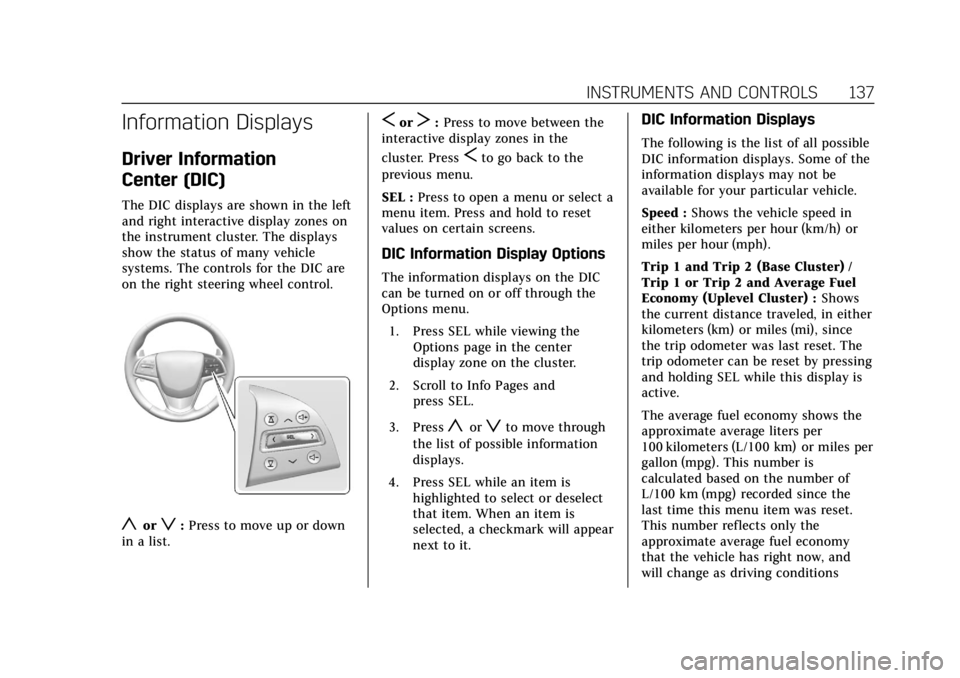
systems. The controls for the DIC are
on the right steering wheel control.
yorz:Press to move up or down
in a list.
SorT: Press to move between the
interactive display zones in the
cluster. Press
Sto go back to the
previous menu.
SEL : Press to open a menu or select a
menu item. Press and hold to reset
values on certain screens.
DIC Information Display Options
The information displays on the DIC
can be turned on or off through the
Options menu.
1. Press SEL while viewing the Options page in the center
display zone on the cluster.
2. Scroll to Info Pages and press SEL.
3. Press
yorzto move through
the list of possible information
displays.
4. Press SEL while an item is highlighted to select or deselect
that item. When an item is
selected, a checkmark will appear
next to it.
DIC Information Displays
The following is the list of all possible
DIC information displays. Some of the
information displays may not be
available for your particular vehicle.
Speed : Shows the vehicle speed in
either kilometers per hour (km/h) or
miles per hour (mph).
Trip 1 and Trip 2 (Base Cluster) /
Trip 1 or Trip 2 and Average Fuel
Economy (Uplevel Cluster) : Shows
the current distance traveled, in either
kilometers (km) or miles (mi), since
the trip odometer was last reset. The
trip odometer can be reset by pressing
and holding SEL while this display is
active.
The average fuel economy shows the
approximate average liters per
100 kilometers (L/100 km) or miles per
gallon (mpg). This number is
calculated based on the number of
L/100 km (mpg) recorded since the
last time this menu item was reset.
This number reflects only the
approximate average fuel economy
that the vehicle has right now, and
will change as driving conditions
Page 141 of 394
Cadillac CTS/CTS-V Owner Manual (GMNA-Localizing-U.S./Canada/Mexico-
11349156) - 2018 - CRC - 9/29/17
140 INSTRUMENTS AND CONTROLS
Head-Up Display (HUD)
{Warning
If the HUD image is too bright or
too high in your field of view, it
may take you more time to see
things you need to see when it is
dark outside. Be sure to keep the
HUD image dim and placed low in
your field of view.
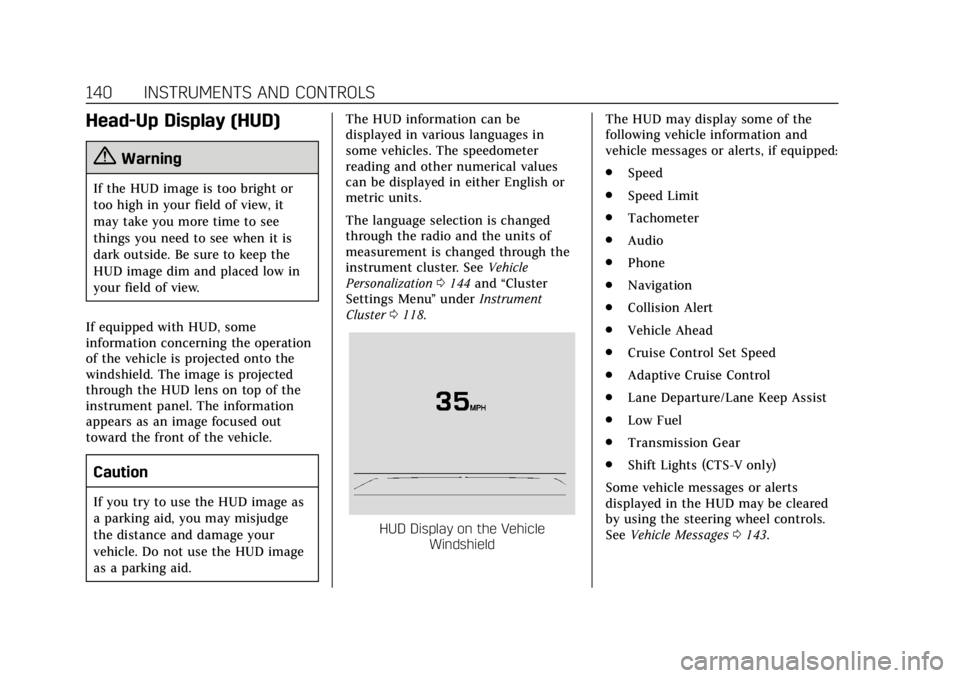
If equipped with HUD, some
information concerning the operation
of the vehicle is projected onto the
windshield. The image is projected
through the HUD lens on top of the
instrument panel. The information
appears as an image focused out
toward the front of the vehicle.
Caution
If you try to use the HUD image as
a parking aid, you may misjudge
the distance and damage your
vehicle. Do not use the HUD image
as a parking aid. The HUD information can be
displayed in various languages in
some vehicles. The speedometer
reading and other numerical values
can be displayed in either English or
metric units.
The language selection is changed
through the radio and the units of
measurement is changed through the
instrument cluster. See
Vehicle
Personalization 0144 and “Cluster
Settings Menu ”under Instrument
Cluster 0118.
HUD Display on the Vehicle
Windshield The HUD may display some of the
following vehicle information and
vehicle messages or alerts, if equipped:
.
Speed
. Speed Limit
. Tachometer
. Audio
. Phone
. Navigation
. Collision Alert
. Vehicle Ahead
. Cruise Control Set Speed
. Adaptive Cruise Control
. Lane Departure/Lane Keep Assist
. Low Fuel
. Transmission Gear
. Shift Lights (CTS-V only)
Some vehicle messages or alerts
displayed in the HUD may be cleared
by using the steering wheel controls.
See Vehicle Messages 0143.
Page 142 of 394

Cadillac CTS/CTS-V Owner Manual (GMNA-Localizing-U.S./Canada/Mexico-
11349156) - 2018 - CRC - 9/29/17
INSTRUMENTS AND CONTROLS 141
The HUD control is to the left of the
steering wheel.
To adjust the HUD image:1. Adjust the driver seat.
2. Start the engine.
3. Use the following settings to adjust the HUD.
$:Press down or lift up to center
the HUD image. The HUD image can
only be adjusted up and down, not
side to side.
!: Press to select the display view.
Each press will change the
display view.
D: Lift up and hold to brighten the
display. Press down and hold to dim
the display. Hold down to turn the
display off. The HUD image will automatically
dim and brighten to compensate for
outside lighting. The HUD brightness
control can also be adjusted as
needed.
The HUD image can temporarily light
up depending on the angle and
position of the sunlight on the HUD
display. This is normal.
Polarized sunglasses could make the
HUD image harder to see.
Head-Up Display (HUD) Rotation
Option
This feature allows for adjusting the
angle of the HUD image.
Press SEL on the steering wheel
controls while Head-up Display is
highlighted in the Options menu to
enter Main View. From the Main View,
press SEL to enter the Adjust Menu.
Press
yorzto adjust the angle of
the HUD display. Press
SorTto
highlight OK, then press SEL to save
the setting. CANCEL can also be
selected to cancel the setting. The
vehicle must be in P (Park). See
Instrument Cluster 0118. HUD Views
There are four views in the HUD.
Some vehicle information and vehicle
messages or alerts may be displayed
in any view.
Metric
English
Speed View : This display gives the
speedometer reading (in English or
metric units), speed limit, Adaptive
Cruise Control, Set Speed, Lane
Departure Warning/Lane Keep Assist,
and Vehicle Ahead indicator. Some
information only appears on vehicles
that have these features, and when
they are active.
Page 148 of 394

Cadillac CTS/CTS-V Owner Manual (GMNA-Localizing-U.S./Canada/Mexico-
11349156) - 2018 - CRC - 9/29/17
INSTRUMENTS AND CONTROLS 147
.Easy Exit Options
. Chime Volume
. Reverse Tilt Mirror
. Rain Sense Wipers
Auto Memory Recall
This feature automatically recalls the
current driver’s previously stored 1 or
2 button positions when the ignition
is changed from off to on or ACC/
ACCESSORY. See Memory Seats062.
Touch Off or On.
Easy Exit Options
This feature automatically recalls the
previously stored exit button position
when exiting the vehicle. See Memory
Seats 062.
Touch Off or On.
Chime Volume
This setting determines the chime
volume level.
Touch the controls on the
infotainment display to adjust the
volume. Reverse Tilt Mirror
When on, both the driver and
passenger, driver, or passenger outside
mirrors will tilt downward when the
vehicle is shifted to R (Reverse) to
improve visibility of the ground near
the rear wheels. They will return to
their previous driving position when
the vehicle is shifted out of
R (Reverse) or the engine is turned off.
See
Reverse Tilt Mirrors 048.
Touch Off, On - Driver and Passenger,
On - Driver, or On - Passenger.
Rain Sense Wipers
This setting automatically turns on
the wipers when moisture is detected
and the wiper switch is in
intermittent mode.
Touch Disabled or Enabled.
Lighting
Touch and the following may display:
. Vehicle Locator Lights
. Exit Lighting Vehicle Locator Lights
This setting flashes the vehicle’s
headlamps when
Kis pressed on the
Remote Keyless Entry (RKE)
transmitter.
Touch Off or On.
Exit Lighting
This setting specifies how long the
headlamps stay on after the vehicle is
turned off and exited.
Touch Off, 30 Seconds, 60 Seconds,
or 120 Seconds.
Power Door Locks
Touch and the following may display:
. Open Door Anti Lock Out
. Auto Door Unlock
. Delayed Door Lock
Open Door Anti Lock Out
This setting prevents the driver door
from locking when the door is open.
If this setting is on, the Delayed Door
Lock menu will not be available.
Touch Off or On.
Page 159 of 394

Cadillac CTS/CTS-V Owner Manual (GMNA-Localizing-U.S./Canada/Mexico-
11349156) - 2018 - CRC - 9/29/17
158 LIGHTING
Interior Lighting
Instrument Panel
Illumination Control
The brightness of the instrument
panel lighting and steering wheel
controls can be adjusted.
D:Move the thumbwheel up or
down to brighten or dim the lights.
The brightness of the displays
automatically adjusts based on
outdoor lighting. The instrument
panel illumination control will set the
lowest level to which the displays will
automatically be adjusted.
Courtesy Lamps
The courtesy lamps come on when
any door is opened and the dome
lamp is in the DOOR position.
Dome Lamps
To change the dome lamp settings,
press the following:
OFF : Turns the lamp off, even when a
door is open.
DOOR : The lamp comes on when a
door is opened.
ON : Turns the lamp on.
Reading Lamps
There are front and rear reading
lamps on the overhead console and
over the rear passenger doors. These
lamps come on when any door is
opened.
To manually turn the reading lamps
on or off:
Pressmornnext to each overhead
console reading lamp.
Page 175 of 394
Cadillac CTS/CTS-V Owner Manual (GMNA-Localizing-U.S./Canada/Mexico-
11349156) - 2018 - CRC - 9/29/17
174 CLIMATE CONTROLS
Manual Operation
Fan Controls :Press or press and
hold
A yorz Aon the rear
climate controls to increase or
decrease the rear climate airf low.
M/N: Touch or pressMorNon the rear climate display or the rear
climate controls to increase or
decrease the rear passenger
temperature.
Y/[/\:TouchY,[,\on
the rear climate display or press
MODE on the rear climate controls to
change the direction of the airf low in
the rear seating area.
MorL: If equipped, pressMorLto heat the left or right outboard seat
cushion. See Heated Rear Seats 068.
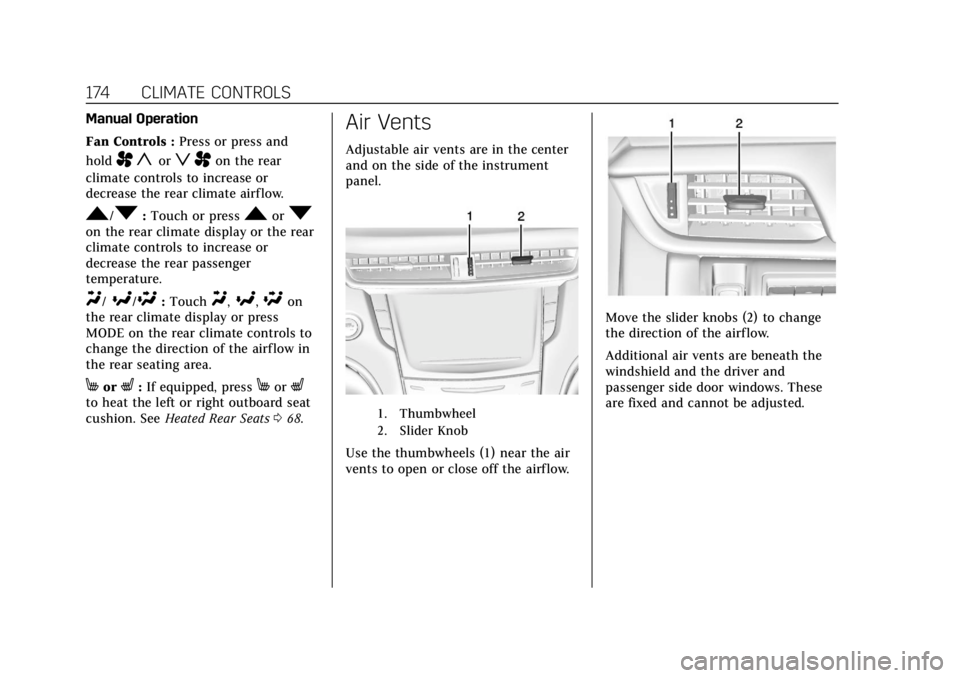
Air Vents
Adjustable air vents are in the center
and on the side of the instrument
panel.
1. Thumbwheel
2. Slider Knob
Use the thumbwheels (1) near the air
vents to open or close off the airflow.
Move the slider knobs (2) to change
the direction of the airf low.
Additional air vents are beneath the
windshield and the driver and
passenger side door windows. These
are fixed and cannot be adjusted.
Page 177 of 394
Cadillac CTS/CTS-V Owner Manual (GMNA-Localizing-U.S./Canada/Mexico-
11349156) - 2018 - CRC - 9/29/17
176 DRIVING AND OPERATING
Driving and
Operating
Driving Information
Distracted Driving . . . . . . . . . . . . . . . . 177
Defensive Driving . . . . . . . . . . . . . . . . 178
Drunk Driving . . . . . . . . . . . . . . . . . . . . 178
Control of a Vehicle . . . . . . . . . . . . . . 178
Braking . . . . . . . . . . . . . . . . . . . . . . . . . . . . 178
Steering . . . . . . . . . . . . . . . . . . . . . . . . . . . 179
Off-Road Recovery . . . . . . . . . . . . . . . . 179
Loss of Control . . . . . . . . . . . . . . . . . . . 180
Track Events and CompetitiveDriving . . . . . . . . . . . . . . . . . . . . . . . . . . 180
Driving on Wet Roads . . . . . . . . . . . 185
Hill and Mountain Roads . . . . . . . . 185
Winter Driving . . . . . . . . . . . . . . . . . . . . 186
If the Vehicle Is Stuck . . . . . . . . . . . 187
Vehicle Load Limits . . . . . . . . . . . . . . 188
Starting and Operating
New Vehicle Break-In . . . . . . . . . . . . 191
Composite Materials . . . . . . . . . . . . . 192
Ignition Positions . . . . . . . . . . . . . . . . 192
Starting the Engine . . . . . . . . . . . . . . 194
Engine Heater . . . . . . . . . . . . . . . . . . . . 196
Retained Accessory Power (RAP) . . . . . . . . . . . . . . . . . . . . 197 Shifting Into Park . . . . . . . . . . . . . . . . 197
Shifting out of Park . . . . . . . . . . . . . . 198
Parking over Things
That Burn . . . . . . . . . . . . . . . . . . . . . . . 199
Extended Parking . . . . . . . . . . . . . . . . . 199
Engine Exhaust
Engine Exhaust . . . . . . . . . . . . . . . . . . . 199
Running the Vehicle While
Parked . . . . . . . . . . . . . . . . . . . . . . . . . . . 200
Automatic Transmission
Automatic Transmission . . . . . . . . . 200
Manual Mode . . . . . . . . . . . . . . . . . . . . . 202
Drive Systems
All-Wheel Drive . . . . . . . . . . . . . . . . . . 203
Brakes
Antilock Brake System (ABS) . . . . 204
Electric Parking Brake . . . . . . . . . . . . 204
Brake Assist . . . . . . . . . . . . . . . . . . . . . . . 206
Hill Start Assist (HSA) . . . . . . . . . . . 206
Ride Control Systems
Traction Control/ElectronicStability Control . . . . . . . . . . . . . . . . 206
Driver Mode Control . . . . . . . . . . . . . 208
Competitive Driving Mode (V-Sport Only) . . . . . . . . . . . . . . . . . . 211
Limited-Slip Differential . . . . . . . . . 214
Cruise Control
Cruise Control . . . . . . . . . . . . . . . . . . . . 214
Adaptive Cruise Control . . . . . . . . . 217
Driver Assistance Systems
Driver Assistance Systems . . . . . . . 225
Assistance Systems for Parking or Backing . . . . . . . . . . . . . . . . . . . . . . . 226
Assistance Systems for Driving . . . . . . . . . . . . . . . . . . . . . . . . . . 232
Forward Collision Alert (FCA) System . . . . . . . . . . . . . . . . . . . . . . . . . . 232
Forward Automatic Braking (FAB) . . . . . . . . . . . . . . . . . . . 235
Side Blind Zone Alert (SBZA) . . . . 236
Lane Change Alert (LCA) . . . . . . . . 236
Lane Departure Warning (LDW) . . . . . . . . . . . . . . . . . 238
Lane Keep Assist (LKA) . . . . . . . . . . 239
Vehicle-to-Vehicle . . . . . . . . . . . . . . . . 240
Fuel
Fuel . . . . . . . . . . . . . . . . . . . . . . . . . . . . . . . 242
California Fuel Requirements . . . . 243
Fuels in Foreign Countries . . . . . . . 244
Fuel Additives . . . . . . . . . . . . . . . . . . . . 244
Filling the Tank . . . . . . . . . . . . . . . . . . 244
Filling a Portable Fuel Container . . . . . . . . . . . . . . . . . . . . . . . . 246
Page 181 of 394

Cadillac CTS/CTS-V Owner Manual (GMNA-Localizing-U.S./Canada/Mexico-
11349156) - 2018 - CRC - 9/29/17
180 DRIVING AND OPERATING
1. Ease off the accelerator and then,if there is nothing in the way,
steer the vehicle so that it
straddles the edge of the
pavement.
2. Turn the steering wheel about one-eighth of a turn, until the
right front tire contacts the
pavement edge.
3. Turn the steering wheel to go straight down the roadway.
Loss of Control
Skidding
There are three types of skids that
correspond to the vehicle's three
control systems:
.Braking Skid —wheels are not
rolling.
. Steering or Cornering Skid —too
much speed or steering in a curve
causes tires to slip and lose
cornering force.
. Acceleration Skid —too much
throttle causes the driving wheels
to spin. Defensive drivers avoid most skids by
taking reasonable care suited to
existing conditions, and by not
overdriving those conditions. But
skids are always possible.
If the vehicle starts to slide, follow
these suggestions:
.
Ease your foot off the accelerator
pedal and steer the way you want
the vehicle to go. The vehicle may
straighten out. Be ready for a
second skid if it occurs.
. Slow down and adjust your driving
according to weather conditions.
Stopping distance can be longer
and vehicle control can be affected
when traction is reduced by water,
snow, ice, gravel, or other material
on the road. Learn to recognize
warning clues —such as enough
water, ice, or packed snow on
the road to make a mirrored
surface —and slow down when
you have any doubt.
. Try to avoid sudden steering,
acceleration, or braking, including
reducing vehicle speed by shifting to a lower gear. Any sudden
changes could cause the tires to
slide.
Remember: Antilock brakes help avoid
only the braking skid.
Track Events and
Competitive Driving
{Danger
High-performance features are
intended for use only on closed
tracks by experienced and qualified
drivers and should not be used on
public roads. High-speed driving,
aggressive cornering, hard braking,
and other high-performance driving
can be dangerous. Improper driver
inputs for the conditions may result
in loss of control of the vehicle,
which could injure or kill you or
others. Always drive safely.
Track events and competitive driving
may affect the vehicle warranty. See
the warranty manual before using the
vehicle for competitive driving.
Page 189 of 394

Cadillac CTS/CTS-V Owner Manual (GMNA-Localizing-U.S./Canada/Mexico-
11349156) - 2018 - CRC - 9/29/17
188 DRIVING AND OPERATING
pedal when the transmission is in
gear. Slowly spinning the wheels in
the forward and reverse directions
causes a rocking motion that could
free the vehicle. If that does not get
the vehicle out after a few tries, it
might need to be towed out. If the
vehicle does need to be towed out, see
Towing the Vehicle0325.
Vehicle Load Limits
It is very important to know how
much weight the vehicle can carry.
This weight is called the vehicle
capacity weight and includes the
weight of all occupants, cargo, and
all nonfactory-installed options.
Two labels on the vehicle may
show how much weight it may
properly carry: the Tire and
Loading Information label and the
Certification label.
{Warning
Do not load the vehicle any
heavier than the Gross Vehicle
Weight Rating (GVWR),
or either the maximum front or
rear Gross Axle Weight Rating
(GAWR). This can cause
systems to break and change
the way the vehicle handles.
This could cause loss of control
and a crash. Overloading can
also reduce stopping distance,
damage the tires, and shorten
the life of the vehicle. Tire and Loading Information
Label
Label Example
A vehicle-specific Tire and
Loading Information label is
attached to the vehicle's center
pillar (B-pillar). The Tire and
Loading Information label shows
the number of occupant seating
positions (1), and the maximum
vehicle capacity weight (2) in
kilograms and pounds.