seats CADILLAC CTS 2018 Manual PDF
[x] Cancel search | Manufacturer: CADILLAC, Model Year: 2018, Model line: CTS, Model: CADILLAC CTS 2018Pages: 394, PDF Size: 6.48 MB
Page 161 of 394

Cadillac CTS/CTS-V Owner Manual (GMNA-Localizing-U.S./Canada/Mexico-
11349156) - 2018 - CRC - 9/29/17
160 LIGHTING
When the battery's state of charge is
low, the voltage is raised slightly to
quickly bring the charge back up.
When the state of charge is high, the
voltage is lowered slightly to prevent
overcharging. If the vehicle has a
voltmeter gauge or a voltage display
on the Driver Information Center
(DIC), you may see the voltage move
up or down. This is normal. If there is
a problem, an alert will be displayed.
The battery can be discharged at idle
if the electrical loads are very high.
This is true for all vehicles. This is
because the generator (alternator)
may not be spinning fast enough at
idle to produce all the power that is
needed for very high electrical loads.
A high electrical load occurs when
several of the following are on, such
as: headlamps, high beams, fog lamps,
rear window defogger, climate control
fan at high speed, heated seats, engine
cooling fans, and loads plugged into
accessory power outlets.
EPM works to prevent excessive
discharge of the battery. It does this
by balancing the generator's output
and the vehicle's electrical needs.It can increase engine idle speed to
generate more power, whenever
needed. It can temporarily reduce the
power demands of some accessories.
Normally, these actions occur in steps
or levels, without being noticeable. In
rare cases at the highest levels of
corrective action, this action may be
noticeable to the driver. If so, a DIC
message might be displayed. If a
battery message is displayed, it is
recommended that the driver reduce
the electrical loads as much as
possible. See
Driver Information Center
(DIC) 0137.
Battery Power Protection
The battery saver feature is designed
to protect the vehicle's battery.
If some interior lamps are left on and
the ignition is turned off, the battery
rundown protection system
automatically turns the lamp off after
some time.
Exterior Lighting Battery
Saver
The exterior lamps turn off about
10 minutes after the ignition is turned
off, if the parking lamps or headlamps
have been manually left on. This
protects against draining the battery.
To restart the 10-minute timer, turn
the exterior lamp control to the
O
position and then back to the;
or2position.
To keep the lamps on for more than
10 minutes, the ignition must be on or
in ACC/ACCESSORY.
Page 168 of 394
Cadillac CTS/CTS-V Owner Manual (GMNA-Localizing-U.S./Canada/Mexico-
11349156) - 2018 - CRC - 9/29/17
CLIMATE CONTROLS 167
Climate Controls
Climate Control Systems
Dual Automatic Climate ControlSystem . . . . . . . . . . . . . . . . . . . . . . . . . . 167
Rear Climate Control System . . . . 172
Air Vents
Air Vents . . . . . . . . . . . . . . . . . . . . . . . . . . 174
Maintenance
Passenger Compartment Air Filter . . . . . . . . . . . . . . . . . . . . . . . . . . . . . 175
Service . . . . . . . . . . . . . . . . . . . . . . . . . . . . 175
Climate Control Systems
Dual Automatic Climate Control System
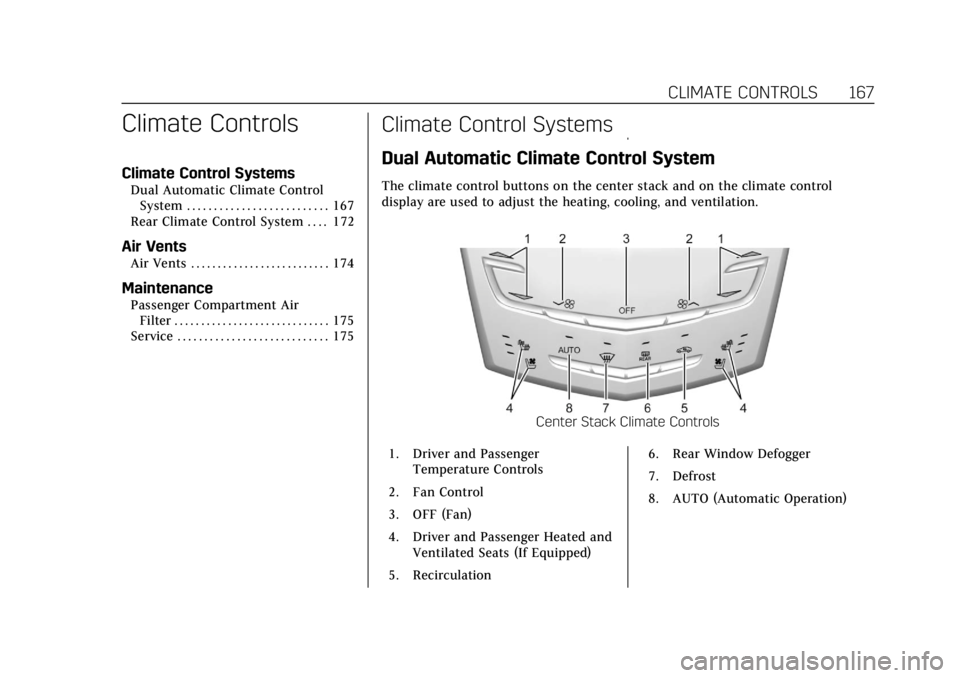
The climate control buttons on the center stack and on the climate control
display are used to adjust the heating, cooling, and ventilation.
Center Stack Climate Controls
1. Driver and Passenger Temperature Controls
2. Fan Control
3. OFF (Fan)
4. Driver and Passenger Heated and Ventilated Seats (If Equipped)
5. Recirculation 6. Rear Window Defogger
7. Defrost
8. AUTO (Automatic Operation)
Page 172 of 394
Cadillac CTS/CTS-V Owner Manual (GMNA-Localizing-U.S./Canada/Mexico-
11349156) - 2018 - CRC - 9/29/17
CLIMATE CONTROLS 171
Rear Window Defogger
K:Press to turn the rear window
defogger on or off. An indicator light
on the button comes on to show that
the rear window defogger is on. The
rear window defogger only works
when the engine is running.
The rear window defogger turns off
automatically after about 15 minutes.
At higher vehicle speeds, the rear
window defogger may stay on
continuously.
The rear window defogger can be set
to automatic operation. See “Climate
and Air Quality” underVehicle
Personalization 0144. When Auto Rear
Defog is selected, the rear window
defogger turns on automatically when
the interior temperature is about 4 °C
(40 °F) and below.
The upper gridlines on the rear
window are antenna lines and are not
intended to heat when the defogger is
activated.
The heated outside mirrors turn on
when the rear window defogger
button is on and help to clear fog or
frost from the surface of the mirrors.Caution
Do not try to clear frost or other
material from the inside of the
front windshield and rear window
with a razor blade or anything else
that is sharp. This may damage the
rear window defogger grid and
affect the radio's ability to pick up
stations clearly. The repairs would
not be covered by the vehicle
warranty.
Driver and Passenger Heated and
Ventilated Seats : If equipped, press
Jorzto heat the driver or
passenger seat cushion and seatback.
Press
Cor{to ventilate the driver
or passenger seat.
The vehicle also has auto heated and
ventilated seats that turn on when the
vehicle is on. The seats will activate at
the level required by the vehicle’s
interior temperature. Use the manual
heated or ventilated seat buttons on
the center stack to turn auto heated
or ventilated seats off. The auto heated and ventilated seat feature
can be turned on or off.
See
Vehicle Personalization 0144 and
Heated and Ventilated Seats 014.
Remote Start Climate Control
Operation : If equipped with the
remote start feature, the climate
control system may run when the
vehicle is started remotely. The system
uses the driver’s previous settings to
heat or cool the inside of the vehicle.
The rear window defogger may come
on during remote start based on cold
ambient conditions. The rear window
defogger indicator light does not come
on during a remote start.
If equipped, the heated seats will turn
on if it is cold outside or the
ventilated seats will turn on if it is hot
outside. The heated and ventilated
seat indicator lights may not come on
during a remote start. If equipped, the
heated steering wheel will come on in
a remote start if it is cold outside. The
heated steering wheel indicator light
may not come on. See Remote Vehicle
Start 037 and Heated and Ventilated
Seats 014.
Page 173 of 394
Cadillac CTS/CTS-V Owner Manual (GMNA-Localizing-U.S./Canada/Mexico-
11349156) - 2018 - CRC - 9/29/17
172 CLIMATE CONTROLS
Sensor
The solar sensor, on top of the
instrument panel near the windshield,
monitors the solar heat.
The climate control system uses the
sensor information to adjust the
temperature, fan speed, recirculation,
and air delivery mode for best
comfort.
If the sensor is covered, the automatic
climate control system may not work
properly.Air Quality Sensor
If equipped with an air quality sensor,
the climate control system adjusts to
limit some exhaust fumes from being
pulled inside the vehicle.
Touch or press AUTO on the display
or center stack to activate the air
quality sensor. Recirculation is
automatically selected when poor
quality air is detected. The air quality
sensor will not maintain recirculation
for an extended period to prevent the
air inside the vehicle from becoming
too dry or stuffy.
Under certain conditions, the air
quality sensor will not activate, such
as during cold weather or with
extreme odors. Touch or press
@to
activate recirculation.
The air quality sensor system does not
protect against carbon monoxide (CO),
which you cannot see or smell. See
Engine Exhaust 0199. The air quality
sensor operation can be adjusted. See
“Climate and Air Quality” under
Vehicle Personalization 0144.
Rear Climate Control
System
If equipped, the rear climate control
system is on the rear of the center
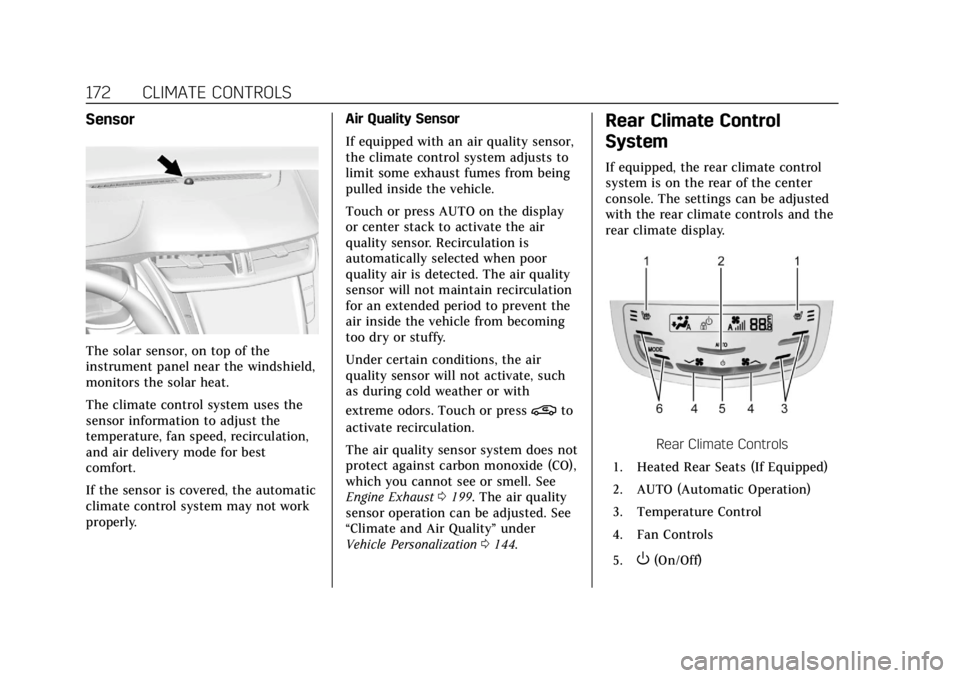
console. The settings can be adjusted
with the rear climate controls and the
rear climate display.
Rear Climate Controls
1. Heated Rear Seats (If Equipped)
2. AUTO (Automatic Operation)
3. Temperature Control
4. Fan Controls
5.
O(On/Off)
Page 175 of 394
Cadillac CTS/CTS-V Owner Manual (GMNA-Localizing-U.S./Canada/Mexico-
11349156) - 2018 - CRC - 9/29/17
174 CLIMATE CONTROLS
Manual Operation
Fan Controls :Press or press and
hold
A yorz Aon the rear
climate controls to increase or
decrease the rear climate airf low.
M/N: Touch or pressMorNon the rear climate display or the rear
climate controls to increase or
decrease the rear passenger
temperature.
Y/[/\:TouchY,[,\on
the rear climate display or press
MODE on the rear climate controls to
change the direction of the airf low in
the rear seating area.
MorL: If equipped, pressMorLto heat the left or right outboard seat
cushion. See Heated Rear Seats 068.
Air Vents
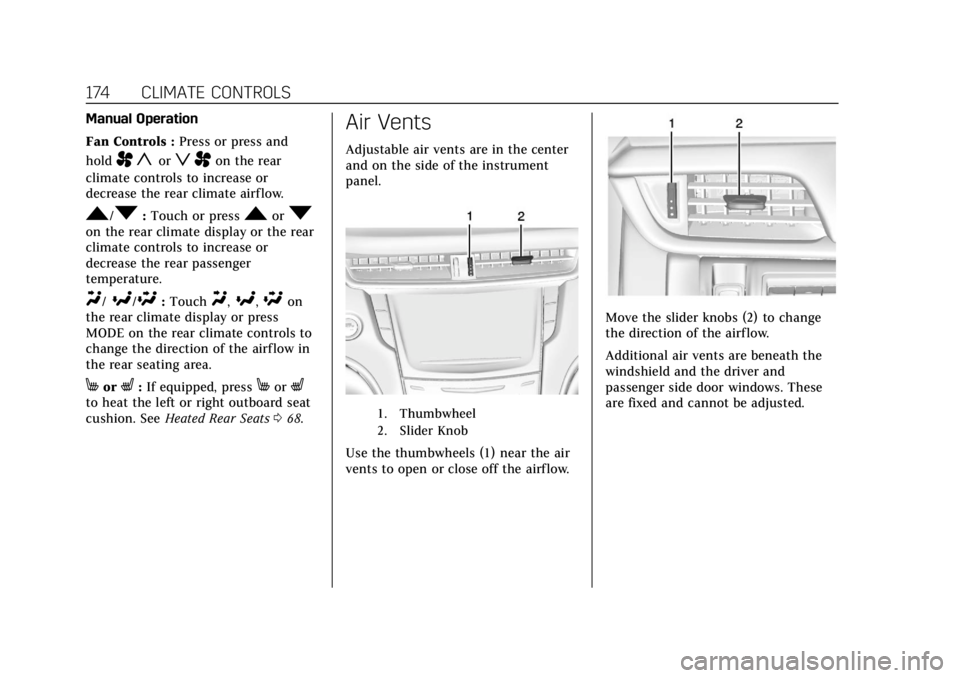
Adjustable air vents are in the center
and on the side of the instrument
panel.
1. Thumbwheel
2. Slider Knob
Use the thumbwheels (1) near the air
vents to open or close off the airflow.
Move the slider knobs (2) to change
the direction of the airf low.
Additional air vents are beneath the
windshield and the driver and
passenger side door windows. These
are fixed and cannot be adjusted.
Page 176 of 394
Cadillac CTS/CTS-V Owner Manual (GMNA-Localizing-U.S./Canada/Mexico-
11349156) - 2018 - CRC - 9/29/17
CLIMATE CONTROLS 175
Operation Tips
.Clear away any ice, snow, or leaves
from air inlets at the base of the
windshield that could block the
flow of air into the vehicle.
. Clear snow off the hood to
improve visibility and help
decrease moisture drawn into the
vehicle.
. Keep the path under the front
seats clear of objects to help
circulate the air inside of the
vehicle more effectively.
. Use of non-GM approved hood
deflectors can adversely affect the
performance of the system. Check
with your dealer before adding
equipment to the outside of the
vehicle.
. Do not attach any devices to the
air vent slats. This restricts airflow
and may cause damage to the air
vents.Maintenance
Passenger Compartment
Air Filter
The filter reduces dust, pollen, and
other airborne irritants from outside
air that is pulled into the vehicle. The
filter should be replaced as part of
routine scheduled maintenance. See
Maintenance Schedule 0339.
See your dealer regarding replacement
of the filter.
Service
All vehicles have a label underhood
that identifies the refrigerant used in
the vehicle. The refrigerant system
should only be serviced by trained and
certified technicians. The air
conditioning evaporator should never
be repaired or replaced by one from a
salvage vehicle. It should only be
replaced by a new evaporator to
ensure proper and safe operation. During service, all refrigerants should
be reclaimed with proper equipment.
Venting refrigerants directly to the
atmosphere is harmful to the
environment and may also create
unsafe conditions based on inhalation,
combustion, frostbite, or other
health-based concerns.
Page 192 of 394

Cadillac CTS/CTS-V Owner Manual (GMNA-Localizing-U.S./Canada/Mexico-
11349156) - 2018 - CRC - 9/29/17
DRIVING AND OPERATING 191
weight of the driver, passengers,
and cargo should never exceed the
vehicle's capacity weight.
Certification Label
Label Example
A vehicle-specific Certification
label is attached to the vehicle's
center pillar (B-pillar). The label
may show the gross weight
capacity of the vehicle, called the
Gross Vehicle Weight Rating
(GVWR). The GVWR includes the
weight of the vehicle, all
occupants, fuel, and cargo.
{Warning
Things inside the vehicle can
strike and injure people in a
sudden stop or turn, or in a
crash.
.Put things in the cargo
area of the vehicle. In the
cargo area, put them as far
forward as possible. Try to
spread the weight evenly.
.Never stack heavier things,
like suitcases, inside the
vehicle so that some of
them are above the tops of
the seats.
.Do not leave an unsecured
child restraint in the
vehicle.
.Secure loose items in the
vehicle.
.Do not leave a seat folded
down unless needed.
Starting and Operating
New Vehicle Break-In
Follow these recommended guidelines
during the first 2 400 km (1,500 mi) of
driving this vehicle. Parts have a
break-in period and performance will
be better in the long run.
For the first 2 400 km (1,500 mi):
. Avoid full throttle starts and
abrupt stops.
. Do not exceed 4000 engine rpm.
. Avoid driving at any one constant
speed, fast or slow.
. Avoid downshifting to brake or
slow the vehicle when the engine
speed will exceed 4000 rpm.
. Do not let the engine labor. Never
lug the engine in high gear at low
speeds.
. Do not participate in track events,
sport driving schools, or similar
activities during this break-in
period.
Page 294 of 394

Cadillac CTS/CTS-V Owner Manual (GMNA-Localizing-U.S./Canada/Mexico-
11349156) - 2018 - CRC - 9/29/17
VEHICLE CARE 293
FusesUsage
26 Front ventilated seats
27 Side blind zone alert/Lane departure warning/External
object calculating module
28 Trailer/Sunshade
29 Rear heated seats
30 Semi-active damping system
31 Transfer case control module/Rear control drive
module
32 Theft module/Universal garage door opener/Rain
sensor
33 Ultrasonic parking assist
34 Radio/DVD
35 –/Exhaust valve (V-series)
36 Trailer
37 Fuel system control module Fuses
Usage
38 Fuel pump prime/Exhaust valve (V-series)
39 –
42 Memory seat module
43 Body control module 3
44 –
45 Battery regulated voltage control
46 Engine control module/ Battery
47 –
48 –
49 Trailer module
53 –
55 – Relays
Usage
17 Trailer
18 Logistics
20 Rear window defogger
40 Run crank 2 (V-series)
41 Fuel pump prime/ Run crank 2
50 Child door lock security
51 Rear closure
52 Rear closure 2
54 Door lock security
56 Fuel door
Page 300 of 394

Cadillac CTS/CTS-V Owner Manual (GMNA-Localizing-U.S./Canada/Mexico-
11349156) - 2018 - CRC - 9/29/17
VEHICLE CARE 299
diagonal or bias ply construction;
and the letter B means belted-bias
ply construction.
(5) Rim Diameter
:Diameter of
the wheel in inches.
(6) Service Description
:These
characters represent the load
index and speed rating of the tire.
The load index represents the load
carrying capacity a tire is certified
to carry. The speed rating is the
maximum speed a tire is certified
to carry a load.
Tire Terminology and
Definitions
Air Pressure:The amount of air
inside the tire pressing outward
on each square inch of the tire.
Air pressure is expressed in kPa
(kilopascal) or psi (pounds per
square inch).
Accessory Weight
:The combined
weight of optional accessories.
Some examples of optional accessories are automatic
transmission, power windows,
power seats, and air conditioning.
Aspect Ratio
:The relationship of
a tire's height to its width.
Belt
:A rubber coated layer of
cords between the plies and the
tread. Cords may be made from
steel or other reinforcing
materials.
Bead
:The tire bead contains steel
wires wrapped by steel cords that
hold the tire onto the rim.
Bias Ply Tire
:A pneumatic tire in
which the plies are laid at
alternate angles less than
90 degrees to the centerline of the
tread.
Cold Tire Pressure
:The amount
of air pressure in a tire, measured
in kPa (kilopascal) or psi (pounds
per square inch) before a tire has
built up heat from driving. See
Tire Pressure 0301. Curb Weight
:The weight of a
motor vehicle with standard and
optional equipment including the
maximum capacity of fuel, oil, and
coolant, but without passengers
and cargo.
DOT Markings
:A code molded
into the sidewall of a tire
signifying that the tire is in
compliance with the U.S.
Department of Transportation
(DOT) Motor Vehicle Safety
Standards. The DOT code includes
the Tire Identification Number
(TIN), an alphanumeric designator
which can also identify the tire
manufacturer, production plant,
brand, and date of production.
GVWR
:Gross Vehicle Weight
Rating. See Vehicle Load Limits
0 188.
GAWR FRT
:Gross Axle Weight
Rating for the front axle. See
Vehicle Load Limits 0188.
Page 383 of 394

Cadillac CTS/CTS-V Owner Manual (GMNA-Localizing-U.S./Canada/Mexico-
11349156) - 2018 - CRC - 9/29/17
382 INDEX
IndexA
Accessories and Modifications . . . . . 254
Accessory Power . . . . . . . . . . . . . . . . . . . . 197
Adaptive Cruise Control . . . . . . . . . . . . 217
Adaptive ForwardLighting (AFL) . . . . . . . . . . . . . . . . . . . . . 156
Adaptive Forward Lighting (AFL) Light . . . . . . . . . . . . . . . . . . . . . . . . 135
Add-On Electrical Equipment . . . . . . 251
Additional Information OnStar . . . . . . . . . . . . . . . . . . . . . . . . . . . . . 377
Additional Maintenance and Care . . . . . . . . . . . . . . . . . . . . . . . . . . . 345
Adjustments
Lumbar, Front Seats . . . . . . . . . . . . . . . . 60
Thigh Support . . . . . . . . . . . . . . . . . . . . . . 60
Air Cleaner/Filter, Engine . . . . . . . . . . 267
Air Conditioning . . . . . . . . . . . . . . .167, 172
Air Filter, Passenger Compartment . . . . . . . . . . . . . . . . . . . . . 175
Air Vents . . . . . . . . . . . . . . . . . . . . . . . . . . . . 174
Airbag System Check . . . . . . . . . . . . . . . . . . . . . . . . . . . . . . . . 87
How Does an Airbag Restrain? . . . . . 81
Passenger Sensing System . . . . . . . . . 82
What Makes an Airbag Inflate? . . . . 80
What Will You See after anAirbag Inflates? . . . . . . . . . . . . . . . . . . . 81 Airbag System (cont'd)
When Should an Airbag
Inflate? . . . . . . . . . . . . . . . . . . . . . . . . . . . . . 79
Where Are the Airbags? . . . . . . . . . . . . 78
Airbags Adding Equipment to theVehicle . . . . . . . . . . . . . . . . . . . . . . . . . . . . . 87
Passenger Status Indicator . . . . . . . 126
Readiness Light . . . . . . . . . . . . . . . . . . . 126
Servicing Airbag-Equipped Vehicles . . . . . . . . . . . . . . . . . . . . . . . . . . . . 86
System Check . . . . . . . . . . . . . . . . . . . . . . . 76
Alarm Vehicle Security . . . . . . . . . . . . . . . . . . . . . 44
Alert Lane Change . . . . . . . . . . . . . . . . . . . . . . 236
Side Blind Zone (SBZA) . . . . . . . . . . 236
All-Season Tires . . . . . . . . . . . . . . . . . . . . . 295
All-Wheel Drive . . . . . . . . . . . . . . . .203, 279
Antilock Brake System (ABS) . . . . . . 204
Warning Light . . . . . . . . . . . . . . . . . . . . 131
Appearance Care Exterior . . . . . . . . . . . . . . . . . . . . . . . . . . . . 329
Interior . . . . . . . . . . . . . . . . . . . . . . . . . . . . 333
Armrest Storage . . . . . . . . . . . . . . . . . . . . . 107
Assistance Systems for Driving . . . . 232
Assistance Systems for Parking and Backing . . . . . . . . . . . . . . . . . . . . . . . 226