automatic transmission CADILLAC CTS 2019 User Guide
[x] Cancel search | Manufacturer: CADILLAC, Model Year: 2019, Model line: CTS, Model: CADILLAC CTS 2019Pages: 401, PDF Size: 6.85 MB
Page 195 of 401

Cadillac CTS/CTS-V Owner Manual (GMNA-Localizing-U.S./Canada/Mexico-
12460273) - 2019 - CRC - 5/16/18
194 DRIVING AND OPERATING
Stopping the Engine/OFF (No
Indicator Lights) :When the vehicle
is stopped, press ENGINE START/
STOP once to turn the engine off.
If the vehicle is in P (Park), the
ignition will turn off, and Retained
Accessory Power (RAP) will remain
active. See Retained Accessory Power
(RAP) 0198.
If the vehicle is not in P (Park), the
ignition will return to ACC/
ACCESSORY and display a message in
the Driver Information Center (DIC).
When the vehicle is shifted into
P (Park), the ignition system will
switch to OFF.
The vehicle may have an electric
steering column lock. The lock is
activated when the vehicle is switched
to OFF and the driver door is opened.
A sound may be heard as the lock
actuates or releases. The steering
column lock may not release with the
wheels turned off center. If this
happens, the vehicle may not start.
Move the steering wheel from left to
right while attempting to start the
vehicle. If this does not work, the
vehicle needs service. Do not turn the engine off when the
vehicle is moving. This will cause a
loss of power assist in the brake and
steering systems and disable the
airbags.
If the vehicle must be shut off in an
emergency:
1. Brake using a firm and steady pressure. Do not pump the
brakes repeatedly. This may
deplete power assist, requiring
increased brake pedal force.
2. Shift the vehicle to N (Neutral). This can be done while the
vehicle is moving. After shifting
to N (Neutral), firmly apply the
brakes and steer the vehicle to a
safe location.
3. Come to a complete stop, shift to P (Park), and turn the ignition to
OFF. On vehicles with an
automatic transmission, the shift
lever must be in P (Park) to turn
the ignition switch to the OFF
position.
4. Set the parking brake. See Electric Parking Brake 0205.{Warning
Turning off the vehicle while
moving may cause loss of power
assist in the brake and steering
systems and disable the airbags.
While driving, only shut the vehicle
off in an emergency.
If the vehicle cannot be pulled over,
and must be shut off while driving,
press and hold the ENGINE START/
STOP button for longer than
two seconds, or press twice in
five seconds.
ACC/ACCESSORY (Amber Indicator
Light) : This mode allows you to use
some electrical accessories when the
engine is off.
With the ignition off, pressing the
button one time without the brake
pedal applied will place the ignition
system in ACC/ACCESSORY.
The ignition will switch from ACC/
ACCESSORY to OFF after five minutes
to prevent battery rundown.
Page 197 of 401

Cadillac CTS/CTS-V Owner Manual (GMNA-Localizing-U.S./Canada/Mexico-
12460273) - 2019 - CRC - 5/16/18
196 DRIVING AND OPERATING
Caution (Continued)
ended, can overheat and damage
the cranking motor, and drain the
battery. Wait at least 15 seconds
between each try, to let the
cranking motor cool down.
2. If the engine does not start after five to 10 seconds, especially in
very cold weather (below −18 °C
or 0 °F), it could be flooded with
too much gasoline. Try pushing
the accelerator pedal all the way
to the floor and holding it there
as you press ENGINE START/
STOP. Wait at least 15 seconds
between each try, to allow the
cranking motor to cool down.
When the engine starts, release
the accelerator. If the vehicle
starts briefly but then stops
again, do the same thing. This
clears the extra gasoline from the
engine. Do not race the engine
immediately after starting it.
Operate the engine and transmission gently until the oil
warms up and lubricates all
moving parts.
Stop/Start System
If equipped, the Stop/Start system will
shut off the engine to help conserve
fuel. It has components designed for
the increased number of starts.
{Warning
The automatic engine Stop/Start
feature causes the engine to shut
off while the vehicle is still on. Do
not exit the vehicle before shifting
to P (Park). The vehicle may restart
and move unexpectedly. Always
shift to P (Park), and then turn the
ignition off before exiting the
vehicle.
Auto Engine Stop/Start
When the brakes are applied and the
vehicle is at a complete stop, the
engine may turn off. When stopped,
the tachometer displays AUTO STOP.
See Tachometer 0123. When the brake pedal is released or the accelerator
pedal is pressed, the engine will
restart.
To maintain vehicle performance,
other conditions may cause the engine
to automatically restart before the
brake pedal is released.
Auto Stops may not occur and/or Auto
Starts may occur because:
.
The climate control settings
require the engine to be running
to cool or heat the vehicle interior.
. The vehicle battery charge is low.
. The vehicle battery has recently
been disconnected.
. Minimum vehicle speed has not
been reached since the last
Auto Stop.
. The accelerator pedal is pressed.
. The engine or transmission is not
at the required operating
temperature.
. The outside temperature is not in
the required operating range.
. The vehicle is in any gear other
than D (Drive).
Page 202 of 401
Cadillac CTS/CTS-V Owner Manual (GMNA-Localizing-U.S./Canada/Mexico-
12460273) - 2019 - CRC - 5/16/18
DRIVING AND OPERATING 201
Warning (Continued)
.There are holes or openings
in the vehicle body from
damage or aftermarket
modifications that are not
completely sealed.
If unusual fumes are detected or if
it is suspected that exhaust is
coming into the vehicle: . Drive it only with the
windows completely down.
. Have the vehicle repaired
immediately.
Never park the vehicle with the
engine running in an enclosed area
such as a garage or a building that
has no fresh air ventilation.
Running the Vehicle While
Parked
It is better not to park with the engine
running.
If the vehicle is left with the engine
running, follow the proper steps to be
sure the vehicle will not move.
See Shifting Into Park 0198 and Engine
Exhaust 0200.
If parking on a hill and pulling a
trailer, see Driving Characteristics and
Towing Tips 0248.
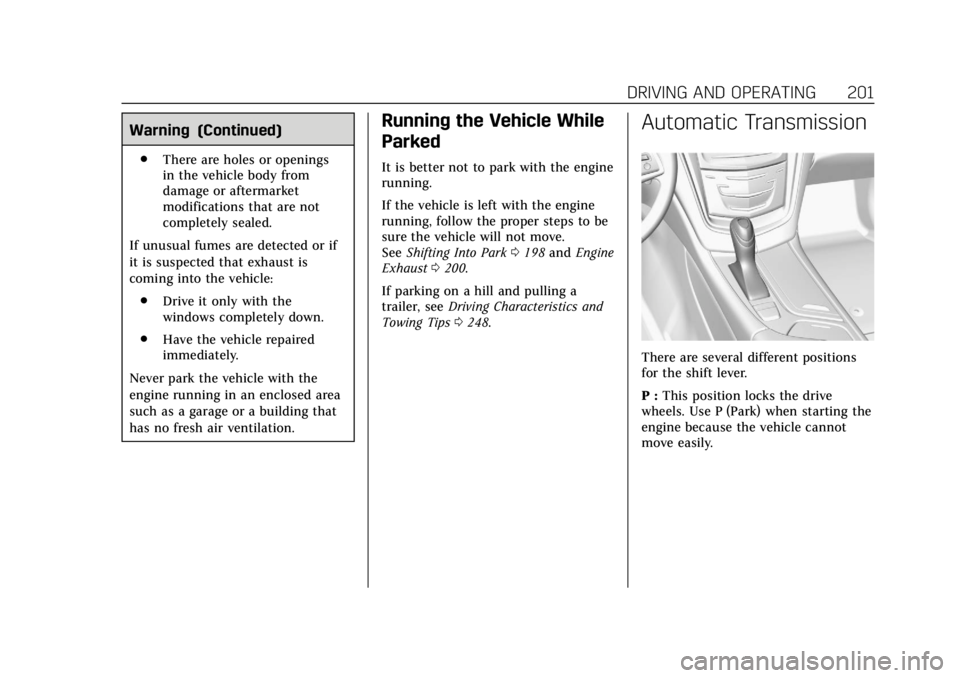
Automatic Transmission
There are several different positions
for the shift lever.
P : This position locks the drive
wheels. Use P (Park) when starting the
engine because the vehicle cannot
move easily.
Page 204 of 401
Cadillac CTS/CTS-V Owner Manual (GMNA-Localizing-U.S./Canada/Mexico-
12460273) - 2019 - CRC - 5/16/18
DRIVING AND OPERATING 203
Caution
A transmission hot message may
display if the automatic
transmission fluid is too hot.
Driving under this condition can
damage the vehicle. Stop and idle
the engine to cool the automatic
transmission fluid. This message
clears when the transmission fluid
has cooled sufficiently.
D : This position is for normal driving.
If more power is needed for passing,
press the accelerator pedal down.
Downshifting the transmission in
slippery road conditions could result
in skidding. See “Skidding”underLoss
of Control 0181.
M : This mode can be entered with
the shift lever in the D (Drive) position
by pressing the M (Manual Mode)
button on the top of the shift lever.
M (Manual Mode) allows the driver to
select gears appropriate for current
driving conditions. M (Manual Mode) can be exited with a second press of
the M (Manual Mode) button. See
Manual Mode
0203.
Caution
Spinning the tires or holding the
vehicle in one place on a hill using
only the accelerator pedal may
damage the transmission. The
repair will not be covered by the
vehicle warranty. If the vehicle is
stuck, do not spin the tires. When
stopping on a hill, use the brakes to
hold the vehicle in place.
While in Sport or Track Mode, the
vehicle monitors driving behavior, and
automatically enables Performance
Shift Features when spirited driving is
detected. These features maintain
lower transmission gears to increase
available engine braking and improve
acceleration response. The vehicle will
exit these features and return to Sport
or Track Mode normal operation after
a short period when no spirited
driving is detected. See Driver Mode
Control 0209.
Manual Mode
Tap Shift
Caution
Driving with the engine at a high
rpm without upshifting while using
Tap Shift, could damage the vehicle.
Always upshift when necessary
while using Tap Shift.
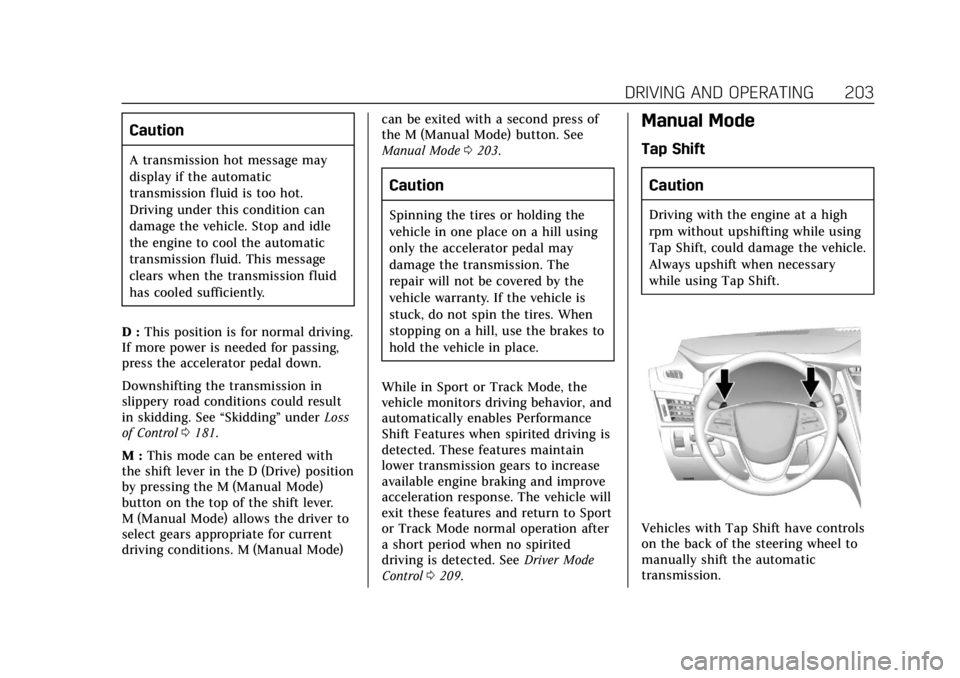
Vehicles with Tap Shift have controls
on the back of the steering wheel to
manually shift the automatic
transmission.
Page 205 of 401
Cadillac CTS/CTS-V Owner Manual (GMNA-Localizing-U.S./Canada/Mexico-
12460273) - 2019 - CRC - 5/16/18
204 DRIVING AND OPERATING
To enter Permanent Tap Shift Mode:1. With the shift lever in D (Drive), press the M (Manual Mode)
button on the top of the shift
lever. While in Tap Shift Mode,
the M of the PRNDM section of
the instrument cluster will
become highlighted, and the
current gear is indicated.
2. Tap the left control to downshift, and the right control to upshift.
To shift to the lowest available
gear, press and hold the left
control.
3. To exit, press the M (Manual Mode) button a second time.
With the shift lever in D (Drive) and
not in Permanent Tap Shift Mode, the
tap shift controls will activate a
temporary tap manual shift mode,
allowing the transmission to be
manually shifted. Automatic shifts
return after no manual shifts have
been done for seven to 10 seconds.
The Temporary Tap Shift Mode can
also be deactivated by holding the
right upshift control briefly. While using Tap Shift, the vehicle will
have firmer, quicker shifting. You can
use this for sport driving or when
climbing or descending hills, to stay in
gear longer, or to downshift for more
power or engine braking.
The transmission will only allow you
to shift into gears appropriate for the
vehicle speed and engine revolutions
per minute (rpm). The transmission
will not automatically shift to the next
lower gear if the engine rpm is too
high, nor to the next higher gear when
the maximum engine rpm is reached.
If shifting is prevented for any reason,
a SHIFT DENIED message will be
displayed in the instrument cluster.
When accelerating the vehicle from a
stop in snowy and icy conditions, it is
suggested to shift into second gear.
A higher gear allows the vehicle to
gain more traction on slippery
surfaces.Drive Systems
All-Wheel Drive
Vehicles with this feature always send
engine power to all four wheels. It is
fully automatic, and adjusts itself as
needed for road conditions.
Page 211 of 401

Cadillac CTS/CTS-V Owner Manual (GMNA-Localizing-U.S./Canada/Mexico-
12460273) - 2019 - CRC - 5/16/18
210 DRIVING AND OPERATING
Tour Mode
Use for normal city and highway
driving to provide a smooth, soft ride.
Sport Mode
Use where road conditions or personal
preference demand a more controlled
response.
When selected, the Sport Mode
indicator will display.
When in Sport or Track Mode, the
vehicle will shift automatically but
may hold a lower gear longer than it
would in the normal driving mode
based on braking, throttle input, and
vehicle lateral acceleration. See
Automatic Transmission0201. The
steering will change to provide more
precise control. If the vehicle has
Magnetic Ride Control, the suspension
will change to provide better
cornering performance.
Competitive Driving Mode (V-Sport
only) can be accessed through this
mode. See Competitive Driving Mode
(V-Sport Only) 0212.
Snow/Ice Mode
Use when more traction is needed
during slippery conditions.
Snow/Ice Mode will use a different
accelerator pedal map to optimize
traction on a slippery surface. The
accelerator pedal will reduce engine
torque at small pedal inputs.
When selected, the Snow/Ice Mode
indicator will display.
This feature is not intended for use
when the vehicle is stuck in sand,
mud, ice, snow, or gravel. If the
vehicle becomes stuck, see If the
Vehicle Is Stuck 0188.
Track Mode (V-Sport and
V-Series Only)
Use when maximum vehicle handling
is desired. For use when driving on a
closed race course or drag strip. When selected, the Track Mode
indicator will display.
When in Track Mode, the automatic
transmission and steering will
function similar to Sport Mode. The
accelerator pedal is adjusted to give
maximum control during the highest
level of spirited driving. The Magnetic
Ride Control will be set to the
optimum level for vehicle
responsiveness. Competitive Driving
Mode (V-Sport only) or Performance
Traction Management (PTM) (V-Series
only) can be accessed through this
mode. See
Competitive Driving Mode
(V-Sport Only) 0212.
There are six attributes that vary by
mode shown below. Not all vehicles
have all features, depending on the
vehicle options.
Page 219 of 401

Cadillac CTS/CTS-V Owner Manual (GMNA-Localizing-U.S./Canada/Mexico-
12460273) - 2019 - CRC - 5/16/18
218 DRIVING AND OPERATING
brake or shift to a lower gear to keep
the vehicle speed down. If the brake
pedal is applied, cruise control
disengages.
Ending Cruise Control
There are four ways to end cruise
control:
.Step lightly on the brake pedal.
. Press
*.
. Shift the transmission to
N (Neutral).
. Press
J.
Erasing Speed Memory
The cruise control set speed is erased
from memory if
Jis pressed or if
the ignition is turned off.
Adaptive Cruise Control
If equipped with Adaptive Cruise
Control (ACC), it allows the driver to
select the cruise control set speed and
following gap. Read this entire section
before using this system. The
following gap is the following time
between your vehicle and a vehicle detected directly ahead in your path
moving in the same direction. If no
vehicle is detected in your path, ACC
works like regular cruise control. ACC
uses camera and radar sensors. See
Radio Frequency Statement
0373.
If a vehicle is detected in your path,
ACC can apply acceleration or limited,
moderate braking to maintain the
selected following gap. To disengage
ACC, apply the brake. If ACC is
controlling your vehicle speed when
the Traction Control System (TCS) or
StabiliTrak/Electronic Stability Control
(ESC) system activates, the ACC may
automatically disengage. See Traction
Control/Electronic Stability Control
0 207. When road conditions allow
ACC to be safely used, the ACC can be
turned back on.
ACC will not engage if the TCS or
StabiliTrak/ESC system is disabled.
{Warning
ACC has limited braking ability and
may not have time to slow the
vehicle down enough to avoid a
collision with another vehicle you
are following. This can occur when
vehicles suddenly slow or stop
ahead, or enter your lane. Also see
“Alerting the Driver” in this section.
Complete attention is always
required while driving and you
should be ready to take action and
apply the brakes. See Defensive
Driving 0179.
{Warning
ACC will not detect or brake for
children, pedestrians, animals,
or other objects.
(Continued)
Page 250 of 401

Cadillac CTS/CTS-V Owner Manual (GMNA-Localizing-U.S./Canada/Mexico-
12460273) - 2019 - CRC - 5/16/18
DRIVING AND OPERATING 249
Warning (Continued)
inadequate for the load, the vehicle
may not stop as expected. You and
others could be seriously injured.
The vehicle may also be damaged,
and the repairs would not be
covered by the vehicle warranty.
Pull a trailer only if all the steps in
this section have been followed. Ask
your dealer for advice and
information about towing a trailer
with the vehicle.
Driving with a Trailer
Trailering is different than just driving
the vehicle by itself. Trailering means
changes in handling, acceleration,
braking, durability, and fuel economy.
Successful, safe trailering takes correct
equipment, and it has to be used
properly.
The following information has many
time-tested, important trailering tips
and safety rules. Many of these areimportant for your safety and that of
your passengers. Read this section
carefully before pulling a trailer.
When towing a trailer:
.
Become familiar with and follow
all state and local laws that apply
to trailer towing. These
requirements vary from state to
state.
. State laws may require the use of
extended side view mirrors. Even if
not required, you should install
extended side view mirrors if your
visibility is limited or restricted
while towing.
. Do not tow a trailer during the
first 800 km (500 mi) of vehicle
use to prevent damage to the
engine, axle, or other parts.
. It is recommended to perform the
first oil change before heavy
towing.
. During the first 800 km (500 mi) of
trailer towing, do not drive over
80 km/h (50 mph) and do not
make starts at full throttle. .
Vehicles can tow in D (Drive).
If the transmission downshifts too
often, a lower gear may be
selected using Manual Mode See
Manual Mode 0203.
If equipped, the following driver
assistance features should be turned
off when towing a trailer:
. Adaptive Cruise Control (ACC)
. Super Cruise Control
. Lane Keep Assist (LKA)
. Park Assist
. Automatic Parking Assist (APA)
. Reverse Automatic Braking (RAB)
If equipped, the following driver
assistance features should be turned
to alert or off when towing a trailer:
. Forward Automatic Braking
System (FAB)
. Intelligent Brake Assist (IBA)
. Front Pedestrian Braking (FPB)
If equipped with Lane Change Alert
(LCA), the LCA detection zones that
extend back from the side of the
vehicle do not move further back
Page 253 of 401
Cadillac CTS/CTS-V Owner Manual (GMNA-Localizing-U.S./Canada/Mexico-
12460273) - 2019 - CRC - 5/16/18
252 DRIVING AND OPERATING
3. When the wheel chocks are inplace, gradually release the brake
pedal to allow the chocks to
absorb the load of the trailer.
4. Reapply the brake pedal. Then apply the parking brake and shift
into P (Park).
5. Release the brake pedal.
Leaving After Parking on a Hill
1. Apply and hold the brake pedal. .Start the engine.
. Shift into a gear.
. Release the parking brake.
2. Let up on the brake pedal.
3. Drive slowly until the trailer is clear of the chocks.
4. Stop and have someone pick up and store the chocks.
Maintenance When Trailer
Towing
The vehicle needs service more often
when used to tow trailers. See
Maintenance Schedule 0345. It is
especially important to check the automatic transmission fluid, engine
oil, axle lubricant, belts, cooling
system, and brake system before and
during each trip.
Check periodically that all nuts and
bolts on the trailer hitch are tight.
Engine Cooling When Trailer
Towing
The cooling system may temporarily
overheat during severe operating
conditions. See
Engine Overheating
0 279.
Trailer Towing (V6 Engine,
Non Twin Turbo)
Caution
Towing a trailer improperly can
damage the vehicle and result in
costly repairs not covered by the
vehicle warranty. To tow a trailer
correctly, follow the directions in
this section and see your dealer for
important information about
towing a trailer with the vehicle. Trailering is different than just driving
the vehicle by itself. Trailering means
changes in handling, acceleration,
braking, durability, and fuel economy.
Successful, safe trailering takes correct
equipment, and it has to be used
properly.
The following information has many
time-tested, important trailering tips
and safety rules. Many of these are
important for your safety and that of
your passengers. Read this section
carefully before pulling a trailer.
Trailer Weight
{Warning
Never exceed the towing capacity
for your vehicle.
Safe trailering requires monitoring the
weight, speed, altitude, road grades,
outside temperature, dimensions of
the front of the trailer, and how
frequently the vehicle is used to tow a
trailer.
Page 258 of 401
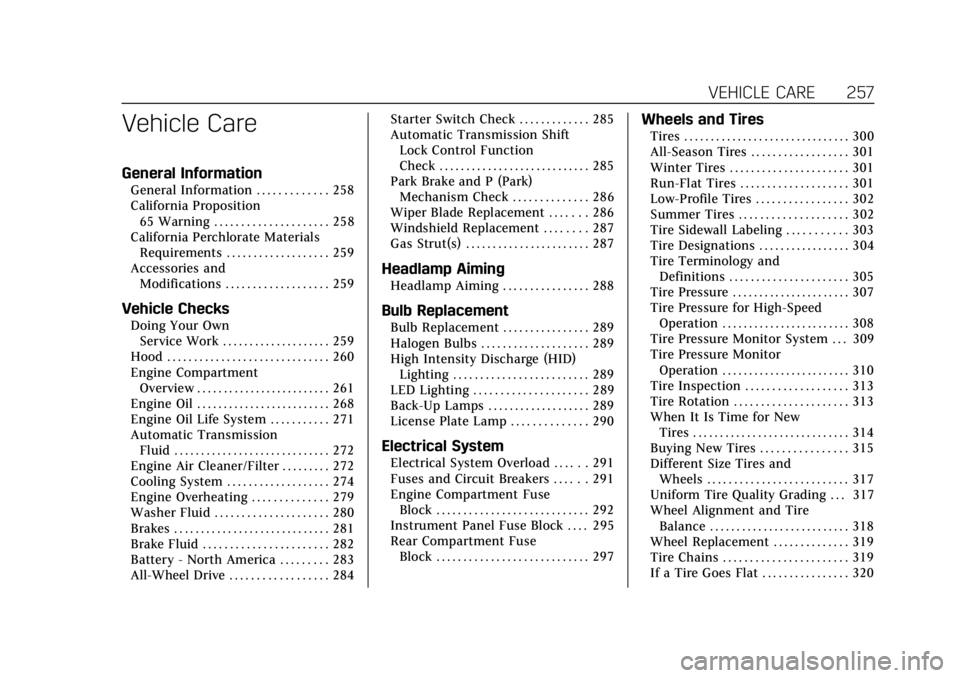
Cadillac CTS/CTS-V Owner Manual (GMNA-Localizing-U.S./Canada/Mexico-
12460273) - 2019 - CRC - 5/16/18
VEHICLE CARE 257
Vehicle Care
General Information
General Information . . . . . . . . . . . . . 258
California Proposition65 Warning . . . . . . . . . . . . . . . . . . . . . 258
California Perchlorate Materials Requirements . . . . . . . . . . . . . . . . . . . 259
Accessories and Modifications . . . . . . . . . . . . . . . . . . . 259
Vehicle Checks
Doing Your OwnService Work . . . . . . . . . . . . . . . . . . . . 259
Hood . . . . . . . . . . . . . . . . . . . . . . . . . . . . . . 260
Engine Compartment Overview . . . . . . . . . . . . . . . . . . . . . . . . . 261
Engine Oil . . . . . . . . . . . . . . . . . . . . . . . . . 268
Engine Oil Life System . . . . . . . . . . . 271
Automatic Transmission Fluid . . . . . . . . . . . . . . . . . . . . . . . . . . . . . 272
Engine Air Cleaner/Filter . . . . . . . . . 272
Cooling System . . . . . . . . . . . . . . . . . . . 274
Engine Overheating . . . . . . . . . . . . . . 279
Washer Fluid . . . . . . . . . . . . . . . . . . . . . 280
Brakes . . . . . . . . . . . . . . . . . . . . . . . . . . . . . 281
Brake Fluid . . . . . . . . . . . . . . . . . . . . . . . 282
Battery - North America . . . . . . . . . 283
All-Wheel Drive . . . . . . . . . . . . . . . . . . 284 Starter Switch Check . . . . . . . . . . . . . 285
Automatic Transmission Shift
Lock Control Function
Check . . . . . . . . . . . . . . . . . . . . . . . . . . . . 285
Park Brake and P (Park)
Mechanism Check . . . . . . . . . . . . . . 286
Wiper Blade Replacement . . . . . . . 286
Windshield Replacement . . . . . . . . 287
Gas Strut(s) . . . . . . . . . . . . . . . . . . . . . . . 287
Headlamp Aiming
Headlamp Aiming . . . . . . . . . . . . . . . . 288
Bulb Replacement
Bulb Replacement . . . . . . . . . . . . . . . . 289
Halogen Bulbs . . . . . . . . . . . . . . . . . . . . 289
High Intensity Discharge (HID) Lighting . . . . . . . . . . . . . . . . . . . . . . . . . 289
LED Lighting . . . . . . . . . . . . . . . . . . . . . 289
Back-Up Lamps . . . . . . . . . . . . . . . . . . . 289
License Plate Lamp . . . . . . . . . . . . . . 290
Electrical System
Electrical System Overload . . . . . . 291
Fuses and Circuit Breakers . . . . . . 291
Engine Compartment Fuse Block . . . . . . . . . . . . . . . . . . . . . . . . . . . . 292
Instrument Panel Fuse Block . . . . 295
Rear Compartment Fuse Block . . . . . . . . . . . . . . . . . . . . . . . . . . . . 297
Wheels and Tires
Tires . . . . . . . . . . . . . . . . . . . . . . . . . . . . . . . 300
All-Season Tires . . . . . . . . . . . . . . . . . . 301
Winter Tires . . . . . . . . . . . . . . . . . . . . . . 301
Run-Flat Tires . . . . . . . . . . . . . . . . . . . . 301
Low-Profile Tires . . . . . . . . . . . . . . . . . 302
Summer Tires . . . . . . . . . . . . . . . . . . . . 302
Tire Sidewall Labeling . . . . . . . . . . . 303
Tire Designations . . . . . . . . . . . . . . . . . 304
Tire Terminology andDefinitions . . . . . . . . . . . . . . . . . . . . . . 305
Tire Pressure . . . . . . . . . . . . . . . . . . . . . . 307
Tire Pressure for High-Speed Operation . . . . . . . . . . . . . . . . . . . . . . . . 308
Tire Pressure Monitor System . . . 309
Tire Pressure Monitor Operation . . . . . . . . . . . . . . . . . . . . . . . . 310
Tire Inspection . . . . . . . . . . . . . . . . . . . 313
Tire Rotation . . . . . . . . . . . . . . . . . . . . . 313
When It Is Time for New Tires . . . . . . . . . . . . . . . . . . . . . . . . . . . . . 314
Buying New Tires . . . . . . . . . . . . . . . . 315
Different Size Tires and Wheels . . . . . . . . . . . . . . . . . . . . . . . . . . 317
Uniform Tire Quality Grading . . . 317
Wheel Alignment and Tire Balance . . . . . . . . . . . . . . . . . . . . . . . . . . 318
Wheel Replacement . . . . . . . . . . . . . . 319
Tire Chains . . . . . . . . . . . . . . . . . . . . . . . 319
If a Tire Goes Flat . . . . . . . . . . . . . . . . 320