transmission CADILLAC CTS 2019 Owner's Guide
[x] Cancel search | Manufacturer: CADILLAC, Model Year: 2019, Model line: CTS, Model: CADILLAC CTS 2019Pages: 401, PDF Size: 6.85 MB
Page 196 of 401

Cadillac CTS/CTS-V Owner Manual (GMNA-Localizing-U.S./Canada/Mexico-
12460273) - 2019 - CRC - 5/16/18
DRIVING AND OPERATING 195
ON/RUN/START (Green Indicator
Light) :This mode is for driving and
starting. With the ignition off, and the
brake pedal applied, pressing the
button once will place the ignition
system in ON/RUN/START. Once
engine cranking begins, release the
button. Engine cranking will continue
until the engine starts. See Starting the
Engine 0195. The ignition will then
remain in ON/RUN.
Service Mode
This power mode is available for
service and diagnostics, and to verify
the proper operation of the
malfunction indicator lamp as may be
required for emission inspection
purposes. With the vehicle off, and the
brake pedal not applied, pressing and
holding the button for more than
five seconds will place the vehicle in
Service Mode. The instruments and
audio systems will operate as they do
in ON/RUN, but the vehicle will not be
able to be driven. The engine will not
start in Service Mode. Press the
button again to turn the vehicle off.Starting the Engine
Move the shift lever to P (Park) or
N (Neutral). To restart the engine
when the vehicle is already moving,
use N (Neutral) only.
Caution
Do not try to shift to P (Park) if the
vehicle is moving. If you do, you
could damage the transmission.
Shift to P (Park) only when the
vehicle is stopped.
Caution
If you add electrical parts or
accessories, you could change the
way the engine operates. Any
resulting damage would not be
covered by the vehicle warranty. See
Add-On Electrical Equipment 0255. Starting Procedure
1. With the Keyless Access system, the Remote Keyless Entry (RKE)
transmitter must be in the
vehicle. Press ENGINE START/
STOP with the brake pedal
applied. When the engine begins
cranking, let go of the button.
The idle speed will go down as
the engine gets warm. Do not
race the engine immediately
after starting it.
If the RKE transmitter is not in
the vehicle, if there is
interference, or if the RKE
battery is low, a Driver
Information Center (DIC) will
display a message. See Remote
Keyless Entry (RKE) System
Operation 029.
Caution
Cranking the engine for long
periods of time, by returning the
ignition to the START position
immediately after cranking has
(Continued)
Page 197 of 401

Cadillac CTS/CTS-V Owner Manual (GMNA-Localizing-U.S./Canada/Mexico-
12460273) - 2019 - CRC - 5/16/18
196 DRIVING AND OPERATING
Caution (Continued)
ended, can overheat and damage
the cranking motor, and drain the
battery. Wait at least 15 seconds
between each try, to let the
cranking motor cool down.
2. If the engine does not start after five to 10 seconds, especially in
very cold weather (below −18 °C
or 0 °F), it could be flooded with
too much gasoline. Try pushing
the accelerator pedal all the way
to the floor and holding it there
as you press ENGINE START/
STOP. Wait at least 15 seconds
between each try, to allow the
cranking motor to cool down.
When the engine starts, release
the accelerator. If the vehicle
starts briefly but then stops
again, do the same thing. This
clears the extra gasoline from the
engine. Do not race the engine
immediately after starting it.
Operate the engine and transmission gently until the oil
warms up and lubricates all
moving parts.
Stop/Start System
If equipped, the Stop/Start system will
shut off the engine to help conserve
fuel. It has components designed for
the increased number of starts.
{Warning
The automatic engine Stop/Start
feature causes the engine to shut
off while the vehicle is still on. Do
not exit the vehicle before shifting
to P (Park). The vehicle may restart
and move unexpectedly. Always
shift to P (Park), and then turn the
ignition off before exiting the
vehicle.
Auto Engine Stop/Start
When the brakes are applied and the
vehicle is at a complete stop, the
engine may turn off. When stopped,
the tachometer displays AUTO STOP.
See Tachometer 0123. When the brake pedal is released or the accelerator
pedal is pressed, the engine will
restart.
To maintain vehicle performance,
other conditions may cause the engine
to automatically restart before the
brake pedal is released.
Auto Stops may not occur and/or Auto
Starts may occur because:
.
The climate control settings
require the engine to be running
to cool or heat the vehicle interior.
. The vehicle battery charge is low.
. The vehicle battery has recently
been disconnected.
. Minimum vehicle speed has not
been reached since the last
Auto Stop.
. The accelerator pedal is pressed.
. The engine or transmission is not
at the required operating
temperature.
. The outside temperature is not in
the required operating range.
. The vehicle is in any gear other
than D (Drive).
Page 200 of 401
Cadillac CTS/CTS-V Owner Manual (GMNA-Localizing-U.S./Canada/Mexico-
12460273) - 2019 - CRC - 5/16/18
DRIVING AND OPERATING 199
Warning (Continued)
It is dangerous to get out of the
vehicle if the shift lever is not fully
in P (Park) with the parking brake
firmly set. The vehicle can roll.
Do not leave the vehicle when the
engine is running. If you have left
the engine running, the vehicle can
move suddenly. You or others could
be injured. To be sure the vehicle
will not move, even when you are
on fairly level ground, always set
the parking brake and move the
shift lever to P (Park). SeeShifting
Into Park 0198. If you are towing a
trailer, see Driving Characteristics
and Towing Tips 0248.
If you have to leave the vehicle with
the engine running, the vehicle must
be in P (Park) and the parking brake
set. After shifting into P (Park), try to
move the shift lever out without first
pushing the button on the shift lever.
If you can, the shift lever was not
fully locked into P (Park).
Torque Lock
Torque lock is when the weight of the
vehicle puts too much force on the
parking pawl in the transmission. This
happens when parking on a hill and
shifting the transmission into P (Park)
is not done properly and then it is
difficult to shift out of P (Park). To
prevent torque lock, set the parking
brake and then shift into P (Park). To
find out how, see "Shifting Into Park"
listed previously.
If torque lock does occur, the vehicle
may need to be pushed uphill by
another vehicle to relieve the parking
pawl pressure, so you can shift out of
P (Park).
Shifting out of Park
This vehicle is equipped with an
electronic shift lock release system.
The shift lock release is designed to
prevent movement of the shift lever
out of P (Park), unless the ignition is
on and the brake pedal is applied. The shift lock release is always
functional except in the case of an
uncharged or low voltage (less than
9 volt) battery.
If the vehicle has an uncharged
battery or a battery with low voltage,
try charging or jump starting the
battery. See
Jump Starting - North
America 0329 for more information.
To shift out of P (Park): 1. Apply the brake pedal.
2. Release the parking brake. See Electric Parking Brake 0205.
3. Press the shift lever button.
4. Move the shift lever.
If unable to shift out of P (Park): 1. Fully release the shift lever button.
2. While holding down the brake pedal, press the shift lever
button again.
3. Move the shift lever.
If the shift lever will not move from
P (Park), consult your dealer or a
professional towing service.
Page 202 of 401
Cadillac CTS/CTS-V Owner Manual (GMNA-Localizing-U.S./Canada/Mexico-
12460273) - 2019 - CRC - 5/16/18
DRIVING AND OPERATING 201
Warning (Continued)
.There are holes or openings
in the vehicle body from
damage or aftermarket
modifications that are not
completely sealed.
If unusual fumes are detected or if
it is suspected that exhaust is
coming into the vehicle: . Drive it only with the
windows completely down.
. Have the vehicle repaired
immediately.
Never park the vehicle with the
engine running in an enclosed area
such as a garage or a building that
has no fresh air ventilation.
Running the Vehicle While
Parked
It is better not to park with the engine
running.
If the vehicle is left with the engine
running, follow the proper steps to be
sure the vehicle will not move.
See Shifting Into Park 0198 and Engine
Exhaust 0200.
If parking on a hill and pulling a
trailer, see Driving Characteristics and
Towing Tips 0248.
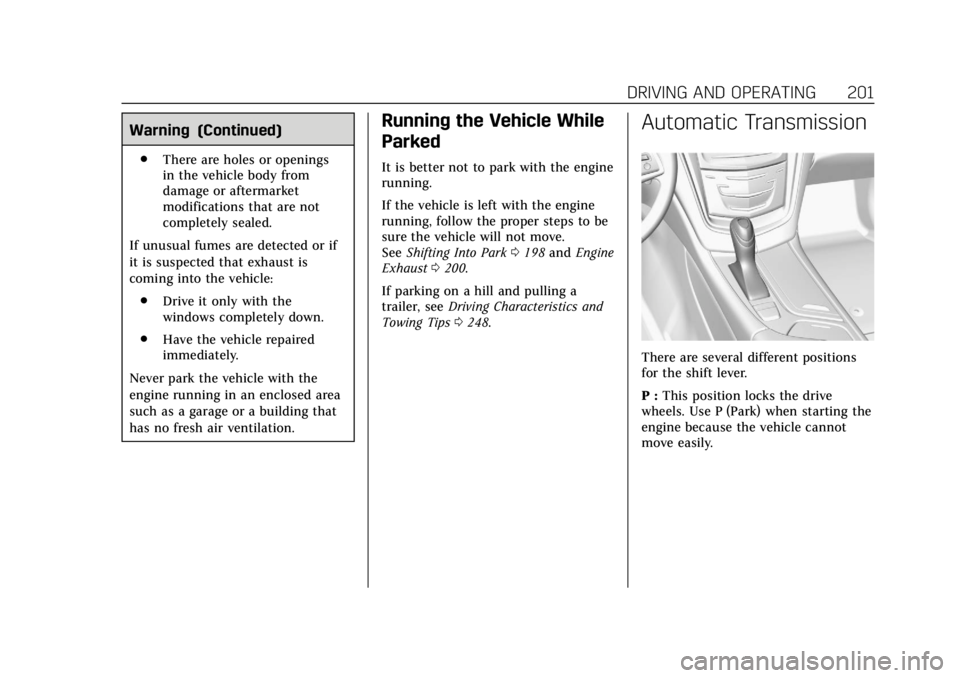
Automatic Transmission
There are several different positions
for the shift lever.
P : This position locks the drive
wheels. Use P (Park) when starting the
engine because the vehicle cannot
move easily.
Page 203 of 401
Cadillac CTS/CTS-V Owner Manual (GMNA-Localizing-U.S./Canada/Mexico-
12460273) - 2019 - CRC - 5/16/18
202 DRIVING AND OPERATING
{Warning
It is dangerous to get out of the
vehicle if the shift lever is not fully
in P (Park) with the parking brake
firmly set. The vehicle can roll.
Do not leave the vehicle when the
engine is running unless you have
to. If you have left the engine
running, the vehicle can move
suddenly. You or others could be
injured. To be sure the vehicle will
not move, even when you are on
fairly level ground, always set the
parking brake and move the shift
lever to P (Park). SeeShifting Into
Park 0198. If you are pulling a
trailer, see Driving Characteristics
and Towing Tips 0248.
Make sure the shift lever is fully in
P (Park) before starting the engine.
The vehicle has an electronic shift
lock release system. Fully apply the
regular brakes first and then press the
shift lever button before shifting from
P (Park) when the ignition is on. If you
cannot shift out of P (Park), ease pressure on the shift lever and push
the shift lever all the way into P (Park)
as you maintain brake application.
Then press the shift lever button and
move the shift lever into another gear.
See
Shifting out of Park 0199.
Caution
Shifting to R (Reverse) while the
vehicle is moving forward could
damage the transmission. The
repairs would not be covered by the
vehicle warranty. Shift to
R (Reverse) only after the vehicle is
stopped.
R : Use this gear to back up.
At low vehicle speeds, R (Reverse) can
be used to rock the vehicle back and
forth to get out of snow, ice, or sand
without damaging the transmission.
See If the Vehicle Is Stuck 0188.
N : In this position, the engine does
not connect with the wheels. To
restart the engine when the vehicle is
already moving, use N (Neutral) only.
{Warning
Shifting into a drive gear while the
engine is running at high speed is
dangerous. Unless your foot is
firmly on the brake pedal, the
vehicle could move very rapidly.
You could lose control and hit
people or objects. Do not shift into
a drive gear while the engine is
running at high speed.
Caution
Shifting out of P (Park) or
N (Neutral) with the engine running
at high speed may damage the
transmission. The repairs would not
be covered by the vehicle warranty.
Be sure the engine is not running at
high speed when shifting the
vehicle.
Page 204 of 401
Cadillac CTS/CTS-V Owner Manual (GMNA-Localizing-U.S./Canada/Mexico-
12460273) - 2019 - CRC - 5/16/18
DRIVING AND OPERATING 203
Caution
A transmission hot message may
display if the automatic
transmission fluid is too hot.
Driving under this condition can
damage the vehicle. Stop and idle
the engine to cool the automatic
transmission fluid. This message
clears when the transmission fluid
has cooled sufficiently.
D : This position is for normal driving.
If more power is needed for passing,
press the accelerator pedal down.
Downshifting the transmission in
slippery road conditions could result
in skidding. See “Skidding”underLoss
of Control 0181.
M : This mode can be entered with
the shift lever in the D (Drive) position
by pressing the M (Manual Mode)
button on the top of the shift lever.
M (Manual Mode) allows the driver to
select gears appropriate for current
driving conditions. M (Manual Mode) can be exited with a second press of
the M (Manual Mode) button. See
Manual Mode
0203.
Caution
Spinning the tires or holding the
vehicle in one place on a hill using
only the accelerator pedal may
damage the transmission. The
repair will not be covered by the
vehicle warranty. If the vehicle is
stuck, do not spin the tires. When
stopping on a hill, use the brakes to
hold the vehicle in place.
While in Sport or Track Mode, the
vehicle monitors driving behavior, and
automatically enables Performance
Shift Features when spirited driving is
detected. These features maintain
lower transmission gears to increase
available engine braking and improve
acceleration response. The vehicle will
exit these features and return to Sport
or Track Mode normal operation after
a short period when no spirited
driving is detected. See Driver Mode
Control 0209.
Manual Mode
Tap Shift
Caution
Driving with the engine at a high
rpm without upshifting while using
Tap Shift, could damage the vehicle.
Always upshift when necessary
while using Tap Shift.
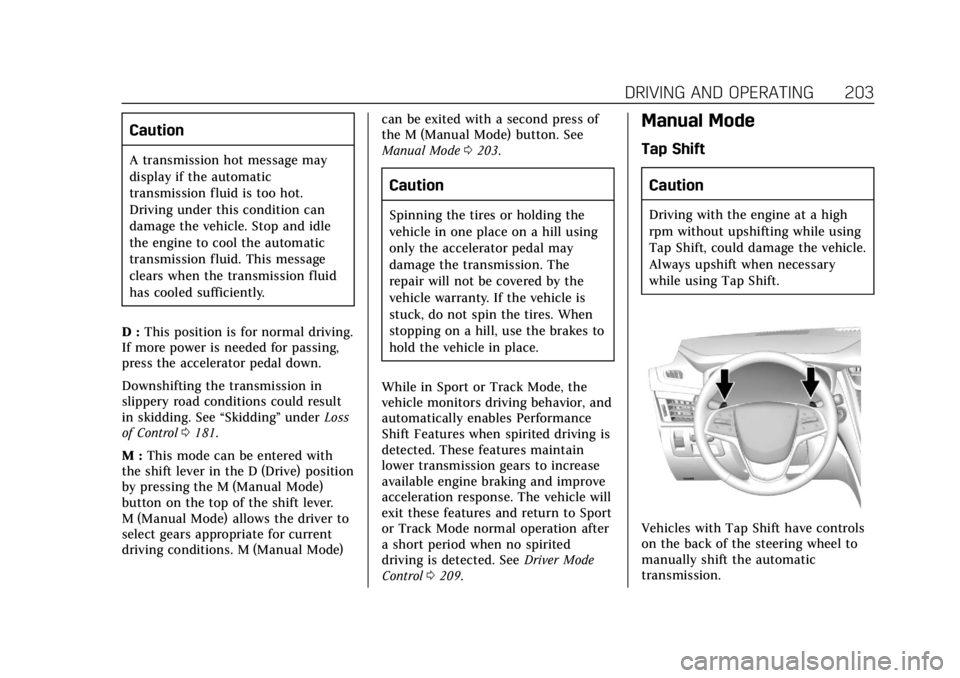
Vehicles with Tap Shift have controls
on the back of the steering wheel to
manually shift the automatic
transmission.
Page 205 of 401
Cadillac CTS/CTS-V Owner Manual (GMNA-Localizing-U.S./Canada/Mexico-
12460273) - 2019 - CRC - 5/16/18
204 DRIVING AND OPERATING
To enter Permanent Tap Shift Mode:1. With the shift lever in D (Drive), press the M (Manual Mode)
button on the top of the shift
lever. While in Tap Shift Mode,
the M of the PRNDM section of
the instrument cluster will
become highlighted, and the
current gear is indicated.
2. Tap the left control to downshift, and the right control to upshift.
To shift to the lowest available
gear, press and hold the left
control.
3. To exit, press the M (Manual Mode) button a second time.
With the shift lever in D (Drive) and
not in Permanent Tap Shift Mode, the
tap shift controls will activate a
temporary tap manual shift mode,
allowing the transmission to be
manually shifted. Automatic shifts
return after no manual shifts have
been done for seven to 10 seconds.
The Temporary Tap Shift Mode can
also be deactivated by holding the
right upshift control briefly. While using Tap Shift, the vehicle will
have firmer, quicker shifting. You can
use this for sport driving or when
climbing or descending hills, to stay in
gear longer, or to downshift for more
power or engine braking.
The transmission will only allow you
to shift into gears appropriate for the
vehicle speed and engine revolutions
per minute (rpm). The transmission
will not automatically shift to the next
lower gear if the engine rpm is too
high, nor to the next higher gear when
the maximum engine rpm is reached.
If shifting is prevented for any reason,
a SHIFT DENIED message will be
displayed in the instrument cluster.
When accelerating the vehicle from a
stop in snowy and icy conditions, it is
suggested to shift into second gear.
A higher gear allows the vehicle to
gain more traction on slippery
surfaces.Drive Systems
All-Wheel Drive
Vehicles with this feature always send
engine power to all four wheels. It is
fully automatic, and adjusts itself as
needed for road conditions.
Page 211 of 401

Cadillac CTS/CTS-V Owner Manual (GMNA-Localizing-U.S./Canada/Mexico-
12460273) - 2019 - CRC - 5/16/18
210 DRIVING AND OPERATING
Tour Mode
Use for normal city and highway
driving to provide a smooth, soft ride.
Sport Mode
Use where road conditions or personal
preference demand a more controlled
response.
When selected, the Sport Mode
indicator will display.
When in Sport or Track Mode, the
vehicle will shift automatically but
may hold a lower gear longer than it
would in the normal driving mode
based on braking, throttle input, and
vehicle lateral acceleration. See
Automatic Transmission0201. The
steering will change to provide more
precise control. If the vehicle has
Magnetic Ride Control, the suspension
will change to provide better
cornering performance.
Competitive Driving Mode (V-Sport
only) can be accessed through this
mode. See Competitive Driving Mode
(V-Sport Only) 0212.
Snow/Ice Mode
Use when more traction is needed
during slippery conditions.
Snow/Ice Mode will use a different
accelerator pedal map to optimize
traction on a slippery surface. The
accelerator pedal will reduce engine
torque at small pedal inputs.
When selected, the Snow/Ice Mode
indicator will display.
This feature is not intended for use
when the vehicle is stuck in sand,
mud, ice, snow, or gravel. If the
vehicle becomes stuck, see If the
Vehicle Is Stuck 0188.
Track Mode (V-Sport and
V-Series Only)
Use when maximum vehicle handling
is desired. For use when driving on a
closed race course or drag strip. When selected, the Track Mode
indicator will display.
When in Track Mode, the automatic
transmission and steering will
function similar to Sport Mode. The
accelerator pedal is adjusted to give
maximum control during the highest
level of spirited driving. The Magnetic
Ride Control will be set to the
optimum level for vehicle
responsiveness. Competitive Driving
Mode (V-Sport only) or Performance
Traction Management (PTM) (V-Series
only) can be accessed through this
mode. See
Competitive Driving Mode
(V-Sport Only) 0212.
There are six attributes that vary by
mode shown below. Not all vehicles
have all features, depending on the
vehicle options.
Page 212 of 401

Cadillac CTS/CTS-V Owner Manual (GMNA-Localizing-U.S./Canada/Mexico-
12460273) - 2019 - CRC - 5/16/18
DRIVING AND OPERATING 211
Modes:TOUR
Default SPORT SNOW/ICE TRACK
Throttle Progression TourTour Snow/Ice Track
Transmission Shift Mode TourSport TourTrack
Steering (Assist Effort) TourSport TourTrack
Magnetic Ride Control (if equipped) TourSport TourTrack
Launch Control (V-Series Only) NANANAAvailable
Stability Control TourTourTourTrack
Performance Traction Management (if
equipped) (V-Series Only) NA
NANAAvailable
Engine Sound Management TourSport TourTrack
Driver Mode Selector Attributes
Affected
The Gauge Cluster Display is
configured for each mode when linked
(default):
Throttle Progression
Adjusts throttle sensitivity by
selecting how quick or slow the
throttle reacts to input. .
Snow/Ice - The accelerator pedal
will reduce engine torque at small
pedal inputs. This allows better
wheel control on slippery surfaces.
. Track - The accelerator pedal is
adjusted to give maximum control
during the highest level of spirited
driving. Transmission Shift Mode
Sport or Track
–Performance Mode
Lift Foot (PMLF) allows the
transmission to hold the current gear
after a quick release of a heavily
applied accelerator pedal. This
provides greater engine braking and
enhanced vehicle control without
using the paddles. Performance
Algorithm Shift (PAS) recognizes
aggressive cornering, heavy braking,
and high acceleration to select and
Page 219 of 401

Cadillac CTS/CTS-V Owner Manual (GMNA-Localizing-U.S./Canada/Mexico-
12460273) - 2019 - CRC - 5/16/18
218 DRIVING AND OPERATING
brake or shift to a lower gear to keep
the vehicle speed down. If the brake
pedal is applied, cruise control
disengages.
Ending Cruise Control
There are four ways to end cruise
control:
.Step lightly on the brake pedal.
. Press
*.
. Shift the transmission to
N (Neutral).
. Press
J.
Erasing Speed Memory
The cruise control set speed is erased
from memory if
Jis pressed or if
the ignition is turned off.
Adaptive Cruise Control
If equipped with Adaptive Cruise
Control (ACC), it allows the driver to
select the cruise control set speed and
following gap. Read this entire section
before using this system. The
following gap is the following time
between your vehicle and a vehicle detected directly ahead in your path
moving in the same direction. If no
vehicle is detected in your path, ACC
works like regular cruise control. ACC
uses camera and radar sensors. See
Radio Frequency Statement
0373.
If a vehicle is detected in your path,
ACC can apply acceleration or limited,
moderate braking to maintain the
selected following gap. To disengage
ACC, apply the brake. If ACC is
controlling your vehicle speed when
the Traction Control System (TCS) or
StabiliTrak/Electronic Stability Control
(ESC) system activates, the ACC may
automatically disengage. See Traction
Control/Electronic Stability Control
0 207. When road conditions allow
ACC to be safely used, the ACC can be
turned back on.
ACC will not engage if the TCS or
StabiliTrak/ESC system is disabled.
{Warning
ACC has limited braking ability and
may not have time to slow the
vehicle down enough to avoid a
collision with another vehicle you
are following. This can occur when
vehicles suddenly slow or stop
ahead, or enter your lane. Also see
“Alerting the Driver” in this section.
Complete attention is always
required while driving and you
should be ready to take action and
apply the brakes. See Defensive
Driving 0179.
{Warning
ACC will not detect or brake for
children, pedestrians, animals,
or other objects.
(Continued)