navigation system CADILLAC CTS SEDAN 2015 3.G Owners Manual
[x] Cancel search | Manufacturer: CADILLAC, Model Year: 2015, Model line: CTS SEDAN, Model: CADILLAC CTS SEDAN 2015 3.GPages: 401, PDF Size: 4.46 MB
Page 22 of 401
Black plate (15,1)Cadillac CTS Owner Manual (GMNA-Localizing-U.S./Canada/Mexico-
7707478) - 2015 - crc - 10/1/14
In Brief 1-15
SeeDual Automatic Climate Control
System on page 8-1 andRear
Climate Control System on page 8-6
(if equipped).
Transmission
Tap Shift
If equipped, permanent Tap Shift
Mode may be entered with the shift
lever in D (Drive), by pressing the
M (Manual Mode) button on the top
of the shift lever.
Temporary Tap Shift Mode may be
entered while in D (Drive) using the
tap shift controls on the back of the
steering wheel.
See Manual Mode on page 9-25.
Vehicle Features
Infotainment System
See the infotainment manual for
information on the radio, audio
players, phone, navigation system,
and voice or speech recognition.
It also includes information on
settings.
Steering Wheel Controls
The infotainment system can be
operated by using the steering
wheel controls. See "Steering
Wheel Controls" in the infotainment
manual.
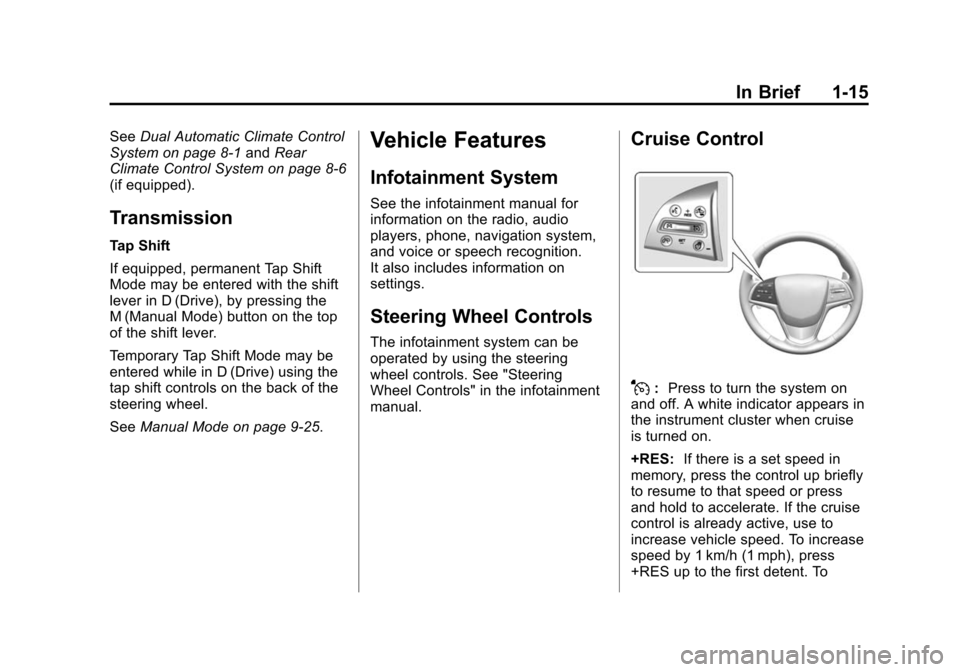
Cruise Control
J:Press to turn the system on
and off. A white indicator appears in
the instrument cluster when cruise
is turned on.
+RES: If there is a set speed in
memory, press the control up briefly
to resume to that speed or press
and hold to accelerate. If the cruise
control is already active, use to
increase vehicle speed. To increase
speed by 1 km/h (1 mph), press
+RES up to the first detent. To
Page 29 of 401
Black plate (22,1)Cadillac CTS Owner Manual (GMNA-Localizing-U.S./Canada/Mexico-
7707478) - 2015 - crc - 10/1/14
1-22 In Brief
Driving for Better Fuel
Economy
Driving habits can affect fuel
mileage. Here are some driving tips
to get the best fuel economy
possible.
.Avoid fast starts and accelerate
smoothly.
.Brake gradually and avoid
abrupt stops.
.Avoid idling the engine for long
periods of time.
.When road and weather
conditions are appropriate, use
cruise control.
.Always follow posted speed
limits or drive more slowly when
conditions require.
.Keep vehicle tires properly
inflated.
.Combine several trips into a
single trip.
.Replace the vehicle's tires with
the same TPC Spec number
molded into the tire's sidewall
near the size.
.Follow recommended scheduled
maintenance.
Roadside Service
U.S.: 1-800-224-1400
Canada: 1-800-882-1112
TTY Users (U.S. Only):
1-888-889-2438
New Cadillac owners are
automatically enrolled in the
Roadside Service Program.
SeeRoadside Service on
page 13-5.
OnStar®
This vehicle may be equipped with a
comprehensive, in-vehicle system
that can connect to a live OnStar
Advisor for Emergency, Security,
Navigation, Connection, and
Diagnostic Services. OnStar
services may require a paid
subscription. See OnStar Overview
on page 14-1.
Page 144 of 401
Black plate (31,1)Cadillac CTS Owner Manual (GMNA-Localizing-U.S./Canada/Mexico-
7707478) - 2015 - crc - 10/1/14
Instruments and Controls 5-31
per hour (mph). This average is
calculated based on the various
vehicle speeds recorded since the
last reset of this value. The average
speed can be reset by pressing and
holding SEL while this display is
active.
Timer:This display can be used as
a timer. To start the timer, press SEL
while this display is active. The
display will show the amount of time
that has passed since the timer was
last reset. To stop the timer, press
SEL briefly while this display is
active and the timer is running. To
reset the timer to zero, press and
hold SEL while this display is active.
Compass (Base Cluster): Shows
the direction the vehicle is driving.
Turn Arrow: Shows the next
maneuver when using route
guidance.
Estimated Time to Arrival: Shows
the estimated time until arrival at
your destination. Distance to Destination:
Shows
the distance to the destination when
using route guidance.
Speed Limit: Shows the current
speed limit on vehicles with the
navigation system. The information
for this page comes from a roadway
database.
Speed Warning: Allows the driver
to set a speed that they do not want
to exceed. To set the Speed
Warning, press SEL when Speed
Warning is displayed. Press
yor
zto adjust the value. This feature
can be turned off by pressing and
holding SEL while viewing this
page. If the selected speed limit is
exceeded, a pop-up warning is
displayed and a chime may sound.
Cruise Set Speed: Shows the
speed the cruise control or Adaptive
Cruise Control (ACC, if equipped) is
set to.
Follow Distance Indicator/Gap
Setting: The current follow time to
the vehicle ahead is displayed as a
time value on this page when ACC is not engaged. When ACC has
been engaged, the Follow Distance
Indicator page switches to the Gap
Setting page. This page shows the
current gap setting along with the
vehicle ahead telltale.
Battery Voltage:
Shows the
current battery voltage.
Engine Boost: Shows the current
amount of boost being added.
Oil Life: Shows an estimate of the
oil's remaining useful life.
If REMAINING OIL LIFE 99% is
displayed, that means 99% of the
current oil life remains.
When the remaining oil life is low,
the CHANGE ENGINE OIL SOON
message will appear on the display.
See Engine Oil Messages on
page 5-39. The oil should be
changed as soon as possible. See
Engine Oil on page 10-10. In
addition to the engine oil life system
monitoring the oil life, additional
maintenance is recommended in the
Page 148 of 401
Black plate (35,1)Cadillac CTS Owner Manual (GMNA-Localizing-U.S./Canada/Mexico-
7707478) - 2015 - crc - 10/1/14
Instruments and Controls 5-35
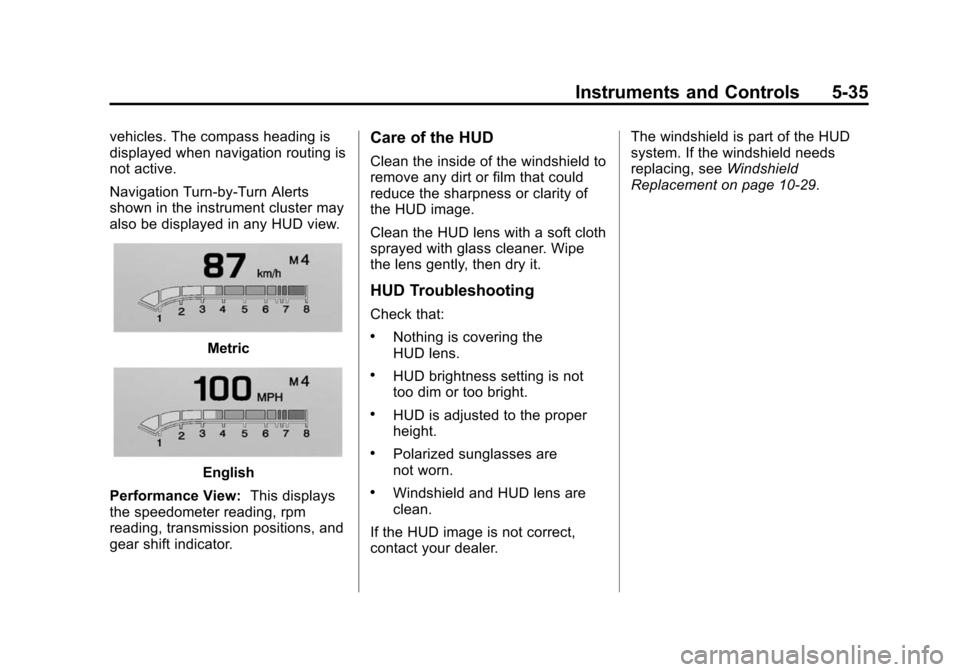
vehicles. The compass heading is
displayed when navigation routing is
not active.
Navigation Turn-by-Turn Alerts
shown in the instrument cluster may
also be displayed in any HUD view.
Metric
English
Performance View: This displays
the speedometer reading, rpm
reading, transmission positions, and
gear shift indicator.
Care of the HUD
Clean the inside of the windshield to
remove any dirt or film that could
reduce the sharpness or clarity of
the HUD image.
Clean the HUD lens with a soft cloth
sprayed with glass cleaner. Wipe
the lens gently, then dry it.
HUD Troubleshooting
Check that:
.Nothing is covering the
HUD lens.
.HUD brightness setting is not
too dim or too bright.
.HUD is adjusted to the proper
height.
.Polarized sunglasses are
not worn.
.Windshield and HUD lens are
clean.
If the HUD image is not correct,
contact your dealer. The windshield is part of the HUD
system. If the windshield needs
replacing, see
Windshield
Replacement on page 10-29.
Page 182 of 401
Black plate (1,1)Cadillac CTS Owner Manual (GMNA-Localizing-U.S./Canada/Mexico-
7707478) - 2015 - crc - 10/1/14
Infotainment System 7-1
Infotainment
System
Introduction
Infotainment . . . . . . . . . . . . . . . . . . . 7-1
Introduction
Infotainment
See the infotainment manual for
information on the radio, audio
players, phone, navigation system,
and voice or speech recognition.
It also includes information on
settings.
Page 196 of 401
Black plate (3,1)Cadillac CTS Owner Manual (GMNA-Localizing-U.S./Canada/Mexico-
7707478) - 2015 - crc - 10/1/14
Driving and Operating 9-3
{Warning
Taking your eyes off the road too
long or too often could cause a
crash resulting in injury or death.
Focus your attention on driving.
See the infotainment manual for
information on that system or the
navigation system, if equipped,
including pairing and using a cell
phone.
Defensive Driving
Defensive driving means “always
expect the unexpected.” The first
step in driving defensively is to wear
the safety belt. See Safety Belts on
page 3-13.
.Assume that other road users
(pedestrians, bicyclists, and
other drivers) are going to be
careless and make mistakes.
Anticipate what they might do
and be ready.
.Allow enough following distance
between you and the driver in
front of you.
.Focus on the task of driving.
Drunk Driving
Death and injury associated with
drinking and driving is a global
tragedy.
{Warning
Drinking and then driving is very
dangerous. Your reflexes,
perceptions, attentiveness, and
judgment can be affected by even
a small amount of alcohol. You
can have a serious —or even
fatal —collision if you drive after
drinking.
Do not drink and drive or ride with
a driver who has been drinking.
Ride home in a cab; or if you are
with a group, designate a driver
who will not drink.
Control of a Vehicle
Braking, steering, and accelerating
are important factors in helping to
control a vehicle while driving.
Braking
Braking action involves perception
time and reaction time. Deciding to
push the brake pedal is perception
time. Actually doing it is
reaction time.
Average driver reaction time is
about three-quarters of a second. In
that time, a vehicle moving at
100 km/h (60 mph) travels 20 m
(66 ft), which could be a lot of
distance in an emergency.
Helpful braking tips to keep in mind
include:
.Keep enough distance between
you and the vehicle in front
of you.
.Avoid needless heavy braking.
.Keep pace with traffic.
Page 378 of 401
Black plate (15,1)Cadillac CTS Owner Manual (GMNA-Localizing-U.S./Canada/Mexico-
7707478) - 2015 - crc - 10/1/14
Customer Information 13-15
OnStar Terms and Conditions and
Privacy Statement on the OnStar
website.
Infotainment System
If the vehicle is equipped with a
navigation system as part of the
infotainment system, use of the
system may result in the storage of
destinations, addresses, telephone
numbers, and other trip information.
See the infotainment manual for
information on stored data and for
deletion instructions.
Page 380 of 401
Black plate (1,1)Cadillac CTS Owner Manual (GMNA-Localizing-U.S./Canada/Mexico-
7707478) - 2015 - crc - 10/1/14
OnStar 14-1
OnStar
OnStar Overview
OnStar Overview . . . . . . . . . . . . 14-1
OnStar Services
Emergency . . . . . . . . . . . . . . . . . . 14-2
Security . . . . . . . . . . . . . . . . . . . . . . 14-3
Navigation . . . . . . . . . . . . . . . . . . . 14-3
Connections . . . . . . . . . . . . . . . . . 14-4
Vehicle Diagnostics . . . . . . . . . . 14-6
OnStar Additional Information
OnStar AdditionalInformation . . . . . . . . . . . . . . . . . 14-6
OnStar Overview
=Voice Command Button
QBlue OnStar Button
>Emergency Button
This vehicle may be equipped with a
comprehensive, in-vehicle system
that can connect to a live OnStar
Advisor for Emergency, Security,
Navigation, Connection, and
Diagnostic Services. OnStar
services may require a paid
subscription. OnStar requires the
vehicle battery and electrical
system, cellular service, and GPS
satellite signals to be available and
operating. OnStar acts as a link to
existing public emergency service
providers. OnStar may collect
information about you and your vehicle, including location
information. See OnStar
’s Terms
and Conditions and Privacy
Statement for more details including
system limitations at
www.onstar.com (U.S.) or
www.onstar.ca (Canada).
The OnStar system status light is
next to the OnStar buttons. If the
status light is:
.Solid Green: System is on.
.Flashing Green: On a call.
.Red: Indicates a problem.
.Off: System is off. PressQ
twice to speak with an OnStar
Advisor.
Press
Qor call 1-888-4-ONSTAR
(1-888-466-7827) to speak to an
Advisor.
Press
=to:
.Make a call, end a call,
or answer an incoming call.
.Give OnStar Hands-Free Calling
voice commands.
Page 381 of 401
Black plate (2,1)Cadillac CTS Owner Manual (GMNA-Localizing-U.S./Canada/Mexico-
7707478) - 2015 - crc - 10/1/14
14-2 OnStar
.Give OnStar Turn-by-Turn
Navigation voice commands.
Requires a specific OnStar
subscription plan.
.Obtain the WiFi network name,
or Service Set Identifier or SSID,
and passphrase (if equipped).
Press
Qto connect to a live
Advisor to:
.Verify account information or
update contact information.
.Get driving directions. Requires
a specific OnStar
subscription plan.
.Receive On-Demand
Diagnostics for a check of the
vehicle’s key operating systems.
.Receive Roadside Assistance.
.Manage WiFi Settings (if
equipped).
Press
>to get a priority connection
to an OnStar Emergency Advisor
available 24/7 to:
.Get help for an emergency.
.Be a Good Samaritan or
respond to an AMBER Alert.
.Get assistance in severe
weather or other crisis and
evacuation routes.
OnStar Services
Emergency
With Automatic Crash Response,
the OnStar system can
automatically connect to an OnStar
Emergency Advisor. The built-in
system can automatically connect to
help in certain crashes.
Press
>to connect to an OnStar
Emergency Advisor. GPS
technology is used to identify the
vehicle location and can provide
important information to emergency
personnel. OnStar Emergency
Advisors are trained to provide
assistance and link to existing
public emergency service providers
in emergency situations.
With OnStar Crisis Assist, specially
trained Crisis Advisors are available
24 hours a day, 7 days a week, to
provide a central point of contact,
assistance, and information if a
crisis occurs.
Page 382 of 401
Black plate (3,1)Cadillac CTS Owner Manual (GMNA-Localizing-U.S./Canada/Mexico-
7707478) - 2015 - crc - 10/1/14
OnStar 14-3
Security
OnStar provides services including
Stolen Vehicle Assistance, Remote
Ignition Block, and Roadside
Assistance, if equipped. OnStar can
unlock the vehicle doors remotely,
if equipped with automatic door
locks, and can help police locate the
vehicle if it is stolen.
Navigation
OnStar navigation requires a
specific OnStar subscription plan.
Press
Qto receive directions or
have them sent to the vehicle
navigation screen, if equipped.
Destinations can also be forwarded
to the vehicle from MapQuest.com.
Turn-by-Turn Navigation
1. PressQto connect to a live
Advisor.
2. Request directions.
3. Directions are downloaded to the vehicle. 4. Follow the voice-guided
commands.
Using Voice Commands
During a Planned Route
Cancel Route
1. Press
=. System responds:
“OnStar ready,” then a tone. Say
“Cancel route.” System
responds: “Do you want to
cancel directions?”
2. Say “Yes.”System responds:
“OK, request completed, thank
you, goodbye.”
Route Preview
1. Press
=. System responds:
“OnStar ready,” then a tone.
2. Say “Route preview.” System
responds with the next three
maneuvers.
Repeat
1. Press
=. System responds:
“OnStar ready,” then a tone. 2. Say
“Repeat.” System responds
with the last direction given, then
responds with “OnStar ready,”
then a tone.
Get My Destination
1. Press
=. System responds:
“OnStar ready,” then a tone.
2. Say “Get my destination.”
System responds with the
address and the distance to the
destination, then responds with
“OnStar ready,” then a tone.
Other Navigation Services
Available from OnStar
OnStar eNav:Subscribers can
send destinations from
MapQuest.com to the vehicle
Turn-by-Turn Navigation or
screen-based navigation system (if
equipped). When ready, the
directions will be downloaded to the
vehicle.
Destination Download: Press
Q,
then request the Advisor to
download directions to the