radio CADILLAC DEVILLE 1995 7.G User Guide
[x] Cancel search | Manufacturer: CADILLAC, Model Year: 1995, Model line: DEVILLE, Model: CADILLAC DEVILLE 1995 7.GPages: 403, PDF Size: 20.69 MB
Page 187 of 403
Downloaded from www.Manualslib.com manuals search engine The Lower Knob
Tbrn the lowcr knob to choose radio stations. Press the knob to switch
between AM and FM.
Behind the lower knob is the kdc control. It moves the sound between
the front and rear spcakcrs.
Finding a Station
SEEK: This button selects stations, but it doesn't keep moving as SCAN
does. When you press SEEK. up or down, the radio will automatically go
to the next station and stay there.
2. Tune in the station.
3. Press the SET button.
Setting the Tone
BASS: The slide control increases or decreases the bass response tone.
Moving the control
to the right increases bass while moving it tu the lct't
decreases it.
TREBLE: The slide control increascs or decreases the treble respmse
tone. Moving the control to the right increases the treble while moving it
to the left decreases it.
3-18
Page 188 of 403

Downloaded from www.Manualslib.com manuals search engine Your Cassette Tape Player
c
Your cassette tape player works best with tapes that are 30 to 15 minutes
long
on cach side. Thpes longer than that are so thin that they may not
work
well in this player.
If vou look at the tape, or on its label or box. it should say whether its bias,
b’~qualization,” is
70 microseconds (70 p.) or 120 microseconds ( 120 p).
Chrome and metal tapes arc 70 It ssc and standard iron tapes are 120 p.
sec. Your tapc player will adjust automatically for either type of cassette
kIPC.
To Play a Cassette Tape
2. Insert thc cassetle through the tape door. (Thc TAPE indicator in the
display
will light.)
If vou hcar nothing or 11c;lr just a garbled sound, the cassette may not
beh squarely. PI-& the
EJCT button to removc the tape and start
over. Thc tape equalization is automaticallv sensed and set. Inserting
the cassette also activates
DOLBY,?, noise ;*eduction.
3. Use the upper and lower knobs to adjust the volume and balance, once
the tape
is playing, just as you do for the radio. Press the upper knob
to change tape direction. The arrow in the display shows which
dircction the tape is being
played.
FWD and REV: Press the FWD button to go fonvard rapidly to another
part
of the tape. Press the REV button to rcverse the tape.
ST/PL: Press this button in either SEEK, SCAN, FWD or REV to stop
tape movement and switch
to radio without ejecting the tape. (In ST/PL
the radio may be tuned by the tuner knob only.)
EJCT Press this button to remove the tape. EJCT is operational even
when
the ignition or the radio is off.
3- 19
Page 189 of 403

Downloaded from www.Manualslib.com manuals search engine To Play a Compact Disc
NOTICE:
Before you begin, please note: don’t use the mini-discs that are
called “singles” (even with an adapter). They won’t eject. Use
full-size compact discs only.
1. Turn the radio on.
2. Insert the CD (label side up) partway into the slot. The player will pull
it in. Wait a few seconds and the CD will play. Then only the time of
day and CD will display.
If the CD comes back out. chcck to see if
The disc is upside down.
The disc is dirty, scratched or wet.
0 There is too much moisture in the air. If there is, wait about an hour
and try
it again.
ERR: This error message is displayed if you have a condition of either
extreme temperature, moisture
or an incorrect CD. The CD will
automatically be ejected. When conditions are back to normal the CD
should play again.
RCLIPROG: Press the recall/program button once to see what track is
being plaved. Within five seconds press it a second time to see how long
the track-has been playing. Press
it a third time to see thc time of day.
REV: Press and hold the reverse button to return rapidly within a track.
Release
it to play the passage. The elapsed time will be displayed to show
the reverse progress of the CD.
FWD: Press and hold this forward button to advance rapidly within a
track. Release it to resume playing. Elapsed time will be displayed to show
the forward progress
of the CD.
3-20
H
U
I
L-
c- .
c
Page 190 of 403
Downloaded from www.Manualslib.com manuals search engine LI
PREY Press this button to go back to the beginning of the track. Pressing
this button
when in the pause period between tracks will take it back to
the start of the track preceding the pause.
NEXT: Press this button to advance to the next track.
ST/PL: Press this button and the tape or CD will stop without ejecting and
the radio will start to play. Press it again and the tape or CD will start to
play again.
EJCT Press this button to remove the CD or tapc. If you nave both a
CD and tape in the player, then the other playback media will start to
play. Press
it again and the other media will eject.
COILIP: Pressing COMP makes soft and loud passages more equal in
volume. For example, classical and jazz music have vety quiet and very
loud passages in the same tune. The COMP display will light as long as
COMP is on.
TAPE and CD Operation
With both a tape and a CD inserted, both the TP and CD indicators in the
display will be lit and either the TP or CD (LED) wjll also be lit,
depending on which has the current priority.
TP-CD: Press the lower knob to switch between tape and CD.
3-21
Page 191 of 403
Downloaded from www.Manualslib.com manuals search engine Tips about Your Audio System
Be aware that hearing damage from loud noise is almost undetectable
until it is too late. Your hearing can adapt to higher volumes of sound.
Sound that
seems normal can be loud and harmful to your hearing. Take
precautions by adjusting the volume control on your radio to a safe sound
level before
your hearing adapts to it.
To hclp avoid hearing loss or damage:
0 Adjust the volume control to the lowest setting.
0 Increase volume slowly until you hear comfortably and clearly.
~~ ~~~~~~~~~
NOTICE:
Before you add any sound equipment to your vehicle -- like a
tape player, CB radio, mobile telephone or two-way radio
-- be
sure you can add what you want.
If you can, it's very important
to do it properly. Added sound equipment may interfere with the
operation
of your vehicle's engine, Delco" radio or other
systems, and even damage them. And, your vehicle's systems
may interfere with the operation of sound equipment that has
~ been added improperly.
So before adding sound equipment, check with your dealer and
be sure to check Federal rules covering mobile radio
and
telephone units.
3-22
u
Page 193 of 403

Downloaded from www.Manualslib.com manuals search engine Power Antenna Mast Care
To Clean the Antenna Mast
1. Turn on the ignition and radio to raise the alltenna to full mast
extension.
2. Dampen a clcan cloth with mineral spirits or equivalent solvent.
3. Wipe the cloth over the mast sections, removing any dirt.
4. Wipe dry with a clean cloth before retracting.
5. Make the antenna go up and down by turning the radio or ignition on
6. Then repeat if necessary.
and off.
NOTICE:
Don't lubricate the power antenna. Lubrication could damage
it.
NOTICE:
Before entering an automatic car wash, turn off your radio to
make the power antenna
go down. This will prevent the mast
from possibly getting damaged. If the antenna does not go down
when
you turn the radio off, it may be damaged or need to be
cleaned. In either case, lower the antenna by hand by carefully
pressing the antenna down.
3-24
U
Page 239 of 403

Downloaded from www.Manualslib.com manuals search engine I NOTICE:
Ignoring these steps could result in costly damage to your
vehicle that wouldn’t be covered by your warranty.
Trying
to start your Cadillac by pushing or pulling it won’t work
and
it could damage your vehicle.
TO JUMP START YOUR CADILLAC:
1. Check the other vehicle. It must have a 12-volt battery with a negative
ground system.
I NOTICE:
If the other system isn’t a 12-volt system with a negative ground,
both vehicles can
be damaged.
2.
3.
4.
Get the vehicles close enough so the jumper cables can reach, but be
sure the vehicles aren’t touching each other.
If they are, it could cause
a ground connection you don’t want. You wouldn’t be able to start
your Cadillac and the bad grounding could damage the electrical
systems.
Turn off the ignition on both vehicles. Turn off all lamps, radio or any
accessorie.s that are
in use on both vehicles. This will avoid sparks arld
help save both batteries as well as avoid damage to any of the
accessories.
Open the hoods and locate the batteries.
5 -4
I
Page 330 of 403
Downloaded from www.Manualslib.com manuals search engine c
c
4DD-ON ELECTMCX, EQUIPMENT
NOTICE:
Don’t add anything electrical to your Cadillac unless you check
with your dealer first. Some electrical equipment can damage
your vehicle and the damage wouldn’t
be covered by your
warranty. Some add-on electrical equipment can keep other
components from working as they should,
Your vehicle has an air bag svsttlnl. Bcforc attempting to add anything
electrical
to vour Cadiliac, sic b‘Sewicing Your Air Bag-Equipped
Cadillac”
in ihe Index.
Retained Accessory Power
When you stop vour Cadillac and turn thc kcy to OFF? you cal~ use these
accessories for io more minutes:
Radio
Power Windows
Astroroof
Windshield Wipers
Fuel Door Release
Trunk Release
Everything
will go off after 10 minutes or if you open a door.
If you want power for another 10 minutes, just turn the key to RUN and
then back to OFF.
Page 335 of 403
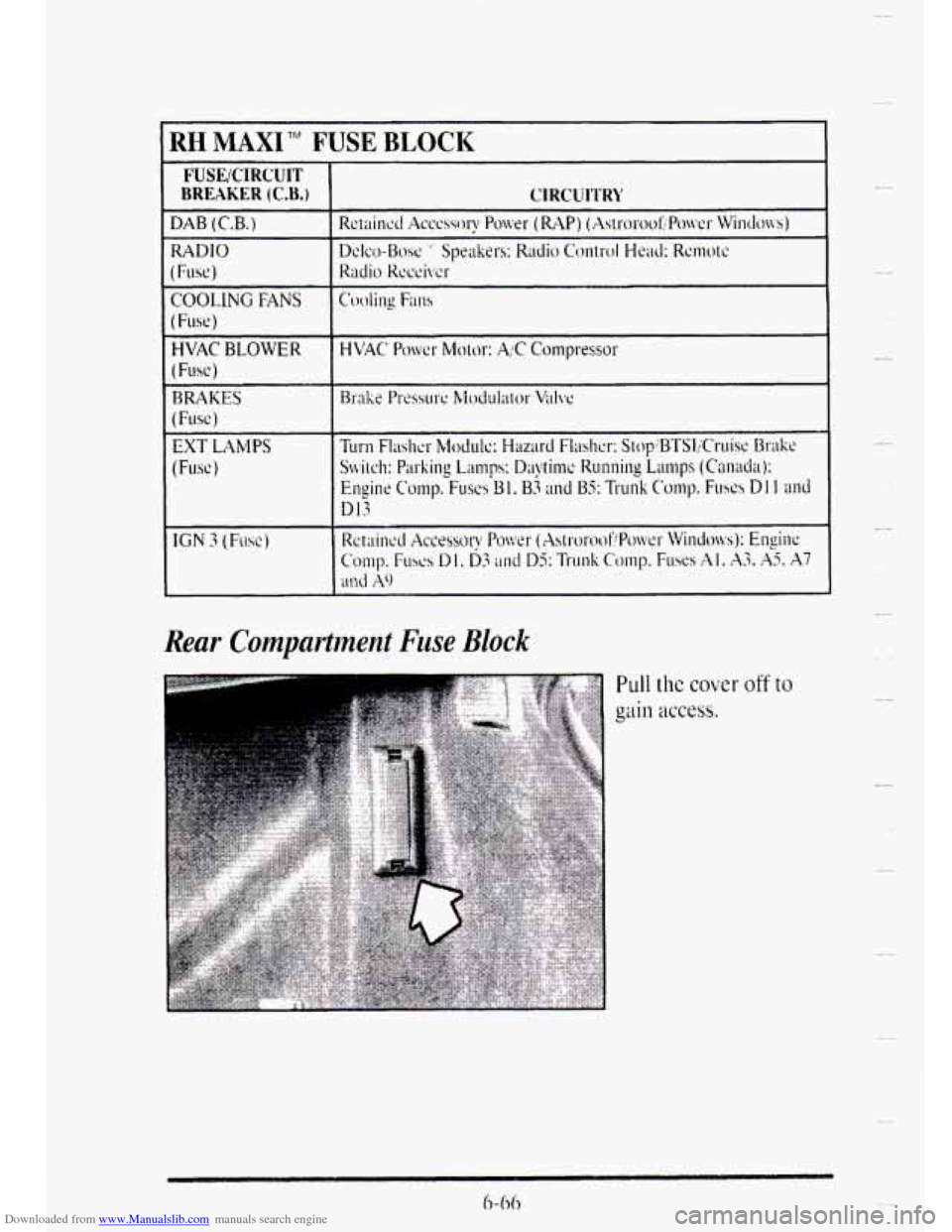
Downloaded from www.Manualslib.com manuals search engine RH MAXI TM F JSE BLOCK
FUSEICIRCUIT
BREAKER (C.B.)
RADIO
I (Fuse)
COOLING FANS
(Fuse)
HVAC BLOWER
( Fuse j
BRAKES
(Fuse)
EXT LAMPS
(Fusc)
IGN 3 (Fuse)
CIRCUl'l'RI'
1
Rear Compartment Fuse Block
Pull the cover off to
I-
-
C.
-.-
Page 336 of 403
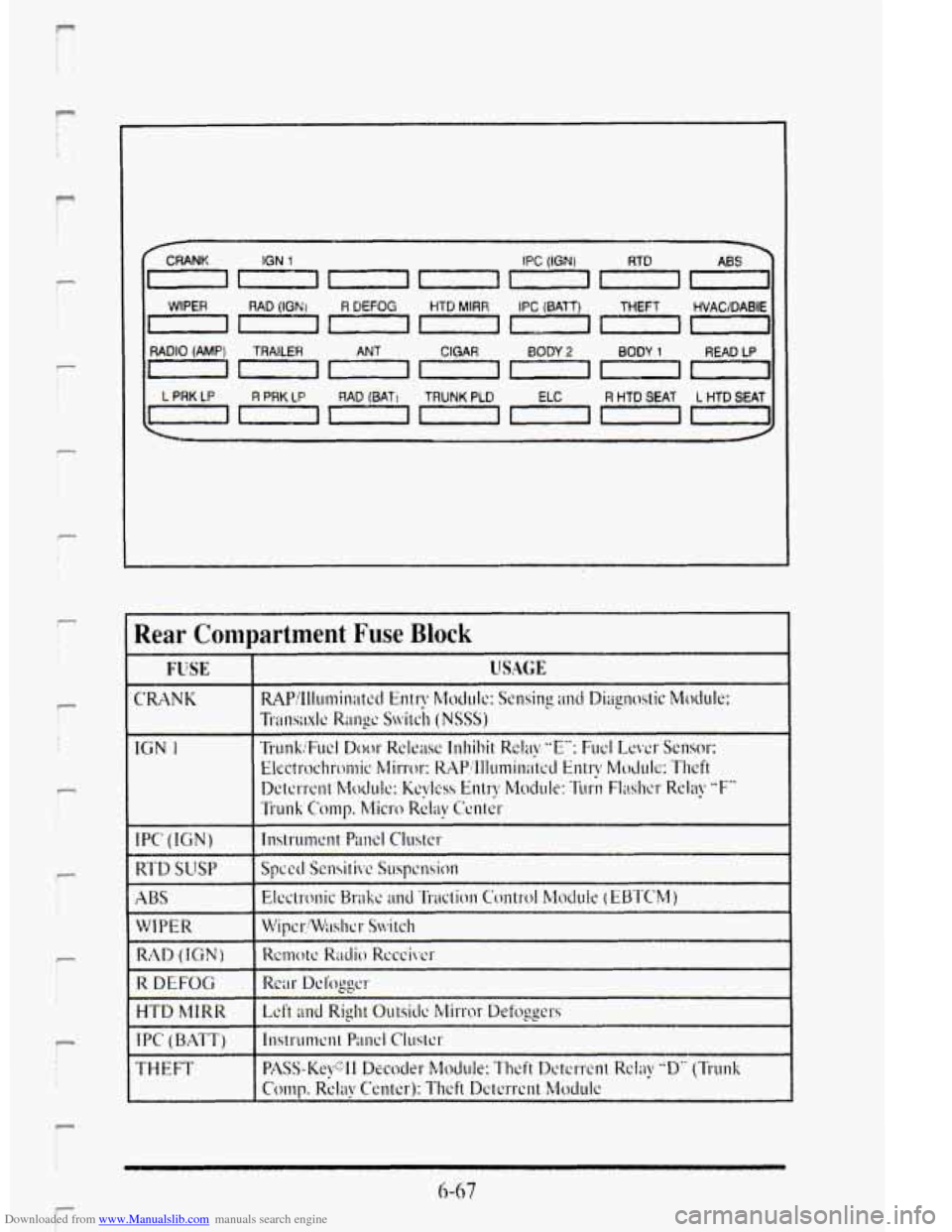
Downloaded from www.Manualslib.com manuals search engine f
f
r f 1,
r I
i
r !
r I
1
r I t
r t
I-
WIPER
CRANK IGN 1
I
RADIO (AMP)
0
I
L PRK LP
0
TRAILER CIGAR BODY 2 BODY 1 READ LP
R PRK LP RAD (BATJ TRUNK PLD R HTD SEAT L HTD SEAT
Rear Compartment Fuse Block
CRANK
IGN 1
RAD (IGN)
R DEFOG
HTD hllRR
I PC ( BATT)
THEFT
6-67
F