parking brake CADILLAC DEVILLE 2003 8.G User Guide
[x] Cancel search | Manufacturer: CADILLAC, Model Year: 2003, Model line: DEVILLE, Model: CADILLAC DEVILLE 2003 8.GPages: 423, PDF Size: 2.91 MB
Page 125 of 423

Instrument Panel Overview...............................3-4
Hazard Warning Flashers................................3-6
Other Warning Devices...................................3-7
Horn.............................................................3-7
Tilt Wheel.....................................................3-7
Turn Signal/Multifunction Lever.........................3-8
Exterior Lamps.............................................3-15
Interior Lamps..............................................3-19
Night Vision System......................................3-22
Ultrasonic Rear Parking Assist (URPA)............3-25
Accessory Power Outlets...............................3-27
Ashtrays and Cigarette Lighter........................3-28
Climate Controls............................................3-29
Dual Climate Control System..........................3-29
Outlet Adjustment.........................................3-33
Rear Climate Control System.........................3-34
Passenger Compartment Air Filter...................3-36
Steering Wheel Climate Controls.....................3-38
Climate Controls Personalization.....................3-39
Warning Lights, Gages and Indicators.............3-40
Instrument Panel Cluster................................3-40
Speedometer and Odometer...........................3-43
Trip Odometer..............................................3-43
Tachometer (Analog Cluster Only)...................3-44Safety Belt Reminder Light.............................3-45
Air Bag Readiness Light................................3-45
Charging System Light..................................3-46
Brake System Warning and Parking Brake
Indicator Light...........................................3-47
Anti-Lock Brake System Warning Light.............3-48
Traction Control System (TCS) Warning Light . . .3-48
Engine Coolant Temperature Warning Light......3-49
Engine Coolant Temperature Gage..................3-50
Malfunction Indicator Lamp.............................3-50
Oil Pressure Light.........................................3-53
Security Light...............................................3-54
Fog Lamp Light............................................3-54
Lights On Reminder......................................3-54
Cruise Control Light......................................3-55
Fuel Gage...................................................3-55
Fuel Data Display
(Digital Cluster Only)..................................3-56
Driver Information Center (DIC).......................3-57
DIC Controls and Displays.............................3-57
DIC Warnings and Messages.........................3-60
Climate Controls and Radio System
Personalization..........................................3-67
DIC Vehicle Personalization............................3-67
Section 3 Instrument Panel
3-1
Page 138 of 423
Exterior Lamps
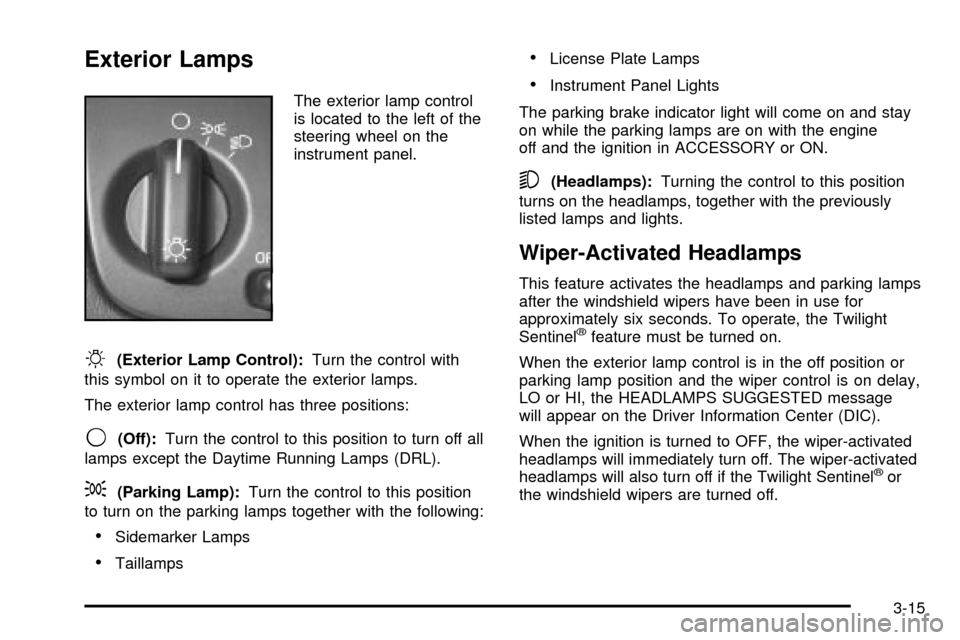
The exterior lamp control
is located to the left of the
steering wheel on the
instrument panel.
O(Exterior Lamp Control):Turn the control with
this symbol on it to operate the exterior lamps.
The exterior lamp control has three positions:
9(Off):Turn the control to this position to turn off all
lamps except the Daytime Running Lamps (DRL).
;(Parking Lamp):Turn the control to this position
to turn on the parking lamps together with the following:
·Sidemarker Lamps
·Taillamps
·License Plate Lamps
·Instrument Panel Lights
The parking brake indicator light will come on and stay
on while the parking lamps are on with the engine
off and the ignition in ACCESSORY or ON.
5(Headlamps):Turning the control to this position
turns on the headlamps, together with the previously
listed lamps and lights.
Wiper-Activated Headlamps
This feature activates the headlamps and parking lamps
after the windshield wipers have been in use for
approximately six seconds. To operate, the Twilight
Sentinel
žfeature must be turned on.
When the exterior lamp control is in the off position or
parking lamp position and the wiper control is on delay,
LO or HI, the HEADLAMPS SUGGESTED message
will appear on the Driver Information Center (DIC).
When the ignition is turned to OFF, the wiper-activated
headlamps will immediately turn off. The wiper-activated
headlamps will also turn off if the Twilight Sentinel
žor
the windshield wipers are turned off.
3-15
Page 170 of 423

Brake System Warning and Parking
Brake Indicator Light
Your vehicle's hydraulic brake system is divided into two
parts. If one part isn't working, the other part can still
work and stop you. For good braking, though, you need
both parts working well.
If the warning light comes on, there is a brake problem.
Have your brake system inspected right away.
This light should come on
brie¯y when you turn the
ignition key to ON. If it
doesn't come on
then, have it ®xed so it will
be ready to warn you if
there's a problem.
When the ignition is on, the brake system warning light
will also come on when you set your parking brake.
The light will stay on if your parking brake doesn't fully
release. If it stays on after your parking brake is
fully released, it means you have a brake problem.
{CAUTION:
Your brake system may not be working
properly if the brake system warning light is
on. Driving with the brake system warning light
on can lead to an accident. If the light is still
on after you've pulled off the road and stopped
carefully, have the vehicle towed for service.
If the light comes on while you are driving, pull off the
road and stop carefully. You may notice that the pedal is
harder to push. Or, the pedal may go closer to the
¯oor. It may take longer to stop. If the light is still on,
have the vehicle towed for service. See
Towing
Your Vehicle on page 4-31.
3-47
Page 171 of 423
Anti-Lock Brake System Warning
Light
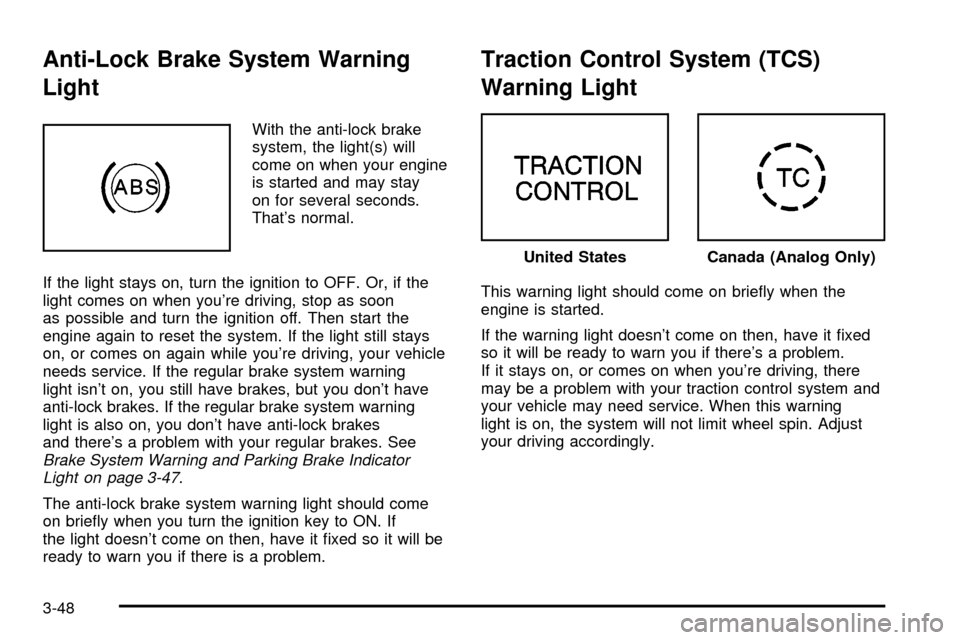
With the anti-lock brake
system, the light(s) will
come on when your engine
is started and may stay
on for several seconds.
That's normal.
If the light stays on, turn the ignition to OFF. Or, if the
light comes on when you're driving, stop as soon
as possible and turn the ignition off. Then start the
engine again to reset the system. If the light still stays
on, or comes on again while you're driving, your vehicle
needs service. If the regular brake system warning
light isn't on, you still have brakes, but you don't have
anti-lock brakes. If the regular brake system warning
light is also on, you don't have anti-lock brakes
and there's a problem with your regular brakes. See
Brake System Warning and Parking Brake Indicator
Light on page 3-47.
The anti-lock brake system warning light should come
on brie¯y when you turn the ignition key to ON. If
the light doesn't come on then, have it ®xed so it will be
ready to warn you if there is a problem.
Traction Control System (TCS)
Warning Light
This warning light should come on brie¯y when the
engine is started.
If the warning light doesn't come on then, have it ®xed
so it will be ready to warn you if there's a problem.
If it stays on, or comes on when you're driving, there
may be a problem with your traction control system and
your vehicle may need service. When this warning
light is on, the system will not limit wheel spin. Adjust
your driving accordingly.
United StatesCanada (Analog Only)
3-48
Page 184 of 423

CHANGE ENGINE OIL ± 82:This means that the life
of the engine oil has expired and it should be changed
within 200 miles. After an oil change, the Oil Life
Indicator must be reset. See
Oil Life Indicator on
page 3-79. SeeEngine Oil on page 5-13.
CHANGE TRANS FLUID ± 47:This message will
appear when it is time to change the transaxle ¯uid. See
Part A: Scheduled Maintenance Services on page 6-4for the proper ¯uid and change intervals.
CHECK BRAKE FLUID ± 37:This message will
display if the ignition is in ON to inform the driver that
the brake ¯uid level is low. Have the brake system
serviced by a technician as soon as possible. See
Brake
System Warning and Parking Brake Indicator Light on
page 3-47
.
CHECK COOLANT LEVEL ± 2:This message will
appear when there is a low level of engine coolant. Have
the cooling system serviced by a technician as soon
as possible. See
Engine Coolant on page 5-24.
CHECK FUEL GAGE ± 50:(Analog Cluster) This
message will appear when the fuel supply is less than
5 gallons (18.9 L) and the display is turned off. A
single chime will also sound when this message is
displayed.
CHECK GAS CAP ± 61:This message will appear if
the gas cap has not been fully tightened. You should
recheck your gas cap to ensure that it's on properly.CHECK OIL LEVEL ± 36:For correct operation of the
low oil sensing system, your vehicle should be on a
level surface. A false CHECK OIL LEVEL message may
appear if the vehicle is parked on a grade. The oil
level sensing system does not check for actual oil level
if the engine has been off for a short period of time,
and the oil level is never checked while the engine is
running. If the CHECK OIL LEVEL message appears,
and your vehicle has been parked on level ground
with the engine off for at least 30 minutes, the oil level
should be checked by observing the oil dipstick. Prior to
checking the oil level, be sure the engine has been
off for a few minutes and your vehicle is on a level
surface. Then check the dipstick and add oil if
necessary. See
Engine Oil on page 5-13.
CHECK TIRE PRESSURE ± 144:This message is
displayed when the Tire Pressure Monitor (TPM) system
detects a low or high tire pressure condition in one or
more of the road tires. By pressing the INFO button up or
down, the DIC display will show which tire or tires do not
have the correct in¯ation pressure. A ªLOW TIREº
condition exists when the tire's air pressure is under
25 psi (172 kPa) and a ªHIGH TIREº condition exists
when the tire's air pressure is above 38 psi (262 kPa).
The system will display the air pressure, the tire location
(LF, RF, RR or LR) and if the air pressure is low or high.
The tire pressure information is available in English or
metric measurements. For example, a driver's side front
tire that is low may be shown as: 22 PSI LF TIRE LOW.
3-61
Page 263 of 423

Dolly Towing
Your vehicle can be towed using a dolly. To tow your
vehicle using a dolly, follow these steps:
1. Put the front wheels on the dolly.
2. Put the vehicle in PARK (P).
3. Set the parking brake and then remove the key.
4. Clamp the steering wheel in a straight-ahead
position.
5. Release the parking brake.
Loading Your Vehicle
Two labels on your vehicle show how much weight it
may properly carry. The Tire-Loading Information
label found on the rear edge of the driver's side rear
door tells you the proper size, speed rating and
recommended in¯ation pressures for the tires on your
vehicle. It also gives you important information about the
number of people that can be in your vehicle and the
total weight that your vehicle can carry. This weight
is called the Vehicle Capacity Weight and includes the
weight of all occupants, cargo and all options not
installed in the factory.
4-32
Page 270 of 423
Turn Signals When Towing a Trailer
When you tow a trailer, your vehicle may need a
different turn signal ¯asher and/or extra wiring. Check
with your dealer. The arrows on your instrument
panel will ¯ash whenever you signal a turn or lane
change. Properly hooked up, the trailer lamps will also
¯ash, telling other drivers you're about to turn,
change lanes or stop.
When towing a trailer, the arrows on your instrument
panel will ¯ash for turns even if the bulbs on the trailer
are burned out. Thus, you may think drivers behind
you are seeing your signal when they are not. It's
important to check occasionally to be sure the trailer
bulbs are still working.
Driving on Grades
Reduce speed and shift to a lower gearbeforeyou start
down a long or steep downgrade. If you don't shift
down, you might have to use your brakes so much that
they would get hot and no longer work well.
On long uphill grades, reduce speed to 45 to 50 mph
(70 to 90 km/h) and avoid prolonged use of SECOND (2)
gear and engine speeds above 3800 rpm.
Climbing grades steeper than four percent at
temperatures above 90É F (32É C) with a loaded vehicle
and trailer is not recommended. The cooling system
may temporarily overheat. See
Engine Overheating on
page 5-27.
Parking on Hills
{CAUTION:
You really should not park your vehicle, with a
trailer attached, on a hill. If something goes
wrong, your rig could start to move. People
can be injured, and both your vehicle and the
trailer can be damaged.
But if you ever have to park your rig on a hill, here's
how to do it:
1. Apply your regular brakes, but do not shift into
PARK (P).
2. Have someone place chocks behind the trailer
wheels.
3. When the wheel chocks are in place, release the
regular brakes until the chocks absorb the load.
4. Reapply the regular brakes. Then shift into PARK
(P) ®rmly and apply your parking brake.
5. Release the regular brakes.
4-39
Page 271 of 423

When You Are Ready to Leave After
Parking on a Hill
1. Apply your regular brakes and hold the pedal down
while you:
·start your engine
·shift into a gear, and
·make sure the parking brake has released.
2. Let up on the brake pedal.
3. Drive slowly until the trailer is clear of the chocks.
4. Stop and have someone pick up and store the
chocks.
Maintenance When Trailer Towing
Your vehicle will need service more often when you're
pulling a trailer. See the Maintenance Schedule for more
on this. Things that are especially important in trailer
operation are automatic transaxle ¯uid (don't over®ll),
engine oil, drive belt, cooling system and brake system.
Each of these is covered in this manual, and the
Index will help you ®nd them quickly. If you're trailering,
it's a good idea to review this information before you
start your trip.
Check periodically to see that all hitch nuts and bolts
are tight.
Engine Cooling When Trailer Towing
Your cooling system may temporarily overheat during
severe operating conditions. SeeEngine Overheating on
page 5-27.
4-40
Page 272 of 423

Service............................................................5-3
Doing Your Own Service Work.........................5-3
Adding Equipment to the Outside of Your
Vehicle......................................................5-4
Fuel................................................................5-4
Gasoline Octane............................................5-4
Gasoline Speci®cations....................................5-5
California Fuel...............................................5-5
Additives.......................................................5-6
Fuels in Foreign Countries...............................5-6
Filling Your Tank............................................5-7
Filling a Portable Fuel Container.......................5-9
Checking Things Under
the Hood....................................................5-10
Hood Release..............................................5-11
Engine Compartment Overview.......................5-12
Engine Oil...................................................5-13
Engine Air Cleaner/Filter................................5-19
Automatic Transaxle Fluid..............................5-21
Engine Coolant.............................................5-24
Coolant Surge Tank Pressure Cap..................5-27
Engine Overheating.......................................5-27
Cooling System............................................5-30Power Steering Fluid.....................................5-36
Windshield Washer Fluid................................5-37
Brakes........................................................5-38
Battery........................................................5-41
Jump Starting...............................................5-43
Headlamp Aiming...........................................5-49
Headlamp Horizontal Aiming...........................5-50
Headlamp Vertical Aiming..............................5-50
Bulb Replacement..........................................5-53
Halogen Bulbs..............................................5-53
Headlamps..................................................5-53
Front Turn Signal, Sidemarker, Parking and
Cornering Lamps.......................................5-57
Center High-Mounted Stoplamp (CHMSL).........5-58
Taillamps, Turn Signal, and Stoplamps............5-58
Replacement Bulbs.......................................5-58
Windshield Wiper Blade Replacement..............5-59
Tires..............................................................5-60
In¯ation Ð Tire Pressure...............................5-61
Tire Pressure Monitor System.........................5-62
Tire Inspection and Rotation...........................5-64
When It Is Time for New Tires.......................5-65
Buying New Tires.........................................5-66
Section 5 Service and Appearance Care
5-1
Page 293 of 423
Checking the Fluid Level
Prepare you vehicle as follows:
·Park your vehicle on a level place. Keep the engine
running.
·With the parking brake applied, place the shift lever
in PARK (P).
·With your foot on the brake pedal, move the shift
lever through each gear range, pausing for about
three seconds in each range. Then, position the shift
lever in PARK (P).
·Let the engine run at idle for three to ®ve minutes.
Then, without shutting off the engine, follow these steps:
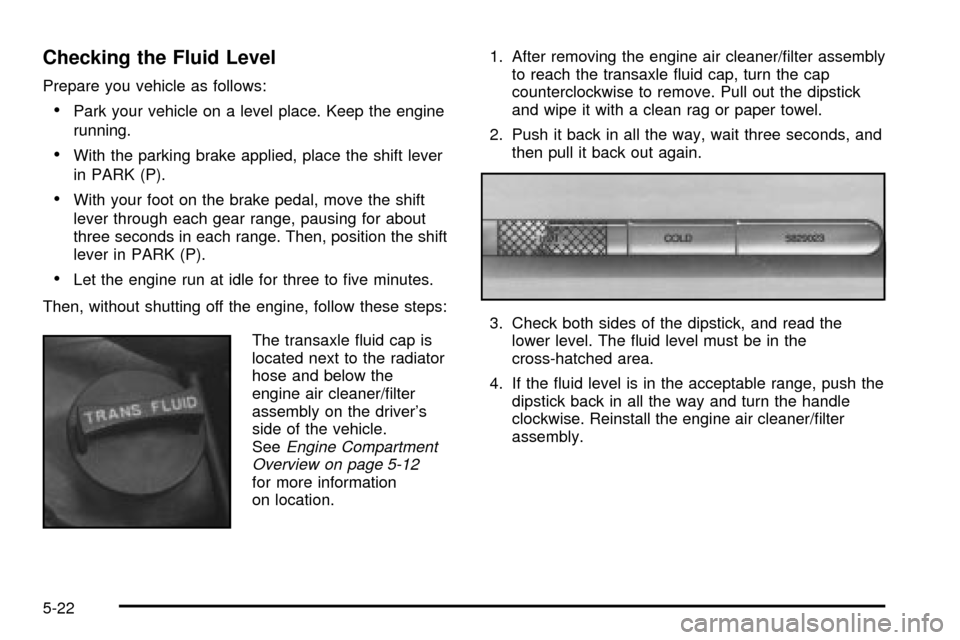
The transaxle ¯uid cap is
located next to the radiator
hose and below the
engine air cleaner/®lter
assembly on the driver's
side of the vehicle.
See
Engine Compartment
Overview on page 5-12
for more information
on location.1. After removing the engine air cleaner/®lter assembly
to reach the transaxle ¯uid cap, turn the cap
counterclockwise to remove. Pull out the dipstick
and wipe it with a clean rag or paper towel.
2. Push it back in all the way, wait three seconds, and
then pull it back out again.
3. Check both sides of the dipstick, and read the
lower level. The ¯uid level must be in the
cross-hatched area.
4. If the ¯uid level is in the acceptable range, push the
dipstick back in all the way and turn the handle
clockwise. Reinstall the engine air cleaner/®lter
assembly.
5-22