steering wheel CADILLAC DTS 2006 1.G User Guide
[x] Cancel search | Manufacturer: CADILLAC, Model Year: 2006, Model line: DTS, Model: CADILLAC DTS 2006 1.GPages: 450, PDF Size: 2.55 MB
Page 122 of 450

OnStar®Hands-Free Calling
OnStar®Hands-Free Calling allows OnStar®subscribers
to make and receive calls using voice commands at
the touch of a button. Hands-Free Calling is fully
integrated into the vehicle, and may be used with
Pre-Paid Packages or linked to a cell phone through
OnStar
®Shared Minutes Plan. To nd out more, refer to
the OnStar®Owner’s Guide in the vehicle’s glove
box, visit www.onstar.com or www.onstar.ca, or speak
with an OnStar
®advisor by pressing the OnStar®button
or calling 1-888-4-ONSTAR (1-888-466-7827).
OnStar®Virtual Advisor
Your vehicle may have Virtual Advisor. It is a feature of
OnStar®Hands-Free Calling that uses your minutes
to access weather, local traffic reports, and stock quotes.
By pressing the phone button and giving a few simple
voice commands, you can browse through the
various topics. Customize your information prole at
www.myonstar.com. See the OnStar
®Owner’s Guide for
more information.
OnStar®Steering Wheel Controls
g
(Talk/Mute):Your vehicle may be equipped with a
Talk/Mute button that can be used to interact with
OnStar
®. SeeAudio Steering Wheel Controls on
page 3-122for more information.
When calling into voice mail systems or to dial directory
numbers, press this button once, wait for the response,
say the number(s) to be dialed, wait for the number(s)
to be repeated and then say “dial.”
See the OnStar
®Owner’s Guide for more information.
2-44
Page 130 of 450

Vehicle Personalization
In addition to the following features, your vehicle may
also have features that can be programmed through the
Driver Information Center (DIC). SeeDIC Vehicle
Customization on page 3-88for more information.
Memory Seat, Mirrors and Steering
Wheel
Your vehicle may have the memory package.
The controls for this feature are located on the driver’s
door panel, and are used to program and recall
memory settings for the driver’s seat, outside mirror,
and the steering wheel position if the vehicle has
the power tilt wheel and telescopic steering feature.To save your positions in memory, do the following:
1. Adjust the driver’s seat, including the seatback
recliner and lumbar, both outside mirrors, and
the steering wheel to a comfortable position.
2. Press and hold button 1 until two beeps sound
through the driver’s side front speaker to let you
know that the position has been stored.
A second seating, mirror, and steering wheel position
can be programmed by repeating the above steps
and pressing button 2 for a second driver.
To recall your memory positions, the vehicle must be in
PARK (P). Press and release either button 1 or
button 2 corresponding to the desired driving position.
The seat, outside mirrors, and steering wheel will move
to the position previously stored for the identied
driver. You will hear a single beep.
If you use the remote keyless entry transmitter to enter
your vehicle and the remote recall memory feature
is on, automatic seat and mirror movement will occur.
See “MEMORY SEAT RECALL” underDIC Vehicle
Customization on page 3-88for more information.
To stop recall movement of the memory feature at any
time, press one of the power seat controls, memory
buttons, power tilt wheel control, or power mirror
buttons.
2-52
Page 131 of 450

If something has blocked the driver’s seat and/or the
steering column while recalling a memory position, the
driver’s seat and/or the steering column recall may
stop working. If this happens, press the appropriate
control for the area that is not recalling for two seconds,
after the obstruction is removed. Then try recalling
the memory position again by pressing the appropriate
memory button. If the memory position is still not
recalling, see your GM dealer for service.
Easy Exit Seat
The control for this feature is located on the driver’s
door panel between buttons 1 and 2.
With the vehicle in PARK (P), the exit position can be
recalled by pressing the exit button. You will hear
a single beep. The driver’s seat will move back, and if
the vehicle has the power tilt wheel and telescopic
steering feature, the power telescopic steering column
will move up and forward.If the easy exit seat feature is on in the DIC, automatic
seat and power telescopic steering column movement
will occur when the key is removed from the ignition.
See “EASY EXIT SEAT” underDIC Vehicle
Customization on page 3-88for more information.
Further programming for automatic seat and steering
wheel movement can be done using the Driver
Information Center (DIC). You can select or not select
the following:
The easy exit seat feature
The memory seat recall feature
For programming information, seeDIC Vehicle
Customization on page 3-88.
2-53
Page 133 of 450
Instrument Panel Overview...............................3-4
Hazard Warning Flashers................................3-6
Other Warning Devices...................................3-6
Horn.............................................................3-6
Tilt Wheel.....................................................3-6
Power Tilt Wheel and Telescopic Steering
Column......................................................3-7
Heated Steering Wheel...................................3-7
Turn Signal/Multifunction Lever.........................3-8
Turn and Lane-Change Signals........................3-8
Headlamp High/Low-Beam Changer..................3-9
Forward Collision Alert (FCA) System................3-9
Flash-to-Pass...............................................3-13
Windshield Wipers........................................3-13
Rainsense™ II Wipers...................................3-14
Windshield Washer.......................................3-15
Cruise Control..............................................3-16
Adaptive Cruise Control.................................3-19
Exterior Lamps.............................................3-30
Wiper Activated Headlamps............................3-34
Headlamps on Reminder................................3-34
Daytime Running Lamps (DRL).......................3-34Fog Lamps..................................................3-35
Cornering Lamps..........................................3-35
Exterior Lighting Battery Saver........................3-35
Instrument Panel Brightness...........................3-36
Courtesy Lamps...........................................3-36
Entry Lighting...............................................3-36
Parade Dimming...........................................3-36
Reading Lamps............................................3-37
Battery Load Management.............................3-37
Inadvertent Power Battery Saver.....................3-37
Ultrasonic Front and Rear Parking
Assist (UFRPA).........................................3-38
Accessory Power Outlet(s).............................3-42
Ashtray(s) and Cigarette Lighter......................3-43
Analog Clock...............................................3-44
Climate Controls............................................3-44
Dual Climate Control System..........................3-44
Outlet Adjustment.........................................3-50
Rear Climate Control System.........................3-51
Passenger Compartment Air Filter...................3-53
Section 3 Instrument Panel
3-1
Page 134 of 450
Warning Lights, Gages, and Indicators............3-55
Instrument Panel Cluster................................3-56
Speedometer and Odometer...........................3-57
Tachometer.................................................3-57
Safety Belt Reminder Light.............................3-57
Passenger Safety Belt Reminder Light.............3-58
Airbag Readiness Light..................................3-58
Passenger Airbag Status Indicator...................3-59
Charging System Light..................................3-61
Brake System Warning Light..........................3-62
Anti-Lock Brake System Warning Light.............3-63
Low Tire Pressure Warning Light....................3-63
Traction Control System (TCS)
Warning Light...........................................3-64
StabiliTrak
®Indicator Light..............................3-64
Engine Coolant Temperature Warning Light......3-65
Engine Coolant Temperature Gage..................3-65
Malfunction Indicator Lamp.............................3-66
Oil Pressure Light.........................................3-68
Security Light...............................................3-69
Fog Lamp Light............................................3-69
Rear Fog Lamp Light....................................3-69
Lights On Reminder......................................3-70Cruise Control Light......................................3-70
Highbeam On Light.......................................3-70
Fuel Gage...................................................3-70
Driver Information Center (DIC).......................3-71
DIC Controls and Displays.............................3-72
DIC Warnings and Messages.........................3-76
DIC Vehicle Customization.............................3-88
Audio System(s).............................................3-97
Setting the Time (Radio with Single
CD Player)...............................................3-98
Setting the Time (Radio with Six-Disc
CD Player).............................................3-100
Radio with CD (MP3)..................................3-102
Navigation/Radio System..............................3-121
Theft-Deterrent Feature................................3-121
Audio Steering Wheel Controls......................3-122
Radio Reception.........................................3-123
Care of Your CDs.......................................3-124
Care of the CD Player.................................3-124
Diversity Antenna System.............................3-124
XM™ Satellite Radio Antenna System............3-125
Section 3 Instrument Panel
3-2
Page 137 of 450
The main components of the instrument panel are the following:
A. Air Outlets. SeeOutlet Adjustment on page 3-50.
B. Driver Information Center (DIC) Buttons. SeeDriver
Information Center (DIC) on page 3-71.
C. Exterior Lamp Controls. SeeExterior Lamps on
page 3-30.
D. Instrument Panel Cluster. SeeInstrument Panel
Cluster on page 3-56.
E. Horn. SeeHorn on page 3-6.
F. Audio Steering Wheel Controls. SeeAudio Steering
Wheel Controls on page 3-122.
G. Shift Lever. SeeAutomatic Transaxle Operation on
page 2-26.
H. Traction Control System Button (Column-Shift
Vehicles). SeeTraction Control System (TCS) on
page 4-9.
I. Ultrasonic Front and Rear Parking Assist and
Adaptive Cruise Control Display (if equipped). See
Ultrasonic Front and Rear Parking Assist (UFRPA)
on page 3-38andAdaptive Cruise Control on
page 3-19.J. Analog Clock. SeeAnalog Clock on page 3-44.
K. Hazard Warning Flashers Button. SeeHazard
Warning Flashers on page 3-6.
L. Radio. SeeAudio System(s) on page 3-97.
M. Trunk Release Button. SeeTrunk on page 2-13.
N. Instrument Panel Brightness Control. SeeInstrument
Panel Brightness on page 3-36.
O. Turn Signal/Multifunction Lever. SeeTurn
Signal/Multifunction Lever on page 3-8.
P. Hood Release. SeeHood Release on page 5-11.
Q. Parking Brake. SeeParking Brake on page 2-30.
R. Heated Steering Wheel Button (If Equipped).
SeeHeated Steering Wheel on page 3-7.
S. Cruise Control or Adaptive Cruise Control. See
Cruise Control on page 3-16orAdaptive Cruise
Control on page 3-19.
T. Climate Controls. SeeDual Climate Control System
on page 3-44.
U. Glove Box. SeeGlove Box on page 2-49.
3-5
Page 138 of 450
Hazard Warning Flashers
Your hazard warning ashers let you warn others. They
also let police know you have a problem. Your front
and rear turn signal lamps will ash on and off.
The hazard warning
asher button is located in
the center of the
instrument panel.
Your hazard warning ashers work no matter what
position your key is in, and even if the key is not in the
ignition switch.
Press the button to make the front and rear turn signal
lamps ash on and off. Press the button again to
turn the ashers off.
When the hazard warning ashers are on, your turn
signals will not work.
Other Warning Devices
If you carry reective triangles, you can set them up at
the side of the road about 300 feet (100 m) behind
your vehicle.
Horn
Press near or on the horn symbols on your steering
wheel pad to sound the horn.
Tilt Wheel
A tilt wheel allows you to adjust the steering wheel
before you drive. You can raise the steering wheel to
the highest level to give your legs more room when you
enter and exit the vehicle.
The lever that allows you to tilt the steering wheel is
located on the left side of the steering column.
3-6
Page 139 of 450

To tilt the wheel, hold the
wheel and pull the lever.
Then move the wheel
to a comfortable position
and release the lever
to lock the wheel in place.
Power Tilt Wheel and Telescopic
Steering Column
If your vehicle has this
feature, the power tilt
wheel control is located on
the outboard side of the
steering column.To operate the power tilt feature, push the control up
and the steering wheel will tilt up. Push the control down
and the steering wheel will go down.
Push the control forward and the steering wheel moves
toward the front of the vehicle. Push the control
rearward and the steering wheel moves toward the rear
of the vehicle. To set the memory position, seeDIC
Vehicle Customization on page 3-88andMemory Seat,
Mirrors and Steering Wheel on page 2-52.
Heated Steering Wheel
Your vehicle may have a heated steering wheel.
The button for this feature
is located on the steering
wheel.
Press the button to turn the heated steering wheel on or
off. A light on the button will display while the feature
is on.
The steering wheel will take about three minutes to start
heating.
3-7
Page 142 of 450

The Forward Collision Alert (FCA) system provides an
audible and visual alert if you approach a vehicle
too quickly that is directly ahead. FCA also provides a
visual alert with no audible alert if you are following
another vehicle much too closely. The FCA alert symbol
is located on top of the instrument panel to the right
of the driver. FCA uses the Adaptive Cruise Control
radar to detect a vehicle directly ahead, in your path,
within a distance of 328 ft (100 m) and operates at
speeds above 20 mph (32 km/h).
{CAUTION:
FCA is only a warning system and does not
apply the brakes. When you are approaching a
vehicle or object too rapidly or when you are
following a vehicle too closely that is ahead of
you, FCA may not provide you with enough
time to avoid a collision. FCA is not designed
to warn the driver of pedestrians or animals.
Your complete attention is always required
while driving and you should be ready to
take action and apply the brakes. For more
information, seeDefensive Driving on page 4-2.The FCA control is located
on the steering wheel.
To enable or disable FCA, press the Adaptive Cruise
Control button. SeeAdaptive Cruise Control on
page 3-19.
FCA is enabled when the green light on the button
is lit. FCA is disabled when the green light is off.
3-10
Page 149 of 450
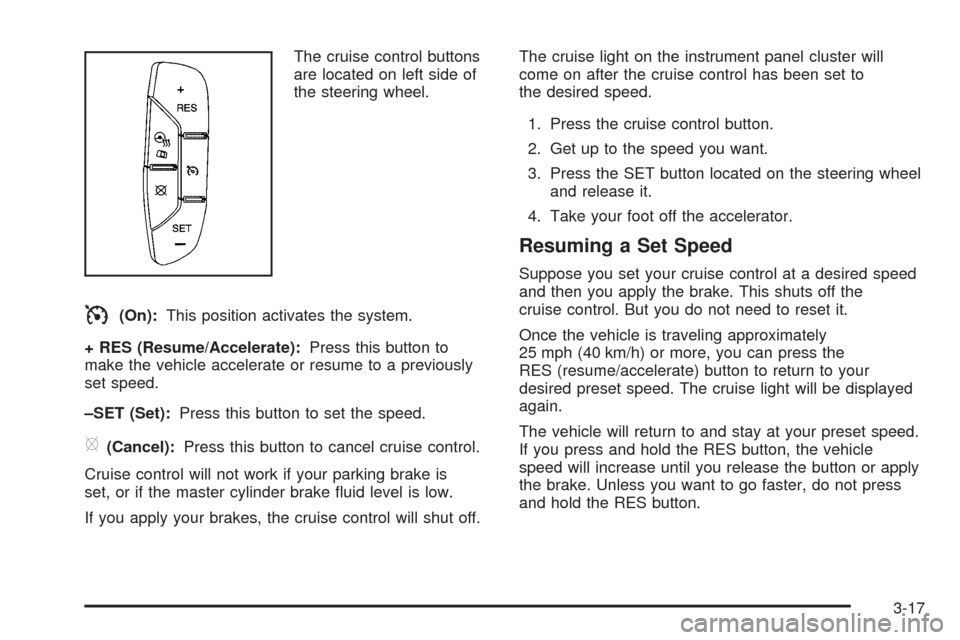
The cruise control buttons
are located on left side of
the steering wheel.
I(On):This position activates the system.
+ RES (Resume/Accelerate):Press this button to
make the vehicle accelerate or resume to a previously
set speed.
–SET (Set):Press this button to set the speed.
[(Cancel):Press this button to cancel cruise control.
Cruise control will not work if your parking brake is
set, or if the master cylinder brake uid level is low.
If you apply your brakes, the cruise control will shut off.The cruise light on the instrument panel cluster will
come on after the cruise control has been set to
the desired speed.
1. Press the cruise control button.
2. Get up to the speed you want.
3. Press the SET button located on the steering wheel
and release it.
4. Take your foot off the accelerator.
Resuming a Set Speed
Suppose you set your cruise control at a desired speed
and then you apply the brake. This shuts off the
cruise control. But you do not need to reset it.
Once the vehicle is traveling approximately
25 mph (40 km/h) or more, you can press the
RES (resume/accelerate) button to return to your
desired preset speed. The cruise light will be displayed
again.
The vehicle will return to and stay at your preset speed.
If you press and hold the RES button, the vehicle
speed will increase until you release the button or apply
the brake. Unless you want to go faster, do not press
and hold the RES button.
3-17