power steering CADILLAC DTS 2007 1.G Owners Manual
[x] Cancel search | Manufacturer: CADILLAC, Model Year: 2007, Model line: DTS, Model: CADILLAC DTS 2007 1.GPages: 518, PDF Size: 2.77 MB
Page 7 of 518
Front Seats..................................................... 9
Power Seats................................................. 9
Power Lumbar............................................. 10
Massaging Lumbar...................................... 10
Heated and Cooled Seats........................... 11
Memory Seat, Mirrors and
Steering Wheel......................................... 12
Power Reclining Seatbacks......................... 14
Head Restraints.......................................... 16
Center Seat................................................ 17
Rear Seats.................................................... 17
Heated Seats.............................................. 17
Rear Seat Pass-Through Door.................... 18
Power Lumbar............................................. 18
Safety Belts.................................................. 19
Safety Belts: They Are for Everyone........... 19
Questions and Answers About
Safety Belts............................................. 23
How to Wear Safety Belts Properly............. 24
Driver Position............................................. 25
Shoulder Belt Height Adjustment................. 33Safety Belt Use During Pregnancy.............. 34
Right Front Passenger Position................... 34
Center Front Passenger Position................. 35
Rear Seat Passengers................................ 36
Rear Safety Belt Comfort Guides................ 39
Safety Belt Pretensioners............................ 41
Safety Belt Extender................................... 42
Child Restraints............................................ 42
Older Children............................................. 42
Infants and Young Children......................... 45
Child Restraint Systems.............................. 49
Where to Put the Restraint.......................... 54
Lower Anchors and Tethers for
Children (LATCH).................................... 55
Securing a Child Restraint in a
Rear Seat Position................................... 63
Securing a Child Restraint in the
Center Front Seat Position....................... 65
Securing a Child Restraint in the
Right Front Seat Position......................... 66
Section 1 Seats and Restraint Systems
7
Page 9 of 518
Front Seats
Power Seats
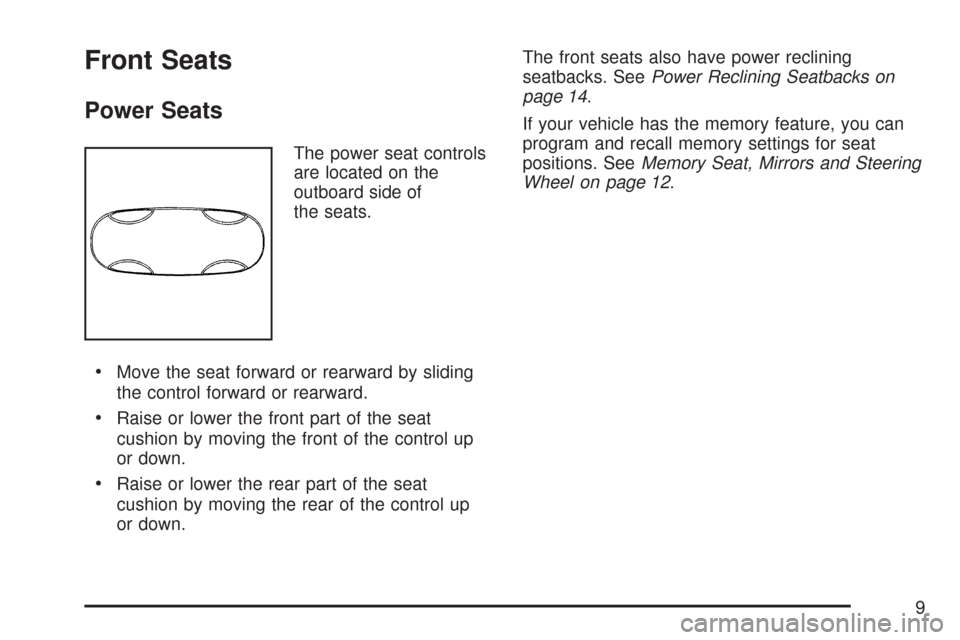
The power seat controls
are located on the
outboard side of
the seats.
Move the seat forward or rearward by sliding
the control forward or rearward.
Raise or lower the front part of the seat
cushion by moving the front of the control up
or down.
Raise or lower the rear part of the seat
cushion by moving the rear of the control up
or down.The front seats also have power reclining
seatbacks. SeePower Reclining Seatbacks on
page 14.
If your vehicle has the memory feature, you can
program and recall memory settings for seat
positions. SeeMemory Seat, Mirrors and Steering
Wheel on page 12.
9
Page 12 of 518
Memory Seat, Mirrors and Steering
Wheel
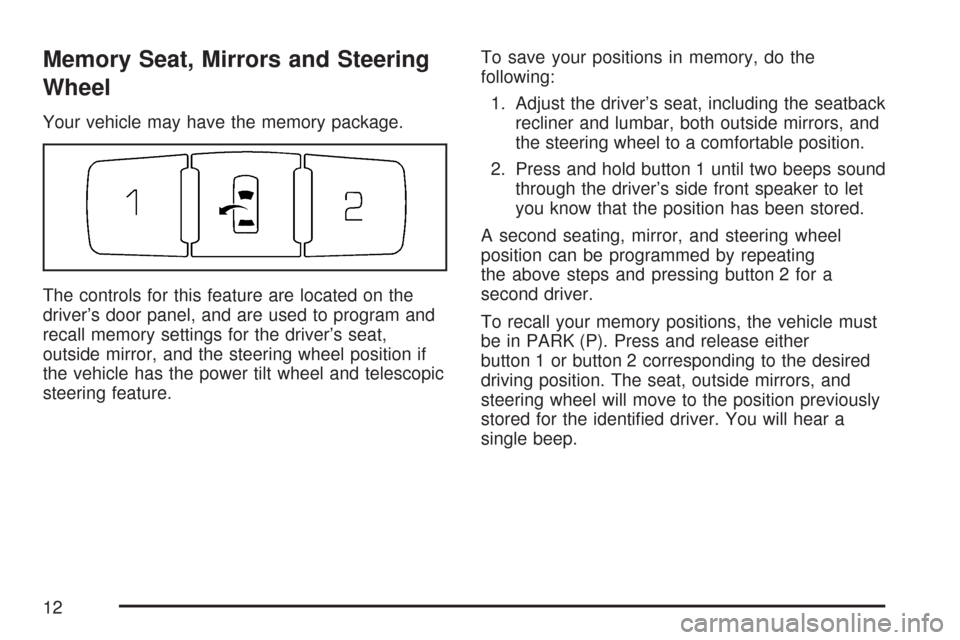
Your vehicle may have the memory package.
The controls for this feature are located on the
driver’s door panel, and are used to program and
recall memory settings for the driver’s seat,
outside mirror, and the steering wheel position if
the vehicle has the power tilt wheel and telescopic
steering feature.To save your positions in memory, do the
following:
1. Adjust the driver’s seat, including the seatback
recliner and lumbar, both outside mirrors, and
the steering wheel to a comfortable position.
2. Press and hold button 1 until two beeps sound
through the driver’s side front speaker to let
you know that the position has been stored.
A second seating, mirror, and steering wheel
position can be programmed by repeating
the above steps and pressing button 2 for a
second driver.
To recall your memory positions, the vehicle must
be in PARK (P). Press and release either
button 1 or button 2 corresponding to the desired
driving position. The seat, outside mirrors, and
steering wheel will move to the position previously
stored for the identied driver. You will hear a
single beep.
12
Page 13 of 518
If you use the remote keyless entry transmitter to
enter your vehicle and the remote recall memory
feature is on, automatic seat and mirror movement
will occur. See “MEMORY SEAT RECALL”
underDIC Vehicle Customization on page 259for
more information.
To stop recall movement of the memory feature at
any time, press one of the power seat controls,
memory buttons, power tilt wheel control, or power
mirror buttons.
If something has blocked the driver’s seat and/or
the steering column while recalling a memory
position, the driver’s seat and/or the steering
column recall may stop. If this happens remove
the obstruction, then press the appropriate control
for the area that is not recalling for two seconds.
Try recalling the memory position again by
pressing the appropriate memory button. If the
memory position is still not recalling, see
your dealer for service.Easy Exit Seat
The control for this feature is located on the
driver’s door panel between buttons 1 and 2.
With the vehicle in PARK (P), the exit position can
be recalled by pressing the exit button. You will
hear a single beep. The driver’s seat will move
back, and if the vehicle has the power tilt wheel and
telescopic steering feature, the power telescopic
steering column will move up and forward.
If the easy exit seat feature is on in the DIC,
automatic seat and power telescopic steering
column movement will occur when the key
is removed from the ignition. See “EASY EXIT
SEAT” underDIC Vehicle Customization on
page 259for more information.
Further programming for automatic seat and
steering wheel movement can be done using the
Driver Information Center (DIC). You can select
or not select the following:
The easy exit seat feature
The memory seat recall feature
For programming information, seeDIC Vehicle
Customization on page 259.
13
Page 119 of 518

Key In the Ignition
Never leave your vehicle with the keys inside, as it
is an easy target for joy riders or thieves. If you
leave the key in the ignition and park your vehicle,
a chime will sound, when you open the driver’s
door. Always remember to remove your key from
the ignition and take it with you. This will lock
your ignition and transaxle. Also, always remember
to lock the doors.
The battery could be drained if you leave the key
in the ignition while your vehicle is parked.
You may not be able to start your vehicle after it
has been parked for an extended period of time.
Retained Accessory Power (RAP)
These vehicle accessories can be used for up to
10 minutes after the ignition key is turned off:
Audio System
Audio Steering Wheel Controls
Power Windows
SunroofPower to these accessories will work up to
10 minutes or until the driver’s door is opened. For
an additional 10 minutes of power, close all the
doors and turn the key to RUN and then back
to OFF.
Starting the Engine
Place the transaxle in the proper gear.
Move your shift lever to PARK (P) or
NEUTRAL (N). Your engine will not start in
any other position – this is a safety feature. To
restart when you are already moving, use
NEUTRAL (N) only.
Notice:Shifting into PARK (P) with the vehicle
moving could damage the transaxle. Shift into
PARK (P) only when your vehicle is stopped.
Starting Procedure
1. With your foot off the accelerator pedal, turn
the ignition key to START. When the engine
starts, let go of the key. The idle speed will go
down as your engine gets warm. Do not
race the engine immediately after starting it.
119
Page 159 of 518

Instrument Panel Overview........................ 162
Hazard Warning Flashers.......................... 164
Other Warning Devices............................. 164
Horn.......................................................... 164
Tilt Wheel.................................................. 165
Power Tilt Wheel and Telescopic
Steering Column.................................... 165
Heated Steering Wheel............................. 166
Turn Signal/Multifunction Lever.................. 166
Turn and Lane-Change Signals................. 167
Headlamp High/Low-Beam Changer.......... 167
Forward Collision Alert (FCA) System........ 168
Flash-to-Pass............................................ 172
Windshield Wipers..................................... 172
Rainsense™ II Wipers............................... 173
Windshield Washer.................................... 175
Cruise Control........................................... 176
Adaptive Cruise Control............................. 179
Exterior Lamps.......................................... 193
Wiper Activated Headlamps....................... 197
Headlamps on Reminder........................... 197
Daytime Running Lamps (DRL)................. 197Fog Lamps................................................ 198
Cornering Lamps....................................... 199
Exterior Lighting Battery Saver.................. 199
Instrument Panel Brightness...................... 199
Courtesy Lamps........................................ 199
Entry Lighting............................................ 200
Parade Dimming........................................ 200
Reading Lamps......................................... 200
Battery Load Management......................... 200
Electric Power Management...................... 201
Inadvertent Power Battery Saver............... 202
Battery Run-Down Protection..................... 202
Ultrasonic Front and Rear Parking
Assist (UFRPA)...................................... 202
Accessory Power Outlet(s)........................ 208
Ashtray(s) and Cigarette Lighter................ 209
Analog Clock............................................. 210
Climate Controls......................................... 210
Dual Climate Control System..................... 210
Outlet Adjustment...................................... 217
Rear Climate Control System.................... 218
Passenger Compartment Air Filter............. 220
Section 3 Instrument Panel
159
Page 165 of 518

Tilt Wheel
A tilt wheel lets you adjust the steering wheel
before you drive. You can raise the steering wheel
to the highest level to give your legs more room
when you enter and exit the vehicle.
The lever that lets you tilt the steering wheel is
located on the left side of the steering column.
To tilt the wheel, hold the
wheel and pull the lever.
Then move the wheel to
a comfortable position
and release the lever to
lock the wheel in place.
Power Tilt Wheel and Telescopic
Steering Column
If your vehicle has this
feature, the power tilt
wheel control is located
on the left side of the
steering column.
To operate the power tilt feature, push the control
up and the steering wheel will tilt up. Push the
control down and the steering wheel will go down.
Push the control forward and the steering wheel
moves toward the front of the vehicle. Push the
control rearward and the steering wheel moves
toward the rear of the vehicle. To set the memory
position, seeDIC Vehicle Customization on
page 259andMemory Seat, Mirrors and Steering
Wheel on page 12.
165
Page 255 of 518

SERVICE POWER STEERING
Your vehicle may have a speed variable assist
steering system. SeeSteering on page 312.
This message displays if a problem is detected
with the speed variable assist steering system.
When this message is displayed, you may notice
that the effort required to steer the vehicle
decreases or feels lighter, but you will still be
able to steer the vehicle.
SERVICE RADAR CRUISE
This message displays when the Adaptive Cruise
Control (ACC) system and the Forward Collision
Alert (FCA) system are disabled and need service.
See your dealer.
SERVICE STABILITRAK
Your vehicle may have a vehicle stability
enhancement system called StabiliTrak®.
SeeStabiliTrak®System on page 311.
This message displays if there has been a
problem detected with the StabiliTrak
®system.If this message comes on while you are driving,
pull off the road as soon as possible and stop
carefully. Try resetting the system by turning
the ignition off then back on. If this message
still stays on or comes back on again while you
are driving, your vehicle needs service. Have
the StabiliTrak
®system inspected by your dealer
as soon as possible.
SERVICE SUSPENSION SYS (System)
This message displays when the magnetic ride
control or automatic leveling control system is not
operating properly. Have your vehicle serviced by
your dealer.
SERVICE THEFT DETERRENT SYSTEM
This message displays when there is a problem
with the theft-deterrent system programmed in the
key. A fault has been detected in the system which
means that the system is disabled and it is not
protecting the vehicle. The vehicle usually restarts;
however, you may want to take the vehicle to
your dealer before turning off the engine. See
PASS-Key
®III+ Operation on page 115for more
information.
255
Page 265 of 518
PARK TILT MIRRORS
If your vehicle has this feature, it allows you
to select whether or not the outside mirror(s)
will automatically tilt down when the vehicle is
shifted into REVERSE (R). SeeOutside Curb View
Assist Mirror on page 138for more information.
Press the customization button until PARK
TILT MIRRORS appears on the DIC display.
Press the set/reset button to access the settings
for this feature. Then press the menu up/down
button to scroll through the following settings:
OFF (default):Neither outside mirror will
be tilted down when the vehicle is shifted into
REVERSE (R).
DRIVER MIRROR:The driver’s outside mirror will
be tilted down when the vehicle is shifted into
REVERSE (R).
PASSENGER MIRROR:The passenger’s outside
mirror will be tilted down when the vehicle is
shifted into REVERSE (R).
BOTH MIRRORS:The driver’s and passenger’s
outside mirrors will be tilted down when the vehicle
is shifted into REVERSE (R).NO CHANGE:No change will be made to this
feature. The current setting will remain.
Choose one of the available settings and press
the set/reset button while it is displayed on the DIC
to select it.
EASY EXIT SEAT
If the vehicle has this feature, it allows you to
select your preference for the easy exit seat
feature. SeeMemory Seat, Mirrors and Steering
Wheel on page 12for more information.
Press the customization button until EASY EXIT
SEAT appears in the display. Press the set/reset
button to access the settings for this feature.
Then press the menu up/down button to scroll
through the following settings:
OFF (default):No seat exit recall will occur.
ON:The driver’s seat will move back, and if the
vehicle has the power tilt wheel and telescopic
steering feature, the power steering column
will move up and forward when the key is
removed from the ignition.
265
Page 266 of 518

The automatic easy exit seat movement will only
occur one time after the key is removed from the
ignition. If the automatic movement has already
occurred, and you put the key back in the ignition
and remove it again, the seat and steering column
will stay in the original exit position, unless a
memory recall took place prior to removing the
key again.
NO CHANGE:No change will be made to this
feature. The current setting will remain.
Choose one of the available settings and press
the set/reset button while it is displayed on the DIC
to select it.
MEMORY SEAT RECALL
If the vehicle has this feature, it allows you to
select your preference for the memory seat recall
feature. SeeMemory Seat, Mirrors and Steering
Wheel on page 12for more information.Press the customization button until MEMORY
SEAT RECALL appears in the display. Press the
set/reset button to access the settings for this
feature. Then press the menu up/down button to
scroll through the following settings:
OFF (default):No memory seat recall will occur.
ON:The driver’s seat and outside mirrors will
automatically move to the stored driving position
when the unlock button on the Remote Keyless
Entry (RKE) transmitter is pressed. The steering
column will also move on vehicles with the
power tilt and telescopic steering feature. See
Power Tilt Wheel and Telescopic Steering Column
on page 165for more information. See “RELEARN
REMOTE KEY” underDIC Controls and Displays
on page 240for more information on matching
transmitters to driver ID numbers.
NO CHANGE:No change will be made to this
feature. The current setting will remain.
Choose one of the available settings and press
the set/reset button while it is displayed on the DIC
to select it.
266