seats CADILLAC DTS 2010 1.G Owner's Manual
[x] Cancel search | Manufacturer: CADILLAC, Model Year: 2010, Model line: DTS, Model: CADILLAC DTS 2010 1.GPages: 480, PDF Size: 17.56 MB
Page 198 of 480

Reading Lamps
The reading lamps are located on the overhead consoleon the headliner and in the rear door opening. Theselamps come on automatically when any door is openedand it is dark outside.
For manual operation, press the button to turn them on.Press it again to turn them off.
If the reading lamps are left on, they automatically shutoff 10 minutes after the ignition has been turned off.
Footwell Lamps
For vehicles with footwell lamps, they are located underthe instrument panel and at the rear of the frontseats. These lamps provide soft light to the front andrear floor areas. They dim with the instrument panelcluster lights.
Footwell lighting brightness can be adjusted with theinstrument panel brightness control located belowthe exterior lamps control. SeeInstrument PanelBrightness on page 4-31. The footwell lights will turn offbefore the instrument panel lights are at their lowestlevel of brightness.
Battery Load Management
This feature monitors the vehicle’s electrical load anddetermines when the battery is in a heavy dischargecondition. During times of high electrical loading,the engine may idle at a higher revolutions per minute(rpm) setting than normal to make sure the batterycharges. High electrical loads may occur when severalof the following are on: headlamps, high beams, foglamps, rear window defogger, the climate control fan athigh speeds, heated seats and engine cooling fans.
If the battery continues to discharge, even withthe engine idling at a higher rpm setting, some electricalloads will automatically be reduced. When this occurs,the rear window defogger may take slightly longerto clear the glass, the heated seats may not get as warmas they usually do and the climate control fan may cutback to a lower speed. For more battery savinginformation, see “Battery Saver Active Message” underDIC Warnings and Messages on page 4-67.
4-32
Page 199 of 480

Electric Power Management
The vehicle has Electric Power Management (EPM) thatestimates the battery’s temperature and state ofcharge. It then adjusts the voltage for best performanceand extended life of the battery.
When the battery’s state of charge is low, the voltage israised slightly to quickly bring the charge back up.When the state of charge is high, the voltage is loweredslightly to prevent overcharging. If the vehicle has avoltmeter gage or a voltage display on the DriverInformation Center (DIC), you may see the voltage moveup or down. This is normal. If there is a problem, analert will be displayed.
The battery can be discharged at idle if the electricalloads are very high. This is true for all vehicles. This isbecause the generator (alternator) may not bespinning fast enough at idle to produce all the powerthat is needed for very high electrical loads.
A high electrical load occurs when several of thefollowing are on, such as: headlamps, high beams, foglamps, rear window defogger, climate control fan athigh speed, heated seats, engine cooling fans, trailerloads, and loads plugged into accessory power outlets.
EPM works to prevent excessive discharge of thebattery. It does this by balancing the generator’s outputand the vehicle’s electrical needs. It can increase
engine idle speed to generate more power, wheneverneeded. It can temporarily reduce the power demands ofsome accessories.
Normally, these actions occur in steps or levels, withoutbeing noticeable. In rare cases at the highest levelsof corrective action, this action may be noticeable to thedriver. If so, a Driver Information Center (DIC)message might be displayed, such as BATTERYSAVER ACTIVE, BATTERY VOLTAGE LOW, orLOW BATTERY. If this message is displayed, it isrecommended that the driver reduce the electrical loadsas much as possible. SeeDIC Warnings and Messageson page 4-67.
Inadvertent Power Battery Saver
This feature is designed to protect your vehicle’s batteryagainst drainage from the interior lamps, trunk lamp,glove box lamp, or the garage door opener. When theignition is turned off, the power to these features willautomatically turn off after 10 minutes. Power willbe restored for an additional 10 minutes if any door ortrunk is opened, or the courtesy lamp switch isturned on.
4-33
Page 207 of 480

There is also an interiortemperature sensorlocated next to the steeringwheel that measures thetemperature of the airinside the vehicle.
There is also an exterior temperature sensor locatedbehind the front grille. This sensor reads the outside airtemperature and helps maintain the temperatureinside the vehicle. Any cover on the front of the vehiclecould cause a false reading in the displayedtemperature.
In order to prevent false temperature readings atstartup, the displayed temperature will not change untilthe following occurs:
•Vehicle speed is above 16 km/h (10 mph) for
5 minutes.
•Vehicle speed is above 51 km/h (32 mph) for 2 and
a half minutes.
The climate control system uses the information fromthese sensors to maintain your comfort setting byadjusting the outlet temperature, fan speed, and the airdelivery mode. The system may also supply coolerair to the side of the vehicle facing the sun. Therecirculation mode will also be used as needed tomaintain cool outlet temperatures.
Outlet Adjustment
For the front outlets, use the thumbwheel located beloweach outlet to change the direction of the airflow. Use thethumbwheel located next to the outlets to shut the airflowor to open the outlets and re-direct the air.
For the rear outlets, slide the lever left or right and up ordown to change the direction of the airflow.
Operation Tips
•Clear away any ice, snow or leaves from the air
inlets at the base of the windshield that mayblock the flow of air into your vehicle.
•Use of non-GM approved hood deflectors may
adversely affect the performance of the system.
•Keep the path under the front seats clear of objects
to help circulate the air inside of your vehicle moreeffectively.
4-41
Page 233 of 480

RELEARN REMOTE KEY
This display allows you to match Remote KeylessEntry (RKE) transmitters to your vehicle. This procedurewill erase all previously learned transmitters. Therefore,they must be relearned as additional transmitters.
To match an RKE transmitter to your vehicle:
1. Press the vehicle information button until
PRESSVTO RELEARN REMOTE KEY displays.
2. Press the set/reset button until REMOTE KEYLEARNING ACTIVE is displayed.
3. Press and hold the lock and unlock buttons on thefirst transmitter at the same time for about15 seconds.
On vehicles with memory recall seats, the firsttransmitter learned will match driver 1 andthe second will match driver 2.
A chime will sound indicating that the transmitter ismatched.
4. To match additional transmitters at this time, repeatStep 3.
Each vehicle can have a maximum of eighttransmitters matched to it.
5. To exit the programming mode, you must cycle thekey to LOCK/OFF.
Blank Display
This display shows no information.
DIC Warnings and Messages
These messages appear if there is a problem detectedin one of your vehicle’s systems.
You must acknowledge a message to clear it from thescreen for further use. To clear a message, pressthe set/reset button.
Be sure to take any message that appears on thescreen seriously and remember that clearing themessage will only make the message disappear, notthe problem.
ADVISORY XXX MPH (km/h)
This message displays when the Speed Alert has beenturned on through the DIC Information Menu and thevehicle is at or above the advised speed. SeeDICOperation and Displays on page 4-62.
AUTOMATIC LIGHT CONTROL OFF
This message displays when the automatic headlampsare turned off. SeeExterior Lamps on page 4-25formore information.
4-67
Page 311 of 480

Notice:Overloading the vehicle may causedamage. Repairs would not be covered by thevehicle warranty. Do not overload the vehicle.
If you put things inside your vehicle, likesuitcases, tools, packages, or anything else, theywill go as fast as the vehicle goes. If you haveto stop or turn quickly, or if there is a crash, theywill keep going.
{WARNING:
Things you put inside your vehicle can strikeand injure people in a sudden stop or turn, orin a crash.
•Put things in the trunk of your vehicle. In
a trunk, put them as far forward as youcan. Try to spread the weight evenly.
•Never stack heavier things, like
suitcases, inside the vehicle so that someof them are above the tops of the seats.
•Do not leave an unsecured child restraint
in your vehicle.
•When you carry something inside the
vehicle, secure it whenever you can.
Automatic Level Control
This feature keeps the rear of your vehicle levelas the load changes. It is automatic, you donot need to adjust anything.
This type of level control is fully automatic and willprovide a better leveled riding position as well asbetter handling under a variety of passenger andloading conditions. An air compressor connected tothe rear shocks will raise or lower the rear of thevehicle to maintain proper vehicle height. Thesystem is activated when the ignition key is turnedto ON/RUN and will automatically adjust vehicleheight thereafter. The system may exhaust(lower vehicle height) for up to ten minutes afterthe ignition key has been turned to LOCK/OFF.You may hear the air compressor operating whenthe height is being adjusted.
5-23
Page 372 of 480

Tire Terminology and Definitions
Air Pressure:The amount of air inside thetire pressing outward on each square inch of thetire. Air pressure is expressed in pounds persquare inch (psi) or kilopascal (kPa).
Accessory Weight:This means the combinedweight of optional accessories. Some examples ofoptional accessories are, automatic transmission,power steering, power brakes, power windows,power seats, and air conditioning.
Aspect Ratio:The relationship of a tire’s heightto its width.
Belt:A rubber coated layer of cords that is locatedbetween the plies and the tread. Cords may bemade from steel or other reinforcing materials.
Bead:The tire bead contains steel wires wrappedby steel cords that hold the tire onto the rim.
Bias Ply Tire:A pneumatic tire in which the pliesare laid at alternate angles less than 90 degreesto the centerline of the tread.
Cold Tire Pressure:The amount of air pressure ina tire, measured in pounds per square inch (psi) orkilopascals (kPa) before a tire has built up heatfrom driving. SeeInflation - Tire Pressure onpage 6-54.
Curb Weight:The weight of a motor vehicle withstandard and optional equipment including themaximum capacity of fuel, oil, and coolant,but without passengers and cargo.
DOT Markings:A code molded into the sidewallof a tire signifying that the tire is in compliancewith the U.S. Department of Transportation (DOT)motor vehicle safety standards. The DOT codeincludes the Tire Identification Number (TIN),an alphanumeric designator which can also identifythe tire manufacturer, production plant, brand,and date of production.
GVWR:Gross Vehicle Weight Rating. SeeLoading the Vehicle on page 5-18.
GAWR FRT:Gross Axle Weight Rating for thefront axle. SeeLoading the Vehicle on page 5-18.
GAWR RR:Gross Axle Weight Rating for therear axle. SeeLoading the Vehicle on page 5-18.
Intended Outboard Sidewall:The side of anasymmetrical tire, that must always face outwardwhen mounted on a vehicle.
Kilopascal (kPa):The metric unit for air pressure.
Light Truck (LT-Metric) Tire:A tire used onlight duty trucks and some multipurpose passengervehicles.
6-52
Page 424 of 480

Rear Underseat Fuse Block
The rear fuse block is located under the rear seat onthe driver side. The rear seat cushion must be removedto access the rear fuse block.
Removing the Rear Seat Cushion
Notice:If you touch the exposed wires with themetal on the seat cushion, you could cause ashort that could damage the battery and or wires.Avoid contact between the rear seat and thefuse center whenever you remove or reinstall therear seat. Do not remove covers from any ofthe covered parts, and do not store anything underthe seats.
To remove the rear seat cushion, do the following:
1. Pull up on the front of the cushion to release thefront hooks.
2. Pull the cushion up and out toward the front ofthe vehicle.
To access the fuse block, pull out and lift up on thecover latch, located at the end of the fuse block, nearthe battery cable.
6-104
Page 427 of 480
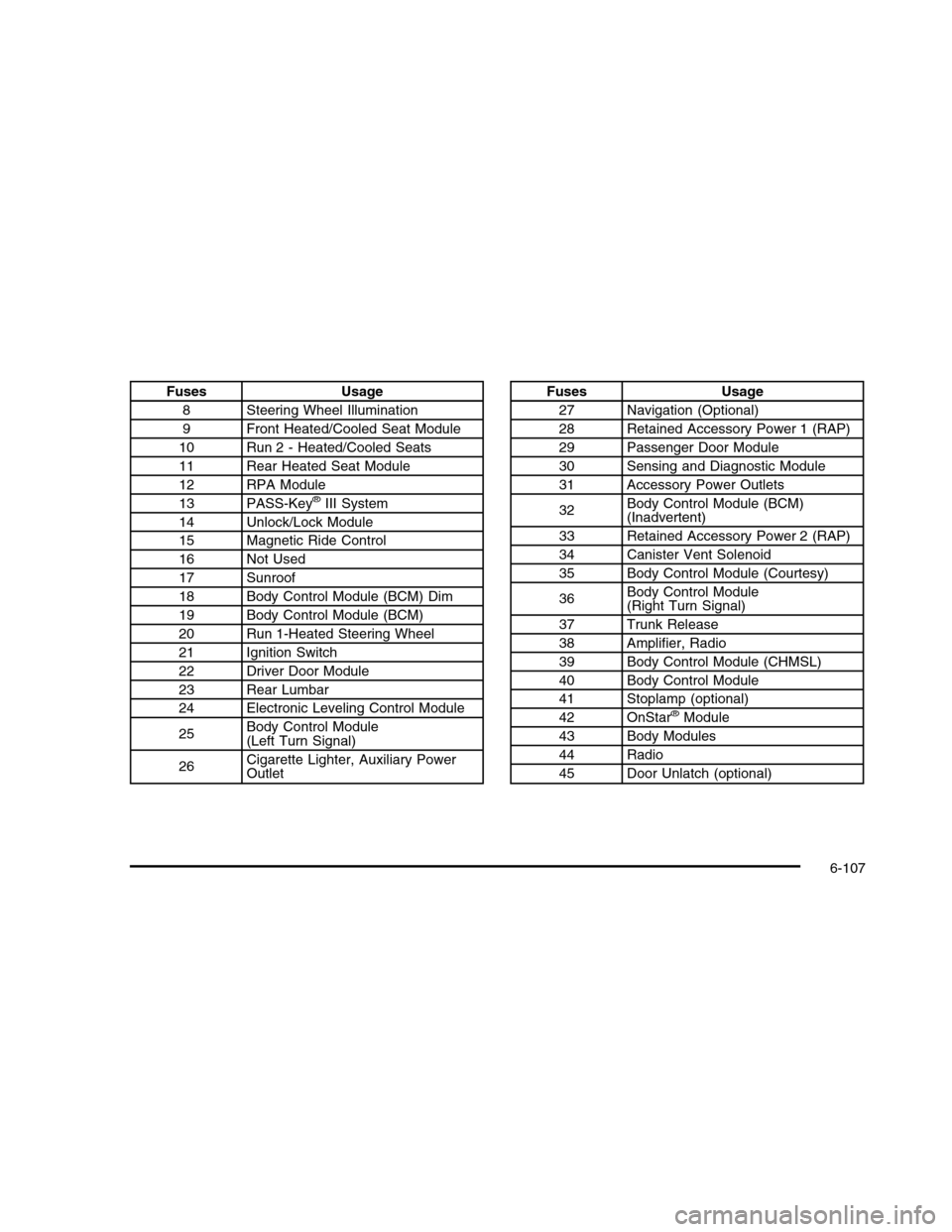
FusesUsage
8Steering Wheel Illumination
9Front Heated/Cooled Seat Module
10Run 2 - Heated/Cooled Seats
11Rear Heated Seat Module
12RPA Module
13PASS-Key®III System
14Unlock/Lock Module
15Magnetic Ride Control
16Not Used
17Sunroof
18Body Control Module (BCM) Dim
19Body Control Module (BCM)
20Run 1-Heated Steering Wheel
21Ignition Switch
22Driver Door Module
23Rear Lumbar
24Electronic Leveling Control Module
25Body Control Module(Left Turn Signal)
26Cigarette Lighter, Auxiliary PowerOutlet
FusesUsage
27Navigation (Optional)
28Retained Accessory Power 1 (RAP)
29Passenger Door Module
30Sensing and Diagnostic Module
31Accessory Power Outlets
32Body Control Module (BCM)(Inadvertent)
33Retained Accessory Power 2 (RAP)
34Canister Vent Solenoid
35Body Control Module (Courtesy)
36Body Control Module(Right Turn Signal)
37Trunk Release
38Amplifier, Radio
39Body Control Module (CHMSL)
40Body Control Module
41Stoplamp (optional)
42OnStar®Module
43Body Modules
44Radio
45Door Unlatch (optional)
6-107
Page 471 of 480

H
Hazard Warning Flashers . . . . . . . . . . . . . . . . . . . . . . . . . . . . . . . . . . . 4-3Head Restraints . . . . . . . . . . . . . . . . . . . . . . . . . . . . . . . . . . . . . . . . . . . . . . . 2-2Headlamp Wiring . . . . . . . . . . . . . . . . . . . . . . . . . . . . . . . . . . . . . . . . . . . 6-100HeadlampsAiming . . . . . . . . . . . . . . . . . . . . . . . . . . . . . . . . . . . . . . . . . . . . . . . . . . . . . . . 6-40Bulb Replacement . . . . . . . . . . . . . . . . . . . . . . . . . . . . . . . . . . . . . . . 6-43Daytime Running Lamps (DRL) . . . . . . . . . . . . . . . . . . . . . 4-29Exterior Lamps . . . . . . . . . . . . . . . . . . . . . . . . . . . . . . . . . . . . . . . . . . . . 4-25Flash-to-Pass . . . . . . . . . . . . . . . . . . . . . . . . . . . . . . . . . . . . . . . . . . . . . . 4-10High Intensity Discharge (HID) Lighting . . . . . . . . . . . 6-43High/Low Beam Changer . . . . . . . . . . . . . . . . . . . . . . . . . . . . . . . . 4-6On Reminder . . . . . . . . . . . . . . . . . . . . . . . . . . . . . . . . . . . . . . . . . . . . . . 4-29Wiper Activated . . . . . . . . . . . . . . . . . . . . . . . . . . . . . . . . . . . . . . . . . . . 4-29HeatedSteering Wheel . . . . . . . . . . . . . . . . . . . . . . . . . . . . . . . . . . . . . . . . . . . . . 4-4Heated Seats . . . . . . . . . . . . . . . . . . . . . . . . . . . . . . . . . . . . . . . . . . . . . . . . . . . 2-5HeaterEngine Coolant . . . . . . . . . . . . . . . . . . . . . . . . . . . . . . . . . . . . . . . . . . . 3-26Highbeam On Light . . . . . . . . . . . . . . . . . . . . . . . . . . . . . . . . . . . . . . . . . 4-61High-Speed Operation, Tires . . . . . . . . . . . . . . . . . . . . . . . . . . . . . 6-56Highway Hypnosis . . . . . . . . . . . . . . . . . . . . . . . . . . . . . . . . . . . . . . . . . . . 5-13Hill and Mountain Roads . . . . . . . . . . . . . . . . . . . . . . . . . . . . . . . . . . 5-14HoodChecking Things Under . . . . . . . . . . . . . . . . . . . . . . . . . . . . . . . . 6-10Release . . . . . . . . . . . . . . . . . . . . . . . . . . . . . . . . . . . . . . . . . . . . . . . . . . . . . 6-11Horn . . . . . . . . . . . . . . . . . . . . . . . . . . . . . . . . . . . . . . . . . . . . . . . . . . . . . . . . . . . . . . . 4-3How to Wear Safety Belts Properly . . . . . . . . . . . . . . . . . . . 2-17
I
Ignition Positions . . . . . . . . . . . . . . . . . . . . . . . . . . . . . . . . . . . . . . . . . . . . . 3-23Inadvertent Power Battery Saver . . . . . . . . . . . . . . . . . . . . . . . 4-33Infants and Young Children, Restraints . . . . . . . . . . . . . . . 2-37Inflation - Tire Pressure . . . . . . . . . . . . . . . . . . . . . . . . . . . . . . . . . . . 6-54Instrument PanelBrightness . . . . . . . . . . . . . . . . . . . . . . . . . . . . . . . . . . . . . . . . . . . . . . . . . . 4-31Cluster . . . . . . . . . . . . . . . . . . . . . . . . . . . . . . . . . . . . . . . . . . . . . . . . . . . . . . . 4-47Introduction . . . . . . . . . . . . . . . . . . . . . . . . . . . . . . . . . . . . . . . . . . . . . . . . . . . . . . 7-2
J
Jump Starting . . . . . . . . . . . . . . . . . . . . . . . . . . . . . . . . . . . . . . . . . . . . . . . . . 6-36
K
Keyless EntryRemote (RKE) System . . . . . . . . . . . . . . . . . . . . . . . . . . . . . . . . . . . 3-4Keyless Entry System . . . . . . . . . . . . . . . . . . . . . . . . . . . . . . . . . . . . . . . 3-4Keys . . . . . . . . . . . . . . . . . . . . . . . . . . . . . . . . . . . . . . . . . . . . . . . . . . . . . . . . . . . . . . . 3-3
7
Page 475 of 480

R
Radio FrequencyIdentification (RFID) . . . . . . . . . . . . . . . . . . . . . . . . . . . . . . . . . . . . . 8-20Statement . . . . . . . . . . . . . . . . . . . . . . . . . . . . . . . . . . . . . . . . . . . . . . . . . . . 8-20Radio(s) . . . . . . . . . . . . . . . . . . . . . . . . . . . . . . . . . . . . . . . . . . . . . . . . . . . . . . . . 4-92RadiosNavigation/Radio System,see Navigation Manual . . . . . . . . . . . . . . . . . . . . . . . . . . . . 4-108Reception . . . . . . . . . . . . . . . . . . . . . . . . . . . . . . . . . . . . . . . . . . . . . . . . . 4-120Setting the Clock . . . . . . . . . . . . . . . . . . . . . . . . . . . . . . . . . . . . . . . . . 4-89Theft-Deterrent . . . . . . . . . . . . . . . . . . . . . . . . . . . . . . . . . . . . . . . . . . 4-119Rainsense™II Wipers . . . . . . . . . . . . . . . . . . . . . . . . . . . . . . . . . . . . . . 4-10Reading Lamps . . . . . . . . . . . . . . . . . . . . . . . . . . . . . . . . . . . . . . . . . . . . . . 4-32Rear Climate Control System . . . . . . . . . . . . . . . . . . . . . . . . . . . . 4-42Rear Door Security Locks . . . . . . . . . . . . . . . . . . . . . . . . . . . . . . . . 3-10Rear Heated Seats . . . . . . . . . . . . . . . . . . . . . . . . . . . . . . . . . . . . . . . . . 2-10Rear Seat Armrest . . . . . . . . . . . . . . . . . . . . . . . . . . . . . . . . . . . . . . . . . . 3-56Rearview Mirror with Compass and Temperature . . . . 2-11Rearview MirrorsAutomatic Dimming . . . . . . . . . . . . . . . . . . . . . . . . . . . . . . . . . . . . . . 3-36Reclining Seatbacks, Power . . . . . . . . . . . . . . . . . . . . . . . . . . . . . . . 2-8Recommended Fluids and Lubricants . . . . . . . . . . . . . . . . . . 7-8
Recreational Vehicle Towing . . . . . . . . . . . . . . . . . . . . . . . . . . . . . 5-24Reimbursement Program, GM Mobility . . . . . . . . . . . . . . . . . 8-7Remote Keyless Entry (RKE) System . . . . . . . . . . . . . . . . . . 3-4Remote Vehicle Start . . . . . . . . . . . . . . . . . . . . . . . . . . . . . . . . . . . . . . . . 3-7Removing the Flat Tire and Installing theSpare Tire . . . . . . . . . . . . . . . . . . . . . . . . . . . . . . . . . . . . . . . . . . . . . . . . . . 6-83Removing the Spare Tire and Tools . . . . . . . . . . . . . . . . . . . 6-81Replacement PartsMaintenance . . . . . . . . . . . . . . . . . . . . . . . . . . . . . . . . . . . . . . . . . . . . . . . 7-10Reporting Safety DefectsCanadian Government . . . . . . . . . . . . . . . . . . . . . . . . . . . . . . . . . . 8-16General Motors . . . . . . . . . . . . . . . . . . . . . . . . . . . . . . . . . . . . . . . . . . . 8-16U.S. Government . . . . . . . . . . . . . . . . . . . . . . . . . . . . . . . . . . . . . . . . . 8-16Restraint System CheckChecking the Restraint Systems . . . . . . . . . . . . . . . . . . . . 2-74Replacing Restraint System PartsAfter a Crash . . . . . . . . . . . . . . . . . . . . . . . . . . . . . . . . . . . . . . . . . . 2-75Retained Accessory Power (RAP) . . . . . . . . . . . . . . . . . . . . . . 3-24Roadside Service . . . . . . . . . . . . . . . . . . . . . . . . . . . . . . . . . . . . . . . . . . . . . 8-7Rocking Your Vehicle to Get it Out . . . . . . . . . . . . . . . . . . . . 5-17RoofSunroof . . . . . . . . . . . . . . . . . . . . . . . . . . . . . . . . . . . . . . . . . . . . . . . . . . . . . . 3-57Running the Vehicle While Parked . . . . . . . . . . . . . . . . . . . . . 3-35
11