brake light CADILLAC DTS 2011 1.G User Guide
[x] Cancel search | Manufacturer: CADILLAC, Model Year: 2011, Model line: DTS, Model: CADILLAC DTS 2011 1.GPages: 470, PDF Size: 4.72 MB
Page 182 of 470
Black plate (20,1)Cadillac DTS Owner Manual - 2011
Approaching and Following a Vehicle
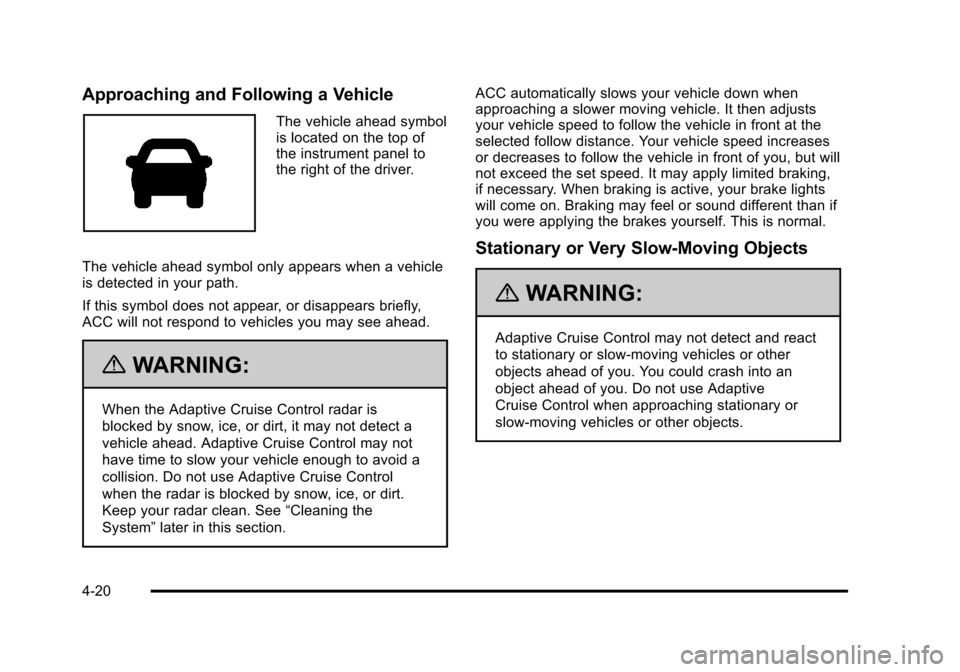
The vehicle ahead symbol
is located on the top of
the instrument panel to
the right of the driver.
The vehicle ahead symbol only appears when a vehicle
is detected in your path.
If this symbol does not appear, or disappears briefly,
ACC will not respond to vehicles you may see ahead.
{WARNING:
When the Adaptive Cruise Control radar is
blocked by snow, ice, or dirt, it may not detect a
vehicle ahead. Adaptive Cruise Control may not
have time to slow your vehicle enough to avoid a
collision. Do not use Adaptive Cruise Control
when the radar is blocked by snow, ice, or dirt.
Keep your radar clean. See “Cleaning the
System” later in this section. ACC automatically slows your vehicle down when
approaching a slower moving vehicle. It then adjusts
your vehicle speed to follow the vehicle in front at the
selected follow distance. Your vehicle speed increases
or decreases to follow the vehicle in front of you, but will
not exceed the set speed. It may apply limited braking,
if necessary. When braking is active, your brake lights
will come on. Braking may feel or sound different than if
you were applying the brakes yourself. This is normal.
Stationary or Very Slow-Moving Objects
{WARNING:
Adaptive Cruise Control may not detect and react
to stationary or slow‐moving vehicles or other
objects ahead of you. You could crash into an
object ahead of you. Do not use Adaptive
Cruise Control when approaching stationary or
slow‐moving vehicles or other objects.
4-20
Page 187 of 470

Black plate (25,1)Cadillac DTS Owner Manual - 2011
Exterior Lamps
The exterior lamps
control is located on the
instrument panel to the
left of the steering wheel.
It controls the following systems:
.Headlamps
.Taillamps
.Parking Lamps
.License Plate Lamps
.Instrument Panel Lights
.Fog Lamps
The exterior lamps control has four positions:
O(Off): Turns off the exterior lamps except for
Daytime Running Lamps (DRL). AUTO (Automatic):
Automatically turns on the
headlamps at normal brightness, together with the
following:
.Parking Lamps
.Instrument Panel Lights
.IntelliBeam®
; (Parking Lamps): Turns on the parking lamps
together with the following:
.Instrument Panel Lights
.License Plate Lamps
.Taillamps
.Side Marker Lamps
The parking brake indicator light comes on and stays on
while the parking lamps are on with the engine off and
the ignition in ACC/ACCESSORY or ON/RUN.
2 (Headlamps): Turns on the headlamps together with
the previously listed lamps. A warning chime sounds if
the driver's door is opened while the ignition switch is
off and the headlamps are on.
# (Fog Lamps): Press the exterior lamps control to
turn on the fog lamps. See Fog Lamps on page 4‑29.
4-25
Page 212 of 470

Black plate (50,1)Cadillac DTS Owner Manual - 2011
SeeDIC Warnings and Messageson page 4‑65for
more information. This light could indicate that there are
problems with a generator drive belt, or that there is an
electrical problem. Have it checked right away. If the
vehicle must be driven a short distance with the light
on, turn off accessories, such as the radio and air
conditioner.
Brake System Warning Light
The vehicle brake system consists of two hydraulic
circuits. If one circuit is not working, the remaining
circuit can still work to stop the vehicle. For normal
braking performance, both circuits need to be working.
If the warning light comes on, there is a brake problem.
Have the brake system inspected right away.
EnglishMetric
This light comes on briefly when the engine is turned
on. If it does not come on then, have it fixed so it will be
ready to warn if there is a problem. When the ignition is on, the brake system warning light
also comes on when the parking brake is set. The light
will stay on if the parking brake does not release fully.
If it stays on after the parking brake is fully released, it
means there is a brake problem.
If the light comes on while driving, pull off the road and
stop carefully.The pedal may be harder to push, or the
pedal may go closer to the floor. It may take longer to
stop. If the light is still on, have the vehicle towed for
service. See
Towing Your Vehicle on page 5‑24.
{WARNING:
The brake system might not be working properly if
the brake system warning light is on. Driving with
the brake system warning light on can lead to a
crash. If the light is still on after the vehicle has
been pulled off the road and carefully stopped,
have the vehicle towed for service.
4-50
Page 213 of 470

Black plate (51,1)Cadillac DTS Owner Manual - 2011
Antilock Brake System (ABS)
Warning Light
For vehicles with the
Antilock Brake System
(ABS), this light comes on
briefly when the engine is
started.
If it does not, have the vehicle serviced by your dealer.
If the system is working normally the indicator light then
goes off.
If the ABS light stays on, turn the ignition off. If the light
comes on while driving, stop as soon as it is safely
possible and turn the ignition off. Then start the engine
again to reset the system. If the ABS light stays on,
or comes on again while driving, the vehicle needs
service. If the regular brake system warning light is not
on, the vehicle still has brakes, but not antilock brakes.
If the regular brake system warning light is also on, the
vehicle does not have antilock brakes and there is a
problem with the regular brakes. See Brake System
Warning Light on page 4‑50. For vehicles with a Driver Information Center (DIC), see
DIC Warnings and Messages
on page 4‑65for all
brake related DIC messages.
Traction Control System (TCS)
Warning Light
This warning light comes
on briefly while starting
the engine.
If it does not, have the vehicle serviced by your dealer.
If the system is working normally the indicator light will
then go off.
If it stays on, or comes on while driving, there may be a
problem with the traction control system and the vehicle
needs service. When this warning light is on, the
system will not limit wheel spin.
If the traction control system warning light comes on
and stays on when the system is turned on, the vehicle
needs service. See Traction Control System (TCS)
on
page 5‑6for more information.
4-51
Page 234 of 470

Black plate (72,1)Cadillac DTS Owner Manual - 2011
SERVICE AIR BAG
This message displays when there is a problem with
the airbag system. Have your vehicle serviced by your
dealer immediately. SeeAirbag Readiness Light
on
page 4‑48for more information.
SERVICE A/C SYSTEM
This message displays when the air delivery mode door
or the electronic sensors that control the air conditioning
and heating systems are no longer working. Have the
climate control system serviced by your dealer if you
notice a drop in heating and air conditioning efficiency.
SERVICE BATTERY CHARGING
SYSTEM
This message displays when a problem with the
charging system has been detected. The charging
system light also displays on the instrument panel
cluster. See Charging System Light
on page 4‑49for
more information. Have your vehicle serviced by your
dealer.
SERVICE BRAKE ASSIST
This message displays if there is a problem with the
brake system. The brake system warning light and
the antilock brake system warning light may also be
displayed on the instrument panel cluster. See Brake
System Warning Light
on page 4‑50and Antilock
Brake System (ABS) Warning Lighton page 4‑51for
more information. If this happens, stop as soon as
possible and turn off the vehicle. Restart the vehicle
and check for the message on the DIC display. If the
message is displayed or appears again when you begin
driving, the brake system needs service. See your
dealer as soon as possible. See Brakes
on page 6‑33for more information.
SERVICE BRAKE SYSTEM
This message displays if the ignition is on to inform the
driver that the brake fluid level is low. Have the brake
system serviced by your dealer as soon as possible.
SERVICE LANE DEPARTURE SYSTEM
If your vehicle has the Lane Departure Warning (LDW)
system, this message may display to indicate that the
LDW system is not working properly. If this message
remains on after continued driving, the system needs
service. See your dealer. SeeLane Departure Warning
(LDW)
on page 3‑45for more information.
4-72
Page 281 of 470
Black plate (3,1)Cadillac DTS Owner Manual - 2011
For persons under 21, it is against the law in every
U.S. state to drink alcohol. There are good medical,
psychological, and developmental reasons for
these laws.
The obvious way to eliminate the leading highway
safety problem is for people never to drink alcohol and
then drive.
Medical research shows that alcohol in a person's
system can make crash injuries worse, especially
injuries to the brain, spinal cord, or heart. This means
that when anyone who has been drinking—driver or
passenger —is in a crash, that person's chance of
being killed or permanently disabled is higher than if the
person had not been drinking.
Control of a Vehicle
The following three systems help to control the vehicle
while driving —brakes, steering, and accelerator. At
times, as when driving on snow or ice, it is easy to ask
more of those control systems than the tires and road
can provide. Meaning, you can lose control of the
vehicle. See Traction Control System (TCS)
on
page 5‑6.
Adding non‐dealer accessories can affect vehicle
performance. See Accessories and Modifications
on
page 6‑3.
Braking
See Brake System Warning Light on page 4‑50.
Braking action involves perception time and reaction
time. Deciding to push the brake pedal is perception
time. Actually doing it is reaction time.
Average reaction time is about three‐fourths of a
second. But that is only an average. It might be less
with one driver and as long as two or three seconds or
more with another. Age, physical condition, alertness,
coordination, and eyesight all play a part. So do alcohol,
drugs, and frustration. But even in three‐fourths of a
second, a vehicle moving at 100 km/h (60 mph) travels
20 m (66 feet). That could be a lot of distance in an
emergency, so keeping enough space between the
vehicle and others is important.
And, of course, actual stopping distances vary greatly
with the surface of the road, whether it is pavement or
gravel; the condition of the road, whether it is wet, dry,
or icy; tire tread; the condition of the brakes; the weight
of the vehicle; and the amount of brake force applied.
5-3
Page 282 of 470

Black plate (4,1)Cadillac DTS Owner Manual - 2011
Avoid needless heavy braking. Some people drive in
spurts, heavy acceleration followed by heavy braking,
rather than keeping pace with traffic. This is a mistake.
The brakes might not have time to cool between hard
stops. The brakes will wear out much faster with a lot
of heavy braking. Keeping pace with the traffic and
allowing realistic following distances eliminates a lot of
unnecessary braking. That means better braking and
longer brake life.
If the engine ever stops while the vehicle is being
driven, brake normally but do not pump the brakes.
If the brakes are pumped, the pedal could get harder to
push down. If the engine stops, there will still be some
power brake assist but it will be used when the brake is
applied. Once the power assist is used up, it can take
longer to stop and the brake pedal will be harder
to push.
Adding non‐dealer accessories can affect vehicle
performance. SeeAccessories and Modifications
on
page 6‑3.
Antilock Brake System (ABS)
This vehicle has the Antilock Brake System (ABS), an
advanced electronic braking system that helps prevent
a braking skid.
When the engine is started and the vehicle begins to
drive away, ABS checks itself. A momentary motor or
clicking noise might be heard while this test is going on,
and it might even be noticed that the brake pedal
moves a little. This is normal.
If there is a problem with
ABS, this warning light
stays on. See Antilock
Brake System (ABS)
Warning Light
on
page 4‑51.
Let us say the road is wet and you are driving safely.
Suddenly, an animal jumps out in front of you. You slam
on the brakes and continue braking. Here is what
happens with ABS:
A computer senses that the wheels are slowing
down. If one of the wheels is about to stop rolling, the
computer will separately work the brakes at each front
wheel and at both rear wheels.
5-4
Page 284 of 470

Black plate (6,1)Cadillac DTS Owner Manual - 2011
StabiliTrak®System
The vehicle may have the StabiliTrak system which
combines antilock brake, traction and stability control
systems and helps the driver maintain directional
control of the vehicle in most driving conditions. This is
accomplished by selectively applying any one of the
vehicle's brakes and reducing engine power.
The StabiliTrak system comes on automatically
whenever the vehicle is started. The system cannot be
turned off.
This light will flash when
the system is operating.
The STABILITRAK NOT READY message may be
displayed in the Driver Information Center (DIC) and the
Traction Control System (TCS)/StabiliTrak warning light
on the instrument panel cluster comes on after first
driving the vehicle and exceeding 19 mph (30 km/h) for
30 seconds. The StabiliTrak system is off until the light
has turned off. This could take up to 15 minutes. The TCS/StabiliTrak warning light on the instrument
panel cluster will flash when the system is operating.
See
Traction Control System (TCS) Warning Light
on
page 4‑51and StabiliTrak®Indicator Lighton
page 4‑52for more information. The system may be
heard or felt while it is working. This is normal.
The SERVICE STABILITRAK message is displayed
and the TCS/StabiliTrak warning light on the instrument
panel cluster comes on if there is a problem with
the system. When this light and the SERVICE
STABILITRAK message are on, the system is not
working. Adjust your driving accordingly.
Traction Control System (TCS)
The vehicle has a Traction Control System (TCS) that
limits wheel spin. This is especially useful in slippery
road conditions. The system operates only if it senses
that the front wheels are spinning too much or
beginning to lose traction. When this happens, the
system works the front brakes and reduces engine
power (by closing the throttle and managing engine
spark) to limit wheel spin.
5-6
Page 285 of 470

Black plate (7,1)Cadillac DTS Owner Manual - 2011
The TCS and StabiliTrak®
light will flash when the
system is limiting
wheel spin.
The system may be heard or felt while it is working, but
this is normal. See Traction Control System (TCS)
Warning Light
on page 4‑51for more information.
If the vehicle is in cruise control when TCS begins to
limit wheel spin, the cruise control will automatically
disengage. The cruise control may be re-engaged when
road conditions allow. See Cruise Control on page 4‑12.
The SERVICE TRACTION CONTROL message in the
DIC and the TCS/StabiliTrak warning light comes on if
there is a problem with the traction control system. See
DIC Warnings and Messages on page 4‑65.
When this light and the SERVICE TRACTION
CONTROL message are on, the system will not limit
wheel spin. Adjust your driving accordingly.
To turn the system off or
on, press and release this
button located in front of
the shift lever.
TCS automatically comes on whenever the vehicle is
started. To limit wheel spin, especially in slippery road
conditions, always leave the system turned on. TCS
can be turned off if needed.
The system can be turned on or off at any time by
pressing the TCS button. The DIC will display
TRACTION CONTROL OFF when the button is
pressed, and part of the traction control system is
disabled. The vehicle will still have brake-traction
control, but will not be able to use the engine speed
management system. System noises may be heard as
a result of the brake-traction control working. If the
controller detects excessive wheel spin in this mode,
the TCS/StabiliTrak light may blink.
It is recommended to leave the system on for normal
driving conditions, but it may be necessary to turn the
system off if the vehicle is stuck in sand, mud, ice or
snow, and you want to “rock”the vehicle to attempt to
free it. See If Your Vehicle is Stuck in Sand, Mud, Ice,
or Snow on page 5‑17.
5-7
Page 288 of 470
Black plate (10,1)Cadillac DTS Owner Manual - 2011
Off-Road Recovery
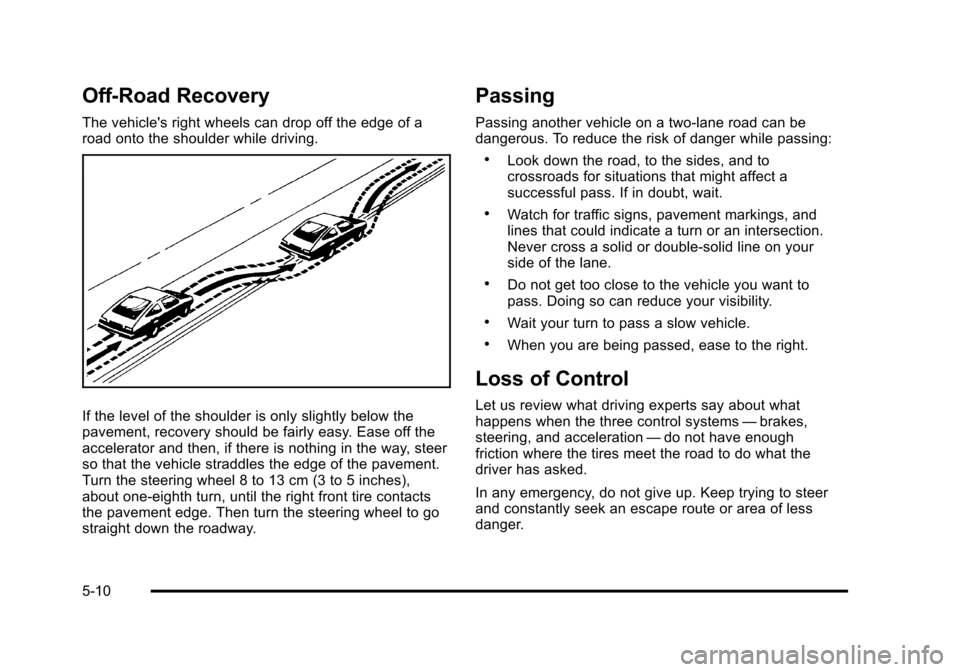
The vehicle's right wheels can drop off the edge of a
road onto the shoulder while driving.
If the level of the shoulder is only slightly below the
pavement, recovery should be fairly easy. Ease off the
accelerator and then, if there is nothing in the way, steer
so that the vehicle straddles the edge of the pavement.
Turn the steering wheel 8 to 13 cm (3 to 5 inches),
about one-eighth turn, until the right front tire contacts
the pavement edge. Then turn the steering wheel to go
straight down the roadway.
Passing
Passing another vehicle on a two-lane road can be
dangerous. To reduce the risk of danger while passing:
.Look down the road, to the sides, and to
crossroads for situations that might affect a
successful pass. If in doubt, wait.
.Watch for traffic signs, pavement markings, and
lines that could indicate a turn or an intersection.
Never cross a solid or double‐solid line on your
side of the lane.
.Do not get too close to the vehicle you want to
pass. Doing so can reduce your visibility.
.Wait your turn to pass a slow vehicle.
.When you are being passed, ease to the right.
Loss of Control
Let us review what driving experts say about what
happens when the three control systems—brakes,
steering, and acceleration —do not have enough
friction where the tires meet the road to do what the
driver has asked.
In any emergency, do not give up. Keep trying to steer
and constantly seek an escape route or area of less
danger.
5-10