phone CADILLAC DTS 2011 1.G Owners Manual
[x] Cancel search | Manufacturer: CADILLAC, Model Year: 2011, Model line: DTS, Model: CADILLAC DTS 2011 1.GPages: 470, PDF Size: 4.72 MB
Page 24 of 470
Black plate (18,1)Cadillac DTS Owner Manual - 2011
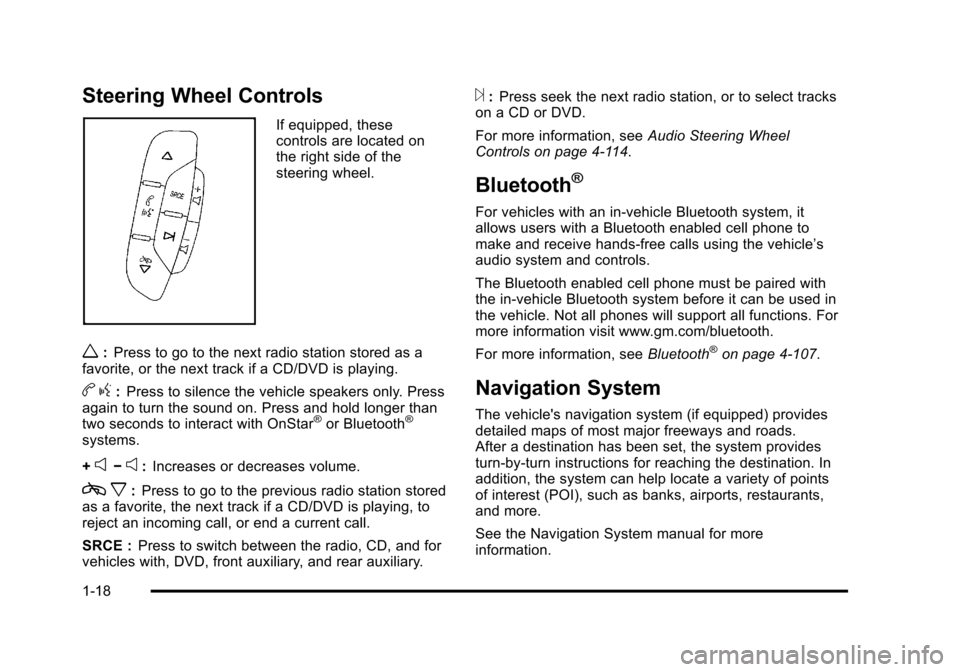
Steering Wheel Controls
If equipped, these
controls are located on
the right side of the
steering wheel.
w:Press to go to the next radio station stored as a
favorite, or the next track if a CD/DVD is playing.
b g:Press to silence the vehicle speakers only. Press
again to turn the sound on. Press and hold longer than
two seconds to interact with OnStar
®or Bluetooth®
systems.
+
e−e: Increases or decreases volume.
c x:Press to go to the previous radio station stored
as a favorite, the next track if a CD/DVD is playing, to
reject an incoming call, or end a current call.
SRCE : Press to switch between the radio, CD, and for
vehicles with, DVD, front auxiliary, and rear auxiliary.
¨: Press seek the next radio station, or to select tracks
on a CD or DVD.
For more information, see Audio Steering Wheel
Controls on page 4‑114.
Bluetooth®
For vehicles with an in-vehicle Bluetooth system, it
allows users with a Bluetooth enabled cell phone to
make and receive hands-free calls using the vehicle’s
audio system and controls.
The Bluetooth enabled cell phone must be paired with
the in-vehicle Bluetooth system before it can be used in
the vehicle. Not all phones will support all functions. For
more information visit www.gm.com/bluetooth.
For more information, see Bluetooth
®on page 4‑107.
Navigation System
The vehicle's navigation system (if equipped) provides
detailed maps of most major freeways and roads.
After a destination has been set, the system provides
turn-by-turn instructions for reaching the destination. In
addition, the system can help locate a variety of points
of interest (POI), such as banks, airports, restaurants,
and more.
See the Navigation System manual for more
information.
1-18
Page 26 of 470
Black plate (20,1)Cadillac DTS Owner Manual - 2011
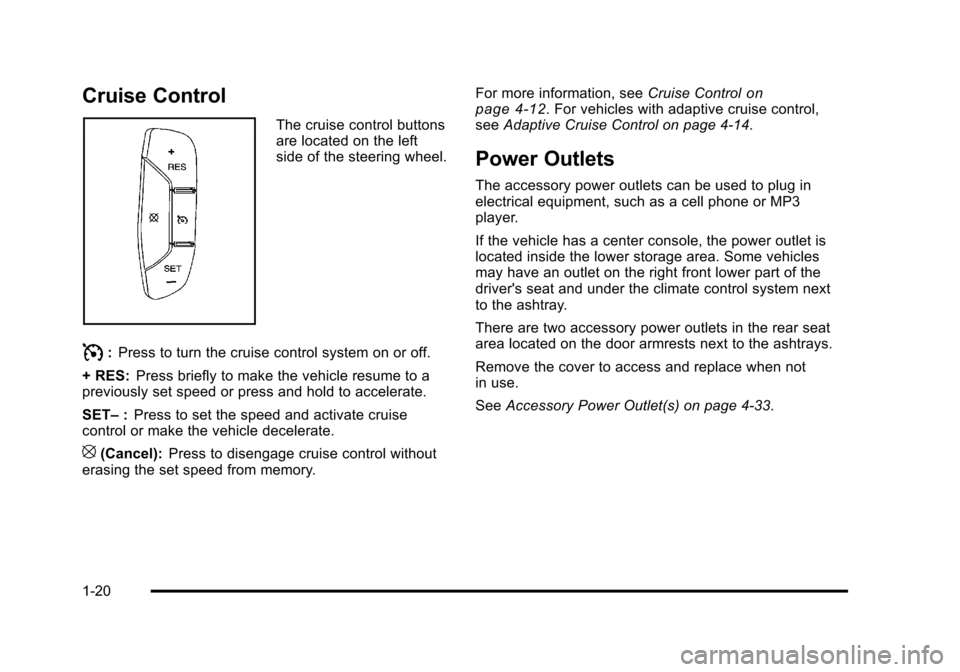
Cruise Control
The cruise control buttons
are located on the left
side of the steering wheel.
I:Press to turn the cruise control system on or off.
+ RES: Press briefly to make the vehicle resume to a
previously set speed or press and hold to accelerate.
SET– :Press to set the speed and activate cruise
control or make the vehicle decelerate.
[(Cancel): Press to disengage cruise control without
erasing the set speed from memory. For more information, see
Cruise Control
on
page 4‑12. For vehicles with adaptive cruise control,
see Adaptive Cruise Control on page 4‑14.
Power Outlets
The accessory power outlets can be used to plug in
electrical equipment, such as a cell phone or MP3
player.
If the vehicle has a center console, the power outlet is
located inside the lower storage area. Some vehicles
may have an outlet on the right front lower part of the
driver's seat and under the climate control system next
to the ashtray.
There are two accessory power outlets in the rear seat
area located on the door armrests next to the ashtrays.
Remove the cover to access and replace when not
in use.
See Accessory Power Outlet(s) on page 4‑33.
1-20
Page 30 of 470

Black plate (24,1)Cadillac DTS Owner Manual - 2011
X:Push this button for hands‐free, voice‐activated
calling and to give voice commands for Hands‐Free
Calling and Turn‐by‐Turn Navigation.
Automatic Crash Response, Emergency Services,
Crisis Assist, Stolen Vehicle Assistance, Vehicle
Diagnostics, Remote Door Unlock, Roadside
Assistance, Turn‐by‐Turn Navigation, and Hands‐Free
Calling are available on most vehicles. Not all OnStar
services are available on all vehicles. For more
information, see the OnStar Owner's Guide; visit
www.onstar.com (U.S.) or www.onstar.ca (Canada);
contact OnStar at 1-888-4-ONSTAR (1‐888‐466‐7827)
or TTY 1‐877‐248‐2080; or press
Qto speak with an
OnStar advisor 24 hours a day, 7 days a week.
For a full description of OnStar services and system
limitations, see the OnStar Owner's Guide in the
glove box.
OnStar service is subject to the OnStar terms and
conditions included in the OnStar Subscriber
Information. OnStar service requires wireless communication
networks and the Global Positioning System (GPS)
satellite network. Not all OnStar services are available
everywhere or on all vehicles at all times.
OnStar service can’t work unless your vehicle is in a
place where OnStar has an agreement with a wireless
service provider for service in that area, and the
wireless service provider has coverage, network
capacity, reception, and technology compatible with
OnStar's service. Service involving location information
about your vehicle can’t work unless GPS signals are
available, unobstructed, and compatible with the OnStar
hardware. The vehicle has to have a working electrical
system and adequate battery power for the OnStar
equipment to operate. OnStar service may not work if
the OnStar equipment isn’t properly installed or you
haven’t maintained it and your vehicle is in good
working order and in compliance with all government
regulations. If you try to add, connect, or modify any
equipment or software in your vehicle, OnStar service
may not work. Other problems OnStar can’t control
may prevent service to you, such as hills, tall buildings,
tunnels, weather, electrical system design and
architecture of your vehicle, damage to important parts
of your vehicle in a crash, or wireless phone network
congestion or jamming.
1-24
Page 31 of 470
Black plate (25,1)Cadillac DTS Owner Manual - 2011
SeeRadio Frequency Statementon page 8‑18for information regarding Part 15 of the Federal
Communications Commission (FCC) rules and Industry
Canada Standards RSS-210/220/310.
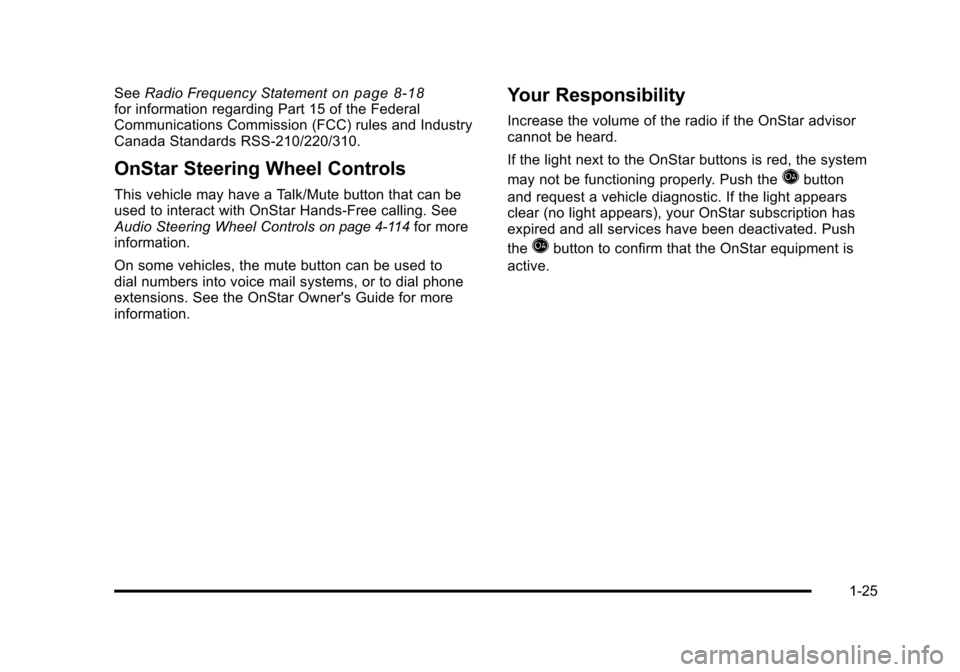
OnStar Steering Wheel Controls
This vehicle may have a Talk/Mute button that can be
used to interact with OnStar Hands-Free calling. See
Audio Steering Wheel Controls
on page 4‑114for more
information.
On some vehicles, the mute button can be used to
dial numbers into voice mail systems, or to dial phone
extensions. See the OnStar Owner's Guide for more
information.
Your Responsibility
Increase the volume of the radio if the OnStar advisor
cannot be heard.
If the light next to the OnStar buttons is red, the system
may not be functioning properly. Push the
Qbutton
and request a vehicle diagnostic. If the light appears
clear (no light appears), your OnStar subscription has
expired and all services have been deactivated. Push
the
Qbutton to confirm that the OnStar equipment is
active.
1-25
Page 101 of 470

Black plate (69,1)Cadillac DTS Owner Manual - 2011
Adding Equipment to Your
Airbag-Equipped Vehicle
Q: Is there anything I might add to or change aboutthe vehicle that could keep the airbags from
working properly?
A: Yes. If you add things that change your vehicle's
frame, bumper system, height, front end or side
sheet metal, they may keep the airbag system from
working properly. Changing or moving any parts of
the front seats, safety belts, the airbag sensing and
diagnostic module, steering wheel, instrument panel,
roof-rail airbag modules, ceiling headliner or pillar
garnish trim, overhead console, front sensors, side
impact sensors, or airbag wiring can affect the
operation of the airbag system.
In addition, your vehicle has a passenger sensing
system for the right front passenger's position, which
includes sensors that are part of the passenger's
seat. The passenger sensing system may not
operate properly if the original seat trim is replaced
with non-GM covers, upholstery or trim, or with GM
covers, upholstery or trim designed for a different
vehicle. Any object, such as an aftermarket seat
heater or a comfort enhancing pad or device, installed under or on top of the seat fabric, could
also interfere with the operation of the passenger
sensing system. This could either prevent proper
deployment of the passenger airbag(s) or prevent
the passenger sensing system from properly turning
off the passenger airbag(s). See
Passenger Sensing
System on page 2‑64.
If you have any questions about this, you should
contact Customer Assistance before you modify
your vehicle. The phone numbers and addresses
for Customer Assistance are in Step Two of the
Customer Satisfaction Procedure in this manual.
See Customer Satisfaction Procedure on page 8‑2.
Q: Because I have a disability, I have to get my vehicle modified. How can I find out whether this
will affect my airbag system?
A: If you have questions, call Customer Assistance.
The phone numbers and addresses for Customer
Assistance are in Step Two of the Customer
Satisfaction Procedure in this manual. See
Customer Satisfaction Procedure on page 8‑2.
In addition, your dealer and the service manual have
information about the location of the airbag sensors,
sensing and diagnostic module and airbag wiring.
2-69
Page 157 of 470
Black plate (53,1)Cadillac DTS Owner Manual - 2011
5. After entering all of the switch positions, again,firmly press and release all three buttons at the
same time. The indicator lights will turn on.
6. Press and hold the button that will be used to control the garage door until the garage door
moves. The indicator light above the selected
button should slowly blink. This button may need to
be held for up to 55 seconds.
7. Immediately release the button when the garage door moves. The indicator light will blink rapidly
until programming is complete.
8. Press and release the same button again. The garage door should move, confirming that
programming is successful and complete.
To program another Fixed Code device such as an
additional garage door opener, a security device,
or home automation device, repeat Steps 1-8, choosing
a different button in Step 6 than what was used for the
garage door opener.
Using Universal Home Remote
Press and hold the appropriate button for at least half
of a second. The indicator light will come on while the
signal is being transmitted.
Reprogramming Universal Home
Remote Buttons
Any of the three buttons can be reprogrammed by
repeating the instructions.
Erasing Universal Home Remote
Buttons
The programmed buttons should be erased when the
vehicle is sold or the lease ends.
To erase either Rolling Code or Fixed Code on the
Universal Home Remote device: 1. Press and hold the two outside buttons at the same time for approximately 20 seconds, until the
indicator lights, located directly above the buttons,
begin to blink rapidly.
2. Once the indicator lights begin to blink, release both buttons. The codes from all buttons will be
erased.
For help or information on the Universal Home Remote
System, call the customer assistance phone number
under Customer Assistance Offices on page 8‑6.
3-53
Page 195 of 470

Black plate (33,1)Cadillac DTS Owner Manual - 2011
Battery Run-Down Protection
This feature helps prevent the battery from being
drained, if the interior courtesy lamps, reading/map
lamps, visor vanity lamps or trunk lamp are accidentally
left on. If any of these lamps are left on, they
automatically turn off after 10 minutes, if the ignition is
off. The lamps will not come back on again until one of
the following occurs:
.The ignition is turned on.
.The exterior lamps control is turned off, then on
again.
The headlamps will timeout after 10 minutes, if they are
manually turned on with the ignition on or off.
Accessory Power Outlet(s)
The accessory power outlets can be used to plug in
electrical equipment, such as a cell phone or MP3
player.
If the vehicle has a center console, the power outlet is
located inside the lower storage area. Some vehicles
may have an outlet on the right front lower part of the
driver's seat and under the climate control system
next to the ashtray. See Center Console Storage
on
page 3‑54. There are two accessory power outlets in the rear seat
area located on the door armrests next to the ashtrays.
Remove the cover to access and replace when not
in use.
The accessory power outlet can be used at any time.
{WARNING:
Power is always supplied to the outlets. Do not
leave electrical equipment plugged in when the
vehicle is not in use because the vehicle could
catch fire and cause injury or death.
Notice: Leaving electrical equipment plugged in for
an extended period of time while the vehicle is off
will drain the battery. Always unplug electrical
equipment when not in use and do not plug in
equipment that exceeds the maximum 20 ampere
rating.
Certain accessory power plugs may not be compatible
with the accessory power outlet and could overload
vehicle or adapter fuses. If a problem is experienced,
see your dealer.
4-33
Page 196 of 470
Black plate (34,1)Cadillac DTS Owner Manual - 2011
When adding electrical equipment, be sure to follow
the proper installation instructions included with the
equipment. SeeAdd-On Electrical Equipment
on
page 6‑103.
Notice: Hanging heavy equipment from the power
outlet can cause damage not covered by the vehicle
warranty. The power outlets are designed for
accessory power plugs only, such as cell phone
charge cords.
Analog Clock
The analog clock is located on the instrument panel
above the radio. The clock is not connected with any
other vehicle system and runs by itself. To adjust the
clock:
1. Locate the adjustment button directly below the clock face.
2. Push and hold the adjustment button to advance the clock hands. Holding the button down will
cause the clock to advance faster. Release the
button before reaching the desired time.
3. Push and release the button to increase the time by one minute increments until the desired time is
reached.
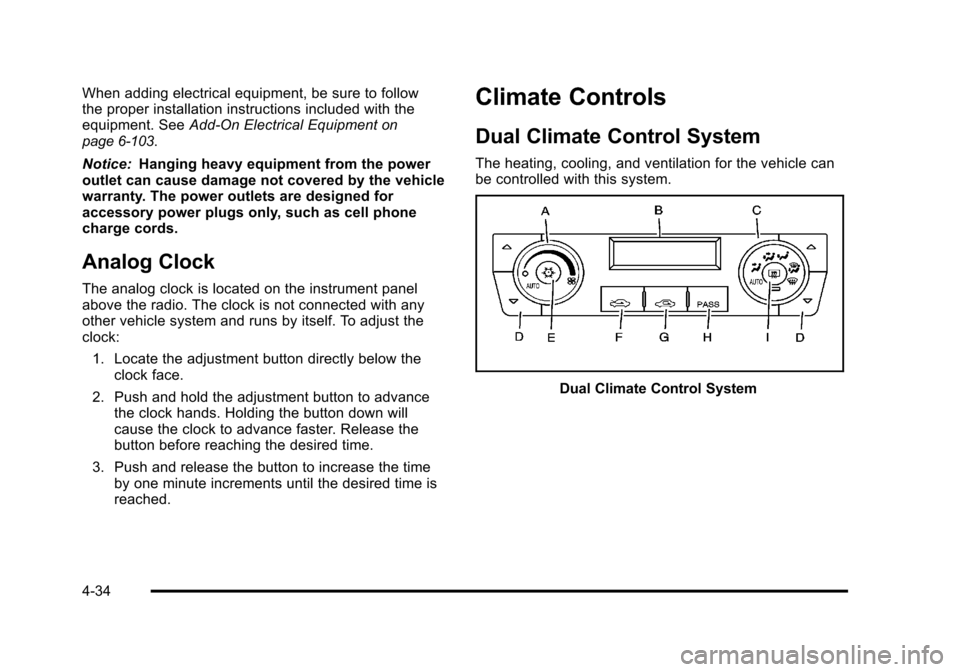
Climate Controls
Dual Climate Control System
The heating, cooling, and ventilation for the vehicle can
be controlled with this system.
Dual Climate Control System
4-34
Page 249 of 470

Black plate (87,1)Cadillac DTS Owner Manual - 2011
Notice:Contact your dealer before adding any
equipment.
Adding audio or communication equipment could
interfere with the operation of the vehicle's engine,
radio, or other systems, and could damage them.
Follow federal rules covering mobile radio and
telephone equipment.
The vehicle has Retained Accessory Power (RAP). With
RAP, the audio system can be played even after the
ignition is turned off. See Retained Accessory Power
(RAP)
on page 3‑24for more information.
Setting the Clock
Radio with a Single CD or a Six-Disc
CD Player
The vehicle has an analog clock as well as the digital
radio clock. At the time of new vehicle delivery, the
digital radio clock display should be disabled. If you
decide to use the digital radio clock as well as the
analog clock, you can change the setting to enable the
radio clock display.
Enabling/Disabling the Digital Radio
Clock
For the Single CD Player
To turn the radio clock display on or off:
1. Turn the radio on.
2. Press the
Hbutton until the clock and date setting
menus appear.
3. Press the pushbutton located under the forward arrow tab until the menu for default clock and date
settings appear.
4. Press the pushbutton located under the currently displayed status of either ON or OFF. The ON
display indicates the radio clock display is disabled
and the OFF display indicates the radio clock
display is enabled. Press this pushbutton to toggle
the radio clock display on or off.
If the radio clock display is turned on, the screen
displays Radio Clock ON for 10 seconds, then
returns to the original clock display menu.
If the radio clock display is turned off, the screen
displays Radio Clock OFF for 10 seconds. The
menus for clock and date settings are removed,
and ON displays as a current status indicating that
the clock display can be turned on, if desired.
4-87
Page 261 of 470

Black plate (99,1)Cadillac DTS Owner Manual - 2011
CD/AUX (CD/Auxiliary):Press to play a CD when
listening to the radio. The CD icon and track number
displays when a CD is in the player. Press again and
the system automatically searches for an auxiliary input
device, such as a portable audio player. If a portable
audio player is not connected, “No Aux Input Device
Found” displays.
Playing an MP3/WMA CD-R or
CD-RW Disc
Radios with the MP3 feature are capable of playing an
MP3/WMA CD-R or CD-RW disc. For more information
on how to play an MP3/WMA CD-R or CD-RW disc, see
Using an MP3
on page 4‑100later in this section.
CD Messages
DISC ERROR: If this message displays and/or the CD
ejects, it could be for one of the following reasons:
.The radio system does not support the playlist
format, the compressed audio format, or the data
file format.
.It is very hot. When the temperature returns to
normal, the CD should play.
.You are driving on a very rough road. When the
road becomes smoother, the CD should play.
.The CD is dirty, scratched, wet, or upside down.
.The air is very humid. If so, wait about an hour and
try again.
.There could have been a problem while burning
the CD.
.The label could be caught in the CD player.
If the CD is not playing correctly, for any other reason,
try a known good CD.
If any error occurs repeatedly or if an error cannot be
corrected, contact your dealer. If the radio displays an
error message, write it down and provide it to your
dealer when reporting the problem.
Using the Auxiliary Input Jack
The radio system has an auxiliary input jack located
on the lower right side of the faceplate. This is not an
audio output; do not plug the headphone set into the
front auxiliary input jack. You can however, connect
an external audio device such as an iPod™, laptop
computer, MP3 player, CD changer, or cassette tape
player, etc. to the auxiliary input jack for use as another
source for audio listening.
Drivers are encouraged to set up any auxiliary device
while the vehicle is in P (Park). See Defensive Driving
on page 5‑2for more information on driver distraction.
4-99