radio controls CADILLAC DTS 2011 1.G Owners Manual
[x] Cancel search | Manufacturer: CADILLAC, Model Year: 2011, Model line: DTS, Model: CADILLAC DTS 2011 1.GPages: 470, PDF Size: 4.72 MB
Page 7 of 470
Black plate (1,1)Cadillac DTS Owner Manual - 2011
Section 1 In Brief
Instrument Panel. . . . . . . . . . . . . . . . . . . . . . . . . . . . . . . . . . . 1-2
Initial Drive Information . . . . . . . . . . . . . . . . . . . . . . . . . . . 1-4
Remote Keyless Entry (RKE) System . . . . . . . . . . . 1-4
Remote Vehicle Start . . . . . . . . . . . . . . . . . . . . . . . . . . . 1-4
Door Locks . . . . . . . . . . . . . . . . . . . . . . . . . . . . . . . . . . . . . 1-5
Trunk Release . . . . . . . . . . . . . . . . . . . . . . . . . . . . . . . . . . 1-5
Windows . . . . . . . . . . . . . . . . . . . . . . . . . . . . . . . . . . . . . . . . 1-6
Seat Adjustment . . . . . . . . . . . . . . . . . . . . . . . . . . . . . . . . 1-6
Memory Features . . . . . . . . . . . . . . . . . . . . . . . . . . . . . . . 1-8
Heated and Ventilated Seats . . . . . . . . . . . . . . . . . . . . 1-9
Head Restraint Adjustment . . . . . . . . . . . . . . . . . . . . . . 1-9
Safety Belt . . . . . . . . . . . . . . . . . . . . . . . . . . . . . . . . . . . . . 1-10
Sensing System for Passenger Airbag . . . . . . . . . 1-10
Mirror Adjustment . . . . . . . . . . . . . . . . . . . . . . . . . . . . . . 1-11
Steering Wheel Adjustment . . . . . . . . . . . . . . . . . . . . 1-12
Interior Lighting . . . . . . . . . . . . . . . . . . . . . . . . . . . . . . . . 1-13
Exterior Lighting . . . . . . . . . . . . . . . . . . . . . . . . . . . . . . . 1-13
Windshield Wiper/Washer . . . . . . . . . . . . . . . . . . . . . . 1-14
Climate Controls . . . . . . . . . . . . . . . . . . . . . . . . . . . . . . . 1-14 Vehicle Features
. . . . . . . . . . . . . . . . . . . . . . . . . . . . . . . . . . 1-15
Radio(s) . . . . . . . . . . . . . . . . . . . . . . . . . . . . . . . . . . . . . . . 1-15
Satellite Radio . . . . . . . . . . . . . . . . . . . . . . . . . . . . . . . . . 1-17
Portable Audio Devices . . . . . . . . . . . . . . . . . . . . . . . . 1-17
Steering Wheel Controls . . . . . . . . . . . . . . . . . . . . . . . 1-18
Bluetooth
®. . . . . . . . . . . . . . . . . . . . . . . . . . . . . . . . . . . . . 1-18
Navigation System . . . . . . . . . . . . . . . . . . . . . . . . . . . . . 1-18
Driver Information Center (DIC) . . . . . . . . . . . . . . . . 1-19
Cruise Control . . . . . . . . . . . . . . . . . . . . . . . . . . . . . . . . . 1-20
Power Outlets . . . . . . . . . . . . . . . . . . . . . . . . . . . . . . . . . 1-20
Performance and Maintenance . . . . . . . . . . . . . . . . . .1-21
Traction Control System (TCS) . . . . . . . . . . . . . . . . 1-21
StabiliTrak
®System . . . . . . . . . . . . . . . . . . . . . . . . . . . 1-21
Tire Pressure Monitor . . . . . . . . . . . . . . . . . . . . . . . . . . 1-21
Tire Sealant and Compressor Kit . . . . . . . . . . . . . . 1-22
Engine Oil Life System . . . . . . . . . . . . . . . . . . . . . . . . 1-22
Driving for Better Fuel Economy . . . . . . . . . . . . . . . 1-22
Roadside Service . . . . . . . . . . . . . . . . . . . . . . . . . . . . . . 1-23
OnStar
®. . . . . . . . . . . . . . . . . . . . . . . . . . . . . . . . . . . . . . . 1-23
1-1
Page 21 of 470
Black plate (15,1)Cadillac DTS Owner Manual - 2011
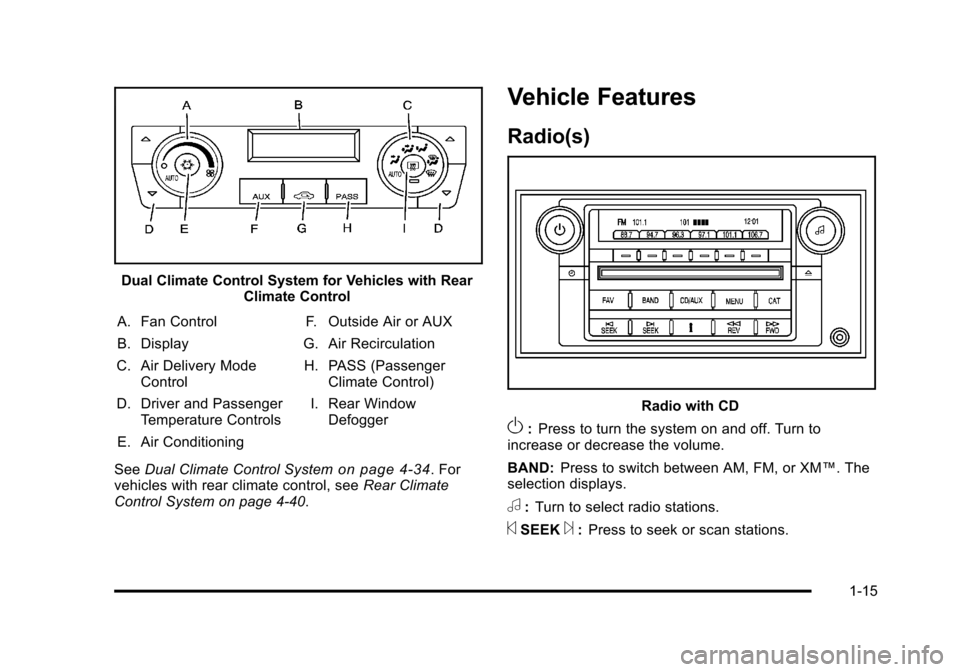
Dual Climate Control System for Vehicles with RearClimate Control
A. Fan Control
B. Display
C. Air Delivery Mode Control
D. Driver and Passenger Temperature Controls
E. Air Conditioning F. Outside Air or AUX
G. Air Recirculation
H. PASS (Passenger Climate Control)
I. Rear Window Defogger
See Dual Climate Control System
on page 4‑34. For
vehicles with rear climate control, see Rear Climate
Control System on page 4‑40.
Vehicle Features
Radio(s)
Radio with CD
O: Press to turn the system on and off. Turn to
increase or decrease the volume.
BAND: Press to switch between AM, FM, or XM™. The
selection displays.
a: Turn to select radio stations.
©SEEK¨: Press to seek or scan stations.
1-15
Page 24 of 470
Black plate (18,1)Cadillac DTS Owner Manual - 2011
Steering Wheel Controls
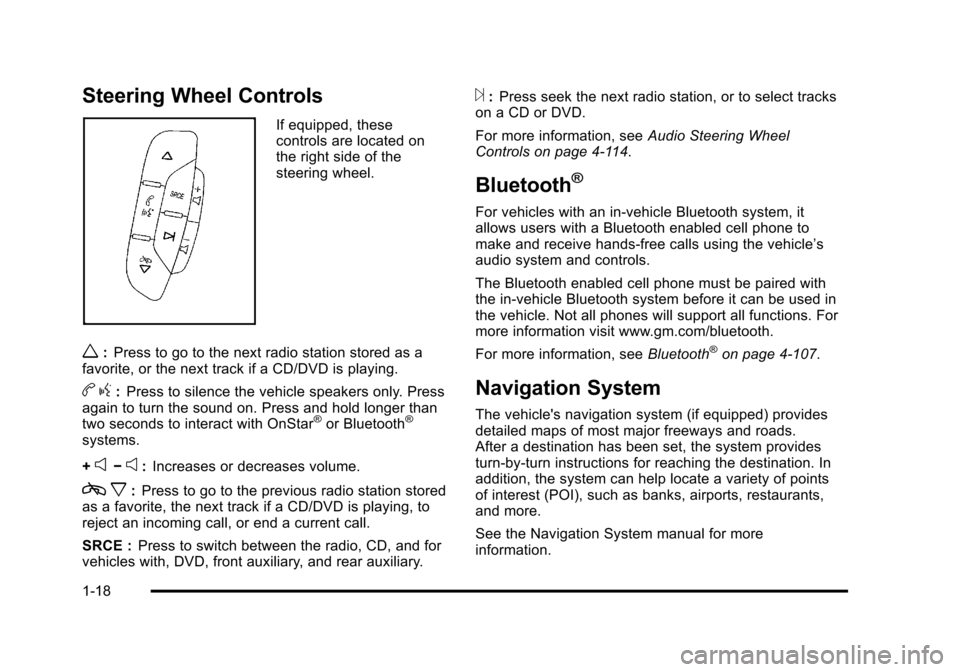
If equipped, these
controls are located on
the right side of the
steering wheel.
w:Press to go to the next radio station stored as a
favorite, or the next track if a CD/DVD is playing.
b g:Press to silence the vehicle speakers only. Press
again to turn the sound on. Press and hold longer than
two seconds to interact with OnStar
®or Bluetooth®
systems.
+
e−e: Increases or decreases volume.
c x:Press to go to the previous radio station stored
as a favorite, the next track if a CD/DVD is playing, to
reject an incoming call, or end a current call.
SRCE : Press to switch between the radio, CD, and for
vehicles with, DVD, front auxiliary, and rear auxiliary.
¨: Press seek the next radio station, or to select tracks
on a CD or DVD.
For more information, see Audio Steering Wheel
Controls on page 4‑114.
Bluetooth®
For vehicles with an in-vehicle Bluetooth system, it
allows users with a Bluetooth enabled cell phone to
make and receive hands-free calls using the vehicle’s
audio system and controls.
The Bluetooth enabled cell phone must be paired with
the in-vehicle Bluetooth system before it can be used in
the vehicle. Not all phones will support all functions. For
more information visit www.gm.com/bluetooth.
For more information, see Bluetooth
®on page 4‑107.
Navigation System
The vehicle's navigation system (if equipped) provides
detailed maps of most major freeways and roads.
After a destination has been set, the system provides
turn-by-turn instructions for reaching the destination. In
addition, the system can help locate a variety of points
of interest (POI), such as banks, airports, restaurants,
and more.
See the Navigation System manual for more
information.
1-18
Page 31 of 470
Black plate (25,1)Cadillac DTS Owner Manual - 2011
SeeRadio Frequency Statementon page 8‑18for information regarding Part 15 of the Federal
Communications Commission (FCC) rules and Industry
Canada Standards RSS-210/220/310.
OnStar Steering Wheel Controls
This vehicle may have a Talk/Mute button that can be
used to interact with OnStar Hands-Free calling. See
Audio Steering Wheel Controls
on page 4‑114for more
information.
On some vehicles, the mute button can be used to
dial numbers into voice mail systems, or to dial phone
extensions. See the OnStar Owner's Guide for more
information.
Your Responsibility
Increase the volume of the radio if the OnStar advisor
cannot be heard.
If the light next to the OnStar buttons is red, the system
may not be functioning properly. Push the
Qbutton
and request a vehicle diagnostic. If the light appears
clear (no light appears), your OnStar subscription has
expired and all services have been deactivated. Push
the
Qbutton to confirm that the OnStar equipment is
active.
1-25
Page 164 of 470
Black plate (2,1)Cadillac DTS Owner Manual - 2011
Section 4 Instrument Panel
Antilock Brake System (ABS) Warning Light . . . 4-51
Traction Control System (TCS) WarningLight . . . . . . . . . . . . . . . . . . . . . . . . . . . . . . . . . . . . . . . . . 4-51
StabiliTrak
®Indicator Light . . . . . . . . . . . . . . . . . . . . . 4-52
Lane Departure Warning (LDW) Light . . . . . . . . . . 4-52
Engine Coolant Temperature Warning Light . . . . 4-53
Engine Coolant Temperature Gauge . . . . . . . . . . . 4-53
Tire Pressure Light . . . . . . . . . . . . . . . . . . . . . . . . . . . . 4-54
Malfunction Indicator Lamp . . . . . . . . . . . . . . . . . . . . 4-54
Oil Pressure Light . . . . . . . . . . . . . . . . . . . . . . . . . . . . . 4-57
Security Light . . . . . . . . . . . . . . . . . . . . . . . . . . . . . . . . . . 4-57
Front Fog Lamp Light . . . . . . . . . . . . . . . . . . . . . . . . . . 4-58
Lights On Reminder . . . . . . . . . . . . . . . . . . . . . . . . . . . 4-58
Cruise Control Light . . . . . . . . . . . . . . . . . . . . . . . . . . . 4-58
Highbeam On Light . . . . . . . . . . . . . . . . . . . . . . . . . . . . 4-58
Fuel Gauge . . . . . . . . . . . . . . . . . . . . . . . . . . . . . . . . . . . . 4-59 Driver Information Center (DIC)
. . . . . . . . . . . . . . . . . .4-59
DIC Operation and Displays . . . . . . . . . . . . . . . . . . . 4-60
DIC Warnings and Messages . . . . . . . . . . . . . . . . . . 4-65
DIC Vehicle Customization . . . . . . . . . . . . . . . . . . . . 4-77
Audio System(s) . . . . . . . . . . . . . . . . . . . . . . . . . . . . . . . . . . 4-86
Setting the Clock . . . . . . . . . . . . . . . . . . . . . . . . . . . . . . 4-87
Radio(s) . . . . . . . . . . . . . . . . . . . . . . . . . . . . . . . . . . . . . . . 4-90
Using an MP3 . . . . . . . . . . . . . . . . . . . . . . . . . . . . . . . . 4-100
XM Radio Messages . . . . . . . . . . . . . . . . . . . . . . . . . 4-105
Navigation/Radio System . . . . . . . . . . . . . . . . . . . . . 4-106
Bluetooth
®. . . . . . . . . . . . . . . . . . . . . . . . . . . . . . . . . . . . 4-107
Theft-Deterrent Feature . . . . . . . . . . . . . . . . . . . . . . . 4-114
Audio Steering Wheel Controls . . . . . . . . . . . . . . . 4-114
Radio Reception . . . . . . . . . . . . . . . . . . . . . . . . . . . . . . 4-115
Backglass Antenna . . . . . . . . . . . . . . . . . . . . . . . . . . . 4-116
XM™ Satellite Radio Antenna System . . . . . . . . 4-116
4-2
Page 196 of 470
Black plate (34,1)Cadillac DTS Owner Manual - 2011
When adding electrical equipment, be sure to follow
the proper installation instructions included with the
equipment. SeeAdd-On Electrical Equipment
on
page 6‑103.
Notice: Hanging heavy equipment from the power
outlet can cause damage not covered by the vehicle
warranty. The power outlets are designed for
accessory power plugs only, such as cell phone
charge cords.
Analog Clock
The analog clock is located on the instrument panel
above the radio. The clock is not connected with any
other vehicle system and runs by itself. To adjust the
clock:
1. Locate the adjustment button directly below the clock face.
2. Push and hold the adjustment button to advance the clock hands. Holding the button down will
cause the clock to advance faster. Release the
button before reaching the desired time.
3. Push and release the button to increase the time by one minute increments until the desired time is
reached.
Climate Controls
Dual Climate Control System
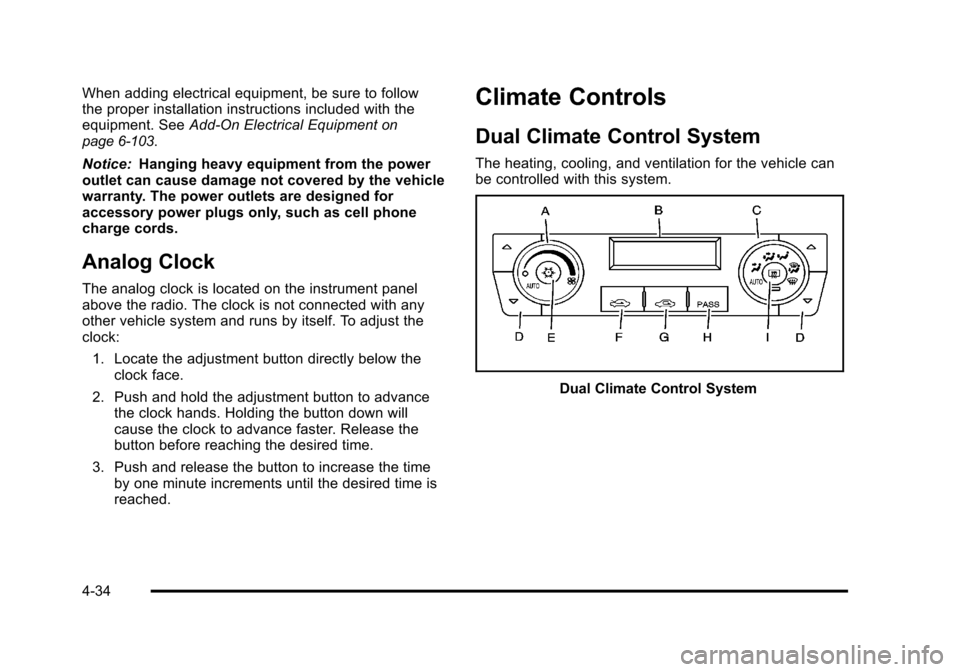
The heating, cooling, and ventilation for the vehicle can
be controlled with this system.
Dual Climate Control System
4-34
Page 248 of 470

Black plate (86,1)Cadillac DTS Owner Manual - 2011
DO NOT RESTORE:The customization features will
not be set to their factory default settings.
To select a setting, press the set/reset button while the
desired setting is displayed on the DIC.
Exiting the Feature Settings Menu
The feature settings menu will be exited when any of
the following occurs:
.The vehicle is shifted out of P (Park).
.The vehicle is no longer in ON/RUN.
.The trip/fuel or vehicle information DIC buttons are
pressed.
.The end of the feature settings menu is reached
and exited.
.A 40 second time period has elapsed with no
selection made.
Audio System(s)
Determine which radio the vehicle has and read the
following pages to become familiar with its features.
{WARNING:
Taking your eyes off the road for extended periods
could cause a crash resulting in injury or death to
you or others. Do not give extended attention to
entertainment tasks while driving.
This system provides access to many audio and non
audio listings.
To minimize taking your eyes off the road while driving,
do the following while the vehicle is parked:
.Become familiar with the operation and controls of
the audio system.
.Set up the tone, speaker adjustments, and preset
radio stations.
For more information, see Defensive Driving
on
page 5‑2.
4-86
Page 254 of 470

Black plate (92,1)Cadillac DTS Owner Manual - 2011
Finding a Station
BAND:Press to switch between AM, FM, or XM™. The
selection displays.
a(Tune): Turn to select radio stations.
©SEEK¨:Press the arrows to go to the next or to the
previous station and stay there.
To scan stations, press and hold either arrow for
three seconds until a beep sounds. The radio goes to a
station, plays for a few seconds, then goes to the next
station. Press either arrow again to stop scanning.
The radio only seeks and scans stations with a strong
signal that are in the selected band.
4(Information) (XM™ Satellite Radio Service,
MP3/WMA, and RDS Features): Press this button to
display additional text information related to the current
FM-RDS or XM station, or MP3/WMA song. A choice of
additional information such as: Channel, Song, Artist,
CAT (category) can display. Continue pressing the
information button to highlight the desired label,
or press the pushbutton positioned under any one of
the tabs and the information about that tab displays.
When information is not available, No Info displays.
Storing a Radio Station as a Favorite
Drivers are encouraged to set up their radio station
favorites while the vehicle is in P (Park). Tune to
favorite stations using the presets, favorites button,
and steering wheel controls, if the vehicle has this
feature. See Defensive Driving on page 5‑2.
FAV (Favorites): A maximum of 36 stations can be
programmed as favorites using the six pushbuttons
positioned below the radio station frequency tabs and
by using the radio favorites page button. Press the FAV
button to go through up to six pages of favorites, each
having six favorite stations available per page. Each
page of favorites can contain any combination of AM,
FM, or XM stations. To store a station as a favorite:
1. Tune to the desired radio station.
2. Press the FAV button to display the page where you want the station stored.
3. Press and hold one of the six pushbuttons until a beep sounds. When that pushbutton is pressed
and released, the station that was set, returns.
4. Repeat the steps for each pushbutton radio station you want stored as a favorite.
4-92
Page 255 of 470
Black plate (93,1)Cadillac DTS Owner Manual - 2011
The number of favorites pages can be setup using the
MENU button. To setup the number of favorites pages:1. Press the MENU button to display the radio setup menu.
2. Press the pushbutton located below the FAV 1-6 label.
3. Select the desired number of favorites pages by pressing the pushbutton located below the
displayed page numbers.
4. Press the FAV button, or let the menu time out, to return to the original main radio screen showing
the radio station frequency labels and to begin the
process of programming your favorites for the
chosen amount of numbered pages.
Setting the Tone (Bass/Midrange/Treble)
BASS/MID/TREB (Bass, Midrange, or Treble): To
adjust bass, midrange, or treble, press the
aknob
until the tone control labels display. Continue pressing
to highlight the desired label, or press the pushbutton
positioned under the desired label. Turn the
aknob
to adjust the highlighted setting. The highlighted
setting can also be adjusted by pressing either SEEK
arrow,
\FWD, orsREV button until the desired
levels are obtained. If a station's frequency is weak or
has static, decrease the treble. To quickly adjust bass, midrange, or treble to the middle
position, press the pushbutton positioned under the
BASS, MID, or TREB label for more than two seconds.
A beep sounds and the level adjusts to the middle
position.
To quickly adjust all tone and speaker controls to the
middle position, press the
aknob for more than
two seconds until a beep sounds.
EQ (Equalization): For the non-Bose
®amplified radio,
perform the following steps to setup the equalization
settings:
1. Press the
aknob until the equalization label
displays.
2. Press the pushbutton located under the equalization label to get choices of POP,
ROCK, CTRY (country), TALK, JAZZ, and
CLAS (classical), to display.
3. Press the pushbutton located under the desired setting.
4-93
Page 256 of 470

Black plate (94,1)Cadillac DTS Owner Manual - 2011
For the Bose amplified radio, perform the following
steps to setup the equalization settings:1. Press the
aknob until the DSP label displays.
2. Press the pushbutton located under the DSP label to get choices of Norm, Driv, Rear, and Surround,
to display.
3. Press the pushbutton located under the desired setting.
To select Surround, press either the fourth or fifth
pushbutton located under the displayed Surround
until Centerpoint displays.
To return to the manual mode, press the tune knob.
Select either BASS, MID, or TREB and start to manually
adjust the settings by turning the
aknob.
Adjusting the Speakers (Balance/Fade)
BAL/FADE (Balance/Fade): To adjust balance or
fade, press the
aknob until the speaker control labels
display. Continue pressing to highlight the desired label,
or press the pushbutton positioned under the desired
label. Turn the
aknob to adjust the highlighted setting.
The highlighted setting can be adjusted by pressing
either SEEK arrow,
\FWD, orsREV buttons until
the desired levels are obtained. To quickly adjust balance or fade to the middle position,
press the pushbutton positioned under the BAL or
FADE label for more than two seconds. A beep sounds
and the level adjusts to the middle position.
To quickly adjust all speaker and tone controls to the
middle position, press the
aknob for more than
two seconds until a beep sounds.
Digital Signal Processing (DSP)
This feature is used to provide a choice of four different
listening experiences. DSP can be used while listening
to the audio system or a CD. To change the DSP mode,
press the
aknob until the DSP control label displays.
Press the pushbutton located under the DSP label until
the control labels display. Continue by pressing the
desired button below the control labels on the display.
For more information on the control label displays, see
the following:
.Norm (Normal): Select this screen button to adjust
the audio for normal mode. This provides the best
sound quality for all seating positions.
.Driv (Driver): Select this screen button to adjust
the audio for the driver to receive the best possible
sound quality.
.Rear: Select this screen button to adjust the audio
for the rear seat passengers to receive the best
possible sound quality.
4-94