radio CADILLAC ELDORADO 1993 10.G User Guide
[x] Cancel search | Manufacturer: CADILLAC, Model Year: 1993, Model line: ELDORADO, Model: CADILLAC ELDORADO 1993 10.GPages: 398, PDF Size: 20.66 MB
Page 169 of 398
Downloaded from www.Manualslib.com manuals search engine If you have the Delco Bose Gold Series Music System, it lets you switch
from
CD (Compact Disc) to TP (Tape player).
The control behind the lower knob moves the sound between your front
and rear speakers.
When you push this button either up or down,
the SCAN indicator in the
display will light and the radio will find the next station and stay there
about
5 seconds. Then it will go to the next station and pause, and keep
doing that until you push either the SCAN or upper knob.
SEEK
This button selects stations, but it doesn’t keep moving as SCAN does.
When you push SEEK
up or down, the radio will automatically go to the
next strongest station and stay there.
Export Radio Only
The SCAN and SEEK function selects station only in one direction.
Push Buttons
You can set the push buttons to get up to ten favorite. stations (Five on
AM and five more on FM). Just:
Choose either AM or FM
Tune in the station.
Push the SET button.
Within 5 seconds, push one of the five push buttons.
Repeat these steps for each of the five push buttons.
BASS
The slide control increases or decreases the bass response tone. Moving
the control to the right increases bass while moving it to the
left decreases
it.
155
Page 170 of 398
Downloaded from www.Manualslib.com manuals search engine TREBLE
The slide control increases or decreases the treble response tone. Moving
the control to the right increases the treble
while moving it to the left
decreases it.
Your Cassette Tape Player
Your cassette tape player works best with tapes that are 30 to 45 minutes
long on each side. Tapes longer than that are
so thin that they may not
work well in this player.
If you look at the tape, or on its label or box, it should say whether its
bias, ("equalization" is 70 microseconds (70
U ) or 120 microseconds (120
U ). Chrome and metal tapes are 70 u scc and standard iron tapes are 120
U sec. Your tape player will adjust automatically for either type of
cassette tape.
To Play A Cassette Tape
0 Turn the radio on.
0 Insert the cassette through the tapc door. (The "TAPE" indicator in
the display will light.)
If you hear nothing or hear just a garbled sound, the cassette may not be
in squarely. Push the EJCT button to remove the tape and start over. The
tape equalization is automatically sensed and set. Inserting the cassette
also automatically disables
DNR""'" and activates DOLBY"' noise
reduction.
DNR" is the Dynamic Noise Reduction. It helps remove background hiss
noise from the radio.
@ Once the tape is playing, use the upper and lower knobs to adjust the
volume and balance, just as you do
for the radio. Push the upper knob
to change tape direction. The arrow in the display show which
direction the tape is being played.
'"DNR" is a registered trademark of National Semiconductor
Corporation.
156
Page 171 of 398
Downloaded from www.Manualslib.com manuals search engine FWD (Forward)
Push the FWD button to move forward rapidly to another part of the
tape. The radio will play during fast forward. To stop the tape push the
same button and the tape will start to play again.
REV (Reverse)
Push the REV button to move the tape rapidly backward. To stop the
tape, push the same button lightly or any of the other buttons. The radio
will play during this reve.rse function.
To go from one side of the tape to the other, push in the upper knob on
your radio.
To remove the tape, push EJCT. The tape can be ejected when
the ignition is turned
off.
NEXT
Push the NEXT button up to jump quickly to the next selection. If the
selection is at the end
of the tape, the tapc will reverse directions and
begin playing at
a normal speed.
PREV
Push the PREV button up to quickly go to the beginning of the last
selcction.
If the player has played less than 10 seconds into the current selection:
depressing the PREV button
will cause the player to find the beginning of
the previous selection and resume play from that point. If the player is
more than
10 seconds into the current selection, pressing PREV button
will cause the player to find the beginning of the current selection and
resume play from that point.
If PREV is issued while the first selection on
the tape is being played, the player will return to the beginning of that
side of the tape.
S TIPL (Stop-Play)
Press ST/PL to switch back to the radio without ejecting the tape. Press it
a second time to start playing it again.
157
Page 172 of 398
Downloaded from www.Manualslib.com manuals search engine EJCT (Eject Tape)
Press this button to remove the tape.
The Delco Bose Gold Series Music System
This optional sound system combines an AM/FM stereo radio with a
cassette tape player and a compact disc player
in a single unit.
To operate the radio and cassette tape player portion of this music
system, please read the beginning
of this section. “How To Operate Your
Sound System” and “Your Cassette Tape Player.”
To Play the Disc Player
Before you begin, please note: don’t use the mini-discs that are called
“singles” (even with an adapter). They won’t eject.
Use full-size compact
discs only.
Turn the radio on.
Insert a disc (label side up) partway into the slot. The player will pull
it in. Wait a few seconds and the disc will play. Then only the time
of
day and “CD” will display.
If the disc comes back out, check to see if:
The disc is upside down.
The disc is dirty, scratched, or wet.
There’s too much moisture in the air. (If there is, wait about one hour
and try again).
“Err” (Error Detection)
If this message is displayed, you have a condition of either extreme
temperature, moisture,
or an incorrect disc. The disc will automatically be
ejected. When conditions are back to normal, the disc should play again.
RCLIPROG (RecalllProgram)
0 Press once to see what track is being played.
158
Page 173 of 398
Downloaded from www.Manualslib.com manuals search engine Within 5 seconds press it a second time to see how long the disc has
been playing.
Press it a third time to see the time of day.
Rev (Reverse)
Push and hold REV to return rapidly within a track. Release it to play the
passage.
The elapsed time will be displayed to show the reverse progress
of the CD.
FWD (Fast Forward)
Press and hold FWD to advance quickly within a track. Release it to
resume playing. Elapsed time will be displayed to show the forward
progress
of the CD.
Prev (Previous)
Push this button to go back to the beginning of the track or push it again
to a favorite track.
Next
Push this button to advance to the next track.
STIPL (StopjPlay)
Press this button and the disc or tape will stop without ejecting it and the
radio will start to play. Press it again and the disc or tape will start to play
again.
E JCT (Eject)
Press this button to eject the disc or tape. If you have both a CD and a
tape in the player, then the other playback media will start to play. Press
it again and the other media will eject.
159
Page 175 of 398
Downloaded from www.Manualslib.com manuals search engine Care of Your Compact Discs
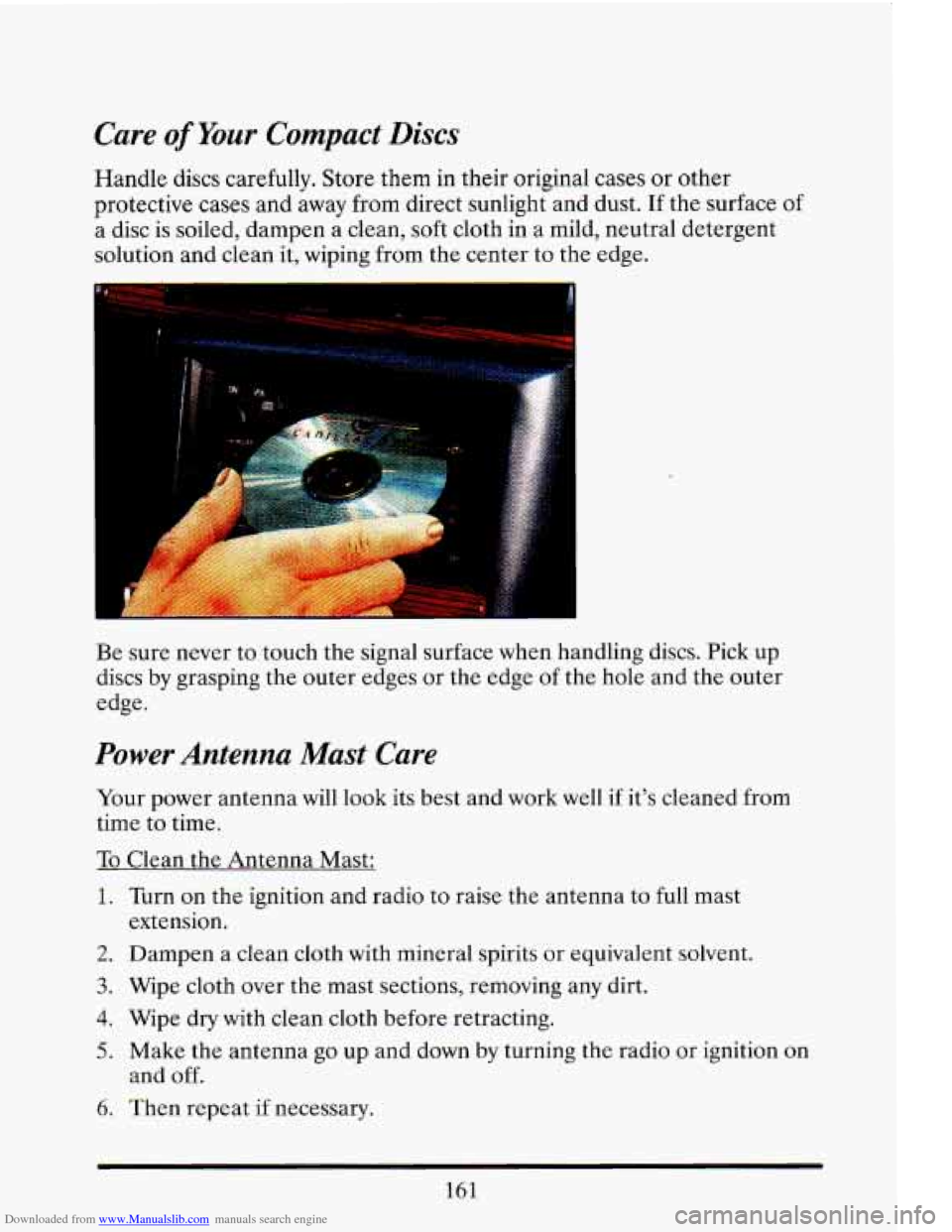
Handle discs carefully. Store them in their original cases or other
protective
cases and away from direct sunlight and dust. If the surface of
a disc is soiled, dampen a clean, soft cloth in a mild, neutral detergent
solution and clean it, wiping from the center to the edge.
L
.
Be sure never to touch the signal surface when handling discs. Pick up
discs by grasping the outer edges or the edge of the hole and the outer
edge.
Power Antenna Mast Care
Your power antenna will look its best and work well if it's cleaned from
time to time.
To Clean the Antenna Mast:
1. Turn on the ignition and radio to raise the antenna to full mast
2. Dampen a clean cloth with mineral spirits or equivalent solvent.
3. Wipe cloth over the mast sections, removing any dirt.
4. Wipe dry with clean cloth before retracting.
5. Make the antenna go up and down by turning the radio or ignition on
6. Then repeat if necessary.
extension.
and
off.
161
Page 236 of 398
Downloaded from www.Manualslib.com manuals search engine 2. Get the vehicles close enough so the jumper cables can reach, but be
sure the vehicles aren’t touching each other.
If they are, it could cause
a ground connection
you don’t want. You wouldn’t be able to start
your Cadillac, and the bad grounding could damage the electrical
systems.
-
A CAUTION:
You could be injured if the vehicles roll. Set the parking brake
firmly on each vehicle. Put an automatic transaxle in
“P”
‘”ark).
-
3. Turn off the ignition on both vehicles. Turn off all lights that aren’t
needed, and radios. This
will avoid sparks and help save both
batteries. And it could save your radio!
4. Open the hoods and locate the batteries.
A CAUTION:
An electric fan can start up even when the engine is not running
and can injure you. Keep hands, clothing and tools away from
any underhood elc ric fan.
Find the positive
(+) and negative (-) terminals on each battery.
222
Page 341 of 398
Downloaded from www.Manualslib.com manuals search engine r
T
ri
‘I
I-
!-
!-
Retained Accessory Power
When you stop your Cadillac and turn the key to Off, you can use these
accessories for
10 more minutes:
0 Radio
0 Power Windows
0 Astroroof
0 Windshield Wipers
If you open a door, everything will go off. And, after
10 minutes
everything will go off, also.
If you want power for another
10 minutes, just turn the key to Run and
then back to Off.
FUSES AND CIRCUIT BREDRS
The wiring circuits in your vehicle are protected from short circuits by a
combination of Mini Fuses, Circuit Breakers, and Maxi Fuses. This
greatly reduces the chance
of fires caused by electrical problems.
If you have a problem on the road and don’t have a spare fuse, you can
“borrow” one of the same value. Select a feature that you can get along
without that is the same value you need
-- like the radio or cigarette
lighter
-- and use its fuse. Be sure to use a fuse with the same amperage
rating number on it (ie.
lOA, 20A, etc.) Replace it as soon as you can.
1
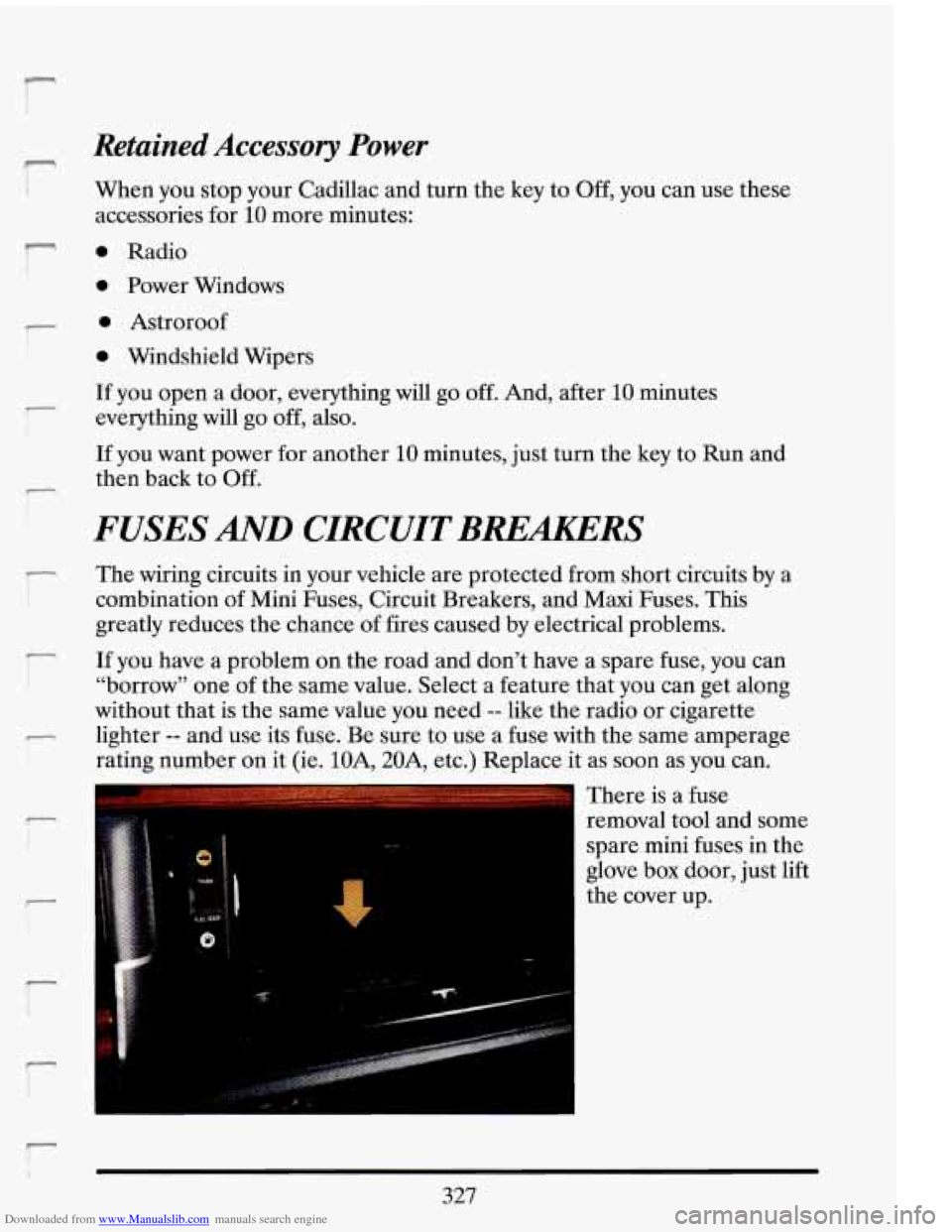
There is a fuse
removal tool and some
spare mini fuses in the
glove box door, just lift
the cover up.
327
Page 344 of 398
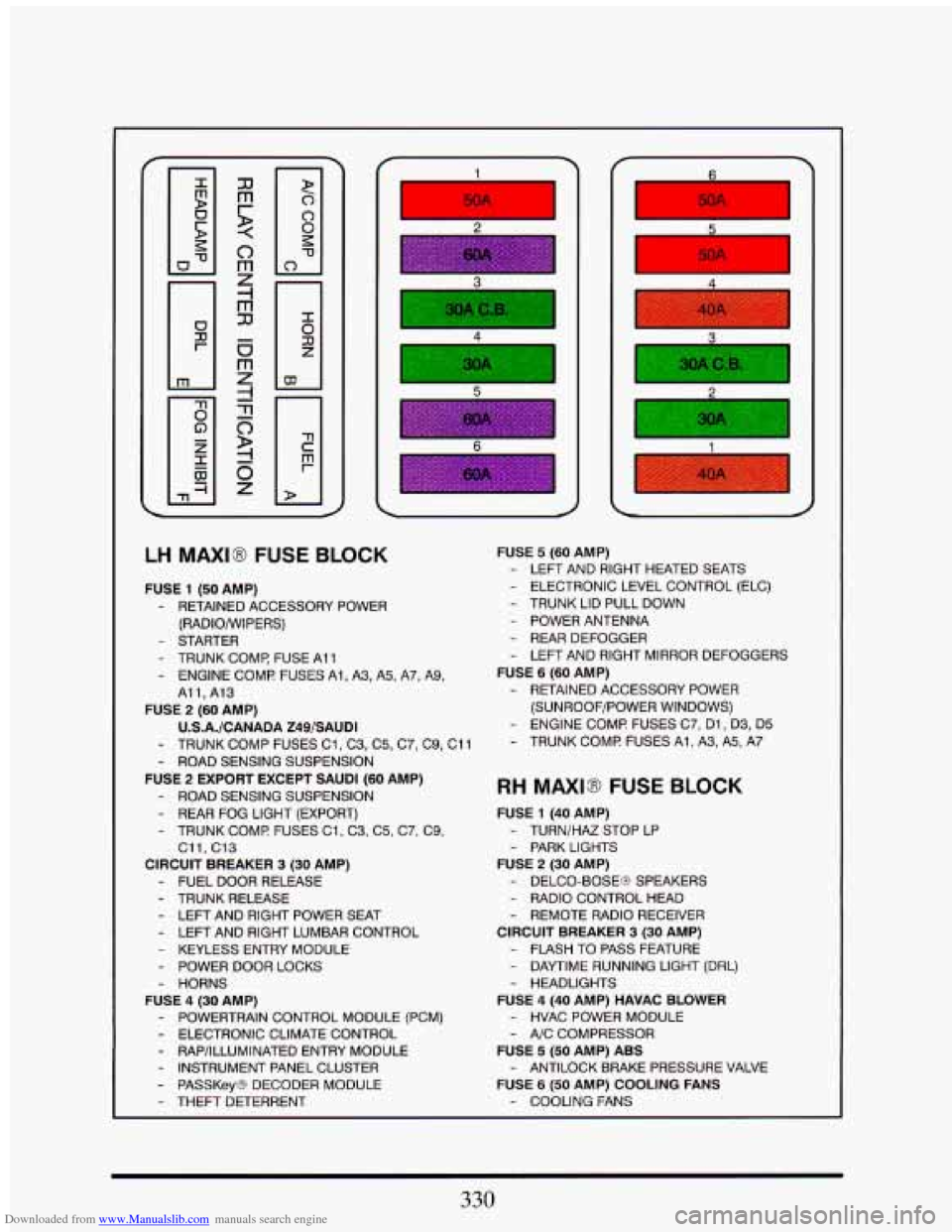
Downloaded from www.Manualslib.com manuals search engine 5
LH MAXI8 FUSE BLOCK
FUSE 1 (50 AMP)
- RETAINED ACCESSORY POWER
(RADIO/WIPERS)
- STARTER
- TRUNK COMR FUSE Ai 1
- ENGINE COMF! FUSES Ai, A3, A5, A7, A9,
All,A13
FUSE 2 (60 AMP)
U.S.A./CANADA Z49/SAUDI
- TRUNK COMP FUSES C1, C3, C5, C7, C9, Cil
- ROAD SENSING SUSPENSION
FUSE 2 EXPORT EXCEPT SAUDI (60 AMP)
- ROAD SENSING SUSPENSION
- REAR FOG LIGHT (EXPORT)
- TRUNK COMP FUSES C1, C3, C5, C7, C9,
C11, C13
CIRCUIT BREAKER 3 (30 AMP)
- FUEL DOOR RELEASE
- TRUNK RELEASE
- LEFT AND RIGHT POWER SEAT
- LEFT AND RIGHT LUMBAR CONTROL
- KEYLESS ENTRY MODULE
- POWER DOOR LOCKS
- HORNS
FUSE 4 (30 AMP)
- POWERTRAIN CONTROL MODULE (PCM)
- ELECTRONIC CLIMATE CONTROL - RAP/ILLUMINATED ENTRY MODULE
- INSTRUMENT PANEL CLUSTER
- PASSKeyB DECODER MODULE
- THEFT DETERRENT
I 50A I m 5
FUSE 5 (60 AMP)
- LEFT AND RIGHT HEATED SEATS
- ELECTRONIC LEVEL CONTROL (ELC)
- TRUNK LID PULL DOWN
- POWER ANTENNA
- REAR DEFOGGER
- LEFT AND RIGHT MIRROR DEFOGGERS
FUSE 6 (60 AMP)
- RETAINED ACCESSORY POWER
(SUNROOF/POWER WINDOWS)
- ENGINE COMF! FUSES C7, Dl, D3, D5
- TRUNK COMF! FUSES Al, A3, A5, A7
RH MAXIB FUSE BLOCK
FUSE 1 (40 AMP)
- TURN/HAZ STOP LP - PARK LIGHTS
FUSE 2 (30 AMP)
- DELCO-BOSEG SPEAKERS
- RADIO CONTROL HEAD
- REMOTE RADIO RECEIVER
CIRCUIT BREAKER 3 (30 AMP)
- FLASH TO PASS FEATURE
- DAYTIME RUNNING LIGHT (DRL)
- HEADLIGHTS
FUSE 4 (40 AMP) HAVAC BLOWER
- HVAC POWER MODULE
- AJC COMPRESSOR
FUSE 5 (50 AMP) ABS
FUSE
6 (50 AMP) COOLING FANS
- ANTILOCK BRAKE PRESSURE VALVE
- COOLING FANS
330
Page 346 of 398
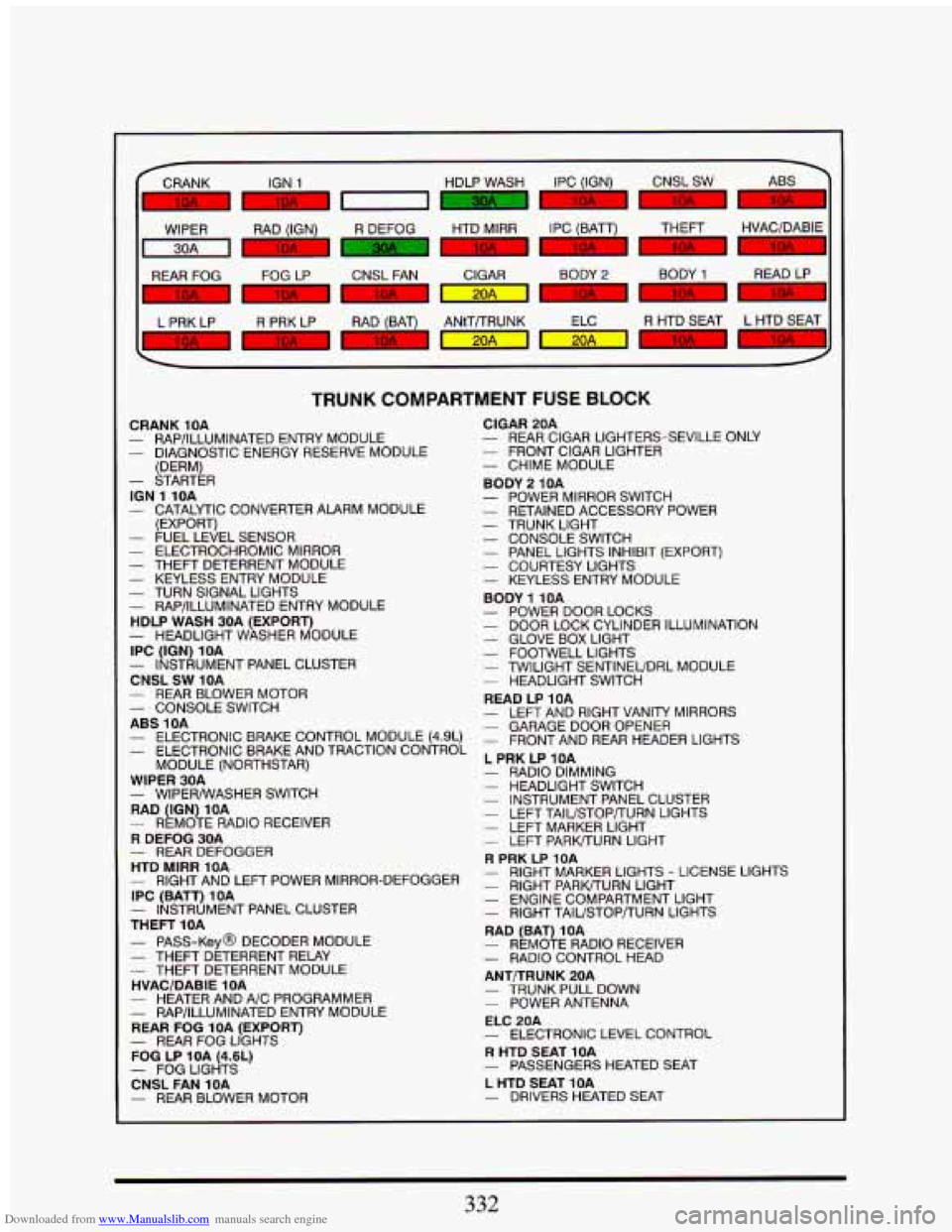
Downloaded from www.Manualslib.com manuals search engine L
WIPER RAD (IGN) R DEFOG HTD MlRR IPC IBATT) THEFT ,
1-1 BI BI
REAR FOG FOG LP CNSL FAN CIGAR
-
L PRK LP R PRK LP RAD (BAT)
7' .I m m
TRUNK COMPARTMENT FUSE BLOCK
CRANK 10A - RAPhLLUMINATED ENTRY MODULE - DIAGNOSTIC ENERGY RESERVE MODULE
(DERM)
- STARTER
- CATALYTIC CONVERTER ALARM MODULE
ION 1 10A
(EXPORTI
- FUEL-LEVEL SENSOR - ELECTROCHROMIC MIRROR - THEFT DETERRENT MODULE - KEYLESS ENTRY MODULE - TURN SIGNAL LIGHTS - RAP/ILLUMINATED ENTRY MODULE
HDLP WASH 30A (EXPORT)
IPC (IGN) 10A
CNSL
SW 10A
- HEADLIGHT WASHER MODULE
- INSTRUMENT PANEL CLUSTER
- REAR BLOWER MOTOR - CONSOLE SWITCH
ABS 1OA - ELECTRONIC BRAKE CONTROL MODULE (4.9L) - ELECTRONIC BRAKE AND TRACTION CONTROL
MODULE (NORTHSTAR)
WIPER 30A
RAD (IGN) 1OA
R DEFOG 30A
HTD MlRR 10A
IPC (BATT) 1 OA
- INSTRUMENT PANEL CLUSTER
THEFT 10A
- PASS-Key@ DECODER MODULE - THEFT DETERRENT RELAY
HVACIDABIE 10A
- HEATER AND A/C PROGRAMMER
REAR FOG 10A (EXPORT)
FOG LP 1OA (4.6L)
CNSL FAN 1OA
- REAR BLOWER MOTOR
- WIPERhVASHER SWITCH
- REMOTE RADIO RECEIVER
- REAR DEFOGGER
- RIGHT AND LEFT POWER MIRROR-DEFOGGER
- THEFT DETERRENT MODULE
- RAP/ILLUMINATED ENTRY MODULE
- REAR FOG LIGHTS
- FOG LIGHTS
- REAR CIGAR LIGHTERS-SEVILLE ONLY
- CHIME MODULE
CIGAR
20A - FRONT CIGAR LIGHTER
BODY 2 10A
- POWER MIRROR SWITCH - RETAINED ACCESSORY POWER
- CONSOLE SWITCH - PANEL LIGHTS INHIBIT (EXPORT) - COURTESY LIGHTS - KEYLESS ENTRY MODULE
BODY
1 10A - POWER DOOR LOCKS - DOOR LOCK CYLINDER ILLUMINATION
- TRUNK LIGHT
- GLOVE BOX LIGHT - FOOTWELL LIGHTS - TWILIGHT SENTINEUDRL MODULE - HEADLIGHT SWITCH
READ LP 10A
- LEFT AND RIGHT VANITY MIRRORS - GARAGEDOOROPENER - FRONT AND REAR HEADER LIGHTS
L PRK LP 1OA - RADIO DIMMING - HEADLIGHT SWITCH - INSTRUMENT PANEL CLUSTER
- LEFT MARKER LIGHT
R PRK LP 10A
- LEFT TAIL/STOP/TURN LIGHTS
- LEFT PARWTURN LIGHT
- RIGHT MARKER LIGHTS - LICENSE LIGHTS - RIGHT PARWURN LIGHT - ENGINE COMPARTMENT LIGHT - RIGHT TAlL/STOP/TURN LIGHTS
RAD (BAT)
1 OA - REMOTE RADIO RECEIVER - RADIO CONTROL HEAD
ANTDRUNK 20A
- TRUNK PULL DOWN
ELC 20A
R HTD SEAT 10A
L HTD SEAT 10A - DRIVERS HEATED SEAT
- POWER ANTENNA
- ELECTRONIC LEVEL CONTROL
- PASSENGERS HEATED SEAT
332