key battery CADILLAC ELDORADO 2001 10.G User Guide
[x] Cancel search | Manufacturer: CADILLAC, Model Year: 2001, Model line: ELDORADO, Model: CADILLAC ELDORADO 2001 10.GPages: 335, PDF Size: 2.72 MB
Page 137 of 335
2-76 Fuel Data Display
Everything you need to know about the fuel economy
and how far you can travel with your vehicle's
remaining fuel is displayed. Fuel data can be obtained
by pressing the INFO (SKIP) button. See ªDIC Controls
and Displaysº later in this section.
Driver Information Center (DIC)
This display gives you the status of many of your
vehicle's systems. The DIC is also used to display driver
personalization features and warning/status messages.
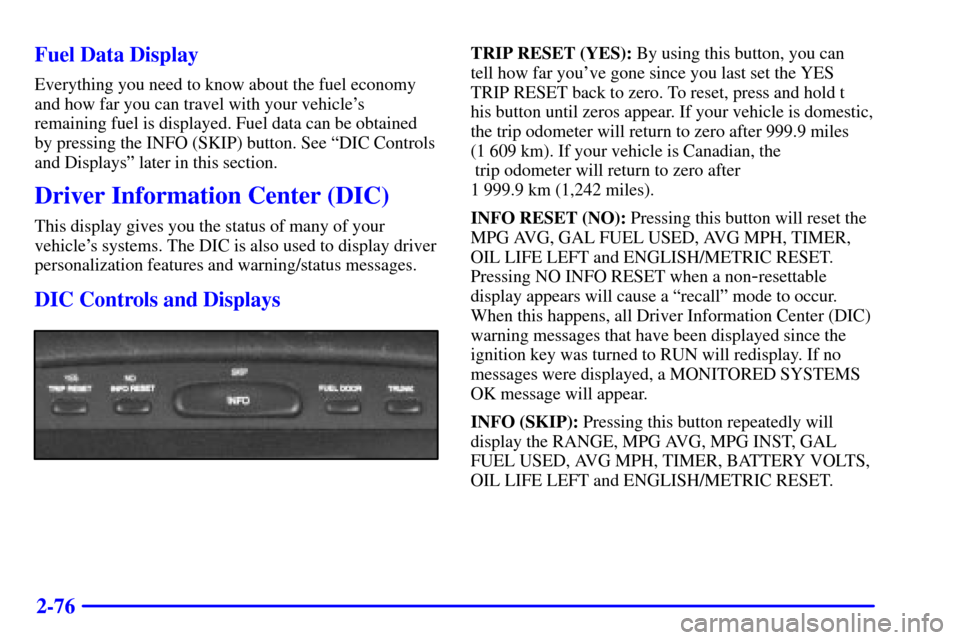
DIC Controls and Displays
TRIP RESET (YES): By using this button, you can
tell how far you've gone since you last set the YES
TRIP RESET back to zero. To reset, press and hold t
his button until zeros appear. If your vehicle is domestic,
the trip odometer will return to zero after 999.9 miles
(1 609 km). If your vehicle is Canadian, the
trip odometer will return to zero after
1 999.9 km (1,242 miles).
INFO RESET (NO): Pressing this button will reset the
MPG AVG, GAL FUEL USED, AVG MPH, TIMER,
OIL LIFE LEFT and ENGLISH/METRIC RESET.
Pressing NO INFO RESET when a non
-resettable
display appears will cause a ªrecallº mode to occur.
When this happens, all Driver Information Center (DIC)
warning messages that have been displayed since the
ignition key was turned to RUN will redisplay. If no
messages were displayed, a MONITORED SYSTEMS
OK message will appear.
INFO (SKIP): Pressing this button repeatedly will
display the RANGE, MPG AVG, MPG INST, GAL
FUEL USED, AVG MPH, TIMER, BATTERY VOLTS,
OIL LIFE LEFT and ENGLISH/METRIC RESET.
Page 151 of 335

2-90
FEATURE ON appears when a yes response is made
and FEATURE OFF shows when a no response is made.
Since this is the last personalization feature available, a
yes or no response will end out of the Driver
Information Center (DIC) display.
Once the battery guard has been programmed, your
vehicle will enter the storage mode about 20 minutes
after the ignition key has been turned off.
Your vehicle will stay in the storage mode until the
ignition key is turned out of LOCK. The system will
ªwake
-upº when the door key is inserted into the door,
however, your vehicle will remain in the storage mode.
The ignition must be out of LOCK before the battery
guard is disabled.Comfort Controls and Radio System Personalization
These features allow both drivers to personalize their
own climate control settings as well as their radio
settings. For more information, see ªClimate Control
Personalizationº and ªRadio Personalizationº in
the Index.
Continuous Variable Road Sensing
Suspension (CVRSS) (ETC Only)
The CVRSS automatically adjusts the ride of your
vehicle. Automatic ride control is achieved through a
computer used to control and monitor the suspension
system. The controller receives input from various
sensors to determine the proper system response. If the
controller detects a problem within the system, the
Driver Information Center (DIC) will display a
SERVICE RIDE CONTROL message. If this message
appears, have your vehicle serviced at your dealership.