center console CADILLAC ELR 2014 Owner's Manual
[x] Cancel search | Manufacturer: CADILLAC, Model Year: 2014, Model line: ELR, Model: CADILLAC ELR 2014Pages: 408, PDF Size: 4.47 MB
Page 17 of 408

Black plate (11,1)Cadillac ELR Owner Manual (GMNA-Localizing-U.S./Canada-6081525) -
2014 - Second Edition - 1/22/14
In Brief 1-11
The passenger sensing system will
turn off the front outboard
passenger frontal airbag and knee
airbag under certain conditions. No
other airbag is affected by the
passenger sensing system. See
Passenger Sensing System on
page 3-25.
The passenger airbag status
indicator lights on the overhead
console when the vehicle is started.
SeePassenger Airbag Status
Indicator on page 5-16.
Mirror Adjustment
Exterior
Mirrors can be folded inward toward
the vehicle to prevent damage when
going through an automatic car
wash. Push the mirror outward to
return it to the original position.
See Folding Mirrors on page 2-18.
Controls for the outside power
mirrors are on the driver door.
To adjust a mirror:
1. Move the selector switch to L
(Left) or R (Right) to choose the
driver or passenger mirror.
2. Press the arrows on the control pad to move each mirror in the
desired direction.
3. Return the selector switch to the center position.
See Power Mirrors on page 2-17. The rear window defogger also
heats the outside mirrors. See
Heated Mirrors on page 2-18.
Interior
Adjust the rearview mirror for a clear
view of the area behind the vehicle.
The mirror will automatically reduce
the glare of headlamps from behind.
The dimming feature comes on
when the vehicle is started. See
Automatic Dimming Rearview Mirror
on page 2-18.
Page 24 of 408
Black plate (18,1)Cadillac ELR Owner Manual (GMNA-Localizing-U.S./Canada-6081525) -
2014 - Second Edition - 1/22/14
1-18 In Brief
vehicle to help avoid or lessen the
severity of crashes while moving
forward.
SeeActive Emergency Braking
System on page 9-53.
Power Outlets
The accessory power outlets can be
used to plug in electrical equipment,
such as a cell phone or MP3 player.
The vehicle has two accessory
power outlets:
.Inside the front center console.
.Inside the center console bin
behind the shift lever.
Lift the cover to access the
accessory power outlet.
See Power Outlets on page 5-6.
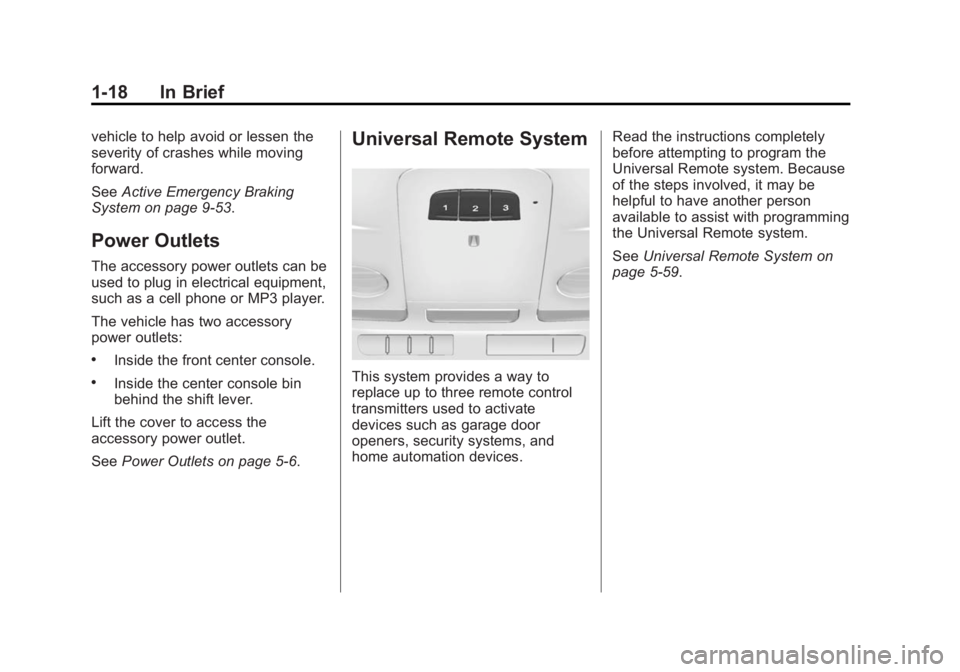
Universal Remote System
This system provides a way to
replace up to three remote control
transmitters used to activate
devices such as garage door
openers, security systems, and
home automation devices. Read the instructions completely
before attempting to program the
Universal Remote system. Because
of the steps involved, it may be
helpful to have another person
available to assist with programming
the Universal Remote system.
See
Universal Remote System on
page 5-59.
Page 30 of 408
Black plate (24,1)Cadillac ELR Owner Manual (GMNA-Localizing-U.S./Canada-6081525) -
2014 - Second Edition - 1/22/14
1-24 In Brief
Service
{Warning
Never try to do your own service
on high voltage components. You
can be injured and the vehicle
can be damaged if you try to do
your own service work. Service
and repair of these high voltage
components should only be
performed by a trained service
technician with the proper
knowledge and tools. SeeDoing
Your Own Service Work on
page 10-5.
Performance and
Maintenance
Traction Control/
Electronic Stability
Control
The Traction Control System (TCS)
limits wheel spin. The system turns
on automatically every time the
vehicle is started.
StabiliTrak assists with directional
control of the vehicle in difficult
driving conditions. The system turns
on automatically every time the
vehicle is started.
.To turn off TCS, press and
release the TCS/StabiliTrak
button
Yon the center console.
iilluminates in the instrument
cluster. The appropriate DIC
message is displayed. See Ride
Control System Messages on
page 5-48.
.Press the TCS/StabiliTrak buttonYagain to turn traction control
back on.
.To turn off both TCS and
StabiliTrak, press and hold the
TCS/StabiliTrak button
Yon the
center console until
gandi
illuminate in the instrument
cluster. The appropriate DIC
message displays. See Ride
Control System Messages on
page 5-48.
.Press the TCS/StabiliTrak buttonYagain to turn on both
systems.
See Traction Control/Electronic
Stability Control on page 9-33.
Page 39 of 408

Black plate (5,1)Cadillac ELR Owner Manual (GMNA-Localizing-U.S./Canada-6081525) -
2014 - Second Edition - 1/22/14
Keys, Doors, and Windows 2-5
4. Insert the vehicle key into thekey cylinder above the license
plate.
5. Open the trunk.
6. Turn the key counterclockwise five times within 10 seconds.
7. The DIC displays READY FOR REMOTE KEY 3 or 4, up to 8.8. Remove the rubber liner toaccess the pocket. Place the
new transmitter on the indent in
the center console storage bin.
9. Press the POWER
Obutton.
10. The DIC displays READY FOR REMOTE KEY 4 or 5, up to 8.
11. Press
QorKon each newly
programmed transmitter to
complete the process. 12. To program additional
transmitters, repeat
Steps 8–11.
Return the key base back into
the RKE transmitter.
13. Press and hold the POWER
O
button for at least 12 seconds
to exit programming.
Programming without a
Recognized Transmitter
If there are no currently recognized
transmitters available, follow this
procedure to program up to eight
transmitters. This feature is not
available in Canada. This procedure
will take approximately 30 minutes
to complete. The vehicle must be off
and all transmitters to be
programmed must be present.
Page 40 of 408

Black plate (6,1)Cadillac ELR Owner Manual (GMNA-Localizing-U.S./Canada-6081525) -
2014 - Second Edition - 1/22/14
2-6 Keys, Doors, and Windows
1. Remove the key from thetransmitter and insert the vehicle
key into the key cylinder above
the license plate.
2. Open the trunk.
3. Turn the key counterclockwise five times within 10 seconds.
The DIC message displays
REMOTE LEARN PENDING
PLEASE WAIT.
4. Return the key base back into the RKE transmitter. 5. Wait for 10 minutes until the DIC
displays PRESS ENGINE
START BUTTON LEARN, then
press the POWER
Obutton.
The DIC reads REMOTE
LEARN PENDING,
PLEASE WAIT.
6. Repeat Step 5 two additional times. After the third time all
previously known transmitters
will no longer work with the
vehicle. Remaining transmitters
can be relearned during the next
steps. The DIC display should
now show READY FOR
REMOTE #1.
7. First remove the rubber liner toaccess the pocket. Place the
new transmitter on the indent in
the center console storage bin.
8. Press the POWER
Obutton.
When the transmitter is learned,
the DIC display will show that it
is ready to program the new
transmitter.
9. Remove the transmitter from the transmitter pocket and press
Q
orKon the transmitter.
10. To program additional transmitters, repeat Steps 7–9.
Page 41 of 408
Black plate (7,1)Cadillac ELR Owner Manual (GMNA-Localizing-U.S./Canada-6081525) -
2014 - Second Edition - 1/22/14
Keys, Doors, and Windows 2-7
11. When all additional transmittersare programmed, press and
hold the POWER
Obutton for
approximately 12 seconds to
exit programming mode.
Starting the Vehicle with a Low
Transmitter Battery
When you try to start the vehicle,
if the transmitter battery is weak,
or if there is interference with the
signal, the DIC may display NO
REMOTE DETECTED or NO
REMOTE KEY WAS DETECTED
PLACE KEY IN TRANSMITTER
POCKET THEN START YOUR
VEHICLE. See Key and Lock
Messages on page 5-45.
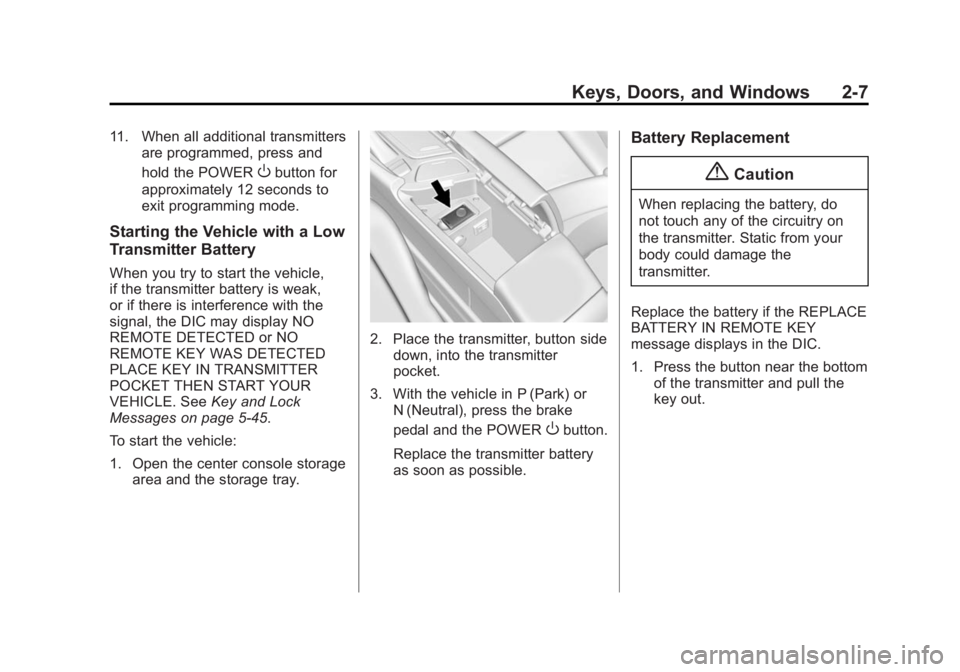
To start the vehicle:
1. Open the center console storage area and the storage tray.
2. Place the transmitter, button side
down, into the transmitter
pocket.
3. With the vehicle in P (Park) or N (Neutral), press the brake
pedal and the POWER
Obutton.
Replace the transmitter battery
as soon as possible.
Battery Replacement
{Caution
When replacing the battery, do
not touch any of the circuitry on
the transmitter. Static from your
body could damage the
transmitter.
Replace the battery if the REPLACE
BATTERY IN REMOTE KEY
message displays in the DIC.
1. Press the button near the bottom of the transmitter and pull the
key out.
Page 107 of 408
Black plate (1,1)Cadillac ELR Owner Manual (GMNA-Localizing-U.S./Canada-6081525) -
2014 - Second Edition - 1/22/14
Storage 4-1
Storage
Storage Compartments
Storage Compartments . . . . . . . 4-1
Instrument Panel Storage . . . . . 4-1
Glove Box . . . . . . . . . . . . . . . . . . . . 4-1
Cupholders . . . . . . . . . . . . . . . . . . . 4-2
Center Console Storage . . . . . . 4-2
Storage
Compartments
{Warning
Do not store heavy or sharp
objects in storage compartments.
In a crash, these objects may
cause the cover to open and
could result in injury.
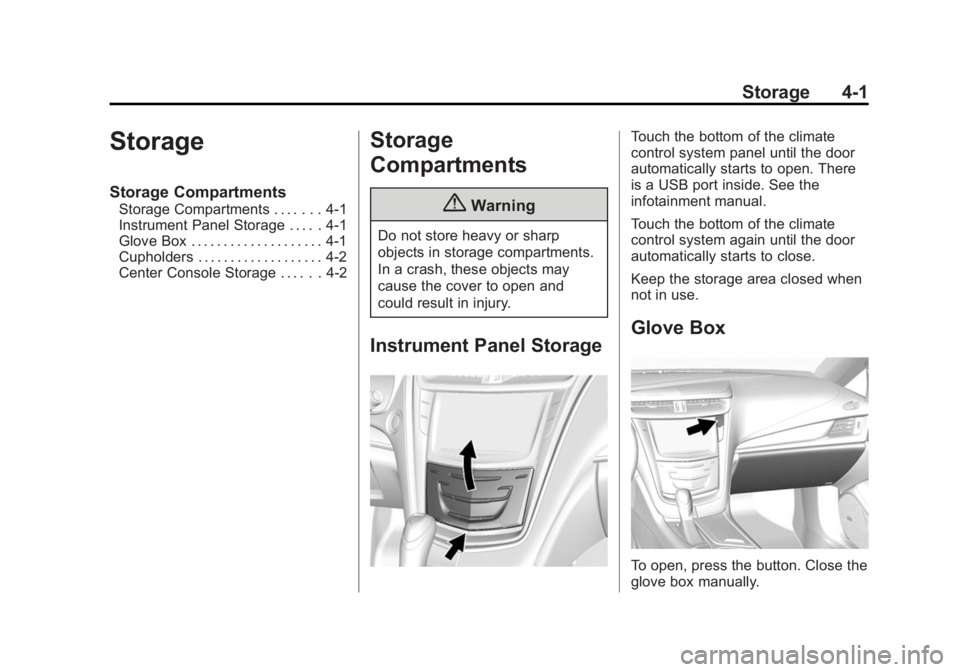
Instrument Panel Storage
Touch the bottom of the climate
control system panel until the door
automatically starts to open. There
is a USB port inside. See the
infotainment manual.
Touch the bottom of the climate
control system again until the door
automatically starts to close.
Keep the storage area closed when
not in use.
Glove Box
To open, press the button. Close the
glove box manually.
Page 108 of 408
Black plate (2,1)Cadillac ELR Owner Manual (GMNA-Localizing-U.S./Canada-6081525) -
2014 - Second Edition - 1/22/14
4-2 Storage
Cupholders
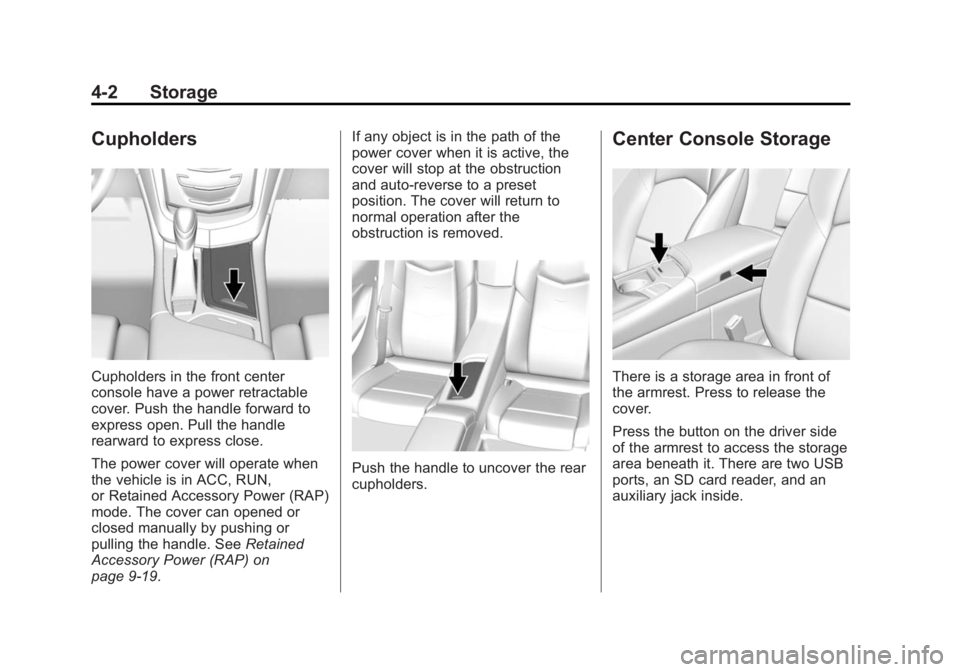
Cupholders in the front center
console have a power retractable
cover. Push the handle forward to
express open. Pull the handle
rearward to express close.
The power cover will operate when
the vehicle is in ACC, RUN,
or Retained Accessory Power (RAP)
mode. The cover can opened or
closed manually by pushing or
pulling the handle. SeeRetained
Accessory Power (RAP) on
page 9-19. If any object is in the path of the
power cover when it is active, the
cover will stop at the obstruction
and auto-reverse to a preset
position. The cover will return to
normal operation after the
obstruction is removed.
Push the handle to uncover the rear
cupholders.
Center Console Storage
There is a storage area in front of
the armrest. Press to release the
cover.
Press the button on the driver side
of the armrest to access the storage
area beneath it. There are two USB
ports, an SD card reader, and an
auxiliary jack inside.
Page 114 of 408
Black plate (6,1)Cadillac ELR Owner Manual (GMNA-Localizing-U.S./Canada-6081525) -
2014 - Second Edition - 1/22/14
5-6 Instruments and Controls
Setting the Clock
Time
To set the time:
1. From the Home Page, press theSETTINGS screen button, then
press Time and Date.
2. Press Set Time, then press + or −to increase or decrease hours
or minutes, and change AM
or PM.
3. Press 12-24Hr for a 12 or 24 hour clock.
4. Press
[Back to go back to the
previous menu.
Date
To set the date:
1. Press the SETTINGS screen button and press Time and Date.
2. Press Set Date and press + or −
to increase or decrease month,
day, or year.
3. Press
[Back to go back to the
previous menu. Auto Set
When on, the time and date will
automatically update.
To set auto set:
1. Press the SETTINGS screen
button, then press Time
and Date.
2. Press Set Time or Set Date.
3. Press Auto Set, then select On-Cell Network or Off-Manual
to manually set the time
and date.
4. Press
[Back to go back to the
previous menu.
If auto timing is set, the time
displayed on the clock may not
update immediately when driving
into a new time zone.
Clock Display
When on, the digital clock will
display on the infotainment screen. To set the clock display:
1. Press the SETTINGS screen
button and press Time and Date.
2. Press Clock Display, then select Off or On.
3. Press
[Back to go back to the
previous menu.
Power Outlets
The accessory power outlets can be
used to plug in electrical equipment,
such as a cell phone or MP3 player.
The vehicle has two accessory
power outlets:
.Inside the front center console.
.Inside the center console bin
behind the shift lever.
Lift the cover to access the
accessory power outlet.
Certain accessory power plugs may
not be compatible with the
accessory power outlet and could
Page 124 of 408
Black plate (16,1)Cadillac ELR Owner Manual (GMNA-Localizing-U.S./Canada-6081525) -
2014 - Second Edition - 1/22/14
5-16 Instruments and Controls
While the vehicle is moving, if a
second row passenger who was
previously buckled becomes
unbuckled, the corresponding safety
belt symbol will change to flashing
red for several seconds and a chime
may sound.
Airbag Readiness Light
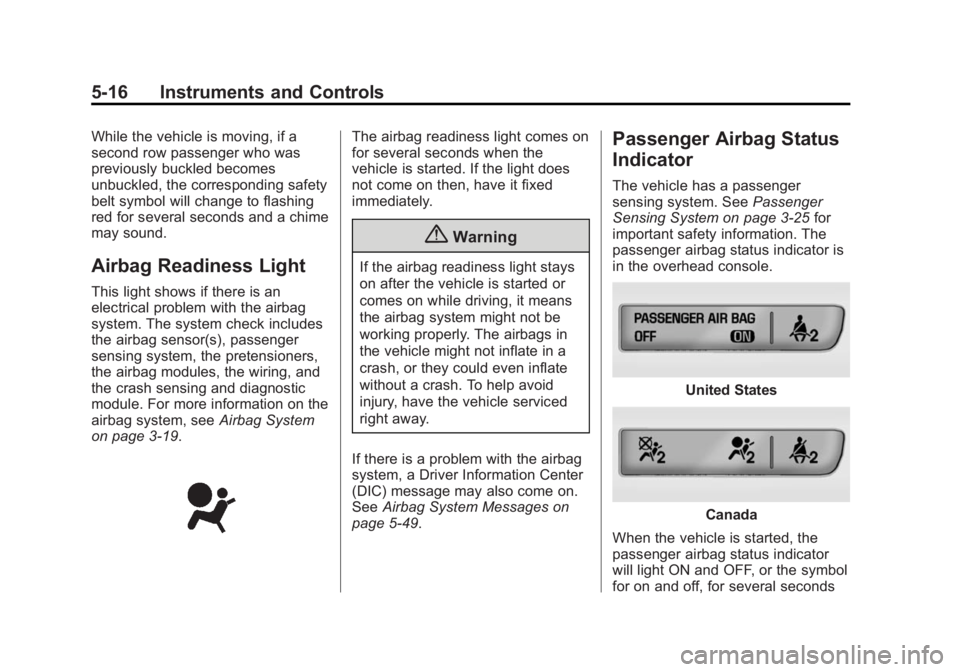
This light shows if there is an
electrical problem with the airbag
system. The system check includes
the airbag sensor(s), passenger
sensing system, the pretensioners,
the airbag modules, the wiring, and
the crash sensing and diagnostic
module. For more information on the
airbag system, seeAirbag System
on page 3-19.
The airbag readiness light comes on
for several seconds when the
vehicle is started. If the light does
not come on then, have it fixed
immediately.
{Warning
If the airbag readiness light stays
on after the vehicle is started or
comes on while driving, it means
the airbag system might not be
working properly. The airbags in
the vehicle might not inflate in a
crash, or they could even inflate
without a crash. To help avoid
injury, have the vehicle serviced
right away.
If there is a problem with the airbag
system, a Driver Information Center
(DIC) message may also come on.
See Airbag System Messages on
page 5-49.
Passenger Airbag Status
Indicator
The vehicle has a passenger
sensing system. See Passenger
Sensing System on page 3-25 for
important safety information. The
passenger airbag status indicator is
in the overhead console.
United States
Canada
When the vehicle is started, the
passenger airbag status indicator
will light ON and OFF, or the symbol
for on and off, for several seconds