instrument panel CADILLAC ELR 2015 Owner's Manual
[x] Cancel search | Manufacturer: CADILLAC, Model Year: 2015, Model line: ELR, Model: CADILLAC ELR 2015Pages: 407, PDF Size: 41.85 MB
Page 186 of 407

Black plate (5,1)Cadillac ELR Owner Manual (GMNA-Localizing-U.S./Canada-7695154) -
2015 - CRC - 4/25/14
Climate Controls 8-5
Air Delivery Mode Control:Press
the CLIMATE touch screen button to
select climate control. Press the air
delivery mode touch screen button
to change the direction of the
airflow. The selected air delivery
mode button is lit. Pressing any of
the air delivery buttons cancels
automatic air delivery control and
the direction of the airflow can be
controlled manually. Press AUTO to
return to automatic operation.
To change the current mode, select
one of the following:
Y(Vent): Air is directed to the
instrument panel outlets.
\(Bi-Level): Air is divided
between the instrument panel
outlets and the floor outlets.
[(Floor): Air is directed to the
floor outlets, with some air to the
windshield and side windows.
-(Defog): Clears the windows of
fog or moisture. Air is directed to the
windshield, side windows, and floor
outlets.
0(Defrost): Press the0button
to turn on or off. This clears the
windshield of fog or frost more
quickly. Air is directed to the
windshield and side windows.
Automatic Air Recirculation:
When the AUTO indicator light is
on, the air is automatically
recirculated as needed to help
quickly cool the inside of the
vehicle.
@(Recirculation): Press to
alternate between recirculating air
inside the vehicle or pulling in
outside air. The indicator light on the
button is lit when recirculation mode
is active. This helps to quickly cool
the air inside the vehicle or prevent
outside air and odors from entering.
Pressing this button cancels
automatic recirculation. Press AUTO
to return to automatic operation;
recirculation runs automatically as
needed.
Manual recirculation mode is not
available when in Defrost mode. Auto Defog:
The climate control
system may have a sensor to
automatically detect high humidity
inside the vehicle. When high
humidity is detected, the climate
control system may adjust to
outside air supply and turn on the
air conditioner. If the climate control
system does not detect possible
window fogging, it returns to normal
operation. To turn Auto Defog off or
on, see “Climate and Air Quality”
under Vehicle Personalization on
page 5-52.
Rear Window Defogger
=REAR (Rear Window
Defogger): Press to turn the rear
window defogger on or off. An
indicator light on the button comes
on to show that the rear window
defogger is on
The heated outside mirrors turn on
when the rear window defogger
button is on. They help to clear fog
or frost from the surface of the
mirrors.
ProCarManuals.com
Page 188 of 407
Black plate (7,1)Cadillac ELR Owner Manual (GMNA-Localizing-U.S./Canada-7695154) -
2015 - CRC - 4/25/14
Climate Controls 8-7
Air Vents
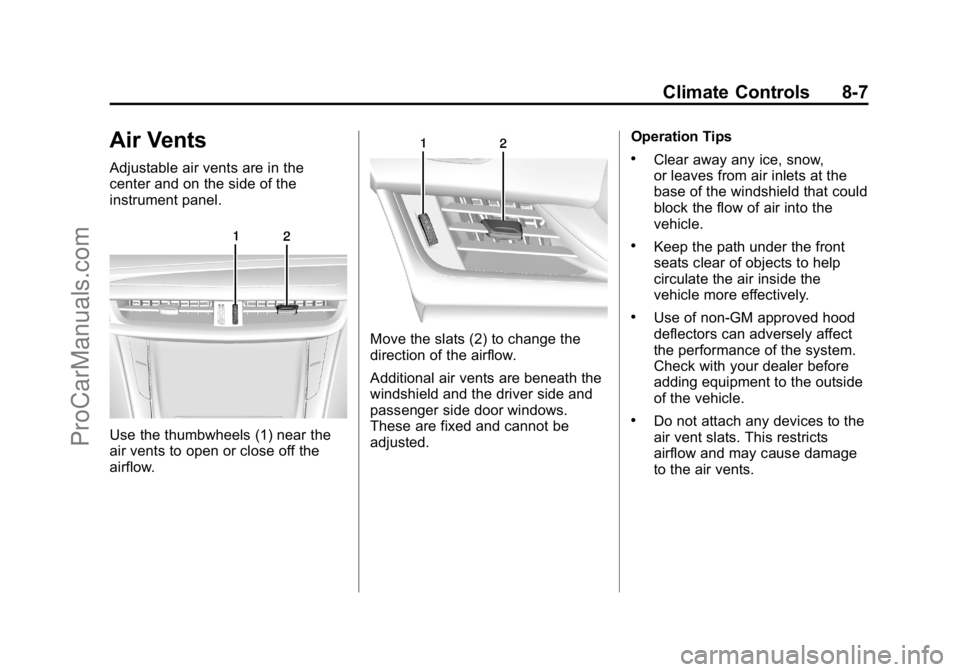
Adjustable air vents are in the
center and on the side of the
instrument panel.
Use the thumbwheels (1) near the
air vents to open or close off the
airflow.
Move the slats (2) to change the
direction of the airflow.
Additional air vents are beneath the
windshield and the driver side and
passenger side door windows.
These are fixed and cannot be
adjusted.Operation Tips
.Clear away any ice, snow,
or leaves from air inlets at the
base of the windshield that could
block the flow of air into the
vehicle.
.Keep the path under the front
seats clear of objects to help
circulate the air inside the
vehicle more effectively.
.Use of non-GM approved hood
deflectors can adversely affect
the performance of the system.
Check with your dealer before
adding equipment to the outside
of the vehicle.
.Do not attach any devices to the
air vent slats. This restricts
airflow and may cause damage
to the air vents.
ProCarManuals.com
Page 200 of 407

Black plate (11,1)Cadillac ELR Owner Manual (GMNA-Localizing-U.S./Canada-7695154) -
2015 - CRC - 4/25/14
Driving and Operating 9-11
Blizzard Conditions
Being stuck in snow can be a
serious situation. Stay with the
vehicle unless there is help nearby.
If possible, use the Roadside
Service Program. To get help and
keep everyone in the vehicle safe:
.Turn on the hazard warning
flashers.
.Tie a red cloth to an outside
mirror.
{Warning
Snow can trap engine exhaust
under the vehicle. This may
cause exhaust gases to get
inside. Engine exhaust contains
carbon monoxide (CO) which
cannot be seen or smelled. It can
cause unconsciousness and even
death.(Continued)
Warning (Continued)
If the vehicle is stuck in the snow:
.Clear away snow from around
the base of the vehicle,
especially any that is blocking
the exhaust pipe.
.Check again from time to
time to be sure snow does
not collect there.
.Open a window about 5 cm
(2 in) on the side of the
vehicle that is away from the
wind to bring in fresh air.
.Fully open the air outlets on
or under the instrument
panel.
.Adjust the climate control
system to a setting that
circulates the air inside the
vehicle and set the fan speed
to the highest setting. See
“Climate Control Systems” in
the Index.
(Continued)
Warning (Continued)
For more information about
carbon monoxide, see Engine
Exhaust on page 9-27.
To conserve energy, run the vehicle
for only short periods as needed to
warm the vehicle and then shut the
vehicle off and close the window
most of the way to save heat.
Repeat this until help arrives but
only when you feel really
uncomfortable from the cold. Moving
about to keep warm also helps.
If it takes some time for help to
arrive, start the vehicle. The engine
may start for cabin comfort and to
maintain the high voltage battery
state of charge. Turn off
unnecessary accessories to
conserve energy.
ProCarManuals.com
Page 248 of 407

Black plate (59,1)Cadillac ELR Owner Manual (GMNA-Localizing-U.S./Canada-7695154) -
2015 - CRC - 4/25/14
Driving and Operating 9-59
In cold weather conditions, ice
may form around the charge port
door. Remove ice from the area
before attempting to open or
close the charge port door.
3. Open the rear trunk, lift the leftload support floor cover, and
remove the charge cord. Pull up
on the charge cord handle to
release. The vehicle plug is
stored as shown. 4. Plug the charge cord into the
electrical outlet. See Electrical
Requirements for Battery
Charging on page 9-66. Verify
the charge cord status. See the
charge cord user guide. See
Charge Cord on page 9-64.
Select the appropriate charge
level using the Select Charge
Level Preference screen on the
center stack. See “Charge Level
Selection” underProgrammable
Charging on page 5-29.
5. Plug in the vehicle plug of the charge cord into the charge port
on the vehicle. Verify that the
charging status indicator
illuminates on top of the
instrument panel and a horn
chirp occurs. See Charging
Status Feedback on page 9-60.
Charge Cord Theft Alert
This vehicle has a Charge Cord
Theft Alert. To enable this feature,
see "Charge Cord Theft Alert" in
Vehicle Personalization on
page 5-52. The system can be
armed and disarmed using the door
lock function on the RKE
transmitter.
End Charge
1. If armed, unlock the vehicle with the RKE transmitter to disarm
the charge cord theft alert.
ProCarManuals.com
Page 249 of 407

Black plate (60,1)Cadillac ELR Owner Manual (GMNA-Localizing-U.S./Canada-7695154) -
2015 - CRC - 4/25/14
9-60 Driving and Operating
2. Disconnect the vehicle plug ofthe charge cord from the vehicle.
3. Close the charge port door by pressing firmly on the rearward
edge of the door surface.
4. Unplug the charge cord from the electrical outlet.
5. Place the charge cord into the storage compartment.
Delayed Charging
Override
To temporarily override a delayed
charge event, unplug the charge
cord from the charge port and then
plug it back in within five seconds.
A single horn chirp will sound and
charging will begin immediately.
To cancel a temporary override,
unplug the charge cord, wait for
10 seconds, and then plug the
charge cord back in. A double horn
chirp will sound and charging will be
delayed.
See Programmable Charging on
page 5-29 for advanced charge
scheduling options.
Charging Status
Feedback
The vehicle has two ways of
monitoring the charging status of
the high voltage battery. The
Instrument Panel Charging Status
Indicator (CSI) is at the center of the
instrument panel near the
windshield. The LEDs in the Outside
Rearview Mirrors (OSRVM) are also
used to monitor charging status.
Some local laws restricting the use
of colored lights on public roads
may apply to the outside rearview
mirrors charging status feedback. To
turn the OSRVM charge indicator
off, see “Charge Status Feedback”
in Vehicle Personalization on
page 5-52.
ProCarManuals.com
Page 250 of 407

Black plate (61,1)Cadillac ELR Owner Manual (GMNA-Localizing-U.S./Canada-7695154) -
2015 - CRC - 4/25/14
Driving and Operating 9-61
Instrument Panel Charging
Status Indicator (CSI)
When the vehicle is plugged in and
the vehicle power is off, the CSI
indicates the following:
.Solid Green–Vehicle is plugged
in. Battery is not fully charged.
Battery is charging.
.Long Flashing Green –Vehicle
is plugged in. Battery is not fully
charged. Battery charging is
delayed.
.Short Flashing Green –Vehicle
is plugged in. Battery is fully
charged.
.Solid Yellow –Vehicle is plugged
in. It is normal for the CSI to turn
yellow for a few seconds after
plugging in a compatible charge
cord. The solid yellow may be
extended depending on the
vehicle temperature or if there is
a total utility interruption via
OnStar. See Utility Interruption of
Charging on page 9-65. This
may also indicate that the
charging system has detected a
fault and will not charge the
battery. See “Charge Cord
Status Indicators” in the charge
cord user guide.
The system may be thermally
conditioning the battery during any
of the states above, requiring
electrical energy to be transferred to
the vehicle. If the vehicle is plugged in and
vehicle power is on, the CSI will be
on solid green. The same is true
during a remote start if the vehicle is
plugged in.
If the vehicle is plugged in and the
CSI is off, a total utility interruption
using OnStar or a charging fault has
been detected. See
Utility
Interruption of Charging on
page 9-65 or“Charge Cord Status
Indicators” in the charge cord user
guide.
This chart indicates vehicle
feedback when the charge cord is
plugged in.
ProCarManuals.com
Page 262 of 407
Black plate (1,1)Cadillac ELR Owner Manual (GMNA-Localizing-U.S./Canada-7695154) -
2015 - CRC - 4/25/14
Vehicle Care 10-1
Vehicle Care
General Information
General Information . . . . . . . . . . 10-2
California Proposition65 Warning . . . . . . . . . . . . . . . . . 10-2
California Perchlorate Materials Requirements . . . . 10-2
Accessories and Modifications . . . . . . . . . . . . . . . 10-2
Lifting the Vehicle . . . . . . . . . . . . 10-3
Vehicle Checks
Doing Your Own Service Work . . . . . . . . . . . . . . . 10-5
Hood . . . . . . . . . . . . . . . . . . . . . . . . 10-6
Engine Compartment Overview . . . . . . . . . . . . . . . . . . . 10-8
Engine Oil . . . . . . . . . . . . . . . . . . . 10-9
Engine Oil Life System . . . . . 10-12
Engine Air Cleaner/Filter . . . . 10-13
Cooling System (Engine) . . . 10-14
Cooling System (High Voltage Battery) . . . . . . . . . . . 10-15
Cooling System (Power Electronics and Charger
Modules) . . . . . . . . . . . . . . . . . . 10-16
Engine Coolant . . . . . . . . . . . . . 10-16 Engine Overheating . . . . . . . . 10-19
Washer Fluid . . . . . . . . . . . . . . . 10-19
Brakes . . . . . . . . . . . . . . . . . . . . . 10-20
Brake Fluid . . . . . . . . . . . . . . . . . 10-21
Battery . . . . . . . . . . . . . . . . . . . . . 10-23
Electric Drive Unit Shift Lock
Control Function Check . . . 10-25
Park Brake and P (Park) Mechanism Check . . . . . . . . 10-25
Wiper Blade Replacement . . . . . . . . . . . . . . 10-26
Headlamp Aiming
Headlamp Aiming . . . . . . . . . . 10-27
Bulb Replacement
Bulb Replacement . . . . . . . . . . 10-27
LED Lighting . . . . . . . . . . . . . . . 10-27
License Plate Lamp . . . . . . . . 10-27
Replacement Bulbs . . . . . . . . . 10-28
Electrical System
High Voltage Devices andWiring . . . . . . . . . . . . . . . . . . . . . 10-28
Electrical System Overload . . . . . . . . . . . . . . . . . . 10-29
Engine Compartment Fuse Block . . . . . . . . . . . . . . . . . . . . . 10-29 Instrument Panel Fuse Block
(Left Side) . . . . . . . . . . . . . . . . 10-33
Instrument Panel Fuse Block (Right Side) . . . . . . . . . . . . . . . 10-35
Rear Compartment Fuse
Block . . . . . . . . . . . . . . . . . . . . . 10-38
Wheels and Tires
Tires . . . . . . . . . . . . . . . . . . . . . . . . 10-41
All-Season Tires . . . . . . . . . . . . 10-42
Winter Tires . . . . . . . . . . . . . . . . 10-42
Summer Tires . . . . . . . . . . . . . . 10-42
Tire Sidewall Labeling . . . . . . 10-43
Tire Designations . . . . . . . . . . . 10-44
Tire Terminology andDefinitions . . . . . . . . . . . . . . . . 10-44
Tire Pressure . . . . . . . . . . . . . . . 10-47
Tire Pressure Monitor
System . . . . . . . . . . . . . . . . . . . 10-48
Tire Pressure Monitor Operation . . . . . . . . . . . . . . . . . 10-49
Tire Inspection . . . . . . . . . . . . . . 10-53
Tire Rotation . . . . . . . . . . . . . . . 10-53
When It Is Time for New Tires . . . . . . . . . . . . . . . . . . . . . . 10-54
Buying New Tires . . . . . . . . . . . 10-55
Different Size Tires and Wheels . . . . . . . . . . . . . . . . . . . 10-57
ProCarManuals.com
Page 267 of 407
Black plate (6,1)Cadillac ELR Owner Manual (GMNA-Localizing-U.S./Canada-7695154) -
2015 - CRC - 4/25/14
10-6 Vehicle Care
Warning (Continued)
High voltage components are
identified by labels. Do not
remove, open, take apart,
or modify these components.
High voltage cable or wiring has
orange covering. Do not probe,
tamper with, cut, or modify high
voltage cable or wiring.
{Warning
It can be dangerous to work on
your vehicle if you do not have
the proper knowledge, service
manual, tools, or parts. Always
follow owner manual procedures
and consult the service manual
for your vehicle before doing any
service work.
If doing some of your own service
work, use the proper service
manual. It tells you much more about how to service the vehicle
than this manual can. To order the
proper service manual, see
Service
Publications Ordering Information
on page 13-11.
This vehicle has an airbag system.
Before attempting to do your own
service work, see Airbag System
Check on page 3-31.
Keep a record with all parts receipts
and list the mileage and the date of
any service work performed. See
Maintenance Records on
page 11-14.{Caution
Even small amounts of
contamination can cause damage
to vehicle systems. Do not allow
contaminants to contact the fluids,
reservoir caps, or dipsticks.
Hood
To open the hood:
1. Turn the vehicle off before opening the hood. If the vehicle
is on, the engine will start when
the hood is opened. See Electric
Mode on page 9-21 and
Extended Range Mode on
page 9-22.
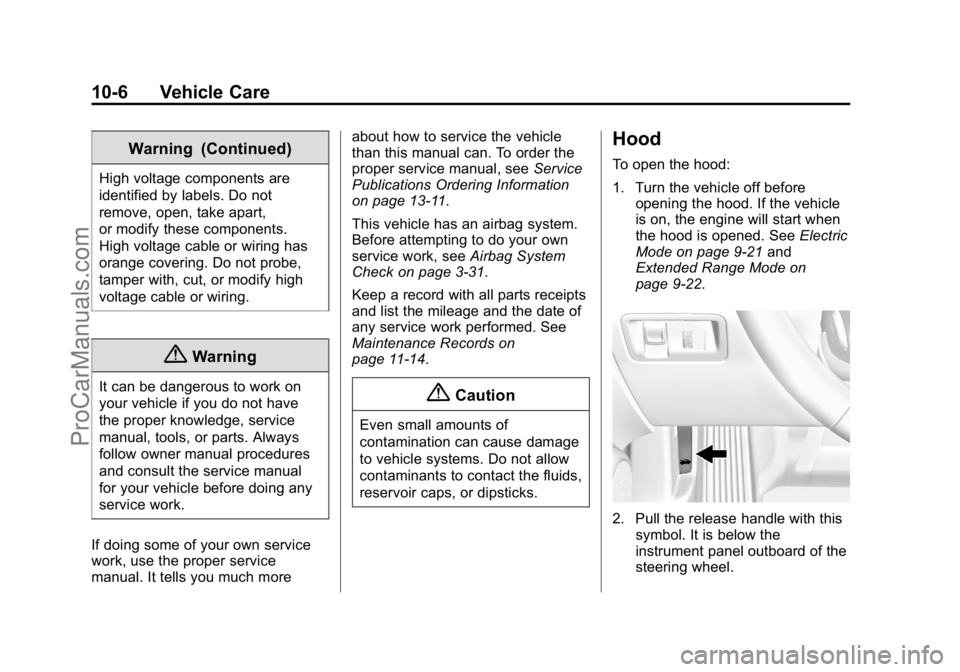
2. Pull the release handle with this
symbol. It is below the
instrument panel outboard of the
steering wheel.
ProCarManuals.com
Page 294 of 407

Black plate (33,1)Cadillac ELR Owner Manual (GMNA-Localizing-U.S./Canada-7695154) -
2015 - CRC - 4/25/14
Vehicle Care 10-33
Mini Relays Usage3 Powertrain
4 Heated Mirrors
7 Empty
9 AIR Pump (PZEV Only)
11 Empty
12 Empty
13 Empty
14 Run/Crank
Micro
Relays Usage
1 Empty
2 AIR Solenoid (PZEV Only)
6 Empty
8 Empty
10 Empty Ultra Micro
Relays Usage
5 Empty
Instrument Panel Fuse
Block (Left Side)
The left instrument panel fuse block
is on the left side end of the
instrument panel, behind the end cap. To access the fuses, insert a
plastic tool between the end panel
and the instrument panel, and
carefully release the end cap
retaining clips. When all clips are
released, remove the panel.
To reinstall the door, insert the
forward edge hook feature, and
press around the edges of the end
cap to reengage all of the clips.
ProCarManuals.com
Page 296 of 407

Black plate (35,1)Cadillac ELR Owner Manual (GMNA-Localizing-U.S./Canada-7695154) -
2015 - CRC - 4/25/14
Vehicle Care 10-35
Fuses Amps UsageRelay Control/
Washer Pump
Relay Control/
Switch Indicator
Lights
F11 15A Body Control Module 4/Left
Headlamp
F12 –Empty
F13 –Empty
F14 –Empty
F15 20A Power Outlet (Inside
Console Bin)
F16 5A Wireless Charger
F17 –Empty
F18 –Empty
Relays Usage R1 Retained Accessory Power Relay for
Power Outlets Relays Usage
R2 Empty
R3 Empty
R4 Empty
Diodes Usage Diode Empty
Instrument Panel Fuse
Block (Right Side)
The right instrument panel fuse
block is on the right side end of the
instrument panel, behind the end
cap. To access the fuses, insert a
plastic tool between the end panel
and the instrument panel, and
carefully release the end cap
retaining clips. When all clips are
released, remove the panel.
To reinstall the door, insert the
forward edge hook feature, and
press around the edges of the end
cap to reengage all of the clips.
ProCarManuals.com