battery CADILLAC ELR 2015 Workshop Manual
[x] Cancel search | Manufacturer: CADILLAC, Model Year: 2015, Model line: ELR, Model: CADILLAC ELR 2015Pages: 407, PDF Size: 41.85 MB
Page 213 of 407
Black plate (24,1)Cadillac ELR Owner Manual (GMNA-Localizing-U.S./Canada-7695154) -
2015 - CRC - 4/25/14
9-24 Driving and Operating
Mountain Mode will not change
normal vehicle braking performance
for steep downhill grades. SeeHill
and Mountain Roads on page 9-9
and Electric Drive Unit on
page 9-28.
Press the MODE switch to select
Mountain Mode. If steep hill driving
is expected, it is recommended to
select Mountain Mode at least
20 minutes before driving on steep
grades. This will allow the vehicle
time to build a sufficient battery
charge reserve.
If Mountain Mode is not selected for
these conditions, propulsion power
may be reduced and the engine
speed may increase. See
Propulsion Power Messages on
page 5-48.
The engine may run when Mountain
Mode is selected, depending on the
high voltage battery charge, to build
reserve battery charge for uphill
climbs. The high voltage battery
charge reserved for Mountain Mode will be displayed on the battery
gauge, but will not be depleted until
it is required for uphill driving.
Press the MODE switch again to
return to Tour Mode and it becomes
active after three seconds.
Each time the vehicle is started, it
will return to Tour Mode to maintain
a smaller battery charge reserve for
normal driving.
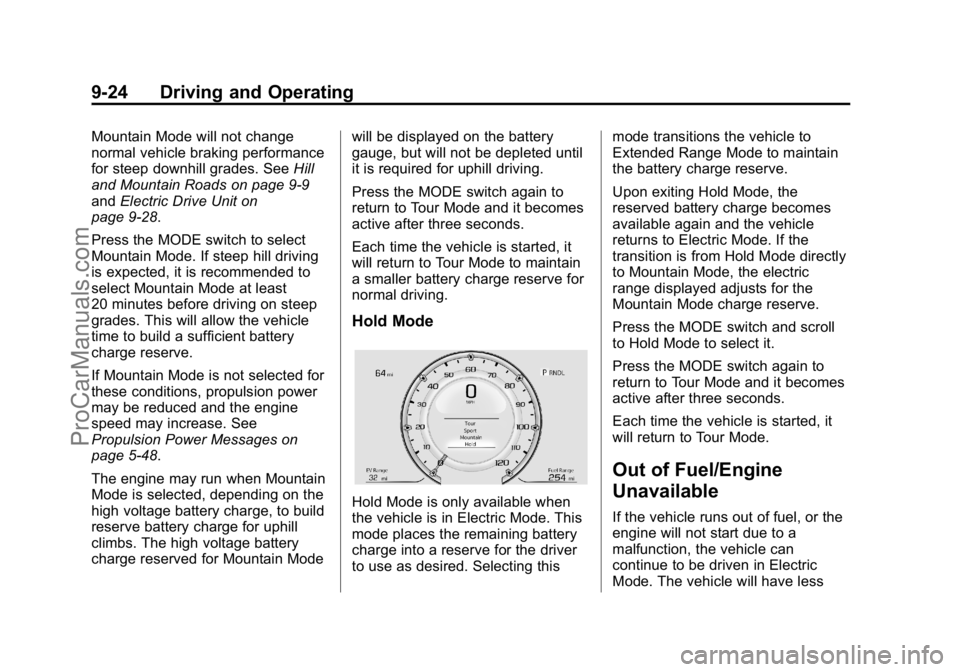
Hold Mode
Hold Mode is only available when
the vehicle is in Electric Mode. This
mode places the remaining battery
charge into a reserve for the driver
to use as desired. Selecting thismode transitions the vehicle to
Extended Range Mode to maintain
the battery charge reserve.
Upon exiting Hold Mode, the
reserved battery charge becomes
available again and the vehicle
returns to Electric Mode. If the
transition is from Hold Mode directly
to Mountain Mode, the electric
range displayed adjusts for the
Mountain Mode charge reserve.
Press the MODE switch and scroll
to Hold Mode to select it.
Press the MODE switch again to
return to Tour Mode and it becomes
active after three seconds.
Each time the vehicle is started, it
will return to Tour Mode.
Out of Fuel/Engine
Unavailable
If the vehicle runs out of fuel, or the
engine will not start due to a
malfunction, the vehicle can
continue to be driven in Electric
Mode. The vehicle will have less
ProCarManuals.com
Page 219 of 407

Black plate (30,1)Cadillac ELR Owner Manual (GMNA-Localizing-U.S./Canada-7695154) -
2015 - CRC - 4/25/14
9-30 Driving and Operating
If driving safely on a wet road and it
becomes necessary to slam on the
brakes and continue braking to
avoid a sudden obstacle, a
computer senses that the wheels
are slowing down. If one of the
wheels is about to stop rolling, the
computer will separately work the
brakes at each wheel.
ABS can change the brake pressure
to each wheel, as required, faster
than any driver could. This can help
the driver steer around the obstacle
while braking hard.
As the brakes are applied, the
computer keeps receiving updates
on wheel speed and controls
braking pressure accordingly.
Remember: ABS does not change
the time needed to get a foot up to
the brake pedal or always decrease
stopping distance. If you get too
close to the vehicle in front of you,
there will not be enough time to
apply the brakes if that vehiclesuddenly slows or stops. Always
leave enough room up ahead to
stop, even with ABS.
Using ABS
Do not pump the brakes. Just hold
the brake pedal down firmly and let
ABS work. You might hear the ABS
pump or motor operating and feel
the brake pedal pulsate, but this is
normal.
Braking in Emergencies
ABS allows the driver to steer and
brake at the same time. In many
emergencies, steering can help
more than even the very best
braking.
Electric Parking Brake
The vehicle has an Electric Parking
Brake (EPB). The switch is to the
left of the steering wheel. The EPB
can always be activated, even if the
vehicle is off. To prevent draining
the 12-volt battery, avoid repeated
cycles of the EPB system when the
vehicle is off.
ProCarManuals.com
Page 221 of 407

Black plate (32,1)Cadillac ELR Owner Manual (GMNA-Localizing-U.S./Canada-7695154) -
2015 - CRC - 4/25/14
9-32 Driving and Operating
{Caution
Driving with the parking brake on
can overheat the brake system
and cause premature wear or
damage to brake system parts.
Make sure that the parking brake
is fully released and the brake
warning light is off before driving.
Automatic EPB Release
The EPB will automatically release if
the vehicle is running, placed into
gear, and an attempt is made to
drive away. Avoid rapid acceleration
when the EPB is applied, to
preserve parking brake lining life.
Regenerative Braking
Regenerative braking takes some of
the energy from the moving vehicle
and turns it back into electrical
energy. This energy is then stored
back into the high voltage battery
system, contributing to increased
energy efficiency.The hydraulic disc brakes work with
the regenerative braking to ensure
effective braking, such as when a
high braking demand is requested.
The braking system is computer
controlled and blends the
regenerative braking with the
conventional hydraulic disc brakes
to meet any requirements for
deceleration. The controller
interprets the braking request and
uses regenerative braking,
conventional hydraulic braking, or a
combination of both as necessary.
Because the controller applies the
hydraulic brakes through its high
pressure accumulator, you may
occasionally hear the motor-driven
pump when it recharges the system.
This is normal.
See
Warning Lights, Gauges, and
Indicators on page 5-7 andDriver
Information Center (DIC) on
page 5-38. In the event of a
controller problem, the brake pedal
may be harder to push and the
stopping distance may be longer.
Regen on Demand™
Regen on Demand allows increased
deceleration by pressing and
holding either of the steering wheel
paddle switches. It works in
D (Drive) and L (Low). The
accelerator pedal must be fully
released for it to work.
The brake pedal must be applied at
low speed, because it will not stop
the car.
Cruise control will turn off, and the
brake lights may come on, when
this feature is activated.
ProCarManuals.com
Page 225 of 407
Black plate (36,1)Cadillac ELR Owner Manual (GMNA-Localizing-U.S./Canada-7695154) -
2015 - CRC - 4/25/14
9-36 Driving and Operating
Mountain Mode
Use when driving in very hilly or
mountainous terrain.
When selected, the Mountain Mode
indicator will display in the DIC.
This feature is intended to maintain
a reserve electrical charge of the
high voltage battery to provide
better grade climbing performance.
While driving in Mountain Mode, the
vehicle will have less responsive
acceleration.
Hold Mode
The Hold Mode is only available
when the vehicle is in the Electric
Mode. Use when wanting to change
to Extended Range Mode to
maintain the battery charge reserve.
SeeExtended Range Mode on
page 9-22.
When selected, the Hold Mode
indicator will display in the DIC.
This feature is intended to place the
remaining battery charge into a
reserve for the driver to use as desired. Hold Mode will not change
normal vehicle acceleration or
braking performance.
Competitive Driving Mode
If equipped, the Competitive Driving
Mode is selected by pressing the
TCS/StabiliTrak
®buttonYon the
center console twice within
five seconds. The StabiliTrak OFF
Light
gwill come on in the
instrument cluster.
The Competitive Driving Mode
allows the driver to have control of
the power applied to the wheels,
while the StabiliTrak system helps
steer the vehicle by selective brake
application.
In the Competitive Driving Mode, the
levels at which StabiliTrak is
engaged have been modified to
better suit a performance driving
environment. When the StabiliTrak
OFF Light
gis on, TCS will not be
operating. Driving should be
adjusted accordingly. When the TCS/StabiliTrak button
Y
is pressed again, TCS will be turned
back on and the StabiliTrak OFF
Light
gin the instrument cluster will
turn off.
Continuous Damping
Control (CDC)
The CDC feature provides superior
vehicle ride and handling under a
variety of passenger and loading
conditions.
The system is fully automatic and
uses a computer controller to
continuously monitor vehicle speed,
wheel to body position, lift/dive, and
steering position of the vehicle. The
controller then sends signals to
each shock absorber to
independently adjust the damping
level to provide the optimum
vehicle ride.
ProCarManuals.com
Page 247 of 407

Black plate (58,1)Cadillac ELR Owner Manual (GMNA-Localizing-U.S./Canada-7695154) -
2015 - CRC - 4/25/14
9-58 Driving and Operating
When the System Does Not
Seem to Work Properly
The system may not detect lanes as
well when there are:
.Close vehicles ahead.
.Sudden lighting changes, such
as when driving through tunnels.
.Banked roads.
If the LDW system is not functioning
properly when lane markings are
clearly visible, cleaning the
windshield may help.
LDW alerts may occur due to tar
marks, shadows, cracks in the road,
temporary or construction lane
markings, or other road
imperfections. This is normal system
operation; the vehicle does not need
service. Turn LDW off if these
conditions continue.
Charging
Plug-In Charging
This section explains the process
for charging the vehicle's high
voltage battery. Do not allow the
vehicle to remain in temperature
extremes for long periods without
being driven or plugged in. It is
recommended that the vehicle be
plugged in when temperatures are
below 0°C (32°F) and above 32°C
(90°F) to maximize high voltage
battery life.
When using a 120-volt AC electrical
outlet, it will take approximately
12.5 hours to charge the vehicle
with the 12 amp AC current setting
or 18 hours using the default 8 amp
AC current setting. When using
a 240-volt charging station, it will
take approximately five hours to
charge the vehicle. Charge times
will vary with outside temperature. There are three ways to program
how the vehicle is charged. See
Programmable Charging on
page 5-29.
The charging system may run fans
and pumps that result in sounds
from the vehicle while it is turned
off. Additional unexpected clicking
sounds may be caused by the
electrical devices used while
charging.
While the charge cord is plugged
into the vehicle, the vehicle cannot
be driven.
Charging
Start Charge
1. Make sure the vehicle is parked
and turned off.
2. Push the rearward edge of the charge port door in and release
to open the door.
ProCarManuals.com
Page 248 of 407

Black plate (59,1)Cadillac ELR Owner Manual (GMNA-Localizing-U.S./Canada-7695154) -
2015 - CRC - 4/25/14
Driving and Operating 9-59
In cold weather conditions, ice
may form around the charge port
door. Remove ice from the area
before attempting to open or
close the charge port door.
3. Open the rear trunk, lift the leftload support floor cover, and
remove the charge cord. Pull up
on the charge cord handle to
release. The vehicle plug is
stored as shown. 4. Plug the charge cord into the
electrical outlet. See Electrical
Requirements for Battery
Charging on page 9-66. Verify
the charge cord status. See the
charge cord user guide. See
Charge Cord on page 9-64.
Select the appropriate charge
level using the Select Charge
Level Preference screen on the
center stack. See “Charge Level
Selection” underProgrammable
Charging on page 5-29.
5. Plug in the vehicle plug of the charge cord into the charge port
on the vehicle. Verify that the
charging status indicator
illuminates on top of the
instrument panel and a horn
chirp occurs. See Charging
Status Feedback on page 9-60.
Charge Cord Theft Alert
This vehicle has a Charge Cord
Theft Alert. To enable this feature,
see "Charge Cord Theft Alert" in
Vehicle Personalization on
page 5-52. The system can be
armed and disarmed using the door
lock function on the RKE
transmitter.
End Charge
1. If armed, unlock the vehicle with the RKE transmitter to disarm
the charge cord theft alert.
ProCarManuals.com
Page 249 of 407

Black plate (60,1)Cadillac ELR Owner Manual (GMNA-Localizing-U.S./Canada-7695154) -
2015 - CRC - 4/25/14
9-60 Driving and Operating
2. Disconnect the vehicle plug ofthe charge cord from the vehicle.
3. Close the charge port door by pressing firmly on the rearward
edge of the door surface.
4. Unplug the charge cord from the electrical outlet.
5. Place the charge cord into the storage compartment.
Delayed Charging
Override
To temporarily override a delayed
charge event, unplug the charge
cord from the charge port and then
plug it back in within five seconds.
A single horn chirp will sound and
charging will begin immediately.
To cancel a temporary override,
unplug the charge cord, wait for
10 seconds, and then plug the
charge cord back in. A double horn
chirp will sound and charging will be
delayed.
See Programmable Charging on
page 5-29 for advanced charge
scheduling options.
Charging Status
Feedback
The vehicle has two ways of
monitoring the charging status of
the high voltage battery. The
Instrument Panel Charging Status
Indicator (CSI) is at the center of the
instrument panel near the
windshield. The LEDs in the Outside
Rearview Mirrors (OSRVM) are also
used to monitor charging status.
Some local laws restricting the use
of colored lights on public roads
may apply to the outside rearview
mirrors charging status feedback. To
turn the OSRVM charge indicator
off, see “Charge Status Feedback”
in Vehicle Personalization on
page 5-52.
ProCarManuals.com
Page 250 of 407

Black plate (61,1)Cadillac ELR Owner Manual (GMNA-Localizing-U.S./Canada-7695154) -
2015 - CRC - 4/25/14
Driving and Operating 9-61
Instrument Panel Charging
Status Indicator (CSI)
When the vehicle is plugged in and
the vehicle power is off, the CSI
indicates the following:
.Solid Green–Vehicle is plugged
in. Battery is not fully charged.
Battery is charging.
.Long Flashing Green –Vehicle
is plugged in. Battery is not fully
charged. Battery charging is
delayed.
.Short Flashing Green –Vehicle
is plugged in. Battery is fully
charged.
.Solid Yellow –Vehicle is plugged
in. It is normal for the CSI to turn
yellow for a few seconds after
plugging in a compatible charge
cord. The solid yellow may be
extended depending on the
vehicle temperature or if there is
a total utility interruption via
OnStar. See Utility Interruption of
Charging on page 9-65. This
may also indicate that the
charging system has detected a
fault and will not charge the
battery. See “Charge Cord
Status Indicators” in the charge
cord user guide.
The system may be thermally
conditioning the battery during any
of the states above, requiring
electrical energy to be transferred to
the vehicle. If the vehicle is plugged in and
vehicle power is on, the CSI will be
on solid green. The same is true
during a remote start if the vehicle is
plugged in.
If the vehicle is plugged in and the
CSI is off, a total utility interruption
using OnStar or a charging fault has
been detected. See
Utility
Interruption of Charging on
page 9-65 or“Charge Cord Status
Indicators” in the charge cord user
guide.
This chart indicates vehicle
feedback when the charge cord is
plugged in.
ProCarManuals.com
Page 253 of 407

Black plate (64,1)Cadillac ELR Owner Manual (GMNA-Localizing-U.S./Canada-7695154) -
2015 - CRC - 4/25/14
9-64 Driving and Operating
Outside Rearview Mirror
(OSRVM) Charging Status
Indicator
The outside rearview mirrors are
equipped with green indicator lights
used to indicate high voltage battery
system charging status. The
OSRVM CSI indicates the following:
.Solid green - Battery is charging
and is less than half complete.
.Fast flashing - Battery is
charging. Battery is more than
half complete.
.Slow flashing - Battery is
charging. Battery is nearly
complete.
.Off - Not charging.
Charge Cord
SeeRadio Frequency Statement on
page 13-12.
A portable charge cord used to
charge the vehicle high voltage
battery is stored under the load
support floor covering in the trunk.
Important Information About
Portable Electric Vehicle Charging
.Charging an electric vehicle can
stress a building’ s electrical
system more than a typical
household appliance.
.Before you plug in to any
electrical outlet, have a qualified
electrician inspect and verify the
electrical system (electrical
outlet, wiring, junctions, and
protection devices) for
heavy-duty service at a 12 amp
continuous load.
.Electrical outlets may wear out
with normal usage or be
damaged over time, making
them unsuitable for electric
vehicle charging.
.Check the electrical outlet/plug
while charging and discontinue
use if the electrical outlet/plug is
hot, then have the electrical
outlet serviced by a qualified
electrician.
.When outdoors, plug into an
electrical outlet that is
weather-proof while in use.
.Mount the charging cord to
reduce strain on the electrical
outlet/plug.
ProCarManuals.com
Page 255 of 407

Black plate (66,1)Cadillac ELR Owner Manual (GMNA-Localizing-U.S./Canada-7695154) -
2015 - CRC - 4/25/14
9-66 Driving and Operating
A pop-up will appear in the center
stack display during the key cycle
following any utility interruption. See
“Charging Override/Interruption
Pop-up”underProgrammable
Charging on page 5-29.
Text will be displayed on the
instrument cluster indicating that a
utility interruption has occurred. See
Instrument Cluster on page 5-8.
Electrical Requirements
for Battery Charging
This vehicle is capable of being
charged with most standard vehicle
charging equipment complying to
one or more of the following:
.SAE J1772
.SAE J2847-2
.IEC 61851-1
.IEC 61851-22
.IEC 61851-23
.IEC 61851-24
.IEC 62196-1
.IEC 62196-2
.IEC 62196-3
.ISO 15118
The following are the minimum
requirements for circuits used to
charge this vehicle:
.120 volts/15 amps
.240 volts/20 amps
Charging equipment with a rating of
at least 240 volts/20 amps will
provide the fastest charging time
and best charging efficiency to
recharge the high voltage battery.
240 volt/40 amp circuits provide
flexibility for future vehicle charging
needs. Always follow the charging
equipment installation instructions.
Contact your dealer for more
information.
{Caution
Do not use portable or stationary
backup generating equipment to
charge the vehicle. This may
cause damage to the vehicle's
charging system. Only charge the
vehicle from utility supplied
power.
ProCarManuals.com