change time CADILLAC ELR 2015 Owners Manual
[x] Cancel search | Manufacturer: CADILLAC, Model Year: 2015, Model line: ELR, Model: CADILLAC ELR 2015Pages: 407, PDF Size: 41.85 MB
Page 33 of 407
Black plate (26,1)Cadillac ELR Owner Manual (GMNA-Localizing-U.S./Canada-7695154) -
2015 - CRC - 4/25/14
1-26 In Brief
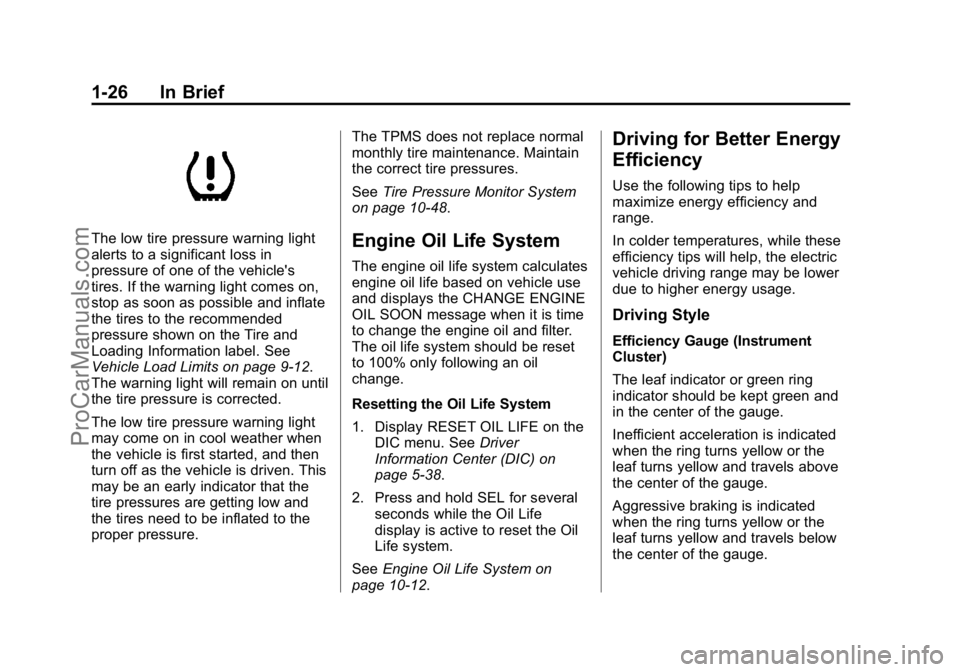
The low tire pressure warning light
alerts to a significant loss in
pressure of one of the vehicle's
tires. If the warning light comes on,
stop as soon as possible and inflate
the tires to the recommended
pressure shown on the Tire and
Loading Information label. See
Vehicle Load Limits on page 9-12.
The warning light will remain on until
the tire pressure is corrected.
The low tire pressure warning light
may come on in cool weather when
the vehicle is first started, and then
turn off as the vehicle is driven. This
may be an early indicator that the
tire pressures are getting low and
the tires need to be inflated to the
proper pressure.The TPMS does not replace normal
monthly tire maintenance. Maintain
the correct tire pressures.
See
Tire Pressure Monitor System
on page 10-48.Engine Oil Life System
The engine oil life system calculates
engine oil life based on vehicle use
and displays the CHANGE ENGINE
OIL SOON message when it is time
to change the engine oil and filter.
The oil life system should be reset
to 100% only following an oil
change.
Resetting the Oil Life System
1. Display RESET OIL LIFE on the DIC menu. See Driver
Information Center (DIC) on
page 5-38.
2. Press and hold SEL for several seconds while the Oil Life
display is active to reset the Oil
Life system.
See Engine Oil Life System on
page 10-12.
Driving for Better Energy
Efficiency
Use the following tips to help
maximize energy efficiency and
range.
In colder temperatures, while these
efficiency tips will help, the electric
vehicle driving range may be lower
due to higher energy usage.
Driving Style
Efficiency Gauge (Instrument
Cluster)
The leaf indicator or green ring
indicator should be kept green and
in the center of the gauge.
Inefficient acceleration is indicated
when the ring turns yellow or the
leaf turns yellow and travels above
the center of the gauge.
Aggressive braking is indicated
when the ring turns yellow or the
leaf turns yellow and travels below
the center of the gauge.
ProCarManuals.com
Page 65 of 407
Black plate (8,1)Cadillac ELR Owner Manual (GMNA-Localizing-U.S./Canada-7695154) -
2015 - CRC - 4/25/14
3-8 Seats and Restraints
column control. If On - At Ignition
On is selected in the vehicle
personalization menu, placing the
ignition in OFF also stops the recall.
Easy Exit Recall
If programmed on in the vehicle
personalization menu, the easy exit
feature automatically moves the
driver seat, power tilt and
telescoping steering column, and
outside mirrors on some vehicles to
the memory positions previously
saved to the
B(Exit) button. See
“Storing Memory Positions” listed
previously. See also Vehicle
Personalization on page 5-52.
Easy exit recall automatically
activates when one of the following
occurs:
.The vehicle is turned off and the
driver door is opened within a
short time.
.The vehicle is turned off with the
driver door open. Obstructions
If something has blocked driver seat
and/or power tilt and telescoping
steering column while recalling a
memory position, the recall may
stop. Remove the obstruction. Then
do one of the following:
.If manually recalling the position,
press and hold the appropriate
manual control for the memory
item that is not recalling for
two seconds. Try recalling again
by pressing the appropriate
memory button.
.If automatically recalling the
position, press and hold the
appropriate manual control for
the memory item that is not
recalling for two seconds. Try
recalling again by opening the
driver door and pressing
Kon
the RKE transmitter.
.If recalling the exit position,
press and hold the appropriate
manual control for the exit feature not recalling for
two seconds. Then try recalling
the exit position again.
If the memory position is still not
recalling, see your dealer for
service.
Heated Front Seats
{Warning
If you cannot feel temperature
change or pain to the skin, the
seat heater may cause burns. To
reduce the risk of burns, people
with such a condition should use
care when using the seat heater,
especially for long periods of
time. Do not place anything on
the seat that insulates against
heat, such as a blanket, cushion,
cover, or similar item. This may
cause the seat heater to
overheat. An overheated seat
heater may cause a burn or may
damage the seat.
ProCarManuals.com
Page 91 of 407

Black plate (34,1)Cadillac ELR Owner Manual (GMNA-Localizing-U.S./Canada-7695154) -
2015 - CRC - 4/25/14
3-34 Seats and Restraints
Warning (Continued)
belt. The belt force would then be
applied right on the abdomen.
That could cause serious or fatal
injuries. The shoulder belt should
go over the shoulder and across
the chest.
Infants and Young
Children
Everyone in a vehicle needs
protection! This includes infants and
all other children. Neither the
distance traveled nor the age and
size of the traveler changes the
need, for everyone, to use safety
restraints. In fact, the law in every
state in the United States and in
every Canadian province says
children up to some age must be
restrained while in a vehicle.
{Warning
Children can be seriously injured
or strangled if a shoulder belt is
wrapped around their neck. The
shoulder belt can tighten but
cannot be loosened if it is locked.
The shoulder belt locks when it is
pulled all the way out of the
retractor. It unlocks when the
shoulder belt is allowed to go all(Continued)
Warning (Continued)
the way back into the retractor,
but it cannot do this if it is
wrapped around a child’s neck.
If the shoulder belt is locked and
tightened around a child’s neck,
the only way to loosen the belt is
to cut it.
Never leave children unattended
in a vehicle and never allow
children to play with the safety
belts.
Every time infants and young
children ride in vehicles, they should
have the protection provided by
appropriate child restraints. Neither
the vehicle's safety belt system nor
its airbag system is designed
for them.
Children who are not restrained
properly can strike other people,
or can be thrown out of the vehicle.
ProCarManuals.com
Page 115 of 407

Black plate (6,1)Cadillac ELR Owner Manual (GMNA-Localizing-U.S./Canada-7695154) -
2015 - CRC - 4/25/14
5-6 Instruments and Controls
Setting the Clock
Time
To set the time:
1. From the Home Page, press theSETTINGS screen button, then
press Time and Date.
2. Press Set Time, then press + or −to increase or decrease hours
or minutes, and change AM
or PM.
3. Press 12-24Hr for a 12 or 24 hour clock.
4. Press
[Back to go back to the
previous menu.
Date
To set the date:
1. Press the SETTINGS screen button and press Time and Date.
2. Press Set Date and press + or −
to increase or decrease month,
day, or year. 3. Press
[Back to go back to the
previous menu.
Auto Set
When on, the time and date will
automatically update.
To set auto set:
1. Press the SETTINGS screen button, then press Time
and Date.
2. Press Set Time or Set Date.
3. Press Auto Set, then select On-Cell Network or Off-Manual
to manually set the time
and date.
4. Press
[Back to go back to the
previous menu. If auto timing is on, the time
displayed on the clock may not
update immediately when driving
into a new time zone.
Clock Display
When on, the digital clock will
display on the infotainment screen.
To set the clock display:
1. Press the SETTINGS screen
button and press Time and Date.
2. Press Clock Display, then select Off or On.
3. Press
[Back to go back to the
previous menu.
ProCarManuals.com
Page 140 of 407

Black plate (31,1)Cadillac ELR Owner Manual (GMNA-Localizing-U.S./Canada-7695154) -
2015 - CRC - 4/25/14
Instruments and Controls 5-31
charge by the departure time.
Electrical rate information from the
utility company for the charging
location is required for this mode.
Also, if the selected electric rate
settings result in a very long charge
completion time, the vehicle will
start charging immediately upon
plug-in. For example, if the electric
rate table is set up with all“Peak”
rates and the rate preference is to
charge during “Off-Peak”rates only,
then the vehicle will start charging
immediately upon plug-in.
Charge Limit Selection
The Charge Limit Preference setting
allows the customer to select their
vehicle’s charge level so it matches
the capability of their charging
location. If the vehicle consistently
stops charging after plugging in, or if
a circuit breaker continues to trip,
reducing to a lower Charge Limit
Preference may resolve the issue.
The Charge Limit Preference should
be configured to match the electrical
current rating for the electrical outlet
that the charge cord is connected
to. The Charge Limit Preference
settings are:
.Maximum: Limits AC current to
12 amps
.Reduced: Limits AC current to
8 amps
Exact current levels may vary from
the values shown in this manual.
Please check the vehicle for the
current available levels.
The Charge Limit Preference setting
can be changed at any time while
the center stack display is operable. For some vehicles, the Charge Limit
Preference must be updated prior to
the vehicle being charged and the
Charge Limit Preference will reset to
a default value when the vehicle is
shifted from P (Park).
{Warning
Using a charge level that exceeds
the electrical circuit or electrical
outlet capacity may start a fire or
damage the electrical circuit. Use
the lowest charge level until a
qualified electrician inspects your
electrical circuit capacity. Use the
lowest charge level if the
electrical circuit or electrical outlet
capacity is not known.
Charge Mode Selection
From the Charge Mode Status
screen, press Change
Charge Mode.
ProCarManuals.com
Page 141 of 407

Black plate (32,1)Cadillac ELR Owner Manual (GMNA-Localizing-U.S./Canada-7695154) -
2015 - CRC - 4/25/14
5-32 Instruments and Controls
Select one option:
.Immediately upon plug in.
.Delayed based on
departure time.
.Delayed based on electric rates
and departure time.
Departure Time Entry
From the Delayed Charge Mode
Status screen, press Edit to change
the departure time for each day of
the week to match your personal
schedule.
1. Press the day to change.
2. Press + or −to change the hours
and minutes.
3. Press + or −to change AM
or PM.
4. Press Back to store changes and return to the previous
screen.
Charge Rate Information
From the Delayed Rate and
Departure Time Charge Mode
Status screen, press Charge Rate
Information.Select one of the following:
.Electric Rate Schedule.
.Charge Rate Preference.
Charge Rate Preference Selection
From the Charge Rate Information
screen, press Charge Rate
Preference.
ProCarManuals.com
Page 143 of 407

Black plate (34,1)Cadillac ELR Owner Manual (GMNA-Localizing-U.S./Canada-7695154) -
2015 - CRC - 4/25/14
5-34 Instruments and Controls
To edit the Yearly Schedule:
1. Select Yearly for the RateSchedule Type.
2. Press Edit Electric Rate Schedule.
Summer/Winter Schedule Start
Date Entering
From the Edit Electric Rate
Schedule screen, press Edit
Summer/Winter Start Dates.1. Press Summer.
2. Press + or −to set the month
and day for the start of summer.
3. Press Winter.
4. Press + or −to set the month
and day for the start of winter.
5. Press Edit Summer Schedule or Edit Winter Schedule to edit the
daily electric rate schedule.
Electric Rate Schedule Editing
From the Edit Electric Rate
Schedule screen, select Weekday
Schedule or Weekend Schedule.1. Press Weekday or Weekend.
2. Select the row to be changed.
.Weekdays are Monday
through Friday and use the
same rate schedule.
.Weekends are Saturday
and Sunday and use the
same rate schedule.
Both weekday and weekend
schedules must be set. The rate
schedule only applies for a 24-hour
period, starting at 12:00 AM and
ending at 12:00 AM. There can be
five rate changes for each day; not
all must be used.
The finish times must be
consecutive. If a finish time does
not follow a start time, the error
ProCarManuals.com
Page 144 of 407

Black plate (35,1)Cadillac ELR Owner Manual (GMNA-Localizing-U.S./Canada-7695154) -
2015 - CRC - 4/25/14
Instruments and Controls 5-35
message displays“An invalid entry
was found in the data entered.
Please re-enter data.”
Electric Rate Finish Time Editing
From the Edit (Summer, Winter,
or Yearly) Electric Rate Schedule
screen, press Edit next to the row to
change.
1. Press + or −to adjust the time.
2. Press Off-Peak, Mid-Peak, or Peak to select the
electric rate.
3. Press the Save button to store changes. Only the finish time can be edited.
The start time is automatically
populated in the rate table.
Electric Rate Schedule Viewing
From the Select Electric Rate Plan
screen, press View (Summer,
Winter, or Yearly) Schedule.
Temporary Charge Mode
Override and Cancel
Programmed Delayed Charge
Modes can be temporarily
overridden to an Immediate Charge
Mode for one charge cycle. Also,
the next planned departure time can
be temporarily overridden for one
charge cycle. In addition to the
in-vehicle overrides via the center
stack, there are other ways to
temporarily override a Delayed
Charge Mode. See
Plug-In Charging
on page 9-58. Temporary Override of a Delayed
Charge Mode
To temporarily override a Delayed
Charge Mode to Immediate Charge
Mode from inside the vehicle:
1. Press Temporary Override
Options on the main charging
screen.
2. Press Charge Immediately atPlug-In to temporarily override to
an Immediate Charge Mode.
The Temporary Charge Mode Status
screen will automatically display the
revised charge complete time.
ProCarManuals.com
Page 145 of 407

Black plate (36,1)Cadillac ELR Owner Manual (GMNA-Localizing-U.S./Canada-7695154) -
2015 - CRC - 4/25/14
5-36 Instruments and Controls
To cancel the temporary override to
Immediate, press Cancel Temporary
Override Setting on the Temporary
Override Options screen. Or, from
the main charging screen, press the
X will be on the far right side of the
Charge Mode button.
Temporary Override of the Next
Planned Departure Time
To temporarily override the Next
Planned Departure Time from inside
the vehicle:
1. Press Temporary OverrideOptions on the main charging
screen.2. Press Next Departure Time.
3. Press the + or –button to
change the Next
Departure Time. 4. Press SAVE to confirm a
temporary override of the Next
Planned Departure Time.
The Temporary Charge Mode Status
screen will automatically display the
revised charge complete time.
The Temporary Departure Time can
only be updated for the same day
as the original Next Planned
Departure Time. Also, the vehicle
will not accept a Temporary
Departure Time that is before the
present time of day.
ProCarManuals.com
Page 148 of 407
Black plate (39,1)Cadillac ELR Owner Manual (GMNA-Localizing-U.S./Canada-7695154) -
2015 - CRC - 4/25/14
Instruments and Controls 5-39
SEL (Select):Press to open a
menu or select a menu item. Press
and hold to reset values on certain
screens.
DIC Information Display
Options
The info displays on the DIC can be
turned on or off through the
Settings menu.
1. Press SEL while viewing the
Settings page in one of the
interactive display zones on the
cluster.
2. Scroll to Info Pages and press SEL.
3. Press
yorzto move through
the list of possible info displays.
4. Press SEL while an item is highlighted to select or deselect
that item. When an item is
selected, a checkmark will
appear next to it.
DIC Information Displays
The following is the list of all
possible DIC information displays.
Some of the information displays
may not be available for your
particular vehicle.
Trip A or Trip B and Average Fuel
Economy: The Trip display shows
the current distance traveled, in
either kilometers (km) or miles (mi),
since the trip odometer was last
reset. The trip odometer can be
reset by pressing and holding SEL
while this display is active.
The Average Fuel Economy display
shows the approximate average
liters per 100 kilometers (L/100 km)
or miles per gallon (mpg). This
number is calculated based on the
number of L/100 km (mpg) recorded
since the last time this menu item
was reset. This number reflects only the approximate average fuel
economy that the vehicle has right
now, and will change as driving
conditions change. The Average
Fuel Economy can be reset along
with the trip odometer by pressing
and holding SEL while this display
is active.
Compass and Speed:
Shows the
direction the vehicle is driving and
the vehicle speed in either
kilometers per hour (km/h) or miles
per hour (mph).
Total Range: Shows the remaining
distance the vehicle can be driven
combining the electric range and
fuel range.
Oil Life: The Oil Life display shows
an estimate of the oil's remaining
useful life. If REMAINING OIL LIFE
99% is displayed, that means 99%
of the current oil life remains.
ProCarManuals.com