warning CADILLAC ELR 2015 Owners Manual
[x] Cancel search | Manufacturer: CADILLAC, Model Year: 2015, Model line: ELR, Model: CADILLAC ELR 2015Pages: 407, PDF Size: 41.85 MB
Page 2 of 407

Black plate (1,1)Cadillac ELR Owner Manual (GMNA-Localizing-U.S./Canada-7695154) -
2015 - CRC - 4/25/14
2015 Cadillac ELR Owner ManualM
In Brief. . . . . . . . . . . . . . . . . . . . . . . . 1-1
Instrument Panel . . . . . . . . . . . . . . 1-2
Initial Drive Information . . . . . . . . 1-4
Vehicle Features . . . . . . . . . . . . . 1-16
Battery and Efficiency . . . . . . . . 1-20
Performance and
Maintenance . . . . . . . . . . . . . . . . 1-25
Keys, Doors, and Windows . . . . . . . . . . . . . . . . . . . . 2-1
Keys and Locks . . . . . . . . . . . . . . . 2-1
Doors . . . . . . . . . . . . . . . . . . . . . . . . 2-13
Vehicle Security . . . . . . . . . . . . . . 2-15
Exterior Mirrors . . . . . . . . . . . . . . . 2-17
Interior Mirrors . . . . . . . . . . . . . . . . 2-18
Windows . . . . . . . . . . . . . . . . . . . . . 2-19
Seats and Restraints . . . . . . . . . 3-1
Head Restraints . . . . . . . . . . . . . . . 3-2
Front Seats . . . . . . . . . . . . . . . . . . . . 3-3
Rear Seats . . . . . . . . . . . . . . . . . . . 3-10
Safety Belts . . . . . . . . . . . . . . . . . . 3-11
Airbag System . . . . . . . . . . . . . . . . 3-19
Child Restraints . . . . . . . . . . . . . . 3-32 Storage
. . . . . . . . . . . . . . . . . . . . . . . 4-1
Storage Compartments . . . . . . . . 4-1
Instruments and Controls . . . . 5-1
Controls . . . . . . . . . . . . . . . . . . . . . . . 5-2
Warning Lights, Gauges, and Indicators . . . . . . . . . . . . . . . . . . . . 5-7
Information Displays . . . . . . . . . . 5-27
Vehicle Messages . . . . . . . . . . . . 5-41
Vehicle Personalization . . . . . . . 5-52
Universal Remote System . . . . 5-59
Lighting . . . . . . . . . . . . . . . . . . . . . . . 6-1
Exterior Lighting . . . . . . . . . . . . . . . 6-1
Interior Lighting . . . . . . . . . . . . . . . . 6-6
Lighting Features . . . . . . . . . . . . . . 6-8
Infotainment System . . . . . . . . . 7-1
Introduction . . . . . . . . . . . . . . . . . . . . 7-1
Climate Controls . . . . . . . . . . . . . 8-1
Climate Control Systems . . . . . . 8-1
Air Vents . . . . . . . . . . . . . . . . . . . . . . . 8-7
Maintenance . . . . . . . . . . . . . . . . . . . 8-8 Driving and Operating
. . . . . . . . 9-1
Driving Information . . . . . . . . . . . . . 9-2
Starting and Operating . . . . . . . 9-16
Electric Vehicle Operating
Modes . . . . . . . . . . . . . . . . . . . . . . 9-21
Engine Exhaust . . . . . . . . . . . . . . 9-27
Electric Drive Unit . . . . . . . . . . . . 9-28
Brakes . . . . . . . . . . . . . . . . . . . . . . . 9-29
Ride Control Systems . . . . . . . . 9-33
Cruise Control . . . . . . . . . . . . . . . . 9-37
Driver Assistance Systems . . . 9-47
Charging . . . . . . . . . . . . . . . . . . . . . 9-58
Fuel . . . . . . . . . . . . . . . . . . . . . . . . . . 9-67
Trailer Towing . . . . . . . . . . . . . . . . 9-71
Conversions and Add-Ons . . . 9-71
Vehicle Care . . . . . . . . . . . . . . . . . 10-1
General Information . . . . . . . . . . 10-2
Vehicle Checks . . . . . . . . . . . . . . . 10-5
Headlamp Aiming . . . . . . . . . . . 10-27
Bulb Replacement . . . . . . . . . . 10-27
Electrical System . . . . . . . . . . . . 10-28
Wheels and Tires . . . . . . . . . . . 10-41
ProCarManuals.com
Page 5 of 407
Black plate (4,1)Cadillac ELR Owner Manual (GMNA-Localizing-U.S./Canada-7695154) -
2015 - CRC - 4/25/14
iv Introduction
Danger, Warnings, and
Cautions
Warning messages found on vehicle
labels and in this manual describe
hazards and what to do to avoid or
reduce them.
{Danger
Danger indicates a hazard with a
high level of risk which will result
in serious injury or death.
{Warning
Warning indicates a hazard that
could result in injury or death.
{Caution
Caution indicates a hazard that
could result in property or vehicle
damage.
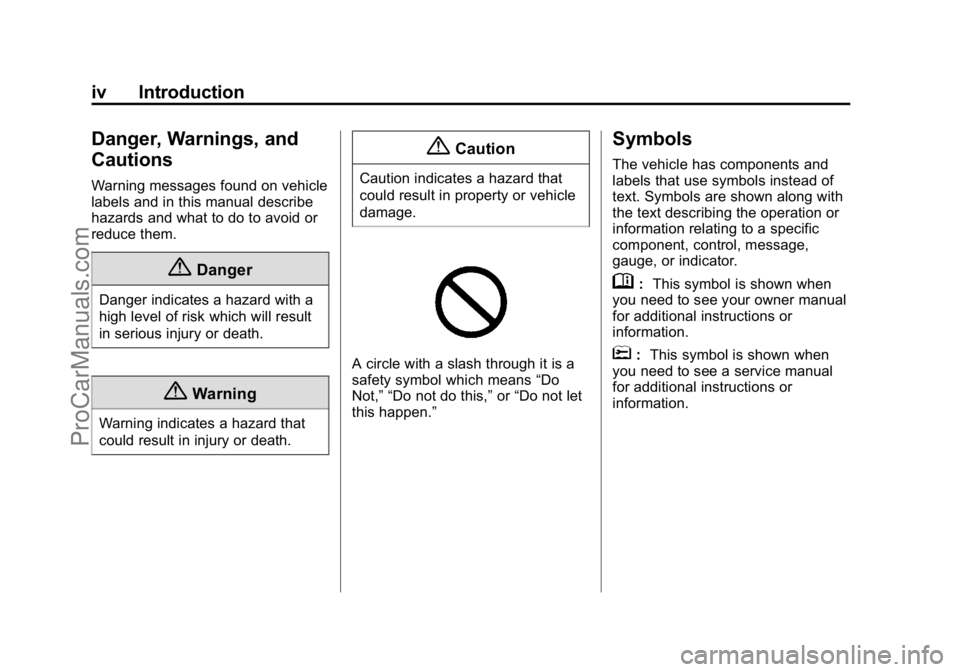
A circle with a slash through it is a
safety symbol which means“Do
Not,” “Do not do this,” or“Do not let
this happen.”
Symbols
The vehicle has components and
labels that use symbols instead of
text. Symbols are shown along with
the text describing the operation or
information relating to a specific
component, control, message,
gauge, or indicator.
M: This symbol is shown when
you need to see your owner manual
for additional instructions or
information.
*: This symbol is shown when
you need to see a service manual
for additional instructions or
information.
ProCarManuals.com
Page 6 of 407

Black plate (5,1)Cadillac ELR Owner Manual (GMNA-Localizing-U.S./Canada-7695154) -
2015 - CRC - 4/25/14
Introduction v
Vehicle Symbol Chart
Here are some additional symbols
that may be found on the vehicle
and what they mean. For more
information on the symbol, refer to
the Index.
9:Airbag Readiness Light
#:Air Conditioning
!:Antilock Brake System (ABS)
i/g:Audio Steering Wheel
Controls or OnStar®
I: Brake System Warning
Light
": Charging System (12-Volt
Battery)
I: Cruise Control
f: Electric Parking Brake
d:Electronic Stability
Control (ESC)
B: Engine Coolant Temperature
O:Exterior Lamps
y:Fault
g:First Responder
.: Fuel Gauge
+:Fuses
3: Headlamp High/Low-Beam
Changer
(: Heated Steering Wheel
_: High Voltage
I:LATCH System Child
Restraints
*: Malfunction Indicator Lamp
::Oil Pressure
O:Power
/:Remote Vehicle Start
>:Safety Belt Reminders
g: StabiliTrak®Disable
7:Tire Pressure Monitor
i:Traction Control System (TCS)
Disable
9: Vehicle Ready
M:Windshield Washer Fluid
ProCarManuals.com
Page 8 of 407
Black plate (1,1)Cadillac ELR Owner Manual (GMNA-Localizing-U.S./Canada-7695154) -
2015 - CRC - 4/25/14
In Brief 1-1
In Brief
Instrument Panel
Instrument Panel Overview . . . . 1-2
Initial Drive Information
Initial Drive Information . . . . . . . . 1-4
Remote Keyless Entry (RKE)System . . . . . . . . . . . . . . . . . . . . . . 1-4
Remote Start . . . . . . . . . . . . . . . . . . 1-5
Door Locks . . . . . . . . . . . . . . . . . . . 1-5
Trunk Release . . . . . . . . . . . . . . . . 1-6
Windows . . . . . . . . . . . . . . . . . . . . . . 1-7
Seat Adjustment . . . . . . . . . . . . . . 1-7
Memory Features . . . . . . . . . . . . . 1-9
Heated Seats . . . . . . . . . . . . . . . . . 1-9
Head Restraint Adjustment . . . . . . . . . . . . . . . . . 1-10
Safety Belts . . . . . . . . . . . . . . . . . . 1-10
Passenger Sensing System . . . . . . . . . . . . . . . . . . . . . 1-11
Mirror Adjustment . . . . . . . . . . . . 1-11 Steering Wheel
Adjustment . . . . . . . . . . . . . . . . . 1-12
Interior Lighting . . . . . . . . . . . . . . 1-12
Exterior Lighting . . . . . . . . . . . . . 1-13
Windshield Wiper/Washer . . . . 1-14
Climate Controls . . . . . . . . . . . . . 1-15Vehicle Features
Infotainment System . . . . . . . . . 1-16
Steering Wheel Controls . . . . . 1-16
Cruise Control . . . . . . . . . . . . . . . 1-16
Driver Information Center (DIC) . . . . . . . . . . . . . . . 1-17
Forward Collision Alert (FCA) System . . . . . . . . . . . . . . . . . . . . . 1-17
Lane Departure Warning (LDW) . . . . . . . . . . . . . 1-17
Side Blind Zone Alert (SBZA) . . . . . . . . . . . . . . . 1-18
Rear Vision Camera (RVC) . . . . . . . . . . . . . 1-18
Rear Cross Traffic Alert (RCTA) System . . . . . . . . . . . . 1-18
Parking Assist . . . . . . . . . . . . . . . 1-18 Rear Automatic Braking (RAB)
System . . . . . . . . . . . . . . . . . . . . . 1-18
Active Emergency Braking System . . . . . . . . . . . . . . . . . . . . . 1-19
Power Outlets . . . . . . . . . . . . . . . 1-19
Universal Remote System . . . 1-19
Battery and Efficiency
High Voltage Safety
Information . . . . . . . . . . . . . . . . . 1-20
Charging . . . . . . . . . . . . . . . . . . . . . 1-21
Fueling . . . . . . . . . . . . . . . . . . . . . . 1-24
Regenerative Braking . . . . . . . . 1-24
Service . . . . . . . . . . . . . . . . . . . . . . 1-25
Performance and Maintenance
Traction Control/Electronic Stability Control . . . . . . . . . . . . 1-25
Tire Pressure Monitor . . . . . . . . 1-25
Engine Oil Life System . . . . . . 1-26
Driving for Better Energy Efficiency . . . . . . . . . . . . . . . . . . . 1-26
Roadside Service . . . . . . . . . . . . 1-28
OnStar
®. . . . . . . . . . . . . . . . . . . . . 1-28
ProCarManuals.com
Page 10 of 407

Black plate (3,1)Cadillac ELR Owner Manual (GMNA-Localizing-U.S./Canada-7695154) -
2015 - CRC - 4/25/14
In Brief 1-3
1.Air Vents on page 8-7.
2. Exterior Lamp Controls on
page 6-1.
Turn Signal Lever. See Turn and
Lane-Change Signals on
page 6-5.
3. Regen on Demand Paddles. See Regenerative Braking on
page 9-32.
4. Instrument Cluster on page 5-8.
Driver Information Center (DIC)
Display. See Driver Information
Center (DIC) on page 5-38.
5. Power Button on page 9-16.
6. Windshield Wiper/Washer on
page 5-3.
7. Hazard Warning Flashers on
page 6-5.
Lane Departure Warning (LDW)
on page 9-56.
8. Charging Status Indicator (CSI). See Charging Status Feedback
on page 9-60. 9. Light Sensor. See
Automatic
Headlamp System on page 6-4.
10. Infotainment on page 7-1.
11. Glove Box Button. See Glove
Box on page 4-1.
Parking Assist Button. See
Driver Assistance Systems on
page 9-47.
12. Electric Parking Brake on
page 9-30.
13. Instrument Panel Illumination
Control on page 6-6.
14. Data Link Connector (DLC) (Out of View). See Malfunction
Indicator Lamp on page 5-17.
15. Hood Release. See Hood on
page 10-6.
16. Cruise Control on page 9-37.
Adaptive Cruise Control on
page 9-39 (If Equipped).
Forward Collision Alert (FCA)
System on page 9-50 (If
Equipped). Heated Steering Wheel on
page 5-2.
17. Steering Wheel Adjustment on
page 5-2.
18. Horn on page 5-3.
19. Steering Wheel Controls on
page 5-2.
Driver Information Center (DIC)
Controls. See Driver
Information Center (DIC) on
page 5-38.
20. Heated Front Seats on
page 3-8 (If Equipped).
21. Traction Control/Electronic
Stability Control on page 9-33.
MODE Button. See Driver
Mode Control on page 9-35 (If
Equipped).
22. Shift Lever. See Electric Drive
Unit on page 9-28.
23. Dual Automatic Climate Control
System on page 8-1.
ProCarManuals.com
Page 12 of 407
Black plate (5,1)Cadillac ELR Owner Manual (GMNA-Localizing-U.S./Canada-7695154) -
2015 - CRC - 4/25/14
In Brief 1-5
Remote Start
Use remote start to heat or cool the
interior when the vehicle is plugged
in to maximize electric range by
utilizing electricity from the electrical
outlet. Normal operation of the
system will return after the vehicle
has been turned on.
Activating Remote Start
1. Aim the transmitter at thevehicle.
2. Press and release
Qon the
RKE transmitter; the doors
will lock.
3. Immediately press and hold
/
until the turn signal lamps flash,
or for at least four seconds.
Pressing
/again during a
remote start will turn the
feature off. After entering the vehicle during a
remote start, press the POWER
O
button on the center stack with the
brake pedal applied to operate as
normal.
Canceling Remote Start
To cancel a remote start, do any of
the following:
.Press and hold/until the
parking lamps turn off.
.Turn on the hazard warning
flashers.
.Press the POWERObutton on
the center stack, with the brake
pedal applied, then press the
POWER
Obutton again to turn
the vehicle off.
See Remote Start on page 2-8.
Door Locks
To lock or unlock the doors from the
outside, press
QorKon the RKE
transmitter. See Remote Keyless
Entry (RKE) System Operation on
page 2-2.
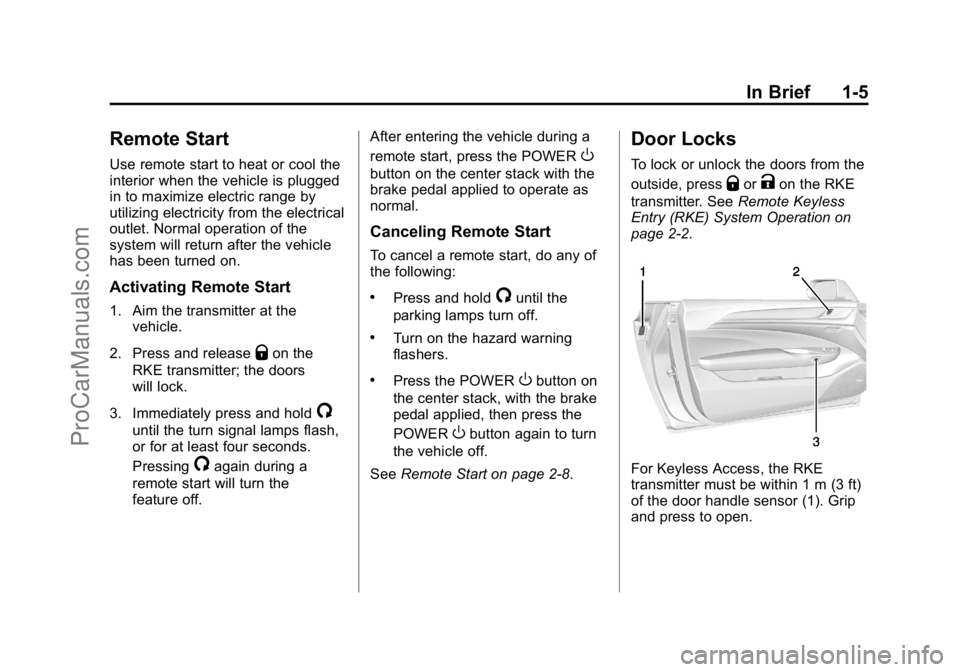
For Keyless Access, the RKE
transmitter must be within 1 m (3 ft)
of the door handle sensor (1). Grip
and press to open.
ProCarManuals.com
Page 24 of 407
Black plate (17,1)Cadillac ELR Owner Manual (GMNA-Localizing-U.S./Canada-7695154) -
2015 - CRC - 4/25/14
In Brief 1-17
the next 5 km/h or 5 mph mark on
the speedometer, press +RES up to
the second detent.
SET−:Press the control down
briefly to set the speed and activate
cruise control. If cruise control is
already active, use to decrease
vehicle speed. To decrease speed
by 1 km/h or 1 mph, press SET−
down to the first detent. To decrease
speed to the next 5 km/h or 5 mph
mark on the speedometer, press
SET− down to the second detent.
*:Press to disengage cruise
control without erasing the set
speed from memory.
See Cruise Control on page 9-37 or
Adaptive Cruise Control on
page 9-39 (if equipped).
Driver Information
Center (DIC)
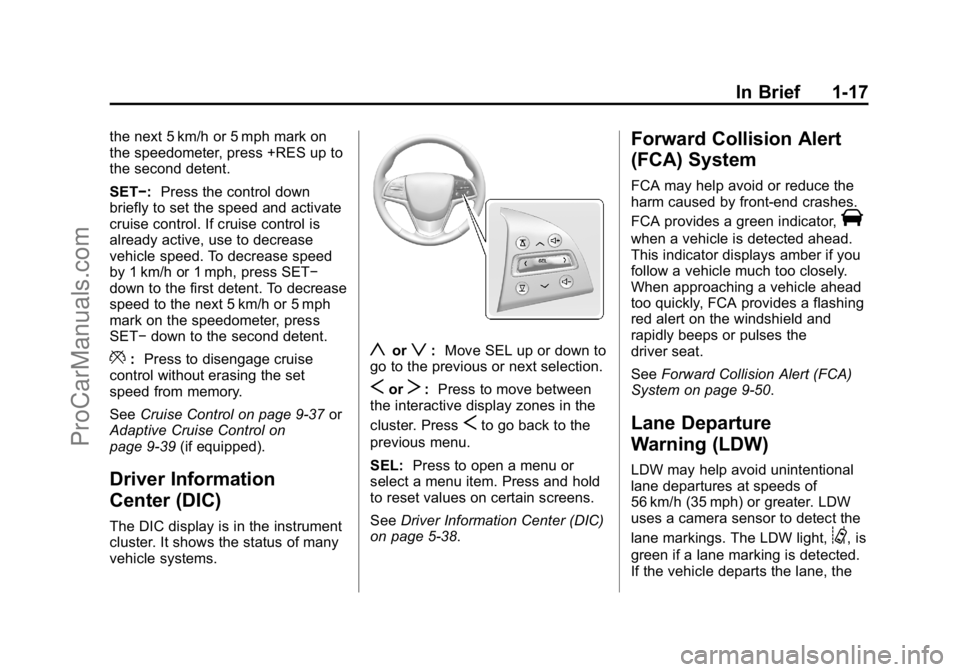
The DIC display is in the instrument
cluster. It shows the status of many
vehicle systems.
yorz:Move SEL up or down to
go to the previous or next selection.
SorT: Press to move between
the interactive display zones in the
cluster. Press
Sto go back to the
previous menu.
SEL: Press to open a menu or
select a menu item. Press and hold
to reset values on certain screens.
See Driver Information Center (DIC)
on page 5-38.
Forward Collision Alert
(FCA) System
FCA may help avoid or reduce the
harm caused by front-end crashes.
FCA provides a green indicator,
V
when a vehicle is detected ahead.
This indicator displays amber if you
follow a vehicle much too closely.
When approaching a vehicle ahead
too quickly, FCA provides a flashing
red alert on the windshield and
rapidly beeps or pulses the
driver seat.
See Forward Collision Alert (FCA)
System on page 9-50.
Lane Departure
Warning (LDW)
LDW may help avoid unintentional
lane departures at speeds of
56 km/h (35 mph) or greater. LDW
uses a camera sensor to detect the
lane markings. The LDW light,
@, is
green if a lane marking is detected.
If the vehicle departs the lane, the
ProCarManuals.com
Page 25 of 407
Black plate (18,1)Cadillac ELR Owner Manual (GMNA-Localizing-U.S./Canada-7695154) -
2015 - CRC - 4/25/14
1-18 In Brief
light will change to amber and flash.
In addition, the driver seat will pulse
or beeps will sound.
SeeLane Departure Warning (LDW)
on page 9-56.
Side Blind Zone
Alert (SBZA)
If equipped, SBZA will detect
vehicles in the next lane over in the
vehicle's side blind zone area.
When this happens, the SBZA
display will light up in the
corresponding outside side mirror
and will flash if the turn signal is on.
See Side Blind Zone Alert (SBZA)
on page 9-55.
Rear Vision
Camera (RVC)
RVC displays a view of the area
behind the vehicle on the center
stack display when the vehicle is
shifted into R (Reverse). See
Assistance Systems for Parking
or Backing on page 9-48.
Rear Cross Traffic Alert
(RCTA) System
If equipped, when backing, the
RCTA system uses a triangle with
an arrow displayed on the RVC
screen to warn of traffic behind your
vehicle that may cross your
vehicle's path. In addition, beeps
will sound, or the driver seat will
pulse.
See Assistance Systems for Parking
or Backing on page 9-48
Parking Assist
Front and Rear Park Assist (FRPA)
uses sensors on the front and rear
bumper to assist with parking and
avoiding objects. It operates at
speeds less than 8 km/h (5 mph).
FRPA may display a warning
triangle on the Rear Vision Camera screen and a graphic on the
instrument cluster to provide the
object distance. In addition, multiple
beeps or seat pulses may occur if
very close to an object.
See
Driver Assistance Systems on
page 9-47.
Rear Automatic Braking
(RAB) System
If the vehicle has Adaptive Cruise
Control (ACC) it also has the Rear
Automatic Braking (RAB) system,
which is designed to help avoid or
reduce the harm caused by backing
crashes. If the system detects the
vehicle is backing too fast to avoid a
crash with a detected object behind
your vehicle in your path, it may
automatically brake hard to a stop.
See Assistance Systems for Parking
or Backing on page 9-48
ProCarManuals.com
Page 27 of 407
Black plate (20,1)Cadillac ELR Owner Manual (GMNA-Localizing-U.S./Canada-7695154) -
2015 - CRC - 4/25/14
1-20 In Brief
Battery and Efficiency
High Voltage Safety
Information
{Warning
Exposure to high voltage can
cause shock, burns, and even
death. The high voltage
components in the vehicle can
only be serviced by technicians
with special training.
High voltage components are
identified by labels. Do not
remove, open, take apart,
or modify these components.
High voltage cable or wiring has
orange covering. Do not probe,
tamper with, cut, or modify high
voltage cable or wiring.
This vehicle has a high voltage
battery and a standard 12-volt
battery. If the vehicle is in a crash, the
sensing system may shut down the
high voltage system. When this
occurs, the high voltage battery is
disconnected and the vehicle will
not start. The SERVICE VEHICLE
SOON message in the Driver
Information Center (DIC) will be
displayed. Before the vehicle can be
operated again, it must be serviced
at your dealer.
{Warning
Damage to the high voltage
battery or high voltage system
can create a risk of electric shock,
overheating, or fire.
If the vehicle is damaged from a
moderate to severe crash, flood,
fire, or other event, the vehicle
should be inspected as soon as
possible. Until the vehicle has
been inspected, store it outside at
least 15 m (50 ft) from any
structure or anything that can
(Continued)
Warning (Continued)
burn. Ventilate the vehicle by
opening a window or a door.
Contact Customer Assistance as
soon as possible to determine
whether an inspection is needed.
SeeCustomer Assistance Offices
on page 13-3.
See Battery on page 10-23 for
important safety information. If an
airbag has inflated, see What Will
You See after an Airbag Inflates? on
page 3-24.
Only a trained service technician
with the proper knowledge and tools
should inspect, test, or replace the
high voltage battery. See your
dealer if the high voltage battery
needs service.
See Battery on page 10-23.
ProCarManuals.com
Page 30 of 407
Black plate (23,1)Cadillac ELR Owner Manual (GMNA-Localizing-U.S./Canada-7695154) -
2015 - CRC - 4/25/14
In Brief 1-23
protection devices) for
heavy-duty service at a 12 amp
continuous load.
.Electrical outlets may wear out
with normal usage or be
damaged over time, making
them unsuitable for electric
vehicle charging.
.Check the electrical outlet/plug
while charging and discontinue
use if the electrical outlet/plug is
hot, then have the electrical
outlet serviced by a qualified
electrician.
.When outdoors, plug into an
electrical outlet that is
weather-proof while in use.
.Mount the charging cord to
reduce strain on the electrical
outlet/plug.
{Warning
Improper use of portable electric
vehicle charge cords may cause
a fire, electrical shock, or burns,
and may result in damage to
property, serious injury, or death.
.Do not use extension cords,
multi-outlet power strips,
splitters, grounding adaptors,
surge protectors, or similar
devices.
.Do not use an electrical outlet
that is worn or damaged,
or one that will not hold the
plug firmly in place.
.Do not use an electrical outlet
that is not properly grounded.
.Do not use an electrical outlet
that is on a circuit with other
electrical loads.
See the charge cord user guide.
Charge Cord Status Indicators
See “Charge Cord Status Indicators”
in the charge cord user guide.
Charge Level Selection
Charge level selection can be made
using the Select Charge Level
Preference setting on the center
stack. See “Charge Level Selection”
under Programmable Charging on
page 5-29.
{Warning
Using a charge level that exceeds
the electrical circuit or electrical
outlet capacity may start a fire or
damage the electrical circuit. Use
the lowest charge level until a
qualified electrician inspects your
electrical circuit capacity. Use the
lowest charge level if the
electrical circuit or electrical outlet
capacity is not known.
ProCarManuals.com