charging CADILLAC ELR 2016 Owner's Manual
[x] Cancel search | Manufacturer: CADILLAC, Model Year: 2016, Model line: ELR, Model: CADILLAC ELR 2016Pages: 368, PDF Size: 6.92 MB
Page 129 of 368
Cadillac ELR Owner Manual (GMNA-Localizing-U.S/Canada-9087644) -
2016 - crc - 9/17/15
128 Instruments and Controls
Electric Rate Schedule Editing
From the Edit Electric Rate
Schedule screen, select Weekday
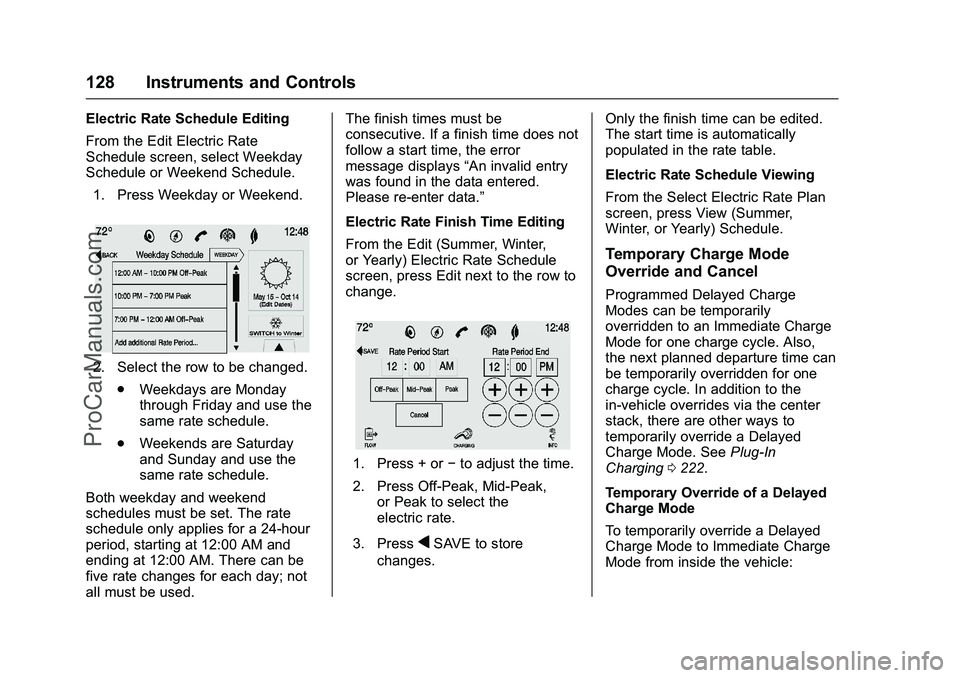
Schedule or Weekend Schedule.1. Press Weekday or Weekend.
2. Select the row to be changed. .Weekdays are Monday
through Friday and use the
same rate schedule.
. Weekends are Saturday
and Sunday and use the
same rate schedule.
Both weekday and weekend
schedules must be set. The rate
schedule only applies for a 24-hour
period, starting at 12:00 AM and
ending at 12:00 AM. There can be
five rate changes for each day; not
all must be used. The finish times must be
consecutive. If a finish time does not
follow a start time, the error
message displays
“An invalid entry
was found in the data entered.
Please re-enter data.”
Electric Rate Finish Time Editing
From the Edit (Summer, Winter,
or Yearly) Electric Rate Schedule
screen, press Edit next to the row to
change.
1. Press + or −to adjust the time.
2. Press Off-Peak, Mid-Peak, or Peak to select the
electric rate.
3. Press
qSAVE to store
changes. Only the finish time can be edited.
The start time is automatically
populated in the rate table.
Electric Rate Schedule Viewing
From the Select Electric Rate Plan
screen, press View (Summer,
Winter, or Yearly) Schedule.
Temporary Charge Mode
Override and Cancel
Programmed Delayed Charge
Modes can be temporarily
overridden to an Immediate Charge
Mode for one charge cycle. Also,
the next planned departure time can
be temporarily overridden for one
charge cycle. In addition to the
in-vehicle overrides via the center
stack, there are other ways to
temporarily override a Delayed
Charge Mode. See
Plug-In
Charging 0222.
Temporary Override of a Delayed
Charge Mode
To temporarily override a Delayed
Charge Mode to Immediate Charge
Mode from inside the vehicle:
ProCarManuals.com
Page 130 of 368

Cadillac ELR Owner Manual (GMNA-Localizing-U.S/Canada-9087644) -
2016 - crc - 9/17/15
Instruments and Controls 129
1. Press Temporary OverrideOptions on the main charging
screen.
2. Press Charge Immediately at
Plug In to temporarily override
to an Immediate Charge Mode.
The Temporary Charge Mode Status
screen will automatically display the
revised charge complete time.
To cancel the temporary override,
press Cancel Temporary Override
Setting on the Temporary Override
Options screen. Or, from the main
charging screen, press the X on the
far right side of the Charge Mode
button.
Temporary Override of the Next
Planned Departure Time
To temporarily override the Next
Planned Departure Time from inside
the vehicle: 1. Press Temporary Override Options on the main charging
screen.
2. Press Next Departure Time.
3. Press the + or –button to
change the Next
Departure Time.
4. Press
qSAVE to confirm a
temporary override of the Next
Planned Departure Time.
The Temporary Charge Mode Status
screen will automatically display the
revised charge complete time.
The Temporary Departure Time can
only be updated for the same day
as the original Next Planned
Departure Time. Also, the vehicle
will not accept a Temporary
Departure Time that is before the
present time of day.
ProCarManuals.com
Page 131 of 368
Cadillac ELR Owner Manual (GMNA-Localizing-U.S/Canada-9087644) -
2016 - crc - 9/17/15
130 Instruments and Controls
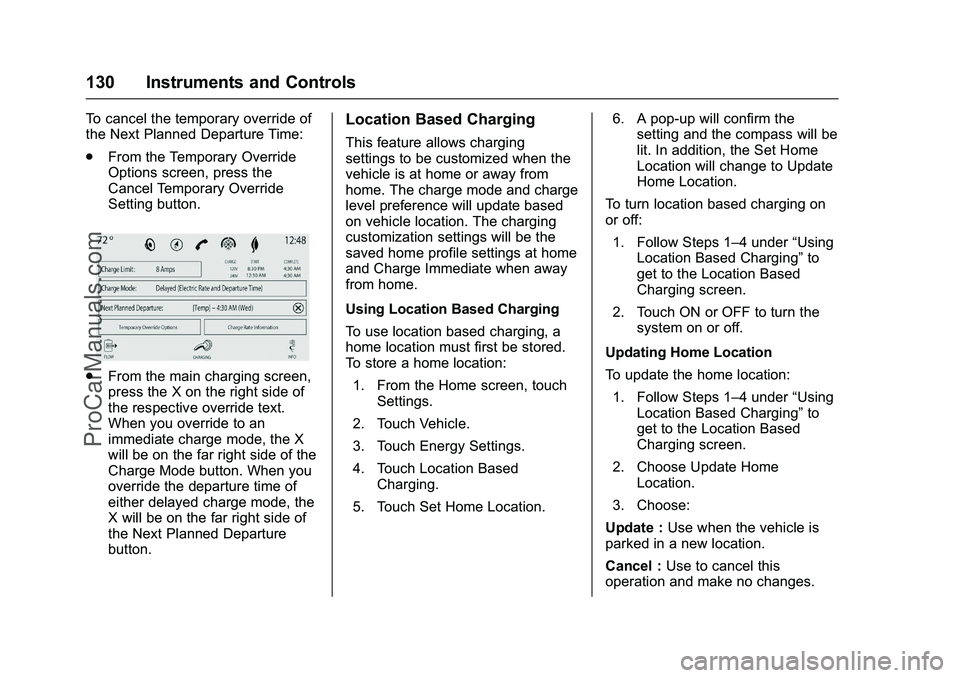
To cancel the temporary override of
the Next Planned Departure Time:
.From the Temporary Override
Options screen, press the
Cancel Temporary Override
Setting button.
.From the main charging screen,
press the X on the right side of
the respective override text.
When you override to an
immediate charge mode, the X
will be on the far right side of the
Charge Mode button. When you
override the departure time of
either delayed charge mode, the
X will be on the far right side of
the Next Planned Departure
button.
Location Based Charging
This feature allows charging
settings to be customized when the
vehicle is at home or away from
home. The charge mode and charge
level preference will update based
on vehicle location. The charging
customization settings will be the
saved home profile settings at home
and Charge Immediate when away
from home.
Using Location Based Charging
To use location based charging, a
home location must first be stored.
To store a home location:
1. From the Home screen, touch Settings.
2. Touch Vehicle.
3. Touch Energy Settings.
4. Touch Location Based Charging.
5. Touch Set Home Location. 6. A pop-up will confirm the
setting and the compass will be
lit. In addition, the Set Home
Location will change to Update
Home Location.
To turn location based charging on
or off:
1. Follow Steps 1–4 under “Using
Location Based Charging” to
get to the Location Based
Charging screen.
2. Touch ON or OFF to turn the system on or off.
Updating Home Location
To update the home location: 1. Follow Steps 1–4 under “Using
Location Based Charging” to
get to the Location Based
Charging screen.
2. Choose Update Home Location.
3. Choose:
Update : Use when the vehicle is
parked in a new location.
Cancel : Use to cancel this
operation and make no changes.
ProCarManuals.com
Page 132 of 368

Cadillac ELR Owner Manual (GMNA-Localizing-U.S/Canada-9087644) -
2016 - crc - 9/17/15
Instruments and Controls 131
Remove :Use to remove the stored
home location from the vehicle. This
will turn the feature off because
there will be no home location
stored.
Expiration : Use to store the
charge level preference at the home
location for up to 90 days. After
90 days, a notification will display
on the screen and the charge level
preference will need to be reset for
the next 90 days.
Charging Interrupted or
Overridden Pop-Up
The Charging Interrupted or
Overridden pop-up will appear if any
of the following conditions occur: .
The charging settings have been
modified via OnStar through the
website or the Mobile App. For
example, the Departure Time
Tables, the Rate Tables, or the
Charge Mode were updated
using the customer website
(available in select regions).
. There was an unintended loss of
AC power during the plug-in
charge event. For example,
there was a power outage or the
charge cord was unplugged from
the wall.
. The charge process was
interrupted by the utility
company via OnStar as
authorized by the vehicle owner
(available in select regions).
See Utility Interruption of
Charging 0228.
Programmable Charging
Disabled
When the Programmable Charging
system is disabled, the Default
Charge Mode Status screen and the
pop-up will display “- -:- -”for the
Charge Complete Time. The
Programmable Charging system will
be disabled if the Charge Complete
Time cannot be confidently
estimated. If the Programmable
Charging system is consistently
disabled, see your dealer.
ProCarManuals.com
Page 136 of 368
Cadillac ELR Owner Manual (GMNA-Localizing-U.S/Canada-9087644) -
2016 - crc - 9/17/15
Instruments and Controls 135
Battery and Charging
Messages
BATTERY SAVER ACTIVE
This message displays when the
vehicle has detected that the 12-volt
battery voltage has dropped and
vehicle features are being disabled.
The 12-volt battery saver system
starts reducing certain features
trying to save the charge of the
12-volt battery. Turn off unnecessary
features to allow the battery to
recharge.
BATTERY TOO COLD, PLUG IN
TO WARM
This message displays during
extremely cold temperatures, when
the vehicle will not start until the
high voltage battery is warm
enough.
Plug the vehicle in and make sure
the vehicle is off to allow the
charging system to warm the high
voltage battery, then the vehicle can
be started.
CHARGE CORD CONNECTED
This message displays when the
charge cord is connected to the
vehicle. The vehicle cannot be
shifted out of P (Park) with the
charge cord connected.
CHARGE DOOR OPEN
This message displays when the
charge door is open and the vehicle
is shifted out of P (Park). The
charge door should be kept fully
closed when the vehicle is not
charging.
LOW BATTERY
This message displays when the
12-volt battery voltage is low. See
Battery - North America0256.
SERVICE BATTERY
CHARGING SYSTEM
This message displays when there
is a fault in the 12-volt battery
charging system. Take the vehicle to
your dealer for service.
SERVICE HIGH VOLTAGE
CHARGING SYSTEM
This message displays when there
is a problem with the high voltage
charging system. See your dealer
for service.
Brake System Messages
BRAKE FLUID LOW
This message is displayed when the
brake fluid level is low. See Brake
Fluid 0255.
STEP ON BRAKE TO
RELEASE PARK BRAKE
This message is displayed if you
attempt to release the Electric
Parking Brake without the brake
pedal applied. See Electric Parking
Brake 0195.
RELEASE PARKING BRAKE
This message is displayed if the
Electric Parking Brake is on while
the vehicle is in motion. See Electric
Parking Brake 0195.
ProCarManuals.com
Page 149 of 368

Cadillac ELR Owner Manual (GMNA-Localizing-U.S/Canada-9087644) -
2016 - crc - 9/17/15
148 Instruments and Controls
Auto Memory Recall
This feature automatically recalls
the current driver’s previously stored
1 or 2 button positions when
entering the vehicle. See Memory
Seats 054.
Select Off, On - Driver Door Open,
or On - At ignition On.
Easy Exit Options
This feature automatically recalls
the current driver ’s previously stored
Exit button position when exiting the
vehicle. See Memory Seats 054.
Select Off or On.
Chime Volume
This allows the selection of the
chime volume level.
Press + or −to adjust the volume.
Reverse Tilt Mirror
This allows the feature to be turned
on or off.
Select Off, On - Driver and
Passenger, On - Driver, or On -
Passenger. Rainsense Wipers
This allows the feature to be turned
on or off.
Select Off or On.
Energy
Select and the following may
display:
.
Location Based Charging
. Energy Summary Pop-up
. Charge Status Feedback
. Charge Cord Theft Alert
. Charge Power Loss Alert
Location Based Charging
This allows the feature to be turned
on or off. See “Location Based
Charging” underProgrammable
Charging 0123.
Select Set Home Location, On,
or Off.
After the home location is set the
title will change to Update Home
Location. Energy Summary Pop-up
This allows the feature to be turned
on or off.
Select Off or On.
Charge Status Feedback
This allows the horn chirp and
outside rearview mirror charge
status feedback to be turned on
or off.
Select Off or On.
Charge Cord Theft Alert
This allows the feature to be turned
on or off.
Select Off or On.
Charge Power Loss Alert
This allows the feature to be turned
on or off.
Select Off or On.
Lighting
Select and the following may
display:
.
Vehicle Locator Lights
. Exit Lighting
ProCarManuals.com
Page 173 of 368

Cadillac ELR Owner Manual (GMNA-Localizing-U.S/Canada-9087644) -
2016 - crc - 9/17/15
172 Driving and Operating
Driving and
Operating
Driving Information
Distracted Driving . . . . . . . . . . . . 173
Defensive Driving . . . . . . . . . . . . . 174
Drunk Driving . . . . . . . . . . . . . . . . . 174
Control of a Vehicle . . . . . . . . . . . 174
Braking . . . . . . . . . . . . . . . . . . . . . . . 174
Steering . . . . . . . . . . . . . . . . . . . . . . 175
Off-Road Recovery . . . . . . . . . . . 175
Loss of Control . . . . . . . . . . . . . . . 176
Driving on Wet Roads . . . . . . . . 176
Hill and Mountain Roads . . . . . 177
Winter Driving . . . . . . . . . . . . . . . . 177
If the Vehicle Is Stuck . . . . . . . . 179
Vehicle Load Limits . . . . . . . . . . . 179
Starting and Operating
New Vehicle Break-In . . . . . . . . . 182
Power Button . . . . . . . . . . . . . . . . . 182
Starting and Stopping theVehicle . . . . . . . . . . . . . . . . . . . . . . 184
Retained Accessory Power (RAP) . . . . . . . . . . . . . . . . 185
Shifting Into Park . . . . . . . . . . . . . 185
Shifting out of Park . . . . . . . . . . . 186
Parking over Things That Burn . . . . . . . . . . . . . . . . . . . 187
Electric Vehicle Operating
Modes
System Operation . . . . . . . . . . . . 187
Electric Mode . . . . . . . . . . . . . . . . . 187
Extended Range Mode . . . . . . . 187
Driver Selected OperatingModes . . . . . . . . . . . . . . . . . . . . . . 188
Out of Fuel/Engine Unavailable . . . . . . . . . . . . . . . . . 190
Maintenance Modes . . . . . . . . . . 190
Engine Exhaust
Engine Exhaust . . . . . . . . . . . . . . 192
Running the Vehicle While Parked . . . . . . . . . . . . . . . . . . . . . . 193
Electric Drive Unit
Electric Drive Unit . . . . . . . . . . . . 193
Brakes
Antilock BrakeSystem (ABS) . . . . . . . . . . . . . . . 195
Electric Parking Brake . . . . . . . . 195
Regenerative Braking . . . . . . . . 197
Ride Control Systems
Traction Control/Electronic Stability Control . . . . . . . . . . . . . 198
Driver Mode Control . . . . . . . . . . 200
Competitive Driving Mode . . . . 201
Continuous Damping Control (CDC) . . . . . . . . . . . . . . . 201
Cruise Control
Cruise Control . . . . . . . . . . . . . . . . 202
Adaptive Cruise Control . . . . . . 204
Driver Assistance Systems
Driver Assistance Systems . . . 211
Assistance Systems for
Parking or Backing . . . . . . . . . . 212
Assistance Systems for Driving . . . . . . . . . . . . . . . . . . . . . . 214
Forward Collision Alert (FCA) System . . . . . . . . . . . . . . . . . . . . . . 214
Front Automatic Braking (FAB) System . . . . . . . . . . . . . . . . . . . . . . 217
Side Blind Zone Alert (SBZA) . . . . . . . . . . . . . . . . 218
Lane Change Alert (LCA) . . . . . 218
Lane Departure Warning (LDW) . . . . . . . . . . . . . 220
Charging
Plug-In Charging . . . . . . . . . . . . . 222
Delayed Charging Override . . . 223
Charging Status Feedback . . . 223
Charge Cord . . . . . . . . . . . . . . . . . 227
Utility Interruption ofCharging . . . . . . . . . . . . . . . . . . . . 228
Electrical Requirements for Battery Charging . . . . . . . . . . . . 229
Fuel
Fuel . . . . . . . . . . . . . . . . . . . . . . . . . . 230
ProCarManuals.com
Page 187 of 368

Cadillac ELR Owner Manual (GMNA-Localizing-U.S/Canada-9087644) -
2016 - crc - 9/17/15
186 Driving and Operating
Warning (Continued)
system running, the vehicle can
move suddenly. You or others
could be injured. To be sure the
vehicle will not move, even when
you are on fairly level ground,
always set the parking brake and
move the shift lever to P (Park).
SeeShifting Into Park 0185.
If you have to leave the vehicle with
the propulsion system on, be sure
the vehicle is in P (Park) and the
parking brake is firmly set before
you leave it. After you have moved
the shift lever into P (Park), hold
down the regular brake pedal. See if
you can move the shift lever away
from P (Park) without first pulling it
toward you. If you can, it means that
the shift lever was not fully locked
into P (Park).
Torque Lock
Torque lock is when the weight of
the vehicle puts too much force on
the parking pawl in the electric drive
unit. This happens when parking on a hill and shifting the electric drive
unit into P (Park) is not done
properly and then it is difficult to
shift out of P (Park). To prevent
torque lock, set the parking brake
and then shift into P (Park).
If torque lock does occur, your
vehicle may need to be pushed
uphill by another vehicle to relieve
the parking pawl pressure, so you
can shift out of P (Park).
Shifting out of Park
To shift out of P (Park), the vehicle
must be in ON/RUN, the brake
pedal must be applied, and the
charge cord must be unplugged.
The vehicle has an electronic shift
lock release system. The shift lock
release is designed to:
.
Prevent the vehicle from turning
off unless the shift lever is in
P (Park).
. Prevent moving the shift lever
out of P (Park), unless the
vehicle is in ON/RUN, the brake
pedal is applied, and the charge
cord is unplugged. Parking the vehicle in extreme cold
for several days without the charge
cord connected may cause the
electric drive unit to be locked in
P (Park) until the propulsion system
has warmed sufficiently.
The shift lock is always functional
except in the case of an uncharged
or low charged 12-volt battery (less
than 9 volts).
If the vehicle has an uncharged
12-volt battery or a 12-volt battery
with low voltage, try charging or
jump starting the 12-volt battery.
See
Battery - North America 0256.
If the console shift lever cannot be
moved out of P (Park): 1. Apply and maintain the regular brakes.
2. Turn the vehicle on using the POWER
Obutton. See Power
Button 0182.
3. Let up on the shift lever and make sure the shift lever is
pushed all the way into
P (Park).
4. Press the shift lever button.
ProCarManuals.com
Page 223 of 368
Cadillac ELR Owner Manual (GMNA-Localizing-U.S/Canada-9087644) -
2016 - crc - 9/17/15
222 Driving and Operating
Charging
Plug-In Charging
This section explains the process
for charging the vehicle's high
voltage battery. Do not allow the
vehicle to remain in temperature
extremes for long periods without
being driven or plugged in. It is
recommended that the vehicle be
plugged in when temperatures are
below 0 °C (32 °F) and above 32 °C
(90 °F) to maximize high voltage
battery life.
When using a 120-volt AC electrical
outlet, it will take approximately
12.5 hours to charge the vehicle
with the 12 amp AC current setting
or 18 hours using the default 8 amp
AC current setting. When using a
240-volt charging station, it will take
approximately five hours to charge
the vehicle. Charge times will vary
with outside temperature. At cold
temperatures, a higher power
charge station is recommended to
avoid extended charge times.There are three ways to program
how the vehicle is charged. See
Programmable Charging
0123.
The charging system may run fans
and pumps that result in sounds
from the vehicle while it is turned
off. Additional unexpected clicking
sounds may be caused by the
electrical devices used while
charging.
While the charge cord is plugged
into the vehicle, the vehicle cannot
be driven.
Charging
Start Charge 1. Make sure the vehicle is parked and turned off.
2. Push the rearward edge of the charge port door in and release
to open the door.
In cold weather conditions, ice
may form around the charge
port door. Remove ice from the
area before attempting to open
or close the charge port door.
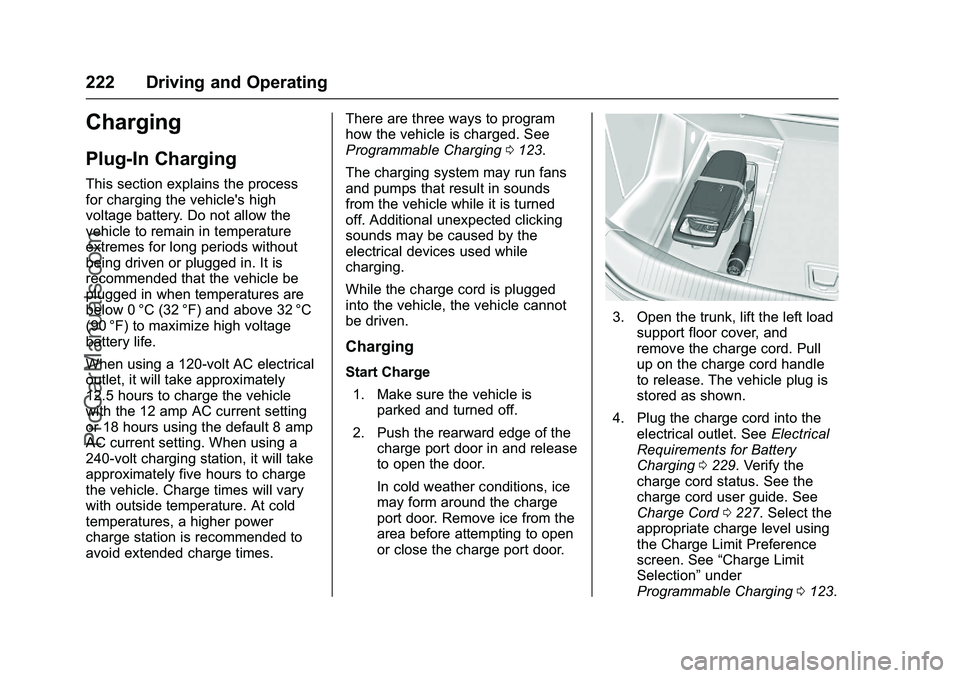
3. Open the trunk, lift the left loadsupport floor cover, and
remove the charge cord. Pull
up on the charge cord handle
to release. The vehicle plug is
stored as shown.
4. Plug the charge cord into the electrical outlet. See Electrical
Requirements for Battery
Charging 0229. Verify the
charge cord status. See the
charge cord user guide. See
Charge Cord 0227. Select the
appropriate charge level using
the Charge Limit Preference
screen. See “Charge Limit
Selection” under
Programmable Charging 0123.
ProCarManuals.com
Page 224 of 368

Cadillac ELR Owner Manual (GMNA-Localizing-U.S/Canada-9087644) -
2016 - crc - 9/17/15
Driving and Operating 223
5. Plug in the vehicle plug of thecharge cord into the charge
port on the vehicle. Verify that
the charging status indicator
illuminates on top of the
instrument panel and a horn
chirp occurs. See Charging
Status Feedback 0223.
Charge Cord Theft Alert
This vehicle has a Charge Cord
Theft Alert. To enable this feature,
see "Charge Cord Theft Alert" in
Vehicle Personalization 0145. The
system can be armed and disarmed
using the door lock function on the
RKE transmitter. End Charge
1. If armed, unlock the vehicle with the RKE transmitter to
disarm the charge cord theft
alert.
2. Disconnect the vehicle plug ofthe charge cord from the
vehicle.
3. Close the charge port door by pressing firmly on the rearward
edge of the door surface.
4. Unplug the charge cord from the electrical outlet.
5. Place the charge cord into the storage compartment.
Delayed Charging
Override
To temporarily override a delayed
charge event, unplug the charge
cord from the charge port and then
plug it back in within five seconds.
A single horn chirp will sound and
charging will begin immediately.
To cancel a temporary override,
unplug the charge cord, wait for
10 seconds, and then plug the
charge cord back in. A double horn
chirp will sound and charging will be
delayed.
See Programmable Charging 0123
for advanced charge scheduling
options.
Charging Status
Feedback
The vehicle has two ways of
monitoring the charging status of
the high voltage battery. The
Instrument Panel Charging Status
Indicator (CSI) is at the center of the
instrument panel near the
windshield. The indicator lights in
ProCarManuals.com