cruise control CADILLAC ELR 2016 Owner's Manual
[x] Cancel search | Manufacturer: CADILLAC, Model Year: 2016, Model line: ELR, Model: CADILLAC ELR 2016Pages: 368, PDF Size: 6.92 MB
Page 207 of 368

Cadillac ELR Owner Manual (GMNA-Localizing-U.S/Canada-9087644) -
2016 - crc - 9/17/15
206 Driving and Operating
ACC will not set at a speed less
than 24 km/h (15 mph), although it
can be resumed when driving at
lower speeds.
To set ACC:1. Press
J.
2. Get up to the desired speed.
3. Press and release the SET– control on the steering wheel.
4. Remove foot from the accelerator.
After ACC is set, it may immediately
apply the brakes if a vehicle ahead
is detected closer than the selected
following gap.
The ACC indicator displays in the
instrument cluster. When the ACC is
active, the indicator will be lit green. Be mindful of speed limits,
surrounding traffic speeds, and
weather conditions when selecting
the set speed.
Resuming a Set Speed
If the ACC is set at a desired speed
and then the brakes are applied, the
ACC is disengaged without erasing
the set speed from memory.
To begin using ACC again, press
+RES up briefly on the steering
wheel. The vehicle returns to the
previous set speed.
Increasing Speed While ACC is at
a Set Speed
If ACC is already activated, do one
of the following:
.
For increases of 16 km/h
(10 mph) over the current cruise
speed, use the accelerator to get
to the higher speed. Press SET–
down. Release the control and
the accelerator pedal. The
vehicle will now cruise at the
higher speed. When the accelerator pedal is
pressed, ACC will not brake
because it is overridden.
A warning message will appear
on the Driver Information Center
(DIC). See
Cruise Control
Messages 0136.
. Press and hold +RES up until
the desired set speed appears
on the display, then release it.
. To increase vehicle speed in
small increments, briefly press
+RES . For each press, the
vehicle goes to the next 1 km/h
or 1 mph faster mark on the
speedometer.
. To increase vehicle speed in
larger increments, press +RES
up to the second detent. For
each press, the vehicle speed
increases to the next 5 km/h or
5 mph mark on the
speedometer.
When it is determined that there is
no vehicle ahead inside the selected
following gap, then the vehicle
speed will increase to the set speed.
ProCarManuals.com
Page 209 of 368

Cadillac ELR Owner Manual (GMNA-Localizing-U.S/Canada-9087644) -
2016 - crc - 9/17/15
208 Driving and Operating
When this condition occurs, six red
lights will flash on the windshield
and either eight beeps will sound
from the front, or both sides of the
Safety Alert Seat will pulse five
times. See Collision/Detection
systems underVehicle
Personalization 0145.
See Defensive Driving 0174.
Approaching and Following a
Vehicle
The vehicle ahead symbol is in
the DIC.
The vehicle ahead symbol only
displays when a vehicle is detected
in your vehicle’s path moving in the
same direction.
If this symbol is not displaying, ACC
will not respond to or brake to
vehicles ahead. ACC automatically slows the vehicle
down and adjusts vehicle speed to
follow the vehicle in front at the
selected follow gap. The vehicle
speed increases or decreases to
follow the vehicle in front of you, but
will not exceed the set speed. It may
apply limited braking, if necessary.
When braking is active, the brake
lamps will come on. The automatic
braking may feel or sound different
than if the brakes were applied
manually. This is normal.
Stationary or Very Slow-Moving
Objects
{Warning
Adaptive Cruise Control (ACC)
may not detect and react to
stopped or slow-moving vehicles
ahead of you. For example, the
system may not brake for a
vehicle it has never detected
moving. This can occur in
stop-and-go traffic or when a
vehicle suddenly appears due to
a vehicle ahead changing lanes.
(Continued)
Warning (Continued)
Your vehicle may not stop and
could cause a crash. Use caution
when using ACC. Your complete
attention is always required while
driving and you should be ready
to take action and apply the
brakes.
ACC Automatically Disengages
ACC may automatically disengage
and the driver will need to manually
apply the brakes to slow the
vehicle when:
. The sensors are blocked.
. The Traction Control System
(TCS) or electronic stability
control system has activated or
been disabled.
. No traffic or other objects are
being detected.
. There is a fault in the system.
. Regen on Demand is engaged.
ProCarManuals.com
Page 212 of 368

Cadillac ELR Owner Manual (GMNA-Localizing-U.S/Canada-9087644) -
2016 - crc - 9/17/15
Driving and Operating 211
Do Not Use ACC on Hills and
When Towing a Trailer
Do not use ACC when driving on
steep hills or when towing a trailer.
ACC will not detect a vehicle in the
lane while driving on steep hills. The
driver will often need to take over
acceleration and braking on steep
hills, especially when towing a
trailer. If the brakes are applied, the
ACC disengages.
Ending ACC
To disengage ACC, do one of the
following:
.Step lightly on the brake pedal.
. Press
*.
. Press
J. .
Press a Regen on Demand
paddle.
Erasing Speed Memory
The cruise control set speed is
erased from memory if
Jis
pressed or if the ignition is
turned off.
Cleaning the Sensing System
The radar sensor on the front of the
vehicle can become blocked by
snow, ice, dirt, or mud. These areas
need to be cleaned for ACC to
operate properly.
For cleaning instructions, see
“Washing the Vehicle” under
Exterior Care 0308.
System operation may also be
limited under snow, heavy rain,
or road spray conditions.
Driver Assistance
Systems
This vehicle may have features that
work together to help avoid crashes
or reduce crash damage while
driving, backing, and parking. Read
this entire section before using
these systems.
{Warning
Do not rely on the Driver
Assistance Systems. These
systems do not replace the need
for paying attention and driving
safely. You may not hear or feel
alerts or warnings provided by
these systems. Failure to use
proper care when driving may
result in injury, death, or vehicle
damage. See Defensive
Driving 0174.
(Continued)
ProCarManuals.com
Page 216 of 368

Cadillac ELR Owner Manual (GMNA-Localizing-U.S/Canada-9087644) -
2016 - crc - 9/17/15
Driving and Operating 215
alert on the windshield and rapidly
beeps or pulses the driver seat.
FCA also lights an amber visual
alert if following another vehicle
much too closely.
FCA detects vehicles within a
distance of approximately 60 m
(197 ft) and operates at speeds
above 40 km/h (25 mph). If the
vehicle has Adaptive Cruise Control
(ACC), it can detect vehicles to
distances of approximately 110 m
(360 ft) and operates at all speeds.
SeeAdaptive Cruise Control 0204.
{Warning
FCA is a warning system and
does not apply the brakes. When
approaching a slower-moving or
stopped vehicle ahead too rapidly,
or when following a vehicle too
closely, FCA may not provide a
warning with enough time to help
avoid a crash. It also may not
provide any warning at all. FCA
does not warn of pedestrians,
animals, signs, guardrails,
(Continued)
Warning (Continued)
bridges, construction barrels,
or other objects. Be ready to take
action and apply the brakes. See
Defensive Driving0174.
FCA can be disabled with the FCA
steering wheel control, or if your
vehicle is equipped with Adaptive
Cruise Control (ACC), through
vehicle personalization. See the
“Auto Collision Preparation” portion
of “Collision/Detection Systems”
under Vehicle
Personalization 0145.
Detecting the Vehicle Ahead
FCA warnings will not occur unless
the FCA system detects a vehicle
ahead. When a vehicle is detected,
the vehicle ahead indicator will display green. Vehicles may not be
detected on curves, highway exit
ramps, or hills, due to poor visibility;
or if a vehicle ahead is partially
blocked by pedestrians or other
objects. FCA will not detect another
vehicle ahead until it is completely
in the driving lane.
{Warning
FCA does not provide a warning
to help avoid a crash, unless it
detects a vehicle. FCA may not
detect a vehicle ahead if the FCA
sensor is blocked by dirt, snow,
or ice, or if the windshield is
damaged. It may also not detect a
vehicle on winding or hilly roads,
or in conditions that can limit
visibility such as fog, rain,
or snow, or if the headlamps or
windshield are not cleaned or in
proper condition. Keep the
windshield, headlamps, and FCA
sensors clean and in good repair.
ProCarManuals.com
Page 217 of 368

Cadillac ELR Owner Manual (GMNA-Localizing-U.S/Canada-9087644) -
2016 - crc - 9/17/15
216 Driving and Operating
Collision Alert
When your vehicle approaches
another detected vehicle too rapidly,
the red FCA display will flash on the
windshield. Also, eight rapid
high-pitched beeps will sound from
the front, or both sides of the Safety
Alert Seat will pulse five times.
When this Collision Alert occurs, the
brake system may prepare for driver
braking to occur more rapidly which
can cause a brief, mild deceleration.
Continue to apply the brake pedal
as the driving situation dictates.
Cruise control may be disengaged
when the Collision Alert occurs.Tailgating AlertThe vehicle-ahead indicator will
display amber when you are
following a vehicle ahead much too
closely.
Selecting the Alert Timing
The Collision Alert control is on the
steering wheel. Press
[to set the
FCA timing to far, medium, near, or on some vehicles, off. The first
button press shows the current
setting on the DIC. Additional button
presses will change this setting. The
chosen setting will remain until it is
changed and will affect the timing of
both the Collision Alert and the
Tailgating Alert features. The timing
of both alerts will vary based on
vehicle speed. The faster the
vehicle speed, the farther away the
alert will occur. Consider traffic and
weather conditions when selecting
the alert timing. The range of
selectable alert timing may not be
appropriate for all drivers and
driving conditions.
If your vehicle is equipped with
Adaptive Cruise Control (ACC),
changing the FCA timing setting
automatically changes the following
gap setting (Far, Medium, or Near).
Following Distance Indication
The following distance to a moving
vehicle you are following is
indicated in following time in
seconds on the Driver Information
Center (DIC). See
Driver
Information Center (DIC) 0132. The
ProCarManuals.com
Page 218 of 368

Cadillac ELR Owner Manual (GMNA-Localizing-U.S/Canada-9087644) -
2016 - crc - 9/17/15
Driving and Operating 217
minimum following time is
0.5 seconds away. If there is no
vehicle detected ahead, or the
vehicle ahead is out of sensor
range, dashes will be displayed.
Unnecessary Alerts
FCA may provide unnecessary
alerts for turning vehicles, vehicles
in other lanes, objects that are not
vehicles, or shadows. These alerts
are normal operation and the
vehicle does not need service.
Cleaning the System
If the FCA system does not seem to
operate properly, cleaning the
outside of the windshield in front of
the rearview mirror, and cleaning the
front of the vehicle where radar
sensors are located, may correct
the issue.
Front Automatic Braking
(FAB) System
If the vehicle has Adaptive Cruise
Control (ACC), it also has FAB,
which includes Intelligent Brake
Assist (IBA). When the systemdetects a vehicle ahead in your path
that is traveling in the same
direction that you may be about to
crash into, it can provide a boost to
braking or automatically brake the
vehicle. This can help avoid or
lessen the severity of crashes when
driving in a forward gear. Depending
on the situation, the vehicle may
automatically brake moderately or
hard. This front automatic braking
can only occur if a vehicle is
detected. This is shown by the FCA
vehicle ahead indicator being lit.
See
Forward Collision Alert (FCA)
System 0214.
The system works when driving in a
forward gear between 10 km/h
(6 mph) and 180 km/h (112 mph) for
moving vehicles, or between
10 km/h (6 mph) and 55 km/h
(34 mph) for stationary vehicles.
It can detect vehicles up to
approximately 60 m (197 ft).
{Warning
FAB is an emergency crash
preparation feature and is not
designed to avoid crashes. Do
not rely on FAB to brake the
vehicle. FAB will not brake
outside of its operating speed
range and only responds to
detected vehicles.
FAB may not: . Detect a vehicle ahead on
winding or hilly roads.
. Detect all vehicles,
especially vehicles with a
trailer, tractors, muddy
vehicles, etc.
. Detect a vehicle when
weather limits visibility, such
as in fog, rain, or snow.
. Detect a vehicle ahead if it
is partially blocked by
pedestrians or other objects.
(Continued)
ProCarManuals.com
Page 265 of 368
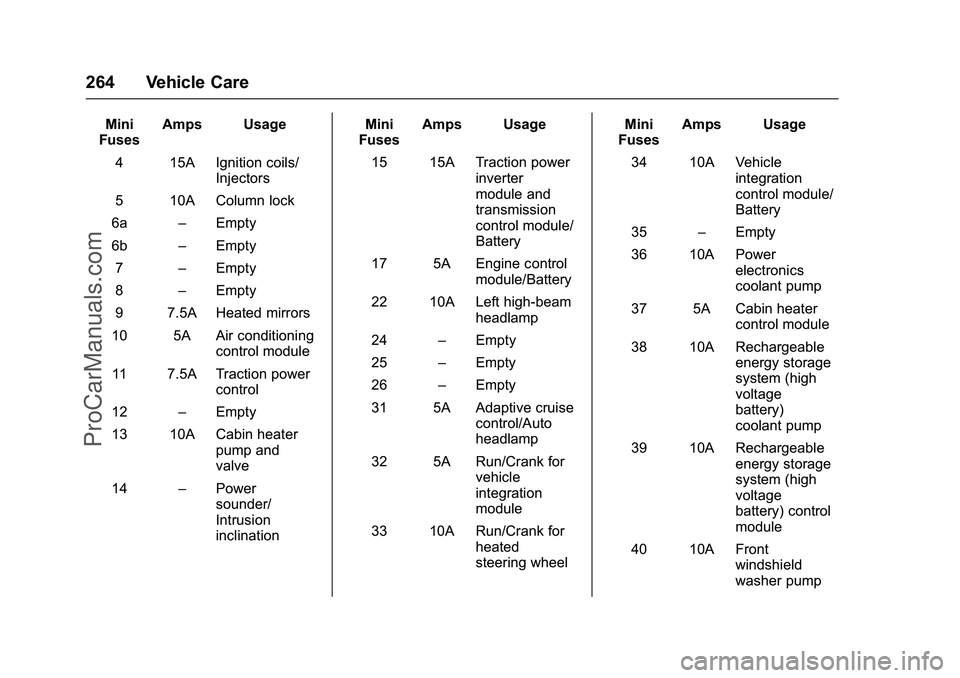
Cadillac ELR Owner Manual (GMNA-Localizing-U.S/Canada-9087644) -
2016 - crc - 9/17/15
264 Vehicle Care
Mini
Fuses Amps Usage
4 15A Ignition coils/ Injectors
5 10A Column lock
6a –Empty
6b –Empty
7 –Empty
8 –Empty
9 7.5A Heated mirrors
10 5A Air conditioning control module
11 7.5A Traction power control
12 –Empty
13 10A Cabin heater pump and
valve
14 –Power
sounder/
Intrusion
inclination Mini
Fuses Amps Usage
15 15A Traction power inverter
module and
transmission
control module/
Battery
17 5A Engine control module/Battery
22 10A Left high-beam headlamp
24 –Empty
25 –Empty
26 –Empty
31 5A Adaptive cruise control/Auto
headlamp
32 5A Run/Crank for vehicle
integration
module
33 10A Run/Crank for heated
steering wheel Mini
Fuses Amps Usage
34 10A Vehicle integration
control module/
Battery
35 –Empty
36 10A Power electronics
coolant pump
37 5A Cabin heater control module
38 10A Rechargeable energy storage
system (high
voltage
battery)
coolant pump
39 10A Rechargeable energy storage
system (high
voltage
battery) control
module
40 10A Front windshield
washer pump
ProCarManuals.com
Page 358 of 368

Cadillac ELR Owner Manual (GMNA-Localizing-U.S/Canada-9087644) -
2016 - crc - 9/17/15
Index 357
IndexA
Accessories andModifications . . . . . . . . . . . . . . . . . . 236
Accessory Power . . . . . . . . . . . . . . . 185
Adaptive Cruise Control . . . . . . . . 204
Add-On Electrical Equipment . . . 234
Additional Information OnStar
®. . . . . . . . . . . . . . . . . . . . . . 351
Additional Maintenance and Care . . . . . . . . . . . . . . . . . . . . . . 324
Adjustments Lumbar, Front Seats . . . . . . . . . . . . 52
Thigh Support . . . . . . . . . . . . . . . . . . 53
Air Cleaner/Filter, Engine . . . . . . . 246
Air Filter, Passenger
Compartment . . . . . . . . . . . . . . . . . 170
Air Vents . . . . . . . . . . . . . . . . . . . . . . . 169
Airbag System Check . . . . . . . . . . . . . . . . . . . . . . . . . . 76
How Does an Airbag
Restrain? . . . . . . . . . . . . . . . . . . . . . 68
Passenger Sensing System . . . . 70
What Makes an Airbag Inflate? . . . . . . . . . . . . . . . . . . . . . . . . 68
What Will You See after an Airbag Inflates? . . . . . . . . . . . . . . . 69
When Should an Airbag Inflate? . . . . . . . . . . . . . . . . . . . . . . . . 67 Airbag System (cont'd)
Where Are the Airbags? . . . . . . . . 66
Airbags Adding Equipment to the
Vehicle . . . . . . . . . . . . . . . . . . . . . . . . 75
Passenger Status Indicator . . . .112
Readiness Light . . . . . . . . . . . . . . . 111
Servicing Airbag-Equipped Vehicles . . . . . . . . . . . . . . . . . . . . . . . 75
System Check . . . . . . . . . . . . . . . . . . 64
Alarm Vehicle Security . . . . . . . . . . . . . . . . 43
Alert Lane Change . . . . . . . . . . . . . . . . . 218
Side Blind Zone (SBZA) . . . . . . 218
All-Season Tires . . . . . . . . . . . . . . . . 273
Antilock Brake System (ABS) . . . 195 Warning Light . . . . . . . . . . . . . . . . . .116
Appearance Care Exterior . . . . . . . . . . . . . . . . . . . . . . . 308
Interior . . . . . . . . . . . . . . . . . . . . . . . . 313
Assistance Systems for Driving . . . . . . . . . . . . . . . . . . . . . . . . 214
Assistance Systems for Parking and Backing . . . . . . . . . . 212
Automatic Door Locks . . . . . . . . . . . . . . . . . . . . . 40
Headlamp System . . . . . . . . . . . . 158
ProCarManuals.com
Page 360 of 368

Cadillac ELR Owner Manual (GMNA-Localizing-U.S/Canada-9087644) -
2016 - crc - 9/17/15
Index 359
Continuous DampingControl (CDC) . . . . . . . . . . . . . . . . . 201
Control Traction and ElectronicStability . . . . . . . . . . . . . . . . . . . . . 198
Control of a Vehicle . . . . . . . . . . . . . 174
Convex Mirrors . . . . . . . . . . . . . . . . . . 45
Coolant Engine . . . . . . . . . . . . . . . . . . . . . . . . 250
Engine TemperatureWarning Light . . . . . . . . . . . . . . . .118
Cooling System . . . . . . . . . . . . 248, 249 Engine Messages . . . . . . . . . . . . 137
Courtesy Lamps . . . . . . . . . . . . . . . . 160
Courtesy Transportation Program . . . . . . . . . . . . . . . . . . . . . . . 339
Cruise Control . . . . . . . . . . . . . . . . . . 202 Light . . . . . . . . . . . . . . . . . . . . . . . . . . 120
Messages . . . . . . . . . . . . . . . . . . . . 136
Cruise Control, Adaptive . . . . . . . . 204
Cupholders . . . . . . . . . . . . . . . . . . . . . . 96
Customer Assistance . . . . . . . . . . . 335 Offices . . . . . . . . . . . . . . . . . . . . . . . . 335
Text Telephone (TTY)Users . . . . . . . . . . . . . . . . . . . . . . . 335
Customer Information Service PublicationsOrdering Information . . . . . . . . 342 Customer Satisfaction
Procedure . . . . . . . . . . . . . . . . . . . . . 333
D
Damage Repair, Collision . . . . . . . 340
Danger, Warning, and Caution . . . . 2
Data Recorders, Event . . . . . . . . . 345
Daytime Running
Lamps (DRL) . . . . . . . . . . . . . . . . . . 158
Defensive Driving . . . . . . . . . . . . . . . 174
Delayed Charging Override . . . . . 223
Delayed Locking . . . . . . . . . . . . . . . . . 40
Diagnostics OnStar
®. . . . . . . . . . . . . . . . . . . . . . 351
Display Center Stack . . . . . . . . . . . . . . . . . 121
Distracted Driving . . . . . . . . . . . . . . . 173
Dome Lamps . . . . . . . . . . . . . . . . . . . 160
Door
Ajar Light . . . . . . . . . . . . . . . . . . . . . 121
Ajar Messages . . . . . . . . . . . . . . . 137
Delayed Locking . . . . . . . . . . . . . . . . 40
Locks . . . . . . . . . . . . . . . . . . . . . . . . . . . 38
Power Locks . . . . . . . . . . . . . . . . . . . . 39
Drive Belt Routing, Engine . . . . . . 332
Drive Mode Messages . . . . . . . . . . 137
Drive Unit Electric . . . . . . . . . . . . . . . . . . . . . . . 193
Driver Assistance Systems . . . . . 211 Driver Efficiency Gauge . . . . . . . . 109
Driver Information
Center (DIC) . . . . . . . . . . . . . . . . . . 132
Driver Mode Control . . . . . . . . . . . . 200
Driver Selected Operating Modes . . . . . . . . . . . . . . . . . . . . . . . . 188
Driving
Assistance Systems . . . . . . . . . . 214
Competitive . . . . . . . . . . . . . . . . . . . 201
Defensive . . . . . . . . . . . . . . . . . . . . . 174
Drunk . . . . . . . . . . . . . . . . . . . . . . . . . 174
Hill and Mountain Roads . . . . . . 177
If the Vehicle is Stuck . . . . . . . . . 179
Loss of Control . . . . . . . . . . . . . . . 176
Off-Road Recovery . . . . . . . . . . . 175
Vehicle Load Limits . . . . . . . . . . . 179
Wet Roads . . . . . . . . . . . . . . . . . . . 176
Winter . . . . . . . . . . . . . . . . . . . . . . . . 177
Driving for Better Energy Efficiency . . . . . . . . . . . . . . . . . . . . . . 27
Dual Automatic Climate
Control System . . . . . . . . . . . . . . . . 164
E
Easy Entry Seat . . . . . . . . . . . . . . . . . 51
Electric Drive Unit . . . . . . . . . . . . . . 193
Electric Drive Unit Messages . . . 137
Electric Drive Unit Shift LockControl Function Check . . . . . . . 258
ProCarManuals.com
Page 363 of 368

Cadillac ELR Owner Manual (GMNA-Localizing-U.S/Canada-9087644) -
2016 - crc - 9/17/15
362 Index
L
Labeling, Tire Sidewall . . . . . . . . . . 274
LampsCourtesy . . . . . . . . . . . . . . . . . . . . . . 160
Daytime Running (DRL) . . . . . . 158
Dome . . . . . . . . . . . . . . . . . . . . . . . . . 160
Exterior Controls . . . . . . . . . . . . . . 156
Exterior Lamps OffReminder . . . . . . . . . . . . . . . . . . . 158
Exterior Lighting Battery
Saver . . . . . . . . . . . . . . . . . . . . . . . 162
License Plate . . . . . . . . . . . . . . . . . 261
Malfunction Indicator . . . . . . . . . .113
Messages . . . . . . . . . . . . . . . . . . . . 139
On Reminder . . . . . . . . . . . . . . . . . 120
Reading . . . . . . . . . . . . . . . . . . . . . . 161
Lane Change Alert (LCA) . . . . . . . 218
Lane Departure Warning (LDW) . . . . . . . . . . . . . . . . 220
Lane Departure Warning Light . . . . . . . . . . . . . . . . . . . . . . . . . . 116
Lap-Shoulder Belt . . . . . . . . . . . . . . . 60
LATCH System Replacing Parts after a
Crash . . . . . . . . . . . . . . . . . . . . . . . . . 89
LATCH, Lower Anchors and Tethers for Children . . . . . . . . . . . . 83
LED Lighting . . . . . . . . . . . . . . . . . . . . 260 Lifting the Vehicle, Tires . . . . . . . . 237
Light
Ready Indicator . . . . . . . . . . . . . . . 120
Vehicle Ready . . . . . . . . . . . . . . . . 120
Lighting Entry . . . . . . . . . . . . . . . . . . . . . . . . . 161
Exit . . . . . . . . . . . . . . . . . . . . . . . . . . . 161
Illumination Control . . . . . . . . . . . 160
LED . . . . . . . . . . . . . . . . . . . . . . . . . . 260
Lights . . . . . . . . . . . . . . . . . . . . . . . . . . . 116 Airbag Readiness . . . . . . . . . . . . . . 111
Antilock Brake System
(ABS) Warning . . . . . . . . . . . . . . .116
Brake System Warning . . . . . . . .114
Charging System . . . . . . . . . . . . . .112
Cruise Control . . . . . . . . . . . . . . . . 120
Door Ajar . . . . . . . . . . . . . . . . . . . . . 121
Electric Parking Brake . . . . . . . . .115
Engine Coolant Temperature Warning . . . . . . . .118
Engine Oil Pressure . . . . . . . . . . .119
Flash-to-Pass . . . . . . . . . . . . . . . . . 158
High-Beam On . . . . . . . . . . . . . . . . 120
High/Low Beam Changer . . . . . 158
Lane Departure Warning . . . . . . .116
Low Fuel Warning . . . . . . . . . . . . .119
Safety Belt Reminders . . . . . . . . .110
Security . . . . . . . . . . . . . . . . . . . . . . .119 Lights (cont'd)
Service Electric Parking
Brake . . . . . . . . . . . . . . . . . . . . . . . .115
StabiliTrak
®OFF . . . . . . . . . . . . . .117
Tire Pressure . . . . . . . . . . . . . . . . . .118
Traction Control System (TCS)/StabiliTrak
®. . . . . . . . . . .117
Traction Off . . . . . . . . . . . . . . . . . . . .116
Locks
Automatic Door . . . . . . . . . . . . . . . . . 40
Delayed Locking . . . . . . . . . . . . . . . . 40
Door . . . . . . . . . . . . . . . . . . . . . . . . . . . . 38
Lockout Protection . . . . . . . . . . . . . . 41
Power Door . . . . . . . . . . . . . . . . . . . . . 39
Loss of Control . . . . . . . . . . . . . . . . . 176
Low Fuel Warning Light . . . . . . . . . 119
Lower Anchors and Tethers for Children (LATCH
System) . . . . . . . . . . . . . . . . . . . . . . . . 83
Lumbar Adjustment . . . . . . . . . . . . . . 52 Front Seats . . . . . . . . . . . . . . . . . . . . . 52
M
MaintenanceRecords . . . . . . . . . . . . . . . . . . . . . . 329
Maintenance and Care Additional . . . . . . . . . . . . . . . . . . . . . 324
Maintenance Modes . . . . . . . . . . . . 190
Maintenance Schedule . . . . . . . . . 318
ProCarManuals.com