center console CADILLAC ELR 2016 Owners Manual
[x] Cancel search | Manufacturer: CADILLAC, Model Year: 2016, Model line: ELR, Model: CADILLAC ELR 2016Pages: 368, PDF Size: 6.92 MB
Page 15 of 368

Cadillac ELR Owner Manual (GMNA-Localizing-U.S/Canada-9087644) -
2016 - crc - 9/17/15
14 In Brief
Canada
The passenger sensing system will
turn off the front outboard
passenger frontal airbag and knee
airbag under certain conditions. No
other airbag is affected by the
passenger sensing system. See
Passenger Sensing System 070.
The passenger airbag status
indicator lights on the overhead
console when the vehicle is started.
See Passenger Airbag Status
Indicator 0112.
Mirror Adjustment
Exterior
Mirrors can be folded inward toward
the vehicle to prevent damage when
going through an automatic car
wash. Push the mirror outward to
return it to the original position.
See Folding Mirrors 046.
To adjust a mirror:
1. Move the selector switch to L (Left) or R (Right) to choose
the driver or passenger mirror.
2. Press the arrows on the control pad to move each mirror in the
desired direction.
3. Return the selector switch to the center position.
See Power Mirrors 045.
The rear window defogger also
heats the outside mirrors. See
Heated Mirrors 046.
Interior
Adjust the rearview mirror for a clear
view of the area behind the vehicle.
The mirror will automatically reduce
the glare of headlamps from behind.
The dimming feature comes on
when the vehicle is started. See
Automatic Dimming Rearview
Mirror 046.
Steering Wheel
Adjustment
Press the control to move the tilt
and telescoping steering wheel up
and down or forward and rearward.
ProCarManuals.com
Page 22 of 368

Cadillac ELR Owner Manual (GMNA-Localizing-U.S/Canada-9087644) -
2016 - crc - 9/17/15
In Brief 21
The vehicle has two accessory
power outlets:
.Inside the front center console.
. Inside the center console bin
behind the shift lever.
Lift the cover to access the
accessory power outlet.
See Power Outlets 0102.
Universal Remote System
This system provides a way to
replace up to three remote control
transmitters used to activate devices such as garage door
openers, security systems, and
home automation devices.
Read the instructions completely
before attempting to program the
Universal Remote system. Because
of the steps involved, it may be
helpful to have another person
available to assist with programming
the Universal Remote system.
See
Universal Remote
System 0152.
Battery and Efficiency
High Voltage Safety
Information
{Warning
Exposure to high voltage can
cause shock, burns, and even
death. The high voltage
components in the vehicle can
only be serviced by technicians
with special training.
High voltage components are
identified by labels. Do not
remove, open, take apart,
or modify these components.
High voltage cable or wiring has
orange covering or labels. Do not
probe, tamper with, cut, or modify
high voltage cable or wiring.
This vehicle has a high voltage
battery and a standard 12-volt
battery.
ProCarManuals.com
Page 27 of 368

Cadillac ELR Owner Manual (GMNA-Localizing-U.S/Canada-9087644) -
2016 - crc - 9/17/15
26 In Brief
unlock. To open the fuel door,
push and release the rearward
center edge of the door.
3. Turn the fuel cap counterclockwise to remove.
While refueling, hang the fuel
cap tether from the hook on the
inside of the fuel door.
Complete refueling within
30 minutes of pressing the fuel
door button on the driver door.
If refueling after more than
30 minutes, press the fuel door
button again.
4. After refueling, reinstall the fuel cap by turning it clockwise until
it clicks. Close the fuel door.
See Filling the Tank 0231.
Regenerative Braking
Regenerative braking takes some of
the energy from the moving vehicle
and turns it back into electrical
energy. This energy is then stored in
the high voltage battery system,
contributing to increased energy
efficiency.
Regen on Demand®
This feature will slow the vehicle by
recapturing energy using the
steering wheel paddles.
See Regenerative Braking 0197.
Service
{Warning
Never try to do your own service
on high voltage components. You
can be injured and the vehicle
can be damaged if you try to do
your own service work. Service
and repair of these high voltage
components should only be
performed by a trained service
technician with the proper
knowledge and tools. See Doing
Your Own Service Work 0239.
Performance and
Maintenance
Traction Control/
Electronic Stability
Control
The Traction Control System (TCS)
limits wheel spin. The system turns
on automatically every time the
vehicle is started.
StabiliTrak assists with directional
control of the vehicle in difficult
driving conditions. The system turns
on automatically every time the
vehicle is started.
.
To turn off TCS, press and
release
Yon the center
console.
icomes on in the
instrument cluster. The
appropriate DIC message is
displayed. See Ride Control
System Messages 0142.
. Press
Yagain to turn traction
control back on.
ProCarManuals.com
Page 28 of 368
Cadillac ELR Owner Manual (GMNA-Localizing-U.S/Canada-9087644) -
2016 - crc - 9/17/15
In Brief 27
.To turn off both TCS and
StabiliTrak, press and hold
Y
on the center console untilg
andicome on and stay on in
the instrument cluster. The
appropriate DIC message
displays. See Ride Control
System Messages 0142.
. Press and release
Yagain to
turn on both systems.
See Traction Control/Electronic
Stability Control 0198.
Tire Pressure Monitor
This vehicle may have a Tire
Pressure Monitor System (TPMS).
The low tire pressure warning light
alerts to a significant loss in
pressure of one of the vehicle's
tires. If the warning light comes on, stop as soon as possible and inflate
the tires to the recommended
pressure shown on the Tire and
Loading Information label. See
Vehicle Load Limits
0179. The
warning light will remain on until the
tire pressure is corrected.
The low tire pressure warning light
may come on in cool weather when
the vehicle is first started, and then
turn off as the vehicle is driven. This
may be an early indicator that the
tire pressures are getting low and
the tires need to be inflated to the
proper pressure.
The TPMS does not replace normal
monthly tire maintenance. Maintain
the correct tire pressures.
See Tire Pressure Monitor
System 0280.
Engine Oil Life System
The engine oil life system calculates
engine oil life based on vehicle use
and displays the CHANGE ENGINE
OIL SOON message when it is time
to change the engine oil and filter. The oil life system should be reset
to 100% only following an oil
change.
Resetting the Oil Life System
1. Display RESET OIL LIFE on the DIC menu. See Driver
Information Center (DIC) 0132.
2. Press and hold SEL for several seconds while the Oil Life
display is active to reset the Oil
Life system.
See Engine Oil Life System 0245.
Driving for Better Energy
Efficiency
Use the following tips to help
maximize energy efficiency and
range.
In colder temperatures, while these
efficiency tips will help, the electric
vehicle driving range may be lower
due to higher energy usage.
ProCarManuals.com
Page 35 of 368

Cadillac ELR Owner Manual (GMNA-Localizing-U.S/Canada-9087644) -
2016 - crc - 9/17/15
34 Keys, Doors, and Windows
8. Remove the rubber liner toaccess the pocket. Place the
new transmitter, button side
down, on the indent in the
center console storage area.
9. Press POWER
O.
10. The DIC displays READY FOR REMOTE KEY 4 or 5, up to 8.
11. Press
QorKon each newly
programmed transmitter to
complete the process.
12. To program additional transmitters, repeat
Steps 8–11. Return the key base back into
the RKE transmitter.
13. Press and hold POWER
Ofor
at least 12 seconds to exit
programming.
Programming without a
Recognized Transmitter
If there are no currently recognized
transmitters available, follow this
procedure to program up to eight
transmitters. This feature is not
available in Canada. This procedure
will take approximately 30 minutes
to complete. The vehicle must be off
and all transmitters to be
programmed must be present.
1. Remove the key from the transmitter and insert the
vehicle key into the key
cylinder above the license
plate.
2. Open the trunk.
3. Turn the key counterclockwise five times within 10 seconds.
The DIC message displays
REMOTE LEARN PENDING
PLEASE WAIT.
4. Return the key base back into the RKE transmitter.
ProCarManuals.com
Page 36 of 368
Cadillac ELR Owner Manual (GMNA-Localizing-U.S/Canada-9087644) -
2016 - crc - 9/17/15
Keys, Doors, and Windows 35
5. Wait for 10 minutes until theDIC displays PRESS ENGINE
START BUTTON TO LEARN,
then press POWER
O.
The DIC reads REMOTE
LEARN PENDING,
PLEASE WAIT.
6. Repeat Step 5 two additional times. After the third time all
previously known transmitters
will no longer work with the
vehicle. Remaining transmitters
can be relearned during the
next steps. The DIC display
should now show READY FOR
REMOTE #1.
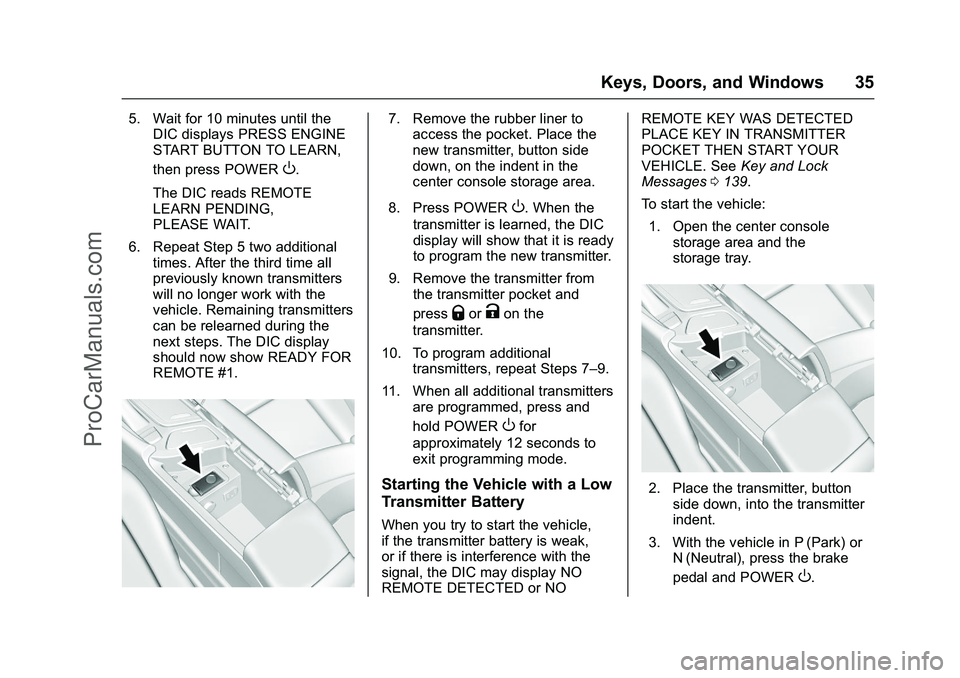
7. Remove the rubber liner toaccess the pocket. Place the
new transmitter, button side
down, on the indent in the
center console storage area.
8. Press POWER
O. When the
transmitter is learned, the DIC
display will show that it is ready
to program the new transmitter.
9. Remove the transmitter from the transmitter pocket and
press
QorKon the
transmitter.
10. To program additional transmitters, repeat Steps 7–9.
11. When all additional transmitters are programmed, press and
hold POWER
Ofor
approximately 12 seconds to
exit programming mode.
Starting the Vehicle with a Low
Transmitter Battery
When you try to start the vehicle,
if the transmitter battery is weak,
or if there is interference with the
signal, the DIC may display NO
REMOTE DETECTED or NO REMOTE KEY WAS DETECTED
PLACE KEY IN TRANSMITTER
POCKET THEN START YOUR
VEHICLE. See
Key and Lock
Messages 0139.
To start the vehicle:
1. Open the center console storage area and the
storage tray.
2. Place the transmitter, buttonside down, into the transmitter
indent.
3. With the vehicle in P (Park) or N (Neutral), press the brake
pedal and POWER
O.
ProCarManuals.com
Page 71 of 368

Cadillac ELR Owner Manual (GMNA-Localizing-U.S/Canada-9087644) -
2016 - crc - 9/17/15
70 Seats and Restraints
Warning (Continued)
the vehicle, such as the fuel
system, brake and steering
systems, etc. Even if the vehicle
appears to be drivable after a
moderate crash, there may be
concealed damage that could
make it difficult to safely operate
the vehicle.
Use caution if you should attempt
to restart the engine after a crash
has occurred.
If an airbag inflates or the vehicle
has been in a crash, the sensing
system may shut down the high
voltage system. When this occurs,
the high voltage battery is
disconnected and the vehicle will
not start. The SERVICE VEHICLE
SOON message in the Driver
Information Center (DIC) will be
displayed. Before the vehicle can be
operated again, it must be serviced
at your dealer. In many crashes severe enough to
inflate the airbag, windshields are
broken by vehicle deformation.
Additional windshield breakage may
also occur from the front outboard
passenger airbag.
.
Airbags are designed to inflate
only once. After an airbag
inflates, you will need some new
parts for the airbag system.
If you do not get them, the
airbag system will not be there
to help protect you in another
crash. A new system will include
airbag modules and possibly
other parts. The service manual
for the vehicle covers the need
to replace other parts.
. The vehicle has a crash sensing
and diagnostic module which
records information after a
crash. See Vehicle Data
Recording and Privacy 0345
and Event Data
Recorders 0345.
. Let only qualified technicians
work on the airbag systems.
Improper service can mean that an airbag system will not work
properly. See your dealer for
service.
Passenger Sensing
System
The vehicle has a passenger
sensing system for the front
outboard passenger position. The
passenger airbag status indicator
will light on the overhead console
when the vehicle is started.
United States
ProCarManuals.com
Page 96 of 368

Cadillac ELR Owner Manual (GMNA-Localizing-U.S/Canada-9087644) -
2016 - crc - 9/17/15
Storage 95
Storage
Storage Compartments
Storage Compartments . . . . . . . . 95
Instrument Panel Storage . . . . . . 95
Glove Box . . . . . . . . . . . . . . . . . . . . . 95
Cupholders . . . . . . . . . . . . . . . . . . . . 96
Center Console Storage . . . . . . . 96
Storage
Compartments
{Warning
Do not store heavy or sharp
objects in storage compartments.
In a crash, these objects may
cause the cover to open and
could result in injury.
Instrument Panel Storage
Touch the bottom of the climate
control system panel until the door
automatically starts to open. There
is a USB port inside. See the
infotainment manual.
Touch the bottom of the climate
control system again until the door
automatically starts to close.
Keep the storage area door closed
while driving.
The storage area may be equipped
with wireless charging. See
Wireless Charging0103.
Glove Box
ProCarManuals.com
Page 97 of 368

Cadillac ELR Owner Manual (GMNA-Localizing-U.S/Canada-9087644) -
2016 - crc - 9/17/15
96 Storage
To open, press the button. Close the
glove box manually.
Cupholders
The cupholders have a power
retractable cover. Push the handle
forward to express open. Pull the
handle rearward to express close.
The power cover will operate when
the vehicle is in ACC, RUN,
or Retained Accessory Power (RAP)
mode. The cover can be opened or
closed manually by pushing or
pulling the handle. SeeRetained
Accessory Power (RAP) 0185. If any object is in the path of the
power cover when it is active, the
cover will stop at the obstruction
and auto-reverse to a preset
position. The cover will return to
normal operation after the
obstruction is removed.
Push the handle to uncover the rear
cupholders.
Center Console Storage
There is a storage area in front of
the armrest. Press to release the
cover.
Press the button on the driver side
of the armrest to access the storage
area under it. Depending on the
options, there may be two USB
ports and an auxiliary jack inside.
ProCarManuals.com
Page 103 of 368

Cadillac ELR Owner Manual (GMNA-Localizing-U.S/Canada-9087644) -
2016 - crc - 9/17/15
102 Instruments and Controls
Date
To set the date:1. Touch the SETTINGS screen button, then touch Time
and Date.
2. Touch Set Date, then touch + or−to increase or decrease
month, day, or year.
3. Touch
[Back to go back to the
previous menu.
Auto Set
When on, the time and date will
automatically update.
To set auto set: 1. Touch the SETTINGS screen button, then touch Time
and Date.
2. Touch Set Time or Set Date.
3. Touch Auto Set, then select On-Cell Network or Off-Manual
to manually set the time
and date.
4. Touch
[Back to go back to the
previous menu. If auto set is on, the time displayed
on the clock may not update
immediately when driving into a new
time zone.
Clock Display
When on, the digital clock will
display on the infotainment screen.
To set the clock display:
1. Touch the SETTINGS screen button, then touch Time
and Date.
2. Touch Clock Display, then select Off or On.
3. Touch
[Back to go back to the
previous menu.
Power Outlets
The accessory power outlets can be
used to plug in electrical equipment,
such as a cell phone or MP3 player.
The vehicle has two accessory
power outlets:
. Inside the front center console.
. Inside the center console bin
behind the shift lever. Lift the cover to access the
accessory power outlet.
Certain accessory power plugs may
not be compatible with the
accessory power outlet and could
overload vehicle or adapter fuses.
If a problem is experienced, see
your dealer.
When adding electrical equipment,
be sure to follow the proper
installation instructions included with
the equipment. See
Add-On
Electrical Equipment 0234.
Caution
Hanging heavy equipment from
the power outlet can cause
damage not covered by the
vehicle warranty. The power
outlets are designed for
accessory power plugs only, such
as cell phone charge cords.
Always unplug electrical equipment
when not in use and do not plug in
equipment that exceeds the
maximum 15 amps.
ProCarManuals.com