lock CADILLAC ESCALADE 2006 2.G Workshop Manual
[x] Cancel search | Manufacturer: CADILLAC, Model Year: 2006, Model line: ESCALADE, Model: CADILLAC ESCALADE 2006 2.GPages: 484, PDF Size: 2.84 MB
Page 143 of 484
If a hand, arm, or other object is blocking the sunroof
glass panel as it is closing, the glass panel will stop
at the obstruction. After the obstruction is removed, the
glass panel can be closed or opened.
Use care not to leave the sunroof open for long periods
of time as debris may collect in the tracks.
If the battery has been recharged, disconnected or is
not working, you may need to reprogram the sunroof. To
do this, start the vehicle and press the forward side of
the sunroof button until the glass panel moves to a fully
closed position. Release, and press again to move to
the vent position, which occurs when the sunroof is fully
tilted upward and the button is held for an additional
twenty seconds. This will reset the memory and enable
the sunroof to function properly.
Vehicle Personalization
In addition to the following features, your vehicle may
also have features that can be programmed through
the Driver Information Center (DIC). SeeDIC Vehicle
Customization on page 3-63for more information.
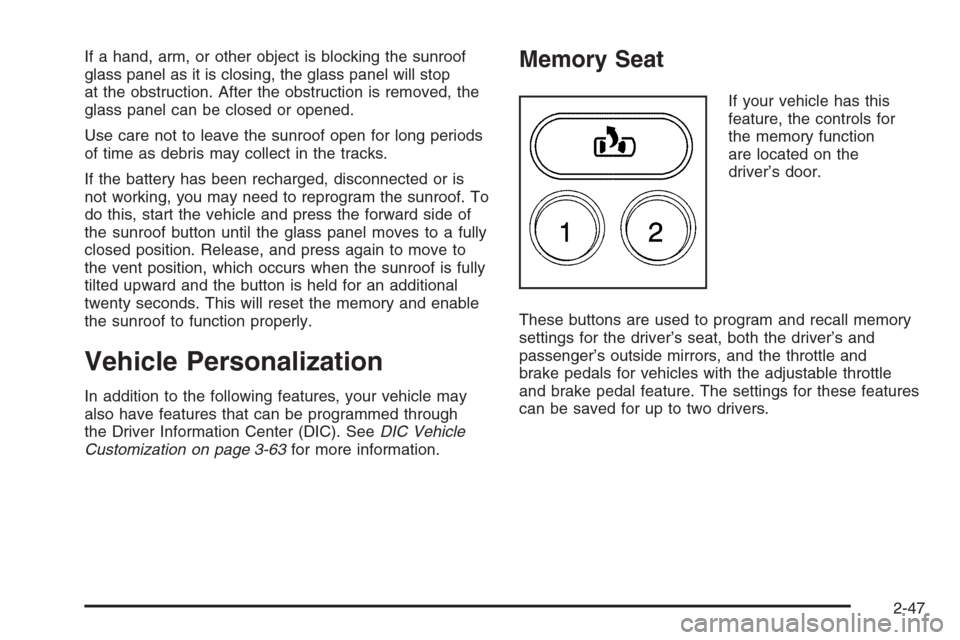
Memory Seat
If your vehicle has this
feature, the controls for
the memory function
are located on the
driver’s door.
These buttons are used to program and recall memory
settings for the driver’s seat, both the driver’s and
passenger’s outside mirrors, and the throttle and
brake pedals for vehicles with the adjustable throttle
and brake pedal feature. The settings for these features
can be saved for up to two drivers.
2-47
Page 145 of 484
Instrument Panel Overview...............................3-4
Hazard Warning Flashers................................3-6
Other Warning Devices...................................3-6
Horn .............................................................3-6
Tilt Wheel.....................................................3-6
Turn Signal/Multifunction Lever.........................3-7
Turn and Lane-Change Signals........................3-8
Headlamp High/Low-Beam Changer..................3-9
Flash-to-Pass.................................................3-9
Windshield Wipers........................................3-10
Windshield Washer.......................................3-10
Rear Window Wiper/Washer...........................3-11
Cruise Control..............................................3-12
Exterior Lamps.............................................3-15
Headlamps on Reminder................................3-16
Daytime Running Lamps (DRL).......................3-16
Automatic Headlamp System..........................3-17
Fog Lamps ..................................................3-18
Instrument Panel Brightness...........................3-18
Dome Lamps ...............................................3-19
Entry/Exit Lighting.........................................3-19
Reading Lamps............................................3-19
Battery Run-Down Protection..........................3-19
Ultrasonic Rear Parking Assist (URPA)............3-20Accessory Power Outlet(s).............................3-22
Ashtray(s) and Cigarette Lighter......................3-23
Analog Clock...............................................3-23
Climate Controls............................................3-24
Dual Automatic Climate Control System...........3-24
Outlet Adjustment.........................................3-29
Rear Climate Control System.........................3-30
Warning Lights, Gages, and Indicators............3-32
Instrument Panel Cluster................................3-33
Speedometer and Odometer...........................3-34
Trip Odometer..............................................3-34
Tachometer.................................................3-34
Safety Belt Reminder Light.............................3-34
Airbag Readiness Light..................................3-35
Passenger Airbag Status Indicator...................3-36
Charging System Light..................................3-38
Voltmeter Gage............................................3-38
Brake System Warning Light..........................3-39
Anti-Lock Brake System Warning Light.............3-40
Low Tire Pressure Warning Light....................3-41
Traction Off Light..........................................3-41
Engine Coolant Temperature Gage..................3-42
Transmission Temperature Gage.....................3-42
Section 3 Instrument Panel
3-1
Page 149 of 484
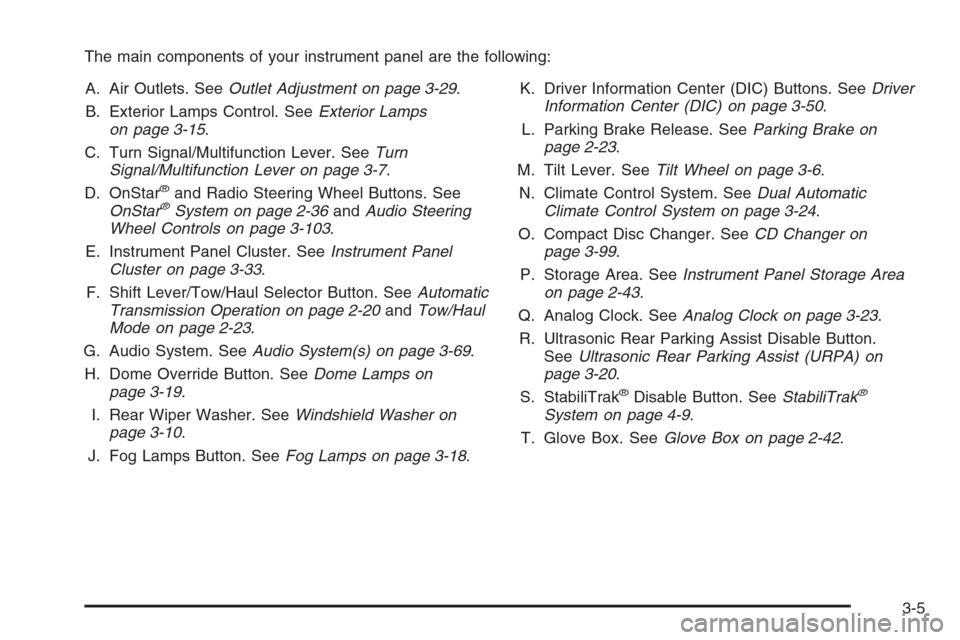
The main components of your instrument panel are the following:
A. Air Outlets. SeeOutlet Adjustment on page 3-29.
B. Exterior Lamps Control. SeeExterior Lamps
on page 3-15.
C. Turn Signal/Multifunction Lever. SeeTurn
Signal/Multifunction Lever on page 3-7.
D. OnStar
®and Radio Steering Wheel Buttons. See
OnStar®System on page 2-36andAudio Steering
Wheel Controls on page 3-103.
E. Instrument Panel Cluster. SeeInstrument Panel
Cluster on page 3-33.
F. Shift Lever/Tow/Haul Selector Button. SeeAutomatic
Transmission Operation on page 2-20andTow/Haul
Mode on page 2-23.
G. Audio System. SeeAudio System(s) on page 3-69.
H. Dome Override Button. SeeDome Lamps on
page 3-19.
I. Rear Wiper Washer. SeeWindshield Washer on
page 3-10.
J. Fog Lamps Button. SeeFog Lamps on page 3-18.K. Driver Information Center (DIC) Buttons. SeeDriver
Information Center (DIC) on page 3-50.
L. Parking Brake Release. SeeParking Brake on
page 2-23.
M. Tilt Lever. SeeTilt Wheel on page 3-6.
N. Climate Control System. SeeDual Automatic
Climate Control System on page 3-24.
O. Compact Disc Changer. SeeCD Changer on
page 3-99.
P. Storage Area. SeeInstrument Panel Storage Area
on page 2-43.
Q. Analog Clock. SeeAnalog Clock on page 3-23.
R. Ultrasonic Rear Parking Assist Disable Button.
SeeUltrasonic Rear Parking Assist (URPA) on
page 3-20.
S. StabiliTrak
®Disable Button. SeeStabiliTrak®
System on page 4-9.
T. Glove Box. SeeGlove Box on page 2-42.
3-5
Page 151 of 484
To tilt the wheel, hold the steering wheel and pull the
lever. Move the steering wheel to a comfortable
level, then release the lever to lock the wheel in place.
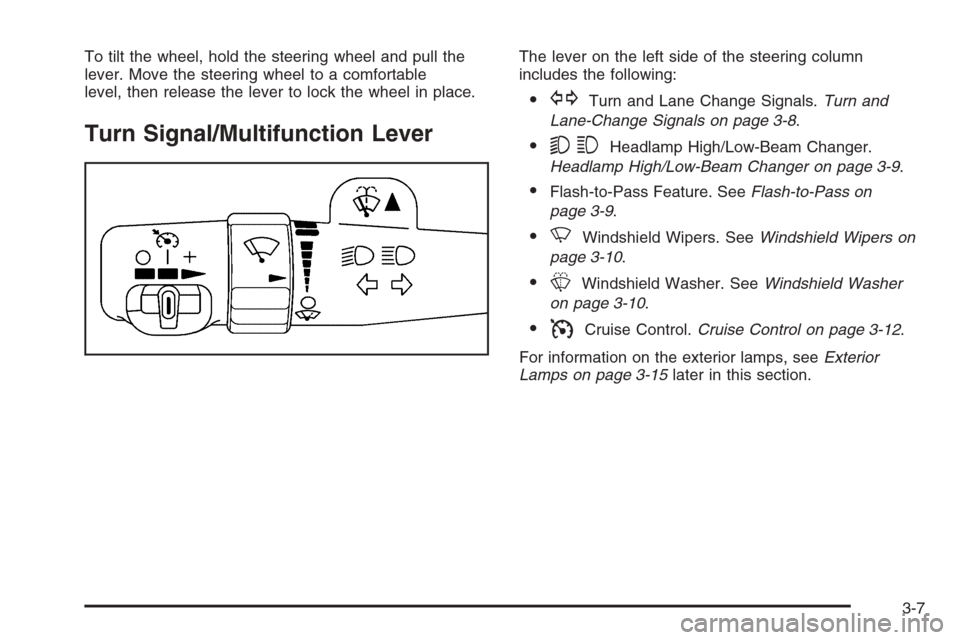
Turn Signal/Multifunction Lever
The lever on the left side of the steering column
includes the following:
GTurn and Lane Change Signals.Turn and
Lane-Change Signals on page 3-8.
53Headlamp High/Low-Beam Changer.
Headlamp High/Low-Beam Changer on page 3-9.
Flash-to-Pass Feature. SeeFlash-to-Pass on
page 3-9.
NWindshield Wipers. SeeWindshield Wipers on
page 3-10.
LWindshield Washer. SeeWindshield Washer
on page 3-10.
ICruise Control.Cruise Control on page 3-12.
For information on the exterior lamps, seeExterior
Lamps on page 3-15later in this section.
3-7
Page 152 of 484
Turn and Lane-Change Signals
The turn signal has two upward (for right) and
two downward (for left) positions. These positions
allow you to signal a turn or a lane change.
To signal a turn, move the lever all the way up or
down. When the turn is nished, the lever will return
automatically.
To signal a lane change, just raise or lower the lever
until the arrow starts to ash. Hold it there until you
complete your lane change. The lever will return by
itself when you release it.
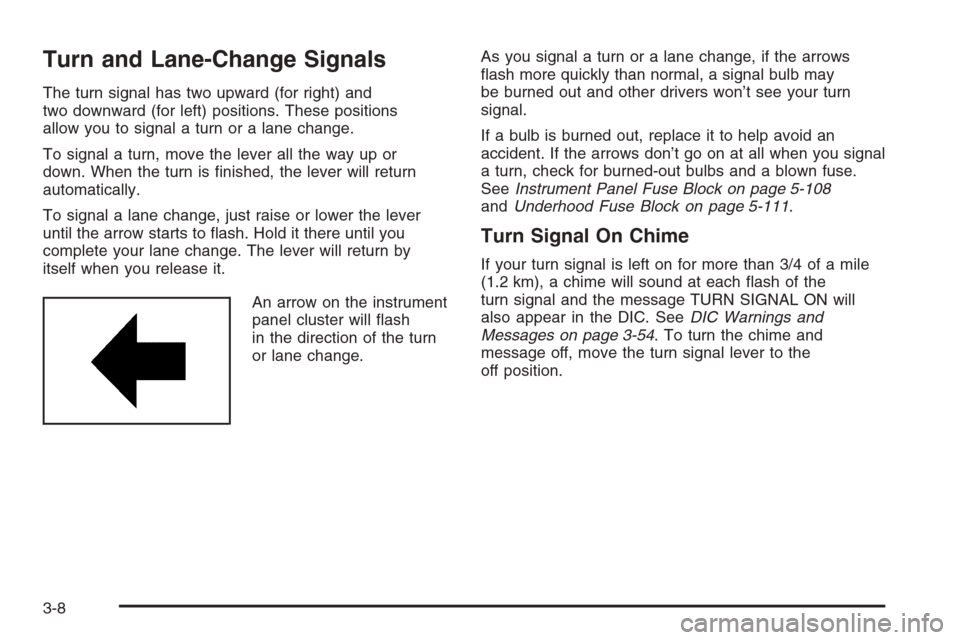
An arrow on the instrument
panel cluster will ash
in the direction of the turn
or lane change.As you signal a turn or a lane change, if the arrows
ash more quickly than normal, a signal bulb may
be burned out and other drivers won’t see your turn
signal.
If a bulb is burned out, replace it to help avoid an
accident. If the arrows don’t go on at all when you signal
a turn, check for burned-out bulbs and a blown fuse.
SeeInstrument Panel Fuse Block on page 5-108
andUnderhood Fuse Block on page 5-111.
Turn Signal On Chime
If your turn signal is left on for more than 3/4 of a mile
(1.2 km), a chime will sound at each ash of the
turn signal and the message TURN SIGNAL ON will
also appear in the DIC. SeeDIC Warnings and
Messages on page 3-54. To turn the chime and
message off, move the turn signal lever to the
off position.
3-8
Page 154 of 484
Windshield Wipers
You control the windshield wipers by turning the band
with the wiper symbol on it.
8(Mist):For a single wiping cycle, turn the band to
mist. Hold it there until the wipers start. Then let go.
The wipers will stop after one wipe. If you want
more wipes, hold the band on mist longer.
N(Delay):You can set the wiper speed for a long or
short delay between wipes. This can be very useful
in light rain or snow. Turn the band to choose the delay
time. The closer to the top of the lever, the shorter
the delay.
6(Low Speed):For steady wiping at low speed,
turn the band away from you to the rst solid band past
the delay settings.
1(High Speed):For high-speed wiping, turn the
band further, to the second solid band past the
delay settings.
9(Off):To stop the wipers, move the band to off.
Be sure to clear ice and snow from the wiper blades
before using them. If they’re frozen to the windshield,
carefully loosen or thaw them. If your blades do become
worn or damaged, get new blades or blade inserts.
Windshield Washer
L(Washer Fluid):There is a paddle marked with the
windshield washer symbol at the top of the multifunction
lever. To spray washer uid on the windshield, push
the paddle. The wipers will clear the window and then
either stop or return to your preset speed.
{CAUTION:
In freezing weather, do not use your washer
until the windshield is warmed. Otherwise the
washer uid can form ice on the windshield,
blocking your vision.
3-10
Page 155 of 484
Rear Window Wiper/Washer
{CAUTION:
In freezing weather, do not use your washer
until the windshield is warmed. Otherwise the
washer uid can form ice on the windshield,
blocking your vision.
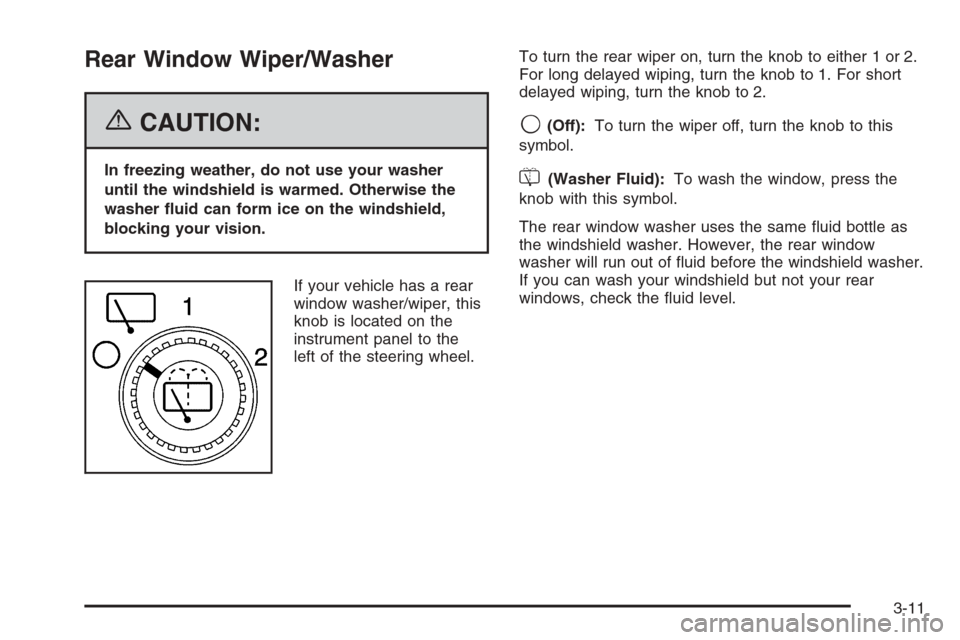
If your vehicle has a rear
window washer/wiper, this
knob is located on the
instrument panel to the
left of the steering wheel.To turn the rear wiper on, turn the knob to either 1 or 2.
For long delayed wiping, turn the knob to 1. For short
delayed wiping, turn the knob to 2.
9(Off):To turn the wiper off, turn the knob to this
symbol.
=(Washer Fluid):To wash the window, press the
knob with this symbol.
The rear window washer uses the same uid bottle as
the windshield washer. However, the rear window
washer will run out of uid before the windshield washer.
If you can wash your windshield but not your rear
windows, check the uid level.
3-11
Page 160 of 484
2(Headlamps):Turn the control to this position to
turn on the headlamps, together with the previously
listed lamps and lights.
When the vehicle is turned off and the headlamps are in
AUTO, the headlamps may automatically remain on
for a set time. You can change this delay time using the
DIC. SeeDriver Information Center (DIC) on page 3-50.
You can switch your headlamps from low to high-beam
by pushing the turn signal/multifunction lever toward
the instrument panel.
Headlamps on Reminder
If a door is open, a reminder chime will sound when
your headlamps or parking lamps are manually turned
on and your key is out of the ignition. To turn off
the chime, turn the headlamp switch to off or AUTO
and then back on. In the AUTO mode, the headlamps
turn off once the ignition is in LOCK or may remain
on until the headlamp delay ends (if enabled in the DIC).
See “Exit Lighting” underDIC Vehicle Customization
on page 3-63.
Daytime Running Lamps (DRL)
Daytime Running Lamps (DRL) can make it easier
for others to see the front of your vehicle during the day.
DRL can be helpful in many different driving conditions,
but they can be especially helpful in the short periods
after dawn and before sunset. Fully functional daytime
running lamps are required on all vehicles rst sold
in Canada.
The DRL system will come on when the following
conditions are met:
The ignition is on,
the exterior lamps control is in AUTO,
the transmission is not in PARK (P), and
the light sensor determines it is daytime.
When the DRL are on, only your DRL lamps will be on.
The taillamps, sidemarker and other lamps won’t be
on. The instrument panel won’t be lit up either.
When it begins to get dark, the automatic headlamp
system will switch from DRL to the headlamps.
As with any vehicle, you should turn on the regular
headlamp system when you need it.
3-16
Page 163 of 484
Dome Lamps
The dome lamps will come on when you open a door,
and will turn off when all doors are closed.
You can also turn the dome lamps on by turning the
thumbwheel, located next to the exterior lamp control,
all the way up. In this position, the dome lamps will
remain on whether a door is opened or closed.
E(Dome Override):Press this button, located below
the exterior lamp control, to turn dome lamps off even
while a door is opened. To return the lamps to automatic
operation, press the button again and it will return to
the out position. In this position, the dome lamps
will come on when you open a door.
Entry/Exit Lighting
Your vehicle is equipped with an illuminated entry/exit
feature.
When a door is opened or the key is removed from
the ignition, the dome lamps will come on if the dome
override button is in the out position.
Reading Lamps
If your vehicle has reading lamps, press the button
located next to the lamp to turn it on or off. The lamps
can be adjusted to shine in a desired direction.
Your vehicle may also have reading lamps in other
locations. To turn each one on or off, press the button
located next to the lamp. The lamps cannot be adjusted.
Battery Run-Down Protection
This feature shuts off the dome lamps if they are left
on for more than 10 minutes when the ignition is
in LOCK. This will keep your battery from running down.
3-19
Page 167 of 484
Ashtray(s) and Cigarette Lighter
The front ashtray and lighter are located in the center
console near the cupholders, if equipped. Press on
the access door to open it and use the ashtray
and lighter.
Notice:If you put papers, pins, or other ammable
items in the ashtray, hot cigarettes or other
smoking materials could ignite them and possibly
damage your vehicle. Never put ammable items in
the ashtray.
To remove the ashtray, pull it from the center console.
Slide it back in and push down to be sure it is secure.
To use the cigarette lighter, push it in all the way, and let
go. When it’s ready, it will pop back out by itself.
Notice:Holding a cigarette lighter in while it is
heating will not allow the lighter to back away from
the heating element when it is hot. Damage from
overheating may occur to the lighter or heating
element, or a fuse could be blown. Do not hold a
cigarette lighter in while it is heating.
Analog Clock
To adjust the clock, do the following:
1. Locate the adjustment button to the lower left
corner of the clock.
2. Push and hold the adjustment button to advance
the clock hands. Release the buttonbeforeyou
get to the desired time.
3. Push and release the button to increase the time by
one minute increments until the desired time is
reached.
3-23