instrument panel CADILLAC ESCALADE 2008 3.G Service Manual
[x] Cancel search | Manufacturer: CADILLAC, Model Year: 2008, Model line: ESCALADE, Model: CADILLAC ESCALADE 2008 3.GPages: 490, PDF Size: 2.65 MB
Page 324 of 490
If you are charging a remote (non-vehicle) battery,
press the Tow/Haul mode button located at the
end of the shift lever. This will boost the vehicle
system voltage and properly charge the battery.
Electric Brake Control Wiring
Provisions
These wiring provisions are included with your vehicle
as part of the heavy-duty trailer wiring package.
These provisions are for an electric brake controller.
The red/black stripe power feed will not be connected
to the battery until the ring terminal is unstowed
and connected to the underhood electrical center.
The instrument panel contains blunt cut wires near
the data link connector for the trailer brake controller.
The harness contains the following wires:
Dark Blue: Auxiliary
Red/Black: Battery
Light Blue/White: Brake Switch
White: Ground
It should be installed by your dealer/retailer
or a qualied service center.
Trailer Recommendations
You must subtract your hitch loads from the Cargo
Weight Rating (CWR). CWR is the maximum weight
of the load your vehicle can carry. It doesn’t include the
weight of the people inside. But you can gure about
150 lbs. (68 kg) for each seat. The total cargo load must
not be more than your vehicle’s CWR.
Weigh your vehicle with the trailer attached, so that you
won’t go over the GVWR or GAWR. If you are using
a weight-distributing hitch, weigh the vehicle without
the spring bars in place.
You’ll get the best performance if you spread out the
weight of your load the right way, and if you choose
the correct hitch and trailer brakes.
For more information, seeTowing a Trailer on page 4-44.
4-56
Page 326 of 490
Tire Pressure Monitor System.........................5-62
Tire Pressure Monitor Operation.....................5-63
Tire Inspection and Rotation...........................5-67
When It Is Time for New Tires.......................5-69
Buying New Tires.........................................5-70
Different Size Tires and Wheels......................5-71
Uniform Tire Quality Grading..........................5-72
Wheel Alignment and Tire Balance..................5-73
Wheel Replacement......................................5-74
Tire Chains..................................................5-75
If a Tire Goes Flat........................................5-76
Changing a Flat Tire.....................................5-77
Removing the Spare Tire and Tools................5-78
Removing the Flat Tire and Installing the
Spare Tire................................................5-83
Secondary Latch System...............................5-88
Storing a Flat or Spare Tire and Tools............5-91
Spare Tire...................................................5-95
Appearance Care............................................5-96
Interior Cleaning...........................................5-96
Fabric/Carpet...............................................5-97
Leather.......................................................5-98
Instrument Panel, Vinyl, and Other Plastic
Surfaces..................................................5-98
Wood Panels...............................................5-99
Speaker Covers............................................5-99Care of Safety Belts......................................5-99
Weatherstrips...............................................5-99
Washing Your Vehicle..................................5-100
Cleaning Exterior Lamps/Lenses....................5-100
Finish Care................................................5-100
Windshield, Backglass, and Wiper Blades.......5-101
Aluminum or Chrome-Plated Wheels
and Trim................................................5-102
Tires.........................................................5-103
Sheet Metal Damage...................................5-103
Finish Damage...........................................5-103
Underbody Maintenance...............................5-103
Chemical Paint Spotting...............................5-103
Vehicle Care/Appearance Materials................5-104
Vehicle Identication.....................................5-105
Vehicle Identication Number (VIN)................5-105
Service Parts Identication Label...................5-105
Electrical System..........................................5-106
Add-On Electrical Equipment.........................5-106
Windshield Wiper Fuses...............................5-106
Power Windows and Other Power Options......5-106
Fuses and Circuit Breakers..........................5-106
Instrument Panel Fuse Block........................5-107
Center Instrument Panel Fuse Block..............5-108
Underhood Fuse Block................................5-109
Capacities and Specications........................5-113
Section 5 Service and Appearance Care
5-2
Page 350 of 490
Coolant Surge Tank Pressure Cap
Notice:If the pressure cap is not tightly installed,
coolant loss and possible engine damage may
occur. Be sure the cap is properly and tightly
secured.
The coolant surge tank pressure cap must be fully
installed on the coolant surge tank. SeeEngine
Compartment Overview on page 5-12for more
information on location.
Engine Overheating
You will nd a coolant temperature gage on your
vehicle’s instrument panel. SeeEngine Coolant
Temperature Gage on page 3-42.
In addition, the messages ENGINE OVERHEATED
STOP ENGINE, ENGINE OVERHEATED IDLE
ENGINE, or ENGINE POWER IS REDUCED could
appear in the Driver Information Center (DIC) on
the instrument panel. SeeDIC Warnings and
Messages on page 3-52.
If Steam Is Coming From Your Engine
{CAUTION:
Steam from an overheated engine can burn
you badly, even if you just open the hood.
Stay away from the engine if you see or hear
steam coming from it. Turn it off and get
everyone away from the vehicle until it cools
down. Wait until there is no sign of steam or
coolant before you open the hood.
If you keep driving when the vehicles engine
is overheated, the liquids in it can catch re.
You or others could be badly burned. Stop
your engine if it overheats, and get out of the
vehicle until the engine is cool.
SeeOverheated Engine Protection Operating
Mode on page 5-28for information on driving
to a safe place in an emergency.
Notice:If your engine catches re because you keep
driving with no coolant, your vehicle can be badly
damaged. The costly repairs would not be covered by
your warranty. SeeOverheated Engine Protection
Operating Mode on page 5-28for information on
driving to a safe place in an emergency.
5-26
Page 387 of 490
Federal Communications Commission
(FCC) and Industry and Science
Canada
The Tire Pressure Monitor System (TPMS) operates on
a radio frequency and complies with Part 15 of the
FCC Rules. Operation is subject to the following
two conditions:
1. This device may not cause harmful interference.
2. This device must accept any interference received,
including interference that may cause undesired
operation.
The TPMS operates on a radio frequency and complies
with RSS-210 of Industry and Science Canada.
Operation is subject to the following two conditions:
1. This device may not cause interference.
2. This device must accept any interference received,
including interference that may cause undesired
operation of the device.
Changes or modications to this system by other than
an authorized service facility could void authorization to
use this equipment.
Tire Pressure Monitor Operation
The Tire Pressure Monitor System (TPMS) is designed
to warn the driver when a low tire pressure condition
exists. TPMS sensors are mounted onto each tire
and wheel assembly, excluding the spare tire and wheel
assembly. The TPMS sensors monitor the air pressure
in the vehicle’s tires and transmits the tire pressure
readings to a receiver located in the vehicle.
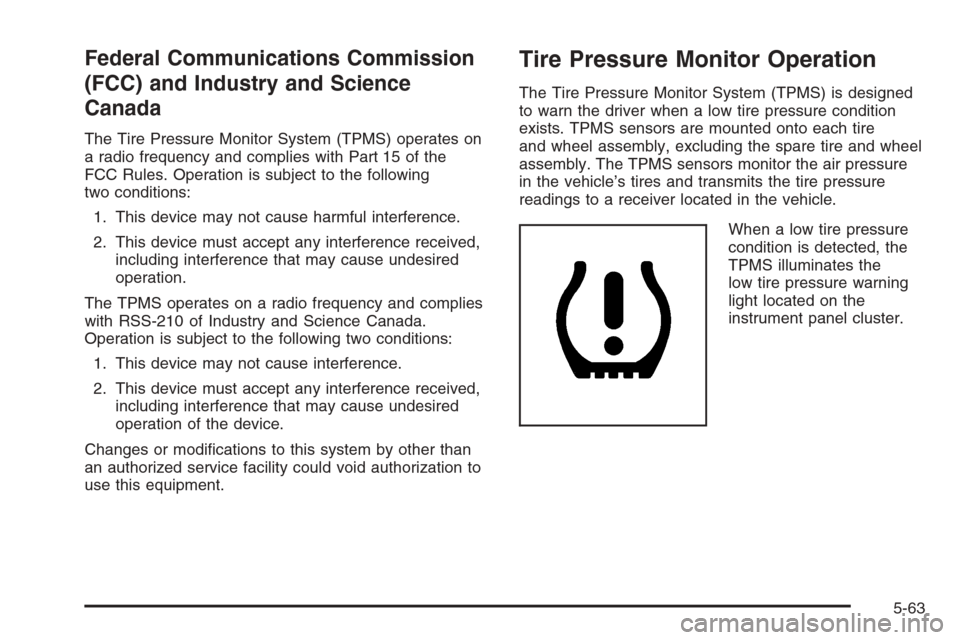
When a low tire pressure
condition is detected, the
TPMS illuminates the
low tire pressure warning
light located on the
instrument panel cluster.
5-63
Page 422 of 490
To clean:
1. Saturate a lint-free, clean white cloth with water or
club soda.
2. Wring the cloth to remove excess moisture.
3. Start on the outside edge of the soil and gently rub
toward the center. Continue cleaning, using a clean
area of the cloth each time it becomes soiled.
4. Continue to gently rub the soiled area until the
cleaning cloth remains clean.
5. If the soil is not completely removed, use a mild
soap solution and repeat the cleaning process
that was used with plain water.
If any of the soil remains, a commercial fabric cleaner or
spot lifter may be necessary. When a commercial
upholstery cleaner or spot lifter is to be used, test a
small hidden area for colorfastness rst. If the locally
cleaned area gives any impression that a ring formation
may result, clean the entire surface.
After the cleaning process has been completed, a paper
towel can be used to blot excess moisture from the
fabric or carpet.Leather
A soft cloth dampened with water can be used to
remove dust. If a more thorough cleaning is necessary,
a soft cloth dampened with a mild soap solution can
be used. Allow the leather to dry naturally. Do not
use heat to dry. Never use steam to clean leather.
Never use spot lifters or spot removers on leather.
Many commercial leather cleaners and coatings that are
sold to preserve and protect leather may permanently
change the appearance and feel of your leather and are
not recommended. Do not use silicone or wax-based
products, or those containing organic solvents to clean
your vehicle’s interior because they can alter the
appearance by increasing the gloss in a non-uniform
manner. Never use shoe polish on leather.
Instrument Panel, Vinyl, and Other
Plastic Surfaces
A soft cloth dampened with water may be used to
remove dust. If a more thorough cleaning is necessary,
a clean soft cloth dampened with a mild soap solution
can be used to gently remove dust and dirt.
Never use spot lifters or removers on plastic surfaces.
5-98
Page 423 of 490
Many commercial cleaners and coatings that are sold
to preserve and protect soft plastic surfaces may
permanently change the appearance and feel of your
interior and are not recommended. Do not use silicone
or wax-based products, or those containing organic
solvents to clean your vehicle’s interior because
they can alter the appearance by increasing the gloss
in a non-uniform manner.
Some commercial products may increase gloss on your
instrument panel. The increase in gloss may cause
annoying reections in the windshield and even make it
difficult to see through the windshield under certain
conditions.
Wood Panels
Use a clean cloth moistened in warm, soapy water
(use mild dish washing soap). Dry the wood immediately
with a clean cloth.
Speaker Covers
Vacuum around a speaker cover gently, so that the
speaker will not be damaged. Clean spots with
just water and mild soap.
Care of Safety Belts
Keep belts clean and dry.
{CAUTION:
Do not bleach or dye safety belts. If you do,
it may severely weaken them. In a crash,
they might not be able to provide adequate
protection. Clean safety belts only with mild
soap and lukewarm water.
Weatherstrips
Silicone grease on weatherstrips will make them last
longer, seal better, and not stick or squeak. Apply
silicone grease with a clean cloth. During very cold,
damp weather frequent application may be required.
SeeRecommended Fluids and Lubricants on page 6-13.
5-99
Page 429 of 490
Vehicle Identication
Vehicle Identication Number (VIN)
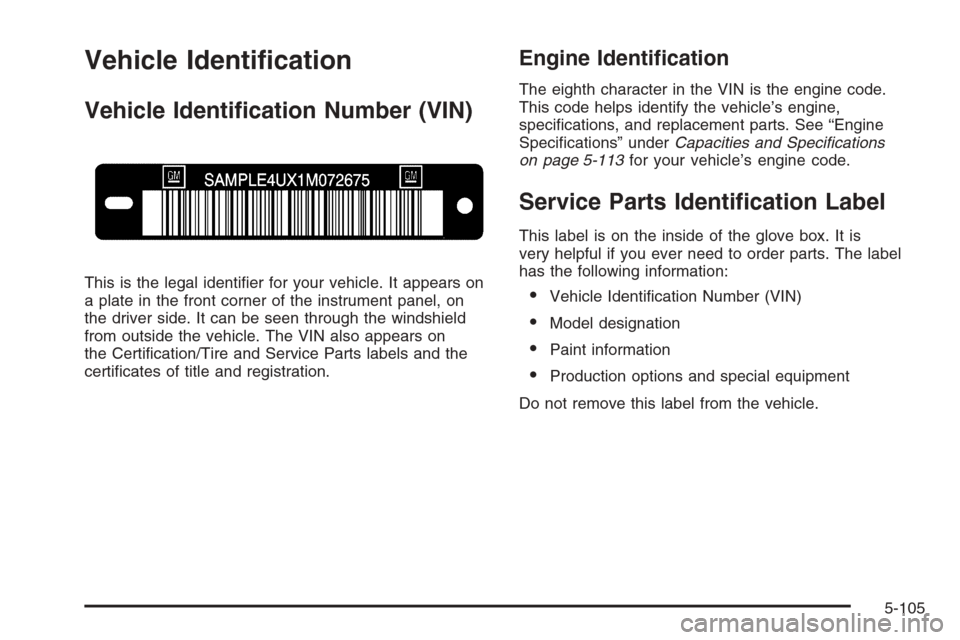
This is the legal identier for your vehicle. It appears on
a plate in the front corner of the instrument panel, on
the driver side. It can be seen through the windshield
from outside the vehicle. The VIN also appears on
the Certication/Tire and Service Parts labels and the
certicates of title and registration.
Engine Identication
The eighth character in the VIN is the engine code.
This code helps identify the vehicle’s engine,
specications, and replacement parts. See “Engine
Specications” underCapacities and Specifications
on page 5-113for your vehicle’s engine code.
Service Parts Identication Label
This label is on the inside of the glove box. It is
very helpful if you ever need to order parts. The label
has the following information:
Vehicle Identication Number (VIN)
Model designation
Paint information
Production options and special equipment
Do not remove this label from the vehicle.
5-105
Page 431 of 490
Instrument Panel Fuse Block
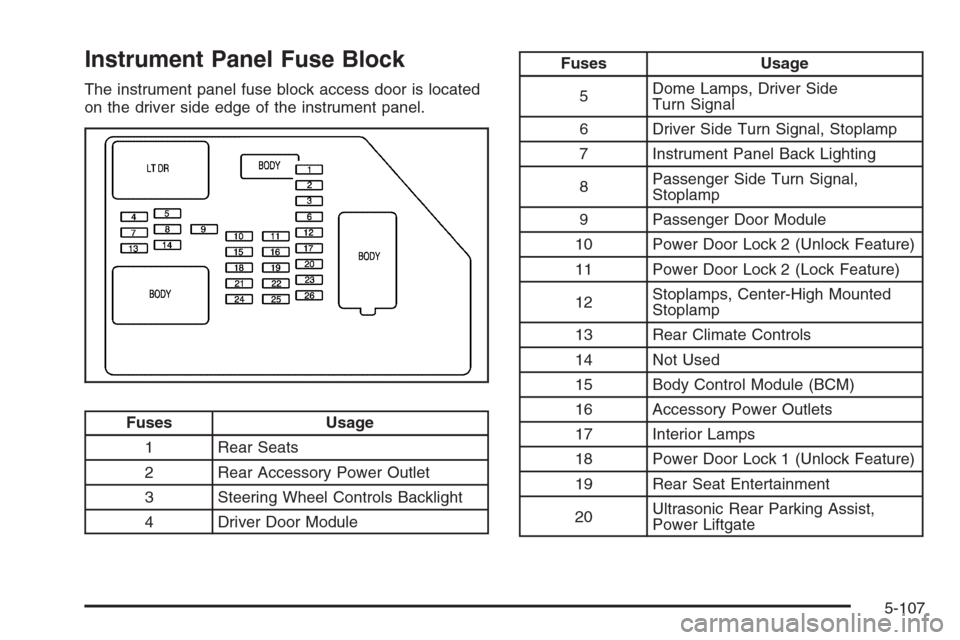
The instrument panel fuse block access door is located
on the driver side edge of the instrument panel.
Fuses Usage
1 Rear Seats
2 Rear Accessory Power Outlet
3 Steering Wheel Controls Backlight
4 Driver Door Module
Fuses Usage
5Dome Lamps, Driver Side
Turn Signal
6 Driver Side Turn Signal, Stoplamp
7 Instrument Panel Back Lighting
8Passenger Side Turn Signal,
Stoplamp
9 Passenger Door Module
10 Power Door Lock 2 (Unlock Feature)
11 Power Door Lock 2 (Lock Feature)
12Stoplamps, Center-High Mounted
Stoplamp
13 Rear Climate Controls
14 Not Used
15 Body Control Module (BCM)
16 Accessory Power Outlets
17 Interior Lamps
18 Power Door Lock 1 (Unlock Feature)
19 Rear Seat Entertainment
20Ultrasonic Rear Parking Assist,
Power Liftgate
5-107
Page 432 of 490
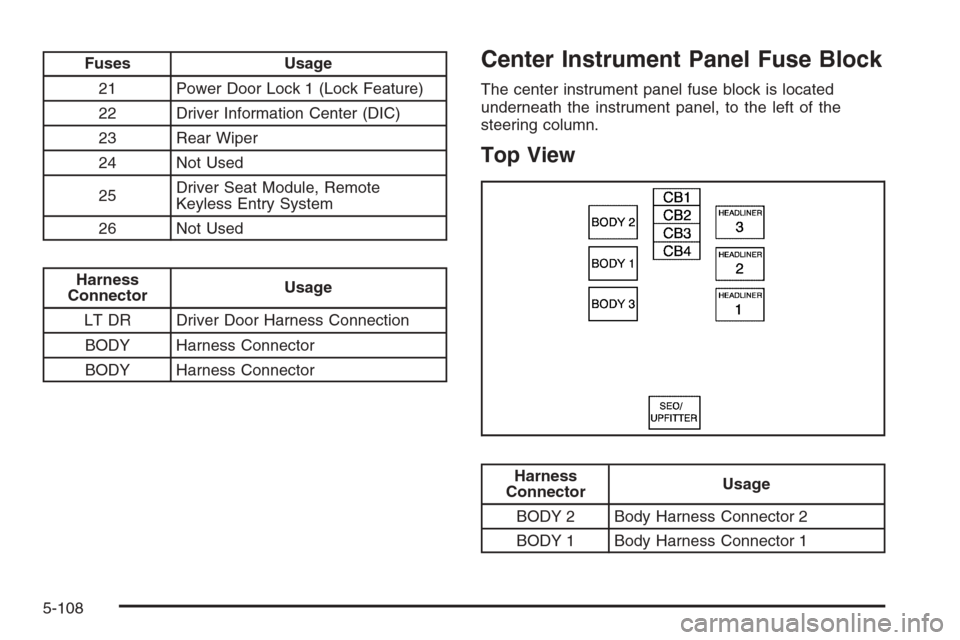
Fuses Usage
21 Power Door Lock 1 (Lock Feature)
22 Driver Information Center (DIC)
23 Rear Wiper
24 Not Used
25Driver Seat Module, Remote
Keyless Entry System
26 Not Used
Harness
ConnectorUsage
LT DR Driver Door Harness Connection
BODY Harness Connector
BODY Harness Connector
Center Instrument Panel Fuse Block
The center instrument panel fuse block is located
underneath the instrument panel, to the left of the
steering column.
Top View
Harness
ConnectorUsage
BODY 2 Body Harness Connector 2
BODY 1 Body Harness Connector 1
5-108
Page 435 of 490
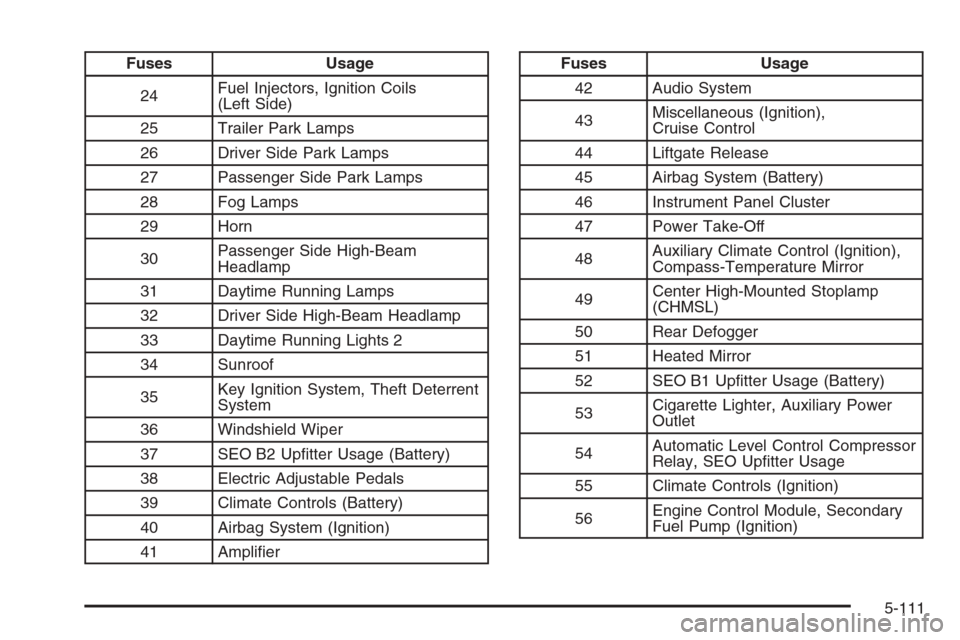
Fuses Usage
24Fuel Injectors, Ignition Coils
(Left Side)
25 Trailer Park Lamps
26 Driver Side Park Lamps
27 Passenger Side Park Lamps
28 Fog Lamps
29 Horn
30Passenger Side High-Beam
Headlamp
31 Daytime Running Lamps
32 Driver Side High-Beam Headlamp
33 Daytime Running Lights 2
34 Sunroof
35Key Ignition System, Theft Deterrent
System
36 Windshield Wiper
37 SEO B2 Uptter Usage (Battery)
38 Electric Adjustable Pedals
39 Climate Controls (Battery)
40 Airbag System (Ignition)
41 AmplierFuses Usage
42 Audio System
43Miscellaneous (Ignition),
Cruise Control
44 Liftgate Release
45 Airbag System (Battery)
46 Instrument Panel Cluster
47 Power Take-Off
48Auxiliary Climate Control (Ignition),
Compass-Temperature Mirror
49Center High-Mounted Stoplamp
(CHMSL)
50 Rear Defogger
51 Heated Mirror
52 SEO B1 Uptter Usage (Battery)
53Cigarette Lighter, Auxiliary Power
Outlet
54Automatic Level Control Compressor
Relay, SEO Uptter Usage
55 Climate Controls (Ignition)
56Engine Control Module, Secondary
Fuel Pump (Ignition)
5-111