mirror CADILLAC ESCALADE 2009 3.G User Guide
[x] Cancel search | Manufacturer: CADILLAC, Model Year: 2009, Model line: ESCALADE, Model: CADILLAC ESCALADE 2009 3.GPages: 586, PDF Size: 4.47 MB
Page 175 of 586
Windshield Wipers
Turn the band with the wiper symbol to control the
windshield wipers.
8(Mist):Turn to mist for a single wiping cycle.
Hold it there until the wipers start. Then let go.
The wipers stop after one wipe. Hold the band
on mist longer, for more wipe cycles.
9(Off):Turns the wipers off.
6(Delay): Turn the band to adjust the delay time.
The delay between wiping cycles becomes shorter
as the band is moved to the top of the lever.
This can be very useful in light rain or snow.
6(Low Speed):For steady wiping at low speed.
?(High Speed):For high-speed wiping.
Clear ice and snow from the wiper blades before using
them. If they are frozen to the windshield, gently
loosen or thaw them. Damaged wiper blades may not
clear the windshield well, making it harder to see
and drive safely. If the blades do become damaged,
install new blades or blade inserts. For more information,
seeWindshield Wiper Blade Replacement on page 6-54.Heavy snow or ice can overload the wiper motor.
A circuit breaker will stop the motor until it cools down.
Clear away snow or ice to prevent an overload.
Rainsense™ II Wipers
The vehicle has Rainsense™ II windshield wipers.
These wipers automatically turn on when a sensor,
mounted next to the inside rearview mirror, detects
moisture on the windshield. When active, these wipers
are able to detect moisture on the windshield and
automatically turn on the wipers.
To turn on the Rainsense™ feature, the wipers must be
set to one of the ve delay settings. Each of the ve
settings adjusts the sensitivity of the rain sensor.
Since different drivers have different setting preferences,
it is recommended that the mid-range setting, position
three, be used initially. For more wipes, select the higher
settings; for fewer wipes, select the lower settings located
closer to the off position on the multifunction lever.
The rain sensor will automatically control the frequency
of the wipes from off to high speed according to the
weather conditions. The wipers can be left in a
Rainsense™ mode even when it is not raining.
3-9
Page 182 of 586
When the headlamps are turned on while the vehicle is
on, the headlamps will turn off automatically 10 minutes
after the ignition is turned off. When the headlamps are
turned on while the vehicle is off, the headlamps will stay
on for 10 minutes before automatically turning off to
prevent the battery from being drained. Turn the
headlamp control to off and then back to the headlamp on
position to make the headlamps stay on for an additional
10 minutes.
IntelliBeam®Intelligent High-Beam
Headlamp Control System
For vehicles with this feature, be sure to read this entire
section before using it.
IntelliBeam
®is an enhancement to the vehicle’s
headlamp system. Using a digital light sensor on the
rearview mirror, this system will turn the vehicle’s
high-beam headlamps on and off according to
surrounding traffic conditions.
The IntelliBeam
®system turns the high-beam
headlamps on when it is dark enough, there is no other
traffic present, and the IntelliBeam
®system is enabled.
Turning On and Enabling IntelliBeam®
Press and release the IntelliBeam®button on the inside
rear view mirror. The IntelliBeam®indicator on the
mirror will turn on to let you know the system has been
turned on. Once the system has been turned on, it
will remain on each time the vehicle is started.
Additionally, the IntelliBeam
®system must be enabled.
To enable the IntelliBeam
®system, turn the exterior
lamp control to AUTO, with the turn signal/multifunction
lever in its neutral position. The High-Beam On Light
will appear on the instrument panel cluster when
the high-beams are on. SeeHighbeam On Light on
page 3-45.
Driving with IntelliBeam®
IntelliBeam®will only activate your high-beams when
driving over 20 mph (32 km/h).
The high-beam headlamps will remain on, under the
automatic control of IntelliBeam
®, until any of the
following situations occur:
The system detects an approaching vehicle’s
headlamps.
The system detects a preceding vehicle’s taillamps.
The outside light is bright enough that high-beam
headlamps are not required.
3-16
Page 183 of 586
The vehicle’s speed drops below 15 mph (24 km/h).
The headlamp stalk is moved forward to the
high-beam position. SeeHeadlamp High/Low-Beam
Changer on page 3-8.
When either of these conditions occur, the
IntelliBeam
®feature will be disabled and the
IntelliBeam®light in the mirror will turn off until the
high-beam stalk is returned to the neutral position.
If IntelliBeam®was using low-beams prior to
this action, the IntelliBeam®feature will be
temporarily disabled until the stalk is returned
to the neutral position.
The exterior lamp control is turned to any setting
except AUTO.
When this occurs, IntelliBeam
®will be disabled until
the control is turned back to the AUTO position.
The IntelliBeam®system is turned off at the inside
rearview mirror.IntelliBeam
®may not turn off the high-beams if the
system cannot detect other vehicle’s lamps because of
any of the following:
The others vehicle’s lamp(s) are missing, damaged,
obstructed from view or otherwise undetected.
The other vehicle’s lamp(s) are covered with dirt,
snow and/or road spray.
The other vehicle’s lamp(s) cannot be detected due
to dense exhaust, smoke, fog, snow, road spray,
mist or other airborne obstructions.
Your vehicle’s windshield is dirty, cracked or
obstructed by something that blocks the view of the
IntelliBeam
®light sensor.
Your vehicle’s windshield is covered with ice, dirt,
haze or other obstructions.
Your vehicle is loaded such that the front end of the
vehicle points upward, causing the IntelliBeam®
sensor to aim high and not detect headlamps and
taillamps.
You are driving on winding or hilly roads.
You may need to manually disable or cancel the
high-beam headlamps by turning the low-beam
headlamps on, if any of the above conditions exist.
3-17
Page 184 of 586
Disabling and Resetting IntelliBeam®at
the Rearview Mirror
IntelliBeam®can be disabled by using the controls on
the inside rearview mirror.
AUTO
3(On/Off):To disable the system, press this
button on the inside rearview mirror. The IntelliBeam®
indicator will turn off and will not come back on until the
IntelliBeam®button is pressed again.
(Stalk Disable):When IntelliBeam
®has turned on the
high-beams, pull or push the high-beam stalk. This
will disable IntelliBeam
®. The IntelliBeam®indicator on
the mirror will turn off. To re-enable IntelliBeam®,
press the IntelliBeam®button on the mirror.
A different sensitivity setting is available for dealer
diagnostics. This is done by pushing and holding this
button for 20 seconds until the IntelliBeam
®indicator
light ashes three times. If you accidentally activate this,
the vehicle’s setting will automatically be reset each
time the ignition is turned off and then on again.
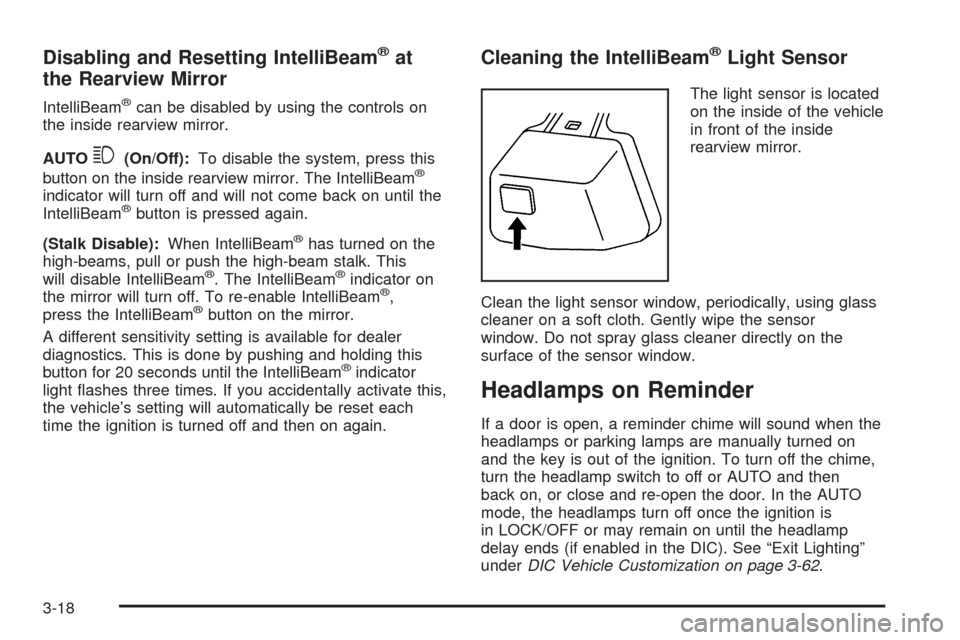
Cleaning the IntelliBeam®Light Sensor
The light sensor is located
on the inside of the vehicle
in front of the inside
rearview mirror.
Clean the light sensor window, periodically, using glass
cleaner on a soft cloth. Gently wipe the sensor
window. Do not spray glass cleaner directly on the
surface of the sensor window.
Headlamps on Reminder
If a door is open, a reminder chime will sound when the
headlamps or parking lamps are manually turned on
and the key is out of the ignition. To turn off the chime,
turn the headlamp switch to off or AUTO and then
back on, or close and re-open the door. In the AUTO
mode, the headlamps turn off once the ignition is
in LOCK/OFF or may remain on until the headlamp
delay ends (if enabled in the DIC). See “Exit Lighting”
underDIC Vehicle Customization on page 3-62.
3-18
Page 195 of 586

Rear Window Defogger
The rear window defogger uses a warming grid to
remove fog from the rear window.
<(Rear Window Defogger):Press to turn the rear
window defogger on or off. It automatically turns off after
it has been activated. The defogger can also be
turned off by turning off the engine. Do not drive the
vehicle until all the windows are clear.
Notice:Do not use a razor blade or sharp object to
clear the inside rear window. Do not adhere
anything to the defogger grid lines in the rear glass.
These actions may damage the rear defogger.
Repairs would not be covered by your warranty.
Heated Mirrors:For vehicles with heated outside
rearview mirrors, the mirrors heat to help clear fog or
frost from the surface of the mirror when the rear window
defog button is pressed. SeeOutside Heated Mirrors
on page 2-42.
Heated or Cooled Seats:For vehicles with heated
seats or heated and cooled seats, seeHeated Seats on
page 1-5orHeated and Cooled Seats on page 1-6.
Outlet Adjustment
Use the air outlets located in the center and on the side
of the instrument panel to direct the airow.
Operation Tips
Keep the hood and front air inlets free of ice, snow,
or any other obstruction (such as leaves). The
heater and defroster will work far better, reducing
the chance of fogging the inside of the windows.
When you enter a vehicle in cold weather, press
the fan up button to the maximum fan level
before driving. This helps clear the intake ducts of
snow and moisture, and reduces the chance of
fogging the inside of the window.
Keep the air path under the front seats clear of
objects. This helps air to circulate throughout
the vehicle.
Adding outside equipment to the front of the
vehicle, such as hood-air deectors, may affect the
performance of the heating and air conditioning
system. Check with your dealer/retailer before
adding equipment to the outside of the vehicle.
3-29
Page 234 of 586
CHIME VOLUME
This feature allows you to select the volume level of
the chime.
Press the customization button until CHIME VOLUME
appears on the DIC display. Press the set/reset
button once to access the settings for this feature.
Then press the customization button to scroll through
the following settings:
NORMAL:The chime volume will be set to a
normal level.
LOUD:The chime volume will be set to a loud level.
NO CHANGE:No change will be made to this feature.
The current setting will remain.
There is no default for chime volume. The volume will
stay at the last known setting.
To select a setting, press the set/reset button while the
desired setting is displayed on the DIC.
PARK TILT MIRRORS
This feature allows you to select whether or not the
outside mirror(s) will automatically tilt down when
the vehicle is shifted into R (Reverse). SeeOutside
Power Foldaway Mirrors on page 2-40for more
information.Press the customization button until PARK TILT
MIRRORS appears on the DIC display. Press the
set/reset button once to access the settings for
this feature. Then press the customization button to
scroll through the following settings:
OFF (default):Neither outside mirror will be tilted down
when the vehicle is shifted into R (Reverse).
DRIVER MIRROR:The driver’s outside mirror will be
tilted down when the vehicle is shifted into R (Reverse).
PASSENGER MIRROR:The passenger’s outside
mirror will be tilted down when the vehicle is shifted into
R (Reverse).
BOTH MIRRORS:The driver’s and passenger’s outside
mirrors will be tilted down when the vehicle is shifted
into R (Reverse).
NO CHANGE:No change will be made to this feature.
The current setting will remain.
To select a setting, press the set/reset button while the
desired setting is displayed on the DIC.
3-68
Page 236 of 586
MEMORY SEAT RECALL
This feature allows you to select your preference for the
remote memory seat recall feature. SeeMemory
Features on page 1-7for more information.
Press the customization button until MEMORY SEAT
RECALL appears on the DIC display. Press the set/reset
button once to access the settings for this feature.
Then press the customization button to scroll through
the following settings:
OFF (default):No remote memory seat recall
will occur.
ON:The driver’s seat, and on some vehicles, the
outside mirrors will automatically move to the stored
driving position when the unlock button on the Remote
Keyless Entry (RKE) transmitter is pressed. On
some vehicles with the adjustable throttle and brake
pedal feature, the pedals will also automatically move.
See “Relearn Remote Key” underDIC Operation
and Displays on page 3-46for more information on
matching transmitters to driver ID numbers.
NO CHANGE:No change will be made to this feature.
The current setting will remain.
To select a setting, press the set/reset button while the
desired setting is displayed on the DIC.
REMOTE START
If your vehicle has this feature, it allows you to turn the
remote start off or on. The remote start feature allows
you to start the engine from outside of the vehicle using
the Remote Keyless Entry (RKE) transmitter. See
Remote Vehicle Start on page 2-8for more information.
Press the customization button until REMOTE START
appears on the DIC display. Press the set/reset
button once to access the settings for this feature.
Then press the customization button to scroll through
the following settings:
OFF:The remote start feature will be disabled.
ON (default):The remote start feature will be enabled.
NO CHANGE:No change will be made to this
feature. The current setting will remain.
To select a setting, press the set/reset button while the
desired setting is displayed on the DIC.
3-70
Page 381 of 586
While driving on a surface with reduced traction, try your
best to avoid sudden steering, acceleration, or braking,
including reducing vehicle speed by shifting to a lower
gear. Any sudden changes could cause the tires to slide.
You may not realize the surface is slippery until the
vehicle is skidding. Learn to recognize warning
clues — such as enough water, ice, or packed snow
on the road to make a mirrored surface — and slow
down when you have any doubt.
Remember: Any Antilock Brake System (ABS) helps
avoid only the braking skid.
Off-Road Driving
Vehicles with all-wheel drive can be used for off-road
driving. Vehicles without all-wheel drive and vehicles
with 22-inch tire/wheel assemblies should not be driven
off-road except on a level, solid surface.
Many of the vehicle design features that help make the
vehicle more responsive on paved roads during poor
weather conditions also help make it better suited
for off-road use than conventional passenger vehicles.
The vehicle does not have features usually thought to be
necessary for extended or severe off-road use such
as special underbody shielding and transfer case
low gear range.The airbag system is designed to work properly under
a wide range of conditions, including off-road usage.
Always wear your safety belt and observe safe driving
speeds, especially on rough terrain.
Drinking and driving can be very dangerous on any road
and this is certainly true for off-road driving. At the
very time you need special alertness and driving skills,
your reexes, perceptions, and judgment can be
affected by even a small amount of alcohol. You could
have a serious — or even fatal — accident if you
drink and drive or ride with a driver who has been
drinking.
Off-roading can be great fun but has some denite
hazards. The greatest of these is the terrain itself. When
off-road driving, traffic lanes are not marked, curves
are not banked, and there are no road signs. Surfaces
can be slippery, rough, uphill, or downhill.
Avoid sharp turns and abrupt maneuvers. Failure to
operate the vehicle correctly off-road could result in loss
of vehicle control or vehicle rollover.
Off-roading involves some new skills. That is why it is
very important that you read these driving tips and
suggestions to help make off-road driving safer
and more enjoyable.
5-13
Page 392 of 586
Driving in Water
{CAUTION:
Driving through rushing water can be dangerous.
Deep water can sweep your vehicle downstream
and you and your passengers could drown. If it is
only shallow water, it can still wash away the
ground from under your tires, and you could lose
traction and roll the vehicle over. Do not drive
through rushing water.
Heavy rain can mean ash ooding, and ood waters
demand extreme caution.
Find out how deep the water is before driving through it.
Do not try it if it is deep enough to cover the wheel
hubs, axles, or exhaust pipe — you probably will not get
through. Deep water can damage the axle and other
vehicle parts.
If the water is not too deep, drive slowly through it. At
faster speeds, water splashes on the ignition system and
the vehicle can stall. Stalling can also occur if you get the
tailpipe under water. If the tailpipe is under water, you will
never be able to start the engine. When going throughwater, remember that when the brakes get wet, it might
take longer to stop. SeeDriving in Rain and on Wet
Roads on page 5-25.
After Off-Road Driving
Remove any brush or debris that has collected on the
underbody, chassis, or under the hood. These
accumulations can be a re hazard.
After operation in mud or sand, have the brake linings
cleaned and checked. These substances can cause
glazing and uneven braking. Check the body structure,
steering, suspension, wheels, tires, and exhaust
system for damage and check the fuel lines and cooling
system for any leakage.
The vehicle requires more frequent service due to
off-road use. Refer to the Maintenance Schedule for
additional information.
Driving at Night
Night driving is more dangerous than day driving because
some drivers are likely to be impaired — by alcohol or
drugs, with night vision problems, or by fatigue.
Night driving tips include:
Drive defensively.
Do not drink and drive.
Reduce headlamp glare by adjusting the inside
rearview mirror.
5-24
Page 394 of 586
Other Rainy Weather Tips
Besides slowing down, other wet weather driving tips
include:
Allow extra following distance.
Pass with caution.
Keep windshield wiping equipment in good shape.
Keep the windshield washer uid reservoir lled.
Have good tires with proper tread depth. SeeTires
on page 6-56.
Turn off cruise control.
Before Leaving on a Long Trip
To prepare your vehicle for a long trip, consider having
it serviced by your dealer/retailer before departing.
Things to check on your own include:
Windshield Washer Fluid:Reservoir full? Windows
clean — inside and outside?
Wiper Blades:In good shape?
Fuel, Engine Oil, Other Fluids:All levels checked?
Lamps:Do they all work and are lenses clean?
Tires:Are treads good? Are tires inated to
recommended pressure?
Weather and Maps:Safe to travel? Have up-to-date
maps?
Highway Hypnosis
Always be alert and pay attention to your surroundings
while driving. If you become tired or sleepy, nd a
safe place to park your vehicle and rest.
Other driving tips include:
Keep the vehicle well ventilated.
Keep interior temperature cool.
Keep your eyes moving — scan the road ahead
and to the sides.
Check the rearview mirror and vehicle instruments
often.
5-26