wheel CADILLAC ESCALADE 2009 3.G User Guide
[x] Cancel search | Manufacturer: CADILLAC, Model Year: 2009, Model line: ESCALADE, Model: CADILLAC ESCALADE 2009 3.GPages: 586, PDF Size: 4.47 MB
Page 98 of 586
In addition, the vehicle has a passenger sensing
system for the right front passenger position, which
includes sensors that are part of the passenger
seat. The passenger sensing system may not
operate properly if the original seat trim is replaced
with non-GM covers, upholstery or trim, or with
GM covers, upholstery or trim designed for a
different vehicle. Any object, such as an aftermarket
seat heater or a comfort enhancing pad or device,
installed under or on top of the seat fabric,
could also interfere with the operation of the
passenger sensing system. This could either
prevent proper deployment of the passenger
airbag(s) or prevent the passenger sensing system
from properly turning off the passenger airbag(s).
SeePassenger Sensing System on page 1-85.
If you have any questions, call Customer
Assistance. The phone numbers and addresses for
Customer Assistance are in Step Two of the
Customer Satisfaction Procedure in this manual.
SeeCustomer Satisfaction Procedure on page 8-2.
If the vehicle has rollover roof-rail airbags, see
Different Size Tires and Wheels on page 6-72for
additional important information.Q:Because I have a disability, I have to get my
vehicle modied. How can I nd out whether
this will affect my airbag system?
A:If you have questions, call Customer Assistance.
The phone numbers and addresses for Customer
Assistance are in Step Two of the Customer
Satisfaction Procedure in this manual. See
Customer Satisfaction Procedure on page 8-2.
In addition, your dealer/retailer and the service manual
have information about the location of the airbag
sensors, sensing and diagnostic module and airbag
wiring.
1-92
Page 125 of 586
Ignition Positions
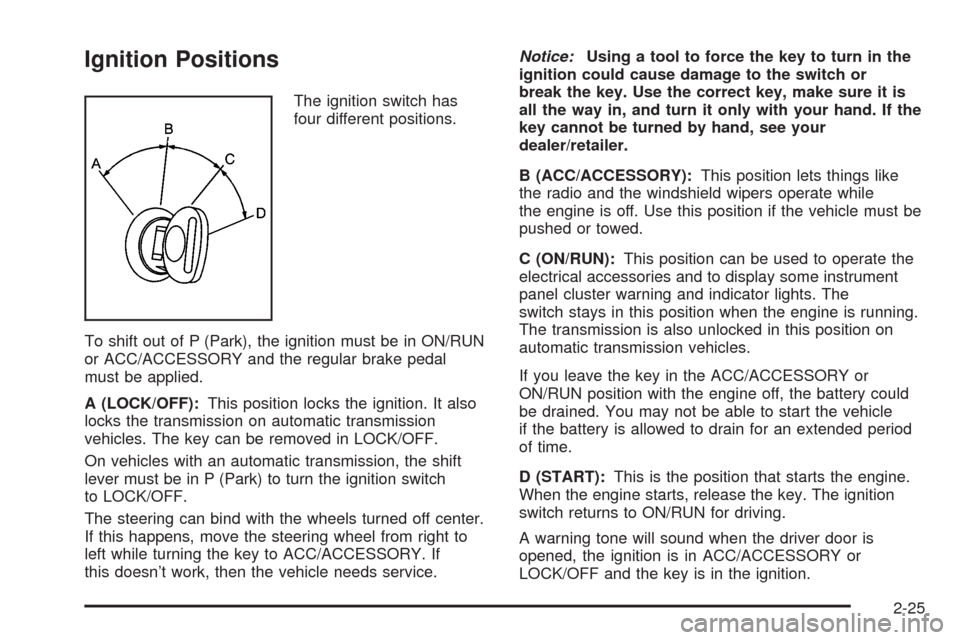
The ignition switch has
four different positions.
To shift out of P (Park), the ignition must be in ON/RUN
or ACC/ACCESSORY and the regular brake pedal
must be applied.
A (LOCK/OFF):This position locks the ignition. It also
locks the transmission on automatic transmission
vehicles. The key can be removed in LOCK/OFF.
On vehicles with an automatic transmission, the shift
lever must be in P (Park) to turn the ignition switch
to LOCK/OFF.
The steering can bind with the wheels turned off center.
If this happens, move the steering wheel from right to
left while turning the key to ACC/ACCESSORY. If
this doesn’t work, then the vehicle needs service.Notice:Using a tool to force the key to turn in the
ignition could cause damage to the switch or
break the key. Use the correct key, make sure it is
all the way in, and turn it only with your hand. If the
key cannot be turned by hand, see your
dealer/retailer.
B (ACC/ACCESSORY):This position lets things like
the radio and the windshield wipers operate while
the engine is off. Use this position if the vehicle must be
pushed or towed.
C (ON/RUN):This position can be used to operate the
electrical accessories and to display some instrument
panel cluster warning and indicator lights. The
switch stays in this position when the engine is running.
The transmission is also unlocked in this position on
automatic transmission vehicles.
If you leave the key in the ACC/ACCESSORY or
ON/RUN position with the engine off, the battery could
be drained. You may not be able to start the vehicle
if the battery is allowed to drain for an extended period
of time.
D (START):This is the position that starts the engine.
When the engine starts, release the key. The ignition
switch returns to ON/RUN for driving.
A warning tone will sound when the driver door is
opened, the ignition is in ACC/ACCESSORY or
LOCK/OFF and the key is in the ignition.
2-25
Page 129 of 586
Automatic Transmission Operation
If the vehicle is a Two-mode Hybrid, see the Two-mode
Hybrid manual for more information.
The vehicle has a Hydra-Matic
®6L80 automatic
transmission, and has an electronic shift position
indicator within the instrument panel cluster. The
electronic shift position indicator displays when the shift
lever is moved out of P (Park).
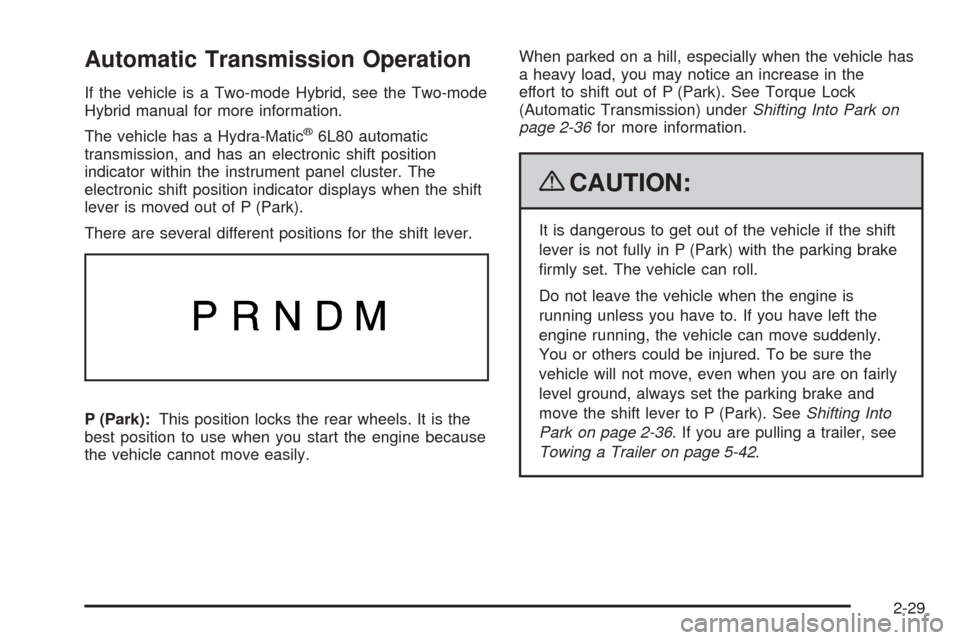
There are several different positions for the shift lever.
P (Park):This position locks the rear wheels. It is the
best position to use when you start the engine because
the vehicle cannot move easily.When parked on a hill, especially when the vehicle has
a heavy load, you may notice an increase in the
effort to shift out of P (Park). See Torque Lock
(Automatic Transmission) underShifting Into Park on
page 2-36for more information.
{CAUTION:
It is dangerous to get out of the vehicle if the shift
lever is not fully in P (Park) with the parking brake
rmly set. The vehicle can roll.
Do not leave the vehicle when the engine is
running unless you have to. If you have left the
engine running, the vehicle can move suddenly.
You or others could be injured. To be sure the
vehicle will not move, even when you are on fairly
level ground, always set the parking brake and
move the shift lever to P (Park). SeeShifting Into
Park on page 2-36. If you are pulling a trailer, see
Towing a Trailer on page 5-42.
2-29
Page 130 of 586
R (Reverse):Use this gear to back up.
Notice:Shifting to R (Reverse) while the vehicle is
moving forward could damage the transmission.
The repairs would not be covered by the vehicle
warranty. Shift to R (Reverse) only after the vehicle
is stopped.
To rock the vehicle back and forth to get out of snow,
ice, or sand without damaging the transmission,
seeIf Your Vehicle is Stuck in Sand, Mud, Ice, or Snow
on page 5-30.
N (Neutral):In this position, the engine does not
connect with the wheels. To restart when you are
already moving, use N (Neutral) only. Also, use
N (Neutral) when the vehicle is being towed.
{CAUTION:
Shifting into a drive gear while the engine is
running at high speed is dangerous. Unless your
foot is rmly on the brake pedal, the vehicle could
move very rapidly. You could lose control and hit
people or objects. Do not shift into a drive gear
while the engine is running at high speed.Notice:Shifting out of P (Park) or N (Neutral) with
the engine running at high speed may damage
the transmission. The repairs would not be covered
by the vehicle warranty. Be sure the engine is
not running at high speed when shifting the vehicle.
D (Drive):This position is for normal driving. It
provides the best fuel economy. If you need more
power for passing, and you are:
Going less than about 35 mph (55 km/h), push the
accelerator pedal about halfway down.
Going about 35 mph (55 km/h) or more, push the
accelerator all the way down.
By doing this, the vehicle shifts down to the next gear
and has more power.
D (Drive) can be used when towing a trailer, carrying a
heavy load, driving on steep hills, or for off-road
driving. You may want to shift the transmission to a
lower gear selection if the transmission shifts too often.
Downshifting the transmission in slippery road
conditions could result in skidding, see Skidding under
Loss of Control on page 5-12.
2-30
Page 154 of 586
OnStar®Virtual Advisor
OnStar
®Virtual Advisor is a feature of OnStar®
Hands-Free Calling that uses minutes to access
location-based weather, local traffic reports, and stock
quotes. Press the phone button and give a few
simple voice commands to browse through the various
topics. See the OnStar
®Owner’s Guide for more
information. This feature is only available in the
continental U.S.
OnStar®Steering Wheel Controls
This vehicle may have a Talk/Mute button that can be
used to interact with OnStar
®Hands-Free Calling.
SeeAudio Steering Wheel Controls on page 3-113for
more information.
On some vehicles, the mute button can be used to dial
numbers into voice mail systems, or to dial phone
extensions. See the OnStar
®Owner’s Guide for more
information.
How OnStar®Service Works
The OnStar
®system can record and transmit vehicle
information. This information is automatically sent to an
OnStar
®Call Center when the OnStar®button is pressed,
the emergency button is pressed, or if the airbags or
AACN system deploy. This information usually includes
the vehicle’s GPS location and, in the event of a crash,additional information regarding the crash that the vehicle
was involved in (e.g. the direction from which the vehicle
was hit). When the Virtual Advisor feature of OnStar
®
Hands-Free Calling is used, the vehicle also sends
OnStar®the vehicle’s GPS location so they can provide
services where it is located.
OnStar
®service cannot work unless the vehicle is in a
place where OnStar®has an agreement with a wireless
service provider for service in that area. OnStar®
service also cannot work unless the vehicle is in a place
where the wireless service provider OnStar®has hired
for that area has coverage, network capacity and
reception when the service is needed, and technology
that is compatible with the OnStar
®service. Not all
services are available everywhere, particularly in remote
or enclosed areas, or at all times.
Location information about the vehicle is only
available if the GPS satellite signals are
unobstructed and available.
The vehicle must have a working electrical system,
including adequate battery power, for the OnStar
®
equipment to operate. There are other problems OnStar®
cannot control that may prevent OnStar®from providing
OnStar®service at any particular time or place. Some
examples are damage to important parts of the vehicle
in a crash, hills, tall buildings, tunnels, weather or
wireless phone network congestion.
2-54
Page 164 of 586
Luggage Carrier
For vehicles with a luggage carrier, items can be loaded
on top of the vehicle.
The luggage carrier has siderails attached to the roof
and crossrails, if equipped, which can be moved
back and forth to help secure cargo. To adjust them,
turn the knob located at each end of the crossrail
counterclockwise until the crossrail can move freely.
To secure the crossrail, turn the knob located at each
end of the crossrail clockwise until tightened. Tie
the load to the siderails or siderail supports.
Notice:Loading cargo on the luggage carrier that
weighs more than 200 lbs (91 kg) or hangs over
the rear or sides of the vehicle can damage
the vehicle. Load cargo so that it rests as far forward
as possible and against the side rails, making
sure to fasten it securely.
Do not exceed the maximum vehicle capacity when
loading the vehicle. For more information on vehicle
capacity and loading, seeLoading the Vehicle on
page 5-32.
To prevent damage or loss of cargo, check now and
then to make sure the luggage and cargo are still
securely fastened.Be sure the cargo is properly loaded.If small heavy objects are placed on the roof, place
the load in the area over the rear wheels (behind
the rear side door on extended models). If needed,
cut a piece of 3/8 inch plywood to t inside the
crossrails and siderails to spread the load. If
plywood is used, tie it to the siderail supports.
Tie the load to the crossrails or the siderail supports.
Use the crossrails only to keep the load from sliding.
To move the crossrails, pull out on the latch release
handle at each end. Slide the crossrail to the desired
position balancing the force side to side. Push the
release handle back into the latched position and
slide the crossrail back and forth slightly to be sure
the latch snaps securely into place.
If needed to carry long items, move the crossrails as
far apart as they will go. Tie the load to the crossrails
and the siderails or siderail supports. Also tie the
load to the bumpers. Do not tie the load so tightly that
the crossrails or siderails are damaged.
After moving a crossrail, be sure it is securely locked
into the siderail.
A Center High-Mounted Stoplamp (CHMSL) is located
above the glass or above the rear load doors.
If items are loaded on the roof of the vehicle, care
should be taken not to block or damage the CHMSL unit.
2-64
Page 167 of 586
Instrument Panel Overview...............................3-4
Hazard Warning Flashers................................3-5
Horn .............................................................3-5
Tilt Wheel.....................................................3-6
Heated Steering Wheel...................................3-6
Turn Signal/Multifunction Lever.........................3-7
Turn and Lane-Change Signals........................3-7
Headlamp High/Low-Beam Changer..................3-8
Flash-to-Pass.................................................3-8
Windshield Wipers..........................................3-9
Rainsense™ II Wipers.....................................3-9
Windshield Washer.......................................3-10
Rear Window Wiper/Washer...........................3-11
Cruise Control..............................................3-11
Exterior Lamps.............................................3-15
Headlamps on Reminder................................3-18
Daytime Running Lamps (DRL).......................3-19
Automatic Headlamp System..........................3-19
Fog Lamps ..................................................3-20
Instrument Panel Brightness...........................3-21
Dome Lamps ...............................................3-21
Dome Lamp Override....................................3-21
Entry Lighting...............................................3-21
Exit Lighting.................................................3-21
Reading Lamps............................................3-22
Electric Power Management...........................3-22Battery Run-Down Protection..........................3-23
Accessory Power Outlet(s).............................3-23
Ashtray(s) and Cigarette Lighter......................3-24
Analog Clock...............................................3-24
Climate Controls............................................3-24
Dual Automatic Climate Control System...........3-24
Outlet Adjustment.........................................3-29
Rear Air Conditioning and Heating System
and Electronic Climate Controls...................3-30
Warning Lights, Gages, and Indicators
............3-31
Instrument Panel Cluster................................3-32
Speedometer and Odometer...........................3-33
Trip Odometer..............................................3-33
Tachometer.................................................3-33
Safety Belt Reminders...................................3-33
Airbag Readiness Light..................................3-34
Passenger Airbag Status Indicator...................3-35
Charging System Light..................................3-36
Brake System Warning Light..........................3-37
Antilock Brake System (ABS) Warning Light.....3-38
StabiliTrak
®Indicator Light.............................3-38
Engine Coolant Temperature Gage..................3-39
Tire Pressure Light.......................................3-39
Malfunction Indicator Lamp.............................3-40
Oil Pressure Light.........................................3-43
Section 3 Instrument Panel
3-1
Page 168 of 586
Security Light...............................................3-44
Fog Lamp Light............................................3-44
Lights On Reminder......................................3-44
Cruise Control Light......................................3-44
Highbeam On Light.......................................3-45
Tow/Haul Mode Light....................................3-45
Fuel Gage...................................................3-45
Driver Information Center (DIC).......................3-46
DIC Operation and Displays...........................3-46
DIC Compass..............................................3-51
DIC Warnings and Messages.........................3-54
DIC Vehicle Customization.............................3-62Audio System(s).............................................3-72
Bluetooth®...................................................3-73
Rear Seat Entertainment (RSE) System
(Overhead)...............................................3-85
Rear Seat Entertainment (RSE) System
(Headrest DVD)........................................3-95
Rear Seat Audio (RSA)................................3-111
Theft-Deterrent Feature................................3-113
Audio Steering Wheel Controls......................3-113
Radio Reception.........................................3-114
Rear Side Window Antenna..........................3-115
XM™ Satellite Radio Antenna System............3-115
Section 3 Instrument Panel
3-2
Page 171 of 586
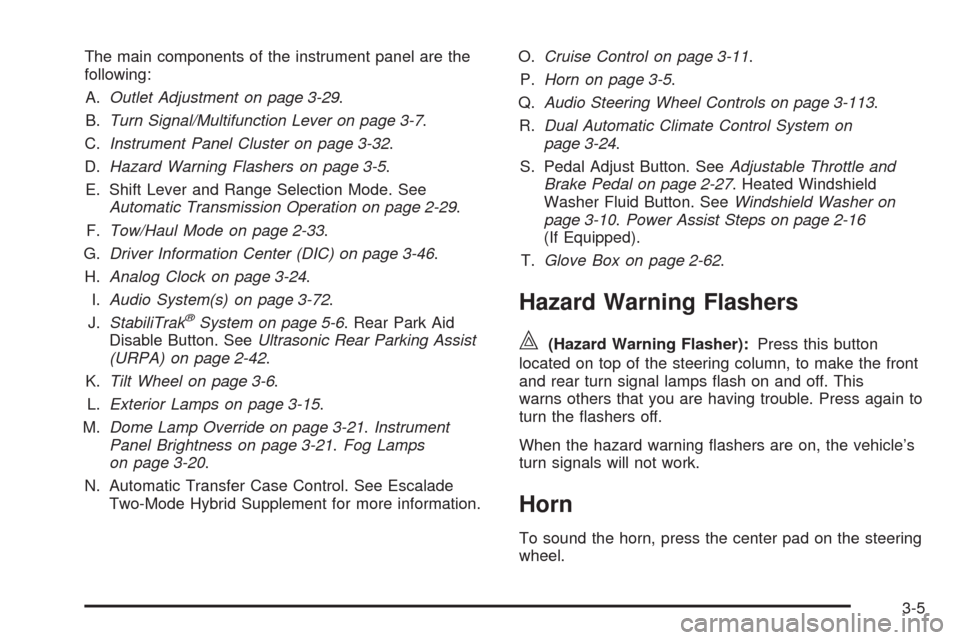
The main components of the instrument panel are the
following:
A.Outlet Adjustment on page 3-29.
B.Turn Signal/Multifunction Lever on page 3-7.
C.Instrument Panel Cluster on page 3-32.
D.Hazard Warning Flashers on page 3-5.
E. Shift Lever and Range Selection Mode. See
Automatic Transmission Operation on page 2-29.
F.Tow/Haul Mode on page 2-33.
G.Driver Information Center (DIC) on page 3-46.
H.Analog Clock on page 3-24.
I.Audio System(s) on page 3-72.
J.StabiliTrak
®System on page 5-6. Rear Park Aid
Disable Button. SeeUltrasonic Rear Parking Assist
(URPA) on page 2-42.
K.Tilt Wheel on page 3-6.
L.Exterior Lamps on page 3-15.
M.Dome Lamp Override on page 3-21.Instrument
Panel Brightness on page 3-21.Fog Lamps
on page 3-20.
N. Automatic Transfer Case Control. See Escalade
Two-Mode Hybrid Supplement for more information.O.Cruise Control on page 3-11.
P.Horn on page 3-5.
Q.Audio Steering Wheel Controls on page 3-113.
R.Dual Automatic Climate Control System on
page 3-24.
S. Pedal Adjust Button. SeeAdjustable Throttle and
Brake Pedal on page 2-27. Heated Windshield
Washer Fluid Button. SeeWindshield Washer on
page 3-10.Power Assist Steps on page 2-16
(If Equipped).
T.Glove Box on page 2-62.
Hazard Warning Flashers
|(Hazard Warning Flasher):Press this button
located on top of the steering column, to make the front
and rear turn signal lamps ash on and off. This
warns others that you are having trouble. Press again to
turn the ashers off.
When the hazard warning ashers are on, the vehicle’s
turn signals will not work.
Horn
To sound the horn, press the center pad on the steering
wheel.
3-5
Page 172 of 586
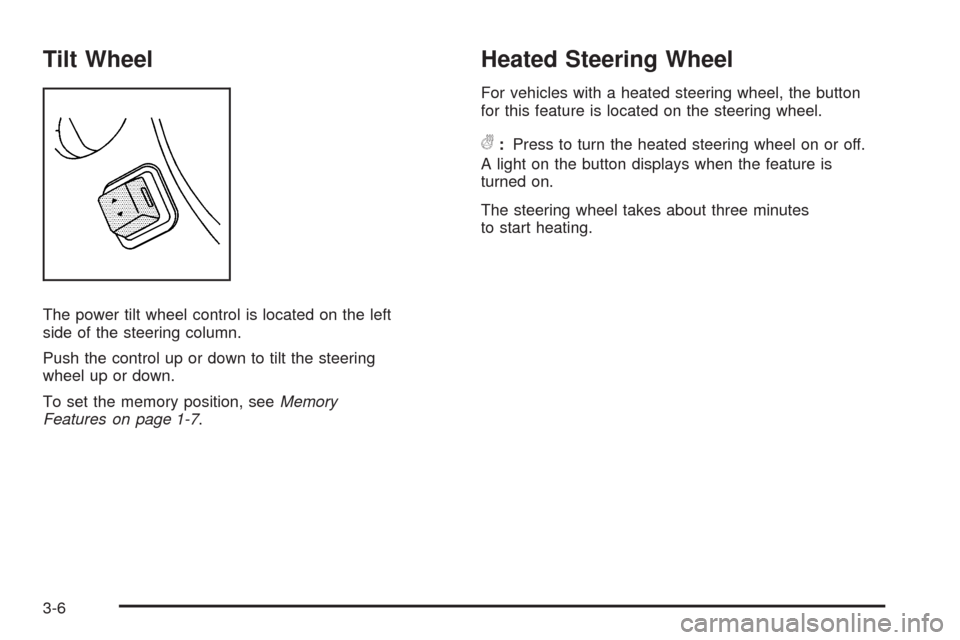
Tilt Wheel
The power tilt wheel control is located on the left
side of the steering column.
Push the control up or down to tilt the steering
wheel up or down.
To set the memory position, seeMemory
Features on page 1-7.
Heated Steering Wheel
For vehicles with a heated steering wheel, the button
for this feature is located on the steering wheel.
(:Press to turn the heated steering wheel on or off.
A light on the button displays when the feature is
turned on.
The steering wheel takes about three minutes
to start heating.
3-6