Lights CADILLAC ESCALADE 2009 3.G Owner's Manual
[x] Cancel search | Manufacturer: CADILLAC, Model Year: 2009, Model line: ESCALADE, Model: CADILLAC ESCALADE 2009 3.GPages: 586, PDF Size: 4.47 MB
Page 210 of 586
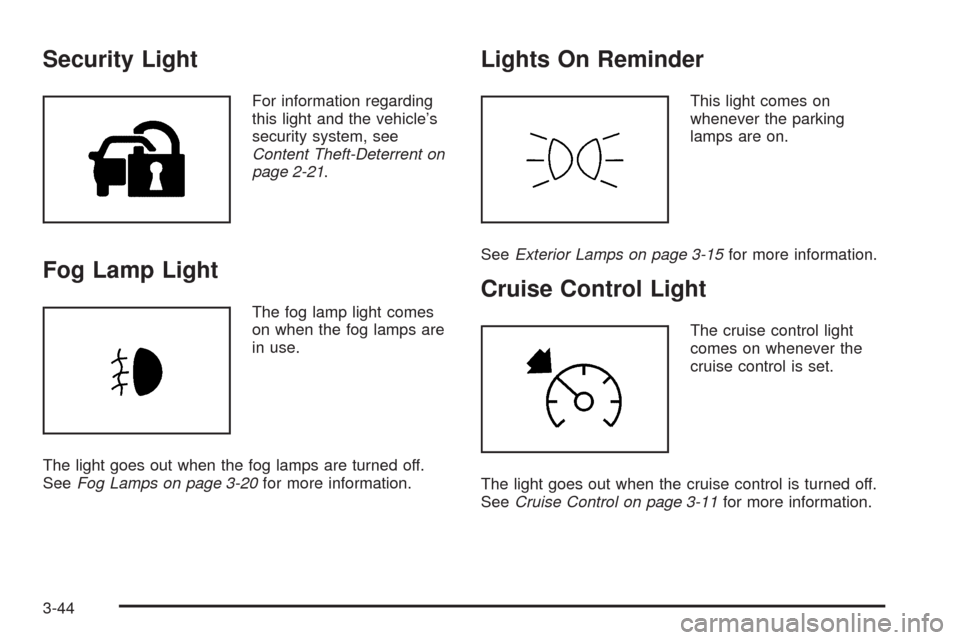
Security Light
For information regarding
this light and the vehicle’s
security system, see
Content Theft-Deterrent on
page 2-21.
Fog Lamp Light
The fog lamp light comes
on when the fog lamps are
in use.
The light goes out when the fog lamps are turned off.
SeeFog Lamps on page 3-20for more information.
Lights On Reminder
This light comes on
whenever the parking
lamps are on.
SeeExterior Lamps on page 3-15for more information.
Cruise Control Light
The cruise control light
comes on whenever the
cruise control is set.
The light goes out when the cruise control is turned off.
SeeCruise Control on page 3-11for more information.
3-44
Page 231 of 586
REMOTE DOOR LOCK
This feature allows you to select the type of feedback
you will receive when locking the vehicle with the
Remote Keyless Entry (RKE) transmitter. You will not
receive feedback when locking the vehicle with the RKE
transmitter if the doors are open. SeeRemote Keyless
Entry (RKE) System Operation on page 2-5for more
information.
Press the customization button until REMOTE DOOR
LOCK appears on the DIC display. Press the set/reset
button once to access the settings for this feature.
Then press the customization button to scroll through
the following settings:
OFF:There will be no feedback when you press the
lock button on the RKE transmitter.
LIGHTS ONLY:The exterior lamps will ash when you
press the lock button on the RKE transmitter.
HORN ONLY:The horn will sound on the second press
of the lock button on the RKE transmitter.
HORN & LIGHTS (default):The exterior lamps will
ash when you press the lock button on the RKE
transmitter, and the horn will sound when the lock button
is pressed again within ve seconds of the previous
command.NO CHANGE:No change will be made to this feature.
The current setting will remain.
To select a setting, press the set/reset button while the
desired setting is displayed on the DIC.
REMOTE DOOR UNLOCK
This feature allows you to select the type of feedback
you will receive when unlocking the vehicle with
the Remote Keyless Entry (RKE) transmitter. You will
not receive feedback when unlocking the vehicle
with the RKE transmitter if the doors are open. See
Remote Keyless Entry (RKE) System Operation
on page 2-5for more information.
Press the customization button until REMOTE DOOR
UNLOCK appears on the DIC display. Press the
set/reset button once to access the settings for this
feature. Then press the customization button to scroll
through the following settings:
LIGHTS OFF:The exterior lamps will not ash when
you press the unlock button on the RKE transmitter.
LIGHTS ON (default):The exterior lamps will
ash when you press the unlock button on the RKE
transmitter.
NO CHANGE:No change will be made to this feature.
The current setting will remain.
To select a setting, press the set/reset button while the
desired setting is displayed on the DIC.
3-65
Page 233 of 586
APPROACH LIGHTING
This feature allows you to select whether or not to have
the exterior lights turn on briey during low light
periods after unlocking the vehicle using the Remote
Keyless Entry (RKE) transmitter.
Press the customization button until APPROACH
LIGHTING appears on the DIC display. Press the
set/reset button once to access the settings for
this feature. Then press the customization button to
scroll through the following settings:
OFF:The exterior lights will not turn on when you
unlock the vehicle with the RKE transmitter.
ON (default):If it is dark enough outside, the exterior
lights will turn on briey when you unlock the vehicle
with the RKE transmitter.
The lights will remain on for 20 seconds or until the lock
button on the RKE transmitter is pressed, or the
vehicle is no longer off. SeeRemote Keyless Entry
(RKE) System Operation on page 2-5for more
information.
NO CHANGE:No change will be made to this feature.
The current setting will remain.
To select a setting, press the set/reset button while the
desired setting is displayed on the DIC.
AUTO HIGH BEAMS
If your vehicle has this feature, it allows you to select to
have the Intellibeam®system turned off or on. See
Exterior Lamps on page 3-15for more information.
Press the customization button until AUTO HIGH
BEAMS appears on the DIC display. Press the set/reset
button once to access the settings for this feature.
Then press the customization button to scroll through
the following settings:
OFF (default):The Intellibeam
®system will be
turned off.
ON:The Intellibeam
®system will be turned on.
NO CHANGE:No change will be made to this feature.
The current setting will remain.
To select a setting, press the set/reset button while the
desired setting is displayed on the DIC.
3-67
Page 291 of 586
9. Once a city has been selected the Street name
category is automatically selected for entry.
If ve or less streets are available for the selected
city, the system displays the list of streets. If
more than ve streets are available the system
displays the alpha keyboard. Start entering
the street name. If ve or less names are available,
a list displays. If more than ve are available, the
List screen button displays a number. This
button represents the number of available streets.
Select this button to view the list and select a street.
10. Once a street has been selected, select the
House # screen button to enter the house number.
The system displays the house number range
that is available for the street.
11. Select the Go screen button. A map screen, with
the destination marked appears.
12. Select the route preference (Fastest, Shortest,
or Other). The system calculates and highlights
the route.
13. Select the Start Guidance screen button. You are
now ready to start your route.
See “Address Entry ” underDestination on page 4-24
for more information.Entering a Point of Interest (POI)
To set a destination by entering a Point of Interest (POI),
do the following:
1. If the radio is already on with a map disc inserted,
skip to Step 5.
2. Press
Oto turn the system on.
3. Insert the DVD map disc. See “Installing the Map
DVD” underMaps on page 4-14for more
information.
4. A caution may appear. Touch the OK screen button
to proceed.
5. Press the DEST hard key.
6. Press the
iPoint of Interest screen button.
7. Select the state/province screen button, if needed,
to change the current state or province. A list of all
of the available states and provinces appear.
Select the state or province.
8. Enter the specic title of the POI in the POI name
space (e.g. Washington Monument).
If ve or less names are available, a list displays.
If more than ve are available, the List screen button
displays a number. This button represents the
number of available POIs. Select this button to view
the list.
4-9
Page 292 of 586
9. Select the Go screen button next to the POI. A map
screen, with the destination marked appears.
10. Select the route preference (Fastest, Shortest,
or Other). The system calculates and highlights
the route.
11. Select the Start Guidance screen button. The route
is now ready to be started.
See “Point of Interest (POI)” underDestination on
page 4-24for more information.
Storing Preset Destinations
1. If the radio is already on with a map disc inserted,
skip to Step 5.
2. Press
Oto turn the system on.
3. Insert the DVD map disc. See “Installing the Map
DVD” underMaps on page 4-14for more
information.
4. A caution may appear. Touch the OK screen button
to proceed.
5. Press the DEST hard key.
Enter a destination. SeeDestination on page 4-24
for more information on how to enter a destination.6. Press the DEST hard key, the Route screen
displays. Press the Final Destination or Stopover
screen button. The information screen displays
for that location. Press the Add to Address Book
screen button. The address book screen appears.
7. Select the Name screen button. An alpha-keyboard
displays. Enter the name. Select the Back screen
button.
8. Press and hold one of the screen buttons at the
bottom of the screen until the name appears in
the screen button on the display.
The name appears in that preset destination screen
button and is now available to select from the
Destination Entry screen. See “Using Your Stored
Preset Destinations” next in this section to select
it as a destination.
See “Adding or Changing Preset Destinations”
underDestination on page 4-24for more information
on how to add preset destinations.
4-10
Page 293 of 586
Using Your Stored Preset Destinations
These destinations are available for selection while
driving.
1. If the radio is already on with a map disc inserted,
skip to Step 5.
2. Press
Oto turn the system on.
3. Insert the DVD map disc. See “Installing the Map
DVD” underMaps on page 4-14for more
information.
4. A caution may appear. Touch the OK screen button
to proceed.
5. Press the DEST hard key.
6. Select one of the available preset destination
screen buttons. A map screen, with the destination
marked appears.
7. Select the route preference (Fastest, Shortest,
or Other). The system calculates and highlights
the route.
8. Select the Start Guidance screen button. The route
is now ready to be started.
See “Preset Destination” underDestination on page 4-24
for more information.
Canceling Guidance
Guidance is canceled once the nal destination is
reached. To cancel guidance prior to arrival at the nal
destination:
1. Press the DEST hard key.
2. Press the Cancel Guidance screen button.
3. Press OK to conrm.
Guidance Volume
Adjust the volume of voice guidance prompts:
1. Press the CONFIG hard key to enter the menu
options, then press the CONFIG key repeatedly
until Nav is selected or touch the Nav screen button.
2. Press the Voice Prompt screen button.
3. Press the + (plus) or – (minus) screen buttons to
increase or to decrease the volume of the voice
prompts. The system responds with the adjusted
voice level.
See “Voice Prompt ” underConfigure Menu on
page 4-42for more information.
Cleaning the Display
Use a soft clean cotton cloth dampened with clean
water.
4-11
Page 296 of 586
U(Space):Select to enter a space between
characters or the words of a name.
Backspace:Select if an incorrect character has
been entered.
To make name entries easier, the system only highlights
the characters that can follow the last one entered.
For example, if a Z is entered, a T may not be available
for selection.
If a name does not display after entry, it may need to
be entered differently or the map DVD disc may
not contain that information. SeeDatabase Coverage
Explanations on page 4-59for more information.
Maps
This section includes basic information that you need to
know about the map database.
The maps are stored on a DVD. The United States,
Canada, and Puerto Rico are contained on one disc.
Detailed Areas
Road network attributes are contained in the map
database for detailed areas. Attributes include
information such as street names, street address, turn
restrictions, etc. A detailed area includes all major
highways, service roads, and residential roads. The
detailed areas include points of interest (POI) such as:
restaurants, airports, banks, hospitals, police stations,
gas stations, tourist attractions, historical monuments,
etc. The map database may not include data for newly
constructed areas or map database corrections that are
completed after the production of the disc. The navigation
system provides full route guidance in the detailed
map areas.
Limited Guidance Areas
Any area that is not classied as detailed, is a limited
guidance area. Limited guidance streets are displayed
on the map but route guidance may not be given
on these streets. Some POI categories, such as the city
center POI category, and some street addresses are
included in the limited guidance areas.
The navigation system informs through voice prompts
when you are traveling into a limited guidance area
where route guidance is not available. The street maps
and the directional arrow displayed on the navigation
system can then be used to determine the remaining
route to your destination.
4-14
Page 307 of 586
4. Once a state or province has been selected the
City name category is automatically selected
for entry.
Enter the City Name or touch the Last 5 Cities
screen button.
The Last 5 Cities screen displays a list of the last ve
city names that had been entered. Select a city from
the list and it appears in the City name area.
If using the alpha keyboard, nish entering the city
name. If ve or less names are available, a list
displays. If more than ve are available, the
List screen button displays a number. This number
represents the number of available cities. Select
this button to view the list and select a city.
5. Once a city has been selected the Street name
category is automatically selected for entry.
Start entering the street name. If ve or less names
are available, a list displays. If more than ve are
available, the List screen button displays a number.
This number represents the number of available
streets. Select this button to view the list.6. Once a street has been selected, press the
House # screen button to enter the house number.
The system displays the house number range
that is available for the street.
7. Select the Go screen button. The map screen,
with the destination marked displays.
8. Select the route preference (Fastest, Shortest,
or Other). The system calculates and highlights
the route.
9. Select the Start Guidance screen button.
The route is now ready to be started.
See “Getting Started on Your Route” later in this
section for more information.
To enter a destination by entering the street name rst:
1. Press the DEST hard key.
2. Select the
2screen button.
3. Select the state/province screen button, if needed,
to change the current state or province. A list of all
of the available states and provinces appear.
Select the state or province.
4-25
Page 308 of 586
4. Select the Street screen button and start entering
the street name or touch the Last 5 Streets screen
button.
If the street name is common, the city might need
to be entered rst.
The Last 5 Streets screen displays a list of the
last ve street names that had been entered. Select
a street from the list and it appears in the Street
name area.
If using the alpha keyboard, nish entering the
street name. If ve or less names are available,
a list displays. If more than ve are available,
the List screen button displays a number. This
number represents the number of available
streets. Select this button to view the list and
select a street.
5. Once a street has been selected, select the
House # screen button to enter the house number.
The system displays the house number range
that is available for the street.
6. Once the house number is selected, the city name
automatically populates. If there is more than
one city available for selection, a list of cities
display. Select the city.7. Select the Go screen button. The map screen,
with the destination marked displays.
8. Select the route preference (Fastest, Shortest,
or Other). The system calculates and highlights
the route.
9. Select the Start Guidance screen button.
The route is now ready to be started.
See “Getting Started on Your Route” later in this
section for more information.
To enter a destination by entering a cross street:
1. Press the DEST hard key.
2. Select the
2screen button.
3. Select the state/province screen button, if needed,
to change the current state or province. A list of all
of the available states and provinces appear.
Select the state or province.
4-26
Page 309 of 586
4. Select the Street screen button and start entering
the street name or touch the Last 5 Streets screen
button.
If the street name is common, the city might need
to be entered rst.
The Last 5 Streets screen displays a list of the last
ve street names that had been entered. Select
a street from the list and it appears in the Street
name area.
If using the alpha keyboard, nish entering the
street name. If ve or less names are available, a
list displays. If more than ve are available, the List
screen button displays a number. This number
represents the number of available streets. Select
this button to view the list and select a street.
5. Once a street has been selected, select the Cross
Street screen button and start entering the cross
street name. If ve or less names are available, a
list displays. If more than ve are available, the List
screen button displays a number. This number
represents the number of available streets. Select
this button to view the list and select a street.
6. Select the Go screen button. The map screen, with
the destination marked displays.
7. Select the route preference (Fastest, Shortest,
or Other). The system calculates and highlights
the route.8. Select the Start Guidance screen button. The route
is now ready to be started.
See “Getting Started on Your Route” later in this
section for more information.
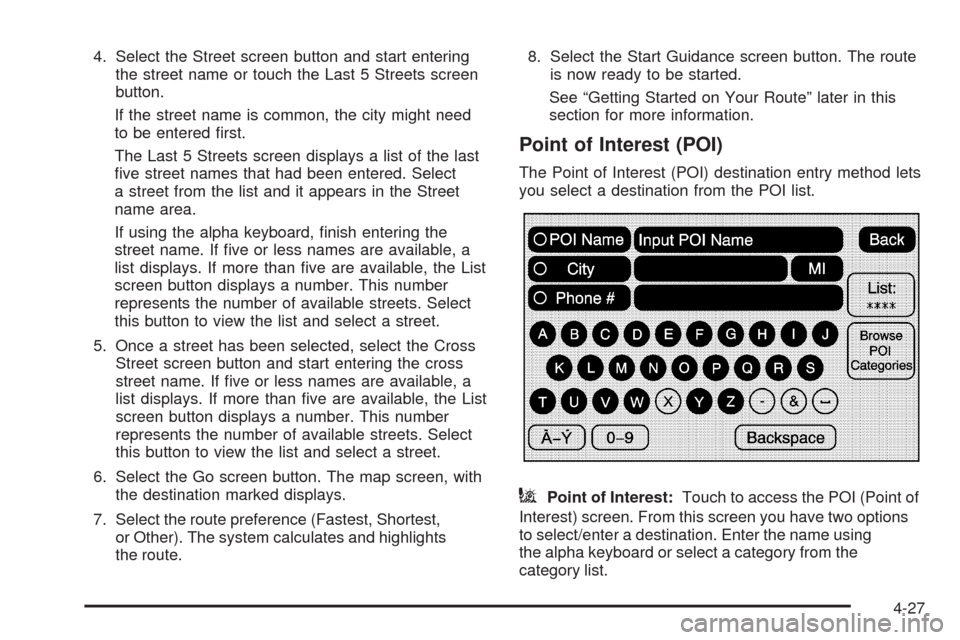
Point of Interest (POI)
The Point of Interest (POI) destination entry method lets
you select a destination from the POI list.
iPoint of Interest:Touch to access the POI (Point of
Interest) screen. From this screen you have two options
to select/enter a destination. Enter the name using
the alpha keyboard or select a category from the
category list.
4-27