remote control CADILLAC ESCALADE 2009 3.G Owner's Manual
[x] Cancel search | Manufacturer: CADILLAC, Model Year: 2009, Model line: ESCALADE, Model: CADILLAC ESCALADE 2009 3.GPages: 586, PDF Size: 4.47 MB
Page 263 of 586
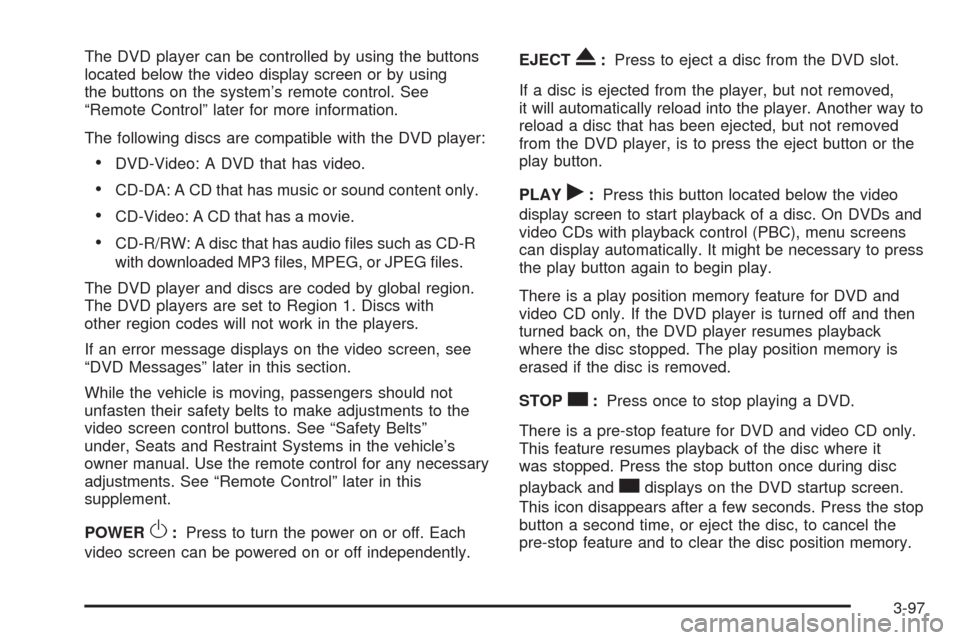
The DVD player can be controlled by using the buttons
located below the video display screen or by using
the buttons on the system’s remote control. See
“Remote Control” later for more information.
The following discs are compatible with the DVD player:
DVD-Video: A DVD that has video.
CD-DA: A CD that has music or sound content only.
CD-Video: A CD that has a movie.
CD-R/RW: A disc that has audio les such as CD-R
with downloaded MP3 les, MPEG, or JPEG les.
The DVD player and discs are coded by global region.
The DVD players are set to Region 1. Discs with
other region codes will not work in the players.
If an error message displays on the video screen, see
“DVD Messages” later in this section.
While the vehicle is moving, passengers should not
unfasten their safety belts to make adjustments to the
video screen control buttons. See “Safety Belts”
under, Seats and Restraint Systems in the vehicle’s
owner manual. Use the remote control for any necessary
adjustments. See “Remote Control” later in this
supplement.
POWER
O:Press to turn the power on or off. Each
video screen can be powered on or off independently.EJECT
X:Press to eject a disc from the DVD slot.
If a disc is ejected from the player, but not removed,
it will automatically reload into the player. Another way to
reload a disc that has been ejected, but not removed
from the DVD player, is to press the eject button or the
play button.
PLAY
r:Press this button located below the video
display screen to start playback of a disc. On DVDs and
video CDs with playback control (PBC), menu screens
can display automatically. It might be necessary to press
the play button again to begin play.
There is a play position memory feature for DVD and
video CD only. If the DVD player is turned off and then
turned back on, the DVD player resumes playback
where the disc stopped. The play position memory is
erased if the disc is removed.
STOP
c:Press once to stop playing a DVD.
There is a pre-stop feature for DVD and video CD only.
This feature resumes playback of the disc where it
was stopped. Press the stop button once during disc
playback and
cdisplays on the DVD startup screen.
This icon disappears after a few seconds. Press the stop
button a second time, or eject the disc, to cancel the
pre-stop feature and to clear the disc position memory.
3-97
Page 265 of 586
Vehicle Speakers
Audio from the DVD player or an auxiliary device
can be heard through the vehicle speakers or the
wireless/wired headphones, while the radio is tuned to
one of the six frequencies selected on the Sound Around
portion of the system’s remote control. See “Remote
Control” later in this supplement.
Only one audio source can be heard through the
vehicle’s speakers at a time. The audio source being
used is specied by the A/V (audio/video) source
selected on the driver side head restraint video display
screen.
To turn the RSE system audio output to the vehicle’s
speakers, press Sound Around ON, on the system’s
remote control. The audio from the RSE system can be
heard through the wireless/wired headphones and
the vehicle’s speakers at the same time. The volume on
the radio can vary when switching between the radio,
CD, DVD, MP3, or an auxiliary device.
Wireless Headphones
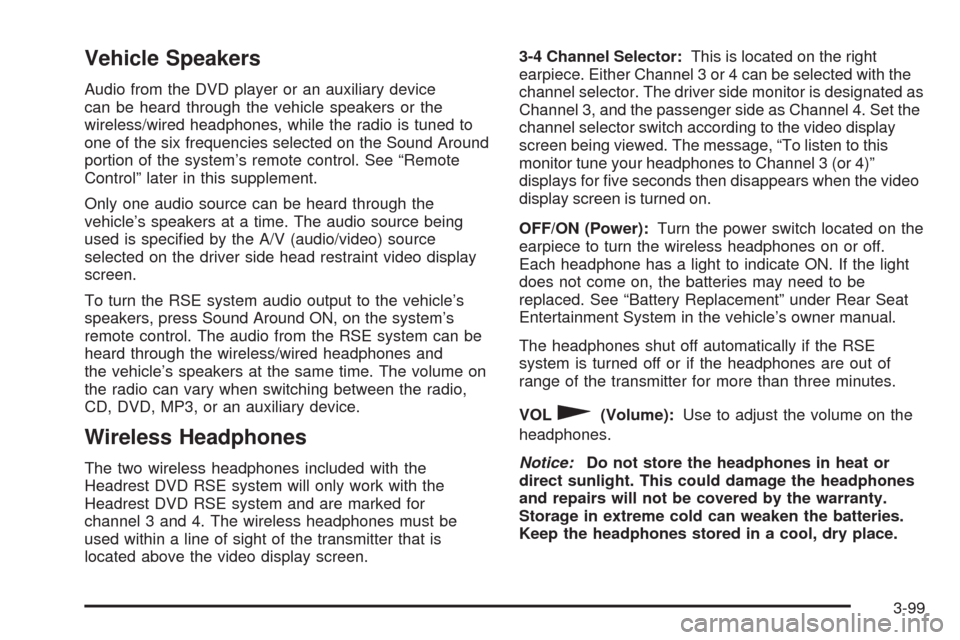
The two wireless headphones included with the
Headrest DVD RSE system will only work with the
Headrest DVD RSE system and are marked for
channel 3 and 4. The wireless headphones must be
used within a line of sight of the transmitter that is
located above the video display screen.3-4 Channel Selector:This is located on the right
earpiece. Either Channel 3 or 4 can be selected with the
channel selector. The driver side monitor is designated as
Channel 3, and the passenger side as Channel 4. Set the
channel selector switch according to the video display
screen being viewed. The message, “To listen to this
monitor tune your headphones to Channel 3 (or 4)”
displays for ve seconds then disappears when the video
display screen is turned on.
OFF/ON (Power):Turn the power switch located on the
earpiece to turn the wireless headphones on or off.
Each headphone has a light to indicate ON. If the light
does not come on, the batteries may need to be
replaced. See “Battery Replacement” under Rear Seat
Entertainment System in the vehicle’s owner manual.
The headphones shut off automatically if the RSE
system is turned off or if the headphones are out of
range of the transmitter for more than three minutes.
VOL
0(Volume):Use to adjust the volume on the
headphones.
Notice:Do not store the headphones in heat or
direct sunlight. This could damage the headphones
and repairs will not be covered by the warranty.
Storage in extreme cold can weaken the batteries.
Keep the headphones stored in a cool, dry place.
3-99
Page 266 of 586
Remote Control
To use the remote control, aim at the remote sensor
located on top center of the video display screen
and press the desired button.
Objects blocking the line-of-sight can affect the function
of the remote control. Direct or very bright light can
affect the ability of the transmitter to receive signals from
the remote control. If the remote control does not
seem to be working, the batteries might need to be
replaced. See “Battery Replacement” following
this section.
The remote control provided with the Headrest DVD
RSE system, is not a universal remote control and will
not control other equipment.
Notice:Storing the remote control in a hot area or
in direct sunlight can damage it, and the repairs
will not be covered by the warranty. Storage
in extreme cold can weaken the batteries. Keep the
remote control stored in a cool, dry place.
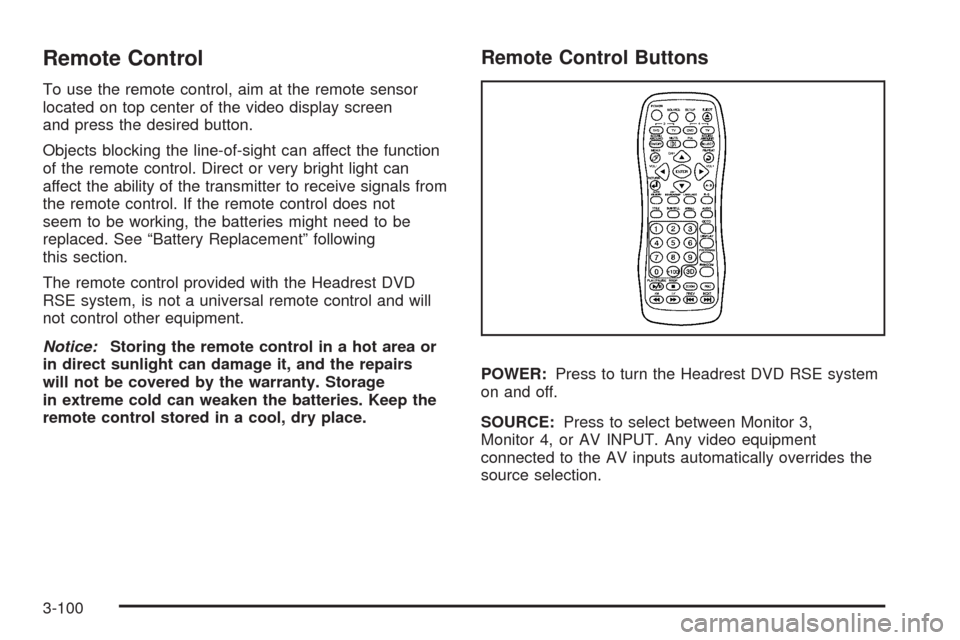
Remote Control Buttons
POWER:Press to turn the Headrest DVD RSE system
on and off.
SOURCE:Press to select between Monitor 3,
Monitor 4, or AV INPUT. Any video equipment
connected to the AV inputs automatically overrides the
source selection.
3-100
Page 268 of 586
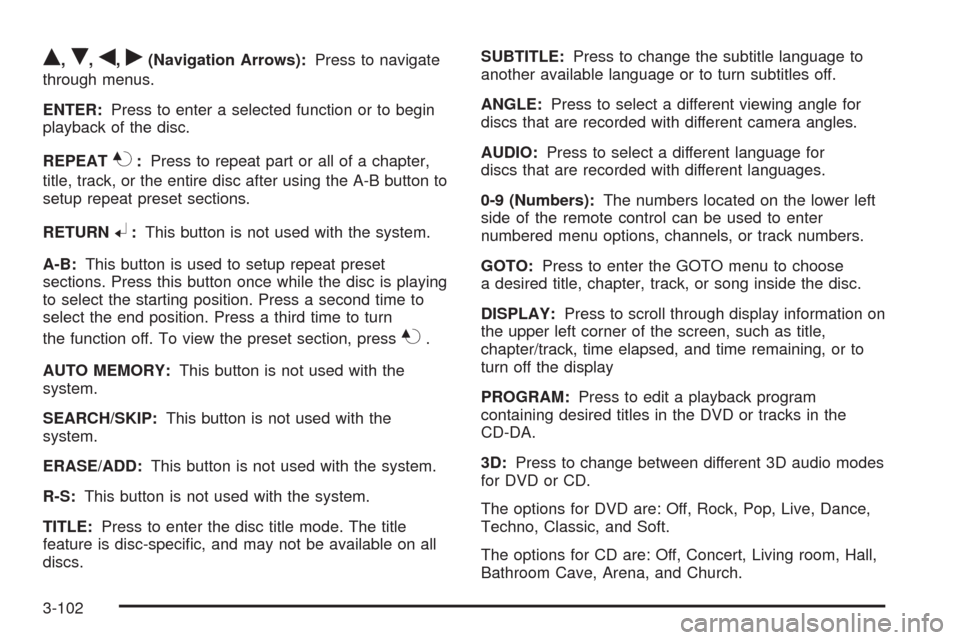
Q,R,q,r(Navigation Arrows):Press to navigate
through menus.
ENTER:Press to enter a selected function or to begin
playback of the disc.
REPEAT
7:Press to repeat part or all of a chapter,
title, track, or the entire disc after using the A-B button to
setup repeat preset sections.
RETURN
8:This button is not used with the system.
A-B:This button is used to setup repeat preset
sections. Press this button once while the disc is playing
to select the starting position. Press a second time to
select the end position. Press a third time to turn
the function off. To view the preset section, press
7.
AUTO MEMORY:This button is not used with the
system.
SEARCH/SKIP:This button is not used with the
system.
ERASE/ADD:This button is not used with the system.
R-S:This button is not used with the system.
TITLE:Press to enter the disc title mode. The title
feature is disc-specic, and may not be available on all
discs.SUBTITLE:Press to change the subtitle language to
another available language or to turn subtitles off.
ANGLE:Press to select a different viewing angle for
discs that are recorded with different camera angles.
AUDIO:Press to select a different language for
discs that are recorded with different languages.
0-9 (Numbers):The numbers located on the lower left
side of the remote control can be used to enter
numbered menu options, channels, or track numbers.
GOTO:Press to enter the GOTO menu to choose
a desired title, chapter, track, or song inside the disc.
DISPLAY:Press to scroll through display information on
the upper left corner of the screen, such as title,
chapter/track, time elapsed, and time remaining, or to
turn off the display
PROGRAM:Press to edit a playback program
containing desired titles in the DVD or tracks in the
CD-DA.
3D:Press to change between different 3D audio modes
for DVD or CD.
The options for DVD are: Off, Rock, Pop, Live, Dance,
Techno, Classic, and Soft.
The options for CD are: Off, Concert, Living room, Hall,
Bathroom Cave, Arena, and Church.
3-102
Page 269 of 586
RANDOM:Press to play titles randomly.
PLAY/PAUSE
r/j: Press to start playback of the
disc, or to pause playback.
STOP
c:Press to stop playback of a disc.
To resume disc playback, press PLAY.
To start playback from the beginning of the disc,
press STOP, STOP, then PLAY.
ZOOM:Press to either enlarge the viewed image by
2X, 3X, and 4X, or reduce the image by 1/2X, 1/3X,
and 1/4X.
PBC (Playback Control):Press to turn video
CD playback control on or off.
FR
r(Fast Reverse):Press to fast reverse the disc.
Press multiple times to choose between 2X, 4X, 8X,
16X, and 32X speeds.
FF
[(Fast Forward):Press to fast forward the disc.
Press multiple times to choose between 2X, 4X, 8X,
16X, and 32X speeds.
PREV
g(Previous):Press to play the previous
chapter or track. To return to previous chapters or tracks
one at a time, press and release multiple times until
the desired chapter or track is reached.NEXT
l:Press to play the next chapter or track.
To go to the next chapter or track one at a time, press
and release multiple times until the desired chapter
or track is reached.
Battery Replacement
To change batteries in the remote control:
1. Turn the remote control face down.
2. Press down on the ridged area of the battery cover
and slide it off.
3. Install two AAA batteries into the battery
compartment.
4. Slide the cover back on until it clicks.
If the remote control is to be stored for a long period of
time, remove the batteries and keep it in a cool, dry place.
Using the RSE On-Screen Display
(OSD) Menus
Use the OSD setup display menus for:
Initial setup
Display setup
Parental control setup
Adjusting the picture quality
Setting the various outputs
On-screen display language
3-103
Page 270 of 586
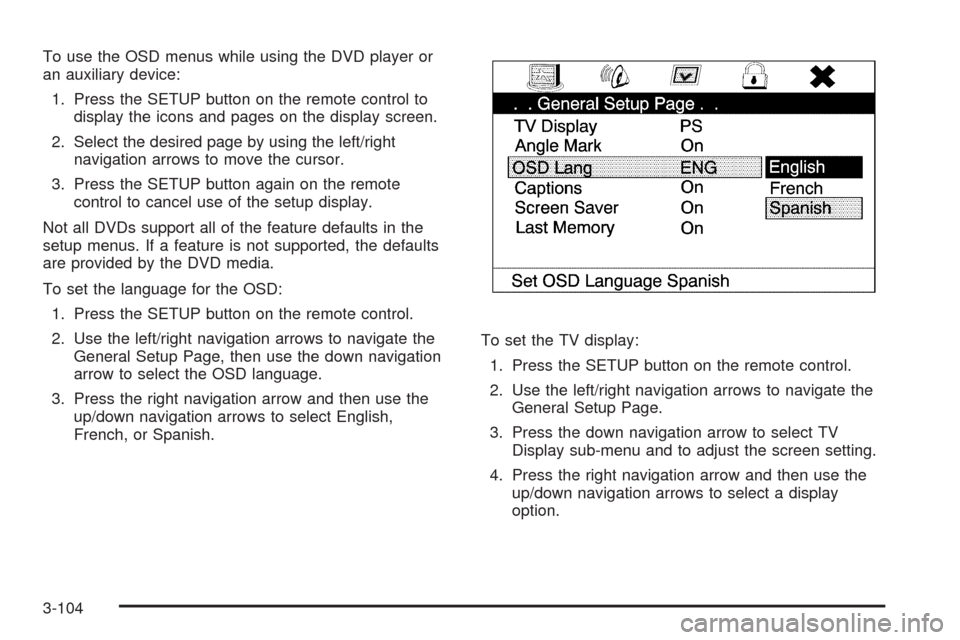
To use the OSD menus while using the DVD player or
an auxiliary device:
1. Press the SETUP button on the remote control to
display the icons and pages on the display screen.
2. Select the desired page by using the left/right
navigation arrows to move the cursor.
3. Press the SETUP button again on the remote
control to cancel use of the setup display.
Not all DVDs support all of the feature defaults in the
setup menus. If a feature is not supported, the defaults
are provided by the DVD media.
To set the language for the OSD:
1. Press the SETUP button on the remote control.
2. Use the left/right navigation arrows to navigate the
General Setup Page, then use the down navigation
arrow to select the OSD language.
3. Press the right navigation arrow and then use the
up/down navigation arrows to select English,
French, or Spanish.To set the TV display:
1. Press the SETUP button on the remote control.
2. Use the left/right navigation arrows to navigate the
General Setup Page.
3. Press the down navigation arrow to select TV
Display sub-menu and to adjust the screen setting.
4. Press the right navigation arrow and then use the
up/down navigation arrows to select a display
option.
3-104
Page 271 of 586
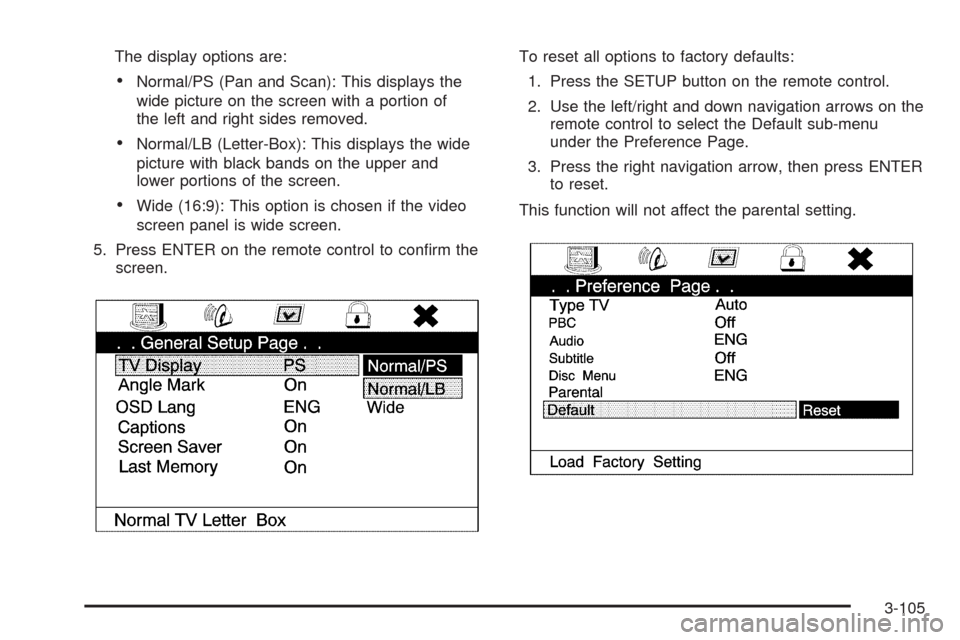
The display options are:
Normal/PS (Pan and Scan): This displays the
wide picture on the screen with a portion of
the left and right sides removed.
Normal/LB (Letter-Box): This displays the wide
picture with black bands on the upper and
lower portions of the screen.
Wide (16:9): This option is chosen if the video
screen panel is wide screen.
5. Press ENTER on the remote control to conrm the
screen.To reset all options to factory defaults:
1. Press the SETUP button on the remote control.
2. Use the left/right and down navigation arrows on the
remote control to select the Default sub-menu
under the Preference Page.
3. Press the right navigation arrow, then press ENTER
to reset.
This function will not affect the parental setting.
3-105
Page 272 of 586
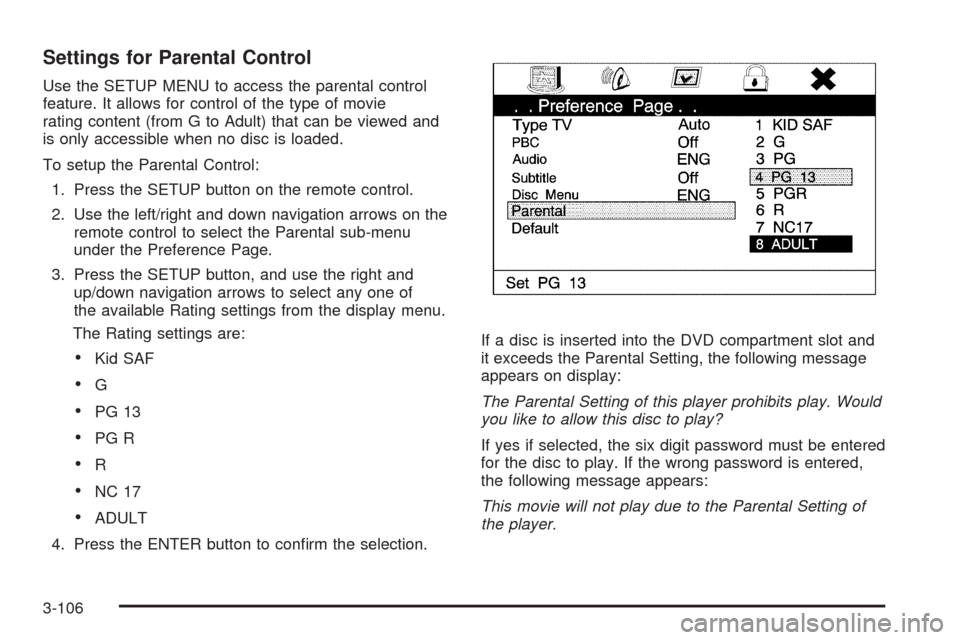
Settings for Parental Control
Use the SETUP MENU to access the parental control
feature. It allows for control of the type of movie
rating content (from G to Adult) that can be viewed and
is only accessible when no disc is loaded.
To setup the Parental Control:
1. Press the SETUP button on the remote control.
2. Use the left/right and down navigation arrows on the
remote control to select the Parental sub-menu
under the Preference Page.
3. Press the SETUP button, and use the right and
up/down navigation arrows to select any one of
the available Rating settings from the display menu.
The Rating settings are:
Kid SAF
G
PG 13
PG R
R
NC 17
ADULT
4. Press the ENTER button to conrm the selection.If a disc is inserted into the DVD compartment slot and
it exceeds the Parental Setting, the following message
appears on display:
The Parental Setting of this player prohibits play. Would
you like to allow this disc to play?
If yes if selected, the six digit password must be entered
for the disc to play. If the wrong password is entered,
the following message appears:
This movie will not play due to the Parental Setting of
the player.
3-106
Page 273 of 586
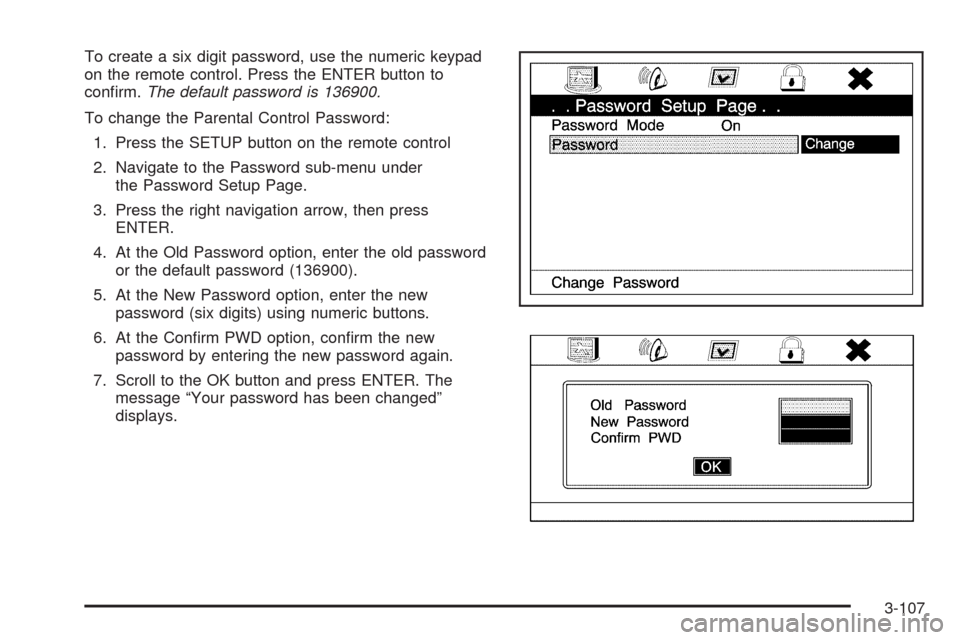
To create a six digit password, use the numeric keypad
on the remote control. Press the ENTER button to
conrm.The default password is 136900.
To change the Parental Control Password:
1. Press the SETUP button on the remote control
2. Navigate to the Password sub-menu under
the Password Setup Page.
3. Press the right navigation arrow, then press
ENTER.
4. At the Old Password option, enter the old password
or the default password (136900).
5. At the New Password option, enter the new
password (six digits) using numeric buttons.
6. At the Conrm PWD option, conrm the new
password by entering the new password again.
7. Scroll to the OK button and press ENTER. The
message “Your password has been changed”
displays.
3-107
Page 275 of 586
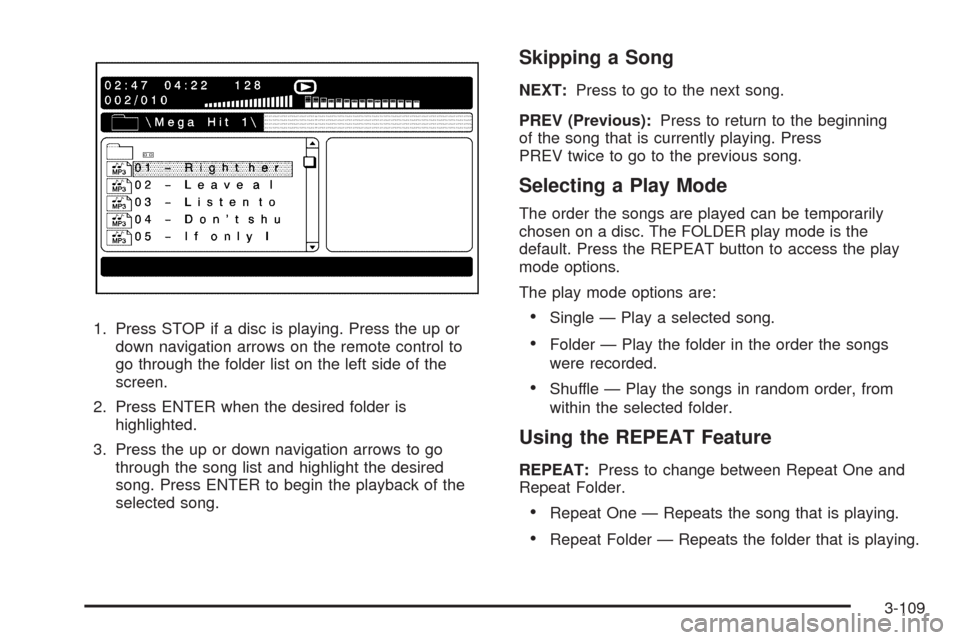
1. Press STOP if a disc is playing. Press the up or
down navigation arrows on the remote control to
go through the folder list on the left side of the
screen.
2. Press ENTER when the desired folder is
highlighted.
3. Press the up or down navigation arrows to go
through the song list and highlight the desired
song. Press ENTER to begin the playback of the
selected song.
Skipping a Song
NEXT:Press to go to the next song.
PREV (Previous):Press to return to the beginning
of the song that is currently playing. Press
PREV twice to go to the previous song.
Selecting a Play Mode
The order the songs are played can be temporarily
chosen on a disc. The FOLDER play mode is the
default. Press the REPEAT button to access the play
mode options.
The play mode options are:
Single — Play a selected song.
Folder — Play the folder in the order the songs
were recorded.
Shuffle — Play the songs in random order, from
within the selected folder.
Using the REPEAT Feature
REPEAT:Press to change between Repeat One and
Repeat Folder.
Repeat One — Repeats the song that is playing.
Repeat Folder — Repeats the folder that is playing.
3-109