phone CADILLAC ESCALADE 2009 3.G Owner's Guide
[x] Cancel search | Manufacturer: CADILLAC, Model Year: 2009, Model line: ESCALADE, Model: CADILLAC ESCALADE 2009 3.GPages: 586, PDF Size: 4.47 MB
Page 285 of 586
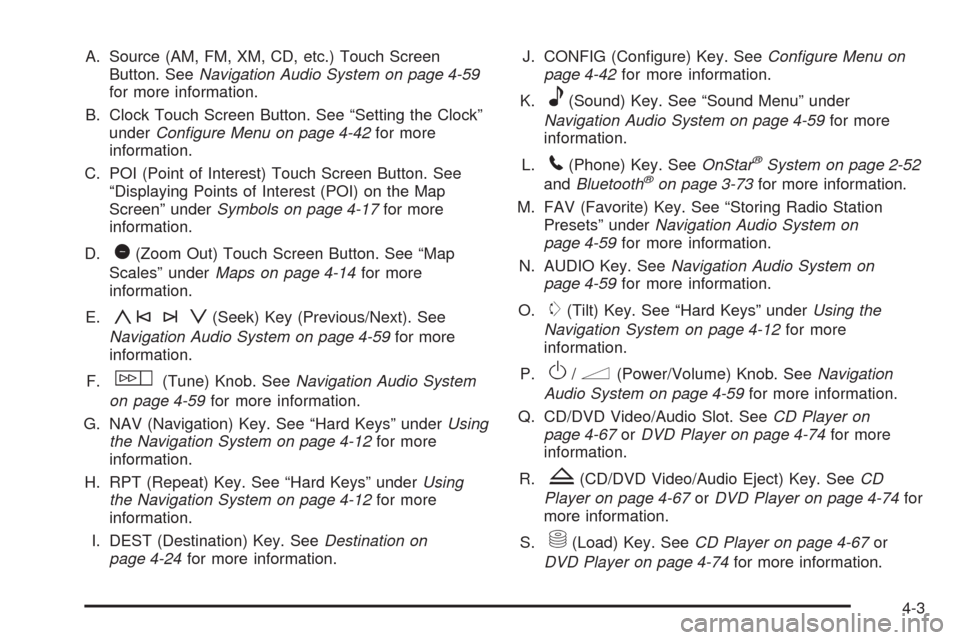
A. Source (AM, FM, XM, CD, etc.) Touch Screen
Button. SeeNavigation Audio System on page 4-59
for more information.
B. Clock Touch Screen Button. See “Setting the Clock”
underConfigure Menu on page 4-42for more
information.
C. POI (Point of Interest) Touch Screen Button. See
“Displaying Points of Interest (POI) on the Map
Screen” underSymbols on page 4-17for more
information.
D.
1(Zoom Out) Touch Screen Button. See “Map
Scales” underMaps on page 4-14for more
information.
E.
y©¨z(Seek) Key (Previous/Next). See
Navigation Audio System on page 4-59for more
information.
F.
w(Tune) Knob. SeeNavigation Audio System
on page 4-59for more information.
G. NAV (Navigation) Key. See “Hard Keys” underUsing
the Navigation System on page 4-12for more
information.
H. RPT (Repeat) Key. See “Hard Keys” underUsing
the Navigation System on page 4-12for more
information.
I. DEST (Destination) Key. SeeDestination on
page 4-24for more information.J. CONFIG (Congure) Key. SeeConfigure Menu on
page 4-42for more information.
K.
e(Sound) Key. See “Sound Menu” under
Navigation Audio System on page 4-59for more
information.
L.
5(Phone) Key. SeeOnStar®System on page 2-52
andBluetooth®on page 3-73for more information.
M. FAV (Favorite) Key. See “Storing Radio Station
Presets” underNavigation Audio System on
page 4-59for more information.
N. AUDIO Key. SeeNavigation Audio System on
page 4-59for more information.
O.
m(Tilt) Key. See “Hard Keys” underUsing the
Navigation System on page 4-12for more
information.
P.
O/n(Power/Volume) Knob. SeeNavigation
Audio System on page 4-59for more information.
Q. CD/DVD Video/Audio Slot. SeeCD Player on
page 4-67orDVD Player on page 4-74for more
information.
R.
Z(CD/DVD Video/Audio Eject) Key. SeeCD
Player on page 4-67orDVD Player on page 4-74for
more information.
S.
M(Load) Key. SeeCD Player on page 4-67or
DVD Player on page 4-74for more information.
4-3
Page 287 of 586
Set up the navigation features before beginning
driving, such as entering an address or a preset
destination.
Set up your phone numbers in advance so they can
be called easily with the press of a single button or
a single voice command (for navigation systems
equipped with phone capability).
{CAUTION:
Taking your eyes off the road too long or too often
while using the navigation system could cause a
crash resulting in injury or death to you or others.
Focus your attention on driving.
{CAUTION:
Avoid looking too long or too often at the moving
map on the navigation screen. This could cause a
crash and you or others can be injured or killed.
Use the turn-by-turn voice guidance directions
whenever possible.Use the navigation system to:
Plan a route.
Select a destination using various methods and
choices.
Follow turn-by-turn route and map guidance with
voice prompts, only if permitted by traffic laws,
controls, and conditions.
You should always be alert and obey traffic and roadway
laws and instructions, regardless of the guidance from the
navigation system. Because the navigation system uses
street map information that does not include all traffic
restrictions or the latest road changes, it may suggest
using a road that is now closed for construction or a turn
that is prohibited by signs at the intersection. Because
the system uses limited information, you must always
evaluate whether following the system’s directions is safe
and legal for the current conditions.
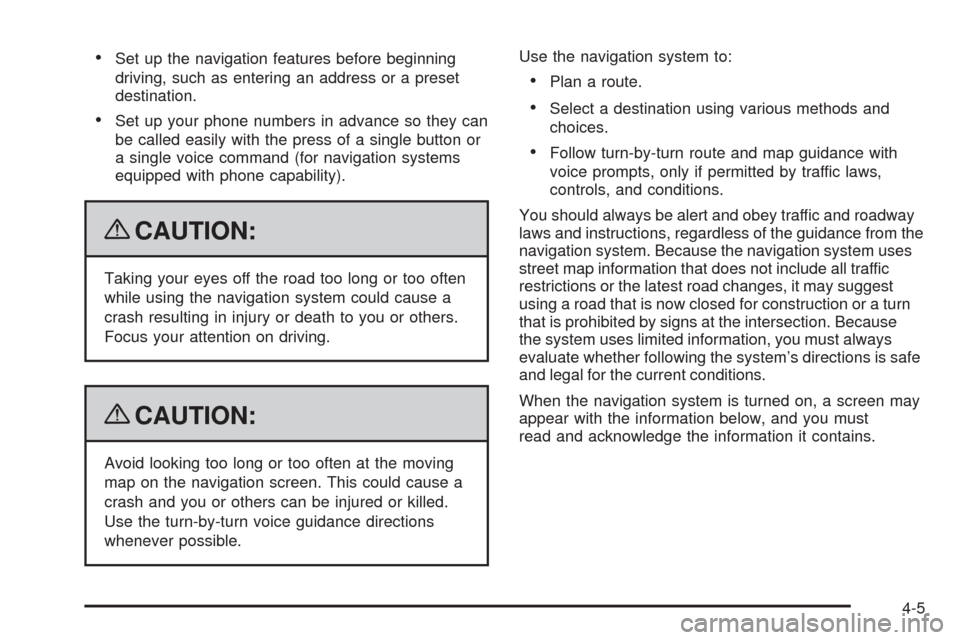
When the navigation system is turned on, a screen may
appear with the information below, and you must
read and acknowledge the information it contains.
4-5
Page 295 of 586
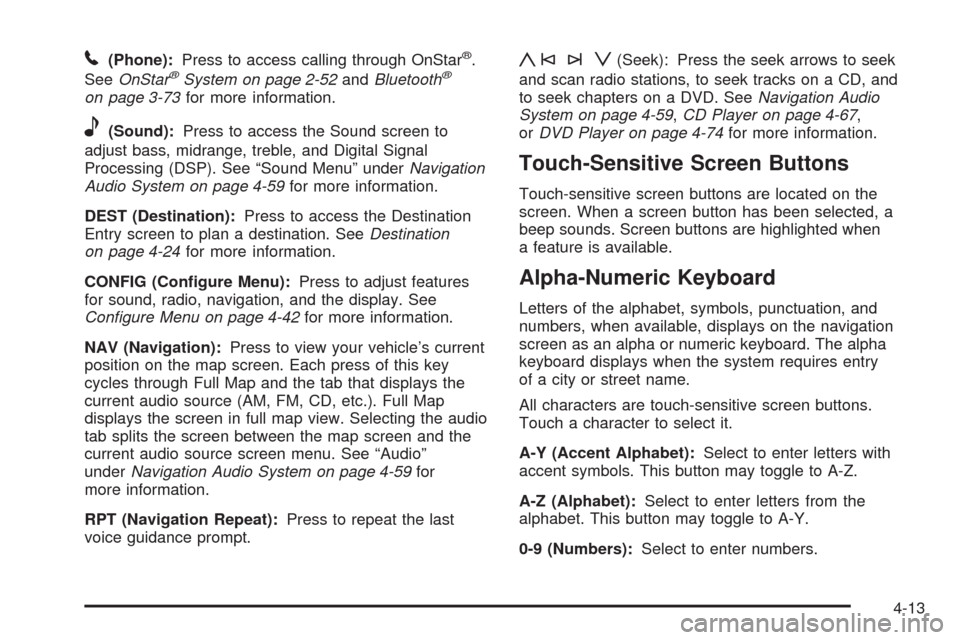
5(Phone):Press to access calling through OnStar®.
SeeOnStar®System on page 2-52andBluetooth®
on page 3-73for more information.
e(Sound):Press to access the Sound screen to
adjust bass, midrange, treble, and Digital Signal
Processing (DSP). See “Sound Menu” underNavigation
Audio System on page 4-59for more information.
DEST (Destination):Press to access the Destination
Entry screen to plan a destination. SeeDestination
on page 4-24for more information.
CONFIG (Congure Menu):Press to adjust features
for sound, radio, navigation, and the display. See
Configure Menu on page 4-42for more information.
NAV (Navigation):Press to view your vehicle’s current
position on the map screen. Each press of this key
cycles through Full Map and the tab that displays the
current audio source (AM, FM, CD, etc.). Full Map
displays the screen in full map view. Selecting the audio
tab splits the screen between the map screen and the
current audio source screen menu. See “Audio”
underNavigation Audio System on page 4-59for
more information.
RPT (Navigation Repeat):Press to repeat the last
voice guidance prompt.
y©¨z(Seek): Press the seek arrows to seek
and scan radio stations, to seek tracks on a CD, and
to seek chapters on a DVD. SeeNavigation Audio
System on page 4-59,CD Player on page 4-67,
orDVD Player on page 4-74for more information.
Touch-Sensitive Screen Buttons
Touch-sensitive screen buttons are located on the
screen. When a screen button has been selected, a
beep sounds. Screen buttons are highlighted when
a feature is available.
Alpha-Numeric Keyboard
Letters of the alphabet, symbols, punctuation, and
numbers, when available, displays on the navigation
screen as an alpha or numeric keyboard. The alpha
keyboard displays when the system requires entry
of a city or street name.
All characters are touch-sensitive screen buttons.
Touch a character to select it.
A-Y (Accent Alphabet):Select to enter letters with
accent symbols. This button may toggle to A-Z.
A-Z (Alphabet):Select to enter letters from the
alphabet. This button may toggle to A-Y.
0-9 (Numbers):Select to enter numbers.
4-13
Page 303 of 586
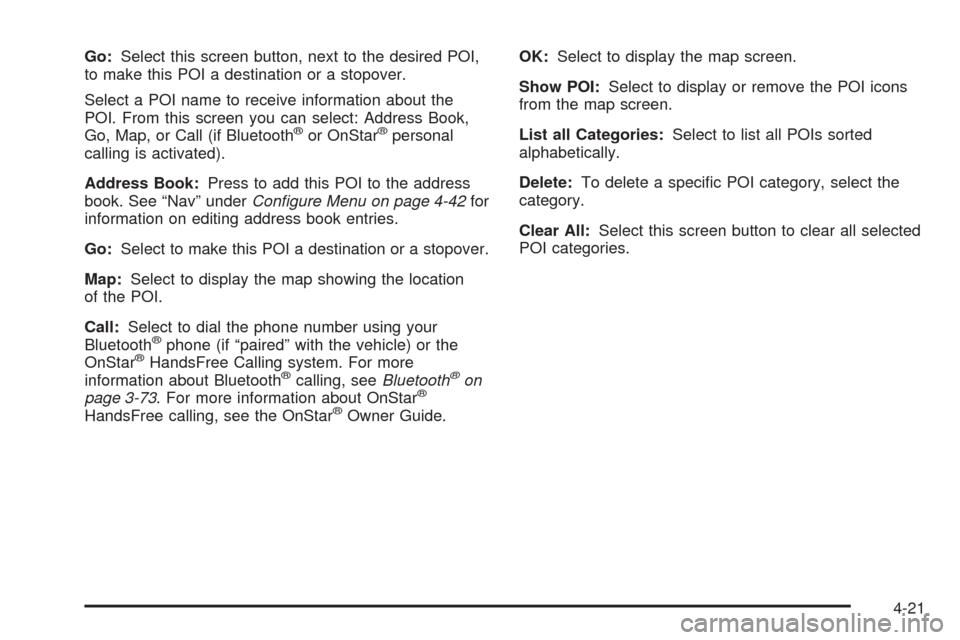
Go:Select this screen button, next to the desired POI,
to make this POI a destination or a stopover.
Select a POI name to receive information about the
POI. From this screen you can select: Address Book,
Go, Map, or Call (if Bluetooth
®or OnStar®personal
calling is activated).
Address Book:Press to add this POI to the address
book. See “Nav” underConfigure Menu on page 4-42for
information on editing address book entries.
Go:Select to make this POI a destination or a stopover.
Map:Select to display the map showing the location
of the POI.
Call:Select to dial the phone number using your
Bluetooth
®phone (if “paired” with the vehicle) or the
OnStar®HandsFree Calling system. For more
information about Bluetooth®calling, seeBluetooth®on
page 3-73. For more information about OnStar®
HandsFree calling, see the OnStar®Owner Guide.OK:Select to display the map screen.
Show POI:Select to display or remove the POI icons
from the map screen.
List all Categories:Select to list all POIs sorted
alphabetically.
Delete:To delete a specic POI category, select the
category.
Clear All:Select this screen button to clear all selected
POI categories.
4-21
Page 317 of 586
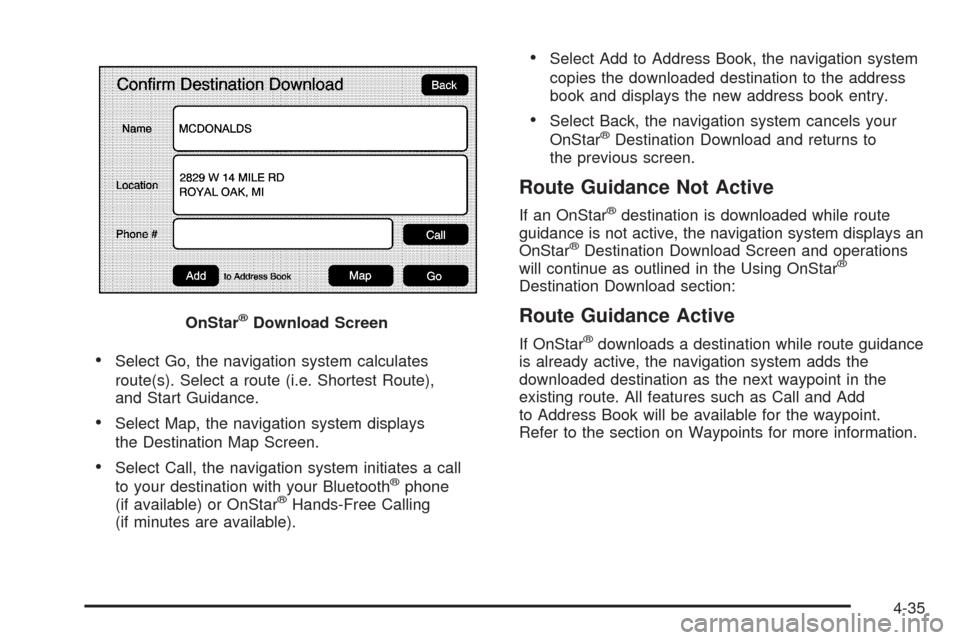
Select Go, the navigation system calculates
route(s). Select a route (i.e. Shortest Route),
and Start Guidance.
Select Map, the navigation system displays
the Destination Map Screen.
Select Call, the navigation system initiates a call
to your destination with your Bluetooth®phone
(if available) or OnStar®Hands-Free Calling
(if minutes are available).
Select Add to Address Book, the navigation system
copies the downloaded destination to the address
book and displays the new address book entry.
Select Back, the navigation system cancels your
OnStar®Destination Download and returns to
the previous screen.
Route Guidance Not Active
If an OnStar®destination is downloaded while route
guidance is not active, the navigation system displays an
OnStar
®Destination Download Screen and operations
will continue as outlined in the Using OnStar®
Destination Download section:
Route Guidance Active
If OnStar®downloads a destination while route guidance
is already active, the navigation system adds the
downloaded destination as the next waypoint in the
existing route. All features such as Call and Add
to Address Book will be available for the waypoint.
Refer to the section on Waypoints for more information. OnStar
®Download Screen
4-35
Page 318 of 586
Previous Destinations
Previous OnStar®Destination Downloads are saved
under Previous Destinations in the navigation
system where they can be accessed or saved
to the address book.
Important Notes regarding OnStar
®Destination
Download:
If the navigation system is turned off when the
destination download is attempted, the navigation
system will automatically turn on and display
the OnStar
®Destination Download Screen. The
radio will remain on after the download occurs.
If OnStar®downloads a destination and the address
is not found in the mapping disc’s database and
routing by coordinates is not available, the Go and
Map buttons gray out and routing will not be
available. Press the blue OnStar
®button for further
assistance.
The Call button grays out when there is no phone
number available for your destination and while
connected to OnStar
®.
Map Destination Screen Functions
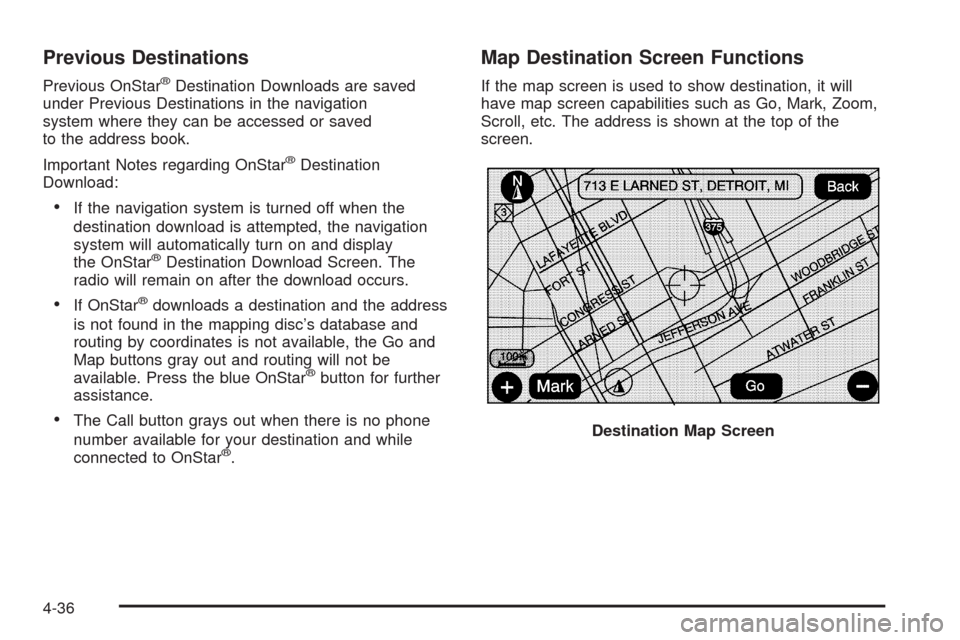
If the map screen is used to show destination, it will
have map screen capabilities such as Go, Mark, Zoom,
Scroll, etc. The address is shown at the top of the
screen.
Destination Map Screen
4-36
Page 327 of 586
To add or change the phone number of an address
book entry:
1. Select the CONFIG hard key.
2. Select the NAV screen button.
3. Select the Edit/View Address Book screen button.
4. Select the address book entry to change.
5. Touch the Phone # screen button and use
the numeric keyboard to input or change
the phone number.
6. Touch the OK screen button to save your changes,
then touch the Back screen button to return to the
Address Book information screen.
To change the map icon of an address book entry:
1. Select the CONFIG hard key.
2. Select the NAV screen button.
3. Select the Edit/View Address Book screen button.
4. Select the address book entry to change.
5. Select the Icon screen button.
6. Select an icon from the list.
To add a voice tag to an address book entry:
1. Select the CONFIG hard key.
2. Select the NAV screen button.
3. Select the Edit/View Address Book screen button.4. Select the Add Voice Tag screen button.
5. The system will ask for you to state the name.
You will have four seconds to state the name.
The system will respond back with the name and
prompt you to repeat the name for conrmation.
To delete an address book entry:
1. Select the CONFIG hard key.
2. Select the NAV screen button.
3. Select the Edit/View Address Book screen button.
4. Select the address book entry to delete.
5. Press the Delete screen button to delete the
address book entry.
6. A conrmation pop-up will display. Select Ok to
delete; select Cancel to cancel the operation.
To delete the entire address book:
1. Select the CONFIG hard key.
2. Select the NAV screen button.
3. Select the Edit/View Address Book screen button.
4. A list of all the address book entries will display.
Press and hold the Clear All screen button.
5. A conrmation pop-up will display. Select Ok to
delete; select Cancel to cancel the operation.
4-45
Page 341 of 586
Ordering Map DVDs
The map DVD in your vehicle is the most up-to-date
information available when your vehicle was produced.
The map DVD is updated periodically, provided that
the map information has changed.
If you have any questions about the operation of the
navigation system or the update process, contact the
GM Nav Disc Center toll-free phone number,
1-877-NAV-DISC (1-877-628-3472) or go to the center’s
website, gmnavdisc.com. If you need any updates or a
replacement disc, because the current disc is lost,
damaged, or needs to be updated, call the GM Nav Disc
Center or order a new disc online. To order a disc, have
your Vehicle Identication Number (VIN) available. This
helps the center make sure you receive the correct and
most up-to-date DVD map disc for your vehicle. See
“Vehicle Identication Number (VIN)” in the Index of your
vehicle’s owner manual for more information.
After receiving the updated disc, replace the old disc in
the navigation system. See “Installing the DVD Map
Disc” and “Ejecting the DVD Map Disc” underMaps on
page 4-14. Dispose of the old disc to avoid confusion
about which disc is the most current.
Database Coverage Explanations
Coverage area depends upon the map detail available.
Some areas have greater map detail than others. The
navigation system works only as well as the information
provided on the map disc. SeeOrdering Map DVDs on
page 4-59on how to obtain updated map information.
Navigation Audio System
Notice:Before adding any sound equipment to the
vehicle, such as an audio system, CD player, CB
radio, mobile telephone, or two-way radio, make sure
that it can be added by checking with your dealer/
retailer. Also, check federal rules covering mobile
radio and telephone units. If sound equipment can be
added, it is very important to do it properly. Added
sound equipment can interfere with the operation of
the vehicle’s engine, radio, or other systems, and
even damage them. The vehicle’s systems can
interfere with the operation of sound equipment that
has been added.
Notice:The chime signals related to safety belts,
parking brake, and other functions of the vehicle
operate through the navigation system. If that
equipment is replaced or additional equipment is
added to the vehicle, the chimes may not work. Make
sure that replacement or additional equipment is
compatible with the vehicle before installing it. See
“Accessories and Modications” in the Index of the
vehicle’s owner manual.
4-59
Page 363 of 586
Do not add any label to a CD or DVD, it could get
caught in the player. If a CD or DVD is recorded on a
personal computer and a description label is needed, try
labeling the top of the recorded CD or DVD with a
soft marker.
Auxiliary Devices
The vehicle may have a rear entertainment system
(RSE) with a second and third row screen. The RSE has
audio adapters to allow you to connect auxiliary
devices. The audio can be heard through the speakers
or through the wireless or wired headphones. See
“Audio/Video Jacks” under,Rear Seat Entertainment
(RSE) System (Overhead) on page 3-85orRear
Seat Entertainment (RSE) System (Headrest DVD) on
page 3-95for more information.
Drivers are encouraged to set up any auxiliary device
while the vehicle is in P (Park). SeeDefensive
Driving on page 5-2for more information on driver
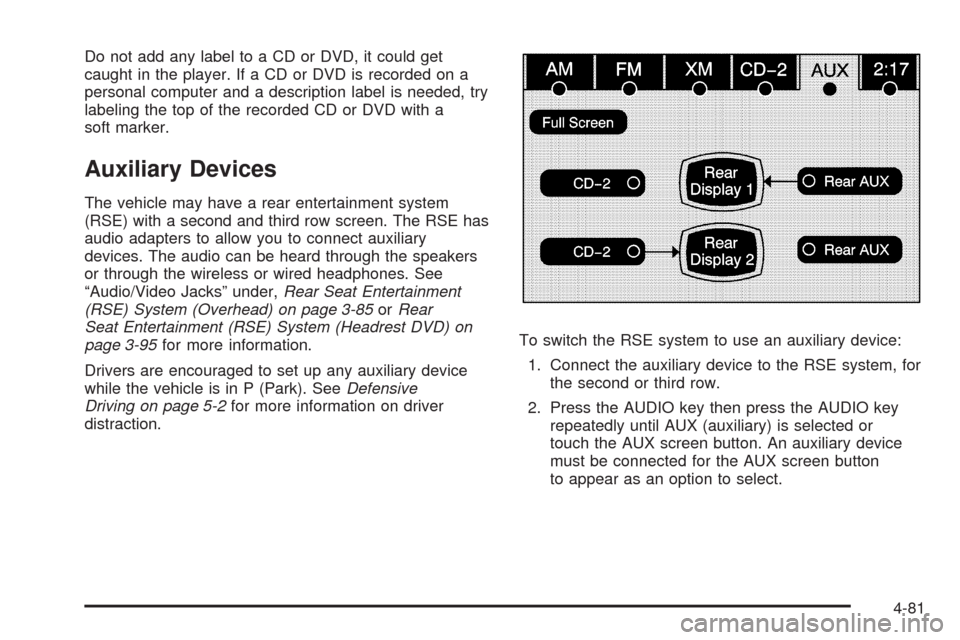
distraction.To switch the RSE system to use an auxiliary device:
1. Connect the auxiliary device to the RSE system, for
the second or third row.
2. Press the AUDIO key then press the AUDIO key
repeatedly until AUX (auxiliary) is selected or
touch the AUX screen button. An auxiliary device
must be connected for the AUX screen button
to appear as an option to select.
4-81
Page 433 of 586
Filling the Tank
{CAUTION:
Fuel vapor burns violently and a fuel re can
cause bad injuries. To help avoid injuries to you
and others, read and follow all the instructions on
the pump island. Turn off the engine when you are
refueling. Do not smoke if you are near fuel or
refueling the vehicle. Do not use cellular phones.
Keep sparks, ames, and smoking materials away
from fuel. Do not leave the fuel pump unattended
when refueling the vehicle. This is against the law
in some places. Do not re-enter the vehicle while
pumping fuel. Keep children away from the fuel
pump; never let children pump fuel.
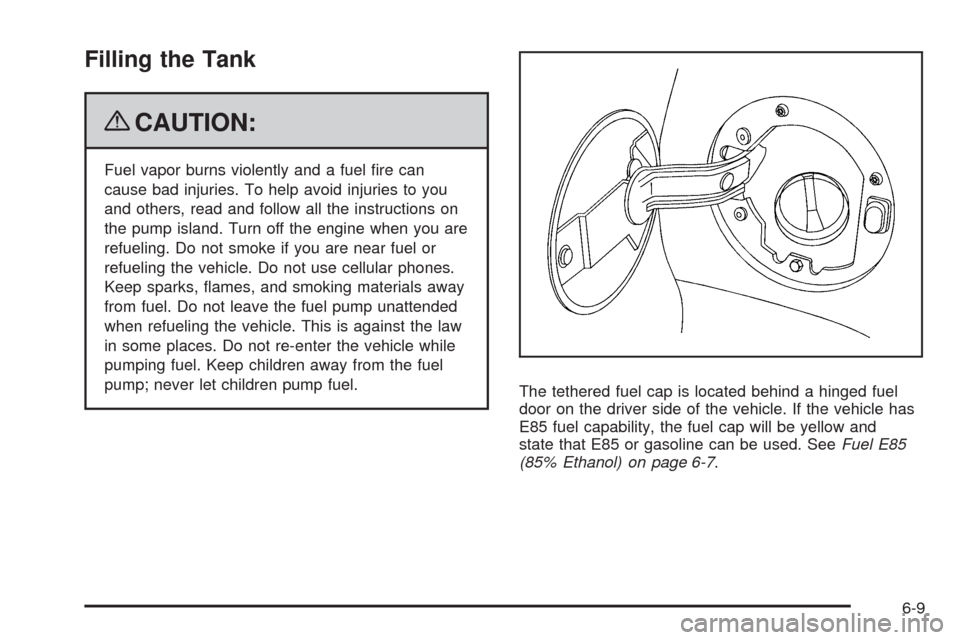
The tethered fuel cap is located behind a hinged fuel
door on the driver side of the vehicle. If the vehicle has
E85 fuel capability, the fuel cap will be yellow and
state that E85 or gasoline can be used. SeeFuel E85
(85% Ethanol) on page 6-7.
6-9