lock CADILLAC ESCALADE 2011 3.G Workshop Manual
[x] Cancel search | Manufacturer: CADILLAC, Model Year: 2011, Model line: ESCALADE, Model: CADILLAC ESCALADE 2011 3.GPages: 558, PDF Size: 7.59 MB
Page 133 of 558
Black plate (77,1)Cadillac Escalade/Escalade ESV Owner Manual - 2011
Seats and Restraints 3-77
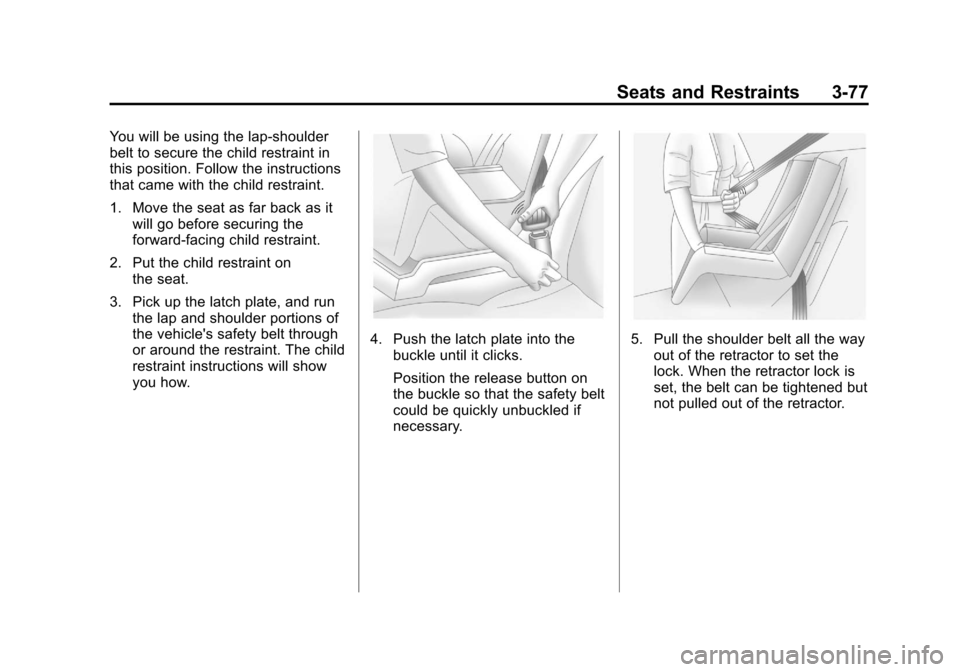
You will be using the lap-shoulder
belt to secure the child restraint in
this position. Follow the instructions
that came with the child restraint.
1. Move the seat as far back as itwill go before securing the
forward-facing child restraint.
2. Put the child restraint on the seat.
3. Pick up the latch plate, and run the lap and shoulder portions of
the vehicle's safety belt through
or around the restraint. The child
restraint instructions will show
you how.
4. Push the latch plate into thebuckle until it clicks.
Position the release button on
the buckle so that the safety belt
could be quickly unbuckled if
necessary.5. Pull the shoulder belt all the wayout of the retractor to set the
lock. When the retractor lock is
set, the belt can be tightened but
not pulled out of the retractor.
Page 134 of 558
Black plate (78,1)Cadillac Escalade/Escalade ESV Owner Manual - 2011
3-78 Seats and Restraints
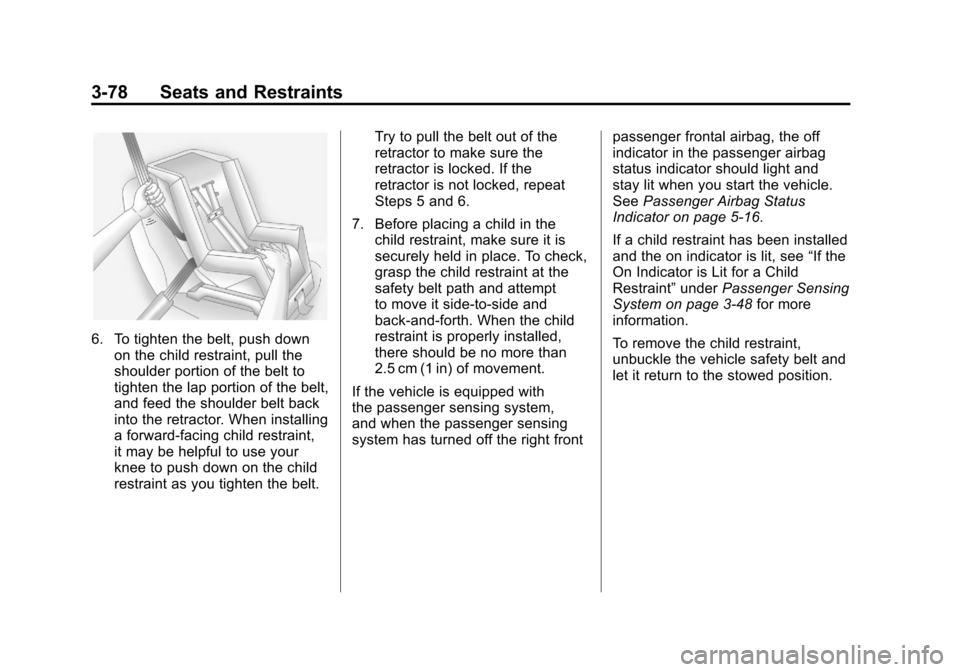
6. To tighten the belt, push downon the child restraint, pull the
shoulder portion of the belt to
tighten the lap portion of the belt,
and feed the shoulder belt back
into the retractor. When installing
a forward-facing child restraint,
it may be helpful to use your
knee to push down on the child
restraint as you tighten the belt. Try to pull the belt out of the
retractor to make sure the
retractor is locked. If the
retractor is not locked, repeat
Steps 5 and 6.
7. Before placing a child in the child restraint, make sure it is
securely held in place. To check,
grasp the child restraint at the
safety belt path and attempt
to move it side‐to‐side and
back‐and‐forth. When the child
restraint is properly installed,
there should be no more than
2.5 cm (1 in) of movement.
If the vehicle is equipped with
the passenger sensing system,
and when the passenger sensing
system has turned off the right front passenger frontal airbag, the off
indicator in the passenger airbag
status indicator should light and
stay lit when you start the vehicle.
See
Passenger Airbag Status
Indicator on page 5‑16.
If a child restraint has been installed
and the on indicator is lit, see “If the
On Indicator is Lit for a Child
Restraint” underPassenger Sensing
System on page 3‑48 for more
information.
To remove the child restraint,
unbuckle the vehicle safety belt and
let it return to the stowed position.
Page 135 of 558
Black plate (1,1)Cadillac Escalade/Escalade ESV Owner Manual - 2011
Storage 4-1
Storage
Storage Compartments
Glove Box . . . . . . . . . . . . . . . . . . . . 4-1
Cupholders . . . . . . . . . . . . . . . . . . . 4-1
Armrest Storage . . . . . . . . . . . . . . 4-2
Rear Storage . . . . . . . . . . . . . . . . . 4-2
Center Console Storage . . . . . . 4-3
Roof Rack System
Roof Rack System . . . . . . . . . . . . 4-3
Storage
Compartments
Glove Box
Pull the bottom of the glove box
handle upward to open it. Use
the key to lock and unlock the
glove box.
Cupholders
Cupholders are located in the center
console for the front passengers.
Press down on the access door
release to open and use the front
cupholders. Push the door back
down to close it. Push down and
then back on the front cupholder
to remove it for cleaning.
Heated and Cooled
Cupholders
For vehicles with heated and cooled
cupholders, these are located in the
front center console.
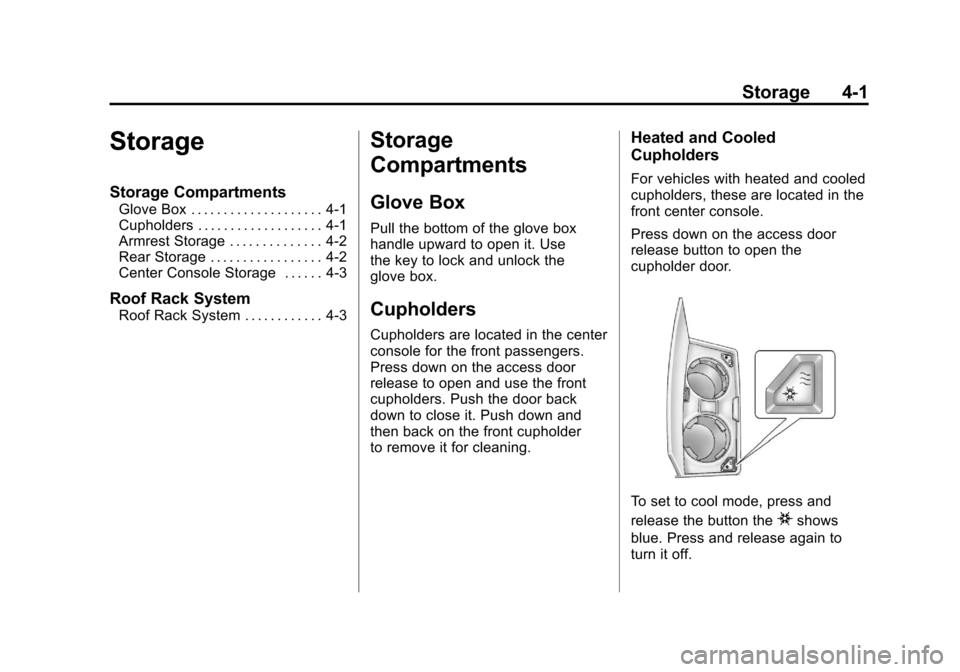
Press down on the access door
release button to open the
cupholder door.
To set to cool mode, press and
release the button the
ishows
blue. Press and release again to
turn it off.
Page 137 of 558
Black plate (3,1)Cadillac Escalade/Escalade ESV Owner Manual - 2011
Storage 4-3
Center Console Storage
A console compartment is located
between the bucket seats.
The console has both an upper and
lower storage bin accessed by lifting
up on the latches located at the
front of the console lid.
The console may have an
accessory power outlet inside.
SeePower Outlets on page 5‑9.
The rear of the console also has a
cupholder that swings down for the
rear seat passengers to use.
Roof Rack System
{WARNING
If something is carried on top of
the vehicle that is longer or wider
than the roof rack— like paneling,
plywood, or a mattress— the wind
can catch it while the vehicle is
being driven. The item being
carried could be violently torn off,
and this could cause a collision,
and damage the vehicle. Never
carry something longer or wider
than the roof rack on top of the
vehicle unless using a GM
Certified accessory carrier.
For vehicles with a roof rack, the
rack can be used to load items.
For roof racks that do not have
crossrails included, GM Certified
crossrails can be purchased as
an accessory. See your dealer
for additional information. For vehicles with crossrails, they
can be moved back and forth to
help secure cargo. To adjust them,
turn the knob located at each end
of the crossrail counterclockwise
until the crossrail can move freely.
To secure the crossrail, turn the
knob located at each end of the
crossrail clockwise until tightened.
Tie the load to the siderails or
siderail supports.
Notice:
Loading cargo on the
roof rack that weighs more than
91 kg (200 lbs) or hangs over the
rear or sides of the vehicle may
damage the vehicle. Load cargo
so that it rests evenly between
the crossrails, making sure to
fasten cargo securely.
To prevent damage or loss of
cargo when driving, check to
make sure crossrails and cargo
are securely fastened. Loading
cargo on the roof rack will make the
vehicle’s center of gravity higher.
Page 138 of 558
Black plate (4,1)Cadillac Escalade/Escalade ESV Owner Manual - 2011
4-4 Storage
Avoid high speeds, sudden starts,
sharp turns, sudden braking or
abrupt maneuvers, otherwise it may
result in loss of control. If driving for
a long distance, on rough roads,
or at high speeds, occasionally stop
the vehicle to make sure the cargo
remains in its place.
Do not exceed the maximum vehicle
capacity when loading the vehicle.
For more information on vehicle
capacity and loading, seeVehicle
Load Limits on page 9‑24.
To prevent damage or loss of cargo,
check now and then to make sure
the luggage and cargo are still
securely fastened. Be sure the cargo is properly
loaded.
.If small heavy objects are placed
on the roof, place the load in
the area over the rear wheels
(behind the rear side door on
extended models). If needed,
cut a piece of 3/8 inch plywood
to fit inside the crossrails and
siderails to spread the load.
If plywood is used, tie it to the
siderail supports.
.Tie the load to the crossrails
or the siderail supports. Use
the crossrails only to keep the
load from sliding. To move the
crossrails, pull out on the latch
release handle at each end.
Slide the crossrail to the desired
position balancing the force side
to side. Push the release handle
back into the latched position
and slide the crossrail back and
forth slightly to be sure the latch
snaps securely into place.
.If needed to carry long items,
move the crossrails as far apart
as they will go. Tie the load to
the crossrails and the siderails
or siderail supports. Also tie
the load to the bumpers. Do not
tie the load so tightly that the
crossrails or siderails are
damaged.
.After moving a crossrail, be sure
it is securely locked into the
siderail.
A Center High-Mounted Stoplamp
(CHMSL) is located above the glass
or above the rear load doors.
If items are loaded on the roof of the
vehicle, care should be taken not to
block or damage the CHMSL unit.
Page 139 of 558
Black plate (1,1)Cadillac Escalade/Escalade ESV Owner Manual - 2011
Instruments and Controls 5-1
Instruments and
Controls
Controls
Steering Wheel Adjustment . . . 5-2
Steering Wheel Controls . . . . . . 5-3
Heated Steering Wheel . . . . . . . 5-5
Horn . . . . . . . . . . . . . . . . . . . . . . . . . . 5-5
Windshield Wiper/Washer . . . . . 5-5
Rear Window Wiper/Washer . . . . . . . . . . . . . . . . . . . . . . 5-6
Compass . . . . . . . . . . . . . . . . . . . . . 5-6
Clock . . . . . . . . . . . . . . . . . . . . . . . . . 5-8
Power Outlets . . . . . . . . . . . . . . . . . 5-9
Cigarette Lighter . . . . . . . . . . . . . 5-10
Ashtrays . . . . . . . . . . . . . . . . . . . . . 5-11
Warning Lights, Gauges, and
Indicators
Warning Lights, Gauges, and Indicators . . . . . . . . . . . . . . . . . . . 5-11
Instrument Cluster . . . . . . . . . . . 5-12
Speedometer . . . . . . . . . . . . . . . . 5-13
Odometer . . . . . . . . . . . . . . . . . . . . 5-13
Trip Odometer . . . . . . . . . . . . . . . 5-13
Tachometer . . . . . . . . . . . . . . . . . . 5-13
Fuel Gauge . . . . . . . . . . . . . . . . . . 5-13
Engine Coolant Temperature Gauge . . . . . . . . . . . . . . . . . . . . . . 5-14
Safety Belt Reminders . . . . . . . 5-15
Airbag Readiness Light . . . . . . 5-16
Passenger Airbag Status Indicator . . . . . . . . . . . . . . . . . . . . 5-16
Charging System Light . . . . . . 5-18
Malfunction
Indicator Lamp . . . . . . . . . . . . . 5-18 Brake System Warning
Light . . . . . . . . . . . . . . . . . . . . . . . 5-21
Antilock Brake System (ABS) Warning Light . . . . . . . . . . . . . . 5-22
Tow/Haul Mode Light . . . . . . . . 5-23
StabiliTrak
®Indicator Light . . . 5-23
Tire Pressure Light . . . . . . . . . . 5-23
Engine Oil Pressure Light . . . . 5-24
Security Light . . . . . . . . . . . . . . . . 5-25
High-Beam on Light . . . . . . . . . 5-25
Front Fog Lamp Light . . . . . . . . 5-25
Lamps on Reminder . . . . . . . . . 5-25
Cruise Control Light . . . . . . . . . 5-25
Information Displays
Driver Information Center (DIC) . . . . . . . . . . . . . . . 5-26
Page 140 of 558
Black plate (2,1)Cadillac Escalade/Escalade ESV Owner Manual - 2011
5-2 Instruments and Controls
Vehicle Messages
Vehicle Messages . . . . . . . . . . . 5-31
Battery Voltage and ChargingMessages . . . . . . . . . . . . . . . . . . 5-31
Brake System Messages . . . . 5-31
Door Ajar Messages . . . . . . . . . 5-32
Engine Cooling System Messages . . . . . . . . . . . . . . . . . . 5-33
Engine Oil Messages . . . . . . . . 5-34
Engine Power Messages . . . . 5-34
Fuel System Messages . . . . . . 5-35
Key and Lock Messages . . . . . 5-35
Lamp Messages . . . . . . . . . . . . . 5-35
Object Detection System Messages . . . . . . . . . . . . . . . . . . 5-36
Ride Control System Messages . . . . . . . . . . . . . . . . . . 5-37
Airbag System Messages . . . . 5-38 Anti-Theft Alarm System
Messages . . . . . . . . . . . . . . . . . . 5-38
Tire Messages . . . . . . . . . . . . . . . 5-39
Transmission Messages . . . . . 5-40
Vehicle Reminder Messages . . . . . . . . . . . . . . . . . . 5-40
Washer Fluid Messages . . . . . 5-40
Vehicle Personalization
Vehicle Personalization . . . . . . 5-40
Universal Remote System
Universal Remote System . . . 5-50
Universal Remote System Programming . . . . . . . . . . . . . . . 5-50
Universal Remote System Operation . . . . . . . . . . . . . . . . . . 5-55
Controls
Steering Wheel
Adjustment
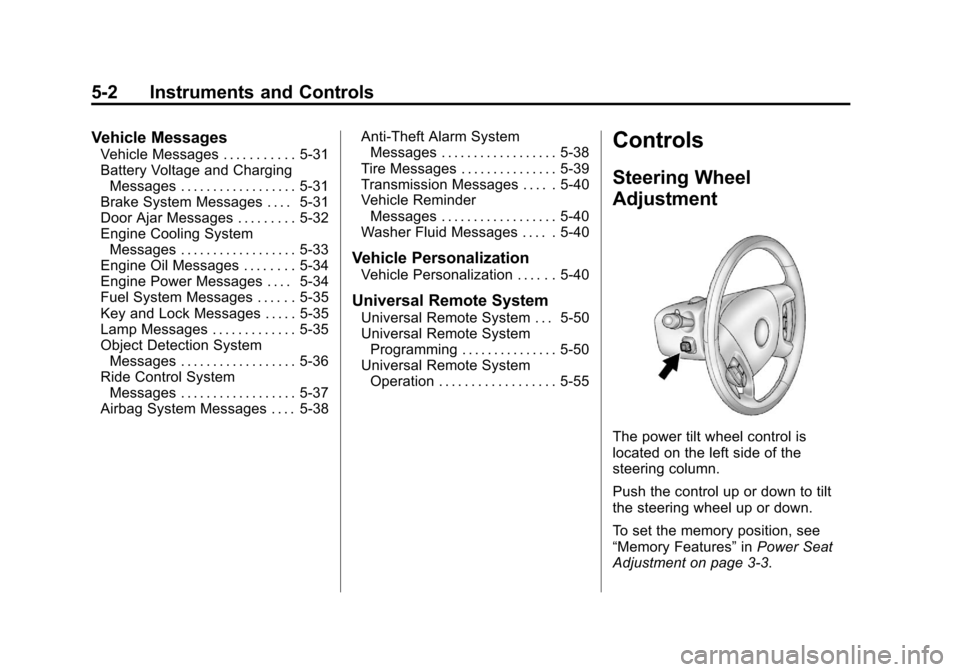
The power tilt wheel control is
located on the left side of the
steering column.
Push the control up or down to tilt
the steering wheel up or down.
To set the memory position, see
“Memory Features” inPower Seat
Adjustment on page 3‑3.
Page 144 of 558
Black plate (6,1)Cadillac Escalade/Escalade ESV Owner Manual - 2011
5-6 Instruments and Controls
?(High Speed):Fast wipes.
Clear ice and snow from the wiper
blades before using them. If frozen
to the windshield, carefully loosen or
thaw them. Damaged wiper blades
should be replaced. See Wiper
Blade Replacement on page 10‑35.
Heavy snow or ice can overload the
wiper motor. A circuit breaker will
stop the motor until it cools down.
Windshield Washer
{WARNING
In freezing weather, do not use
your washer until the windshield
is warmed. Otherwise the
washer fluid can form ice on the
windshield, blocking your vision.
L(Washer Fluid): Push the
paddle at the top of the multifunction
lever, to spray washer fluid on the
windshield. The wipers clear the
window and then either stop or
return to the preset speed.
Rear Window
Wiper/Washer
{WARNING
In freezing weather, do not use
your washer until the windshield
is warmed. Otherwise the
washer fluid can form ice on the
windshield, blocking your vision.
The rear wiper control is located on
the turn and lane‐change lever.
To turn the rear wiper on, slide the
lever to a wiper position.
9(Off): Turns the wiper off.
5(Rear Wiper Delay): Turns on
the rear wiper delay.
Z(Rear Wiper): Turns on the rear
wiper.
=(Rear Wiper Wash): Press this
button on the end of the lever to
spray washer fluid on the rear
window. The wipers will clear the rear window and either stop or
return to your preset speed.
For more washer cycles, press
and hold the button.
The rear window wiper/washer will
not operate if the liftgate or liftglass
is open or ajar. If the liftgate or
liftglass is opened while the rear
wiper is on, the wiper returns to
the parked position and stops.
Compass
Your vehicle may have a compass
in the Driver Information
Center (DIC).
Compass Zone
The zone is set to zone eight upon
leaving the factory. Your dealer
will set the correct zone for your
location.
Under certain circumstances,
such as during a long distance
cross-country trip or moving to a
new state or province, it will be
necessary to compensate for
Page 146 of 558
Black plate (8,1)Cadillac Escalade/Escalade ESV Owner Manual - 2011
5-8 Instruments and Controls
If the DIC display does not show a
heading, for example, N for North,
or the heading does not change
after making turns, there may be
a strong magnetic field interfering
with the compass. Such interference
may be caused by a magnetic CB
or cell phone antenna mount, a
magnetic emergency light, magnetic
note pad holder, or any other
magnetic item. Turn off the vehicle,
move the magnetic item, then turn
on the vehicle and calibrate the
compass.
To calibrate the compass, use the
following procedure:
Compass Calibration Procedure
1. Before calibrating the compass,make sure the compass zone
is set to the variance zone in
which the vehicle is located.
See “Compass Variance (Zone)
Procedure” earlier in this
section. Do not operate any switches
such as window, sunroof,
climate controls, seats, etc.
during the calibration procedure.
2. Press the vehicle information button until PRESS
VTO
CALIBRATE COMPASS
displays.
3. Press the set/reset button to start the compass calibration.
4. The DIC will display CALIBRATING: DRIVE IN
CIRCLES. Drive the vehicle
in tight circles at less than
8 km/h (5 mph) to complete
the calibration. The DIC
will display CALIBRATION
COMPLETE for a few seconds
when the calibration is complete.
The DIC display will then return
to the previous menu.
Clock
The analog clock is not connected
with any other vehicle system and
runs by itself.
To adjust the clock, do the following:
1. Locate the adjustment button,
near the lower left corner of the
clock.
2. Push and hold the adjustment button to advance the clock
hands. Holding the button down
will cause the clock to advance
faster. Release the button before
you get to the desired time.
3. Push and release the button to increase the time by one minute
increments until the desired time
is reached.
Page 147 of 558
Black plate (9,1)Cadillac Escalade/Escalade ESV Owner Manual - 2011
Instruments and Controls 5-9
Power Outlets
The accessory power outlets can be
used to plug in electrical equipment,
such as a cell phone or MP3 player.
The vehicle has three accessory
power outlets located:
.Inside the floor console
storage bin.
.On the rear of the floor console.
.In the rear cargo area on the
passenger side.
Remove the cover to use and
replace when not in use.
The accessory power outlets are
powered, even when the ignition is
in LOCK/OFF. Continuing to use
power outlets while the ignition is in
LOCK/OFF may cause the vehicle's
battery to run down.
{WARNING
Power is always supplied to the
outlets. Do not leave electrical
equipment plugged in when the
vehicle is not in use because the
vehicle could catch fire and cause
injury or death.
Notice: Leaving electrical
equipment plugged in for an
extended period of time while
the vehicle is off will drain the
battery. Always unplug electrical
equipment when not in use and
do not plug in equipment that
exceeds the maximum 20 ampere
rating. Certain power accessory plugs
may not be compatible with the
accessory power outlet and could
overload adapter or vehicle fuses.
If a problem is experienced, see
your dealer.
When adding electrical equipment,
be sure to follow the proper
installation instructions included
with the equipment. Do not
use equipment exceeding the
maximum amperage rating of
20 amperes. See
Add-On Electrical
Equipment on page 9‑82.
Notice: Hanging heavy
equipment from the power
outlet can cause damage not
covered by the vehicle warranty.
The power outlets are designed
for accessory power plugs only,
such as cell phone charge cords.