fuel pressure CADILLAC ESCALADE 2011 3.G Owners Manual
[x] Cancel search | Manufacturer: CADILLAC, Model Year: 2011, Model line: ESCALADE, Model: CADILLAC ESCALADE 2011 3.GPages: 558, PDF Size: 7.59 MB
Page 5 of 558

Black plate (5,1)Cadillac Escalade/Escalade ESV Owner Manual - 2011
Introduction v
Vehicle Symbol Chart
Here are some additional symbols
that may be found on the vehicle
and what they mean. For more
information on the symbol, refer to
the Index.
0:Adjustable Pedals
9:Airbag Readiness Light
#:Air Conditioning
!:Antilock Brake System (ABS)
g:Audio Steering Wheel Controls
or OnStar®
$: Brake System Warning Light
":Charging System
I:Cruise Control
B: Engine Coolant Temperature
O:Exterior Lamps
#:Fog Lamps
.: Fuel Gauge
+:Fuses
3: Headlamp High/Low-Beam
Changer
(: Heated Steering Wheel
j:LATCH System Child
Restraints
*: Malfunction Indicator Lamp
::Oil Pressure
g:Outside Power Foldaway
Mirrors
}: Power
/:Remote Vehicle Start
>:Safety Belt Reminders
7:Tire Pressure Monitor
_: Tow/Haul Mode
F:Traction Control
M:Windshield Washer Fluid
Page 7 of 558
Black plate (1,1)Cadillac Escalade/Escalade ESV Owner Manual - 2011
In Brief 1-1
In Brief
Instrument Panel
Instrument Panel . . . . . . . . . . . . . . 1-2
Initial Drive Information
Initial Drive Information . . . . . . . . 1-4
Remote Keyless Entry (RKE)System . . . . . . . . . . . . . . . . . . . . . . 1-4
Remote Vehicle Start . . . . . . . . . 1-5
Door Locks . . . . . . . . . . . . . . . . . . . 1-5
Liftgate . . . . . . . . . . . . . . . . . . . . . . . . 1-6
Windows . . . . . . . . . . . . . . . . . . . . . . 1-6
Seat Adjustment . . . . . . . . . . . . . . 1-7
Memory Features . . . . . . . . . . . . . 1-8
Second Row Seats . . . . . . . . . . . 1-9
Third Row Seats . . . . . . . . . . . . . . 1-9
Heated and Ventilated Seats . . . . . . . . . . . . . . . . . . . . . . . . 1-9 Head Restraint
Adjustment . . . . . . . . . . . . . . . . . 1-10
Safety Belts . . . . . . . . . . . . . . . . . . 1-10
Sensing System for Passenger Airbag . . . . . . . . . . 1-10
Mirror Adjustment . . . . . . . . . . . . 1-11
Steering Wheel Adjustment . . . . . . . . . . . . . . . . . 1-12
Throttle and Brake Pedal Adjustment . . . . . . . . . . . . . . . . . 1-12
Interior Lighting . . . . . . . . . . . . . . 1-12
Exterior Lighting . . . . . . . . . . . . . 1-13
Windshield Wiper/Washer . . . . 1-14
Climate Controls . . . . . . . . . . . . . 1-15
Transmission . . . . . . . . . . . . . . . . 1-15
Vehicle Features
Radio(s) . . . . . . . . . . . . . . . . . . . . . 1-16
Satellite Radio . . . . . . . . . . . . . . . 1-16
Portable Audio Devices . . . . . . 1-16
Bluetooth
®. . . . . . . . . . . . . . . . . . . 1-17
Steering Wheel Controls . . . . . 1-17 Cruise Control . . . . . . . . . . . . . . . 1-18
Navigation System . . . . . . . . . . . 1-18
Driver Information
Center (DIC) . . . . . . . . . . . . . . . 1-19
Side Blind Zone
Alert (SBZA) . . . . . . . . . . . . . . . 1-20
Rear Vision Camera (RVC) . . . . . . . . . . . . . 1-20
Ultrasonic Parking Assist . . . . 1-20
Power Outlets . . . . . . . . . . . . . . . 1-21
Universal Remote System . . . 1-21
Performance and Maintenance
StabiliTrak®System . . . . . . . . . 1-21
Tire Pressure Monitor . . . . . . . . 1-22
Engine Oil Life System . . . . . . 1-22
Fuel E85 (85% Ethanol) . . . . . 1-23
Driving for Better Fuel Economy . . . . . . . . . . . . . . . . . . . 1-23
Roadside Service . . . . . . . . . . . . 1-23
OnStar
®. . . . . . . . . . . . . . . . . . . . . 1-24
Page 25 of 558
Black plate (19,1)Cadillac Escalade/Escalade ESV Owner Manual - 2011
In Brief 1-19
Driver Information
Center (DIC)
The DIC display is located at the
bottom of the instrument panel
cluster. It shows the status of
many vehicle systems and enables
access to the personalization menu.
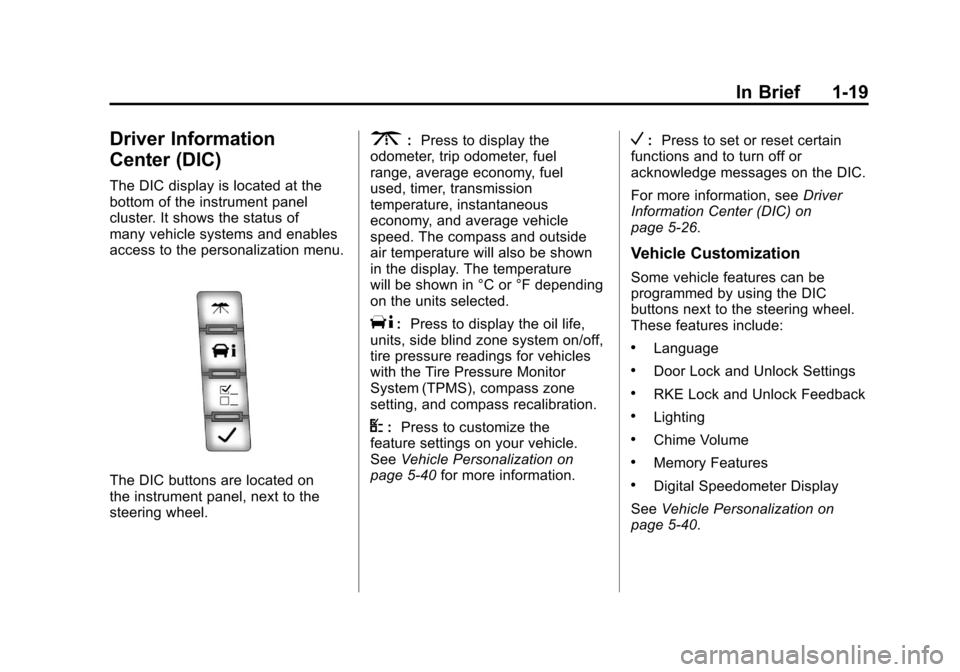
The DIC buttons are located on
the instrument panel, next to the
steering wheel.
3:Press to display the
odometer, trip odometer, fuel
range, average economy, fuel
used, timer, transmission
temperature, instantaneous
economy, and average vehicle
speed. The compass and outside
air temperature will also be shown
in the display. The temperature
will be shown in °C or °F depending
on the units selected.
T: Press to display the oil life,
units, side blind zone system on/off,
tire pressure readings for vehicles
with the Tire Pressure Monitor
System (TPMS), compass zone
setting, and compass recalibration.
U: Press to customize the
feature settings on your vehicle.
See Vehicle Personalization on
page 5‑40 for more information.
V:Press to set or reset certain
functions and to turn off or
acknowledge messages on the DIC.
For more information, see Driver
Information Center (DIC) on
page 5‑26.
Vehicle Customization
Some vehicle features can be
programmed by using the DIC
buttons next to the steering wheel.
These features include:
.Language
.Door Lock and Unlock Settings
.RKE Lock and Unlock Feedback
.Lighting
.Chime Volume
.Memory Features
.Digital Speedometer Display
See Vehicle Personalization on
page 5‑40.
Page 139 of 558
Black plate (1,1)Cadillac Escalade/Escalade ESV Owner Manual - 2011
Instruments and Controls 5-1
Instruments and
Controls
Controls
Steering Wheel Adjustment . . . 5-2
Steering Wheel Controls . . . . . . 5-3
Heated Steering Wheel . . . . . . . 5-5
Horn . . . . . . . . . . . . . . . . . . . . . . . . . . 5-5
Windshield Wiper/Washer . . . . . 5-5
Rear Window Wiper/Washer . . . . . . . . . . . . . . . . . . . . . . 5-6
Compass . . . . . . . . . . . . . . . . . . . . . 5-6
Clock . . . . . . . . . . . . . . . . . . . . . . . . . 5-8
Power Outlets . . . . . . . . . . . . . . . . . 5-9
Cigarette Lighter . . . . . . . . . . . . . 5-10
Ashtrays . . . . . . . . . . . . . . . . . . . . . 5-11
Warning Lights, Gauges, and
Indicators
Warning Lights, Gauges, and Indicators . . . . . . . . . . . . . . . . . . . 5-11
Instrument Cluster . . . . . . . . . . . 5-12
Speedometer . . . . . . . . . . . . . . . . 5-13
Odometer . . . . . . . . . . . . . . . . . . . . 5-13
Trip Odometer . . . . . . . . . . . . . . . 5-13
Tachometer . . . . . . . . . . . . . . . . . . 5-13
Fuel Gauge . . . . . . . . . . . . . . . . . . 5-13
Engine Coolant Temperature Gauge . . . . . . . . . . . . . . . . . . . . . . 5-14
Safety Belt Reminders . . . . . . . 5-15
Airbag Readiness Light . . . . . . 5-16
Passenger Airbag Status Indicator . . . . . . . . . . . . . . . . . . . . 5-16
Charging System Light . . . . . . 5-18
Malfunction
Indicator Lamp . . . . . . . . . . . . . 5-18 Brake System Warning
Light . . . . . . . . . . . . . . . . . . . . . . . 5-21
Antilock Brake System (ABS) Warning Light . . . . . . . . . . . . . . 5-22
Tow/Haul Mode Light . . . . . . . . 5-23
StabiliTrak
®Indicator Light . . . 5-23
Tire Pressure Light . . . . . . . . . . 5-23
Engine Oil Pressure Light . . . . 5-24
Security Light . . . . . . . . . . . . . . . . 5-25
High-Beam on Light . . . . . . . . . 5-25
Front Fog Lamp Light . . . . . . . . 5-25
Lamps on Reminder . . . . . . . . . 5-25
Cruise Control Light . . . . . . . . . 5-25
Information Displays
Driver Information Center (DIC) . . . . . . . . . . . . . . . 5-26
Page 165 of 558
Black plate (27,1)Cadillac Escalade/Escalade ESV Owner Manual - 2011
Instruments and Controls 5-27
The compass and outside air
temperature will also be shown in
the display. The temperature will be
shown in °C or °F depending on the
units selected.
T(Vehicle Information):
Press to display the oil life, units,
side blind zone system on/off,
tire pressure readings for vehicles
with the Tire Pressure Monitor
System (TPMS), compass zone
setting, and compass recalibration.
U(Customization): Press to
customize the feature settings
on your vehicle. See Vehicle
Personalization on page 5‑40
for more information.
V(Set/Reset): Press to set or
reset certain functions and to turn
off or acknowledge messages on
the DIC.
Trip/Fuel Menu Items
3(Trip/Fuel): Press to scroll
through the following menu items:
Odometer
Press the trip/fuel button until
ODOMETER displays. This display
shows the distance the vehicle has
been driven in either kilometers (km)
or miles (mi).
To switch between English and
metric measurements, see “Units”
later in this section.
Trip Odometer
Press the trip/fuel button until TRIP
displays. This display shows the
current distance traveled in either
kilometers (km) or miles (mi)) since
the last reset for the trip odometer.
The trip odometer can be reset to
zero by pressing the set/reset
button while the trip odometer is
displayed. Fuel Range
Press the trip/fuel button until
FUEL RANGE displays. This display
shows the approximate number
of remaining kilometers (km) or
miles (mi) the vehicle can be driven
without refueling. The display will
show LOW if the fuel level is low.
The fuel range estimate is based
on an average of the vehicle's fuel
economy over recent driving history
and the amount of fuel remaining
in the fuel tank. This estimate will
change if driving conditions change.
For example, if driving in traffic and
making frequent stops, this display
may read one number, but if the
vehicle is driven on a freeway, the
number may change even though
the same amount of fuel is in the
fuel tank. This is because different
driving conditions produce different
fuel economies. Generally, freeway
driving produces better fuel
economy than city driving.
Fuel range cannot be reset.
Page 350 of 558
Black plate (28,1)Cadillac Escalade/Escalade ESV Owner Manual - 2011
9-28 Driving and Operating
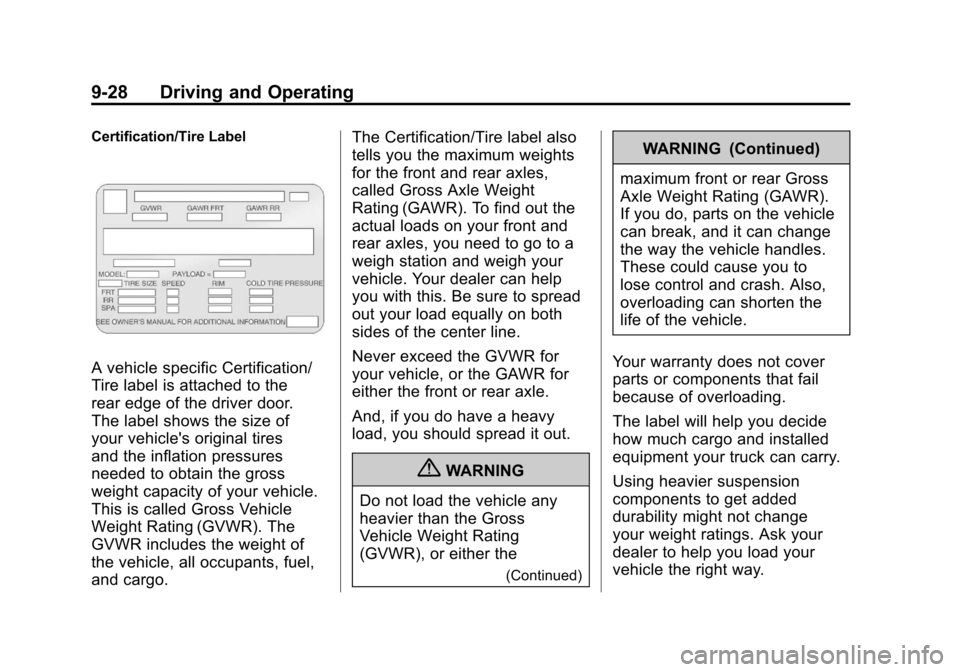
Certification/Tire Label
A vehicle specific Certification/
Tire label is attached to the
rear edge of the driver door.
The label shows the size of
your vehicle's original tires
and the inflation pressures
needed to obtain the gross
weight capacity of your vehicle.
This is called Gross Vehicle
Weight Rating (GVWR). The
GVWR includes the weight of
the vehicle, all occupants, fuel,
and cargo.The Certification/Tire label also
tells you the maximum weights
for the front and rear axles,
called Gross Axle Weight
Rating (GAWR). To find out the
actual loads on your front and
rear axles, you need to go to a
weigh station and weigh your
vehicle. Your dealer can help
you with this. Be sure to spread
out your load equally on both
sides of the center line.
Never exceed the GVWR for
your vehicle, or the GAWR for
either the front or rear axle.
And, if you do have a heavy
load, you should spread it out.
{WARNING
Do not load the vehicle any
heavier than the Gross
Vehicle Weight Rating
(GVWR), or either the
(Continued)
WARNING (Continued)
maximum front or rear Gross
Axle Weight Rating (GAWR).
If you do, parts on the vehicle
can break, and it can change
the way the vehicle handles.
These could cause you to
lose control and crash. Also,
overloading can shorten the
life of the vehicle.
Your warranty does not cover
parts or components that fail
because of overloading.
The label will help you decide
how much cargo and installed
equipment your truck can carry.
Using heavier suspension
components to get added
durability might not change
your weight ratings. Ask your
dealer to help you load your
vehicle the right way.
Page 458 of 558

Black plate (54,1)Cadillac Escalade/Escalade ESV Owner Manual - 2011
10-54 Vehicle Care
(F) Service Description:These
characters represent the load
index and speed rating of the
tire. The load index represents
the load carrying capacity a tire
is certified to carry. The speed
rating is the maximum speed a
tire is certified to carry a load.
Tire Terminology and
Definitions
Air Pressure:The amount
of air inside the tire pressing
outward on each square inch
of the tire. Air pressure is
expressed in psi (pounds per
square inch) or kPa (kilopascal). Accessory Weight
:This
means the combined weight
of optional accessories.
Some examples of optional
accessories are, automatic
transmission, power steering,
power brakes, power windows,
power seats, and air
conditioning.
Aspect Ratio
:The relationship
of a tire's height to its width.
Belt
:A rubber coated layer of
cords that is located between
the plies and the tread. Cords
may be made from steel or other
reinforcing materials.
Bead
:The tire bead contains
steel wires wrapped by steel
cords that hold the tire onto
the rim. Bias Ply Tire
:A pneumatic
tire in which the plies are laid
at alternate angles less than
90 degrees to the centerline
of the tread.
Cold Tire Pressure
:The
amount of air pressure in a tire,
measured in psi (pounds per
square inch) or kPa (kilopascal)
before a tire has built up heat
from driving. See Tire Pressure
on page 10‑57.
Curb Weight
:The weight of a
motor vehicle with standard and
optional equipment including
the maximum capacity of fuel,
oil, and coolant, but without
passengers and cargo.
Page 461 of 558
Black plate (57,1)Cadillac Escalade/Escalade ESV Owner Manual - 2011
Vehicle Care 10-57
Vehicle Placard:A label
permanently attached to a
vehicle showing the vehicle's
capacity weight and the
original equipment tire size
and recommended inflation
pressure. See “Tire and Loading
Information Label” underVehicle
Load Limits on page 9‑24.
Tire Pressure
If the vehicle is a hybrid, see
the hybrid supplement for more
information.
Tires need the correct amount
of air pressure to operate
effectively. Notice:
Do not let anyone tell
you that under‐inflation or
over‐inflation is all right. It is
not. If your tires do not have
enough air (under‐inflation),
you can get the following:
.Tire overloading and
over-heating which could
lead to a blowout.
.Premature or
irregular wear.
.Poor handling.
.Reduced fuel economy.
If your tires have too much air
(over‐inflation), you can get
the following:
.Unusual wear.
.Poor handling.
.Rough ride.
.Needless damage from
road hazards. A vehicle specific Tire and
Loading Information label
is attached to your vehicle.
This label shows your vehicle's
original equipment tires and the
correct inflation pressures for
your tires when they are cold.
The recommended cold tire
inflation pressure, shown on the
label, is the minimum amount of
air pressure needed to support
your vehicle's maximum load
carrying capacity.
For additional information
regarding how much weight
your vehicle can carry, and an
example of the Tire and Loading
Information label, see
Vehicle
Load Limits on page 9‑24.
How you load your vehicle
affects vehicle handling and
ride comfort. Never load your
vehicle with more weight than
it was designed to carry.
Page 463 of 558
Black plate (59,1)Cadillac Escalade/Escalade ESV Owner Manual - 2011
Vehicle Care 10-59
If your vehicle has P265/65R18 or
P285/45R22 size tires and you will
be driving at high speeds, speeds of
100 mph (160 km/h) or higher, set
the cold inflation pressure to 3 psi
(20 kPa) above the recommended
tire pressure shown on the Tire and
Loading Information Label. When
you end this high‐speed driving,
return the tires to the cold inflation
pressure shown on the Tire and
Loading Information label. See
Vehicle Load Limits on page 9‑24
andTire Pressure on page 10‑57.
Tire Pressure Monitor
System
The Tire Pressure Monitor System
(TPMS) uses radio and sensor
technology to check tire pressure
levels. The TPMS sensors monitor
the air pressure in your tires and
transmit tire pressure readings to
a receiver located in the vehicle.
Each tire, including the spare
(if provided), should be checked
monthly when cold and inflated to the inflation pressure recommended
by the vehicle manufacturer on the
vehicle placard or tire inflation
pressure label. (If your vehicle has
tires of a different size than the size
indicated on the vehicle placard or
tire inflation pressure label, you
should determine the proper tire
inflation pressure for those tires.)
As an added safety feature, your
vehicle has been equipped with a
tire pressure monitoring system
(TPMS) that illuminates a low
tire pressure telltale when one or
more of your tires is significantly
under‐inflated.
Accordingly, when the low tire
pressure telltale illuminates, you
should stop and check your tires as
soon as possible, and inflate them
to the proper pressure. Driving on
a significantly under‐inflated tire
causes the tire to overheat and can
lead to tire failure. Under‐inflation
also reduces fuel efficiency and
tire tread life, and may affect the
vehicle's handling and stopping
ability.Please note that the TPMS is
not a substitute for proper tire
maintenance, and it is the driver's
responsibility to maintain correct
tire pressure, even if under‐inflation
has not reached the level to trigger
illumination of the TPMS low tire
pressure telltale.
Your vehicle has also been
equipped with a TPMS malfunction
indicator to indicate when the
system is not operating properly.
The TPMS malfunction indicator is
combined with the low tire pressure
telltale. When the system detects a
malfunction, the telltale will flash for
approximately one minute and then
remain continuously illuminated.
This sequence will continue upon
subsequent vehicle start‐ups as
long as the malfunction exists.
When the malfunction indicator
is illuminated, the system may
not be able to detect or signal low
tire pressure as intended. TPMS
malfunctions may occur for a variety
of reasons, including the installation
of replacement or alternate tires or
Page 514 of 558
Black plate (4,1)Cadillac Escalade/Escalade ESV Owner Manual - 2011
11-4 Service and Maintenance
.Steering and suspension
inspection. Visual inspection
for damaged, loose, or missing
parts or signs of wear.
.Body hinges and latches,
key lock cylinders, rear
compartment hinges, outer
tailgate handle pivot points,
and folding seat hardware
lubrication. SeeRecommended
Fluids and Lubricants on
page 11‑7. More frequent
lubrication may be required
when the vehicle is exposed
to a corrosive environment.
Applying silicone grease on
weatherstrips with a clean cloth
makes them last longer, seal
better, and not stick or squeak.
.Restraint system component
check. See Safety System
Check on page 3‑38.
.Fuel system inspection for
damage or leaks.
.Exhaust system and nearby heat
shields inspection for loose or
damaged components.
Additional Required Services
Every 12 000 km/7,500 Miles
.Rotate tires. Tires should
be rotated every 12 000 km/
7,500 miles. See Tire Rotation
on page 10‑64. At Each Fuel Stop
.Engine oil level check.
See
Engine Oil on page 10‑7.
.Engine coolant level check.
SeeEngine Coolant on
page 10‑18.
.Windshield washer fluid level
check. See Washer Fluid on
page 10‑26.
Once a Month
.Tire inflation pressures check.
See Tire Pressure on
page 10‑57.
.Tire wear inspection. See Tire
Inspection on page 10‑64.
.Sunroof track and seal
inspection, if equipped.
See Sunroof on page 2‑22.