ECU CADILLAC ESCALADE 2013 3.G Service Manual
[x] Cancel search | Manufacturer: CADILLAC, Model Year: 2013, Model line: ESCALADE, Model: CADILLAC ESCALADE 2013 3.GPages: 532, PDF Size: 7.69 MB
Page 167 of 532
Black plate (47,1)Cadillac Escalade/Escalade ESV Owner Manual - 2013 - CRC 2nd Edition - 10/
9/12
Instruments and Controls 5-47
devices such as garage door
openers, security systems, and
home automation devices.
Do not use this system with any
garage door opener that does not
have the stop and reverse feature.
This includes any garage door
opener model manufactured before
April 1, 1982.
Read the instructions completely
before attempting to program the
transmitter. Because of the steps
involved, it may be helpful to have
another person assist with
programming the transmitter.
Be sure to keep the original remote
control transmitter for use in other
vehicles, as well as for future
programming. Only the original
remote control transmitter is needed
for Fixed Code programming. The
programmed buttons should be
erased when the vehicle is sold or
the lease ends. See“Erasing
Universal Home Remote Buttons” in
this section. Park the vehicle outside of the
garage when programming a garage
door. Be sure that people and
objects are clear of the garage door
or gate that is being programmed.
Programming Universal Home
Remote
—Rolling Code
For questions or help programming
the Universal Home Remote
System, call 1-866-572-2728 or go
to www.learcar2u.com.
Most garage door openers sold
after 1996 are Rolling Code units.
Programming a garage door opener
involves time-sensitive actions, so
read the entire procedure before
starting. Otherwise, the device will
time out and the procedure will have
to be repeated.
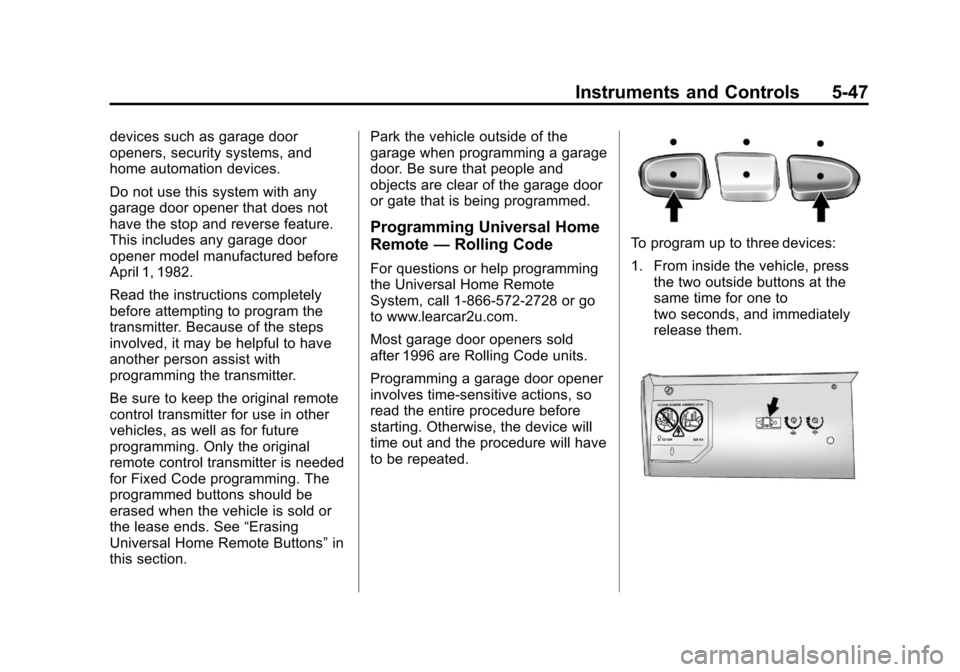
To program up to three devices:
1. From inside the vehicle, press
the two outside buttons at the
same time for one to
two seconds, and immediately
release them.
Page 168 of 532
Black plate (48,1)Cadillac Escalade/Escalade ESV Owner Manual - 2013 - CRC 2nd Edition - 10/
9/12
5-48 Instruments and Controls
2. In the garage, locate the garagedoor opener receiver
(motor-head unit). Find the
“Learn” or“Smart” button. It can
usually be found where the
hanging antenna wire is
attached to the motor-head unit
and may be a colored button.
Press this button. After pressing
this button, complete the
following steps in less than
30 seconds.
3. Immediately return to the vehicle. Press and hold the
Universal Home Remote button
that will be used to control the
garage door until the garage
door moves. The indicator light,
above the selected button,
should slowly blink. This button
may need to be held for up to
20 seconds.
4. Immediately, within one second, release the button when the
garage door moves. The
indicator light will blink rapidly
until programming is complete. 5. Press and release the same
button again. The garage door
should move, confirming that
programming is successful and
complete.
To program another Rolling Code
device such as an additional garage
door opener, a security device,
or home automation device, repeat
Steps 1 through 5, choosing a
different function button in Step 3
than what was used for the garage
door opener.
If these instructions do not work, the
garage door opener is probably a
Fixed Code unit. Follow the
programming instructions that follow
for a Fixed Code garage door
opener.
Programming Universal Home
Remote —Fixed Code
For questions or help programming
the Universal Home Remote
System, call 1-866-572-2728 or go
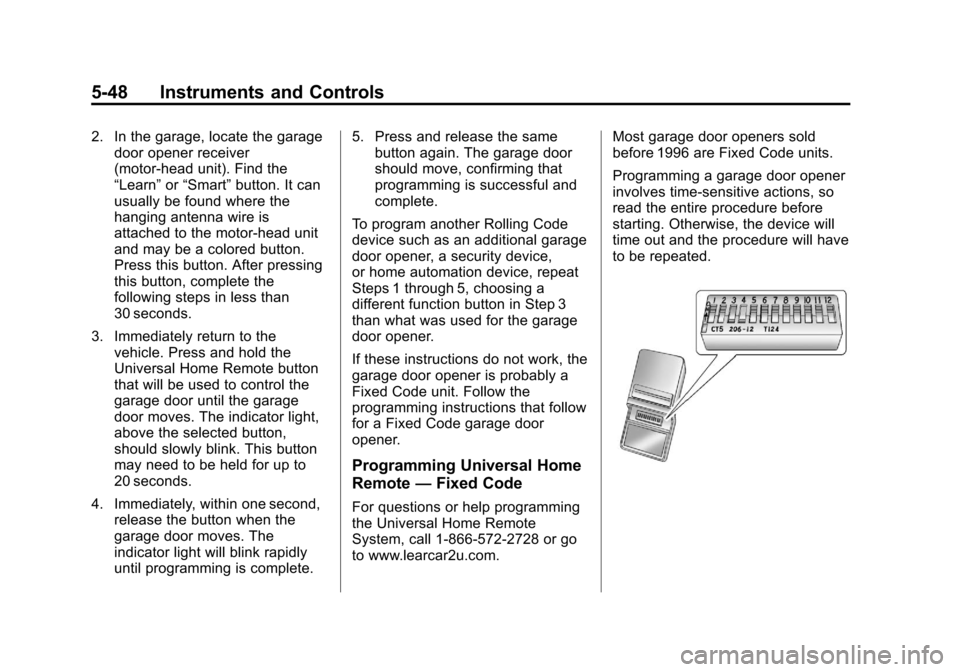
to www.learcar2u.com. Most garage door openers sold
before 1996 are Fixed Code units.
Programming a garage door opener
involves time-sensitive actions, so
read the entire procedure before
starting. Otherwise, the device will
time out and the procedure will have
to be repeated.
Page 171 of 532
Black plate (51,1)Cadillac Escalade/Escalade ESV Owner Manual - 2013 - CRC 2nd Edition - 10/
9/12
Instruments and Controls 5-51
6. Press and hold the button thatwill be used to control the
garage door until the garage
door moves. The indicator light
above the selected button
should slowly blink. This button
may need to be held for up to
55 seconds.
7. Immediately release the button when the garage door moves.
The indicator light will blink
rapidly until programming is
complete.
8. Press and release the same button again. The garage door
should move, confirming that
programming is successful and
complete.
To program another Fixed Code
device such as an additional garage
door opener, a security device,
or home automation device, repeat
Steps 1-8, choosing a different
button in Step 6 than what was used
for the garage door opener.Universal Remote System
Operation
Press and hold the appropriate
button for at least half of a second.
The indicator light will come on
while the signal is being transmitted.
Reprogramming Universal
Home Remote Buttons
Any of the three buttons can be
reprogrammed by repeating the
instructions.
Erasing Universal Home
Remote Buttons
The programmed buttons should be
erased when the vehicle is sold or
the lease ends. To erase either Rolling Code or
Fixed Code settings on the
Universal Home Remote device:
1. Press and hold the two outside
buttons at the same time for
approximately 20 seconds, until
the indicator lights, located
directly above the buttons, begin
to blink rapidly.
2. Once the indicator lights begin to blink, release both buttons. The
codes from all buttons will be
erased.
For help or information on the
Universal Home Remote System,
call the customer assistance phone
number under Customer Assistance
Offices (U.S. and Canada) on
page 13‑4 orCustomer Assistance
Offices (Mexico) on page 13‑5.
Page 198 of 532
Black plate (16,1)Cadillac Escalade/Escalade ESV Owner Manual - 2013 - CRC 2nd Edition - 10/
9/12
7-16 Infotainment System
Channel Unavail:This previously
assigned channel is no longer
assigned.
No Artist Info: No artist
information is available. The system
is working properly.
No Title Info: No song title
information is available. The system
is working properly.
No CAT Info: No category
information is available. The system
is working properly.
CAT Not Found: There are no
channels available for the selected
category. The system is working
properly.
No Information: No text or
informational messages are
available. The system is working
properly.
XM Theftlocked: The SiriusXM
receiver may have previously been
in another vehicle. For security
purposes, SiriusXM receivers
cannot be swapped between vehicles. If this message is received
after having your vehicle serviced,
check with your dealer.
XM Radio ID:
If tuned to channel 0,
this message will alternate with the
SiriusXM Radio eight digit radio ID
label. This label is needed to
activate the service.
Unknown: If this message is
received when tuned to channel 0,
there may be a receiver fault.
Consult with your dealer.
Check XM Receiver: If this
message does not clear within a
short period of time, the receiver
may have a fault. Consult with your
dealer.
No Subscription Please Renew:
The SiriusXM subscription needs to
be reactivated. Contact SiriusXM at
www.siriusxm.com or call
1-866-635-2349 (U.S) and
www.xmradio.ca or call
1-877-209-0079 (Canada).Radio Reception
Frequency interference and static
can occur during normal radio
reception if items such as cell phone
chargers, vehicle convenience
accessories, and external electronic
devices are plugged into the
accessory power outlet. If there is
interference or static, unplug the
item from the accessory power
outlet.
AM
The range for most AM stations is
greater than for FM, especially at
night. The longer range can cause
station frequencies to interfere with
each other. For better radio
reception, most AM radio stations
boost the power levels during the
day, and then reduce these levels
during the night. Static can also
occur when things like storms and
power lines interfere with radio
reception. When this happens, try
reducing the treble on the radio.
Page 215 of 532

Black plate (33,1)Cadillac Escalade/Escalade ESV Owner Manual - 2013 - CRC 2nd Edition - 10/
9/12
Infotainment System 7-33
disc indicator, and
playback starts. If the disc
is inserted incorrectly, the
DVD player ejects the disc
and No Disc displays.
C. Level Lock and Release Latch
.The viewing angle of the
video screen can be
adjusted by releasing the
latch and gently moving
the screen. Then lock it
into a secure position.
D. POWER
O
.Press to turn the power on
or off. Each video screen
can be powered on or off
independently.
E. SOURCE
.Press to select between
Monitor 3, Monitor 4, or the
AV INPUT.
Each video display screen
can be adjusted
independently, as well as display information from
both DVD players and both
A/V inputs.
F. AV OUTPUT (Audio/Video Output Jack)
.Wired headphones or
video output can be
plugged in with a 3.5 mm
(1/8 in) jack to listen to
music or show the video
on another device.
G. Video Input
.The yellow connector is
used for video input.
H. Left Audio Input
.The white connector is
used for the left side audio.
I. Right Audio Input
.The red connector is used
for the right side audio.
J. 3.5 mm (1/8 in) Output Jack
.Wired headphones can be
plugged in with a 3.5 mm
(1/8 in) jack. K. PLAY
r
.Press this button located
below the video display
screen to start playback of
a disc. On DVDs and video
CDs with playback
control (PBC), menu
screens can display
automatically. It might be
necessary to press the
play button again to
begin play.
There is a play position
memory feature for DVD
and video CD only. If the
DVD player is turned off
and then turned back on,
the DVD player resumes
playback where the disc
stopped. The play position
memory is erased if the
disc is removed.
Page 221 of 532

Black plate (39,1)Cadillac Escalade/Escalade ESV Owner Manual - 2013 - CRC 2nd Edition - 10/
9/12
Infotainment System 7-39
B. CD/DVD Slot
.The loading slot for the
DVD player is located at
the top of the head
restraint. Insert the disc
partially into the loading
slot with the printed side
facing the rear of the
vehicle. The DVD player
automatically draws the
disc in,“Loading” displays
on the screen along with a
disc indicator, and
playback starts. If the disc
is inserted incorrectly, the
DVD player ejects the disc
and No Disc displays.
C. Level Lock and Release Latch
.The viewing angle of the
video screen can be
adjusted by releasing the
latch and gently moving
the screen. Then lock it
into a secure position. D. POWER
O
.Press to turn the power on
or off. Each video screen
can be powered on or off
independently.
E. SOURCE
.Press to select between
Monitor 3, Monitor 4, or the
AV INPUT. Each video
display screen can be
adjusted independently, as
well as display information
from both DVD players and
both A/V inputs.
F. USB Port
.Connect USB drive to
listen to music or view
pictures. To charge
devices, connect it to the
USB port. Not all devices
are able to be charged. For
playback, the formats
available are:
‐ JPEG
‐ JPG ‐
M2V
‐ MP3
‐ MPE
‐ MPEG-1
‐ MPEG-2
‐ MPEG-4
‐ MPG
‐ OGG
‐ WMA
‐ MWA
G. Video Input
.The yellow connector is
used for video input.
H. Left Audio Input
.The white connector is
used for the left side audio.
I. Right Audio Input
.The red connector is used
for the right side audio.
Page 232 of 532
Black plate (50,1)Cadillac Escalade/Escalade ESV Owner Manual - 2013 - CRC 2nd Edition - 10/
9/12
7-50 Infotainment System
Tips and Troubleshooting
IR Sensor Inoperative:Check that
the batteries are good in the remote
control. Check that the remote
Control IR Sensor is not blocked.
Aim the remote control toward the
IR Sensor being controlled. Select
the correct screen, 3 or 4.
No picture: Check that the correct
video input mode is selected. Check
that the video cable is plugged into
the jack securely.
No Sound: Check that the correct
audio input mode is selected. Check
that the audio cable is securely
plugged into the jack.
Cleaning the Video Screens
The video display screens are made
of a specially coated glass and can
be scratched or damaged by
abrasive products, solvents,
or ammonia-based window
cleaners. Clean with a soft, lint-free,
cotton cloth that has been slightly dampened with warm water. Dry the
screens by wiping with a clean dry
cotton cloth.
Cleaning the Components
Use care when touching or cleaning
the components such as the DVD
player or the discs.
Do not use DVD lens cleaners for
DVD players because the lens of
the DVD optics can become
contaminated by lubricants.
Handle CDs and DVDs carefully.
Store them in their original cases or
other protective cases and away
from direct sunlight and dust. The
DVD player scans the bottom
surface of the disc. If the surface of
a CD or DVD is damaged, such as
cracked, broken, or scratched, the
CD or DVD may not play properly or
not at all. If the surface of a CD or
DVD is soiled, take a soft, lint free
cloth or dampen a clean, soft cloth
in a mild, neutral detergent solution
mixed with water, and clean it. Make
sure the wiping process starts from
the center to the edge.Do not touch the bottom side of a
CD or DVD while handling it; this
could damage the surface. Pick up
CDs or DVDs by grasping the outer
edges or the edge of the hole and
the outer edge.
Rear Seat Entertainment
(RSE) System (Overhead)
The vehicle may have an Overhead
DVD Rear Seat
Entertainment (RSE) system. The
RSE system works with the
vehicle's audio system. The DVD
player is part of the front radio. The
RSE system includes a radio with a
DVD player, a video display screen,
and if the vehicle has a third row
seat, it could have a second video
display screen, audio/video jacks,
two wireless headphones, and a
remote control. See
CD/DVD Player
on page 7‑18 for more information
on the vehicle's DVD system.
Page 306 of 532
Black plate (6,1)Cadillac Escalade/Escalade ESV Owner Manual - 2013 - CRC 2nd Edition - 10/
9/12
9-6 Driving and Operating
Remember: Antilock brakes help
avoid only the braking skid.
Off-Road Driving
Four-wheel-drive and all-wheel-drive
vehicles can be used for off-road
driving. Vehicles without four-wheel
drive, all-wheel-drive and vehicles
not equipped with All Terrain (AT) or
On-Off Road (OOR) tires must not
be driven off-road except on a level,
solid surface. To contact the tire
manufacturer for more information
about the original equipment tires,
see the Limited Warranty and
Owner Assistance Information
manual.
Controlling the vehicle is the key to
successful off-road driving. One of
the best ways to control the vehicle
is to control the speed.
{WARNING
When driving off-road, bouncing
and quick changes in direction
can easily throw you out of
position. This could cause you to
lose control and crash. You and
your passengers should always
wear safety belts.
Before Driving Off-Road
.Have all necessary maintenance
and service work completed.
.Fuel the vehicle, fill fluid levels,
and check inflation pressure in
all tires, including the spare,
if equipped.
.Read all the information about
four-wheel-drive and
all-wheel-drive vehicles in this
manual.
.Make sure all underbody
shields, if equipped, are properly
attached.
.Know the local laws that apply to
off-road driving.
To gain more ground clearance if
needed, it may be necessary to
remove the front fascia lower
air dam.
Notice: Operating the vehicle for
extended periods without the
front fascia lower air dam
installed can cause improper air
flow to the engine. Re‐attach the
front fascia air dam after off-road
driving.
Loading the Vehicle for
Off-Road Driving
{WARNING
.Unsecured cargo on the load
floor can be tossed about
when driving over rough
terrain. You or your
passengers can be struck by
flying objects. Secure the
cargo properly.
(Continued)
Page 320 of 532
Black plate (20,1)Cadillac Escalade/Escalade ESV Owner Manual - 2013 - CRC 2nd Edition - 10/
9/12
9-20 Driving and Operating
{WARNING
Things you put inside the
vehicle can strike and injure
people in a sudden stop or
turn, or in a crash.
.Put things in the cargo
area of the vehicle. Try to
spread the weight evenly.
.Never stack heavier
things, like suitcases,
inside the vehicle so that
some of them are above
the tops of the seats.
.Do not leave an
unsecured child restraint
in the vehicle.
.When you carry something
inside the vehicle, secure
it whenever you can.
.Do not leave a seat folded
down unless you need to. There is also important loading
information for off-road driving in
this manual. See
“Loading Your
Vehicle for Off-Road Driving”
under Off-Road Driving on
page 9‑6.
Add-On Equipment
When you carry removable
items, you may need to put a
limit on how many people you
can carry inside your vehicle. Be
sure to weigh your vehicle
before you buy and install the
new equipment.
Notice: Overloading the
vehicle may cause damage.
Repairs would not be covered
by the vehicle warranty. Do
not overload the vehicle.
Remember not to exceed the
Gross Axle Weight
Rating (GAWR) of the front or
rear axle. Automatic Level Control
The automatic level control rear
suspension comes as a part of
the Road Sensing Suspension.
See
Road Sensing Suspension
on page 9‑40.
This type of level control is fully
automatic and will provide a
better leveled riding position as
well as better handling under a
variety of passenger and loading
conditions. An air compressor
connected to the rear shocks
will raise or lower the rear of the
vehicle to maintain proper
vehicle height. The system is
activated when the ignition key
is turned to RUN and will
automatically adjust vehicle
height thereafter. The system
may exhaust (lower vehicle
height) for up to 10 minutes after
the ignition key has been turned
Page 325 of 532
Black plate (25,1)Cadillac Escalade/Escalade ESV Owner Manual - 2013 - CRC 2nd Edition - 10/
9/12
Driving and Operating 9-25
2. If the engine does not start after5-10 seconds, especially in very
cold weather (below −18°C or
0°F), it could be flooded with too
much gasoline. Try pushing the
accelerator pedal all the way to
the floor and holding it there as
you hold the key in START for
up to a maximum of 15 seconds.
Wait at least 15 seconds
between each try, to allow the
cranking motor to cool down.
When the engine starts, let go of
the key and accelerator. If the
vehicle starts briefly but then
stops again, repeat these steps.
This clears the extra gasoline
from the engine. Do not race the
engine immediately after starting
it. Operate the engine and
transmission gently until the oil
warms up and lubricates all
moving parts. Notice:
If you add electrical parts
or accessories, you could change
the way the engine operates. Any
resulting damage would not be
covered by the vehicle warranty.
See Add-On Electrical Equipment
on page 9‑67.
Engine Heater
The engine coolant heater can
provide easier starting and better
fuel economy during engine
warm-up in cold weather conditions
at or below −18°C (0°F). Vehicles
with an engine heater should be
plugged in at least four hours before
starting. An internal thermostat in
the plug-end of the cord may exist
which will prevent engine coolant
heater operation at temperatures
above −18°C (0°F).
To Use the Engine Coolant
Heater
1. Turn off the engine. 2. Open the hood and unwrap the
electrical cord. The cord is
secured to the engine
compartment fuse block with a
clip. Carefully remove the wire
tie which secures the electrical
cord. Do not cut the
electrical cord.
3. Plug the cord into a normal, grounded 110-volt AC outlet.
{WARNING
Plugging the cord into an
ungrounded outlet could cause an
electrical shock. Also, the wrong
kind of extension cord could
overheat and cause a fire. You
could be seriously injured. Plug
the cord into a properly grounded
three-prong 110-volt AC outlet.
If the cord will not reach, use a
heavy-duty three-prong extension
cord rated for at least 15 amps.