climate control CADILLAC ESCALADE 2013 3.G Owners Manual
[x] Cancel search | Manufacturer: CADILLAC, Model Year: 2013, Model line: ESCALADE, Model: CADILLAC ESCALADE 2013 3.GPages: 532, PDF Size: 7.69 MB
Page 1 of 532

Black plate (1,1)Cadillac Escalade/Escalade ESV Owner Manual - 2013 - CRC 2nd Edition - 10/
9/12
2013 Cadillac Escalade/Escalade ESVOwner Manual M
In Brief. . . . . . . . . . . . . . . . . . . . . . . . 1-1
Instrument Panel . . . . . . . . . . . . . . 1-2
Initial Drive Information . . . . . . . . 1-4
Vehicle Features . . . . . . . . . . . . . 1-16
Performance and Maintenance . . . . . . . . . . . . . . . . 1-22
Keys, Doors, and Windows . . . . . . . . . . . . . . . . . . . . 2-1
Keys and Locks . . . . . . . . . . . . . . . 2-1
Doors . . . . . . . . . . . . . . . . . . . . . . . . . . 2-8
Vehicle Security . . . . . . . . . . . . . . 2-12
Exterior Mirrors . . . . . . . . . . . . . . . 2-15
Interior Mirrors . . . . . . . . . . . . . . . . 2-17
Windows . . . . . . . . . . . . . . . . . . . . . 2-17
Roof . . . . . . . . . . . . . . . . . . . . . . . . . . 2-20
Seats and Restraints . . . . . . . . . 3-1
Head Restraints . . . . . . . . . . . . . . . 3-2
Front Seats . . . . . . . . . . . . . . . . . . . . 3-3
Rear Seats . . . . . . . . . . . . . . . . . . . . 3-8
Safety Belts . . . . . . . . . . . . . . . . . . 3-16
Airbag System . . . . . . . . . . . . . . . . 3-26
Child Restraints . . . . . . . . . . . . . . 3-41 Storage
. . . . . . . . . . . . . . . . . . . . . . . 4-1
Storage Compartments . . . . . . . . 4-1
Roof Rack System . . . . . . . . . . . . . 4-3
Instruments and Controls . . . . 5-1
Controls . . . . . . . . . . . . . . . . . . . . . . . 5-2
Warning Lights, Gauges, and
Indicators . . . . . . . . . . . . . . . . . . . 5-10
Information Displays . . . . . . . . . . 5-23
Vehicle Messages . . . . . . . . . . . . 5-28
Vehicle Personalization . . . . . . . 5-37
Universal Remote System . . . . 5-46
Lighting . . . . . . . . . . . . . . . . . . . . . . . 6-1
Exterior Lighting . . . . . . . . . . . . . . . 6-1
Interior Lighting . . . . . . . . . . . . . . . . 6-8
Lighting Features . . . . . . . . . . . . . . 6-9
Infotainment System . . . . . . . . . 7-1
Introduction . . . . . . . . . . . . . . . . . . . . 7-2
Radio . . . . . . . . . . . . . . . . . . . . . . . . . . 7-9
Audio Players . . . . . . . . . . . . . . . . 7-18
Rear Seat Infotainment . . . . . . . 7-31
Navigation . . . . . . . . . . . . . . . . . . . . 7-62
Voice Recognition . . . . . . . . . . . 7-100
Phone . . . . . . . . . . . . . . . . . . . . . . . 7-103 Climate Controls
. . . . . . . . . . . . . 8-1
Climate Control Systems . . . . . . 8-1
Air Vents . . . . . . . . . . . . . . . . . . . . . . . 8-8
Driving and Operating . . . . . . . . 9-1
Driving Information . . . . . . . . . . . . . 9-2
Starting and Operating . . . . . . . 9-21
Engine Exhaust . . . . . . . . . . . . . . 9-28
Automatic Transmission . . . . . . 9-29
Drive Systems . . . . . . . . . . . . . . . . 9-34
Brakes . . . . . . . . . . . . . . . . . . . . . . . 9-34
Ride Control Systems . . . . . . . . 9-37
Cruise Control . . . . . . . . . . . . . . . . 9-41
Object Detection Systems . . . . 9-44
Fuel . . . . . . . . . . . . . . . . . . . . . . . . . . 9-51
Towing . . . . . . . . . . . . . . . . . . . . . . . 9-56
Conversions and Add-Ons . . . 9-67
Vehicle Care . . . . . . . . . . . . . . . . . 10-1
General Information . . . . . . . . . . 10-2
Vehicle Checks . . . . . . . . . . . . . . . 10-3
Headlamp Aiming . . . . . . . . . . . 10-30
Bulb Replacement . . . . . . . . . . 10-30
Electrical System . . . . . . . . . . . . 10-32
Wheels and Tires . . . . . . . . . . . 10-40
Jump Starting . . . . . . . . . . . . . . . 10-83
Page 7 of 532
Black plate (1,1)Cadillac Escalade/Escalade ESV Owner Manual - 2013 - CRC 2nd Edition - 10/
9/12
In Brief 1-1
In Brief
Instrument Panel
Instrument Panel . . . . . . . . . . . . . . 1-2
Initial Drive Information
Initial Drive Information . . . . . . . . 1-4
Remote Keyless Entry (RKE)System . . . . . . . . . . . . . . . . . . . . . . 1-4
Remote Vehicle Start . . . . . . . . . 1-5
Door Locks . . . . . . . . . . . . . . . . . . . 1-5
Liftgate . . . . . . . . . . . . . . . . . . . . . . . . 1-6
Windows . . . . . . . . . . . . . . . . . . . . . . 1-7
Seat Adjustment . . . . . . . . . . . . . . 1-7
Memory Features . . . . . . . . . . . . . 1-8
Second Row Seats . . . . . . . . . . . 1-8
Third Row Seats . . . . . . . . . . . . . . 1-8
Heated and Ventilated Seats . . . . . . . . . . . . . . . . . . . . . . . . 1-9
Head Restraint Adjustment . . . . 1-9
Safety Belts . . . . . . . . . . . . . . . . . . 1-10 Passenger Sensing
System . . . . . . . . . . . . . . . . . . . . . 1-10
Mirror Adjustment . . . . . . . . . . . . 1-11
Steering Wheel Adjustment . . . . . . . . . . . . . . . . . 1-12
Throttle and Brake Pedal Adjustment . . . . . . . . . . . . . . . . . 1-12
Interior Lighting . . . . . . . . . . . . . . 1-13
Exterior Lighting . . . . . . . . . . . . . 1-13
Windshield Wiper/Washer . . . . 1-14
Climate Controls . . . . . . . . . . . . . 1-15
Transmission . . . . . . . . . . . . . . . . 1-16
Vehicle Features
Radio(s) . . . . . . . . . . . . . . . . . . . . . 1-16
Satellite Radio . . . . . . . . . . . . . . . 1-16
Portable Audio Devices . . . . . . 1-17
Bluetooth
®. . . . . . . . . . . . . . . . . . . 1-17
Steering Wheel Controls . . . . . 1-17
Cruise Control . . . . . . . . . . . . . . . 1-18
Navigation System . . . . . . . . . . . 1-18 Driver Information
Center (DIC) . . . . . . . . . . . . . . . 1-18
Side Blind Zone Alert (SBZA) . . . . . . . . . . . . . . . 1-19
Rear Vision
Camera (RVC) . . . . . . . . . . . . . 1-19
Ultrasonic Parking Assist . . . . 1-20
Power Outlets . . . . . . . . . . . . . . . 1-20
Universal Remote System . . . 1-20
Sunroof . . . . . . . . . . . . . . . . . . . . . . 1-21
Performance and Maintenance
StabiliTrak®System . . . . . . . . . 1-22
Tire Pressure Monitor . . . . . . . . 1-22
Tire Sealant and Compressor Kit . . . . . . . . . . . . . 1-22
Engine Oil Life System . . . . . . 1-23
Fuel E85 (85% Ethanol) . . . . . 1-23
Driving for Better Fuel
Economy . . . . . . . . . . . . . . . . . . . 1-23
Roadside Service . . . . . . . . . . . . 1-24
OnStar
®. . . . . . . . . . . . . . . . . . . . . 1-24
Page 9 of 532

Black plate (3,1)Cadillac Escalade/Escalade ESV Owner Manual - 2013 - CRC 2nd Edition - 10/
9/12
In Brief 1-3
A.Air Vents on page 8‑8.
B. Turn and Lane-Change Lever. See Turn and Lane-Change
Signals on page 6‑7.
Windshield Wiper/Washer on
page 5‑4.
C. Instrument Cluster on
page 5‑11.
D. Hazard Warning Flashers on
page 6‑7.
E. Shift Lever. See Automatic
Transmission on page 9‑29.
Driver Shift Control (DSC). See
Manual Mode on page 9‑32.
F. Tow/Haul Mode on page 9‑33.
G. Driver Information Center (DIC) Buttons. See Driver Information
Center (DIC) on page 5‑23.
H. Clock on page 5‑7.
I. Infotainment on page 7‑2. J.
StabiliTrak®System on
page 9‑37.
Rear Park Aid Disable Button.
See Ultrasonic Parking Assist
on page 9‑44.
K. Steering Wheel Adjustment on
page 5‑2.
L. Exterior Lamp Controls on
page 6‑1.
M. Dome Lamp Override. See Dome Lamps on page 6‑9.
Instrument Panel Illumination
Control on page 6‑8.
Fog Lamps on page 6‑8.
N. Data Link Connector (DLC) (Out of View). See Malfunction
Indicator Lamp on page 5‑16.
O. Automatic Transfer Case Control (Hybrid only). See the
hybrid supplement for more
information. P.
Cruise Control on page 9‑41.
Heated Steering Wheel on
page 5‑4 (If Equipped).
Q. Horn on page 5‑4.
R. Steering Wheel Controls on
page 5‑2.
S. Dual Automatic Climate Control
System on page 8‑1.
T. Pedal Adjust Button. See Adjustable Throttle and Brake
Pedal on page 9‑22.
Power Assist Steps on
page 2‑12 (If Equipped).
Page 11 of 532
Black plate (5,1)Cadillac Escalade/Escalade ESV Owner Manual - 2013 - CRC 2nd Edition - 10/
9/12
In Brief 1-5
Remote Vehicle Start
With this feature the engine can be
started from outside of the vehicle.
Starting the Vehicle
1. Aim the RKE transmitter at thevehicle.
2. Press and release
Q.
3. Immediately after completing Step 2, press and hold
/for at
least two seconds or until the
turn signal lamps flash.
When the vehicle starts, the parking
lamps will turn on and remain on as
long as the engine is running. The
doors will be locked and the climate
control system may come on.
The engine will continue to run for
10 minutes. Repeat the steps for a
10-minute time extension. Remote
start can be extended only once.
Canceling a Remote Start
To cancel a remote start, do one of
the following:
.Aim the RKE transmitter at the
vehicle and press and hold
/
until the parking lamps turn off.
.Turn on the hazard warning
flashers.
.Turn the vehicle on and then
back off.
See Remote Vehicle Start on
page 2‑5.
Door Locks
There are several ways to lock and
unlock the vehicle.
From outside, use the Remote
Keyless Entry (RKE) transmitter or
the key in the driver door.
From inside, use the power door
locks or the manual door locks. To
lock or unlock the door with the
manual locks, push down or pull up
on the manual lock knob.
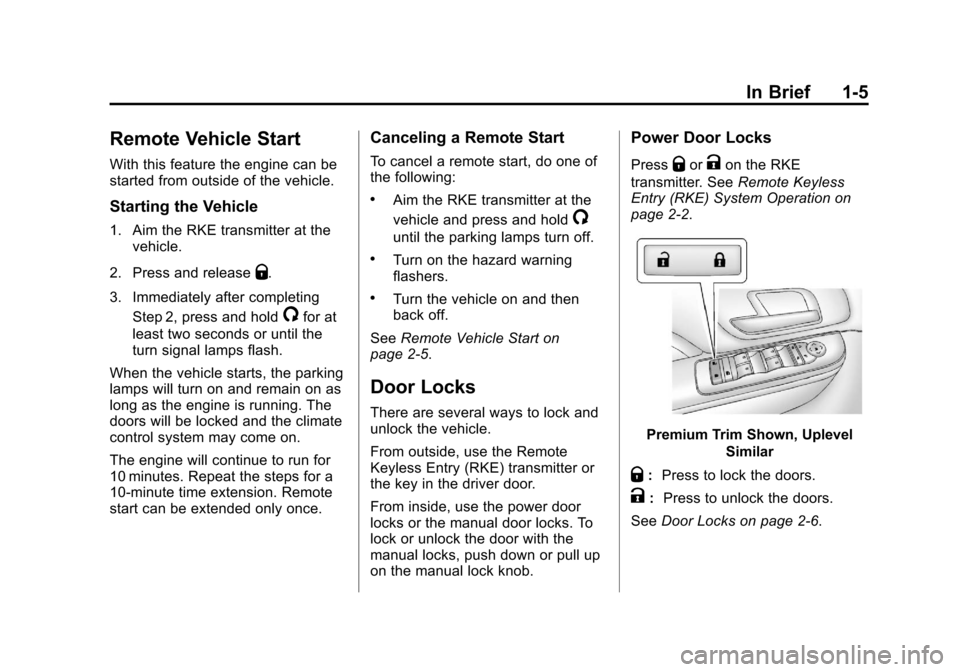
Power Door Locks
PressQorKon the RKE
transmitter. See Remote Keyless
Entry (RKE) System Operation on
page 2‑2.
Premium Trim Shown, Uplevel
Similar
Q:Press to lock the doors.
K: Press to unlock the doors.
See Door Locks on page 2‑6.
Page 15 of 532
Black plate (9,1)Cadillac Escalade/Escalade ESV Owner Manual - 2013 - CRC 2nd Edition - 10/
9/12
In Brief 1-9
Heated and Ventilated
Seats
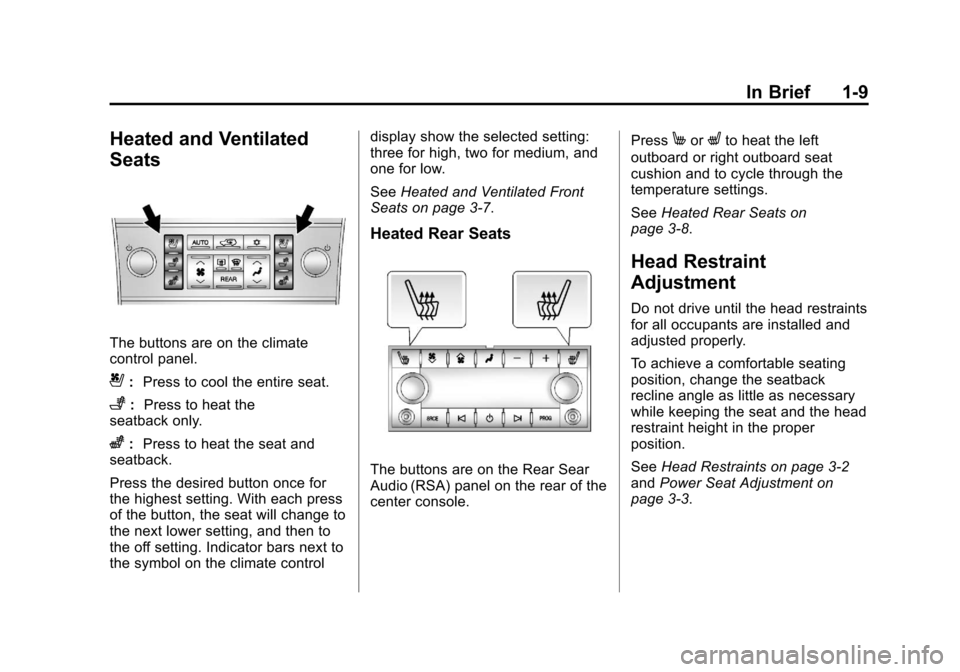
The buttons are on the climate
control panel.
{:Press to cool the entire seat.
+:Press to heat the
seatback only.
z: Press to heat the seat and
seatback.
Press the desired button once for
the highest setting. With each press
of the button, the seat will change to
the next lower setting, and then to
the off setting. Indicator bars next to
the symbol on the climate control display show the selected setting:
three for high, two for medium, and
one for low.
See
Heated and Ventilated Front
Seats on page 3‑7.
Heated Rear Seats
The buttons are on the Rear Sear
Audio (RSA) panel on the rear of the
center console. Press
MorLto heat the left
outboard or right outboard seat
cushion and to cycle through the
temperature settings.
See Heated Rear Seats on
page 3‑8.
Head Restraint
Adjustment
Do not drive until the head restraints
for all occupants are installed and
adjusted properly.
To achieve a comfortable seating
position, change the seatback
recline angle as little as necessary
while keeping the seat and the head
restraint height in the proper
position.
See Head Restraints on page 3‑2
and Power Seat Adjustment on
page 3‑3.
Page 18 of 532
Black plate (12,1)Cadillac Escalade/Escalade ESV Owner Manual - 2013 - CRC 2nd Edition - 10/
9/12
1-12 In Brief
Automatic Dimming Rearview
Mirror
The mirror will automatically reduce
the glare from the headlamps from
behind. The dimming feature comes
on each time the vehicle is started.
SeeAutomatic Dimming Rearview
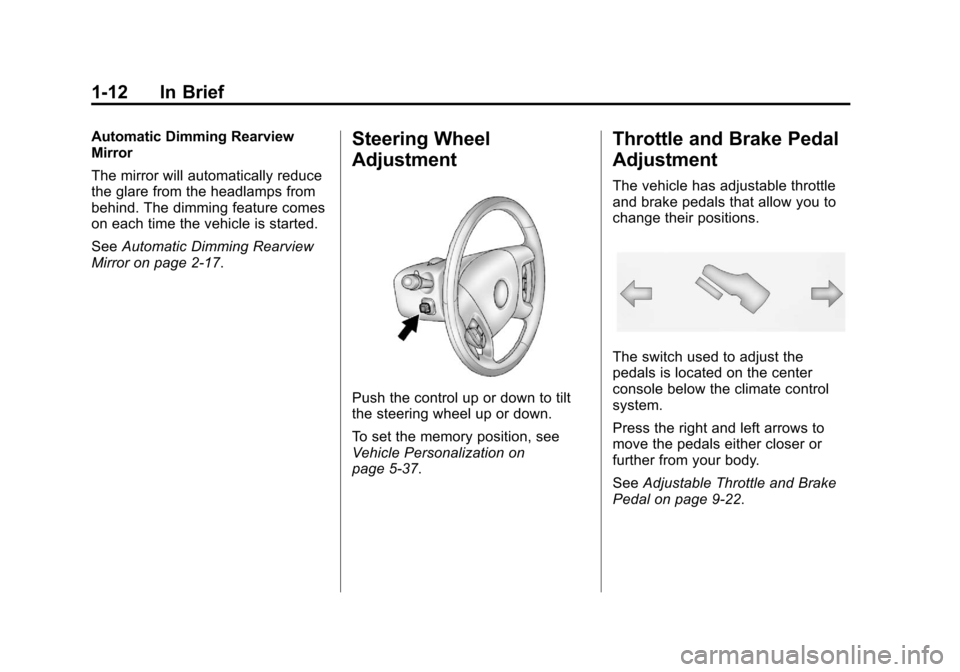
Mirror on page 2‑17.Steering Wheel
Adjustment
Push the control up or down to tilt
the steering wheel up or down.
To set the memory position, see
Vehicle Personalization on
page 5‑37.
Throttle and Brake Pedal
Adjustment
The vehicle has adjustable throttle
and brake pedals that allow you to
change their positions.
The switch used to adjust the
pedals is located on the center
console below the climate control
system.
Press the right and left arrows to
move the pedals either closer or
further from your body.
See Adjustable Throttle and Brake
Pedal on page 9‑22.
Page 21 of 532
Black plate (15,1)Cadillac Escalade/Escalade ESV Owner Manual - 2013 - CRC 2nd Edition - 10/
9/12
In Brief 1-15
Rear Wiper Window Wiper/Washer
To turn the rear wiper on, slide the
lever to a wiper position.
(:Turns the wiper off.
5:Turns on the rear wiper delay.
Z:Turns on the rear wiper.
=:Press the button on the end of
the lever to spray washer fluid on
the rear window.
See Windshield Wiper/Washer on
page 5‑4 andRear Window Wiper/
Washer on page 5‑5.
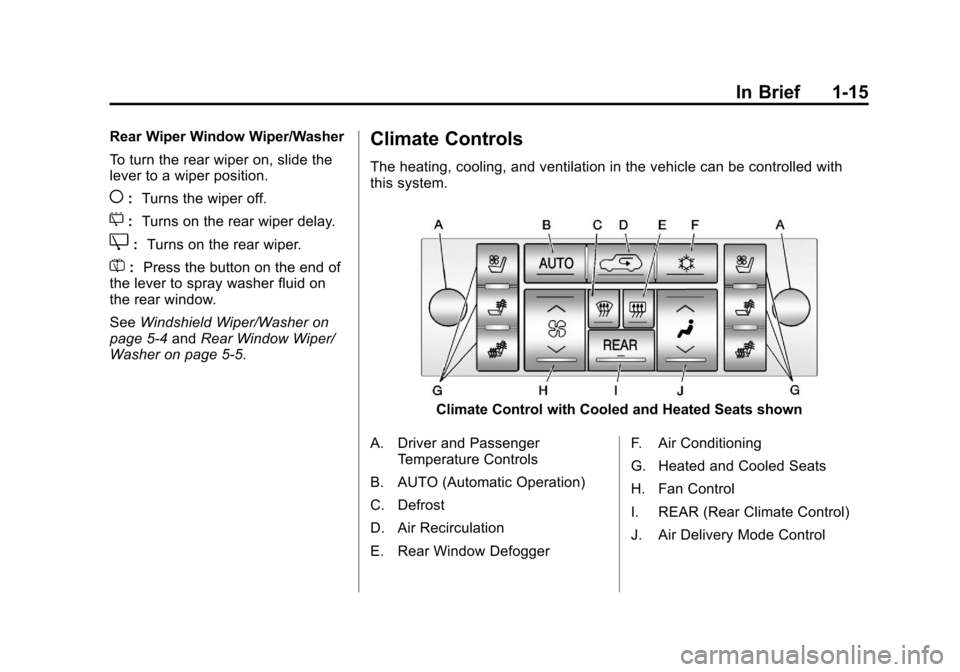
Climate Controls
The heating, cooling, and ventilation in the vehicle can be controlled with
this system.
Climate Control with Cooled and Heated Seats shown
A. Driver and Passenger Temperature Controls
B. AUTO (Automatic Operation)
C. Defrost
D. Air Recirculation
E. Rear Window Defogger F. Air Conditioning
G. Heated and Cooled Seats
H. Fan Control
I. REAR (Rear Climate Control)
J. Air Delivery Mode Control
Page 22 of 532
Black plate (16,1)Cadillac Escalade/Escalade ESV Owner Manual - 2013 - CRC 2nd Edition - 10/
9/12
1-16 In Brief
SeeDual Automatic Climate Control
System on page 8‑1 andRear
Climate Control System (Rear
Climate with Rear Seat Audio) on
page 8‑6 (If Equipped).
Transmission
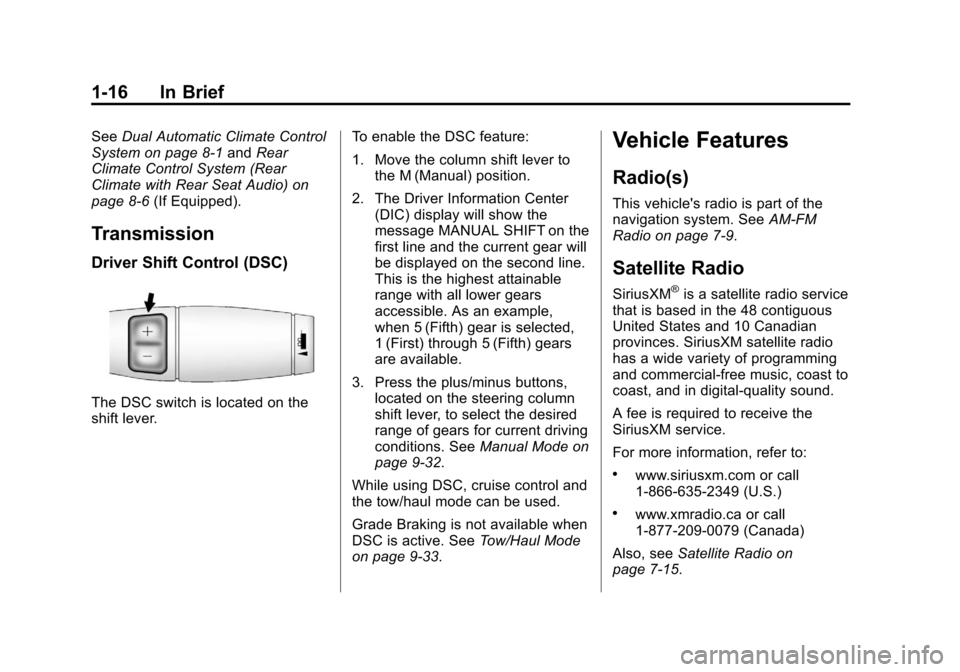
Driver Shift Control (DSC)
The DSC switch is located on the
shift lever. To enable the DSC feature:
1. Move the column shift lever to
the M (Manual) position.
2. The Driver Information Center (DIC) display will show the
message MANUAL SHIFT on the
first line and the current gear will
be displayed on the second line.
This is the highest attainable
range with all lower gears
accessible. As an example,
when 5 (Fifth) gear is selected,
1 (First) through 5 (Fifth) gears
are available.
3. Press the plus/minus buttons, located on the steering column
shift lever, to select the desired
range of gears for current driving
conditions. See Manual Mode on
page 9‑32.
While using DSC, cruise control and
the tow/haul mode can be used.
Grade Braking is not available when
DSC is active. See Tow/Haul Mode
on page 9‑33.
Vehicle Features
Radio(s)
This vehicle's radio is part of the
navigation system. See AM-FM
Radio on page 7‑9.
Satellite Radio
SiriusXM®is a satellite radio service
that is based in the 48 contiguous
United States and 10 Canadian
provinces. SiriusXM satellite radio
has a wide variety of programming
and commercial-free music, coast to
coast, and in digital-quality sound.
A fee is required to receive the
SiriusXM service.
For more information, refer to:
.www.siriusxm.com or call
1-866-635-2349 (U.S.)
.www.xmradio.ca or call
1-877-209-0079 (Canada)
Also, see Satellite Radio on
page 7‑15.
Page 35 of 532
Black plate (5,1)Cadillac Escalade/Escalade ESV Owner Manual - 2013 - CRC 2nd Edition - 10/
9/12
Keys, Doors, and Windows 2-5
Remote Vehicle Start
This feature allows you to start the
engine from outside of the vehicle.
It may also start up the vehicle's
heating or air conditioning systems
and rear window defogger. Normal
operation of the system will return
after the key is turned to the ON/
RUN position.
During a remote start, the climate
control system will default to a
heating or cooling mode depending
on the outside temperatures.
During a remote start, if the vehicle
has an automatic climate control
system and heated seats, the
heated seats will turn on during
colder outside temperatures and will
shut off when the key is turned to
ON/RUN. If the vehicle does not
have an automatic climate control
system, during remote start, you will
need to manually turn the heated
seats on and off. SeeHeated and
Ventilated Front Seats on page 3‑7
for additional information. Laws in some communities may
restrict the use of remote starters.
For example, some laws may
require a person using the remote
start to have the vehicle in view
when doing so. Check local
regulations for any requirements on
remote starting of vehicles.
Do not use the remote start feature
if the vehicle is low on fuel. The
vehicle may run out of fuel.
The RKE transmitter range may be
less while the vehicle is running.
There are other conditions which
can affect the performance of the
transmitter, see
Remote Keyless
Entry (RKE) System on page 2‑2 for
additional information.
/(Remote Start): This button will
be on the RKE transmitter if you
have remote start.
To start the vehicle using the remote
start feature:
1. Aim the transmitter at the
vehicle. 2. Press and release
Q.
3. Immediately press and hold
/
until the turn signal lamps flash.
If you cannot see the vehicle's
lamps, press and hold
/for at
least two seconds.
When the vehicle starts, the
parking lamps will turn on and
remain on while the vehicle is
running. The doors will be
locked and the climate control
system may come on.
The engine will continue to run
for 10 minutes. Repeat the steps
for a 10-minute time extension.
Remote start can be extended
only once.
After entering the vehicle during a
remote start, insert and turn the key
to ON/RUN to drive the vehicle.
To cancel a remote start, do any of
the following:
.Aim the RKE transmitter at the
vehicle and press and hold
/
until the parking lamps turn off.
Page 39 of 532
Black plate (9,1)Cadillac Escalade/Escalade ESV Owner Manual - 2013 - CRC 2nd Edition - 10/
9/12
Keys, Doors, and Windows 2-9
WARNING (Continued)
.Adjust the climate control
system to a setting that
brings in only outside air and
set the fan speed to the
highest setting. See“Climate
Control Systems” in the
Index.
.If the vehicle is equipped with
a power liftgate, disable the
power liftgate function.
See Engine Exhaust on
page 9‑28.
Notice: If you open the liftgate
without checking for overhead
obstructions such as a garage
door, you could damage the
liftgate or the liftgate glass.
Always check to make sure the
area above and behind the liftgate
is clear before opening it.
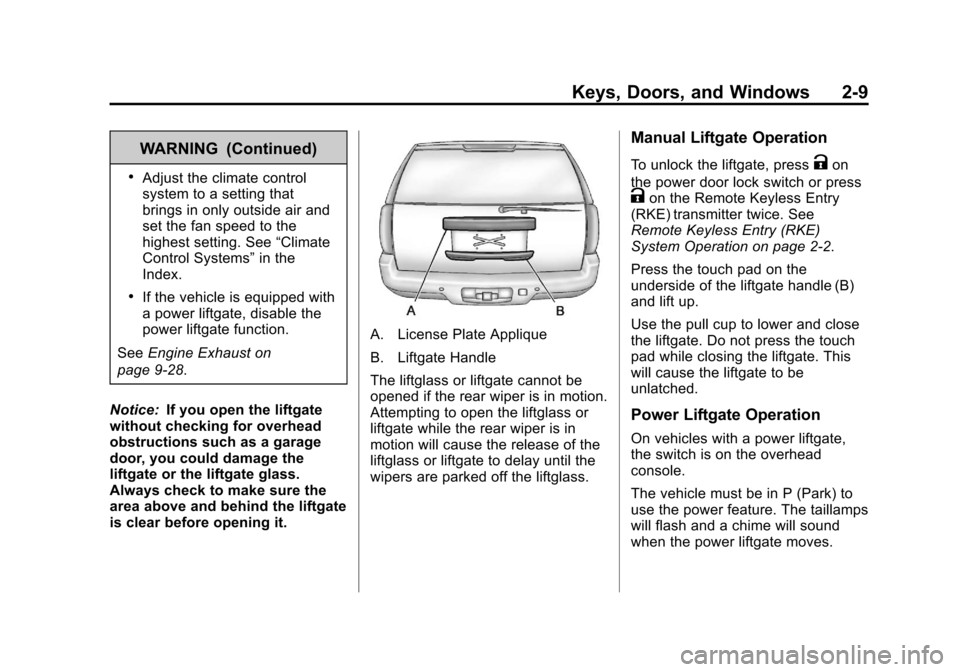
A. License Plate Applique
B. Liftgate Handle
The liftglass or liftgate cannot be
opened if the rear wiper is in motion.
Attempting to open the liftglass or
liftgate while the rear wiper is in
motion will cause the release of the
liftglass or liftgate to delay until the
wipers are parked off the liftglass.
Manual Liftgate Operation
To unlock the liftgate, pressKon
the power door lock switch or press
Kon the Remote Keyless Entry
(RKE) transmitter twice. See
Remote Keyless Entry (RKE)
System Operation on page 2‑2.
Press the touch pad on the
underside of the liftgate handle (B)
and lift up.
Use the pull cup to lower and close
the liftgate. Do not press the touch
pad while closing the liftgate. This
will cause the liftgate to be
unlatched.
Power Liftgate Operation
On vehicles with a power liftgate,
the switch is on the overhead
console.
The vehicle must be in P (Park) to
use the power feature. The taillamps
will flash and a chime will sound
when the power liftgate moves.