heated seats CADILLAC ESCALADE 2014 Owner's Manual
[x] Cancel search | Manufacturer: CADILLAC, Model Year: 2014, Model line: ESCALADE, Model: CADILLAC ESCALADE 2014Pages: 508, PDF Size: 7.64 MB
Page 7 of 508
Black plate (1,1)Cadillac Escalade/Escalade ESV Owner Manual (GMNA-Localizing-U.S./
Canada/Mexico-6081529) - 2014 - CRC 1st Edition - 4/23/13
In Brief 1-1
In Brief
Instrument Panel
Instrument Panel . . . . . . . . . . . . . . 1-2
Initial Drive Information
Initial Drive Information . . . . . . . . 1-4
Remote Keyless Entry (RKE)System . . . . . . . . . . . . . . . . . . . . . . 1-4
Remote Vehicle Start . . . . . . . . . 1-4
Door Locks . . . . . . . . . . . . . . . . . . . 1-5
Liftgate . . . . . . . . . . . . . . . . . . . . . . . . 1-6
Windows . . . . . . . . . . . . . . . . . . . . . . 1-7
Seat Adjustment . . . . . . . . . . . . . . 1-7
Memory Features . . . . . . . . . . . . . 1-8
Second Row Seats . . . . . . . . . . . 1-8
Third Row Seats . . . . . . . . . . . . . . 1-8
Heated and Ventilated Seats . . . . . . . . . . . . . . . . . . . . . . . . 1-9 Head Restraint Adjustment . . . . 1-9
Safety Belts . . . . . . . . . . . . . . . . . . 1-10
Passenger Sensing
System . . . . . . . . . . . . . . . . . . . . . 1-10
Mirror Adjustment . . . . . . . . . . . . 1-11
Steering Wheel
Adjustment . . . . . . . . . . . . . . . . . 1-12
Throttle and Brake Pedal Adjustment . . . . . . . . . . . . . . . . . 1-12
Interior Lighting . . . . . . . . . . . . . . 1-13
Exterior Lighting . . . . . . . . . . . . . 1-13
Windshield Wiper/Washer . . . . 1-14
Climate Controls . . . . . . . . . . . . . 1-15
Transmission . . . . . . . . . . . . . . . . 1-15
Vehicle Features
Steering Wheel Controls . . . . . 1-16
Cruise Control . . . . . . . . . . . . . . . 1-17
Navigation System . . . . . . . . . . . 1-17 Driver Information
Center (DIC) . . . . . . . . . . . . . . . 1-17
Side Blind Zone Alert (SBZA) . . . . . . . . . . . . . . . 1-18
Rear Vision
Camera (RVC) . . . . . . . . . . . . . 1-18
Ultrasonic Parking Assist . . . . 1-18
Power Outlets . . . . . . . . . . . . . . . 1-19
Universal Remote System . . . 1-19
Sunroof . . . . . . . . . . . . . . . . . . . . . . 1-19
Performance and Maintenance
StabiliTrak®System . . . . . . . . . 1-20
Tire Pressure Monitor . . . . . . . . 1-21
Engine Oil Life System . . . . . . 1-21
E85 or FlexFuel . . . . . . . . . . . . . . 1-21
Driving for Better Fuel Economy . . . . . . . . . . . . . . . . . . . 1-21
Roadside Service . . . . . . . . . . . . 1-22
OnStar
®. . . . . . . . . . . . . . . . . . . . . 1-22
Page 15 of 508

Black plate (9,1)Cadillac Escalade/Escalade ESV Owner Manual (GMNA-Localizing-U.S./
Canada/Mexico-6081529) - 2014 - CRC 1st Edition - 4/23/13
In Brief 1-9
Heated and Ventilated
Seats
The buttons are on the climate
control panel.
{:Press to cool the entire seat.
+:Press to heat the
seatback only.
z: Press to heat the seat and
seatback.
Press the desired button once for
the highest setting. With each press
of the button, the seat will change to
the next lower setting, and then to
the off setting. Indicator bars next to
the symbol on the climate control display show the selected setting:
three for high, two for medium, and
one for low.
See
Heated and Ventilated Front
Seats on page 3-6.
Heated Rear Seats
The buttons are on the Rear Sear
Audio (RSA) panel on the rear of the
center console.
Press
MorLto heat the left
outboard or right outboard seat
cushion and to cycle through the
temperature settings. See
Heated Rear Seats on
page 3-7.
Head Restraint
Adjustment
Do not drive until the head restraints
for all occupants are installed and
adjusted properly.
To achieve a comfortable seating
position, change the seatback
recline angle as little as necessary
while keeping the seat and the head
restraint height in the proper
position.
See Head Restraints on page 3-2
and Power Seat Adjustment on
page 3-3.
Page 21 of 508
Black plate (15,1)Cadillac Escalade/Escalade ESV Owner Manual (GMNA-Localizing-U.S./
Canada/Mexico-6081529) - 2014 - CRC 1st Edition - 4/23/13
In Brief 1-15
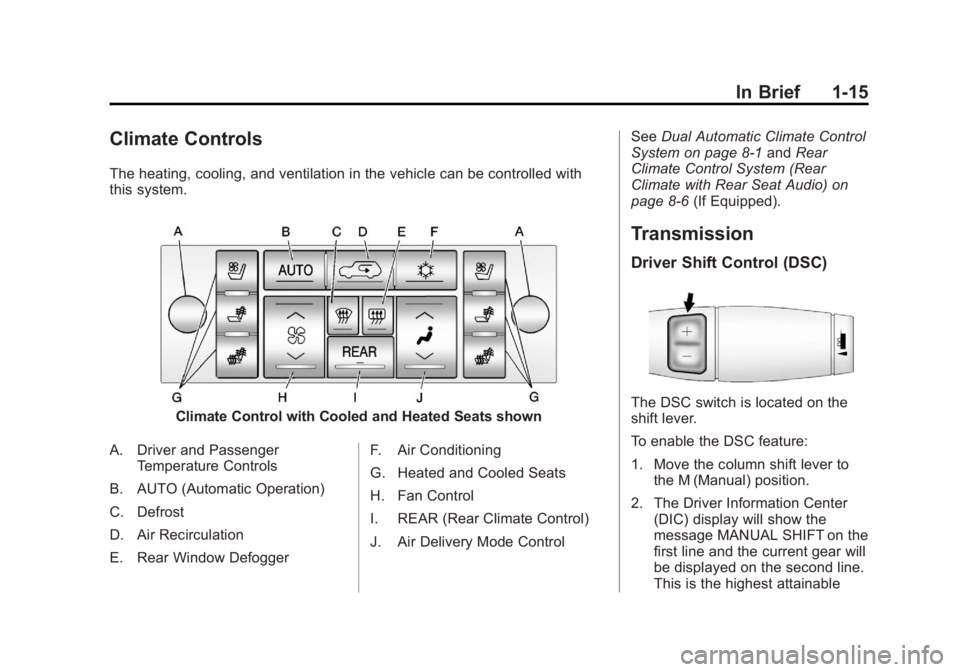
Climate Controls
The heating, cooling, and ventilation in the vehicle can be controlled with
this system.
Climate Control with Cooled and Heated Seats shown
A. Driver and Passenger Temperature Controls
B. AUTO (Automatic Operation)
C. Defrost
D. Air Recirculation
E. Rear Window Defogger F. Air Conditioning
G. Heated and Cooled Seats
H. Fan Control
I. REAR (Rear Climate Control)
J. Air Delivery Mode ControlSee
Dual Automatic Climate Control
System on page 8-1 andRear
Climate Control System (Rear
Climate with Rear Seat Audio) on
page 8-6 (If Equipped).
Transmission
Driver Shift Control (DSC)
The DSC switch is located on the
shift lever.
To enable the DSC feature:
1. Move the column shift lever to
the M (Manual) position.
2. The Driver Information Center (DIC) display will show the
message MANUAL SHIFT on the
first line and the current gear will
be displayed on the second line.
This is the highest attainable
Page 33 of 508

Black plate (5,1)Cadillac Escalade/Escalade ESV Owner Manual (GMNA-Localizing-U.S./
Canada/Mexico-6081529) - 2014 - CRC 1st Edition - 4/23/13
Keys, Doors, and Windows 2-5
Remote Vehicle Start
This feature allows you to start the
engine from outside of the vehicle.
It may also start up the vehicle's
heating or air conditioning systems
and rear window defogger. Normal
operation of the system will return
after the key is turned to the ON/
RUN position.
During a remote start, the climate
control system will default to a
heating or cooling mode depending
on the outside temperatures.
During a remote start, if the vehicle
has an automatic climate control
system and heated seats, the
heated seats will turn on during
colder outside temperatures and will
shut off when the key is turned to
ON/RUN. If the vehicle does not
have an automatic climate control
system, during remote start, you will
need to manually turn the heated
seats on and off. SeeHeated and
Ventilated Front Seats on page 3-6
for additional information. Laws in some communities may
restrict the use of remote starters.
For example, some laws may
require a person using the remote
start to have the vehicle in view
when doing so. Check local
regulations for any requirements on
remote starting of vehicles.
Do not use the remote start feature
if the vehicle is low on fuel. The
vehicle may run out of fuel.
The RKE transmitter range may be
less while the vehicle is running.
There are other conditions which
can affect the performance of the
transmitter, see
Remote Keyless
Entry (RKE) System on page 2-2 for
additional information.
/(Remote Start): This button will
be on the RKE transmitter if you
have remote start.
To start the vehicle using the remote
start feature:
1. Aim the transmitter at the
vehicle. 2. Press and release
Q.
3. Immediately press and hold
/
until the turn signal lamps flash.
If you cannot see the vehicle's
lamps, press and hold
/for at
least four seconds.
When the vehicle starts, the
parking lamps will turn on and
remain on while the vehicle is
running. The doors will be
locked and the climate control
system may come on.
The engine will continue to run
for 10 minutes. Repeat the steps
for a 10-minute time extension.
Remote start can be extended
only once.
After entering the vehicle during a
remote start, insert and turn the key
to ON/RUN to drive the vehicle.
To cancel a remote start, do any of
the following:
.Aim the RKE transmitter at the
vehicle and press and hold
/
until the parking lamps turn off.
Page 51 of 508

Black plate (1,1)Cadillac Escalade/Escalade ESV Owner Manual (GMNA-Localizing-U.S./
Canada/Mexico-6081529) - 2014 - CRC 1st Edition - 4/23/13
Seats and Restraints 3-1
Seats and
Restraints
Head Restraints
Head Restraints . . . . . . . . . . . . . . . 3-2
Front Seats
Power Seat Adjustment . . . . . . . 3-3
Lumbar Adjustment . . . . . . . . . . . 3-3
Reclining Seatbacks . . . . . . . . . . 3-4
Memory Seats . . . . . . . . . . . . . . . . 3-5
Heated and Ventilated FrontSeats . . . . . . . . . . . . . . . . . . . . . . . . 3-6
Rear Seats
Heated Rear Seats . . . . . . . . . . . 3-7
Second Row Seats . . . . . . . . . . . 3-8
Third Row Seats . . . . . . . . . . . . . 3-12
Safety Belts
Safety Belts . . . . . . . . . . . . . . . . . . 3-15
How to Wear Safety BeltsProperly . . . . . . . . . . . . . . . . . . . . 3-16 Lap-Shoulder Belt . . . . . . . . . . . 3-17
Safety Belt Use During
Pregnancy . . . . . . . . . . . . . . . . . . 3-22
Safety Belt Extender . . . . . . . . . 3-23
Safety System Check . . . . . . . . 3-23
Safety Belt Care . . . . . . . . . . . . . 3-23
Replacing Safety Belt System Parts after a Crash . . . . . . . . . 3-23
Airbag System
Airbag System . . . . . . . . . . . . . . . 3-24
Where Are the Airbags? . . . . . 3-26
When Should an AirbagInflate? . . . . . . . . . . . . . . . . . . . . . 3-28
What Makes an Airbag Inflate? . . . . . . . . . . . . . . . . . . . . . 3-29
How Does an Airbag
Restrain? . . . . . . . . . . . . . . . . . . . 3-29
What Will You See after an Airbag Inflates? . . . . . . . . . . . . 3-29
Passenger Sensing System . . . . . . . . . . . . . . . . . . . . . 3-31
Servicing the Airbag-Equipped Vehicle . . . . . . . . . . . . . . . . . . . . . 3-35 Adding Equipment to the
Airbag-Equipped Vehicle . . . 3-35
Airbag System Check . . . . . . . . 3-36
Replacing Airbag System Parts after a Crash . . . . . . . . . 3-36
Child Restraints
Older Children . . . . . . . . . . . . . . . 3-37
Infants and Young
Children . . . . . . . . . . . . . . . . . . . . 3-39
Child Restraint Systems . . . . . 3-41
Where to Put the Restraint . . . 3-43
Lower Anchors and Tethers for Children (LATCH
System) . . . . . . . . . . . . . . . . . . . . 3-45
Replacing LATCH System Parts After a Crash . . . . . . . . . 3-51
Securing Child Restraints (Rear Seat Position) . . . . . . . . 3-52
Securing Child Restraints (Front Outboard Seat
Position) . . . . . . . . . . . . . . . . . . . 3-55
Page 56 of 508

Black plate (6,1)Cadillac Escalade/Escalade ESV Owner Manual (GMNA-Localizing-U.S./
Canada/Mexico-6081529) - 2014 - CRC 1st Edition - 4/23/13
3-6 Seats and Restraints
If something has blocked the driver
seat, power steering column, or the
adjustable pedals while recalling a
memory position, the recall may
stop. Remove the obstruction; then
press and hold the appropriate
manual control for the memory item
that is not recalling for two seconds.
Try recalling the memory position
again by pressing the appropriate
memory button. If the memory
position is still not recalling, see
your dealer for service.
Easy Exit Positions
This feature can move the driver
seat rearward and the power
steering column up and forward to
allow extra room to exit the vehicle.
B(Easy Exit Positions):Press to
recall the easy exit positions. The
vehicle must be in P (Park).
If the easy exit feature is
programmed on in the vehicle
personalization menu, automatic
driver seat and power steering
column movement occur when the
ignition key is removed. A single beep sounds. The driver
seat moves back approximately
8 cm (3 in) and the power steering
column moves up and forward. To
move the seat back farther, press
Bagain until the seat is all the
way back.
If something has blocked the driver
seat while recalling the exit position,
the recall may stop. Remove the
obstruction; then press and hold the
power seat control rearward for
two seconds. Try recalling the exit
position again. If the exit position is
still not recalling, see your dealer for
service.
See Vehicle Personalization on
page 5-35.
Heated and Ventilated
Front Seats
{Warning
If you cannot feel temperature
change or pain to the skin, the
seat heater may cause burns. To
reduce the risk of burns, people
with such a condition should use
care when using the seat heater,
especially for long periods of
time. Do not place anything on
the seat that insulates against
heat, such as a blanket, cushion,
cover, or similar item. This may
cause the seat heater to
overheat. An overheated seat
heater may cause a burn or may
damage the seat.
Page 57 of 508

Black plate (7,1)Cadillac Escalade/Escalade ESV Owner Manual (GMNA-Localizing-U.S./
Canada/Mexico-6081529) - 2014 - CRC 1st Edition - 4/23/13
Seats and Restraints 3-7
The buttons are on the climate
control panel.
{(Cooled Seat):Press to cool
the seat.
+(Heated Seatback): Press to
heat the seatback.
z(Heated Seat and Seatback):
Press to heat the seat and
seatback. Press the desired button once for
the highest setting. With each press
of the button, the seat will change to
the next lower setting, and then to
the off setting. Indicator bars next to
the symbol on the climate control
display show the selected setting:
three for high, two for medium, and
one for low.
The heated and cooled seats are
canceled when the ignition is turned
off. To use this feature after
restarting the vehicle, press the
desired button again.
Rear Seats
Heated Rear Seats
{Warning
If you cannot feel temperature
change or pain to the skin, the
seat heater may cause burns.
See the Warning under
Heated
and Ventilated Front Seats on
page 3-6.
Page 58 of 508
Black plate (8,1)Cadillac Escalade/Escalade ESV Owner Manual (GMNA-Localizing-U.S./
Canada/Mexico-6081529) - 2014 - CRC 1st Edition - 4/23/13
3-8 Seats and Restraints
The buttons are on the Rear Seat
Audio (RSA) panel on the rear of the
center console.
Press
MorLto heat the left
outboard or right outboard seat
cushion. An indicator on the RSA
display appears when this feature
is on.
Press the button once for the
highest setting. With each press of
the button, the heated seat changes
to the next lower setting, and then
the off setting. Indicator bars next to
the symbol show the setting: three
for high, two for medium, and one
for low.
The heated seats are canceled
ten seconds after the ignition is
turned off. To use this feature after
the vehicle is restarted, press the
desired button.
Second Row Seats
The second row seats can be folded
for additional cargo space or folded
and tumbled for easy entry and exit to the third row seat, if equipped.
The seat has either the manual fold
and tumble feature or the automatic
seat release fold and tumble
feature.
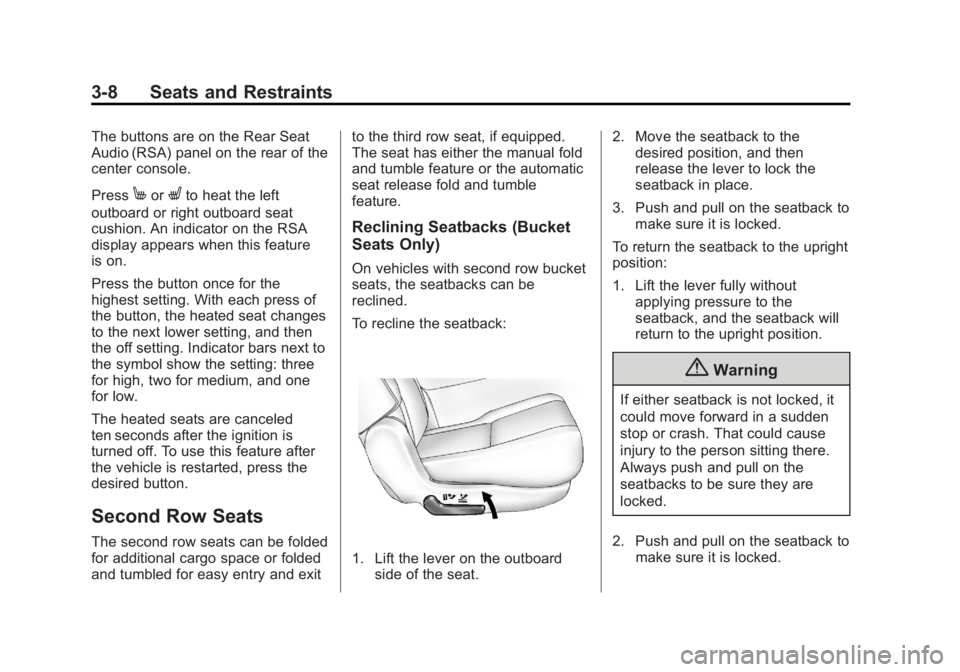
Reclining Seatbacks (Bucket
Seats Only)
On vehicles with second row bucket
seats, the seatbacks can be
reclined.
To recline the seatback:
1. Lift the lever on the outboard
side of the seat. 2. Move the seatback to the
desired position, and then
release the lever to lock the
seatback in place.
3. Push and pull on the seatback to make sure it is locked.
To return the seatback to the upright
position:
1. Lift the lever fully without applying pressure to the
seatback, and the seatback will
return to the upright position.
{Warning
If either seatback is not locked, it
could move forward in a sudden
stop or crash. That could cause
injury to the person sitting there.
Always push and pull on the
seatbacks to be sure they are
locked.
2. Push and pull on the seatback to make sure it is locked.
Page 139 of 508

Black plate (27,1)Cadillac Escalade/Escalade ESV Owner Manual (GMNA-Localizing-U.S./
Canada/Mexico-6081529) - 2014 - CRC 1st Edition - 4/23/13
Instruments and Controls 5-27
Vehicle Messages
Messages displayed on the DIC
indicate the status of the vehicle or
some action may be needed to
correct a condition. Multiple
messages may appear one after
another.
The messages that do not require
immediate action can be
acknowledge and cleared by
pressing any DIC button.
The messages that require
immediate action cannot be cleared
until that action is performed.
All messages should be taken
seriously and clearing the message
does not correct the problem.
The following are the possible
messages and some information
about them.
Battery Voltage and
Charging Messages
BATTERY LOW START
VEHICLE
When the vehicle’s battery is
severely discharged, this message
will display and four chimes will
sound. Start the vehicle
immediately. If the vehicle is not
started and the battery continues to
discharge, the climate controls,
heated seats, and audio systems
will shut off and the vehicle may
require a jump start. These systems
will function again after the vehicle
is started.
SERVICE BATTERY
CHARGING SYSTEM
On some vehicles, this message
displays if there is a problem with
the battery charging system. Under
certain conditions, the charging
system light may also turn on in the
instrument cluster. See Charging
System Light on page 5-14. Driving
with this problem could drain the battery. Turn off all unnecessary
accessories. Have the electrical
system checked as soon as
possible. See your dealer.
Brake System Messages
SERVICE BRAKE SYSTEM
This message displays along with
the brake system warning light if
there is a problem with the brake
system. See
Brake System Warning
Light on page 5-17. If this message
appears, stop as soon as possible
and turn off the vehicle. Restart the
vehicle and check for the message
on the DIC display. If the message
is still displayed or appears again
when you begin driving, the brake
system needs service as soon as
possible. See your dealer.
SERVICE BRAKES SOON
This message displays if there is a
problem with the brake system.
If this message appears, stop as
soon as possible and turn off the
vehicle. Restart the vehicle and
Page 172 of 508

Black plate (10,1)Cadillac Escalade/Escalade ESV Owner Manual (GMNA-Localizing-U.S./
Canada/Mexico-6081529) - 2014 - CRC 1st Edition - 4/23/13
6-10 Lighting
Battery Load
Management
The vehicle has Electric Power
Management (EPM) that estimates
the battery's temperature and state
of charge. It then adjusts the voltage
for best performance and extended
life of the battery.
When the battery's state of charge
is low, the voltage is raised slightly
to quickly bring the charge back up.
When the state of charge is high,
the voltage is lowered slightly to
prevent overcharging. If the vehicle
has a voltmeter gauge or a voltage
display on the Driver Information
Center (DIC), you may see the
voltage move up or down. This is
normal. If there is a problem, an
alert will be displayed.The battery can be discharged at
idle if the electrical loads are very
high. This is true for all vehicles.
This is because the generator
(alternator) may not be spinning fast
enough at idle to produce all the
power that is needed for very high
electrical loads.
A high electrical load occurs when
several of the following are on, such
as: headlamps, high beams, fog
lamps, rear window defogger,
climate control fan at high speed,
heated seats, engine cooling fans,
trailer loads, and loads plugged into
accessory power outlets.
EPM works to prevent excessive
discharge of the battery. It does this
by balancing the generator's output
and the vehicle's electrical needs.
It can increase engine idle speed to
generate more power, whenever
needed. It can temporarily reduce
the power demands of some
accessories.Normally, these actions occur in
steps or levels, without being
noticeable. In rare cases at the
highest levels of corrective action,
this action may be noticeable to the
driver. If so, a Driver Information
Center (DIC) message might be
displayed, such as BATTERY LOW
START VEHICLE. If this message
displays, it is recommended that the
driver reduce the electrical loads as
much as possible and restart the
vehicle. See
Battery Voltage and
Charging Messages on page 5-27.
Battery Power Protection
This feature shuts off the dome
lamps if they are left on for more
than 10 minutes when the ignition is
in LOCK/OFF. This helps to prevent
the battery from running down.