infotainment CADILLAC ESCALADE 2016 4.G User Guide
[x] Cancel search | Manufacturer: CADILLAC, Model Year: 2016, Model line: ESCALADE, Model: CADILLAC ESCALADE 2016 4.GPages: 357, PDF Size: 3.49 MB
Page 158 of 357
Cadillac Escalade Owner Manual (GMNA-Localizing-MidEast-9369153) -
2016 - crc - 6/19/15
Instruments and Controls 157
.Audio Cue Volume
Manage Favorites
This allows favorites to be edited.
See “Manage Favorites” in
“Settings” under“Radio” in the
infotainment manual.
Number of Favorites Pages
Press to set the number of favorites
to display.
Select the desired number or select
Auto and the infotainment system
will automatically adjust the number
of favorites shown.
Audible Touch Feedback
This allows Audible Touch
Feedback to be turned on or off.
Select Off or On.
Auto Volume
This feature adjusts the volume
based on vehicle speed and
ambient noise.
Select Off, Low, Medium-Low,
Medium, Medium-High, or High. Maximum Startup Volume
This feature sets the maximum
startup volume. If the vehicle is
started and the volume is greater
than this level, the volume is
adjusted to this level. To set the
maximum startup volume, press +
or
−to increase or decrease.
Audio Cue Volume
This feature sets the volume of
audio files played at system startup
and shutdown.
Select On, then press + or −to
increase or decrease the volume.
Vehicle
Select and the following may
display:
. Climate and Air Quality
. Collision/Detection Systems
. Comfort and Convenience
. Lighting
. Power Door Locks
. Remote Lock, Unlock, Start Climate and Air Quality
Select and the following may
display:
.
Auto Fan Max Speed
. Auto Defog
Auto Fan Max Speed
This feature will set the maximum
auto fan speed.
Select Low, Medium, or High.
Auto Defog
When set to On, the auto defog
comes on when the climate control
detects a humidity risk based on
outside temp, windshield temp, and
interior humidity. Air will be directed
on to the windshield.
Select Off or On.
Collision/Detection Systems
Select the Collision/Detection
Systems menu and the following
may display:
. Alert Type
. Auto Collision Preparation
. Go Notifier
Page 162 of 357
Cadillac Escalade Owner Manual (GMNA-Localizing-MidEast-9369153) -
2016 - crc - 6/19/15
Instruments and Controls 161
Select All Doors or Driver
Door Only.
Passive Door Lock
This feature can be turned on or off,
or can be used to select feedback
when using the button on the driver
door to lock the vehicle. See
Remote Keyless Entry (RKE)
System Operation029.
Select Off, On with Horn
Chirp, or On.
Remote Left in Vehicle Alert
This feature sounds an alert when
the RKE transmitter is left in the
vehicle.
Select Off or On.
Bluetooth
Select and the following may
display:
. Pair New Device
. Device Management
. Ringtones
. Voice Mail Numbers Pair New Device
Select to pair a new device. See
“Pairing”
under“Bluetooth
(Infotainment Controls)” in the
infotainment manual.
Device Management
Select to connect to a different
phone source, disconnect a phone,
or delete a phone.
Ringtones
Press to change the ring tone for
the specific phone. The phone does
not need to be connected to change
the ring.
Voice Mail Numbers
This feature displays the voice mail
number for all connected phones.
To change the voice mail number,
select EDIT or press the EDIT
button. Type a new number, then
select SAVE or press the SAVE
button.
Voice (If Equipped)
Select and the following may
display:
. Confidence Threshold .
Prompt Length
. Audio Feedback Speed
Confidence Threshold
This feature allows the adjustment
of the sensitivity of the speech
recognition system.
Select Short or Long.
Prompt Length
This feature adjusts the voice
prompt length.
Select Short or Long.
Audio Feedback Speed
This feature adjusts the audio
feedback speed.
Select Slow, Medium, or Fast.
Display
Select and the following may
display:
. Theme
. Proximity Sensing
. Calibrate Touchscreen
. Turn Display Off
Page 163 of 357
Cadillac Escalade Owner Manual (GMNA-Localizing-MidEast-9369153) -
2016 - crc - 6/19/15
162 Instruments and Controls
Theme
Select to change the display of the
infotainment system.
Select Contemporary, Mainstreet,
Edge, or Velocity.
Proximity Sensing
This allows the feature to be turned
on or off.
Select Off, On, or On-Map Only.
Calibrate Touchscreen
Select to calibrate the touchscreen,
then follow the prompts.
Turn Display Off
Select to turn the display off. Press
anywhere on the display area or any
faceplate button to turn the
display on.
Rear Camera
Select and the following may
display:
.Guidance Lines
. Rear Park Assist Symbols Guidance Lines
Select to turn Off or On. See
Assistance Systems for Parking or
Backing
0233.
Rear Park Assist Symbols
Select to turn Off or On. See
Assistance Systems for Parking or
Backing 0233.
Return to Factory Settings
Select and the following may
display:
.
Restore Vehicle Settings
. Clear All Private Data
. Restore Radio Settings
Restore Vehicle Settings
This allows selection of restoring
vehicle settings.
Select Restore or Cancel.
Clear All Private Data
This allows selection to clear all
private information from the vehicle.
Select Delete or Cancel. Restore Radio Settings
This allows selection to restore
radio settings.
Select Restore or Cancel.
Software Information
Select to view the infotainment
system current software information.
Page 176 of 357
Cadillac Escalade Owner Manual (GMNA-Localizing-MidEast-9369153) -
2016 - crc - 6/19/15
Infotainment System 175
Infotainment
System
Introduction
Infotainment . . . . . . . . . . . . . . . . . . 175
Introduction
Infotainment
See the infotainment manual for
information on the radio, audio
players, phone, and navigation
system. It also includes information
on settings.
Page 178 of 357
Cadillac Escalade Owner Manual (GMNA-Localizing-MidEast-9369153) -
2016 - crc - 6/19/15
Climate Controls 177
6. Climate Control Selection(Application Tray Button)
7. Rear (Rear Climate Control Touch Screen)
8. Air Delivery Mode Control
Climate Control Touch Screen
The fan, air delivery mode, air
conditioning, driver and passenger
temperatures, and SYNC settings
can be controlled by pressing
CLIMATE on the infotainment home
screen or the climate button in the
touch screen application tray.
A selection can then be made on
the front climate control page
displayed. See the infotainment
manual. Climate Control Status Screen
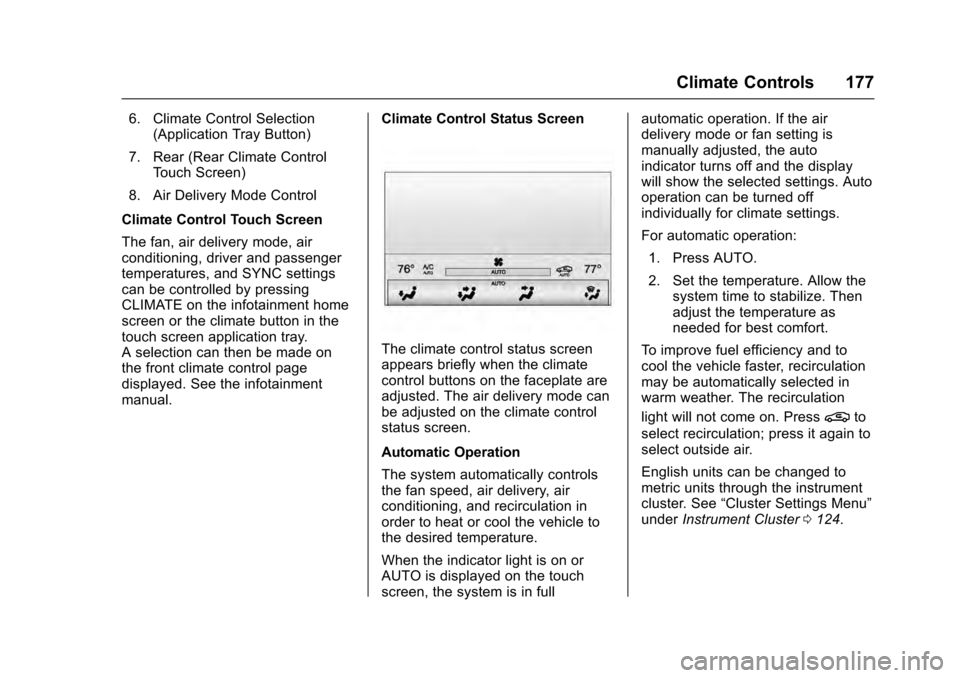
The climate control status screen
appears briefly when the climate
control buttons on the faceplate are
adjusted. The air delivery mode can
be adjusted on the climate control
status screen.
Automatic Operation
The system automatically controls
the fan speed, air delivery, air
conditioning, and recirculation in
order to heat or cool the vehicle to
the desired temperature.
When the indicator light is on or
AUTO is displayed on the touch
screen, the system is in fullautomatic operation. If the air
delivery mode or fan setting is
manually adjusted, the auto
indicator turns off and the display
will show the selected settings. Auto
operation can be turned off
individually for climate settings.
For automatic operation:
1. Press AUTO.
2. Set the temperature. Allow the system time to stabilize. Then
adjust the temperature as
needed for best comfort.
To improve fuel efficiency and to
cool the vehicle faster, recirculation
may be automatically selected in
warm weather. The recirculation
light will not come on. Press
@to
select recirculation; press it again to
select outside air.
English units can be changed to
metric units through the instrument
cluster. See “Cluster Settings Menu”
under Instrument Cluster 0124.
Page 187 of 357
Cadillac Escalade Owner Manual (GMNA-Localizing-MidEast-9369153) -
2016 - crc - 6/19/15
186 Driving and Operating
See the infotainment manual for
information on that system or the
navigation system, if equipped,
including pairing and using a cell
phone.
Defensive Driving
Defensive driving means“always
expect the unexpected.” The first
step in driving defensively is to wear
the safety belt. See Safety Belts
0 69.
. Assume that other road users
(pedestrians, bicyclists, and
other drivers) are going to be
careless and make mistakes.
Anticipate what they might do
and be ready.
. Allow enough following distance
between you and the driver in
front of you.
. Focus on the task of driving.
Control of a Vehicle
Braking, steering, and accelerating
are important factors in helping to
control a vehicle while driving.
Braking
Braking action involves perception
time and reaction time. Deciding to
push the brake pedal is perception
time. Actually doing it is
reaction time.
Average driver reaction time is
about three-quarters of a second. In
that time, a vehicle moving at
100 km/h (60 mph) travels 20 m
(66 ft), which could be a lot of
distance in an emergency.
Helpful braking tips to keep in mind
include:
.Keep enough distance between
you and the vehicle in front
of you.
. Avoid needless heavy braking.
. Keep pace with traffic.
If the engine ever stops while the
vehicle is being driven, brake
normally but do not pump the
brakes. Doing so could make the
pedal harder to push down. If the
engine stops, there will be some
power brake assist but it will be
used when the brake is applied. Once the power assist is used up, it
can take longer to stop and the
brake pedal will be harder to push.
Steering
Electric Power Steering
This vehicle has electric power
steering. It does not have power
steering fluid. Regular maintenance
is not required.
If power steering assist is lost due
to a system malfunction, the vehicle
can be steered, but may require
increased effort.
See your dealer if there is a
problem.
If the steering assist is used for an
extended period of time, power
assist may be reduced.
If the steering wheel is turned until it
reaches the end of its travel, and is
held in that position for an extended
period of time, power steering assist
may be reduced.
Normal use of the power steering
assist should return when the
system cools down.
Page 234 of 357
Cadillac Escalade Owner Manual (GMNA-Localizing-MidEast-9369153) -
2016 - crc - 6/19/15
Driving and Operating 233
Warning (Continued)
.Detect children,
pedestrians, bicyclists,
or animals.
. Detect vehicles or objects
outside the area monitored
by the system.
. Work at all driving speeds.
. Warn you or provide you
with enough time to avoid a
crash.
. Work under poor visibility or
bad weather conditions.
. Work if the detection sensor
is not cleaned or is covered
by ice, snow, mud, or dirt.
Complete attention is always
required while driving, and you
should be ready to take action
and apply the brakes and/or steer
the vehicle to avoid crashes. Audible or Safety Alert Seat
Some driver assistance features
alert the driver of obstacles by
beeping. To change the volume of
the warning chime, see
“Comfort
and Convenience” underVehicle
Personalization 0156.
If equipped with the Safety Alert
Seat, the driver seat cushion may
provide a vibrating pulse alert
instead of beeping. To change this,
see “Collision/Detection Systems”
under Vehicle Personalization
0 156.
Assistance Systems for
Parking or Backing
If equipped, the Rear Vision Camera
(RVC), Rear Parking Assist (RPA),
Front Parking Assist (FPA),
Surround Vision, Front Vision
Camera, Rear Automatic Braking
(RAB) and Backing Warning
System, and Rear Cross Traffic
Alert (RCTA) may help the driver
park or avoid objects. Always check
around the vehicle when parking or
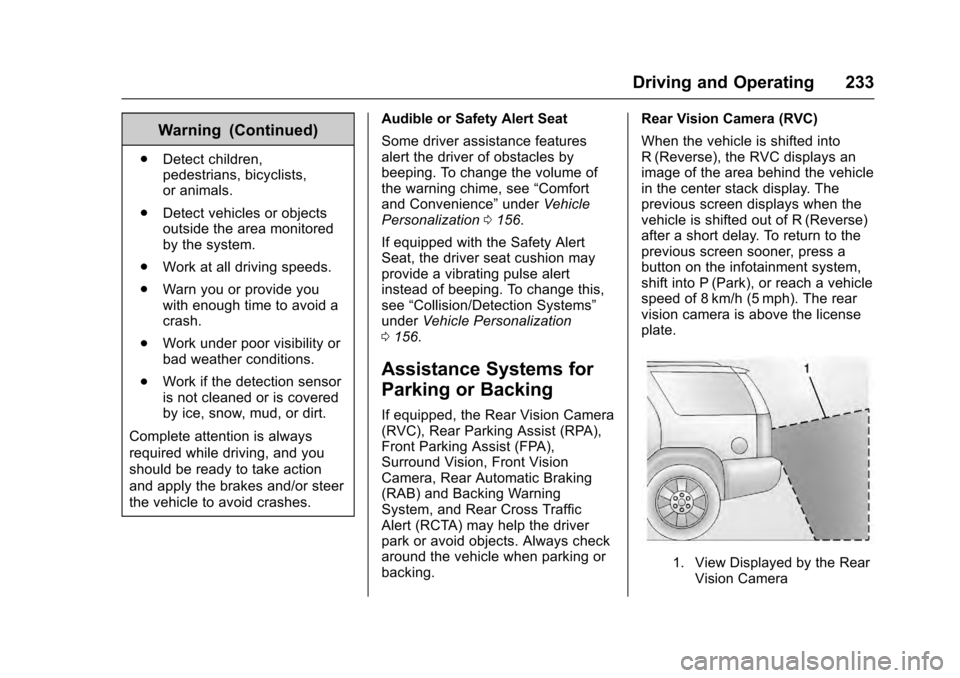
backing. Rear Vision Camera (RVC)
When the vehicle is shifted into
R (Reverse), the RVC displays an
image of the area behind the vehicle
in the center stack display. The
previous screen displays when the
vehicle is shifted out of R (Reverse)
after a short delay. To return to the
previous screen sooner, press a
button on the infotainment system,
shift into P (Park), or reach a vehicle
speed of 8 km/h (5 mph). The rear
vision camera is above the license
plate.
1. View Displayed by the Rear
Vision Camera
Page 346 of 357
Cadillac Escalade Owner Manual (GMNA-Localizing-MidEast-9369153) -
2016 - crc - 6/19/15
Customer Information 345
Customer
Information
Vehicle Data Recording and
Privacy
Vehicle Data Recording andPrivacy . . . . . . . . . . . . . . . . . . . . . . 345
Event Data Recorders . . . . . . . . 345
Infotainment System . . . . . . . . . . 346
Vehicle Data
Recording and
Privacy
The vehicle has a number of
computers that record information
about the vehicle’s performance and
how it is driven. For example, the
vehicle uses computer modules to
monitor and control engine and
transmission performance, to
monitor the conditions for airbag
deployment and deploy them in a
crash, and, if equipped, to provide
antilock braking to help the driver
control the vehicle. These modules
may store data to help the dealer
technician service the vehicle.
Some modules may also store data
about how the vehicle is operated,
such as rate of fuel consumption or
average speed. These modules may
retain personal preferences, such as
radio presets, seat positions, and
temperature settings.
Event Data Recorders
This vehicle is equipped with an
event data recorder (EDR). The
main purpose of an EDR is to
record, in certain crash or near
crash-like situations, such as an
airbag deployment or hitting a road
obstacle, data that will assist in
understanding how a vehicle's
systems performed. The EDR is
designed to record data related to
vehicle dynamics and safety
systems for a short period of time,
typically 30 seconds or less. The
EDR in this vehicle is designed to
record such data as:
. How various systems in your
vehicle were operating.
. Whether or not the driver and
passenger safety belts were
buckled/fastened;
. How far (if at all) the driver was
depressing the accelerator and/
or brake pedal; and
. How fast the vehicle was
traveling.
Page 347 of 357
Cadillac Escalade Owner Manual (GMNA-Localizing-MidEast-9369153) -
2016 - crc - 6/19/15
346 Customer Information
These data can help provide a
better understanding of the
circumstances in which crashes and
injuries occur.
Note
EDR data are recorded by your
vehicle only if a non-trivial crash
situation occurs. No data are
recorded by the EDR under normal
driving conditions and no personal
data (e.g., name, gender, age, and
crash location) are recorded.
However, other parties, such as law
enforcement, could combine the
EDR data with the type of
personally identifying data routinely
acquired during a crash
investigation.
To read data recorded by an EDR,
special equipment is required, and
access to the vehicle or the EDR is
needed. In addition to the vehicle
manufacturer, other parties, such as
law enforcement, that have the
special equipment, can read the
information if they have access to
the vehicle or the EDR.GM will not access these data or
share it with others except: with the
consent of the vehicle owner or,
if the vehicle is leased, with the
consent of the lessee; in response
to an official request of police or
similar government office; as part of
GM's defense of litigation; or, as
required by law. Data that GM
collects or receives may also be
used for GM research needs or may
be made available to others for
research purposes, where a need is
shown and the data is not tied to a
specific vehicle or vehicle owner.
Infotainment System
Using the navigation system may
result in the storage of destinations,
addresses, telephone numbers, and
other trip information. See the
infotainment manual for information
on stored data and for deletion
instructions.
Page 352 of 357

Cadillac Escalade Owner Manual (GMNA-Localizing-MidEast-9369153) -
2016 - crc - 6/19/15
Index 351
Headlamps (cont'd)Daytime Running
Lamps (DRL) . . . . . . . . . . . . . . . . 168
Flash-to-Pass . . . . . . . . . . . . . . . . . 168
High-Beam On Light . . . . . . . . . . 137
High/Low Beam Changer . . . . . 168
Lamps On Reminder . . . . . . . . . 138
Heated Rear Seats . . . . . . . . . . . . . . . . . . . . . 62
Steering Wheel . . . . . . . . . . . . . . . .115
Heated and Cooled Front Seats . . . . . . . . . . . . . . . . . . . . . . . . . . 60
Heated Mirrors . . . . . . . . . . . . . . . . . . . 47
High-Beam On Light . . . . . . . . . . . . 137
High-Speed Operation . . . . . . . . . . 294
Hill and Mountain Roads . . . . . . . . 193
Hill Start Assist (HSA) . . . . . . . . . . 219
Hood . . . . . . . . . . . . . . . . . . . . . . . . . . . 260
Horn . . . . . . . . . . . . . . . . . . . . . . . . . . . . 116
How to Wear Safety Belts Properly . . . . . . . . . . . . . . . . . . . . . . . . 70
I
Ignition Positions . . . . . . . . . . . . . . . 201
IndicatorVehicle Ahead . . . . . . . . . . . . . . . . 134
Infants and Young Children, Restraints . . . . . . . . . . . . . . . . . . . . . . 91
Infotainment . . . . . . . . . . . . . . . . . . . . 175 Infotainment System . . . . . . . . . . . . 346
Instrument Cluster . . . . . . . . . . . . . . 124
Instrument Panel
Storage Area . . . . . . . . . . . . . . . . . 109
Interior Rearview Mirrors . . . . . . . . . 48
Introduction . . . . . . . . . . . . . . . . . . . . . . . 2
J
Jump Starting . . . . . . . . . . . . . . . . . . . 315
K
Key and Lock Messages . . . . . . . . 148
Keyless Entry Remote (RKE) System . . . . . . . . . 29
Keys . . . . . . . . . . . . . . . . . . . . . . . . . . . . . 28
L
Lamps Cornering . . . . . . . . . . . . . . . . . . . . . 171
Daytime Running (DRL) . . . . . . 168
Dome . . . . . . . . . . . . . . . . . . . . . . . . . 172
Exterior Controls . . . . . . . . . . . . . . 166
Exterior Lamps OffReminder . . . . . . . . . . . . . . . . . . . 168
License Plate . . . . . . . . . . . . . . . . . 280
Malfunction Indicator . . . . . . . . . 130
Messages . . . . . . . . . . . . . . . . . . . . 149
On Reminder . . . . . . . . . . . . . . . . . 138 Lamps (cont'd)
Reading . . . . . . . . . . . . . . . . . . . . . . 172
Lane Change Alert (LCA) . . . . . . . 242
Lane Departure Warning (LDW) . . . . . . . . . . . . . . . . 244
Lane Keep Assist (LKA) . . . . . . . . 244
Lane Keep Assist Light . . . . . . . . . 134
Lap-Shoulder Belt . . . . . . . . . . . . . . . 71
LATCH System Replacing Parts after aCrash . . . . . . . . . . . . . . . . . . . . . . . 103
LATCH, Lower Anchors and Tethers for Children . . . . . . . . . . . . 96
LED Lighting . . . . . . . . . . . . . . . . . . . . 280
Level Control
Automatic . . . . . . . . . . . . . . . . . . . . . 222
Liftgate . . . . . . . . . . . . . . . . . . . . . . . . . . 38
Lighter, Cigarette . . . . . . . . . . . . . . . 122
Lighting Entry . . . . . . . . . . . . . . . . . . . . . . . . . 173
Exit . . . . . . . . . . . . . . . . . . . . . . . . . . . 173
Illumination Control . . . . . . . . . . . 171
LED . . . . . . . . . . . . . . . . . . . . . . . . . . 280
Lights . . . . . . . . . . . . . . . . . . . . . . . . . . . 134 Airbag Readiness . . . . . . . . . . . . . 129
Antilock Brake System(ABS) Warning . . . . . . . . . . . . . . 133
Brake System Warning . . . . . . . 132