warning CADILLAC ESCALADE 2016 4.G Workshop Manual
[x] Cancel search | Manufacturer: CADILLAC, Model Year: 2016, Model line: ESCALADE, Model: CADILLAC ESCALADE 2016 4.GPages: 357, PDF Size: 3.49 MB
Page 108 of 357
Cadillac Escalade Owner Manual (GMNA-Localizing-MidEast-9369153) -
2016 - crc - 6/19/15
Seats and Restraints 107
Warning (Continued)
forward-facing child restraint in
the front seat, always move the
front passenger seat as far back
as it will go. It is better to secure
the child restraint in a rear seat.
SeePassenger Sensing System
0 83 for additional information.
If the child restraint uses a top
tether, see Lower Anchors and
Tethers for Children (LATCH
System) 096 for top tether anchor
locations.
Do not secure a child seat in a
position without a top tether anchor
if a national or local law requires
that the top tether be anchored, or if
the instructions that come with the
child restraint say that the top strap
must be anchored. When using the lap-shoulder belt to
secure the child restraint in this
position, follow the instructions that
came with the child restraint and the
following instructions:
1. Move the seat as far back as it will go before securing the
forward-facing child restraint.
When the passenger sensing
system has turned off the front
outboard passenger frontal
airbag, the off indicator on the
passenger airbag status
indicator should light and stay
lit when you start the vehicle.
See Passenger Airbag Status
Indicator 0129.
2. Put the child restraint on the seat.
3. Pick up the latch plate, and run the lap and shoulder portions
of the vehicle's safety belt
through or around the restraint.
The child restraint instructions
will show you how.
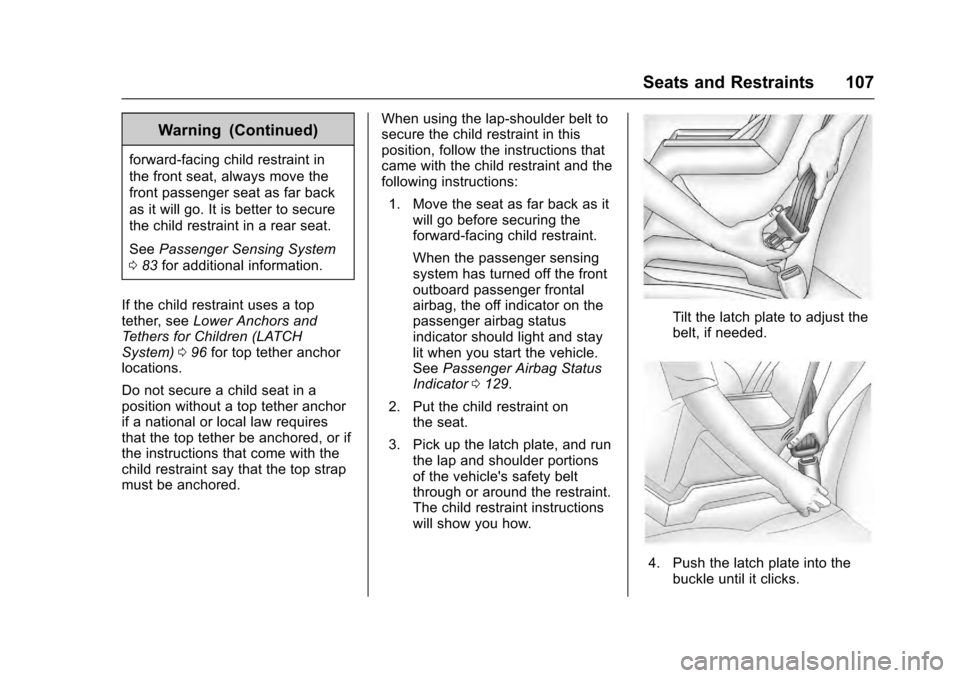
Tilt the latch plate to adjust the
belt, if needed.
4. Push the latch plate into thebuckle until it clicks.
Page 110 of 357
Cadillac Escalade Owner Manual (GMNA-Localizing-MidEast-9369153) -
2016 - crc - 6/19/15
Storage 109
Storage
Storage Compartments
Storage Compartments . . . . . . . 109
Instrument Panel Storage . . . . 109
Glove Box . . . . . . . . . . . . . . . . . . . . 109
Sunglasses Storage . . . . . . . . . . 110
Armrest Storage . . . . . . . . . . . . . . 110
Rear Storage . . . . . . . . . . . . . . . . . 110
Center Console Storage . . . . . . 110
Additional Storage Features
Cargo Cover . . . . . . . . . . . . . . . . . . 111
Roof Rack System
Roof Rack System . . . . . . . . . . . . 112
Storage
Compartments
{Warning
Do not store heavy or sharp
objects in storage compartments.
In a crash, these objects may
cause the cover to open and
could result in injury.
Instrument Panel Storage
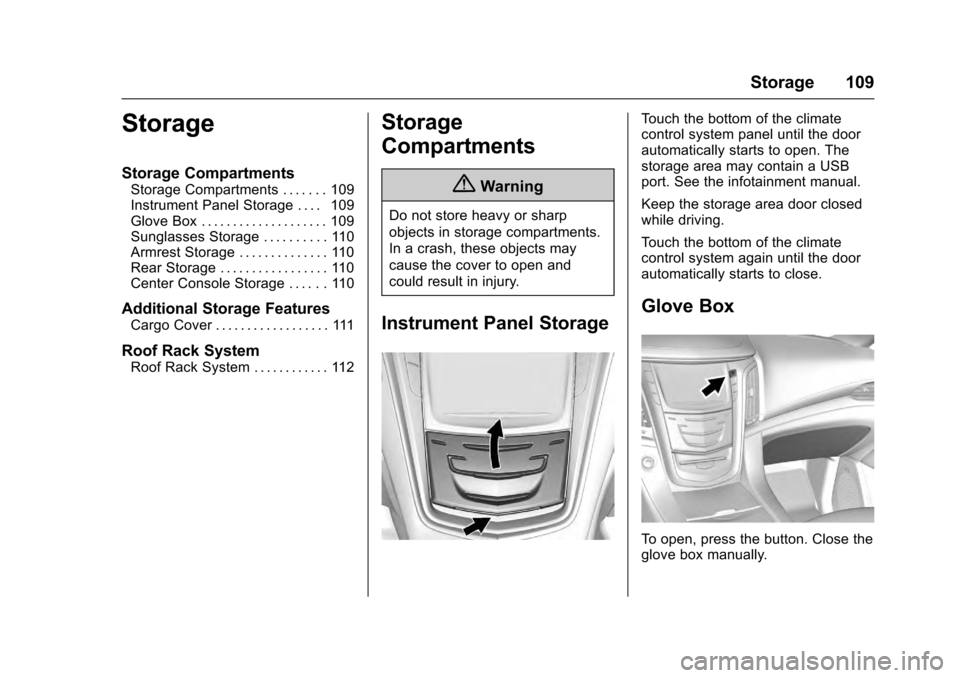
Touch the bottom of the climate
control system panel until the door
automatically starts to open. The
storage area may contain a USB
port. See the infotainment manual.
Keep the storage area door closed
while driving.
Touch the bottom of the climate
control system again until the door
automatically starts to close.
Glove Box
To open, press the button. Close the
glove box manually.
Page 112 of 357
Cadillac Escalade Owner Manual (GMNA-Localizing-MidEast-9369153) -
2016 - crc - 6/19/15
Storage 111
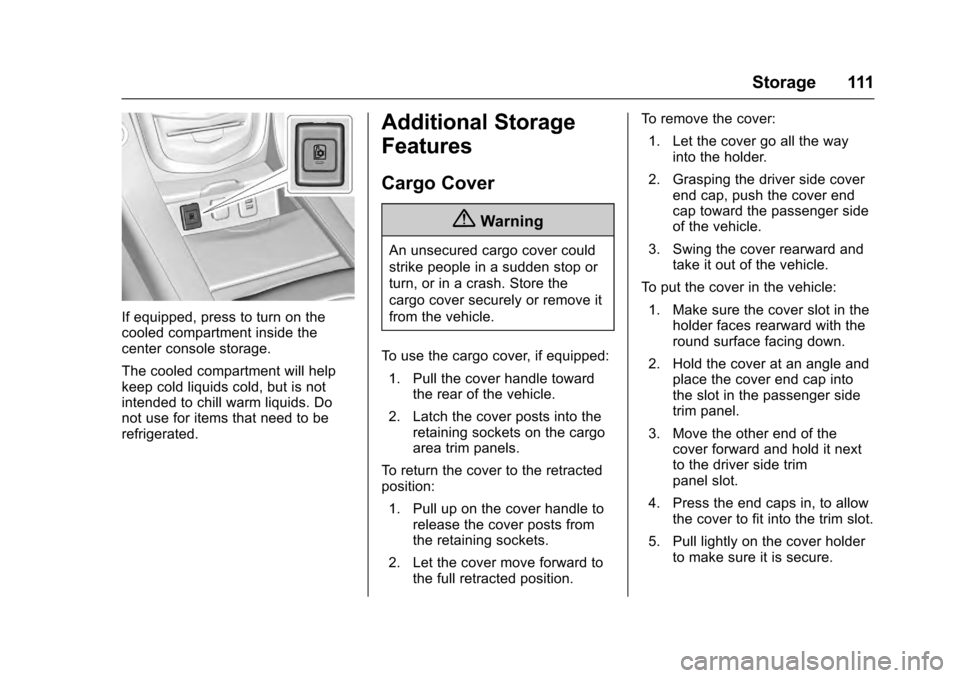
If equipped, press to turn on the
cooled compartment inside the
center console storage.
The cooled compartment will help
keep cold liquids cold, but is not
intended to chill warm liquids. Do
not use for items that need to be
refrigerated.
Additional Storage
Features
Cargo Cover
{Warning
An unsecured cargo cover could
strike people in a sudden stop or
turn, or in a crash. Store the
cargo cover securely or remove it
from the vehicle.
To use the cargo cover, if equipped: 1. Pull the cover handle toward the rear of the vehicle.
2. Latch the cover posts into the retaining sockets on the cargo
area trim panels.
To return the cover to the retracted
position:
1. Pull up on the cover handle to release the cover posts from
the retaining sockets.
2. Let the cover move forward to the full retracted position. To remove the cover:
1. Let the cover go all the way into the holder.
2. Grasping the driver side cover end cap, push the cover end
cap toward the passenger side
of the vehicle.
3. Swing the cover rearward and take it out of the vehicle.
To put the cover in the vehicle: 1. Make sure the cover slot in the holder faces rearward with the
round surface facing down.
2. Hold the cover at an angle and place the cover end cap into
the slot in the passenger side
trim panel.
3. Move the other end of the cover forward and hold it next
to the driver side trim
panel slot.
4. Press the end caps in, to allow the cover to fit into the trim slot.
5. Pull lightly on the cover holder to make sure it is secure.
Page 113 of 357

Cadillac Escalade Owner Manual (GMNA-Localizing-MidEast-9369153) -
2016 - crc - 6/19/15
112 Storage
On long wheelbase models there
are two cover positions. The slots
furthest forward allow the cover to
be used if the third seat is removed
or folded down. The cover can be
installed and removed from
either side.Roof Rack System
{Warning
If something is carried on top of
the vehicle that is longer or wider
than the roof rack—like paneling,
plywood, or a mattress —the
wind can catch it while the vehicle
is being driven. The item being
carried could be violently torn off,
and this could cause a collision
and damage the vehicle. Never
carry something longer or wider
than the roof rack on top of the
vehicle unless using a GM
certified accessory carrier.
If equipped, the roof rack can be
used to load items. For roof racks
that do not have crossrails included,
GM Certified crossrails can be
purchased as an accessory. See
your dealer for additional
information.
Caution
Loading cargo on the roof rack
that weighs more than 100 kg
(220 lb) or hangs over the rear or
sides of the vehicle may damage
the vehicle. Load cargo so that it
rests evenly between the
crossrails, making sure to fasten
cargo securely.
To prevent damage or loss of cargo
when driving, check to make sure
crossrails and cargo are securely
fastened. Loading cargo on the roof
rack will make the vehicle’ s center
of gravity higher. Avoid high speeds,
sudden starts, sharp turns, sudden
braking, or abrupt maneuvers,
otherwise it may result in loss of
control. If driving for a long distance,
on rough roads, or at high speeds,
occasionally stop the vehicle to
make sure the cargo remains in its
place.
Page 115 of 357

Cadillac Escalade Owner Manual (GMNA-Localizing-MidEast-9369153) -
2016 - crc - 6/19/15
114 Instruments and Controls
Instruments and
Controls
Controls
Steering Wheel Adjustment . . . 115
Steering Wheel Controls . . . . . . 115
Heated Steering Wheel . . . . . . . 115
Horn . . . . . . . . . . . . . . . . . . . . . . . . . . 116
Windshield Wiper/Washer . . . . 116
Rear Window Wiper/Washer . . . . . . . . . . . . . . . . . . . . . . 118
Compass . . . . . . . . . . . . . . . . . . . . . 118
Clock . . . . . . . . . . . . . . . . . . . . . . . . . 119
Power Outlets . . . . . . . . . . . . . . . . 120
Wireless Charging . . . . . . . . . . . . 121
Cigarette Lighter . . . . . . . . . . . . . . 122
Ashtrays . . . . . . . . . . . . . . . . . . . . . . 123
Warning Lights, Gauges, and
Indicators
Warning Lights, Gauges, and Indicators . . . . . . . . . . . . . . . . . . . 123
Instrument Cluster . . . . . . . . . . . . 124
Speedometer . . . . . . . . . . . . . . . . . 126
Odometer . . . . . . . . . . . . . . . . . . . . . 126
Trip Odometer . . . . . . . . . . . . . . . . 126
Tachometer . . . . . . . . . . . . . . . . . . . 127
Fuel Gauge . . . . . . . . . . . . . . . . . . . 127 Engine Coolant Temperature
Gauge . . . . . . . . . . . . . . . . . . . . . . 127
Safety Belt Reminders . . . . . . . . 128
Airbag Readiness Light . . . . . . . 129
Passenger Airbag Status Indicator . . . . . . . . . . . . . . . . . . . . 129
Charging System Light . . . . . . . 130
Malfunction Indicator Lamp (Check Engine Light) . . . . . . . . 130
Brake System Warning Light . . . . . . . . . . . . . . . . . . . . . . . . 132
Electric Parking Brake Light . . . . . . . . . . . . . . . . . . . . . . . . 133
Service Electric Parking Brake Light . . . . . . . . . . . . . . . . . . . . . . . . 133
Antilock Brake System (ABS) Warning Light . . . . . . . . . . . . . . . 133
Tow/Haul Mode Light . . . . . . . . . 134
Lane Keep Assist (LKA) Light . . . . . . . . . . . . . . . . . . . . . . . . 134
Vehicle Ahead Indicator . . . . . . 134
Traction Off Light . . . . . . . . . . . . . 134
StabiliTrak®OFF Light . . . . . . . . 135
Traction Control System (TCS)/ StabiliTrak
®Light . . . . . . . . . . . 135
Engine Coolant Temperature Warning Light . . . . . . . . . . . . . . . 135
Tire Pressure Light . . . . . . . . . . . 136
Engine Oil Pressure Light . . . . 136
Low Fuel Warning Light . . . . . . 137
Security Light . . . . . . . . . . . . . . . . . 137 High-Beam On Light . . . . . . . . . . 137
Lamps On Reminder . . . . . . . . . 138
Cruise Control Light . . . . . . . . . . 138
Door Ajar Light . . . . . . . . . . . . . . . 138
Information Displays
Driver Information
Center (DIC) . . . . . . . . . . . . . . . . 139
Head-Up Display (HUD) . . . . . . 141
Vehicle Messages
Vehicle Messages . . . . . . . . . . . . 145
Battery Voltage and Charging Messages . . . . . . . . . . . . . . . . . . . 145
Brake System Messages . . . . . 145
Compass Messages . . . . . . . . . . 146
Cruise Control Messages . . . . . 146
Door Ajar Messages . . . . . . . . . . 147
Engine Cooling System Messages . . . . . . . . . . . . . . . . . . . 147
Engine Oil Messages . . . . . . . . . 148
Engine Power Messages . . . . . 148
Fuel System Messages . . . . . . . 148
Key and Lock Messages . . . . . 148
Lamp Messages . . . . . . . . . . . . . . 149
Object Detection System Messages . . . . . . . . . . . . . . . . . . . 149
Ride Control System Messages . . . . . . . . . . . . . . . . . . . 152
Airbag System Messages . . . . 152
Safety Belt Messages . . . . . . . . 153
Page 118 of 357
Cadillac Escalade Owner Manual (GMNA-Localizing-MidEast-9369153) -
2016 - crc - 6/19/15
Instruments and Controls 117
.Turn the band up to a higher INT
setting for more sensitivity to
moisture.
. Turn the band down to the lower
INT setting for less sensitivity to
moisture.
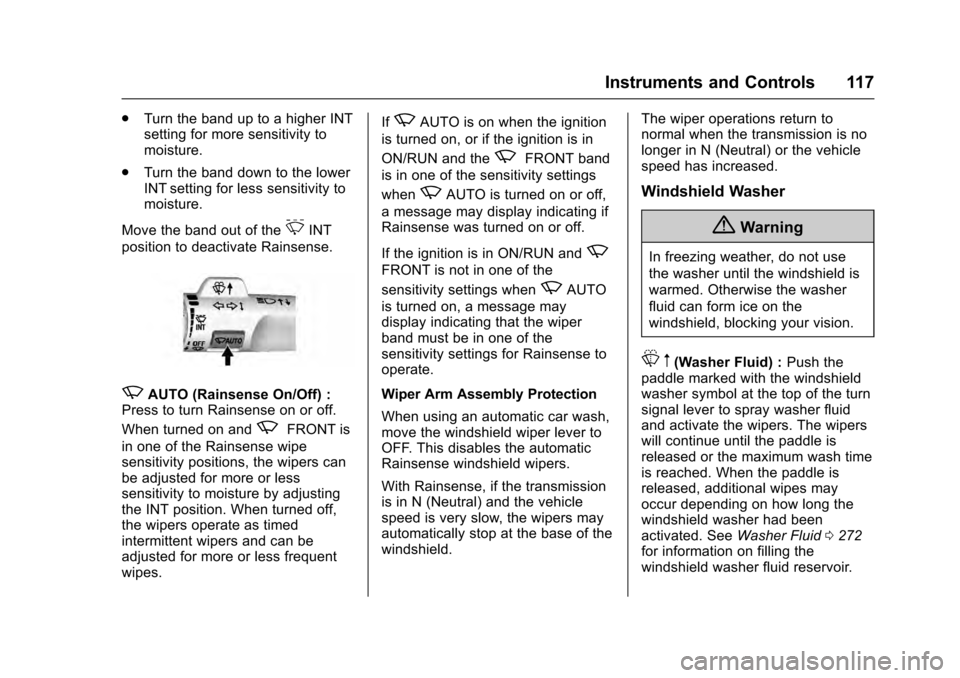
Move the band out of the
3INT
position to deactivate Rainsense.
zAUTO (Rainsense On/Off) :
Press to turn Rainsense on or off.
When turned on and
zFRONT is
in one of the Rainsense wipe
sensitivity positions, the wipers can
be adjusted for more or less
sensitivity to moisture by adjusting
the INT position. When turned off,
the wipers operate as timed
intermittent wipers and can be
adjusted for more or less frequent
wipes. If
zAUTO is on when the ignition
is turned on, or if the ignition is in
ON/RUN and the
zFRONT band
is in one of the sensitivity settings
when
zAUTO is turned on or off,
a message may display indicating if
Rainsense was turned on or off.
If the ignition is in ON/RUN and
z
FRONT is not in one of the
sensitivity settings when
zAUTO
is turned on, a message may
display indicating that the wiper
band must be in one of the
sensitivity settings for Rainsense to
operate.
Wiper Arm Assembly Protection
When using an automatic car wash,
move the windshield wiper lever to
OFF. This disables the automatic
Rainsense windshield wipers.
With Rainsense, if the transmission
is in N (Neutral) and the vehicle
speed is very slow, the wipers may
automatically stop at the base of the
windshield. The wiper operations return to
normal when the transmission is no
longer in N (Neutral) or the vehicle
speed has increased.
Windshield Washer
{Warning
In freezing weather, do not use
the washer until the windshield is
warmed. Otherwise the washer
fluid can form ice on the
windshield, blocking your vision.
L
m(Washer Fluid) : Push the
paddle marked with the windshield
washer symbol at the top of the turn
signal lever to spray washer fluid
and activate the wipers. The wipers
will continue until the paddle is
released or the maximum wash time
is reached. When the paddle is
released, additional wipes may
occur depending on how long the
windshield washer had been
activated. See Washer Fluid0272
for information on filling the
windshield washer fluid reservoir.
Page 121 of 357
Cadillac Escalade Owner Manual (GMNA-Localizing-MidEast-9369153) -
2016 - crc - 6/19/15
120 Instruments and Controls
Power Outlets
Power Outlets 12 Volt Direct
Current
Accessory power outlets can be
used to plug in electrical equipment,
such as a cell phone or MP3 player.
The vehicle has five accessory
power outlets:
.One near the cupholders on the
center console.
. One inside the center console.
. One on the rear of the center
console.
. One in the third row seat on the
driver side.
. One in the rear cargo area on
the passenger side.
Lift the cover to access and replace
when not in use.
The accessory power outlets are
powered as follows:
. The power outlet near the
cupholders on the center
console is powered in Retained
Accessory Power (RAP) mode. This outlet can be configured to
operate using RAP or battery
power. If the power outlet is
used while in the battery power
mode, this could cause
interference between the RKE
transmitter and the vehicle, and
the vehicle may not start. See
Ignition Positions
0201.
. The power outlets inside the
center console and on the rear
of the center console are
powered when the ignition is in
ON/RUN/START or ACC/
ACCESSORY, or until the driver
door is opened within
10 minutes of turning off the
vehicle. See Retained
Accessory Power (RAP) 0204.
. The power outlets in the third
row seat and in the rear cargo
area are powered at all times.
{Warning
Power is always supplied to the
outlets. Do not leave electrical
equipment plugged in when the
(Continued)
Warning (Continued)
vehicle is not in use because the
vehicle could catch fire and cause
injury or death.
Caution
Leaving electrical equipment
plugged in for an extended period
of time while the vehicle is off will
drain the battery. Always unplug
electrical equipment when not in
use and do not plug in equipment
that exceeds the maximum
15 amp rating.
Certain power accessory plugs may
not be compatible with the
accessory power outlet and could
overload vehicle or adapter fuses.
If a problem is experienced, see
your dealer.
Page 123 of 357
Cadillac Escalade Owner Manual (GMNA-Localizing-MidEast-9369153) -
2016 - crc - 6/19/15
122 Instruments and Controls
{Warning
Wireless charging can affect the
operation of an implanted
pacemaker or other medical
devices. If you have one, it is
recommended to consult with
your doctor before using the
wireless charging system.
The vehicle must be in ON/RUN,
ACC/ACCESSORY, or Retained
Accessory Power (RAP). The
wireless charging feature may not
correctly indicate charging when the
vehicle is in RAP. See Retained
Accessory Power (RAP) 0204.
The operating temperature is -20 °C
(-4 °F) to 60 °C (140 °F) for the
charging system and 0 °C (32 °F) to
35 °C (95 °F) for the phone.
{Warning
Remove all metal objects from the
charging pad before charging
your mobile device. Metal objects, (Continued)
Warning (Continued)
such as coins, keys, rings,
or paper clips, between the phone
and charging pad will become
very hot. On the rare occasion
that the charging system does not
detect a metal object, and the
object gets wedged between the
phone and charger, remove the
phone and allow the metallic
object to cool before removing it
from the charging pad, to prevent
burns.
To charge a mobile device:
1. Remove all objects from the charging pad. The system may
not charge if there are any
objects on the charging pad.
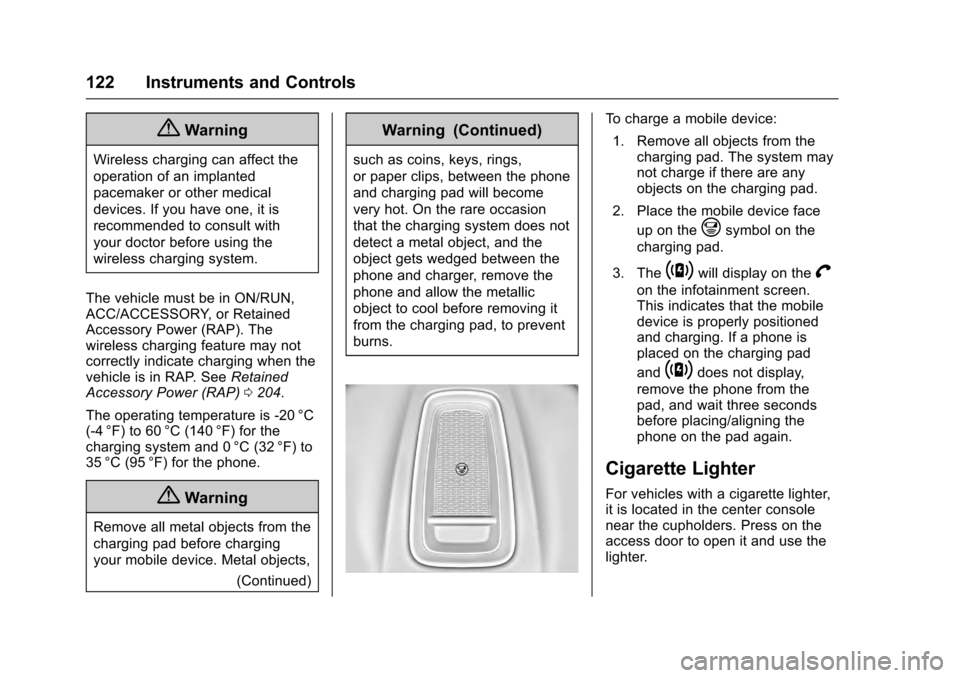
2. Place the mobile device face up on the
@symbol on the
charging pad.
3. The
~will display on theV
on the infotainment screen.
This indicates that the mobile
device is properly positioned
and charging. If a phone is
placed on the charging pad
and
~does not display,
remove the phone from the
pad, and wait three seconds
before placing/aligning the
phone on the pad again.
Cigarette Lighter
For vehicles with a cigarette lighter,
it is located in the center console
near the cupholders. Press on the
access door to open it and use the
lighter.
Page 124 of 357
Cadillac Escalade Owner Manual (GMNA-Localizing-MidEast-9369153) -
2016 - crc - 6/19/15
Instruments and Controls 123
To use the cigarette lighter, push it
in all the way, and let go. When it is
ready, it will pop back out by itself.Holding a cigarette lighter in while
it is heating does not let the lighter
back away from the heating
element when it is hot. Damage
from overheating can occur to the
lighter or heating element, or a
fuse could be blown. Do not hold
a cigarette lighter in while it is
heating.
Ashtrays
For vehicles with an ashtray, it is in
the center console cupholder.
Caution
If papers, pins, or other
flammable items are put in the
ashtray, hot cigarettes or other
smoking materials could ignite
them and possibly damage the
vehicle. Never put flammable
items in the ashtray. To remove the ashtray, pull it from
the cupholder. Push it back down to
be sure it is secure.
Warning Lights,
Gauges, and
Indicators
Warning lights and gauges can
signal that something is wrong
before it becomes serious enough
to cause an expensive repair or
replacement. Paying attention to the
warning lights and gauges could
prevent injury.
Some warning lights come on briefly
when the engine is started to
indicate they are working. When
one of the warning lights comes on
and stays on while driving, or when
one of the gauges shows there may
be a problem, check the section that
explains what to do. Waiting to do
repairs can be costly and even
dangerous.
Page 127 of 357
Cadillac Escalade Owner Manual (GMNA-Localizing-MidEast-9369153) -
2016 - crc - 6/19/15
126 Instruments and Controls
Phone
While the Phone application page is
displayed, press SEL to enter the
Phone menu. In the Phone menu,
if there is no active phone call, view
recent calls, select from favorites,
or scroll through contacts. If there is
an active call, mute the phone or
switch to handset operation.
Cluster Options Menu
To enter the cluster Options menu:1. Use the five-way control on the right side of the steering wheel
to find the Options page in one
of the interactive display zones
on the cluster.
2. Press SEL on the center of the five-way control to enter the
Options menu.
Units : Press SEL while Units is
highlighted to enter the Unit menu.
Choose US or metric units by
pressing SEL while the desired item
is highlighted. A checkmark will be
displayed next to the selected item. Info Pages :
Press SEL while Info
Pages is highlighted to select the
items to be displayed in the DIC info
displays. See Driver Information
Center (DIC) 0139.
Fav Button Options : Press SEL
while Fav Button Options is
highlighted to select between FAV
Primary and SEEK Primary. This
selection allows for configuration of
theCandBsteering wheel
controls. When FAV Primary is
selected, pressing
CandBwill go
to the next or previous favorite and
pressing and holding
CandBwill
seek. When SEEK Primary is
selected, pressing
CandBwill
seek and pressing and holding
C
andBwill go to the next or
previous favorite.
Display Layout : Press SEL while
Display Layout is highlighted to
change the configuration of the
cluster. See “Reconfigurable
Instrument Cluster” earlier in this
section. Open Source Software :
Press
SEL while Open Source Software is
highlighted to display open source
software information.
Speedometer
The speedometer shows the
vehicle's speed in kilometers per
hour (km/h) or miles per hour (mph).
This vehicle is equipped with an
overspeed warning device. When
the vehicle's speed reaches
120 km/h (75 mph), a chime will
sound. A message also displays in
the Driver Information Center (DIC).
See Vehicle Speed Messages
0 155.
Odometer
The odometer shows how far the
vehicle has been driven, in either
kilometers or miles.
Trip Odometer
The trip odometer shows how far
the vehicle has been driven since
the trip odometer was last reset.