ignition CADILLAC ESCALADE 2016 4.G Owners Manual
[x] Cancel search | Manufacturer: CADILLAC, Model Year: 2016, Model line: ESCALADE, Model: CADILLAC ESCALADE 2016 4.GPages: 357, PDF Size: 3.49 MB
Page 8 of 357

Cadillac Escalade Owner Manual (GMNA-Localizing-MidEast-9369153) -
2016 - crc - 6/19/15
In Brief 7
1.Air Vents 0182.
2. Head-Up Display (HUD) 0141
(If Equipped).
3. Turn Signal Lever. See Turn
and Lane-Change Signals
0 170.
Windshield Wiper/Washer
0 116.
Rear Window Wiper/Washer
0 118.
4. Hazard Warning Flashers
0170.
5. Instrument Cluster 0124.
6. Shift Lever. See Automatic
Transmission 0207.
Tow/Haul Mode Selector
Button. See Tow/Haul Mode
0 212.
Range Selection Mode Buttons
(If Equipped). See Manual
Mode 0210.
7. Power Assist Steps 042 (If
Equipped). Pedal Adjust Switch (If
Equipped). See
Adjustable
Throttle and Brake Pedal
0 200.
Magnetic Ride Control Button.
See Magnetic Ride Control
0 222.
8. Light Sensor. See Automatic
Headlamp System 0169.
9. Infotainment 0175.
10. Glove Box Button. See Glove
Box 0109.
Parking Assist Button. See
Assistance Systems for
Parking or Backing 0233.
Lane Keep Assist (LKA) 0244
(If Equipped).
Traction Control/Electronic
Stability Control 0220.
11. Dual Automatic Climate Control
System 0176.
Instrument Panel Storage
0 109.
12. CD Player. See the infotainment manual. 13. ENGINE START/STOP Button.
SeeIgnition Positions 0201.
14. Steering Wheel Controls 0115.
Driver Information Center (DIC)
Controls. See Driver
Information Center (DIC) 0139.
15. Horn 0116.
16. Steering Wheel Adjustment
0115.
17. Hood Release. See Hood
0 260.
18. Cruise Control 0223 (If
Equipped).
Adaptive Cruise Control 0225
(If Equipped).
Forward Collision Alert (FCA)
System 0238 (If Equipped).
Heated Steering Wheel 0115
(If Equipped).
Phone Button. See the
infotainment manual.
19. Automatic Transfer Case Knob (If Equipped). See Four-Wheel
Drive 0213.
Page 11 of 357
Cadillac Escalade Owner Manual (GMNA-Localizing-MidEast-9369153) -
2016 - crc - 6/19/15
10 In Brief
Keyless Access
The RKE transmitter must be within
1 m (3 ft) of the door being opened.
Pressing the button on the driver
door handle will unlock the driver
door. If the handle button is pressed
again within five seconds, the
passenger doors and liftgate will
unlock. See“Keyless Access
Operation” inRemote Keyless Entry
(RKE) System Operation 029.
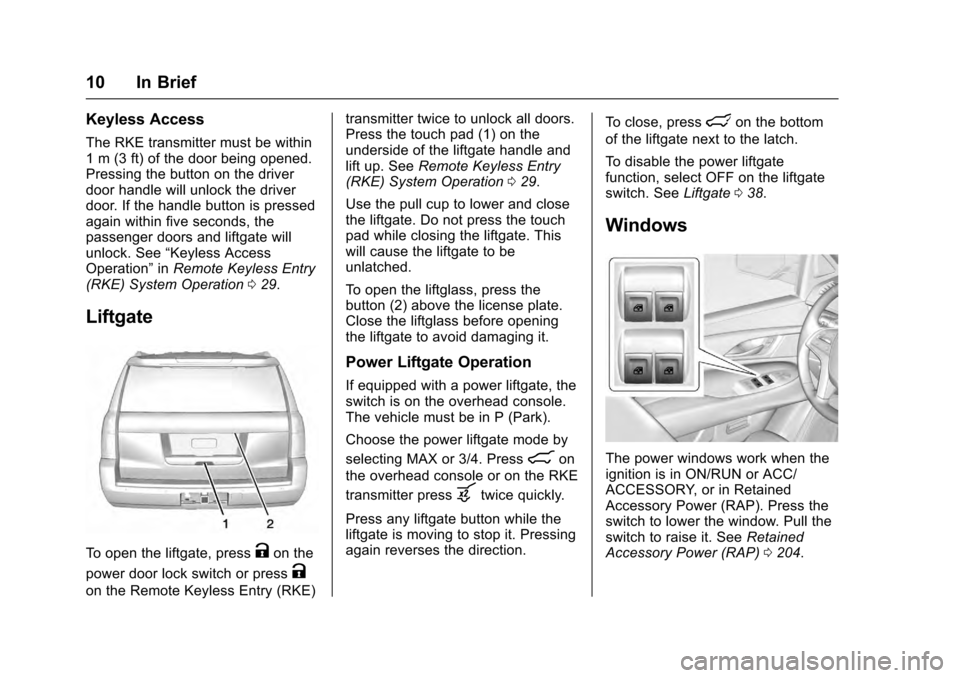
Liftgate
To open the liftgate, pressKon the
power door lock switch or press
K
on the Remote Keyless Entry (RKE) transmitter twice to unlock all doors.
Press the touch pad (1) on the
underside of the liftgate handle and
lift up. See
Remote Keyless Entry
(RKE) System Operation 029.
Use the pull cup to lower and close
the liftgate. Do not press the touch
pad while closing the liftgate. This
will cause the liftgate to be
unlatched.
To open the liftglass, press the
button (2) above the license plate.
Close the liftglass before opening
the liftgate to avoid damaging it.
Power Liftgate Operation
If equipped with a power liftgate, the
switch is on the overhead console.
The vehicle must be in P (Park).
Choose the power liftgate mode by
selecting MAX or 3/4. Press
8on
the overhead console or on the RKE
transmitter press
btwice quickly.
Press any liftgate button while the
liftgate is moving to stop it. Pressing
again reverses the direction. To close, press
lon the bottom
of the liftgate next to the latch.
To disable the power liftgate
function, select OFF on the liftgate
switch. See Liftgate038.
Windows
The power windows work when the
ignition is in ON/RUN or ACC/
ACCESSORY, or in Retained
Accessory Power (RAP). Press the
switch to lower the window. Pull the
switch to raise it. See Retained
Accessory Power (RAP) 0204.
Page 12 of 357
Cadillac Escalade Owner Manual (GMNA-Localizing-MidEast-9369153) -
2016 - crc - 6/19/15
In Brief 11
If equipped, the front and rear
windows have an express-down
feature. The front windows have an
express-up feature. SeeWindows
0 49 and Power Windows 049.
Seat Adjustment
Uplevel Seat Adjustment
If equipped, the ignition must be on
to use all uplevel seat features.
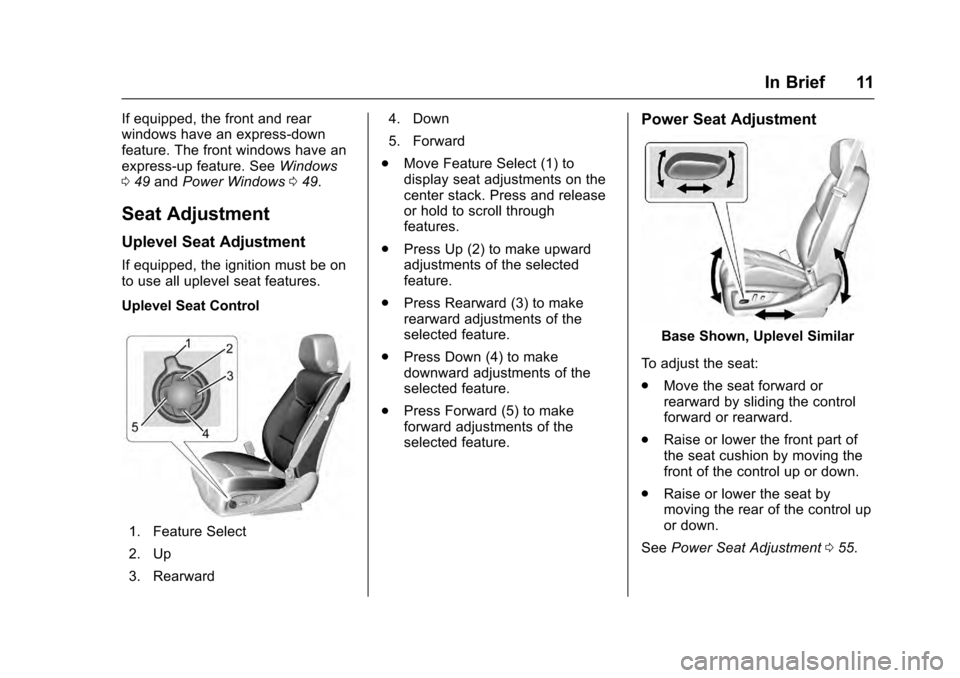
Uplevel Seat Control
1. Feature Select
2. Up
3. Rearward 4. Down
5. Forward
. Move Feature Select (1) to
display seat adjustments on the
center stack. Press and release
or hold to scroll through
features.
. Press Up (2) to make upward
adjustments of the selected
feature.
. Press Rearward (3) to make
rearward adjustments of the
selected feature.
. Press Down (4) to make
downward adjustments of the
selected feature.
. Press Forward (5) to make
forward adjustments of the
selected feature.
Power Seat Adjustment
Base Shown, Uplevel Similar
To adjust the seat:
. Move the seat forward or
rearward by sliding the control
forward or rearward.
. Raise or lower the front part of
the seat cushion by moving the
front of the control up or down.
. Raise or lower the seat by
moving the rear of the control up
or down.
See Power Seat Adjustment 055.
Page 13 of 357
Cadillac Escalade Owner Manual (GMNA-Localizing-MidEast-9369153) -
2016 - crc - 6/19/15
12 In Brief
Lumbar and Bolster Support
Uplevel Seat Adjustment
If equipped, the ignition must be on
to use all uplevel seat features.
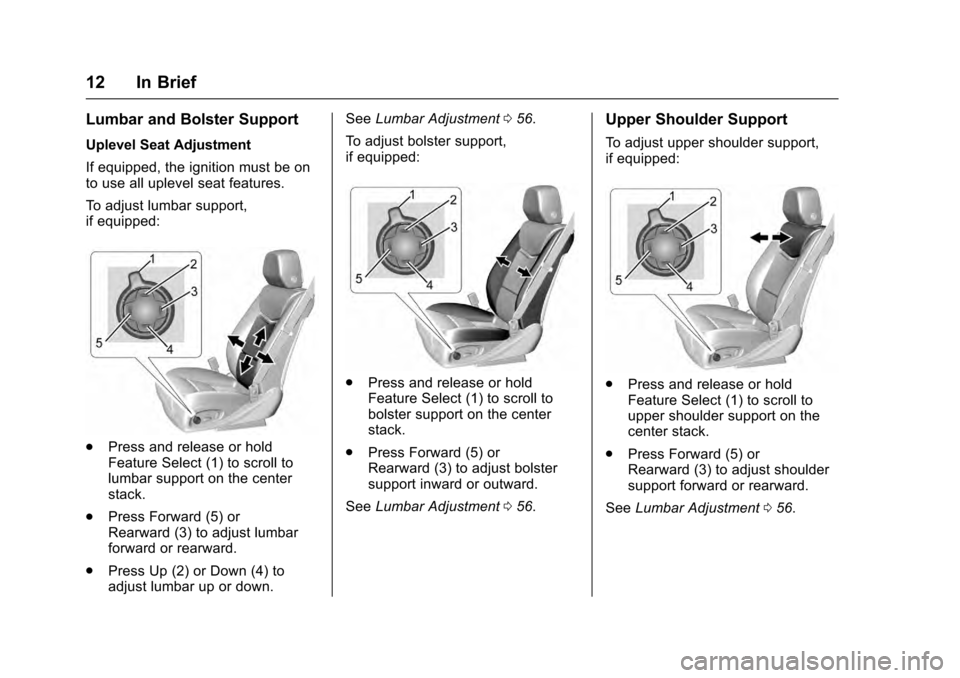
To adjust lumbar support,
if equipped:
.Press and release or hold
Feature Select (1) to scroll to
lumbar support on the center
stack.
. Press Forward (5) or
Rearward (3) to adjust lumbar
forward or rearward.
. Press Up (2) or Down (4) to
adjust lumbar up or down. See
Lumbar Adjustment 056.
To adjust bolster support,
if equipped:
. Press and release or hold
Feature Select (1) to scroll to
bolster support on the center
stack.
. Press Forward (5) or
Rearward (3) to adjust bolster
support inward or outward.
See Lumbar Adjustment 056.
Upper Shoulder Support
To adjust upper shoulder support,
if equipped:
.
Press and release or hold
Feature Select (1) to scroll to
upper shoulder support on the
center stack.
. Press Forward (5) or
Rearward (3) to adjust shoulder
support forward or rearward.
See Lumbar Adjustment 056.
Page 14 of 357
Cadillac Escalade Owner Manual (GMNA-Localizing-MidEast-9369153) -
2016 - crc - 6/19/15
In Brief 13
Reclining Seatbacks
Base Shown, Uplevel Similar
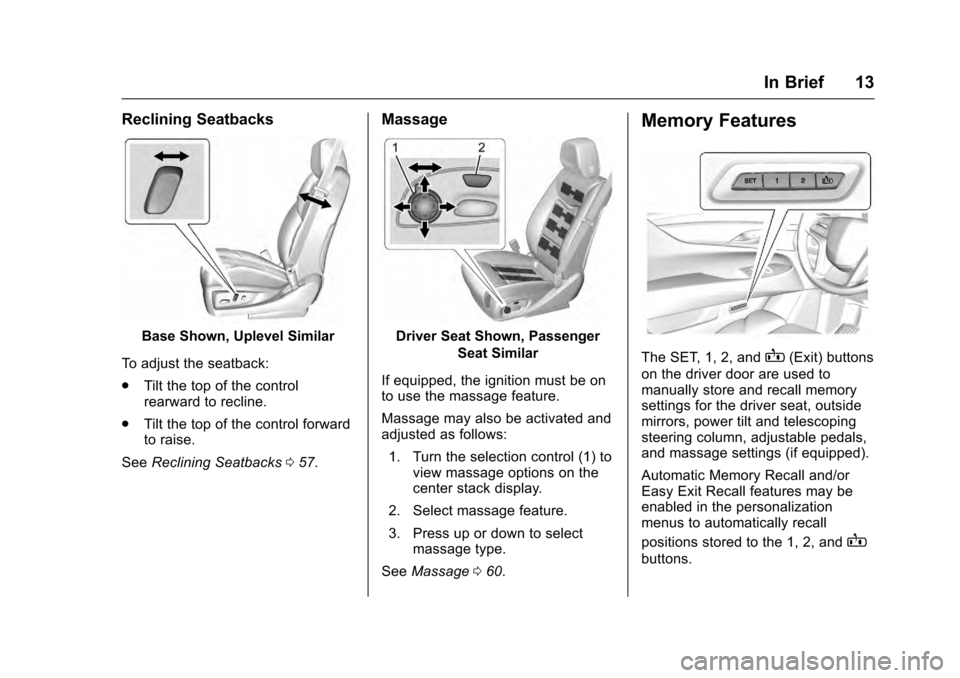
To adjust the seatback:
. Tilt the top of the control
rearward to recline.
. Tilt the top of the control forward
to raise.
See Reclining Seatbacks 057.
Massage
Driver Seat Shown, Passenger
Seat Similar
If equipped, the ignition must be on
to use the massage feature.
Massage may also be activated and
adjusted as follows: 1. Turn the selection control (1) to view massage options on the
center stack display.
2. Select massage feature.
3. Press up or down to select massage type.
See Massage 060.
Memory Features
The SET, 1, 2, andB(Exit) buttons
on the driver door are used to
manually store and recall memory
settings for the driver seat, outside
mirrors, power tilt and telescoping
steering column, adjustable pedals,
and massage settings (if equipped).
Automatic Memory Recall and/or
Easy Exit Recall features may be
enabled in the personalization
menus to automatically recall
positions stored to the 1, 2, and
B
buttons.
Page 18 of 357
Cadillac Escalade Owner Manual (GMNA-Localizing-MidEast-9369153) -
2016 - crc - 6/19/15
In Brief 17
The vehicle may have a memory
function, which lets pedal settings
be saved and recalled. SeeMemory
Seats 058.
Interior Lighting
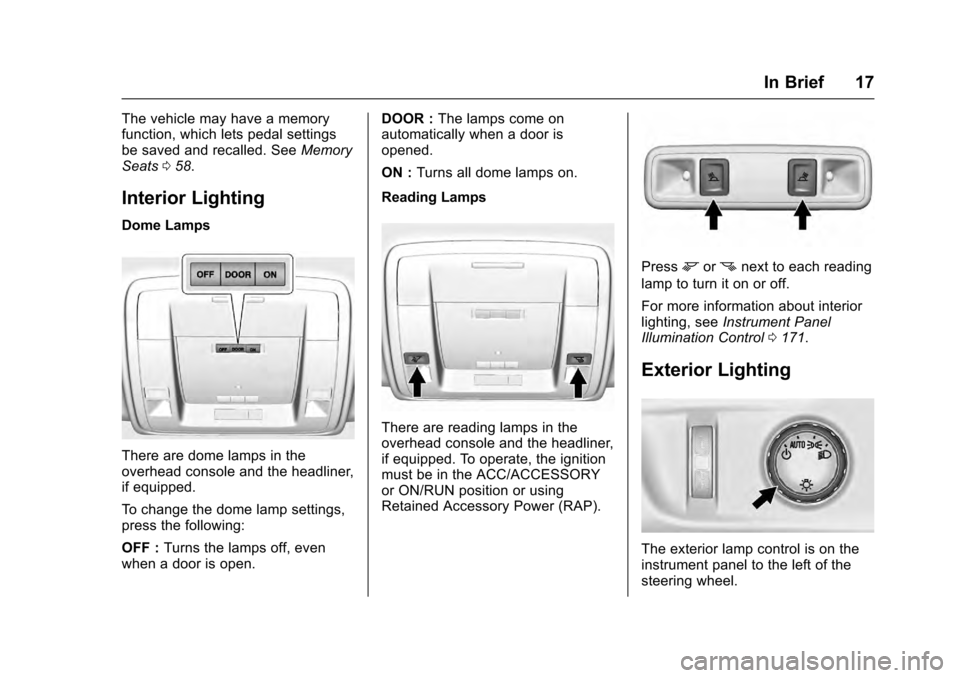
Dome Lamps
There are dome lamps in the
overhead console and the headliner,
if equipped.
To change the dome lamp settings,
press the following:
OFF : Turns the lamps off, even
when a door is open. DOOR :
The lamps come on
automatically when a door is
opened.
ON : Turns all dome lamps on.
Reading Lamps
There are reading lamps in the
overhead console and the headliner,
if equipped. To operate, the ignition
must be in the ACC/ACCESSORY
or ON/RUN position or using
Retained Accessory Power (RAP).
Pressmornnext to each reading
lamp to turn it on or off.
For more information about interior
lighting, see Instrument Panel
Illumination Control 0171.
Exterior Lighting
The exterior lamp control is on the
instrument panel to the left of the
steering wheel.
Page 25 of 357
Cadillac Escalade Owner Manual (GMNA-Localizing-MidEast-9369153) -
2016 - crc - 6/19/15
24 In Brief
Rear Automatic Braking
(RAB) System
If the vehicle has Adaptive Cruise
Control (ACC) it also has the RAB
system, which is designed to help
avoid or reduce the harm caused by
backing crashes when the vehicle is
shifted into R (Reverse). If the
system detects the vehicle is
backing too fast to avoid a crash
with a detected object behind your
vehicle in your path, it may
automatically brake hard to a stop.
SeeAssistance Systems for Parking
or Backing 0233.
Power Outlets
Power Outlets 12 Volt Direct
Current
Accessory power outlets can be
used to plug in electrical equipment,
such as a cell phone, MP3
player, etc.
The vehicle has five accessory
power outlets:
.
One near the cupholders on the
center console. .
One inside the center console.
. One on the rear of the center
console.
. One in the third row seat on the
driver side.
. One in the rear cargo area on
the passenger side.
Lift the cover to access and replace
when not in use.
See Power Outlets 0120.
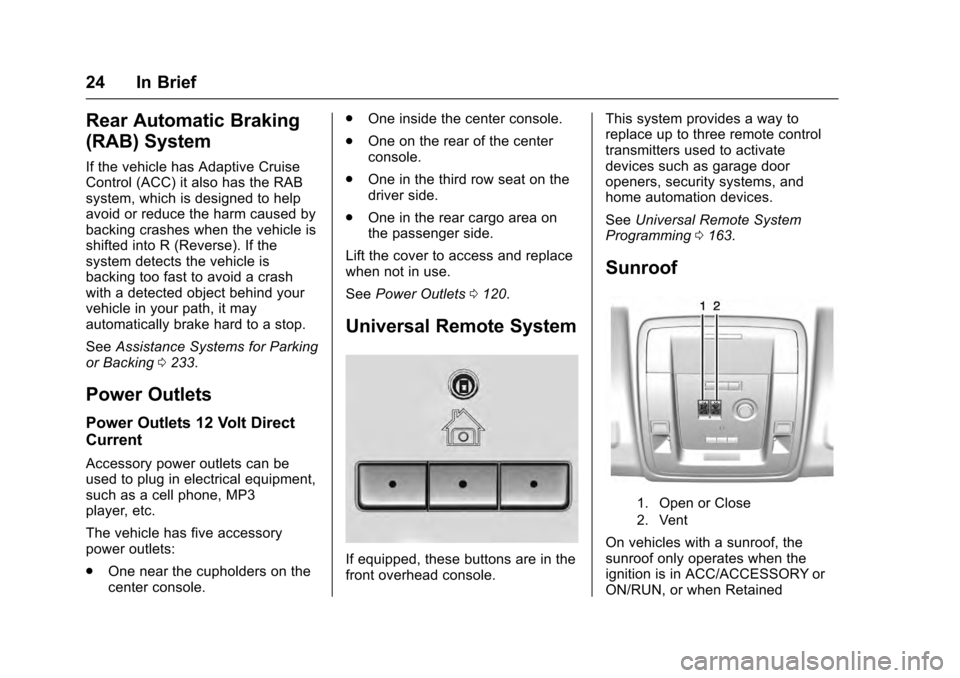
Universal Remote System
If equipped, these buttons are in the
front overhead console. This system provides a way to
replace up to three remote control
transmitters used to activate
devices such as garage door
openers, security systems, and
home automation devices.
See
Universal Remote System
Programming 0163.
Sunroof
1. Open or Close
2. Vent
On vehicles with a sunroof, the
sunroof only operates when the
ignition is in ACC/ACCESSORY or
ON/RUN, or when Retained
Page 27 of 357

Cadillac Escalade Owner Manual (GMNA-Localizing-MidEast-9369153) -
2016 - crc - 6/19/15
26 In Brief
in the instrument cluster and the
appropriate DIC message
displays. SeeRide Control
System Messages 0152.
. Press and release
gagain to
turn on both systems.
StabiliTrak will automatically turn on
if the vehicle exceeds 56 km/h
(35 mph). Traction control will
remain off.
See Traction Control/Electronic
Stability Control 0220.
Tire Pressure Monitor
This vehicle may have a Tire
Pressure Monitor System (TPMS).
The low tire pressure warning light
alerts to a significant loss in
pressure of one of the vehicle's
tires. If the warning light comes on,
stop as soon as possible and inflate the tires to the recommended
pressure shown on the Tire and
Loading Information label. See
Vehicle Load Limits
0196. The
warning light will remain on until the
tire pressure is corrected.
The low tire pressure warning light
may come on in cool weather when
the vehicle is first started, and then
turn off as the vehicle is driven. This
may be an early indicator that the
tire pressures are getting low and
the tires need to be inflated to the
proper pressure.
The TPMS does not replace normal
monthly tire maintenance. Maintain
the correct tire pressures.
See Tire Pressure Monitor System
0 295.
Engine Oil Life System
The engine oil life system calculates
engine oil life based on vehicle use
and displays the CHANGE ENGINE
OIL SOON message when it is time
to change the engine oil and filter.
The oil life system should be reset
to 100% only following an oil
change. Resetting the Oil Life System
1. Using the DIC controls on the right side of the steering wheel,
display OIL LIFE on the DIC.
See Driver Information Center
(DIC) 0139. When remaining
oil life is low, the CHANGE
ENGINE OIL SOON message
will appear on the display. See
Engine Oil Messages 0148.
2. Press SEL on the DIC controls and hold SEL down for a few
seconds to clear the CHANGE
ENGINE OIL SOON message
and reset the oil life at 100%.
Be careful not to reset the oil
life display accidentally at any
time other than after the oil is
changed. It cannot be reset
accurately until the next oil
change.
The oil life system can also be reset
as follows: 1. Turn the ignition on with the engine off.
2. Fully press and release the accelerator pedal three times
within five seconds.
Page 31 of 357

Cadillac Escalade Owner Manual (GMNA-Localizing-MidEast-9369153) -
2016 - crc - 6/19/15
30 Keys, Doors, and Windows
Other conditions can affect the
performance of the transmitter. See
Remote Keyless Entry (RKE)
System029.
/(Remote Vehicle Start) :
If equipped, press and release
Q,
then immediately press and hold
/
until the turn signals flash or for at
least four seconds. The engine may
be started from outside the vehicle
using the RKE transmitter. See
Remote Vehicle Start 034.
Q(Lock) : Press to lock all doors. If enabled through the Driver
Information Center (DIC), the turn
signal lamps flash once to indicate
locking has occurred. If enabled
through the DIC, the horn chirps
when
Qis pressed again within
three seconds. See Vehicle
Personalization 0156.
If the driver door is open when
Qis
pressed and Unlocked Door
Anti-Lockout is enabled through the
vehicle personalization, all door will
lock and then the driver door will
immediately unlock. See Vehicle
Personalization 0156.
If the passenger door is open when
Qis pressed, all doors lock.
Pressing
Qarms the alarm system.
See Vehicle Alarm System 043.
If equipped with auto mirror folding,
pressing and holding
Qfor
one second will fold the mirrors. The
auto mirror folding feature will not
operate unless it is enabled. See
Vehicle Personalization 0156.
K(Unlock) : Press once to unlock
only the driver door. If
Kis pressed
again within three seconds, all
remaining doors unlock. The interior
lamps may come on and stay on for
20 seconds or until the ignition is
turned on.
If enabled through the DIC, the turn
signal lamps flash twice to indicate
unlocking has occurred. If enabled
through the DIC, the exterior lamps
may turn on. See Vehicle
Personalization 0156.
Pressing
Kon the RKE transmitter
disarms the alarm system. See
Vehicle Alarm System 043.
If equipped with auto mirror folding,
pressing and holding
Kfor
one second will unfold mirrors. The
auto mirror folding feature will not
operate unless it is enabled. See
Vehicle Personalization 0156.
c(Liftglass) : Press twice to open
the liftglass.
b(Liftgate) : Press twice to open
or close the liftgate. Press once to
stop the liftgate from moving.
Page 32 of 357
Cadillac Escalade Owner Manual (GMNA-Localizing-MidEast-9369153) -
2016 - crc - 6/19/15
Keys, Doors, and Windows 31
7(Vehicle Locator/Panic
Alarm) : Press and release to
initiate vehicle locate. The turn
signal lamps flash and the horn
sounds three times.
Press and hold
7for more than
three seconds to activate the panic
alarm. The turn signal lamps flash
and the horn sounds repeatedly for
30 seconds. The alarm turns off
when the ignition is moved to ON/
RUN or
7is pressed again. The
ignition must be in LOCK/OFF for
the panic alarm to work.
Keyless Access Operation
The Keyless Access system allows
for the doors and liftgate to be
accessed without pressing the RKE
transmitter button. The RKE
transmitter must be within 1 m (3 ft)
of the door being opened. If the
vehicle has this feature, there will be
a button on the outside door
handles. Keyless Access can be
programmed to unlock all doors on
the first lock/unlock press from the
driver door. See
Vehicle
Personalization 0156.
Keyless Unlocking/Locking from
the Driver Door
When the doors are locked and the
RKE transmitter is within 1 m (3 ft)
of the door handle, pressing the
lock/unlock button on the driver door
handle will unlock the driver door.
If the lock/unlock button is pressed
again within five seconds, all
passenger doors and liftgate will
unlock.
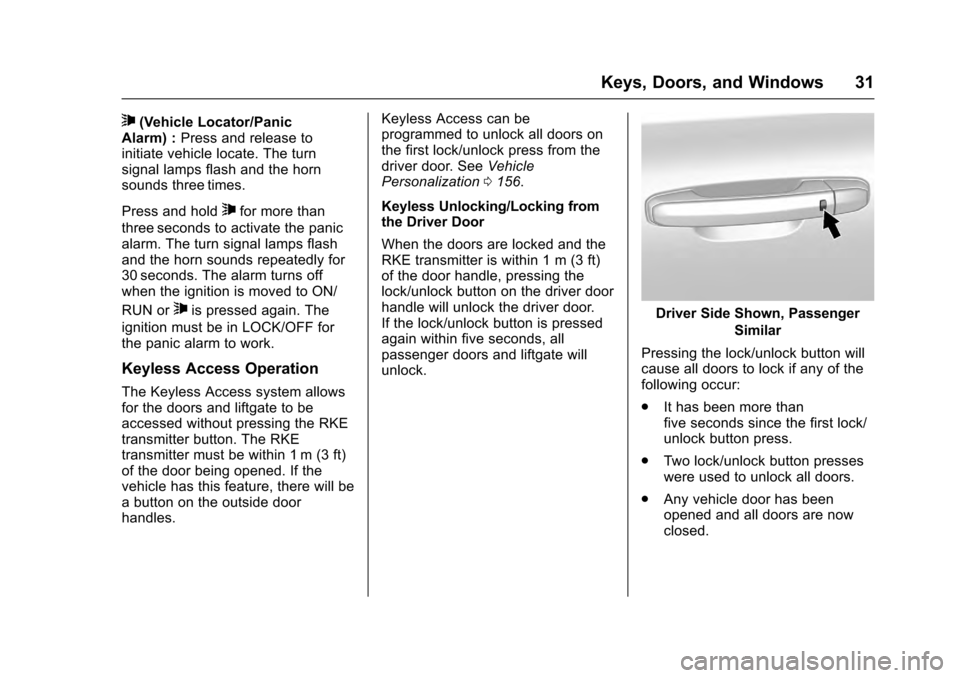
Driver Side Shown, Passenger Similar
Pressing the lock/unlock button will
cause all doors to lock if any of the
following occur:
. It has been more than
five seconds since the first lock/
unlock button press.
. Two lock/unlock button presses
were used to unlock all doors.
. Any vehicle door has been
opened and all doors are now
closed.