window CADILLAC ESCALADE 2016 4.G Owners Manual
[x] Cancel search | Manufacturer: CADILLAC, Model Year: 2016, Model line: ESCALADE, Model: CADILLAC ESCALADE 2016 4.GPages: 357, PDF Size: 3.49 MB
Page 2 of 357

Cadillac Escalade Owner Manual (GMNA-Localizing-MidEast-9369153) -
2016 - crc - 6/19/15
ContentsIntroduction . . . . . . . . . . . . . . . . . . . . . . 2
In Brief . . . . . . . . . . . . . . . . . . . . . . . . . . . 5
Keys, Doors, and Windows . . . . . 28
Seats and Restraints . . . . . . . . . . . 53
Storage . . . . . . . . . . . . . . . . . . . . . . . 109
Instruments and Controls . . . . . . 114
Lighting . . . . . . . . . . . . . . . . . . . . . . . 166
Infotainment System . . . . . . . . . . 175
Climate Controls . . . . . . . . . . . . . . 176
Driving and Operating . . . . . . . . . 184
Vehicle Care . . . . . . . . . . . . . . . . . . 258
Service and Maintenance . . . . . 332
Technical Data . . . . . . . . . . . . . . . . 341
Customer Information . . . . . . . . . 345
Index . . . . . . . . . . . . . . . . . . . . 347
Page 6 of 357
Cadillac Escalade Owner Manual (GMNA-Localizing-MidEast-9369153) -
2016 - crc - 6/19/15
In Brief 5
In Brief
Instrument Panel
Instrument Panel . . . . . . . . . . . . . . . . 6
Initial Drive Information
Initial Drive Information . . . . . . . . . . 8
Remote Keyless Entry (RKE)System . . . . . . . . . . . . . . . . . . . . . . . . 8
Remote Vehicle Start . . . . . . . . . . . 9
Door Locks . . . . . . . . . . . . . . . . . . . . . 9
Liftgate . . . . . . . . . . . . . . . . . . . . . . . . 10
Windows . . . . . . . . . . . . . . . . . . . . . . . 10
Seat Adjustment . . . . . . . . . . . . . . . 11
Memory Features . . . . . . . . . . . . . . 13
Second Row Seats . . . . . . . . . . . . 14
Third Row Seats . . . . . . . . . . . . . . . 14
Heated and Cooled Front Seats . . . . . . . . . . . . . . . . . . . . . . . . . 14
Head Restraint Adjustment . . . . 14
Safety Belts . . . . . . . . . . . . . . . . . . . . 15
Passenger Sensing System . . . 15
Mirror Adjustment . . . . . . . . . . . . . . 15
Steering Wheel Adjustment . . . . 16
Throttle and Brake Pedal Adjustment . . . . . . . . . . . . . . . . . . . 16
Interior Lighting . . . . . . . . . . . . . . . . 17
Exterior Lighting . . . . . . . . . . . . . . . 17
Windshield Wiper/Washer . . . . . . 18
Climate Controls . . . . . . . . . . . . . . . 19 Transmission . . . . . . . . . . . . . . . . . . 19
Four-Wheel Drive . . . . . . . . . . . . . . 20
Vehicle Features
Infotainment System . . . . . . . . . . . 21
Steering Wheel Controls . . . . . . . 21
Cruise Control . . . . . . . . . . . . . . . . . 21
Driver Information
Center (DIC) . . . . . . . . . . . . . . . . . 21
Forward Collision Alert (FCA) System . . . . . . . . . . . . . . . . . . . . . . . 22
Front Automatic Braking (FAB) System . . . . . . . . . . . . . . . . . . . . . . . 22
Lane Keep Assist (LKA) . . . . . . . 22
Lane Change Alert (LCA) . . . . . . 23
Surround Vision . . . . . . . . . . . . . . . 23
Rear Vision Camera (RVC) . . . . 23
Rear Cross Traffic Alert (RCTA) System . . . . . . . . . . . . . . . . . . . . . . . 23
Parking Assist . . . . . . . . . . . . . . . . . 23
Rear Automatic Braking (RAB) System . . . . . . . . . . . . . . . . . . . . . . . 24
Power Outlets . . . . . . . . . . . . . . . . . 24
Universal Remote System . . . . . 24
Sunroof . . . . . . . . . . . . . . . . . . . . . . . . 24
Performance and Maintenance
Traction Control/Electronic Stability Control . . . . . . . . . . . . . . 25
Tire Pressure Monitor . . . . . . . . . . 26
Engine Oil Life System . . . . . . . . 26 Driving for Better Fuel
Economy . . . . . . . . . . . . . . . . . . . . . 27
Page 8 of 357

Cadillac Escalade Owner Manual (GMNA-Localizing-MidEast-9369153) -
2016 - crc - 6/19/15
In Brief 7
1.Air Vents 0182.
2. Head-Up Display (HUD) 0141
(If Equipped).
3. Turn Signal Lever. See Turn
and Lane-Change Signals
0 170.
Windshield Wiper/Washer
0 116.
Rear Window Wiper/Washer
0 118.
4. Hazard Warning Flashers
0170.
5. Instrument Cluster 0124.
6. Shift Lever. See Automatic
Transmission 0207.
Tow/Haul Mode Selector
Button. See Tow/Haul Mode
0 212.
Range Selection Mode Buttons
(If Equipped). See Manual
Mode 0210.
7. Power Assist Steps 042 (If
Equipped). Pedal Adjust Switch (If
Equipped). See
Adjustable
Throttle and Brake Pedal
0 200.
Magnetic Ride Control Button.
See Magnetic Ride Control
0 222.
8. Light Sensor. See Automatic
Headlamp System 0169.
9. Infotainment 0175.
10. Glove Box Button. See Glove
Box 0109.
Parking Assist Button. See
Assistance Systems for
Parking or Backing 0233.
Lane Keep Assist (LKA) 0244
(If Equipped).
Traction Control/Electronic
Stability Control 0220.
11. Dual Automatic Climate Control
System 0176.
Instrument Panel Storage
0 109.
12. CD Player. See the infotainment manual. 13. ENGINE START/STOP Button.
SeeIgnition Positions 0201.
14. Steering Wheel Controls 0115.
Driver Information Center (DIC)
Controls. See Driver
Information Center (DIC) 0139.
15. Horn 0116.
16. Steering Wheel Adjustment
0115.
17. Hood Release. See Hood
0 260.
18. Cruise Control 0223 (If
Equipped).
Adaptive Cruise Control 0225
(If Equipped).
Forward Collision Alert (FCA)
System 0238 (If Equipped).
Heated Steering Wheel 0115
(If Equipped).
Phone Button. See the
infotainment manual.
19. Automatic Transfer Case Knob (If Equipped). See Four-Wheel
Drive 0213.
Page 11 of 357
Cadillac Escalade Owner Manual (GMNA-Localizing-MidEast-9369153) -
2016 - crc - 6/19/15
10 In Brief
Keyless Access
The RKE transmitter must be within
1 m (3 ft) of the door being opened.
Pressing the button on the driver
door handle will unlock the driver
door. If the handle button is pressed
again within five seconds, the
passenger doors and liftgate will
unlock. See“Keyless Access
Operation” inRemote Keyless Entry
(RKE) System Operation 029.
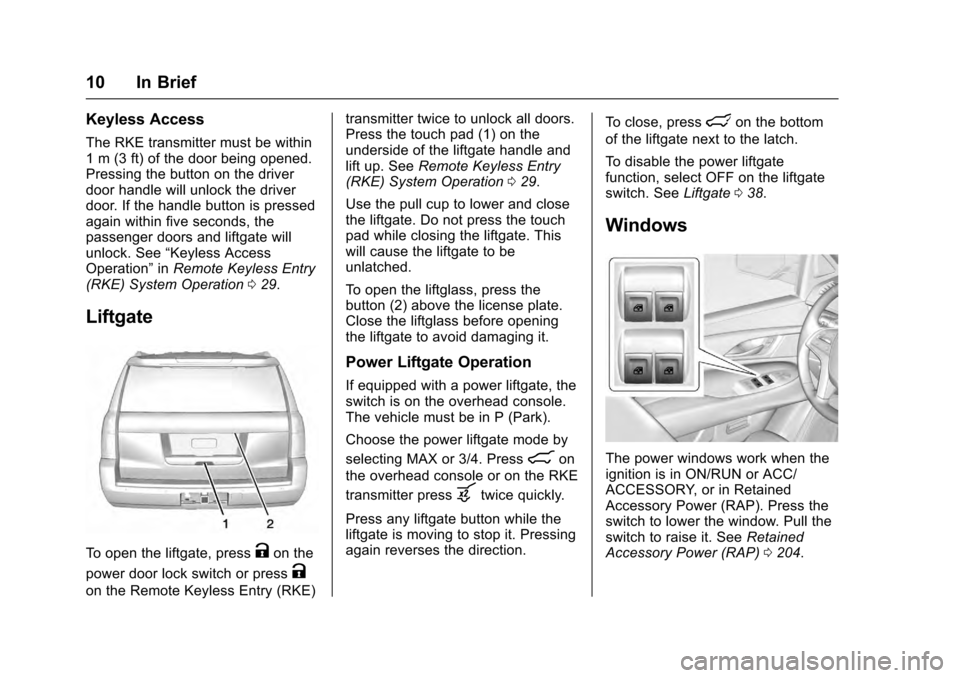
Liftgate
To open the liftgate, pressKon the
power door lock switch or press
K
on the Remote Keyless Entry (RKE) transmitter twice to unlock all doors.
Press the touch pad (1) on the
underside of the liftgate handle and
lift up. See
Remote Keyless Entry
(RKE) System Operation 029.
Use the pull cup to lower and close
the liftgate. Do not press the touch
pad while closing the liftgate. This
will cause the liftgate to be
unlatched.
To open the liftglass, press the
button (2) above the license plate.
Close the liftglass before opening
the liftgate to avoid damaging it.
Power Liftgate Operation
If equipped with a power liftgate, the
switch is on the overhead console.
The vehicle must be in P (Park).
Choose the power liftgate mode by
selecting MAX or 3/4. Press
8on
the overhead console or on the RKE
transmitter press
btwice quickly.
Press any liftgate button while the
liftgate is moving to stop it. Pressing
again reverses the direction. To close, press
lon the bottom
of the liftgate next to the latch.
To disable the power liftgate
function, select OFF on the liftgate
switch. See Liftgate038.
Windows
The power windows work when the
ignition is in ON/RUN or ACC/
ACCESSORY, or in Retained
Accessory Power (RAP). Press the
switch to lower the window. Pull the
switch to raise it. See Retained
Accessory Power (RAP) 0204.
Page 12 of 357
Cadillac Escalade Owner Manual (GMNA-Localizing-MidEast-9369153) -
2016 - crc - 6/19/15
In Brief 11
If equipped, the front and rear
windows have an express-down
feature. The front windows have an
express-up feature. SeeWindows
0 49 and Power Windows 049.
Seat Adjustment
Uplevel Seat Adjustment
If equipped, the ignition must be on
to use all uplevel seat features.
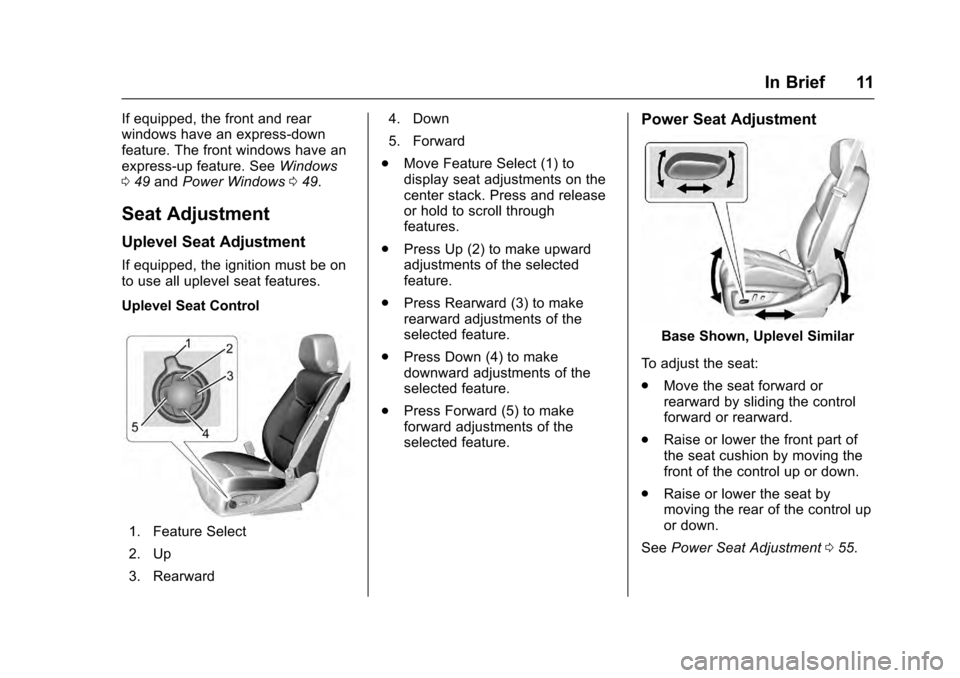
Uplevel Seat Control
1. Feature Select
2. Up
3. Rearward 4. Down
5. Forward
. Move Feature Select (1) to
display seat adjustments on the
center stack. Press and release
or hold to scroll through
features.
. Press Up (2) to make upward
adjustments of the selected
feature.
. Press Rearward (3) to make
rearward adjustments of the
selected feature.
. Press Down (4) to make
downward adjustments of the
selected feature.
. Press Forward (5) to make
forward adjustments of the
selected feature.
Power Seat Adjustment
Base Shown, Uplevel Similar
To adjust the seat:
. Move the seat forward or
rearward by sliding the control
forward or rearward.
. Raise or lower the front part of
the seat cushion by moving the
front of the control up or down.
. Raise or lower the seat by
moving the rear of the control up
or down.
See Power Seat Adjustment 055.
Page 17 of 357
Cadillac Escalade Owner Manual (GMNA-Localizing-MidEast-9369153) -
2016 - crc - 6/19/15
16 In Brief
3. Press either (1) or (2) again todeselect the mirror.
See Power Mirrors 045.
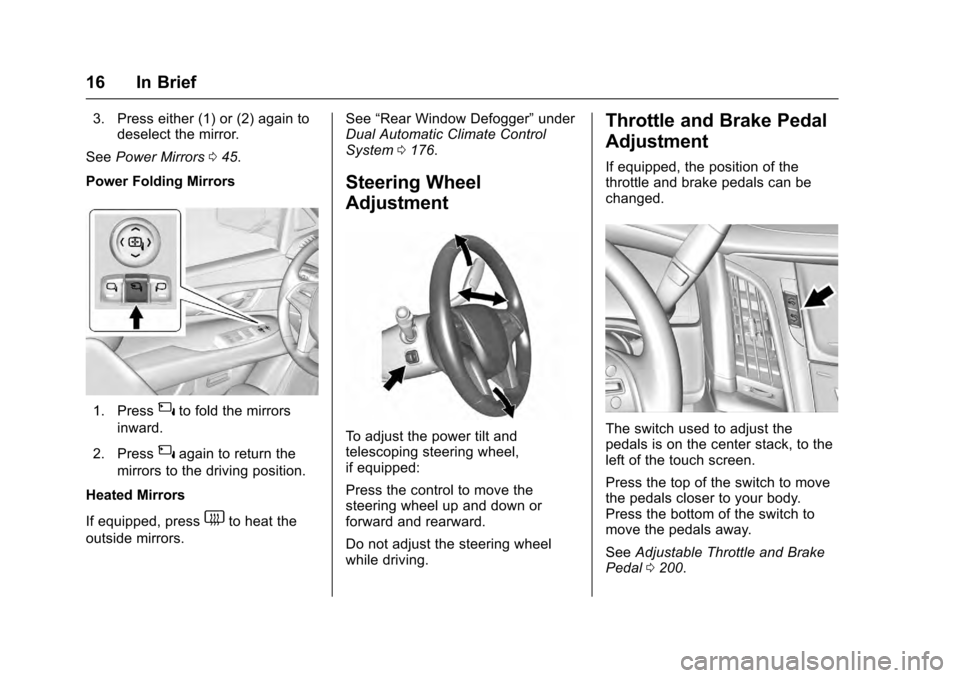
Power Folding Mirrors
1. Press{to fold the mirrors
inward.
2. Press
{again to return the
mirrors to the driving position.
Heated Mirrors
If equipped, press
1to heat the
outside mirrors. See
“Rear Window Defogger” under
Dual Automatic Climate Control
System 0176.
Steering Wheel
Adjustment
To adjust the power tilt and
telescoping steering wheel,
if equipped:
Press the control to move the
steering wheel up and down or
forward and rearward.
Do not adjust the steering wheel
while driving.
Throttle and Brake Pedal
Adjustment
If equipped, the position of the
throttle and brake pedals can be
changed.
The switch used to adjust the
pedals is on the center stack, to the
left of the touch screen.
Press the top of the switch to move
the pedals closer to your body.
Press the bottom of the switch to
move the pedals away.
See Adjustable Throttle and Brake
Pedal 0200.
Page 20 of 357
Cadillac Escalade Owner Manual (GMNA-Localizing-MidEast-9369153) -
2016 - crc - 6/19/15
In Brief 19
Climate Controls
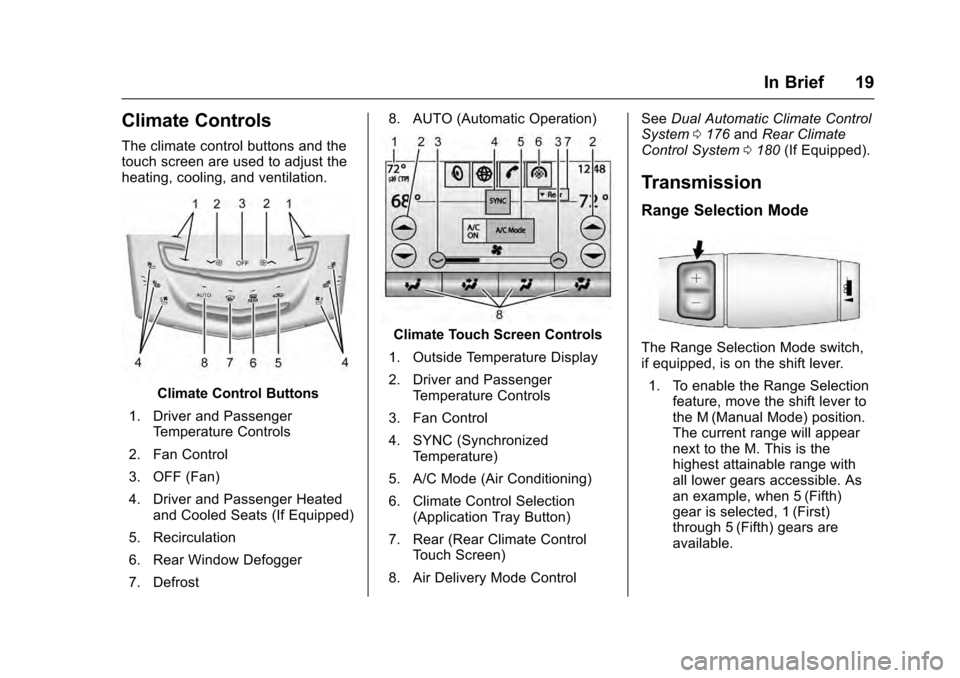
The climate control buttons and the
touch screen are used to adjust the
heating, cooling, and ventilation.
Climate Control Buttons
1. Driver and Passenger Temperature Controls
2. Fan Control
3. OFF (Fan)
4. Driver and Passenger Heated and Cooled Seats (If Equipped)
5. Recirculation
6. Rear Window Defogger
7. Defrost 8. AUTO (Automatic Operation)
Climate Touch Screen Controls
1. Outside Temperature Display
2. Driver and Passenger Temperature Controls
3. Fan Control
4. SYNC (Synchronized Temperature)
5. A/C Mode (Air Conditioning)
6. Climate Control Selection (Application Tray Button)
7. Rear (Rear Climate Control Touch Screen)
8. Air Delivery Mode Control See
Dual Automatic Climate Control
System 0176 andRear Climate
Control System 0180 (If Equipped).
Transmission
Range Selection Mode
The Range Selection Mode switch,
if equipped, is on the shift lever.
1. To enable the Range Selection feature, move the shift lever to
the M (Manual Mode) position.
The current range will appear
next to the M. This is the
highest attainable range with
all lower gears accessible. As
an example, when 5 (Fifth)
gear is selected, 1 (First)
through 5 (Fifth) gears are
available.
Page 29 of 357
Cadillac Escalade Owner Manual (GMNA-Localizing-MidEast-9369153) -
2016 - crc - 6/19/15
28 Keys, Doors, and Windows
Keys, Doors, and
Windows
Keys and Locks
Keys . . . . . . . . . . . . . . . . . . . . . . . . . . . 28
Remote Keyless Entry (RKE)System . . . . . . . . . . . . . . . . . . . . . . . 29
Remote Keyless Entry (RKE) System Operation . . . . . . . . . . . . 29
Remote Vehicle Start . . . . . . . . . . 34
Door Locks . . . . . . . . . . . . . . . . . . . . 35
Power Door Locks . . . . . . . . . . . . . 36
Delayed Locking . . . . . . . . . . . . . . . 37
Automatic Door Locks . . . . . . . . . 37
Lockout Protection . . . . . . . . . . . . . 37
Safety Locks . . . . . . . . . . . . . . . . . . . 37
Doors
Liftgate . . . . . . . . . . . . . . . . . . . . . . . . 38
Power Assist Steps . . . . . . . . . . . . 42
Vehicle Security
Vehicle Security . . . . . . . . . . . . . . . . 43
Vehicle Alarm System . . . . . . . . . 43
Immobilizer Operation . . . . . . . . . 44
Exterior Mirrors
Convex Mirrors . . . . . . . . . . . . . . . . 45
Power Mirrors . . . . . . . . . . . . . . . . . . 45 Folding Mirrors . . . . . . . . . . . . . . . . . 46
Heated Mirrors . . . . . . . . . . . . . . . . . 47
Blind Spot Mirrors . . . . . . . . . . . . . . 47
Reverse Tilt Mirrors . . . . . . . . . . . . 48
Interior Mirrors
Interior Rearview Mirrors . . . . . . . 48
Automatic Dimming Rearview
Mirror . . . . . . . . . . . . . . . . . . . . . . . . . 48
Child-View Mirror . . . . . . . . . . . . . . 48
Windows
Windows . . . . . . . . . . . . . . . . . . . . . . . 49
Power Windows . . . . . . . . . . . . . . . 49
Sun Visors . . . . . . . . . . . . . . . . . . . . . 51
Roof
Sunroof . . . . . . . . . . . . . . . . . . . . . . . . 51
Keys and Locks
Keys
{Warning
Leaving children in a vehicle with
a Remote Keyless Entry (RKE)
transmitter is dangerous and
children or others could be
seriously injured or killed. They
could operate the power windows
or other controls or make the
vehicle move. The windows will
function with the RKE transmitter
in the vehicle, and children or
others could be caught in the path
of a closing window. Do not leave
children in a vehicle with an RKE
transmitter.
Page 30 of 357
Cadillac Escalade Owner Manual (GMNA-Localizing-MidEast-9369153) -
2016 - crc - 6/19/15
Keys, Doors, and Windows 29
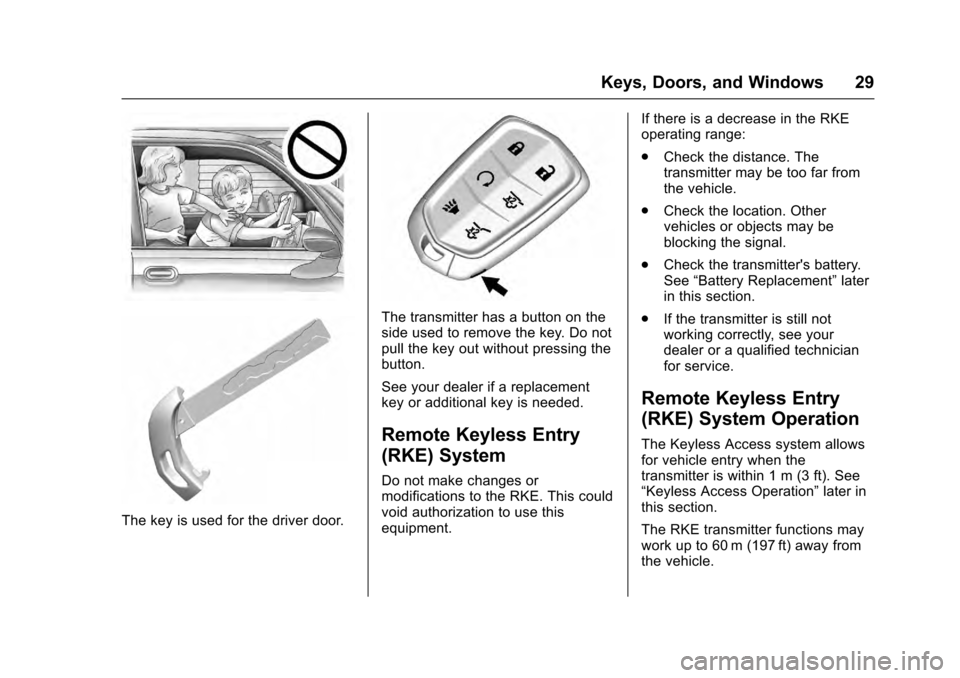
The key is used for the driver door.
The transmitter has a button on the
side used to remove the key. Do not
pull the key out without pressing the
button.
See your dealer if a replacement
key or additional key is needed.
Remote Keyless Entry
(RKE) System
Do not make changes or
modifications to the RKE. This could
void authorization to use this
equipment.If there is a decrease in the RKE
operating range:
.
Check the distance. The
transmitter may be too far from
the vehicle.
. Check the location. Other
vehicles or objects may be
blocking the signal.
. Check the transmitter's battery.
See “Battery Replacement” later
in this section.
. If the transmitter is still not
working correctly, see your
dealer or a qualified technician
for service.
Remote Keyless Entry
(RKE) System Operation
The Keyless Access system allows
for vehicle entry when the
transmitter is within 1 m (3 ft). See
“Keyless Access Operation” later in
this section.
The RKE transmitter functions may
work up to 60 m (197 ft) away from
the vehicle.
Page 31 of 357

Cadillac Escalade Owner Manual (GMNA-Localizing-MidEast-9369153) -
2016 - crc - 6/19/15
30 Keys, Doors, and Windows
Other conditions can affect the
performance of the transmitter. See
Remote Keyless Entry (RKE)
System029.
/(Remote Vehicle Start) :
If equipped, press and release
Q,
then immediately press and hold
/
until the turn signals flash or for at
least four seconds. The engine may
be started from outside the vehicle
using the RKE transmitter. See
Remote Vehicle Start 034.
Q(Lock) : Press to lock all doors. If enabled through the Driver
Information Center (DIC), the turn
signal lamps flash once to indicate
locking has occurred. If enabled
through the DIC, the horn chirps
when
Qis pressed again within
three seconds. See Vehicle
Personalization 0156.
If the driver door is open when
Qis
pressed and Unlocked Door
Anti-Lockout is enabled through the
vehicle personalization, all door will
lock and then the driver door will
immediately unlock. See Vehicle
Personalization 0156.
If the passenger door is open when
Qis pressed, all doors lock.
Pressing
Qarms the alarm system.
See Vehicle Alarm System 043.
If equipped with auto mirror folding,
pressing and holding
Qfor
one second will fold the mirrors. The
auto mirror folding feature will not
operate unless it is enabled. See
Vehicle Personalization 0156.
K(Unlock) : Press once to unlock
only the driver door. If
Kis pressed
again within three seconds, all
remaining doors unlock. The interior
lamps may come on and stay on for
20 seconds or until the ignition is
turned on.
If enabled through the DIC, the turn
signal lamps flash twice to indicate
unlocking has occurred. If enabled
through the DIC, the exterior lamps
may turn on. See Vehicle
Personalization 0156.
Pressing
Kon the RKE transmitter
disarms the alarm system. See
Vehicle Alarm System 043.
If equipped with auto mirror folding,
pressing and holding
Kfor
one second will unfold mirrors. The
auto mirror folding feature will not
operate unless it is enabled. See
Vehicle Personalization 0156.
c(Liftglass) : Press twice to open
the liftglass.
b(Liftgate) : Press twice to open
or close the liftgate. Press once to
stop the liftgate from moving.