ignition CADILLAC ESCALADE 2017 4.G User Guide
[x] Cancel search | Manufacturer: CADILLAC, Model Year: 2017, Model line: ESCALADE, Model: CADILLAC ESCALADE 2017 4.GPages: 354, PDF Size: 3.9 MB
Page 37 of 354
Cadillac Escalade Owner Manual (GMNA-Localizing-MidEast-10293077) -
2017 - crc - 8/24/16
36 KEYS, DOORS, AND WINDOWS
3. Move the cap forward and pressto snap the cap in place.
4. Release the door handle.
Keyless Access
A locked vehicle can be opened if the
RKE transmitter is within 1 m (3 ft) of
the door handle or the liftgate touch
pad. See Remote Keyless Entry (RKE)
System Operation 028.
Free Turning Locks
The door lock cylinder turns freely
when either the wrong key is used,
or the correct key is not fully inserted.
The free turning door lock feature
prevents the lock from being forced
open. To reset the lock, turn it to the vertical position with the correct key
fully inserted. Remove the key and
insert it again. If this does not reset
the lock, turn the key halfway around
in the cylinder and repeat the reset
procedure.
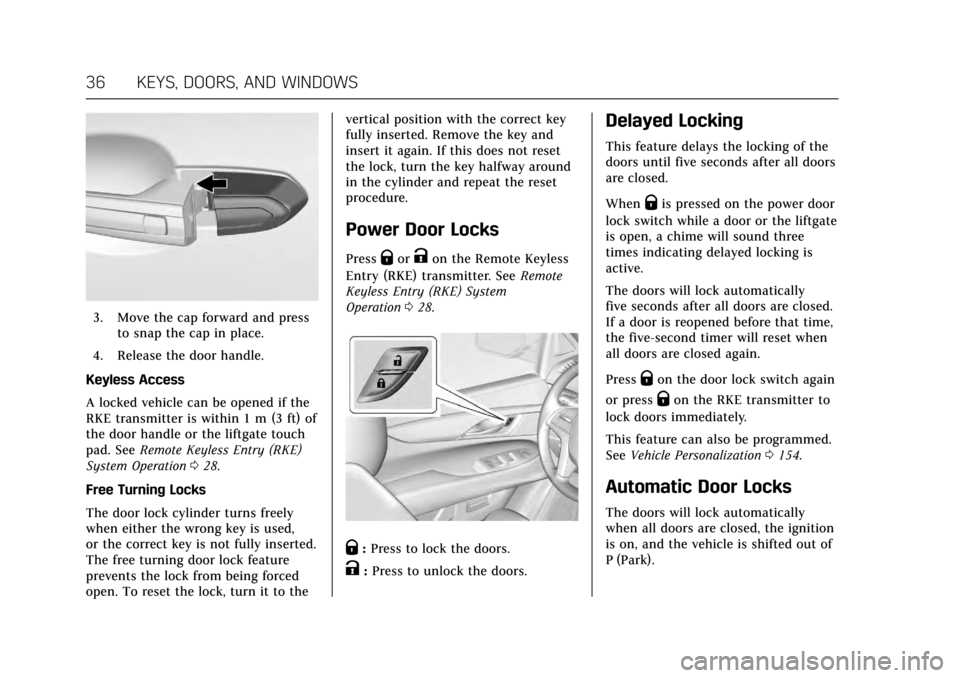
Power Door Locks
PressQorKon the Remote Keyless
Entry (RKE) transmitter. See Remote
Keyless Entry (RKE) System
Operation 028.
Q:Press to lock the doors.
K:Press to unlock the doors.
Delayed Locking
This feature delays the locking of the
doors until five seconds after all doors
are closed.
When
Qis pressed on the power door
lock switch while a door or the liftgate
is open, a chime will sound three
times indicating delayed locking is
active.
The doors will lock automatically
five seconds after all doors are closed.
If a door is reopened before that time,
the five-second timer will reset when
all doors are closed again.
Press
Qon the door lock switch again
or press
Qon the RKE transmitter to
lock doors immediately.
This feature can also be programmed.
See Vehicle Personalization 0154.
Automatic Door Locks
The doors will lock automatically
when all doors are closed, the ignition
is on, and the vehicle is shifted out of
P (Park).
Page 45 of 354
Cadillac Escalade Owner Manual (GMNA-Localizing-MidEast-10293077) -
2017 - crc - 8/24/16
44 KEYS, DOORS, AND WINDOWS
To avoid setting off the alarm by
accident:
.Lock the vehicle after all
occupants have exited.
. Always unlock a door with the
RKE transmitter, or use the
Keyless Access system.
Unlocking the driver door with the
key will not disarm the system or
turn off the alarm.
How to Detect a Tamper
Condition
IfKis pressed on the RKE
transmitter and the horn chirps and
the lights flash three times, an alarm
occurred previously while the alarm
system was armed.
If the alarm has been activated, a
message will appear on the DIC. See
Security Messages 0151.
Immobilizer Operation
This vehicle has a passive
theft-deterrent system.
The system does not have to be
manually armed or disarmed. The vehicle is automatically
immobilized when the vehicle is
turned off.
The immobilization system is
disarmed when the ignition button is
pressed in and a valid transmitter is
found in the vehicle.
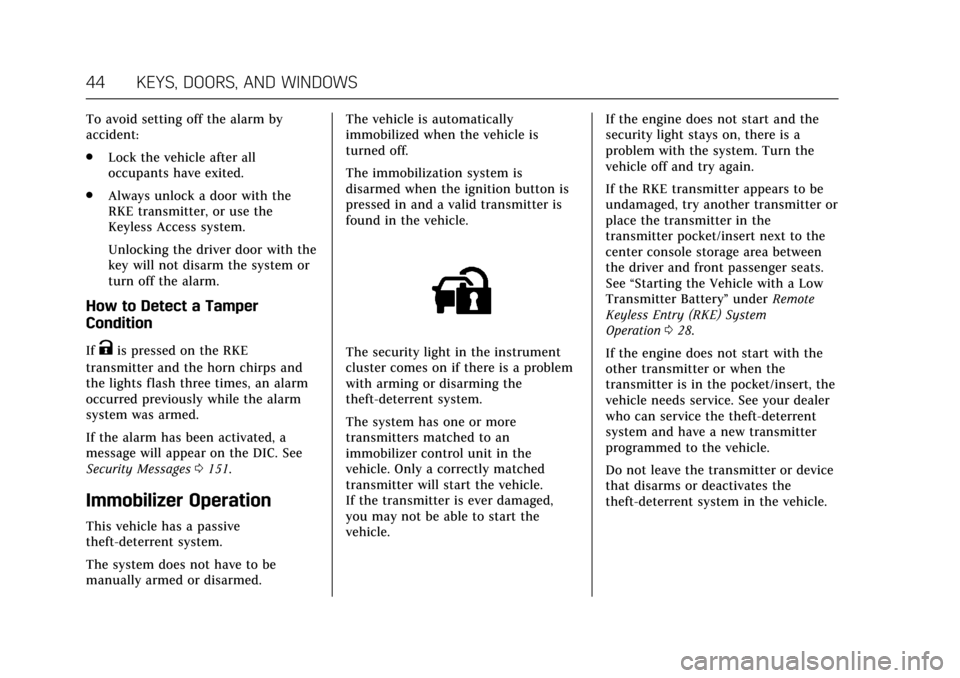
The security light in the instrument
cluster comes on if there is a problem
with arming or disarming the
theft-deterrent system.
The system has one or more
transmitters matched to an
immobilizer control unit in the
vehicle. Only a correctly matched
transmitter will start the vehicle.
If the transmitter is ever damaged,
you may not be able to start the
vehicle.
If the engine does not start and the
security light stays on, there is a
problem with the system. Turn the
vehicle off and try again.
If the RKE transmitter appears to be
undamaged, try another transmitter or
place the transmitter in the
transmitter pocket/insert next to the
center console storage area between
the driver and front passenger seats.
See
“Starting the Vehicle with a Low
Transmitter Battery” underRemote
Keyless Entry (RKE) System
Operation 028.
If the engine does not start with the
other transmitter or when the
transmitter is in the pocket/insert, the
vehicle needs service. See your dealer
who can service the theft-deterrent
system and have a new transmitter
programmed to the vehicle.
Do not leave the transmitter or device
that disarms or deactivates the
theft-deterrent system in the vehicle.
Page 47 of 354
Cadillac Escalade Owner Manual (GMNA-Localizing-MidEast-10293077) -
2017 - crc - 8/24/16
46 KEYS, DOORS, AND WINDOWS
Folding Mirrors
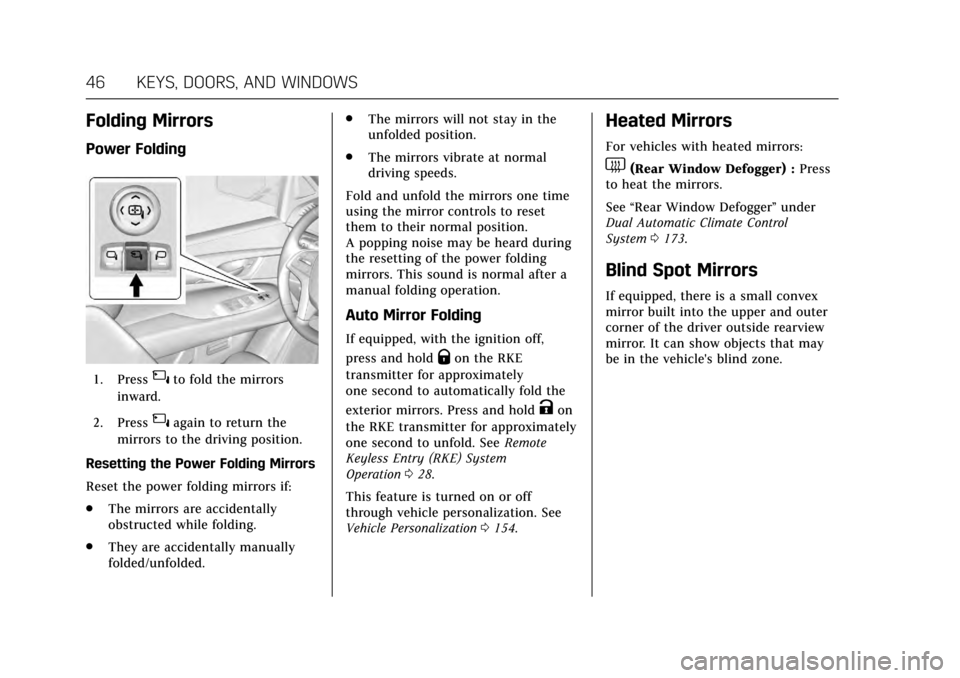
Power Folding
1. Press{to fold the mirrors
inward.
2. Press
{again to return the
mirrors to the driving position.
Resetting the Power Folding Mirrors
Reset the power folding mirrors if:
. The mirrors are accidentally
obstructed while folding.
. They are accidentally manually
folded/unfolded. .
The mirrors will not stay in the
unfolded position.
. The mirrors vibrate at normal
driving speeds.
Fold and unfold the mirrors one time
using the mirror controls to reset
them to their normal position.
A popping noise may be heard during
the resetting of the power folding
mirrors. This sound is normal after a
manual folding operation.
Auto Mirror Folding
If equipped, with the ignition off,
press and hold
Qon the RKE
transmitter for approximately
one second to automatically fold the
exterior mirrors. Press and hold
Kon
the RKE transmitter for approximately
one second to unfold. See Remote
Keyless Entry (RKE) System
Operation 028.
This feature is turned on or off
through vehicle personalization. See
Vehicle Personalization 0154.
Heated Mirrors
For vehicles with heated mirrors:
1(Rear Window Defogger) : Press
to heat the mirrors.
See “Rear Window Defogger” under
Dual Automatic Climate Control
System 0173.
Blind Spot Mirrors
If equipped, there is a small convex
mirror built into the upper and outer
corner of the driver outside rearview
mirror. It can show objects that may
be in the vehicle's blind zone.
Page 48 of 354
Cadillac Escalade Owner Manual (GMNA-Localizing-MidEast-10293077) -
2017 - crc - 8/24/16
KEYS, DOORS, AND WINDOWS 47
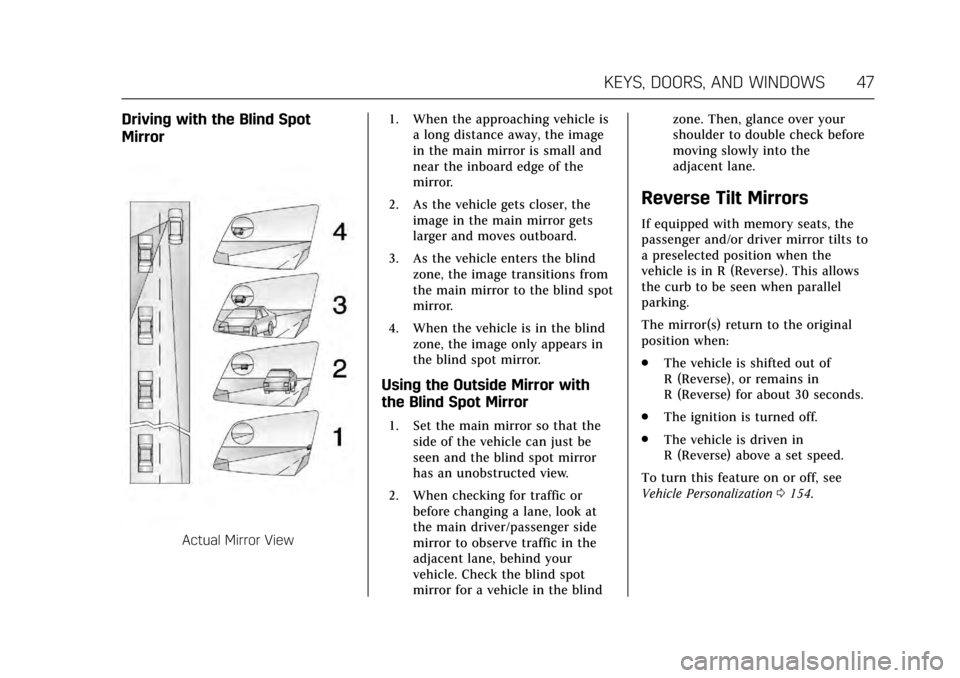
Driving with the Blind Spot
Mirror
Actual Mirror View1. When the approaching vehicle is
a long distance away, the image
in the main mirror is small and
near the inboard edge of the
mirror.
2. As the vehicle gets closer, the image in the main mirror gets
larger and moves outboard.
3. As the vehicle enters the blind zone, the image transitions from
the main mirror to the blind spot
mirror.
4. When the vehicle is in the blind zone, the image only appears in
the blind spot mirror.
Using the Outside Mirror with
the Blind Spot Mirror
1. Set the main mirror so that theside of the vehicle can just be
seen and the blind spot mirror
has an unobstructed view.
2. When checking for traffic or before changing a lane, look at
the main driver/passenger side
mirror to observe traffic in the
adjacent lane, behind your
vehicle. Check the blind spot
mirror for a vehicle in the blind zone. Then, glance over your
shoulder to double check before
moving slowly into the
adjacent lane.
Reverse Tilt Mirrors
If equipped with memory seats, the
passenger and/or driver mirror tilts to
a preselected position when the
vehicle is in R (Reverse). This allows
the curb to be seen when parallel
parking.
The mirror(s) return to the original
position when:
.
The vehicle is shifted out of
R (Reverse), or remains in
R (Reverse) for about 30 seconds.
. The ignition is turned off.
. The vehicle is driven in
R (Reverse) above a set speed.
To turn this feature on or off, see
Vehicle Personalization 0154.
Page 53 of 354
Cadillac Escalade Owner Manual (GMNA-Localizing-MidEast-10293077) -
2017 - crc - 8/24/16
52 KEYS, DOORS, AND WINDOWS
Programming the Power
Windows
Programming may be necessary if the
vehicle's battery has been
disconnected or discharged. If the
window is unable to express-up,
program the window:
To program the window:1. Close all doors.
2. Place the ignition in ACC/ ACCESSORY or ON/RUN.
3. Partially open the window to be programmed, then close it and
continue to pull the switch
briefly after the window has fully
closed.
4. Press the power window switch until the window is fully open
and briefly hold.
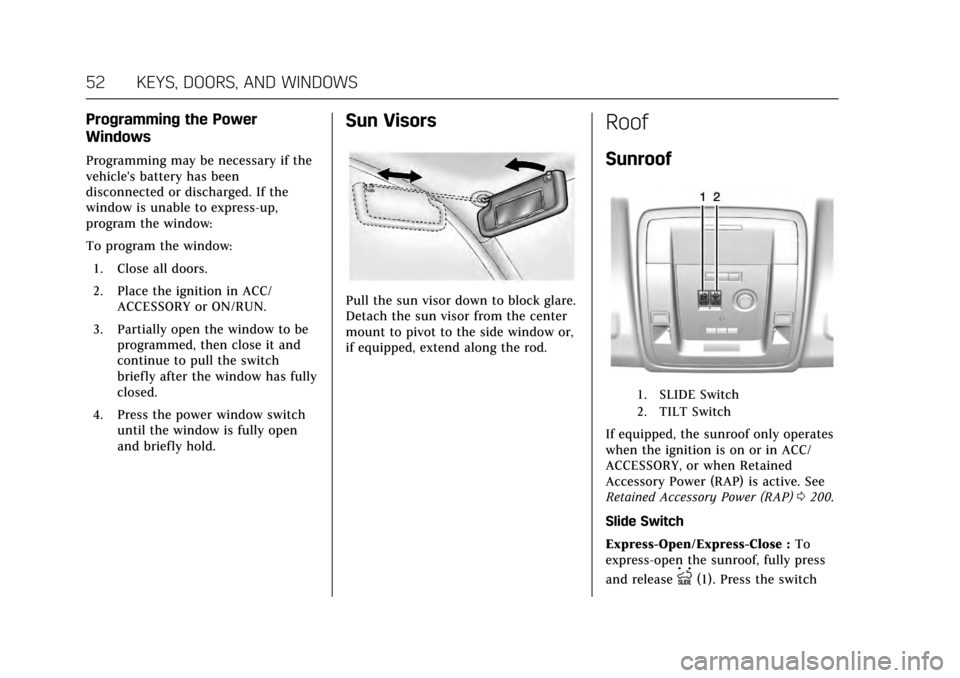
Sun Visors
Pull the sun visor down to block glare.
Detach the sun visor from the center
mount to pivot to the side window or,
if equipped, extend along the rod.
Roof
Sunroof
1. SLIDE Switch
2. TILT Switch
If equipped, the sunroof only operates
when the ignition is on or in ACC/
ACCESSORY, or when Retained
Accessory Power (RAP) is active. See
Retained Accessory Power (RAP) 0200.
Slide Switch
Express-Open/Express-Close : To
express-open the sunroof, fully press
and release
I(1). Press the switch
Page 57 of 354
Cadillac Escalade Owner Manual (GMNA-Localizing-MidEast-10293077) -
2017 - crc - 8/24/16
56 SEATS AND RESTRAINTS
Second Row Seats
The vehicle's second row seats have
head restraints in the outboard
seating positions that cannot be
adjusted.
The second row seat outboard head
restraints are not removable.
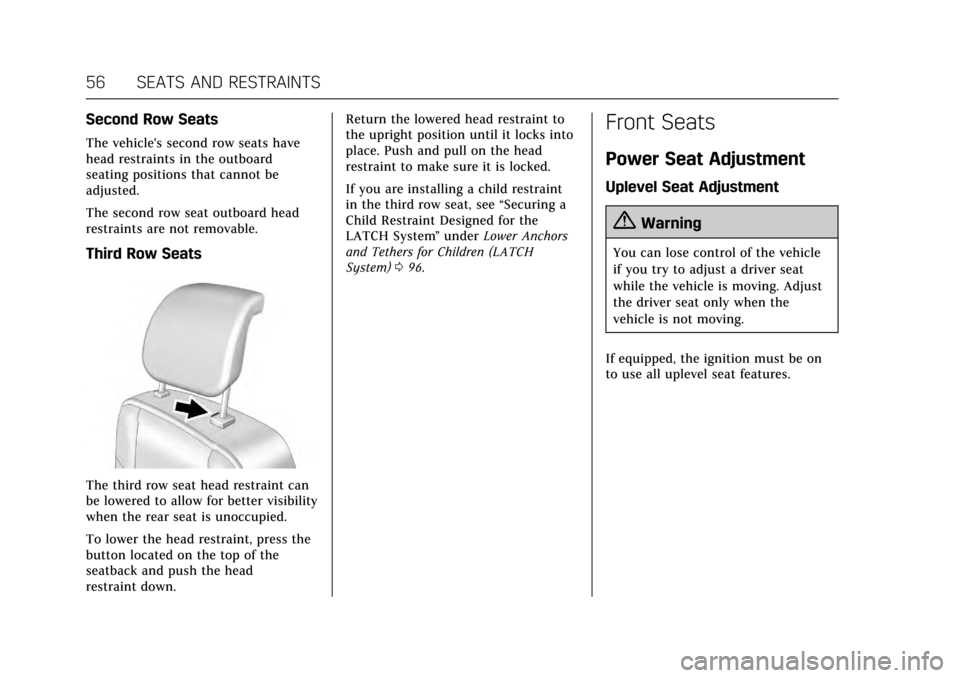
Third Row Seats
The third row seat head restraint can
be lowered to allow for better visibility
when the rear seat is unoccupied.
To lower the head restraint, press the
button located on the top of the
seatback and push the head
restraint down.Return the lowered head restraint to
the upright position until it locks into
place. Push and pull on the head
restraint to make sure it is locked.
If you are installing a child restraint
in the third row seat, see
“Securing a
Child Restraint Designed for the
LATCH System ”under Lower Anchors
and Tethers for Children (LATCH
System) 096.
Front Seats
Power Seat Adjustment
Uplevel Seat Adjustment
{Warning
You can lose control of the vehicle
if you try to adjust a driver seat
while the vehicle is moving. Adjust
the driver seat only when the
vehicle is not moving.
If equipped, the ignition must be on
to use all uplevel seat features.
Page 61 of 354
Cadillac Escalade Owner Manual (GMNA-Localizing-MidEast-10293077) -
2017 - crc - 8/24/16
60 SEATS AND RESTRAINTS
The SET, 1, 2, andB(Exit) buttons
on the driver door are used to
manually store and recall memory
settings for the driver seat, outside
mirrors, power tilt and telescoping
steering column, adjustable pedals (if
equipped), and massage settings (if
equipped).
Storing Memory Positions
To store positions to the 1 and 2
buttons:
1. The ignition must be in ON/RUN or ACC/ACCESSORY.
2. Adjust the driver seat, outside mirrors, power tilt and
telescoping steering column,
adjustable pedals (if equipped),
and massage settings (if
equipped) to the desired
positions.
3. Press and release SET. A beep will sound.
4. Immediately press and hold 1 until two beeps sound.
5. Repeat Steps 1–4 for a second driver using 2. To store exit positions and easy exit
features to theB(Exit) button,
repeat Steps 1–4 using
Bto store
your positions for getting out of the
vehicle.
Manually Recalling Memory
Positions
Press and hold 1, 2, or
Bto
manually recall the previously stored
memory positions.
To stop recall movement, release 1, 2,
or
Bbefore the stored positions are
reached; or press the SET, power
mirror, or power seat controls; or
press the power tilt and telescoping
steering wheel control; or press the
adjustable pedal control.
If the massage feature is off when the
memory recall is performed, the
previously stored type and intensity
will be recalled, but it will remain off
until activated with the massage
control. Automatically Recalling Memory
Positions (Auto Memory Recall)
If programmed on in vehicle
personalization, the Auto (Automatic)
Memory Recall feature automatically
recalls the current driver’s previously
stored 1 or 2 position and massage
settings (if equipped) when the
ignition is changed from OFF to ON/
RUN or ACC/ACCESSORY.
See
“Auto Memory Recall” under
"Comfort and Convenience" in Vehicle
Personalization 0154.
To stop recall movement, pressB,
power mirror, or power seat controls;
or press the power tilt and telescoping
steering wheel control; or press the
adjustable pedal control. Turning the
ignition off also stops the recall.
If the vehicle driver has changed, in
some vehicles the Driver ID may be
displayed for the first few ignition
cycles.
RKE transmitters are not labeled with
a number. If your memory seat
position is stored to 1 or 2 but this
position is not automatically recalling,
Page 62 of 354
Cadillac Escalade Owner Manual (GMNA-Localizing-MidEast-10293077) -
2017 - crc - 8/24/16
SEATS AND RESTRAINTS 61
then store your positions to the other
button or switch RKE transmitters
with the other driver.
Easy Exit Recall
If programmed on in vehicle
personalization, the easy exit feature
automatically recalls the previously
stored Exit positions when leaving the
vehicle. See“Storing Memory
Positions” previously in this section.
See also Vehicle Personalization 0154.
Easy exit recall automatically activates
when one of the following occurs:
. The vehicle is turned off and the
driver door is opened within a
short time.
. The vehicle is turned off with the
driver door open.
RKE transmitters are not labeled with
a number. If your memory seat
position is stored to 1 or 2 but this
position is not automatically recalling,
then store your positions to the other
button or switch RKE transmitters
with the other driver. To stop recall movement, press one of
the memory, power mirror, or power
seat controls; press the power tilt and
telescoping steering column control;
or press the adjustable pedal control.
Obstructions
If something has blocked the driver
seat, power tilt and telescoping
steering column, and/or adjustable
pedals while recalling a memory
position, the recall may stop. Remove
the obstruction. Then do one of the
following:
.
If automatically or manually
recalling the stored memory
position, press and hold the
appropriate manual control for
two seconds. Try recalling again
by pressing the appropriate
memory button.
. If recalling the exit position, press
and hold the appropriate manual
control for the exit feature not
recalling for two seconds. Then try
recalling the exit position again.
If the memory position is still not
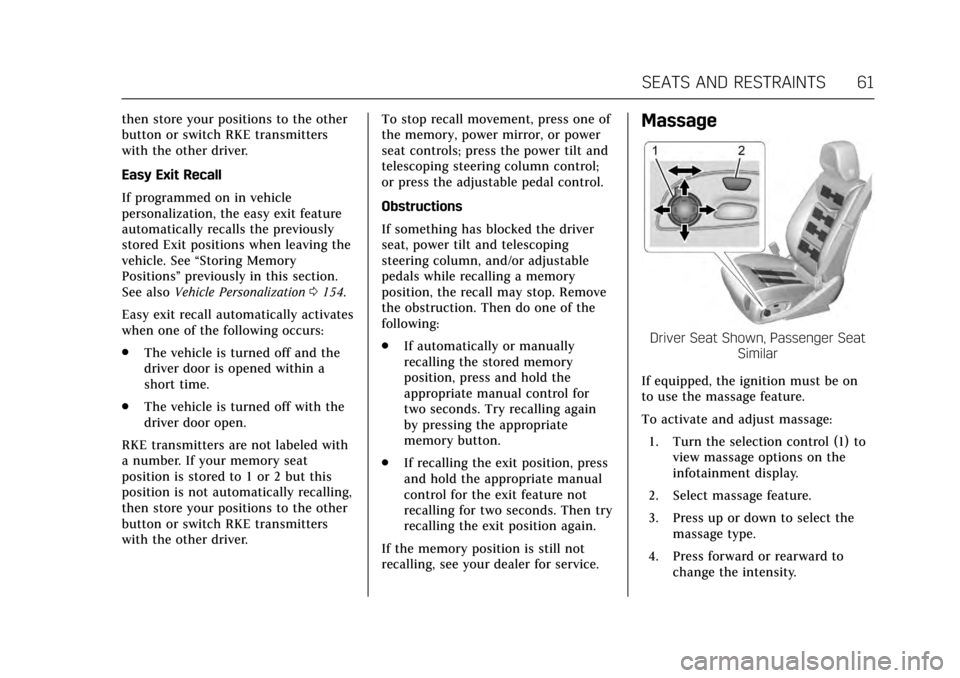
recalling, see your dealer for service.Massage
Driver Seat Shown, Passenger Seat Similar
If equipped, the ignition must be on
to use the massage feature.
To activate and adjust massage: 1. Turn the selection control (1) to view massage options on the
infotainment display.
2. Select massage feature.
3. Press up or down to select the massage type.
4. Press forward or rearward to change the intensity.
Page 63 of 354
Cadillac Escalade Owner Manual (GMNA-Localizing-MidEast-10293077) -
2017 - crc - 8/24/16
62 SEATS AND RESTRAINTS
5. To activate massage at lastmassage type and intensity
settings or to turn massage off,
press the massage On/Off
control (2).
Heated and Cooled Front
Seats
{Warning
If temperature change or pain to
the skin cannot be felt, the seat
heater may cause burns. To reduce
the risk of burns, use care when
using the seat heater, especially for
long periods of time. Do not place
anything on the seat that insulates
against heat, such as a blanket,
cushion, cover, or similar item. This
may cause the seat heater to
overheat. An overheated seat heater
may cause a burn or may damage
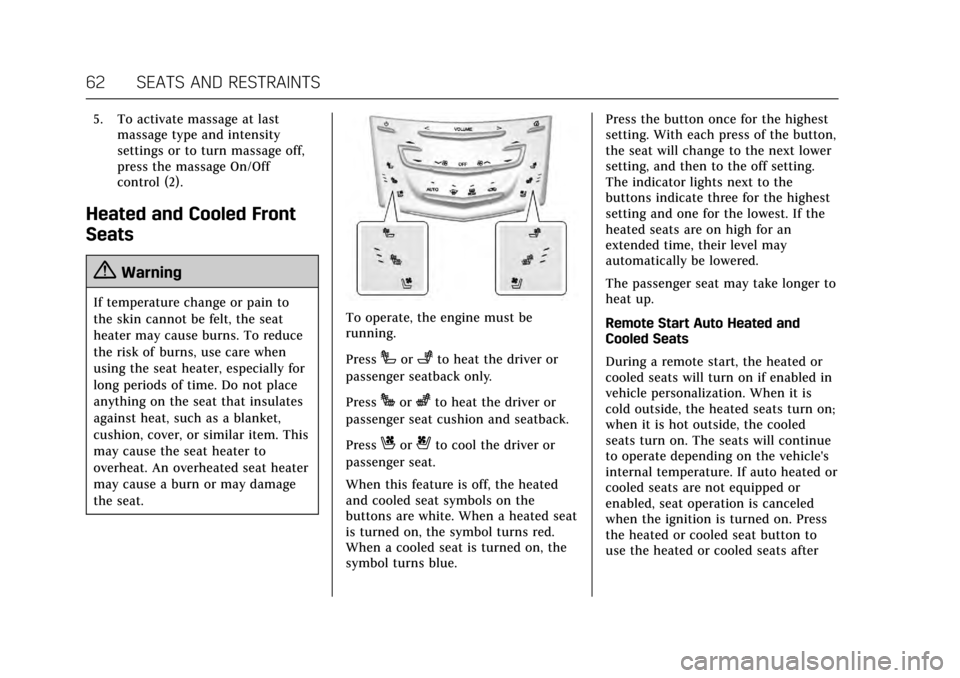
the seat.To operate, the engine must be
running.
Press
Ior+to heat the driver or
passenger seatback only.
Press
Jorzto heat the driver or
passenger seat cushion and seatback.
Press
Cor{to cool the driver or
passenger seat.
When this feature is off, the heated
and cooled seat symbols on the
buttons are white. When a heated seat
is turned on, the symbol turns red.
When a cooled seat is turned on, the
symbol turns blue. Press the button once for the highest
setting. With each press of the button,
the seat will change to the next lower
setting, and then to the off setting.
The indicator lights next to the
buttons indicate three for the highest
setting and one for the lowest. If the
heated seats are on high for an
extended time, their level may
automatically be lowered.
The passenger seat may take longer to
heat up.
Remote Start Auto Heated and
Cooled Seats
During a remote start, the heated or
cooled seats will turn on if enabled in
vehicle personalization. When it is
cold outside, the heated seats turn on;
when it is hot outside, the cooled
seats turn on. The seats will continue
to operate depending on the vehicle's
internal temperature. If auto heated or
cooled seats are not equipped or
enabled, seat operation is canceled
when the ignition is turned on. Press
the heated or cooled seat button to
use the heated or cooled seats after
Page 64 of 354
Cadillac Escalade Owner Manual (GMNA-Localizing-MidEast-10293077) -
2017 - crc - 8/24/16
SEATS AND RESTRAINTS 63
the vehicle is started. SeeRemote
Vehicle Start 033 and Vehicle
Personalization 0154.
The heated or cooled seat indicator
lights do not turn on during a remote
start.
The temperature performance of an
unoccupied seat may be reduced. This
is normal.
Auto Heated and Cooled Seats
When the ignition is on, the auto
heated or cooled seats will
automatically activate at the level
determined by the vehicle's interior
temperature, if enabled in vehicle
personalization. See Vehicle
Personalization 0154. The indicator
lights next to the buttons indicate the
level of operation. Use the heated or
cooled seat buttons to turn off auto
heated or cooled seats. If the
passenger seat is unoccupied, this
feature will not activate that seat.
Rear Seats
Heated Rear Seats
{Warning
If you cannot feel temperature
change or pain to the skin, the seat
heater may cause burns. See the
Warning under Heated and Cooled
Front Seats 062.
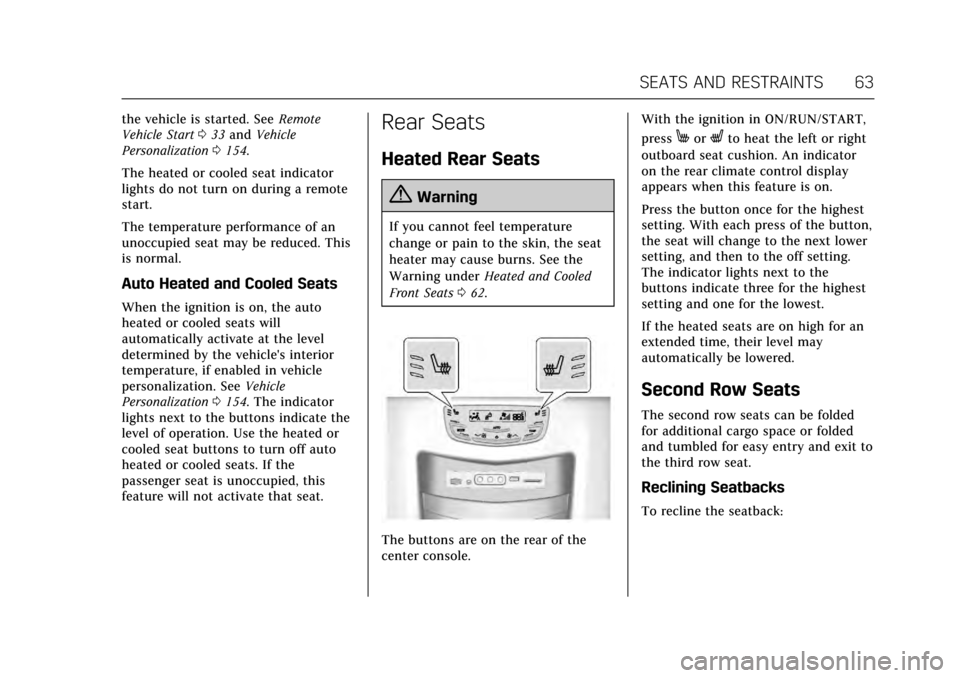
The buttons are on the rear of the
center console. With the ignition in ON/RUN/START,
press
MorLto heat the left or right
outboard seat cushion. An indicator
on the rear climate control display
appears when this feature is on.
Press the button once for the highest
setting. With each press of the button,
the seat will change to the next lower
setting, and then to the off setting.
The indicator lights next to the
buttons indicate three for the highest
setting and one for the lowest.
If the heated seats are on high for an
extended time, their level may
automatically be lowered.
Second Row Seats
The second row seats can be folded
for additional cargo space or folded
and tumbled for easy entry and exit to
the third row seat.
Reclining Seatbacks
To recline the seatback: